

logo elektroda
logo elektroda
X
logo elektroda

WiFi Manager in PlatformIO - convenient WiFi configuration for ESP8266 and ESP32 - tutorial

p.kaczmarek2 2022 4
ADVERTISEMENT
This content has been translated flag-pl » flag-en View the original version here
📢 Listen (AI):
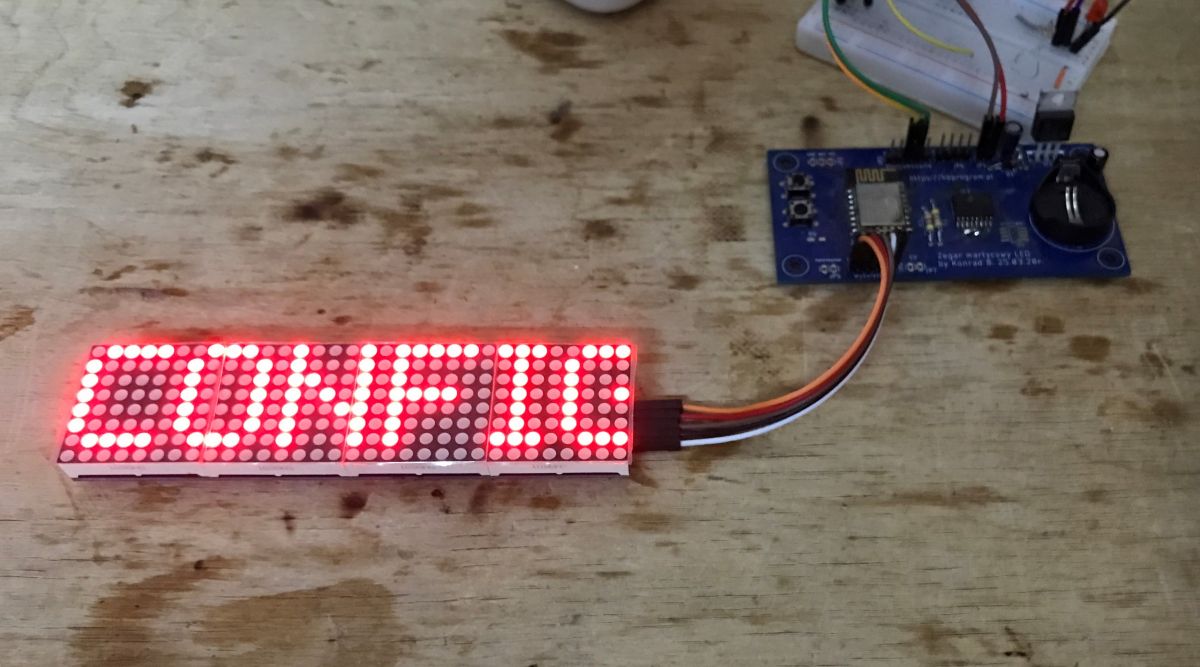
  • LED display with the text 'CONFIG' connected to a prototyping board. .
    WiFiManager is a library that offers a ready-made system for pairing with our WiFi and its configuration is just a few lines of code. Pairing is done in AP mode (WiFi network emitted by the ESP) and then, after providing the pointers to our network, the system itself remembers them and uses them for subsequent launches. The configurable Access Point can optionally be password protected. WiFiManager also offers the possibility to return the device to pairing mode from a code, e.g. at the push of a button, allowing it to be easily transferred to another WiFi in the future.

    Here I will show step-by-step what an example WiFiManager integration looks like with a finished project. For this I will use the clock program from an older topic:
    Clock on ESP12 and MAX7219 display - tutorial - part 1, ArduinoOTA, basics .
    I already have ArduinoOTA configured there, i.e. the mechanism to update the batch via WiFi, but no WiFiManager yet....
    All the code is in the linked topic - along with an explanation of how OTA works etc.
    I will use WiFiManager by tzapu here, documentation is available here .

    Basic WiFiManager integration .
    I implement my project based on PlatformIO because of the simplicity and availability of this environment. I prefer it over ArduinoIDE. So first we add the WiFiManager via PlatformIO/Libraries:
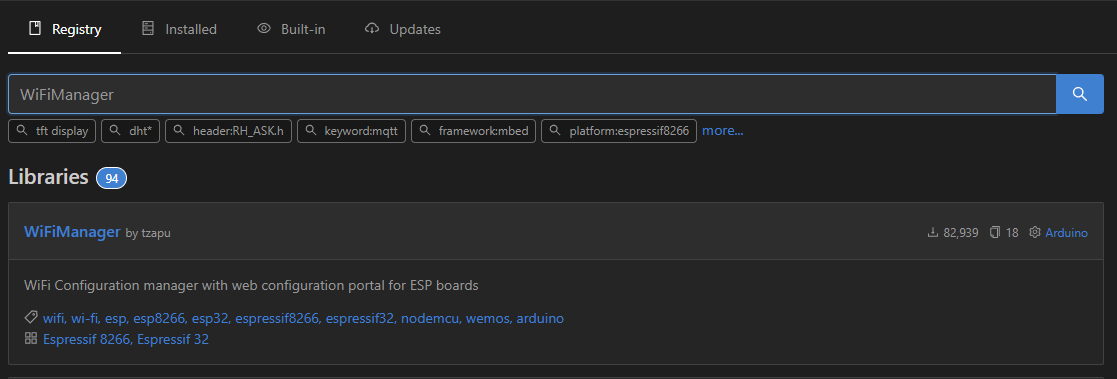
    Screenshot of the library registry in PlatformIO with the WiFiManager library selected. .
    In our program, sequentially:
    - we throw away the old WiFi connection code, together with our password and SSID hardcoded in.
    - attach the Manager header
    Code: C / C++
    Log in, to see the code

    - we create a global object of his class
    Code: C / C++
    Log in, to see the code
    we create an object of its class.
    - we initiate the pairing or connection to the stored WiFi
    Code: C / C++
    Log in, to see the code
    .
    autoConnect has two arguments - the name of the configuration WiFi (ESP will create a network with this name) and, optionally, the password
    These calls are blocking - the program will stop until the WiFi is configured.
    That would be pretty much it, but it's still worth giving the evap option in case we change our network. So, on to the main loop:
    Code: C / C++
    Log in, to see the code
    .
    Before that, you still need to set the AP_TRIGGER_PIN pin to input mode at the start, and make sure there is a hardware button to short it to ground. I myself used pinMode(AP_TRIGGER_PIN, INPUT_PULLUP); so that I didn't have to connect a pull-up resistor to the supply voltage, and so the pin defaults to high (1) until someone presses the button.

    Full code as amended:
    Code: C / C++
    Log in, to see the code
    .
    Now it's time to see if it works. I compiled, uploaded and lo and behold, the configuration network appeared:
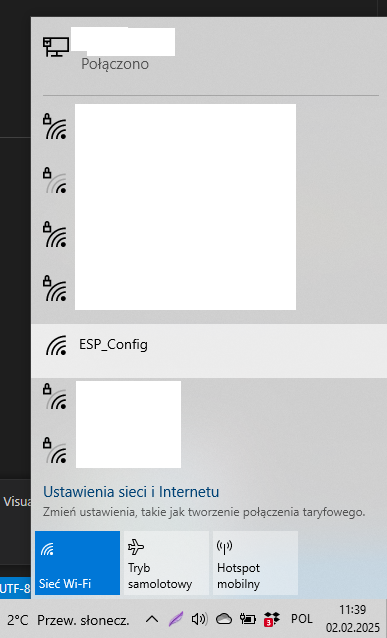
    List of available Wi-Fi networks on a computer with ESP_Config network visible. .
    Once connected, you can visit the 192.168.4.1 address:
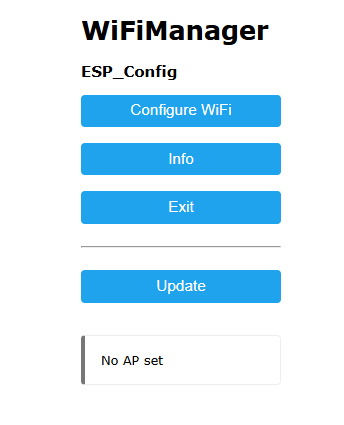
    WiFiManager interface with ESP_Config .
    There you can get a list of WiFi networks seen by the ESP and connect to one of them:
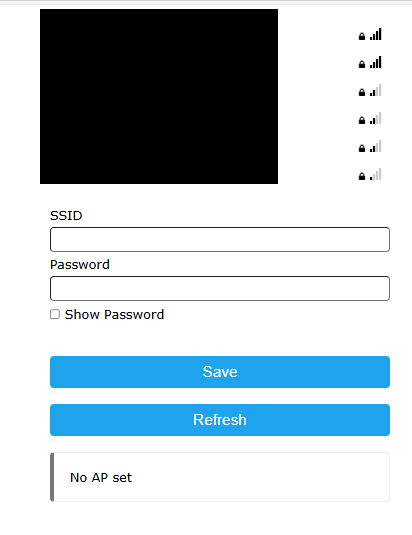
    Screenshot of WiFiManager configuration with SSID and password fields .
    The ESP remembers the password given and joins my WiFi after a while:
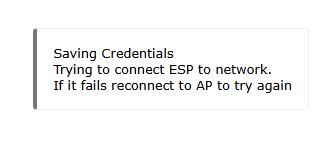
    Information bubble with text about saving credentials and connecting ESP to the network. .
    Success! .
    I also checked the behaviour of the button - correctly restarts AP mode and, in order to communicate this to the user, I have then added the display of the word Config to the screen:
    LED display with the text 'CONFIG' connected to a prototyping board. .
    The basic functionality works, but that's not all.

    Parameters in WiFiManager .
    WiFiManager, however, offers more than just configuring our SSID and password. Basically, we have a whole additional system of parameters here that are automatically shown on the web page, displayed and edited. We add a new parameter by creating an object of the WiFiManagerParameter class. Below I will demonstrate this with the example of time offset (time zones), the offset will be expressed in seconds. First globally:
    Code: C / C++
    Log in, to see the code
    .
    Then, in the setup function, we add the parameter created and retrieve its contents after configuration:
    Code: C / C++
    Log in, to see the code
    .
    atoi converts the string into an integer. Similarly, if we support the configuration while the program is running (in loop), then we also need to refresh the parameter value afterwards. Then it can be passed to the NTP client to set the time offset.
    Code: C / C++
    Log in, to see the code
    .
    All the code after the integration of the parameter:
    Code: C / C++
    Log in, to see the code
    .
    From now on, the parameter is visible on the configuration page:
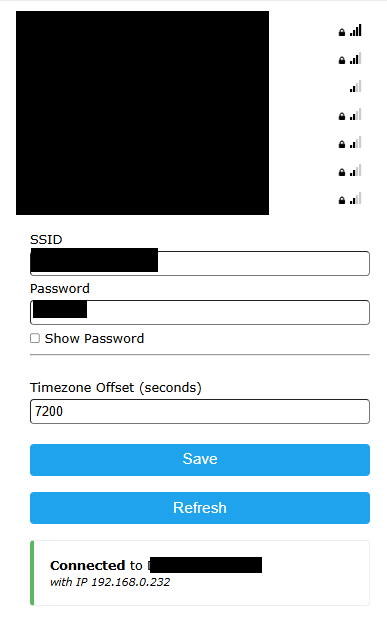
    WiFiManager configuration page with fields for SSID, password, and timezone offset. .
    We test, everything works, and then suddenly we restart ESP i.... surprise - the parameter has reset.
    The explanation for this phenomenon is in the WiFiManager documentation itself:
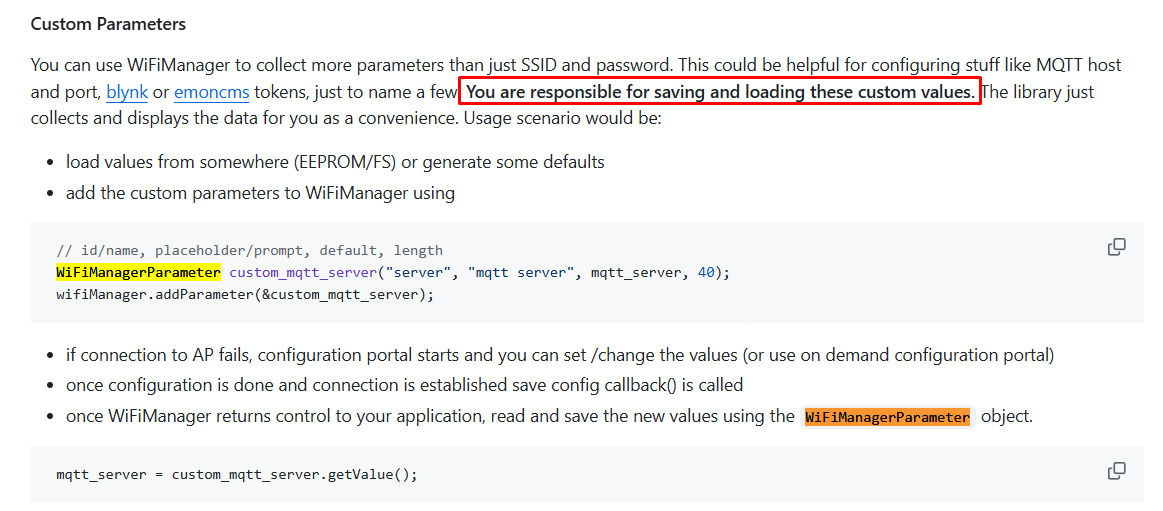
    WiFiManager documentation on custom parameters .
    WiFiManager unfortunately does not save them, we have to do it ourselves.

    Simple parameter saving .
    We have to save the contents of the time zone offset ourselves. On the ESP we do not have an EEPROM, but we do have a Flash memory that can be accessed via a class called.... EEPROM. This is presumably for name compatibility with other Arduino platforms where EEPROM is actually used. In the case of ESPs (including the NodeMCU), the EEPROM class emulates the EEPROM in the Flash part of the memory. This allows us to store persistent data that will remain after the device is rebooted.
    It is now necessary to consider what we need to add. In theory, what is needed is:
    - reading the settings at startup from the EEPROM and sending them to the WiFiManager
    - after the configuration in WiFiManager you need to write these settings back to EEPROM
    In practice, however, there is the problem of the "first start-up", i.e. the first switching on of the board will in this case load some random data from the EEPROM, it will be whatever just happened to be there in memory....
    For this purpose, I additionally calculate a simple checksum (derived from the settings) and check if it agrees, because the chances that by chance the EEPROM data will have a sum that agrees with the calculated one are really small and in practice this will allow to detect the "first start".
    Example implementation:
    Code: C / C++
    Log in, to see the code
    .
    Other functions (with read/write call added):
    Code: C / C++
    Log in, to see the code
    .
    From now on, the time offset is remembered even after loss of power. The clock shows the correct time:
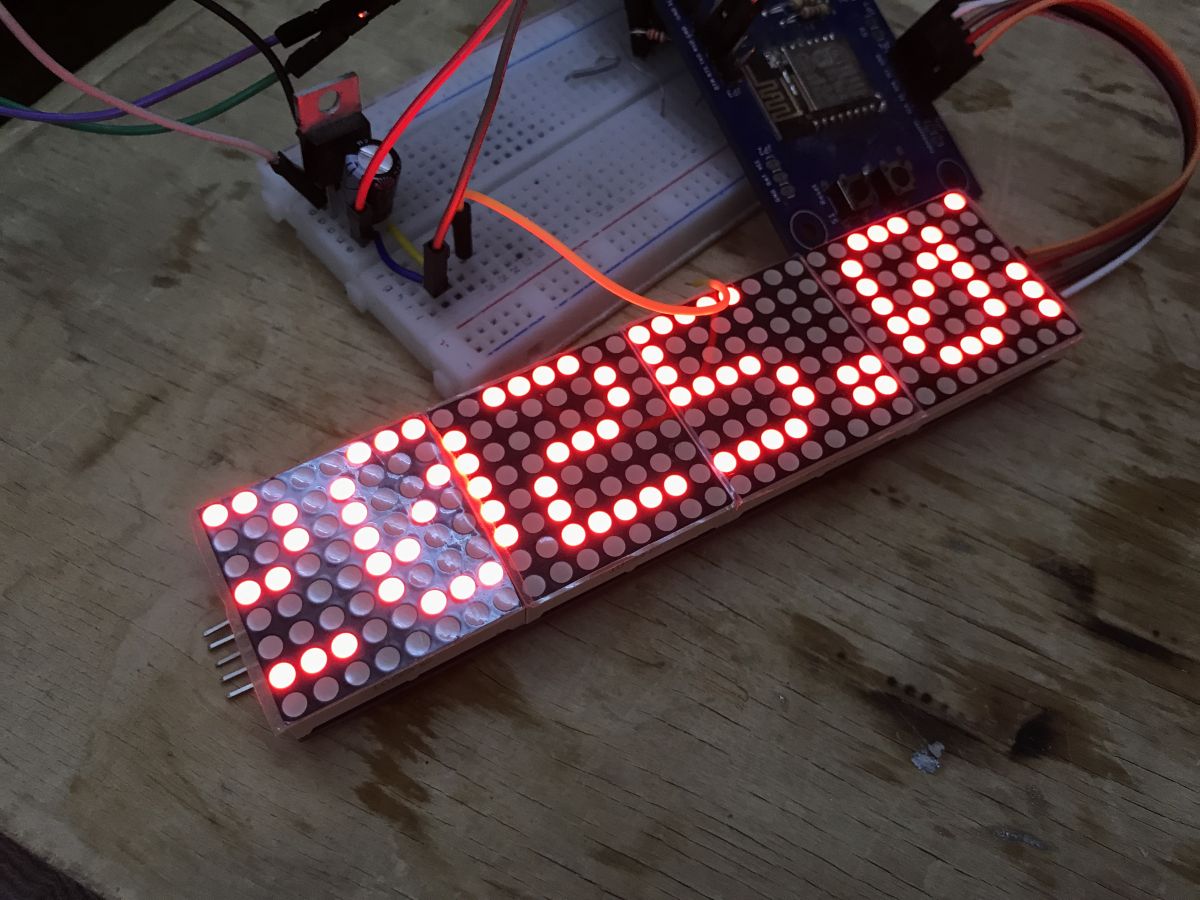
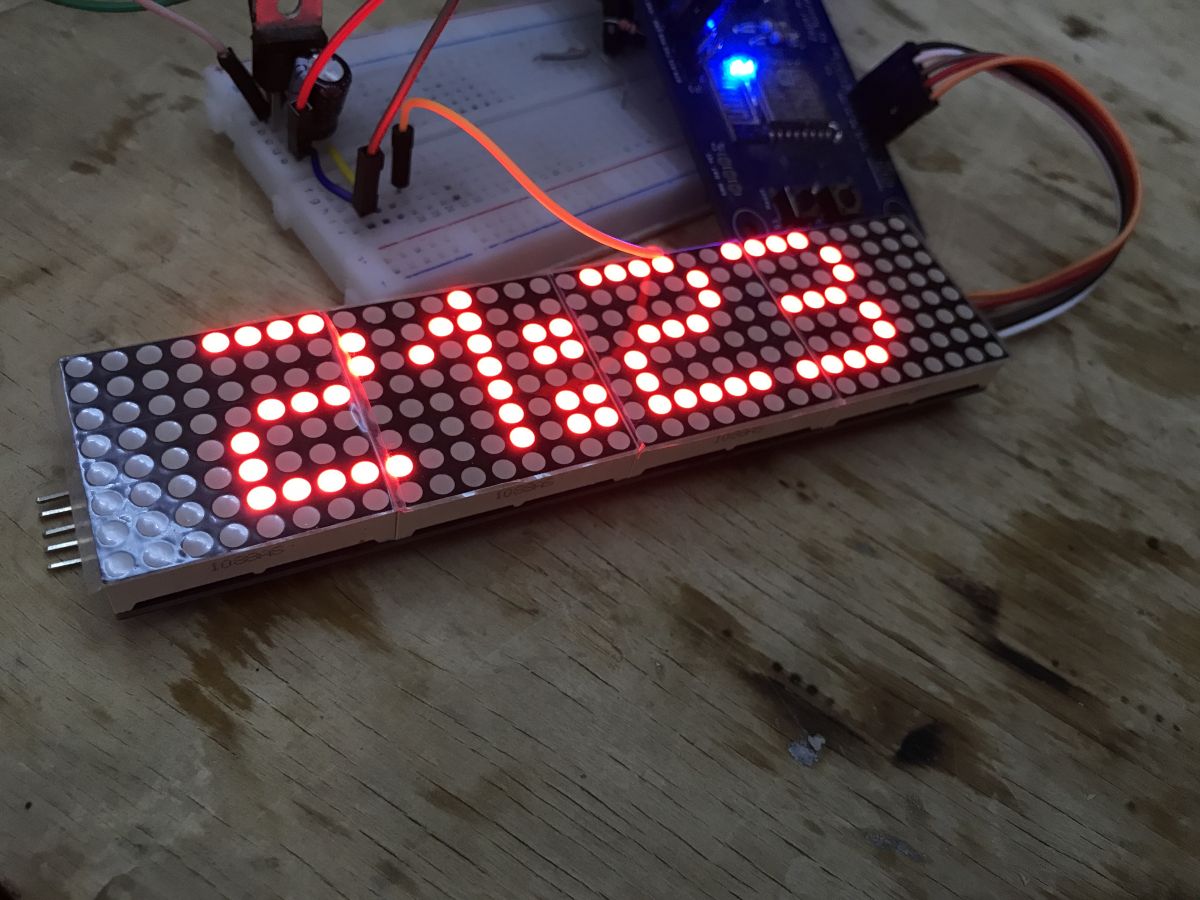
    LED display showing time connected to a breadboard. .
    LED display showing the time 21:23 on a prototyping breadboard. .

    . Information page .
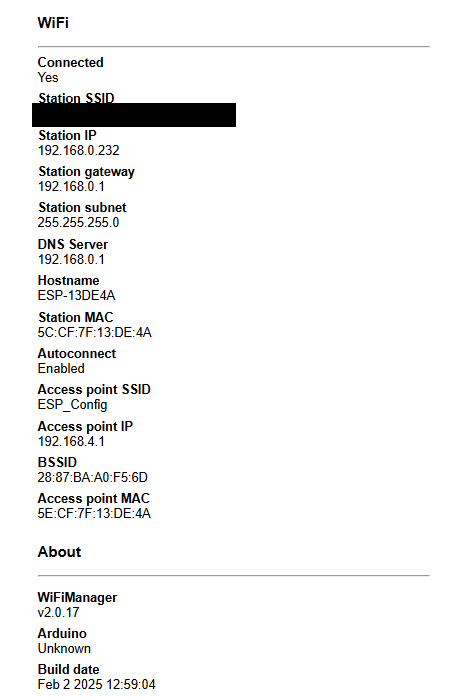
    It is also worth mentioning that WiFiManager offers a simple information page about our device. There you can check the status of the ESP and the network it is connected to. This is available at the resource address /info.
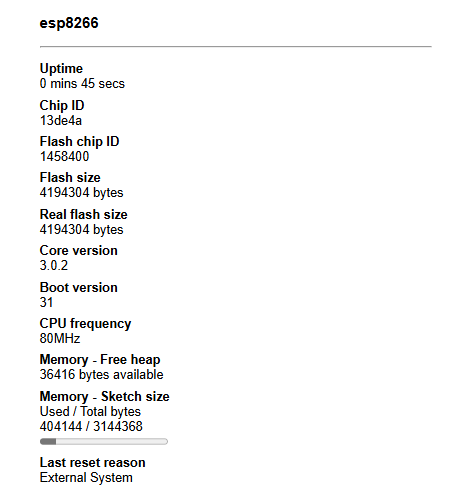
    ESP8266 information page with technical data .
    Screenshot of WiFiManager information panel. .
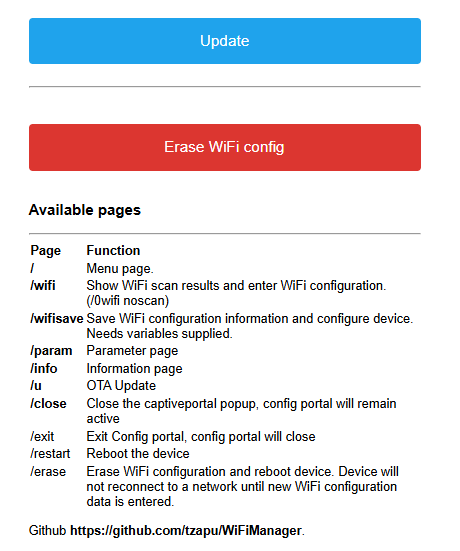
    WiFiManager user interface with update and erase WiFi config options .

    Summary .
    A very simple and convenient to use library. Definitely worth using, thanks to such a simple WiFi pairing system our projects become useful even years after it changes the data of our current WiFi network and we don't need to compile them separately to run them with another router. Additionally, the whole thing works seamlessly with ArduinoOTA, so in my opinion both of these libraries should be the first to run in our projects.
    Of course, the code shown is just an example and could be optimised to reduce flash usage (don't save when no change has occurred), rewritten in a more universal way (better checksum counting etc), but that wasn't the goal here. Perhaps I'll present better solutions - LittleFS - in a separate topic altogether, and then I'll return to the subject of saving settings.
    Have you used WiFiManager in your projects, or do you have other solutions so that you don't have to save WiFi data rigidly in code? .

    Cool? Ranking DIY
    Helpful post? Buy me a coffee.

    About Author
    p.kaczmarek2
    Moderator Smart Home
    Offline 
    p.kaczmarek2 wrote 14316 posts with rating 12202, helped 648 times. Been with us since 2014 year.
  • ADVERTISEMENT
  • #2 21423752
    krzbor
    Level 29  
    I would add that the parameters in WiFiManager can be very useful when configuring MQTT. We immediately configure our network and in addition access to MQTT.
  • ADVERTISEMENT
  • #3 21423795
    p.kaczmarek2
    Moderator Smart Home
    Nice example, in fact my code could be improved by this, I see they used:
    Code: C / C++
    Log in, to see the code
    .
    to call save, and I'm blindly saving in the theme code. And flash should be saved...

    EDIT: I guess you edited the post and the example disappeared, but my point about setSaveConfigCallback still holds.
    Helpful post? Buy me a coffee.
  • ADVERTISEMENT
  • #4 21426658
    DJ_KLIMA
    Level 25  
    Well okay, I'm having a problem with this library in terms of, restoring the connection when it's lost, it works much better with simple logic to disable and restore the connection, but it's probably me doing something wrong.
  • #5 21427055
    error105
    Level 14  
    Cool, add a description of how to create other pages conveniently, as if we wanted to at least click out of the WebUI timezone - then the description would be fully complete for me :) .

    Alternatively, how to make WiFi firing a button only, so that ESP works with the modem switched off all the time (power saving) and only starts the radio and WiFi Manager during configuration.
📢 Listen (AI):

FAQ

TL;DR: In 3 core calls#include <WiFiManager.h>, WiFiManager wifiManager;, and autoConnect("ESP_Config")—you can add ESP8266/ESP32 Wi‑Fi onboarding in PlatformIO. “A very simple and convenient to use library” fits makers who want reusable Wi‑Fi setup, button-triggered reconfiguration, and OTA-friendly projects without hardcoded SSID/password. [#21422141]

Why it matters: This approach lets an ESP device stay deployable even after the router, SSID, or password changes.

Option Setup style Wi‑Fi credentials Thread verdict
WiFiManager in PlatformIO Portal in AP mode via autoConnect() Entered from phone/PC and reused later Most convenient for repeat deployment
Hardcoded Wi‑Fi in code Manual edit and reflash Stored directly in source Less flexible after network changes
Arduino IDE workflow Traditional IDE flow Not the main example here Usable, but less preferred than PlatformIO

Key insight: WiFiManager solves first-time Wi‑Fi setup well, but custom parameters do not persist by themselves. Save them explicitly to Flash, or they reset after reboot.

Quick Facts

  • The example portal appears as an AP named ESP_Config, and its local configuration page opens at 192.168.4.1. [#21422141]
  • The sample clock project uses AP_TRIGGER_PIN 0, pinMode(AP_TRIGGER_PIN, INPUT_PULLUP), and a single button-to-ground press to reopen pairing mode. [#21422141]
  • The custom timezone field is defined with a 6-character buffer and stores offset values in seconds, not hours. [#21422141]
  • The example serial console starts at 115200 baud, and the display project is configured for 4 MAX7219 devices. [#21422141]

How do I integrate WiFiManager in a PlatformIO project for ESP8266 or ESP32 step by step?

Add the library, remove hardcoded Wi‑Fi credentials, then call WiFiManager during startup. Use this 3-step flow: 1. Add #include <WiFiManager.h>. 2. Create WiFiManager wifiManager; globally. 3. Run wifiManager.autoConnect("ESP_Config"); in setup(). The thread’s working example also keeps ArduinoOTA enabled after Wi‑Fi connects. That lets the board join saved Wi‑Fi on later boots without re-entering SSID and password. [#21422141]

What is WiFiManager on ESP8266/ESP32, and how does its AP-based WiFi configuration portal work?

WiFiManager is a library that creates a temporary ESP access point and web portal for Wi‑Fi setup, then reuses the saved credentials on later boots. In the example, the ESP broadcasts ESP_Config; after joining that AP, you open 192.168.4.1, view scanned networks, and enter credentials. The portal can also be password protected, and the setup call is blocking until configuration finishes. [#21422141]

How can I trigger WiFiManager pairing mode from a hardware button using INPUT_PULLUP and startConfigPortal()?

Use a normally open button to pull one GPIO to ground, read it as LOW, and start the portal. The example uses AP_TRIGGER_PIN 0 with INPUT_PULLUP, so the pin stays HIGH until pressed. In loop(), check digitalRead(AP_TRIGGER_PIN) == LOW, then call wifiManager.startConfigPortal("ESP_Config");. The project also shows CONFIG on the display so users know the board entered pairing mode. [#21422141]

Why do custom WiFiManager parameters like a timezone offset reset after reboot, and how do I save them persistently on ESP8266?

They reset because WiFiManager does not save custom parameters for you. The thread demonstrates this with a timezone offset field that works during configuration but returns to default after restart. Save the value yourself after configuration, then reload it before autoConnect(). In the example, the value comes from atoi(custom_timezone.getValue()) and is stored in Flash through the EEPROM class. [#21422141]

What's the best way to store WiFiManager custom parameters in Flash using the EEPROM class on ESP boards?

Store them in a small struct, write it with EEPROM.put(), and call EEPROM.commit(). The example uses a MySettings struct with two integers: checksum and timeZoneOffset. It calls EEPROM.begin(sizeof(MySettings)), writes at address 0, commits, and closes with EEPROM.end(). That is a simple, thread-tested pattern for keeping one custom WiFiManager value persistent across power loss. [#21422141]

How do I detect a first startup or invalid saved settings when loading WiFiManager parameters from emulated EEPROM?

Add a checksum and verify it before trusting the stored data. The example computes checksum = timeZoneOffset ^ 0xA5A5A5A5, reloads the struct, recalculates the value, and compares both integers. If they match, it restores the saved timezone; if not, it sets the field to "0". That catches first-boot garbage in Flash and avoids loading random settings into the portal. [#21422141]

What is ArduinoOTA, and how does it work together with WiFiManager in an ESP8266 clock project?

ArduinoOTA is an update mechanism that uploads new firmware over Wi‑Fi instead of reflashing by cable. The clock example starts Wi‑Fi through WiFiManager, prints the IP address, calls ArduinoOTA.begin(), and services updates with ArduinoOTA.handle() inside loop(). That pairing means you can first configure network access through the portal, then maintain the device remotely over the same Wi‑Fi connection. [#21422141]

Where do I find the WiFiManager information page, and what device or network details are available under /info?

Open the WiFiManager portal and browse to the /info resource. The thread says this page exposes basic information about the ESP and the network it is connected to. It is presented as a simple device-information page inside the existing WiFiManager web UI, useful for checking current connection state after setup. [#21422141]

How can WiFiManager custom parameters be used to configure MQTT settings along with WiFi credentials?

Use extra WiFiManager parameters so users enter MQTT values in the same portal session as Wi‑Fi credentials. One reply states that the parameters are very useful for MQTT because you can configure both the network and MQTT access together. The thread’s timezone example shows the pattern: define a parameter globally, add it before autoConnect(), then read its value after configuration. The same flow applies to MQTT fields. [#21423752]

Why might WiFiManager fail to restore a lost WiFi connection reliably, and what reconnection logic should I use instead?

A forum reply reports weaker recovery after link loss than a simple custom reconnect routine. The practical takeaway is to keep WiFiManager for onboarding and saved credentials, but handle runtime reconnection with your own disable-and-restore logic if the link drops repeatedly. That edge case matters for devices expected to run unattended for long periods. The thread does not provide reconnection code, only the failure observation. [#21426658]

How do I use WiFiManager setSaveConfigCallback() so settings are written only when they actually change?

Register wifiManager.setSaveConfigCallback(saveConfigCallback); and save only when WiFiManager signals a real configuration change. A follow-up post explicitly calls this an improvement over “blindly saving” in normal theme code and notes that Flash should be conserved. That makes the callback approach preferable when you want fewer unnecessary writes to emulated EEPROM or other persistent storage. [#21423795]

PlatformIO vs Arduino IDE for ESP8266/ESP32 with WiFiManager and ArduinoOTA — which workflow is more convenient and why?

PlatformIO is presented as the more convenient workflow here because of its simplicity and library availability. The tutorial author states a clear preference for PlatformIO over Arduino IDE and shows WiFiManager being added through PlatformIO’s Libraries interface. In this thread, that environment also cleanly supports the combined example with WiFiManager, ArduinoOTA, NTPClient, and the display libraries in one project. [#21422141]

How can I create additional custom WebUI pages in WiFiManager, for example to move timezone configuration out of the default parameter form?

This thread does not provide a working method for custom pages; it only asks for that addition. One reply requests a description of creating other pages so timezone settings can move out of the default form, but no implementation follows. So the safe answer is that the topic remains open here, and the current example keeps timezone inside a standard WiFiManagerParameter field. [#21427055]

What is LittleFS on ESP8266/ESP32, and how does it compare with EEPROM emulation for saving WiFiManager settings?

LittleFS is a filesystem option mentioned as a possible future, more complete approach for saving settings than the simple EEPROM-style example shown here. The thread does not compare APIs or performance numbers. It only says the current checksum-plus-EEPROM method is a basic demonstration and that better solutions such as LittleFS may be covered separately later. [#21422141]

How do I keep the ESP radio off for power saving and start WiFi plus WiFiManager only when a button is pressed for configuration?

This thread raises that power-saving idea but does not implement it. A reply asks how to keep Wi‑Fi off permanently and start the radio plus WiFiManager only on button press, yet no follow-up code is posted. So within this source, the confirmed button flow only reopens the portal while normal Wi‑Fi operation remains enabled for the running project. [#21427055]
Generated by the language model.
ADVERTISEMENT