logo elektroda
logo elektroda
X
logo elektroda

Arduino R4 - DAC tutorial, i.e. we generate a sine wave and play a melody

p.kaczmarek2  4 3831 Cool? (+7)
📢 Listen (AI):

TL;DR

  • Arduino R4’s built-in 12-bit DAC on A0 generates analog signals without external modules, unlike Uno R3 setups that needed MCP4725 over SPI or I2C.
  • A potentiometer on A5 acts as a voltage divider, and the ADC reading maps the sine-wave frequency from 0 to 10 kHz.
  • Oscilloscope traces show a usable sine-wave approximation, and the AnalogWave library can also generate other waveforms and melodies.
  • The official example plays “Frere Jacques” through a speaker with a DAC and LM386 amplifier, but the documentation had one pin error corrected from A0 to A5.
Generated by the language model.
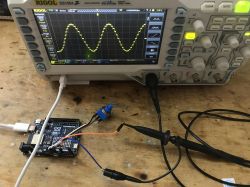
Arduino R4 generating a sine wave signal on a Rigol DS1054Z oscilloscope
Arduino R4 has a built-in 12-bit DAC (Digital-to-Analog Converter), which means it is able to generate an analog signal without connecting additional modules. This is a big step forward, because in the case of the older Uno R3 and similar boards we had to connect an external DAC such as the MCP4725 and control them usually via SPI or I2C to obtain a sine wave. And here you can generate it directly from pin A0. In this topic, I will briefly show how to run a DAC on Arduino R4 and take a look at the generated signal on an oscilloscope.

DAC - sine wave on Arduino R4
Let's consider an example from the Arduino documentation. This example reads the voltage value from the potentiometer and converts it to the frequency of the generated sine wave on the DAC. The potentiometer serves as a voltage divider, the extreme pins on VDD and GND, and the middle pins on the ADC. Below is its corrected code, because at the time of writing the topic there was an error in the Arduino documentation, the wrong pin was used once - A0 instead of A5.
Code: C / C++
Log in, to see the code

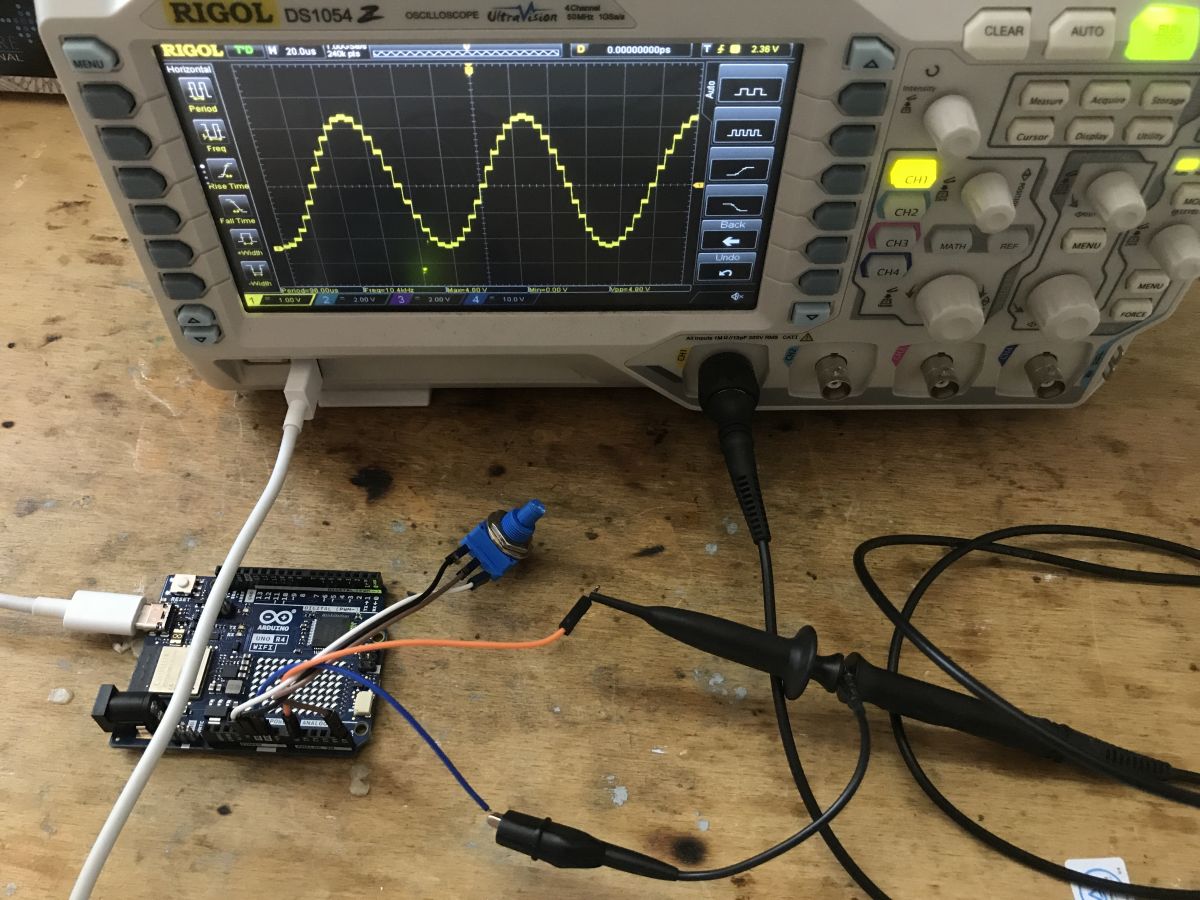
The potentiometer is connected to A5, and there is a DAC output to A0.
The map function, as the name suggests, maps the read value from the ADC, which is in the range from 0 to 1024 (10-bit ADC), to the frequency, the range of which we have chosen is from 0 to 10kHz.
Here is the result:
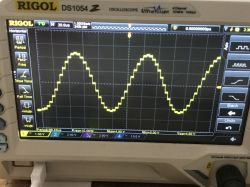
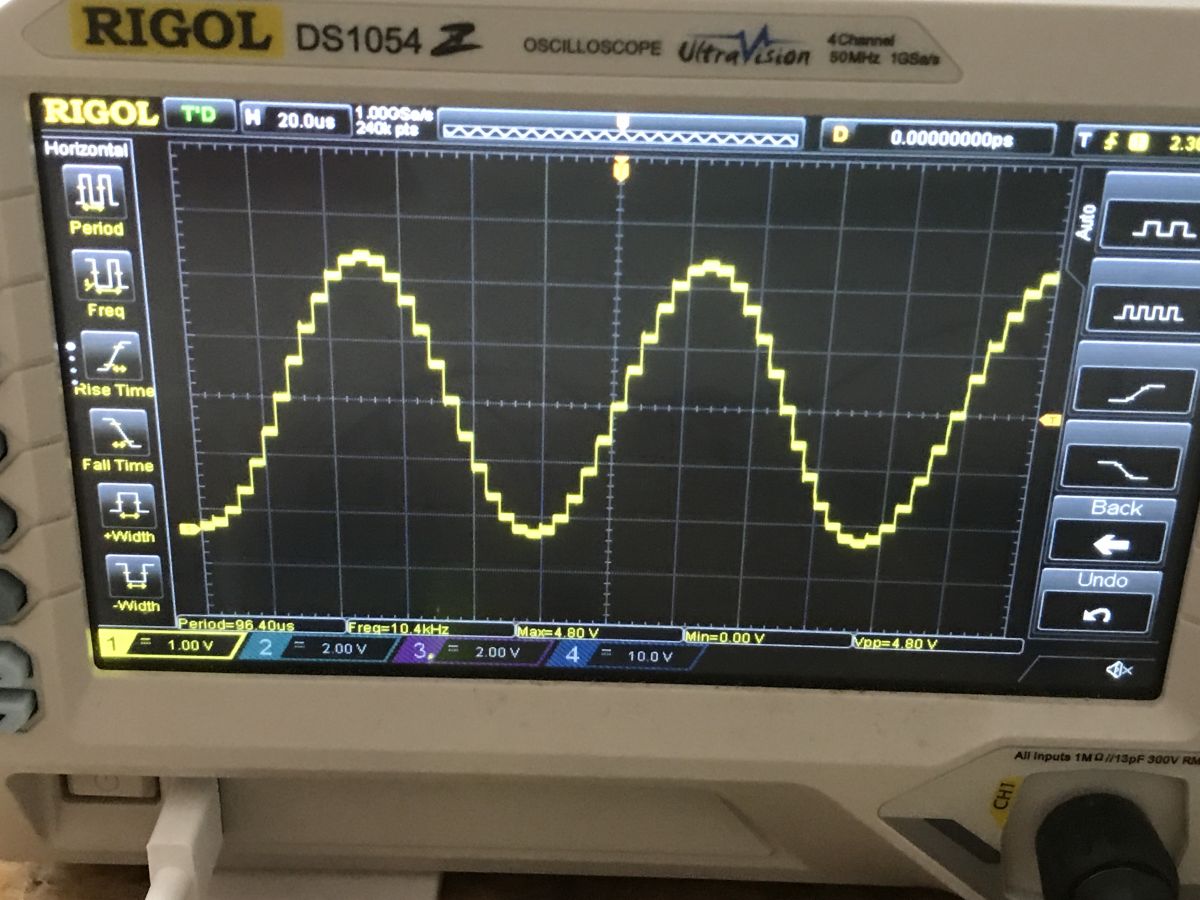
Oscillogram displaying a sine wave signal generated by Arduino R4 on an oscilloscope screen.
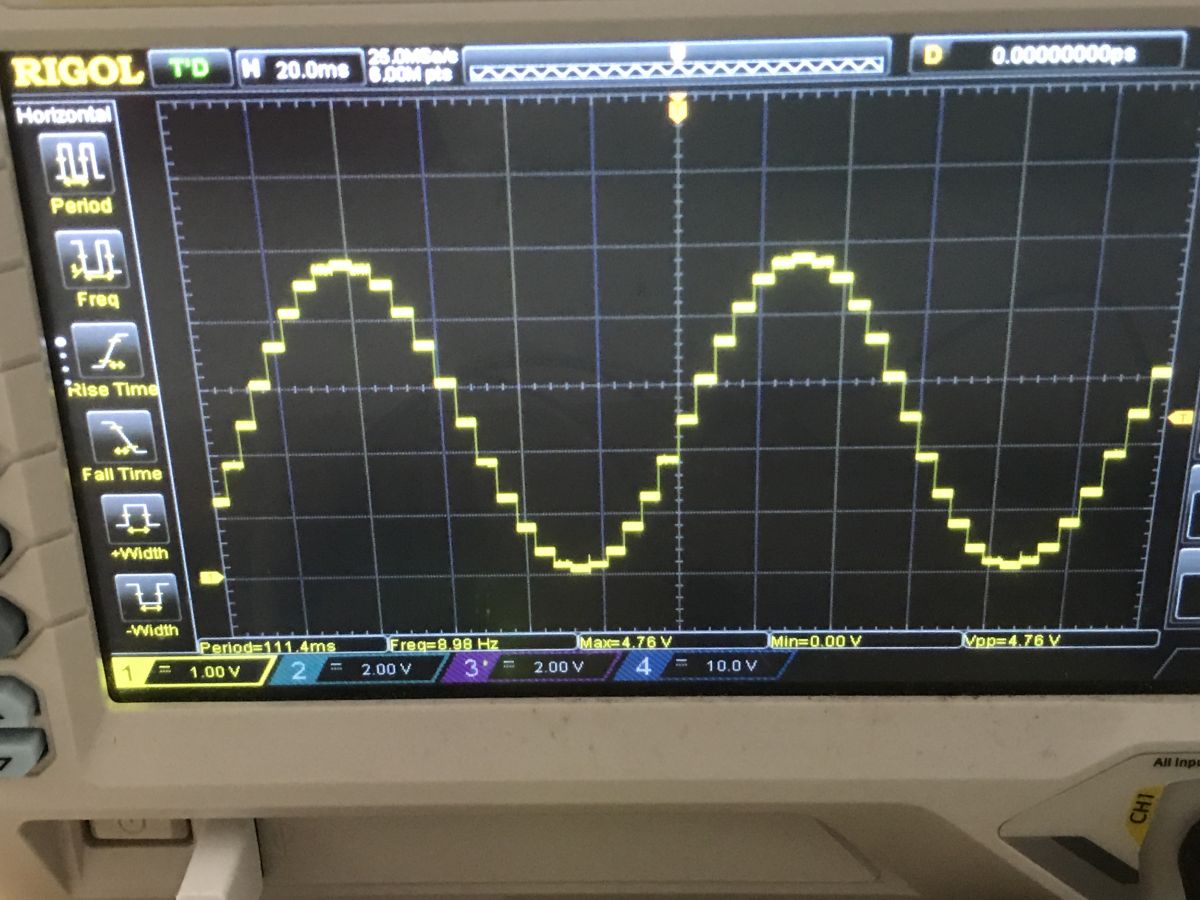
Oscilloscope display showing a sine wave generated by Arduino R4
The oscillograms show very nicely how the DAC creates an approximation of a sine wave sufficient for many applications. If we want to generate another function, we also have the following options:
Code: C / C++
Log in, to see the code

or
Code: C / C++
Log in, to see the code

DAC from Arduino can be used, for example, to generate melodies, here is the code from the official documentation:
Code: C / C++
Log in, to see the code

The above code generates the melody "Frere Jacques", plays a sequence of notes and rhythms, using the AnalogWave library to generate sound waves. The melody is played on the speaker using a DAC and audio amplifier (LM386), and parameters such as pitch, melody, rhythm, tempo and note length are defined in the code.

The full specification of Arduino R4 (in its available versions) can be found on the Arduino website:
https://docs.arduino.cc/hardware/uno-r4-wifi
https://docs.arduino.cc/resources/datasheets/ABX00087-datasheet.pdf

Summary
It's hard to disagree that the typical beginner will have a lot to run and play with with the Arduino R4. There is much more on board this board than in the iconic R3, it even offers the DAC discussed here, which allows you to generate a sine wave without connecting external modules. Just a few contact cables are enough.
Still, I wonder how often these DACs might come in handy? Have you used DACs in your projects and if so, which ones? Or maybe in R4 it is just an unnecessary gadget? I invite you to discuss.


About Author
p.kaczmarek2
p.kaczmarek2 wrote 14621 posts with rating 12636 , helped 655 times. Been with us since 2014 year.

Comments

tmf 10 Nov 2023 21:06

Sometimes a DAC is useful, but when playing music the same can be done using PWM + low-pass filter. So there is no great advantage of DAC here IMHO. Since this processor has DMA, it would be more interesting... [Read more]

Janusz_kk 11 Nov 2023 12:50

Because it has more legs and runs on 5V? [Read more]

tmf 13 Nov 2023 10:30

Probably not, because if I count correctly, there are approximately 22 IO pins (Arduino) + approximately 10 additional pins on this board. A total of approximately 32 IO pins, and the ESP32 has 34 IO pins. ... [Read more]

Anonymous 13 Nov 2023 10:45

This board has ESP32-S3, which has 45 GPIOs. [Read more]

FAQ

TL;DR: Arduino Uno R4’s 12-bit DAC can output a sine wave directly on A0, and one expert comment says it is "useful" for some projects. This FAQ helps makers generate waves, map a potentiometer on A5 to 0–10 kHz, and play a melody without an external MCP4725 module. [#20807971]

Why it matters: The thread shows when the Uno R4 DAC simplifies waveform generation and when PWM, DMA, or another board may be the better engineering choice.

Option Signal source Extra hardware Thread takeaway
Uno R4 built-in DAC DAC on A0 None for basic waveform Easiest way to generate analog output
Older Uno R3 + MCP4725 External DAC DAC module + control bus More setup than Uno R4
PWM + low-pass filter PWM pin Filter components Can also play music

Key insight: The main advantage of Uno R4 is direct analog waveform output from the board itself. The main limitation is that audio generation alone does not automatically make it better than PWM or an ESP32-based design.

Quick Facts

  • The corrected example uses A5 as the potentiometer input and A0 as the DAC output; the post notes the original documentation had one wrong pin reference. [#20807971]
  • The ADC reading is mapped from 0–1024 to a waveform frequency range of 0–10,000 Hz, then updated once every 1000 ms. [#20807971]
  • The melody example sets tempo to 120 bpm and computes beat duration as *60.0 / bpm 1000 ms** before timing each note. [#20807971]
  • The sample audio setup uses an LM386 amplifier, connects its input+ to A0, input- to GND, and drives a 4–8 ohm speaker. [#20807971]
  • One comparison point from the discussion: the board’s main MCU was described as 5 V capable, while another reply stated the onboard ESP32-S3 has 45 GPIOs. [#20809560]

How do I generate a sine wave on the Arduino Uno R4 using its built-in 12-bit DAC and the AnalogWave library?

Use the AnalogWave library, create analogWave wave(DAC);, then start output with wave.sine(freq). In the example, the code begins at 10 Hz and later changes frequency from a potentiometer reading. 1. Include analogWave.h and instantiate wave(DAC). 2. Set pinMode(A5, INPUT) and call wave.sine(freq). 3. Read A5, map it, and update with wave.freq(freq). [#20807971]

Why does the Arduino Uno R4 DAC example use A5 for the potentiometer input and A0 for the DAC output?

Because the corrected wiring separates input and output roles: A5 reads the potentiometer through the ADC, while A0 outputs the analog waveform from the DAC. The post explicitly says the documentation had a pin mistake and used A0 instead of A5 once. If you wire the potentiometer to A0, the example can fail because A0 is the DAC output in this setup. [#20807971]

What is a DAC, and how is the 12-bit DAC in the Arduino Uno R4 different from using an external MCP4725 on older boards like the Uno R3?

A DAC is a circuit that converts digital values into an analog voltage, producing a continuous-looking output from discrete steps. On the Uno R4, the DAC is built in and can generate a signal directly on A0. On older boards like the Uno R3, the thread says you typically needed an external DAC such as the MCP4725, usually controlled over SPI or I2C, to get a sine wave. [#20807971]

How does the map() function convert the Arduino ADC reading from a potentiometer into a sine-wave frequency range such as 0 to 10 kHz?

It rescales the ADC value linearly from one numeric range to another. The example uses map(analogRead(A5), 0, 1024, 0, 10000), so an input near 0 gives about 0 Hz and an input near 1024 gives about 10,000 Hz. Mid-scale input gives a mid-scale frequency. The code then sends that result to wave.freq(freq) once per second. [#20807971]

What is DMA, and how could DMA improve DAC signal generation on the Arduino Uno R4?

DMA is a hardware data-transfer method that moves data without constant CPU intervention, reducing timing jitter and repetitive software overhead. The thread says the processor has DMA and suggests it would be more interesting to connect waveform generation to the DAC through DMA. That approach could feed samples to the DAC more smoothly than a loop-driven update, especially for continuous audio or complex waveforms. [#20808841]

How can I change the Arduino Uno R4 AnalogWave output from a sine wave to a square wave or sawtooth wave?

Call a different AnalogWave method with the same frequency value. The thread gives two direct alternatives: wave.square(freq); for a square wave and wave.saw(freq); for a sawtooth wave. You keep the same DAC-based workflow and only change the waveform function. That makes quick A/B testing easy on the oscilloscope. [#20807971]

What does the oscilloscope waveform from the Arduino Uno R4 DAC actually show, and how close is it to an ideal sine wave?

It shows a stepped approximation of a sine wave, not a mathematically perfect curve. The post says the oscillograms show how the DAC creates an approximation that is sufficient for many applications. That means the waveform is analog at the output, but still built from discrete DAC levels. For tutorial, audio, and basic signal tasks, that approximation is presented as good enough. [#20807971]

How do I play a melody like 'Frere Jacques' on the Arduino Uno R4 DAC with an LM386 amplifier and speaker?

Use the DAC on A0 to feed an LM386 amplifier, then drive a 4–8 ohm speaker. 1. Start the AnalogWave generator with wave.sine(10). 2. Convert each MIDI-style note in the melody array into a frequency and send it with wave.freq(frequency). 3. Hold the note for about 85% of its duration, stop the wave, then pause for the remaining 15%. The example melody is explicitly "Frere Jacques." [#20807971]

What is the MIDI note to frequency formula used in the Arduino Uno R4 DAC melody example, and how does it work?

The example uses FREQ_A4 * pow(2, ((currentNote - NOTE_A4) / 12.0)) to convert a note number into frequency. Here, NOTE_A4 = 69 and FREQ_A4 = 440, so note 69 becomes 440 Hz. Each increase of 12 notes doubles the frequency, which matches the equal-tempered scale. The code adds the current melody offset to a tonic before applying that formula. [#20807971]

PWM with a low-pass filter vs a real DAC on Arduino: which is better for audio and waveform generation?

For simple music output, the thread says PWM plus a low-pass filter can do the same job, so a DAC has no major advantage there. A real DAC still gives direct analog output without an external filter and better suits waveform-generation demos. The practical choice is task-based: use PWM for simple audio, and use the DAC when you want straightforward analog output from A0. [#20808841]

What is the point of using an Arduino Uno R4 WiFi board with two processors, including an ESP32-S3 module, instead of just using an ESP32 board?

The thread presents two answers: board integration and 5 V operation versus software complexity. One reply questions the need for "two processors on board" and says an ESP32-only design may be simpler. Another reply argues the extra MCU matters because it has more pins exposed in Arduino form and runs at 5 V. In practice, the board targets users who want Arduino-style hardware plus onboard wireless capability. [#20808841]

How useful is the Arduino Uno R4 DAC in real projects, and what kinds of applications benefit most from it?

It is most useful when you need direct analog waveform output without extra modules. The thread shows two concrete uses: generating a sine wave up to about 10 kHz from a potentiometer input and playing a melody through an LM386 amplifier. One commenter also notes DACs become more compelling in advanced signal-routing tasks, not just simple music playback. That makes the DAC strongest for prototyping signals, tones, and mixed-signal experiments. [#20807971]

What is a built-in comparator in a microcontroller, and how could DAC output be routed to a comparator or ADC in advanced projects?

A built-in comparator is an analog block that compares two voltages and switches state when one crosses the other, enabling threshold detection and timing functions. The thread says a DAC makes more sense when the processor can switch that analog output programmatically to internal blocks such as a comparator or ADC. That setup would let firmware generate a reference voltage, then measure or compare against it inside the MCU. [#20808841]

Why might 5 V operation and available GPIO count matter when comparing the Arduino Uno R4 WiFi with an ESP32-S3 board?

They matter because voltage compatibility and pin availability affect what hardware you can connect directly. One reply argues the non-ESP32 MCU matters because it has more accessible pins and runs on 5 V. Another reply counters with pin counts, first estimating about 32 IO on the board and then noting the ESP32-S3 has 45 GPIOs. So the tradeoff is not just raw GPIO count, but also board exposure and 5 V ecosystem fit. [#20812833]

What common mistakes in the Arduino Uno R4 DAC tutorial can cause the waveform or melody code not to work as expected?

The biggest documented mistake is using the wrong analog pin in the potentiometer example. The post says the Arduino documentation had A0 instead of A5 once, but the corrected code reads the potentiometer on A5 and outputs DAC on A0. Another failure point is wiring: the melody setup expects LM386 input+ to A0, input- to GND, and a 4–8 ohm speaker on the amplifier output. Wrong pin roles or wrong audio wiring can stop output immediately. [#20807971]
Generated by the language model.
%}