logo elektroda
logo elektroda
X
logo elektroda

Internet module ecoNet 300 and ecoLINK2

jamrjan 199797 688
Best answers LABEL_AI_GENERATED

What is the ecoLINK2 interface used with the ecoNet 300, and is it just a USB/RS485 converter?

ecoLINK2 is basically an RS485 converter, but the ecoNET300 setup uses more than a plain adapter: the controller goes through ecoLINK2 into the ecoNET300, and only that combination establishes communication with the server [#17778027] A normal RS485→USB converter can still let you listen to the controller on a PC, but it does not make ecoNET300 work by itself [#17778027] The controller side uses the G1/G2 RS485 ports; one reply says USB is only for software updates, while G1 is for the ecotouch panel and G2 for ecoNET, with the same data on both buses [#17757514] The interface is tied to FTDI-based hardware; the forum explicitly says ecoLINK2 uses an FTDI chip and that CH340-based converters are not supported by the ecoNET software [#19663291] Even when raw RS485 data is captured, it is not useful without the frame structure/decoder, because the protocol is closed and not Modbus [#17756899]
AI summary based on the discussion. May contain errors.
ADVERTISEMENT
Treść została przetłumaczona polish » english Zobacz oryginalną wersję tematu
  • #661 21815976
    SławekSS
    Level 24  
    Posts: 726
    Help: 34
    Rate: 80
    Mr3020 is TpLink and plum does not use the modbus protocol.

    In general you can connect any rs485 converter, it is a matter of software and knowing the protocol which plum has not published anywhere. Some people using reverse engineering have done this.
  • ADVERTISEMENT
  • EcoNet300 clone shows only 4-character UID

    #662 21816355
    jedrzejmichalak
    Level 3  
    Posts: 3
    Hi, does anyone know if the EcoMAXX800 R2 controller is compatible with ecoNet300?
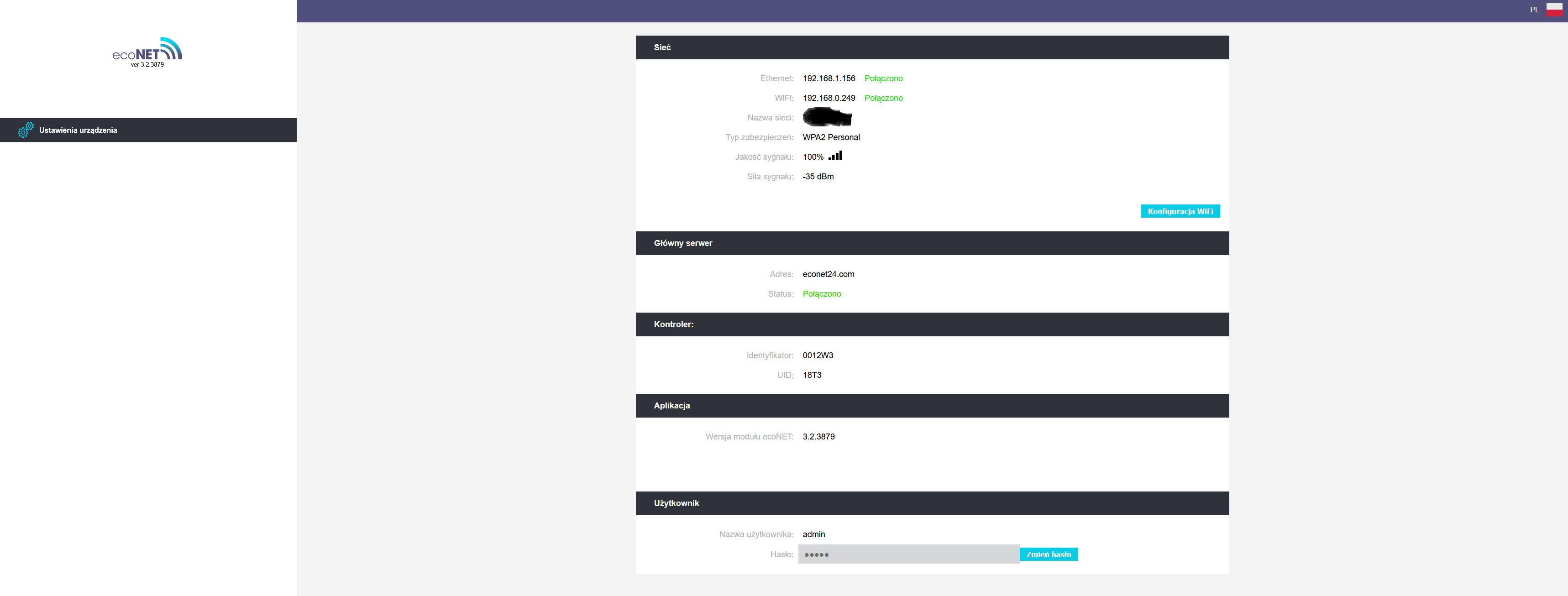
    I'm asking because I've embraced an EcoNeta300 clone on an MR3020 V3.2. I've connected it to the local network and it works cool and over LAN and over WiFi, but unfortunately it doesn't generate the correct UID. On the EcoNeta configuration page in the browser on the PC it shows a UID of only 4 characters, above the ID of 6 characters and that's it. In the control panel next to the controller in the information there are two tabs with information about the status of the connection to the network and to the PLUMa server, but there is no UID anywhere.
    I have the converter on the FTDI FT232RL. The LEDs on the MR3020 are on.
    I have the software in EcoNet300 with 3.2.3875
    Software versions:
    Panel V.01.20.22.A1
    Module A V.01.31.23.G1
    I have the adapter plugged into D and D- on the G1 connector, where the panel is.
  • #663 21816367
    Pisklak1977
    Level 11  
    Posts: 58
    Help: 1
    Rate: 10
    original econet300 binary
    Attachments:
    • econet300_v3.2.3879.bin (8 MB) You must be logged in to download this attachment.
  • #664 21816368
    SławekSS
    Level 24  
    Posts: 726
    Help: 34
    Rate: 80
    jedrzejmichalak wrote:
    Hello, does anyone know if the EcoMAXX800 R2 controller is suitable for use with ecoNet300 ?

    "IS APPLICABLE TO THE CONTROLLER:
     boiler, series: ecoMAX800 (excluding ecoMAX800R1,T1), ecoMAX850, ecoMAX860, ecoMAX910/920
     solar heaters: ecoSOL301/400
     heat pumps, series: ecoTRONIC100/200
     ventilation, series: ecoVENT"
  • #665 21816384
    jedrzejmichalak
    Level 3  
    Posts: 3
    >>21816368
    Yes, I know, I have also read the EcoNET300 manual from Plum. In that case, is there any option to update the controller and panel software?
  • ADVERTISEMENT
  • #666 21816391
    SławekSS
    Level 24  
    Posts: 726
    Help: 34
    Rate: 80
    first try swapping the A and B(D+, D-) cables at the econet.
  • EcoMAXX800R2 may not generate the UID

    #667 21816398
    jedrzejmichalak
    Level 3  
    Posts: 3
    Checked: with reverse connection, there is no communication at all.


    and is there anyone on the forum whose EcoMAXX800R2 works with Econet300 and EcoLink2?
    I'm wondering if this version of ecomax will generate the UID, I'm running out of ideas already and I've already spent so much time on this that it would be a shame to let it go at this point.
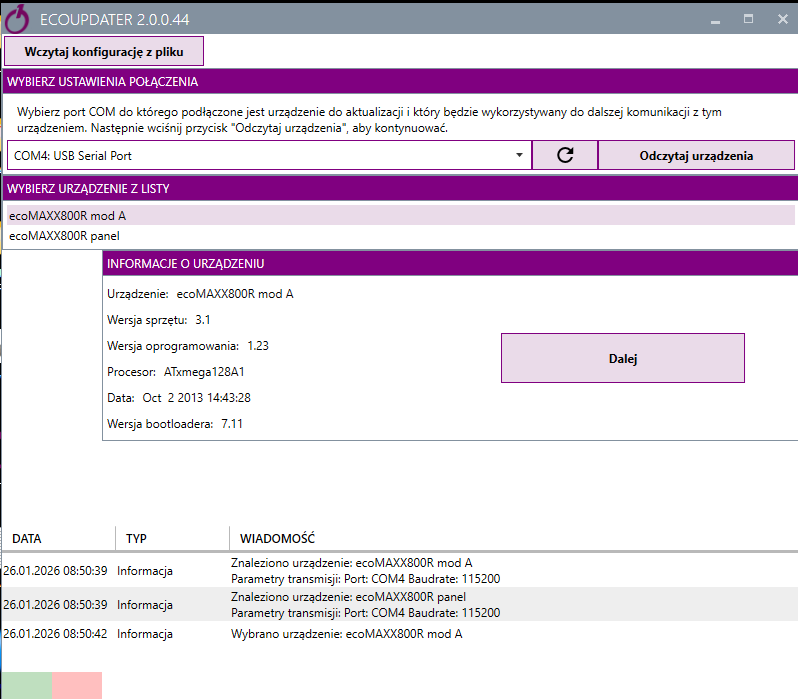
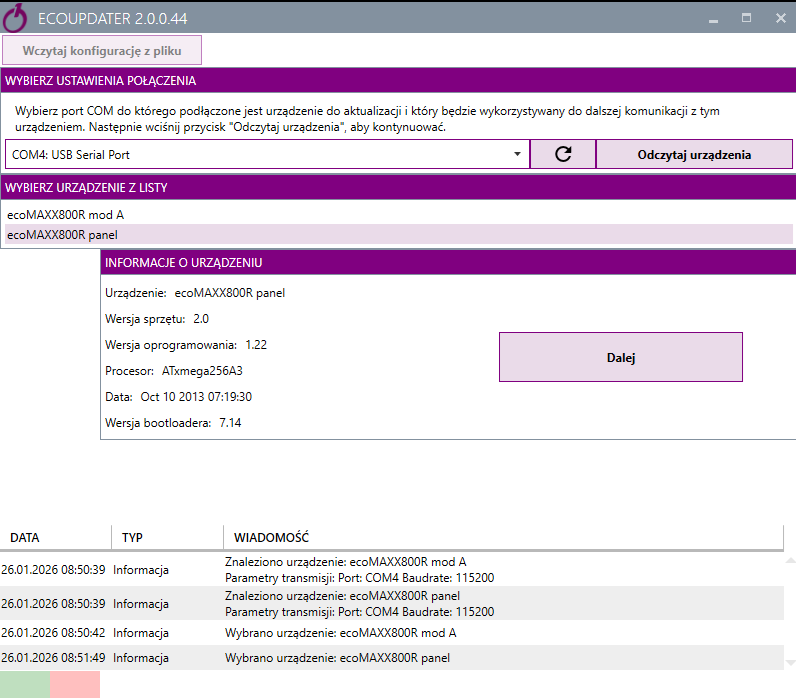
    The FTDI adapter is connected fine, this is confirmed by the fact that when I connect the ecomax to the PC via the ftdi adapter the ecoupdater program reads the driver and panel information correctly, I upload the screenshots
    Screenshot of ECOUPDATER showing ecoMAXX800R device info and communication log Screenshot of EcoUpdater showing COM4 selected and device info for ecoMAXX800R ecoNET device settings page showing network, server, controller ID and UID
  • #668 21823111
    pawlus1841
    Level 2  
    Posts: 2
    Good morning. I made myself an econet clone. I wanted to connect to the cooker and found that I have nowhere to connect it😃. I have a room thermostat connected. Does this mean I need to buy a B module still?
    Attachments:
    • Internet module ecoNet 300 and ecoLINK2 IMG20260129110818.jpg (2.38 MB) You must be logged in to download this attachment.
    • Internet module ecoNet 300 and ecoLINK2 IMG20260129110820.jpg (2.29 MB) You must be logged in to download this attachment.
    • Internet module ecoNet 300 and ecoLINK2 IMG20260129110830.jpg (2.6 MB) You must be logged in to download this attachment.
    • Internet module ecoNet 300 and ecoLINK2 IMG20260129110833.jpg (2.93 MB) You must be logged in to download this attachment.
  • #669 21823113
    SławekSS
    Level 24  
    Posts: 726
    Help: 34
    Rate: 80
    you want them to help you and you sell images for points.
  • #670 21823114
    pawlus1841
    Level 2  
    Posts: 2
    Sorry, I thought it was the file numbering. I have already changed

    Edit. okay now i know, i need this EL2adapter yes ?
  • #671 21823128
    SławekSS
    Level 24  
    Posts: 726
    Help: 34
    Rate: 80
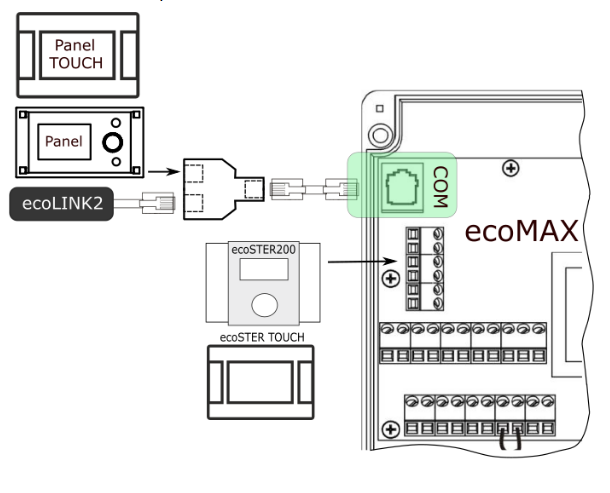
    connect under the G2 socket in parallel with the panel. You will need an RJ11 connector/adapter


    Diagram showing control panels connected to ecoMAX via COM port and RJ11 adapter

    Your G2 is in the image of COM
  • #672 21823145
    Pisklak1977
    Level 11  
    Posts: 58
    Help: 1
    Rate: 10
    >>21823111
    Connect this in parallel to Econet via usb->rs485 to D+ and D-

    Or as Slawek described via rj tee
  • Raspberry Pi app controls ecoMAX920P1-K via RS485

    #673 21833846
    razvans
    Level 2  
    Posts: 2
    Rate: 1
    Hello guys,

    Thank you for all the info on this thread.

    I want to show you a little project I have been working on.
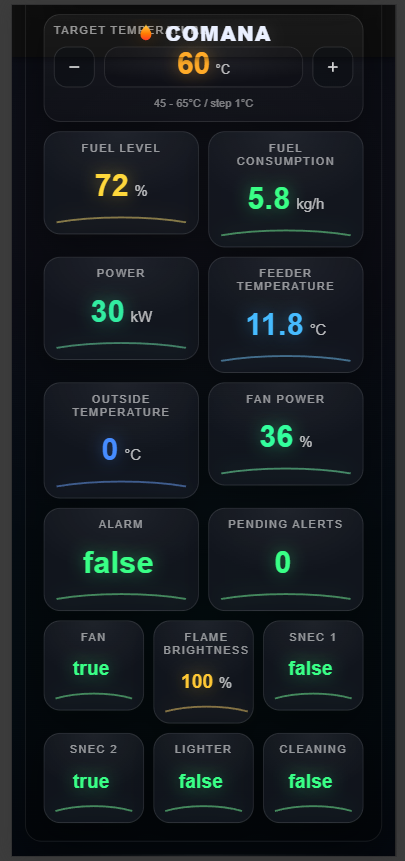
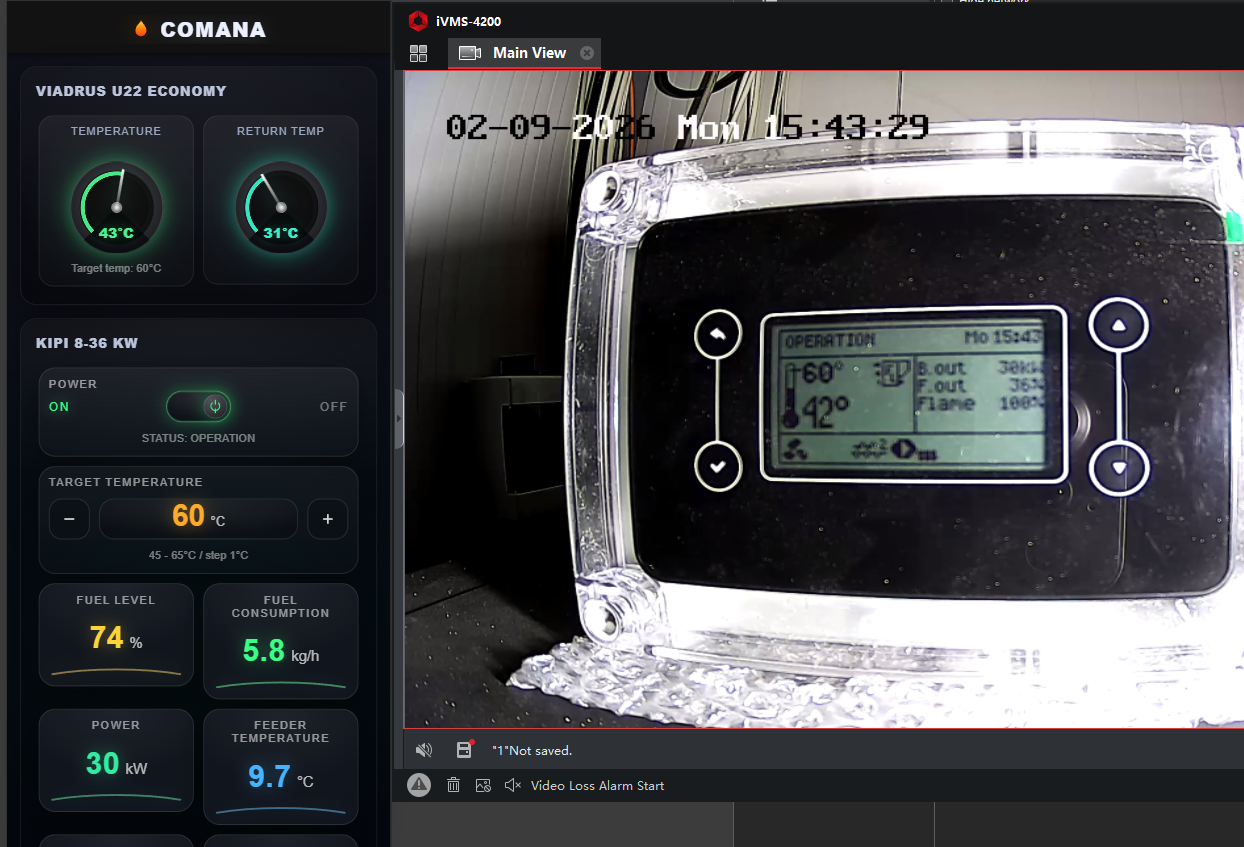
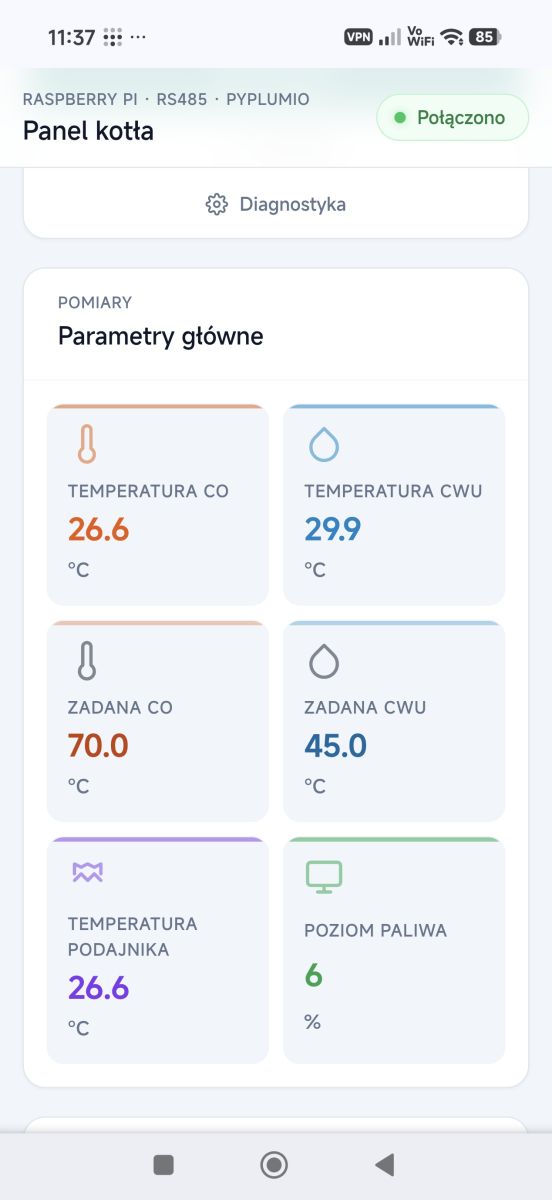
    With the help of https://github.com/denpamusic/PyPlumIO and my knowledge as a programmer I made myself a mobile app that controls my Viadrus U22 Ecomomy + Kipi 8 - 36 kW (ecoMAX920P1-K controller).
    I used a raspberry pi + usb to rs485 (waveshare) and it works very well. It is still work in progress. I will most likely make it opensource once its finished.

    About the Viadrus U22 Economy, I modified it with the air intake on the bottom door then added the pellet burner.
    In this way I can change from pellets to wood in 10 minutes by changing the flanges.
    Attachments:
    • Internet module ecoNet 300 and ecoLINK2 development1.png (219.76 KB) You must be logged in to download this attachment.
    • Internet module ecoNet 300 and ecoLINK2 viadrus5.jpg (186.24 KB) You must be logged in to download this attachment.
    • Internet module ecoNet 300 and ecoLINK2 viadrus3.jpg (216.56 KB) You must be logged in to download this attachment.
    • Internet module ecoNet 300 and ecoLINK2 viadrus4.jpg (163.35 KB) You must be logged in to download this attachment.
    • Internet module ecoNet 300 and ecoLINK2 viadrus2.jpg (189.17 KB) You must be logged in to download this attachment.
    • Internet module ecoNet 300 and ecoLINK2 viadrus1.jpg (172.94 KB) You must be logged in to download this attachment.
    • Internet module ecoNet 300 and ecoLINK2 development.png (934.12 KB) You must be logged in to download this attachment.
  • ADVERTISEMENT
  • #674 21836410
    Pisklak1977
    Level 11  
    Posts: 58
    Help: 1
    Rate: 10
    >>21833846 beautiful work.
  • #675 21836652
    razvans
    Level 2  
    Posts: 2
    Rate: 1
    thank you.
    here's a very cold start/stop from 35 km away


  • #676 21836989
    Pisklak1977
    Level 11  
    Posts: 58
    Help: 1
    Rate: 10
    SławekSS wrote:
    kajapa wrote:
    and on econet24 I have the message "Blocked device"
    I had that too, after a few months it disappeared and everything works until today

    binarka kociol sokol
    Attachments:
    • econet300_v3.2.3879.bin (8 MB) You must be logged in to download this attachment.
  • #677 21837191
    Pisklak1977
    Level 11  
    Posts: 58
    Help: 1
    Rate: 10
    >>21759218
    set the fixed ip to 192.168.0.225, then the same on tftp. wifi on the computer turned off. Unplug the router from the power supply, hold reset. power up in a moment the update comes up and that's it. I couldn't figure it out until Slawek gave me a hint for which I officially thank you. With a different ip setting it would not work.

    Does anyone have the original binary for LAZAR?
  • ADVERTISEMENT
  • #679 21860493
    arjunmehta
    Level 3  
    Posts: 7
    Rate: 1
    The Internet module ecoNet 300 and ecoLINK2 are devices used to connect heating systems, like boilers and heat pumps, to the internet. They allow remote monitoring, control via apps, and integration with smart home systems for energy-efficient management.
  • #680 21867931
    stathochristos
    Level 1  
    Posts: 1
    Rate: 1
    Hello,
    I try to register the apk econet24. (ecoNet 300)
    I put the Controllers UID it's ok, and all my infromations (email, name....).
    Any email i use i get a message ''there is already an account using this email''.
    I try another email same problem. Does anyone faced that problem with the apk ?
    Thank you
  • Seeking compatible .bin firmware for ecoNET 300 v1.9

    #681 21878867
    vahoo
    Level 11  
    Posts: 50
    Rate: 2
    I have an old ecoNET 300 on hardware 1.9 (Plum version). I bought it used as "working" but it turns out that it gets into a loop and restarts all the time. I am trying to find a .bin version compatible with this hardware. I uploaded the original tp-liknek soft to see if the router works on it, and yes, it works without a problem. Does anyone have a .bin version compatible with the older ecoNETs version 1.9? Is there any chance of resurrecting it yet? ;)
  • Need correct Ecosol firmware for sensor readings

    #682 21882613
    celso1
    Level 1  
    Posts: 1
    Hello all.
    Sorry for writing this in English, but I don't understand any other language besides Portuguese.

    I already read all posts from the beginning, and I am unsure about what the firmware for Ecosol is to read the controller 301 of my solar heater.
    All that I have installed doesn't show the temperatures for the collectors and other sensors.
    ~It shows connected to the server, shows the ID, but no info about the sensors.
    Can someone point me to the right software and what I am missing?
    I know it has to be the firmware for Ecosol.
    Thank you all.
  • ESP32 RS485 sniffing for ecoMAX 850 integration

    #683 21902724
    apollogz1000
    Level 1  
    Posts: 1
    Hello.
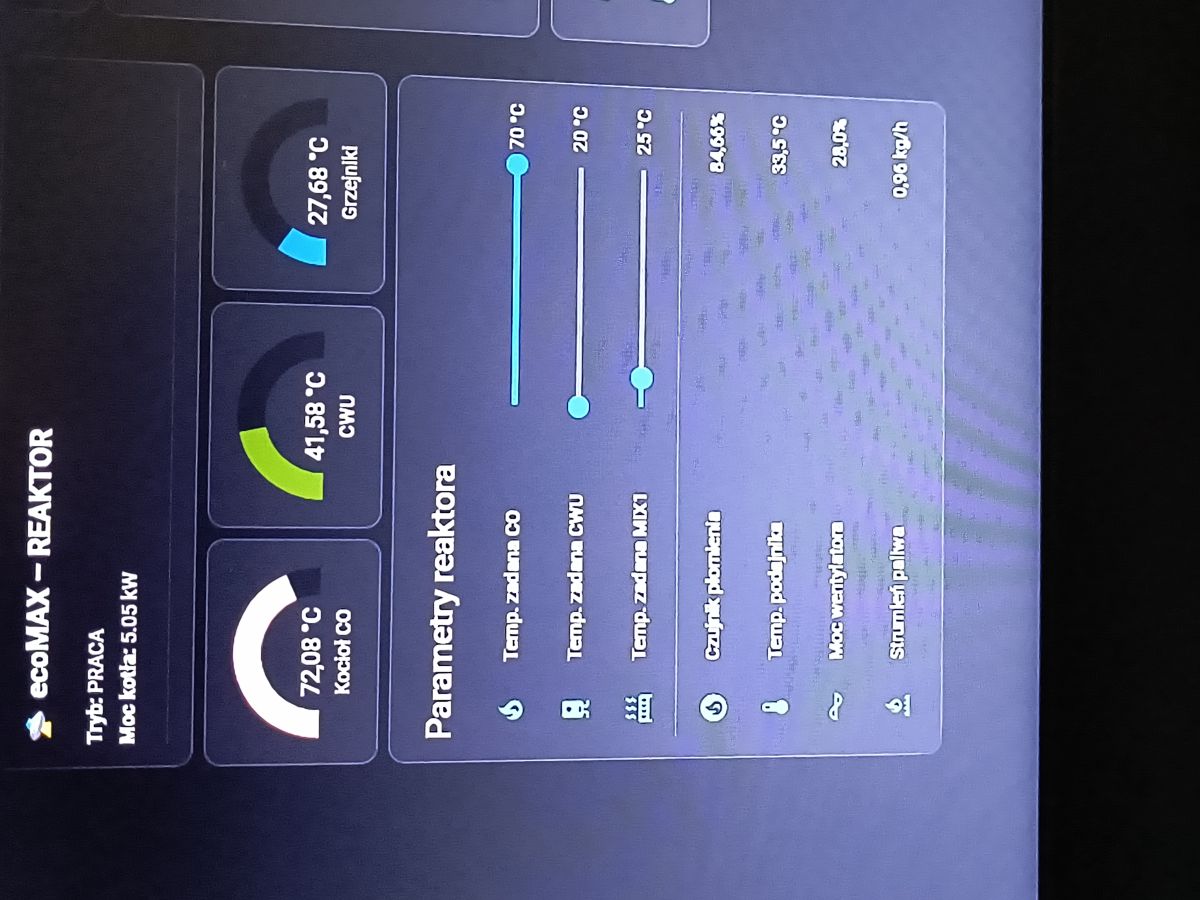
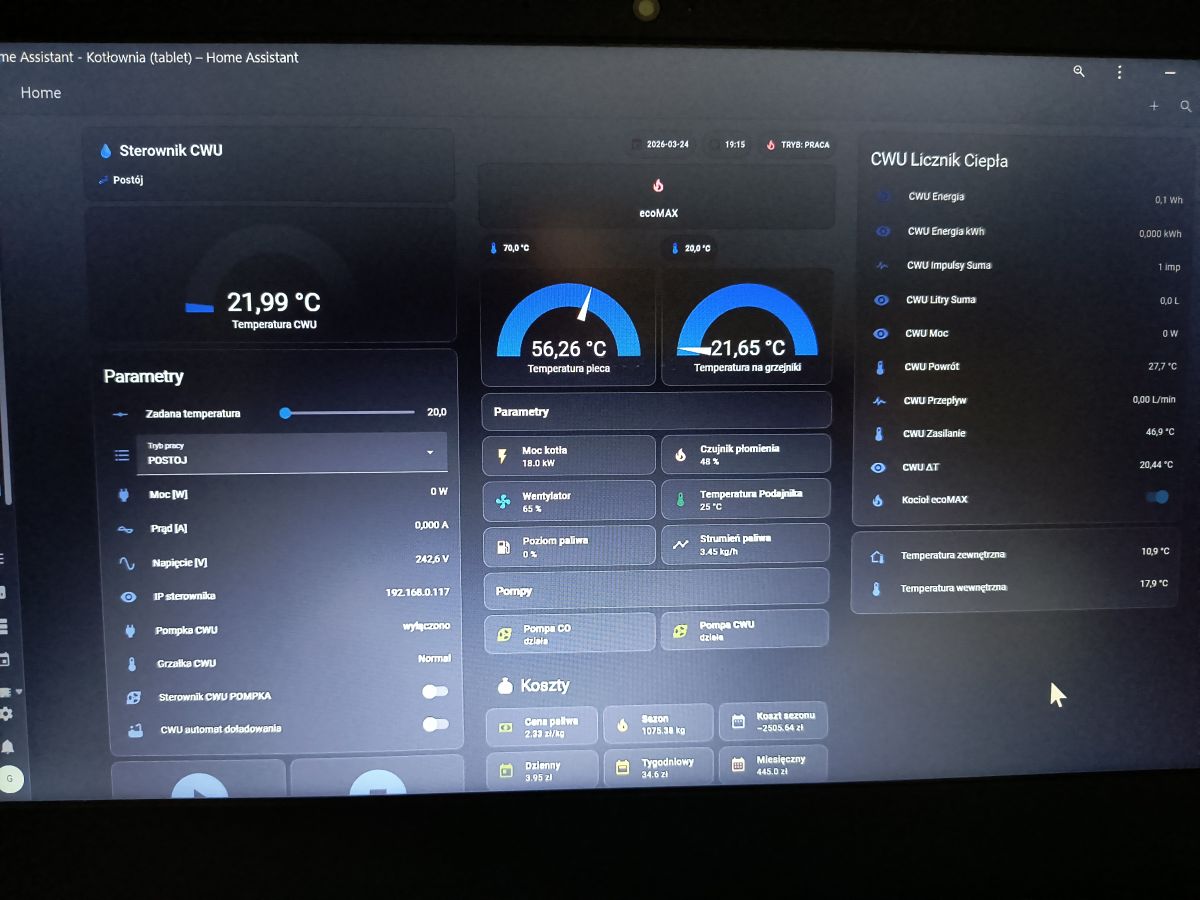
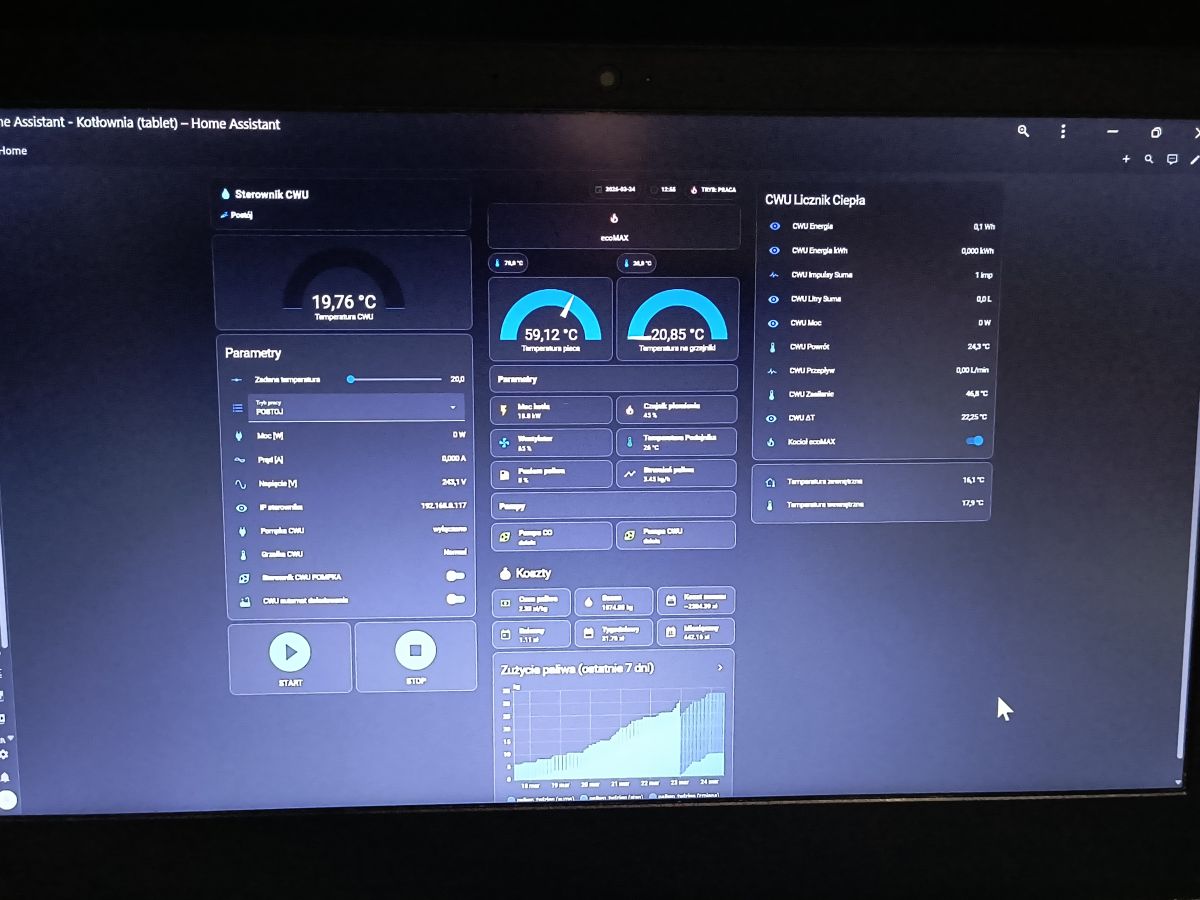
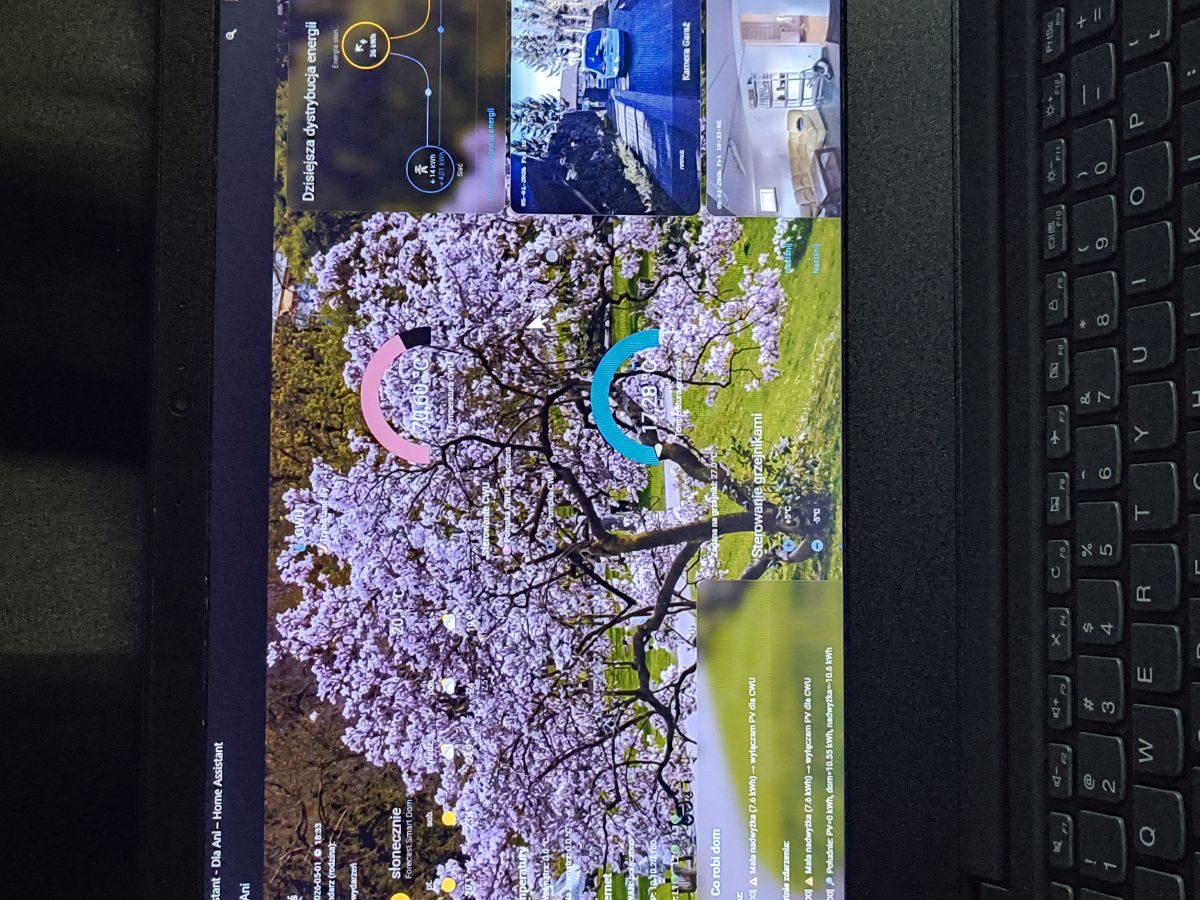
    A year ago I bought a house that had a central heating furnace with a KIPI burner fitted and an ecoMAX 850P2 - C furnace controller. There was a TP-Link router hanging on the cable (original cable) at the controller, but without any Plum markings, so that I don't know if it is the econet 300 original or a regular TP-Link. The login and password for the ecoMax controller was the factory one, ie admin, admin, so I set up my wi-fi and was able to log into the controller locally inside the network. I installed the Plum econet 24 app on my phone but also had a problem such that my device had a locked status. I tried calling Plum and sending emails because I wanted a working device, but without any response from the manufacturer, either by phone or email. Pissed off at Plum, I decided to somehow read the transmission myself, after all I could access the controller via http locally, as I wanted to integrate the ecoMAX 850 into the HA I was installing for myself at home. And I succeeded, I have integrated the furnace controller locally via wi-fi with Home Adjutant and I was able to view the data in real time and control the furnace from the HA locally without internet and without the manufacturer's app, a fantastic thing. But one day the TP-Link died and now I was left with a choice, buy a new econet 300 for £800 or control the appliance by connecting to the RS485 bus. I already have an ESP 32 connected via a Max485 converter to an ecoMAX 850 and I can see some frames, but it's completely different to what I had before and I can see the huge amount of work ahead of me to read what I see on the rs485 bus to restore integration with the HA.
    I would very much appreciate any help to shorten my work. Maybe someone has read frames from the rs485.
    I for my part can help integrate ecoMAX - with HA, I will show how I solved it. My integration showed all the parameters of the burner, CH, DHW temperature, mixer, feeder, fuel consumption, blower operation, flame sensor, pump operation, everything Plum provides. In addition, I was able to control the furnace, i.e. switch the controller on/off, set the desired temperature of the CH, DHW, mixer and all this locally without the manufacturer's cloud. I'm uploading a couple of pics of what it looks like at my place.
    Internet module ecoNet 300 and ecoLINK2 Internet module ecoNet 300 and ecoLINK2 Internet module ecoNet 300 and ecoLINK2 Internet module ecoNet 300 and ecoLINK2
  • #684 21902732
    SławekSS
    Level 24  
    Posts: 726
    Help: 34
    Rate: 80
    And all you have to do is read this thread from the beginning
  • Raspberry Pi RS485 link to ecoMAX 860P6

    #686 21928141
    ebol
    Level 11  
    Posts: 15
    Help: 1
    Rate: 14
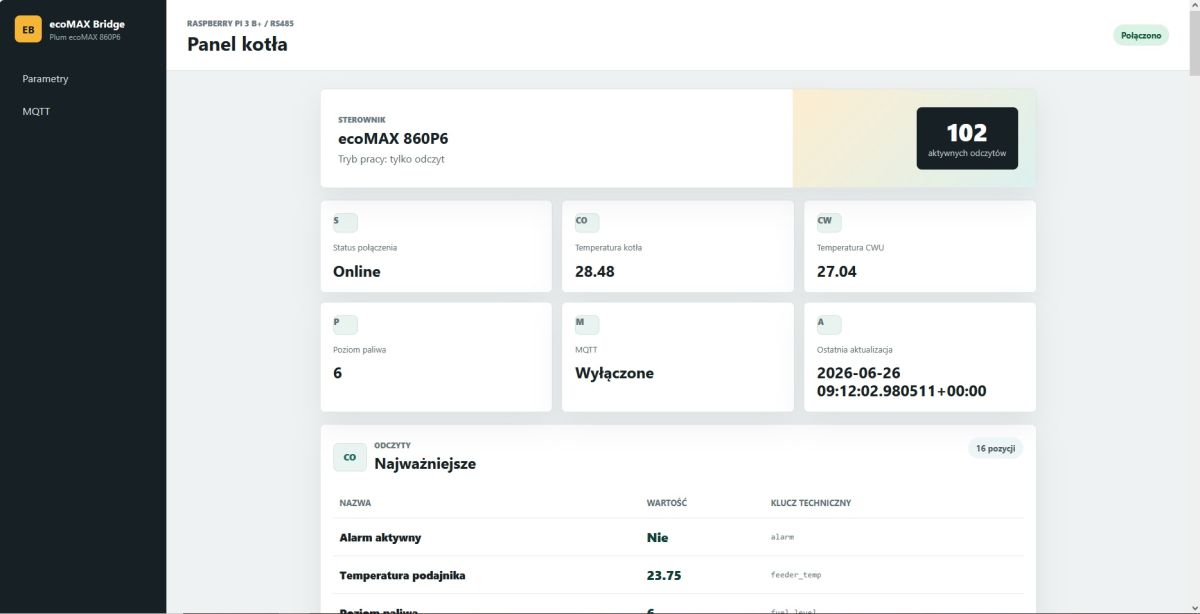
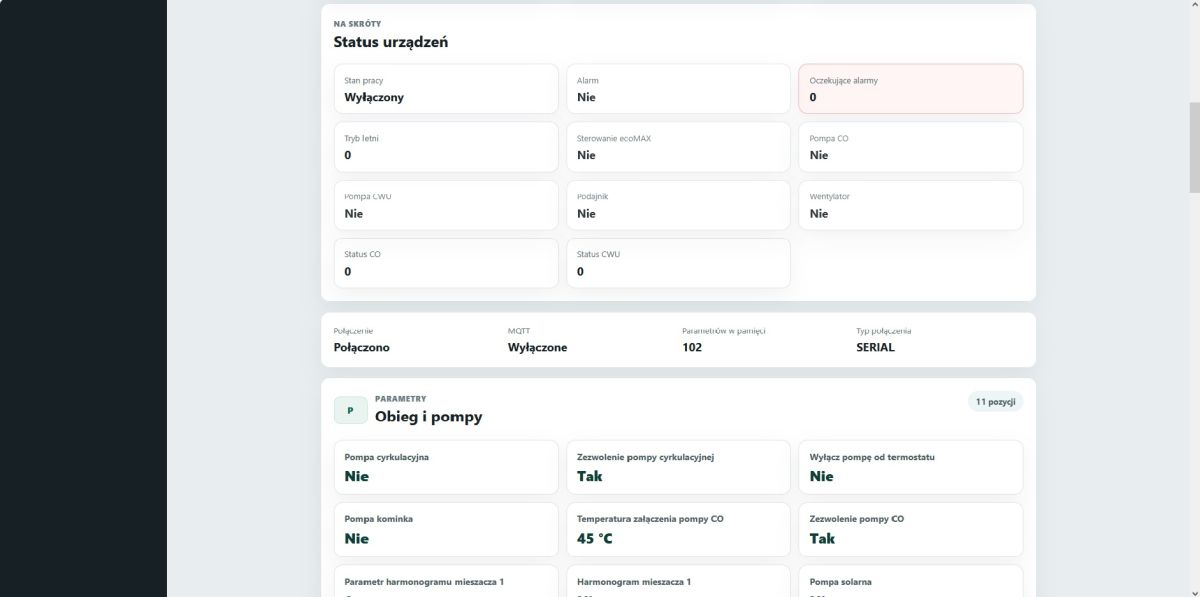
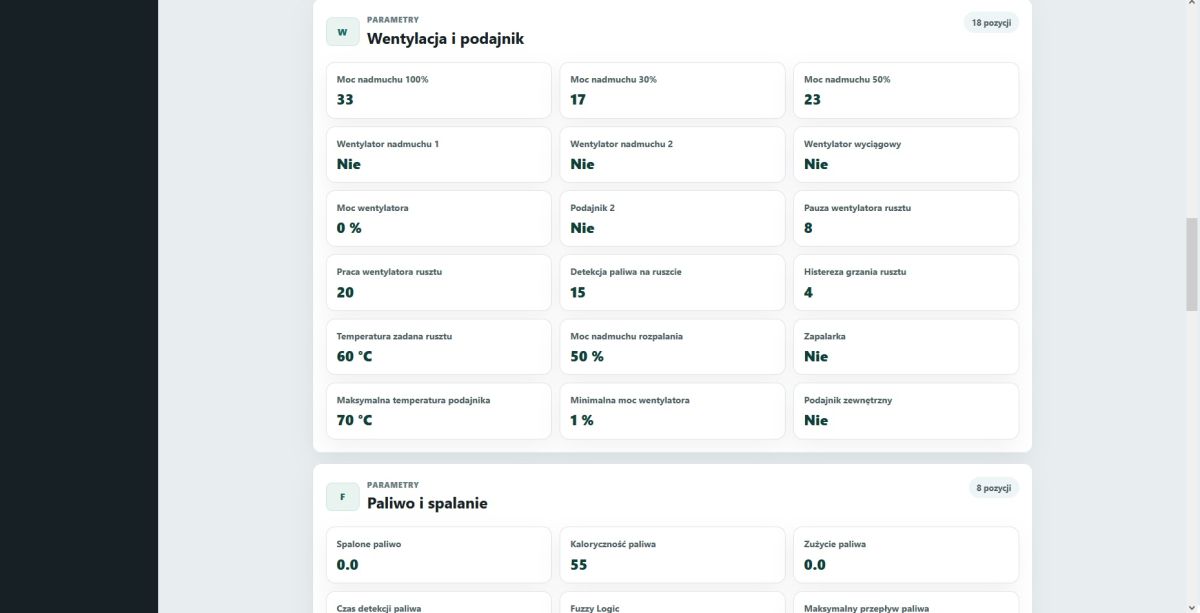
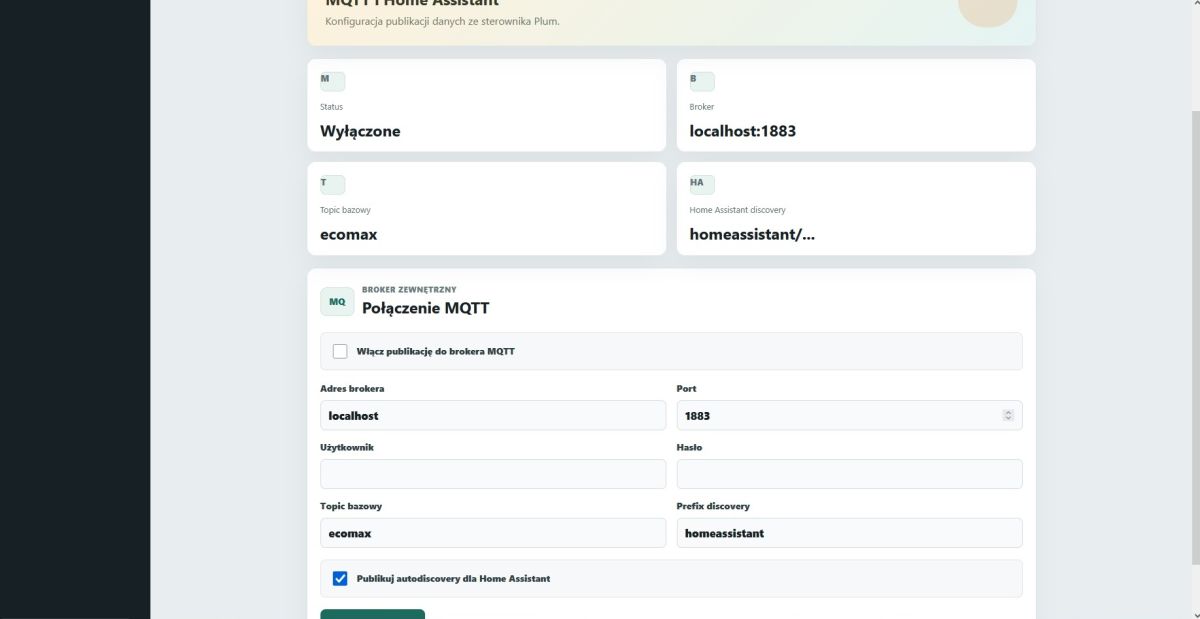
    Hello. As there’s now a light at the end of the tunnel, here’s a quick post on a topic I still need to fine-tune. I’ve managed to get the Raspberry Pi 3 B+ + FTDI USB-RS485 + Plum ecoMAX 860P6 working together. This allows me to view (for now, at least) what I believe to be all the boiler’s parameters locally, and to set up an MQTT bridge to HA or another broker. As soon as I find some more time, I’ll finish the project and post the results.
    Screenshot of the “ecoMAX Bridge” dashboard with tiles showing ecoMAX 860P6 boiler parameters and Connected status
  • #687 21928145
    matiks2
    Level 11  
    Posts: 71
    Rate: 2
    >>21928141 I’m keeping my fingers crossed because I could do with it too :) I wonder if Ecomax will work with other drivers
  • Raspberry Pi Zero bridge for Ecomax control

    #688 21929727
    ebol
    Level 11  
    Posts: 15
    Help: 1
    Rate: 14
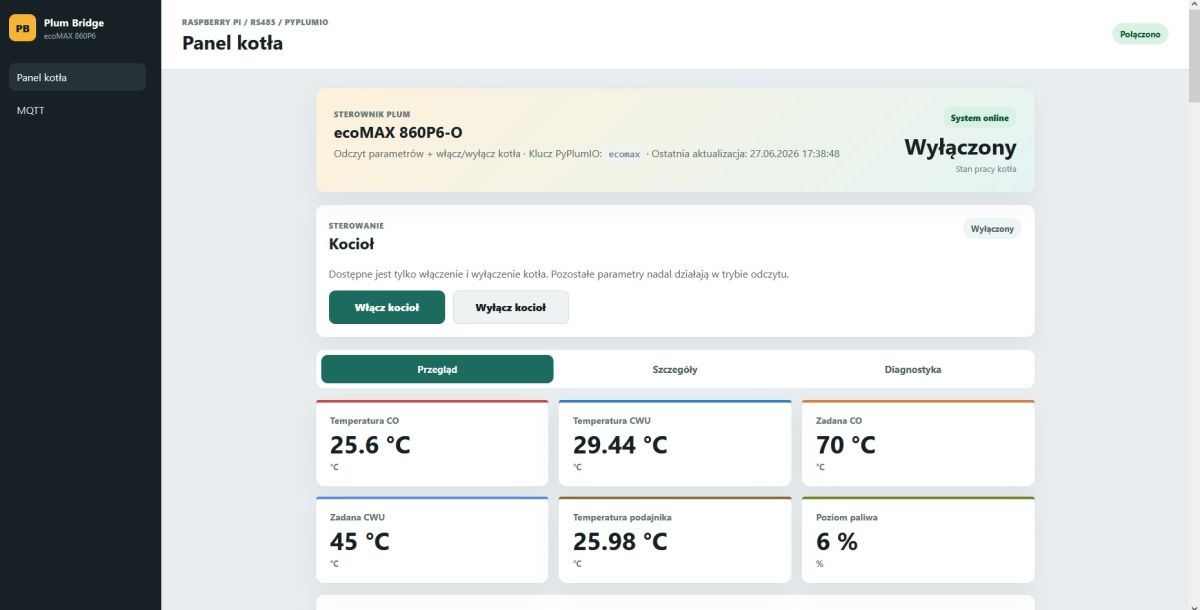
    Hello again. It’s time to publish my ramblings on the Ecomax bridge. The code is based on the Plum.io libraries, so any drivers that work with those libraries should work here too (you’ll just need to make an optional name change in the configuration file). As for the hardware, a standard Raspberry Pi Zero, an OTG adapter and a CH340 should suffice (most of the popular USB/RS485 converters should work, apart from dedicated HATs – those don’t work). As for the control functions, they’re limited to switching the boiler on and off, but they can be expanded fairly easily. The programme was created using Codex and Cursor, so please use it with care, given the damage it could potentially cause. The full manual, including the commands, is included in the package. It would be great if the community could take this little project further.
    Internet module ecoNet 300 and ecoLINK2
    Internet module ecoNet 300 and ecoLINK2
    Internet module ecoNet 300 and ecoLINK2
    Internet module ecoNet 300 and ecoLINK2
    Internet module ecoNet 300 and ecoLINK2
    Attachments:
    • PLUM BRIDGE.zip (40.44 KB) You must be logged in to download this attachment.
  • Garbage temperature readings after out-of-range SET_PARAM writes

    #689 21942276
    scienindustries
    Level 1  
    Posts: 1
    Subject: ecoMAX 850P2 (+ Module B) - garbage temperature readings after bad SET_PARAM (0x33) writes to out-of-range indices - looking for Module A firmware / recovery advice

    Hi everyone,

    First off, thanks to this thread and everyone who's contributed to it over
    the years - the protocol reverse-engineering here has been incredibly
    useful. I've gotten myself into a bit of trouble with my own controller
    and would really appreciate any pointers.

    SETUP
    Plum ecoMAX 850P2-C, Module A + Module B (2 mixer circuits), standard
    monochrome control panel (3 buttons, one rotary/encoder - not the touch
    panel variant, no SD card slot - just a mini-USB port on the board).
    Direct USB-serial connection (bypassing the ecoNET300 WiFi module), 115200 8N1,
    standard ecoNET frame protocol (0x68/0x16, XOR CRC).
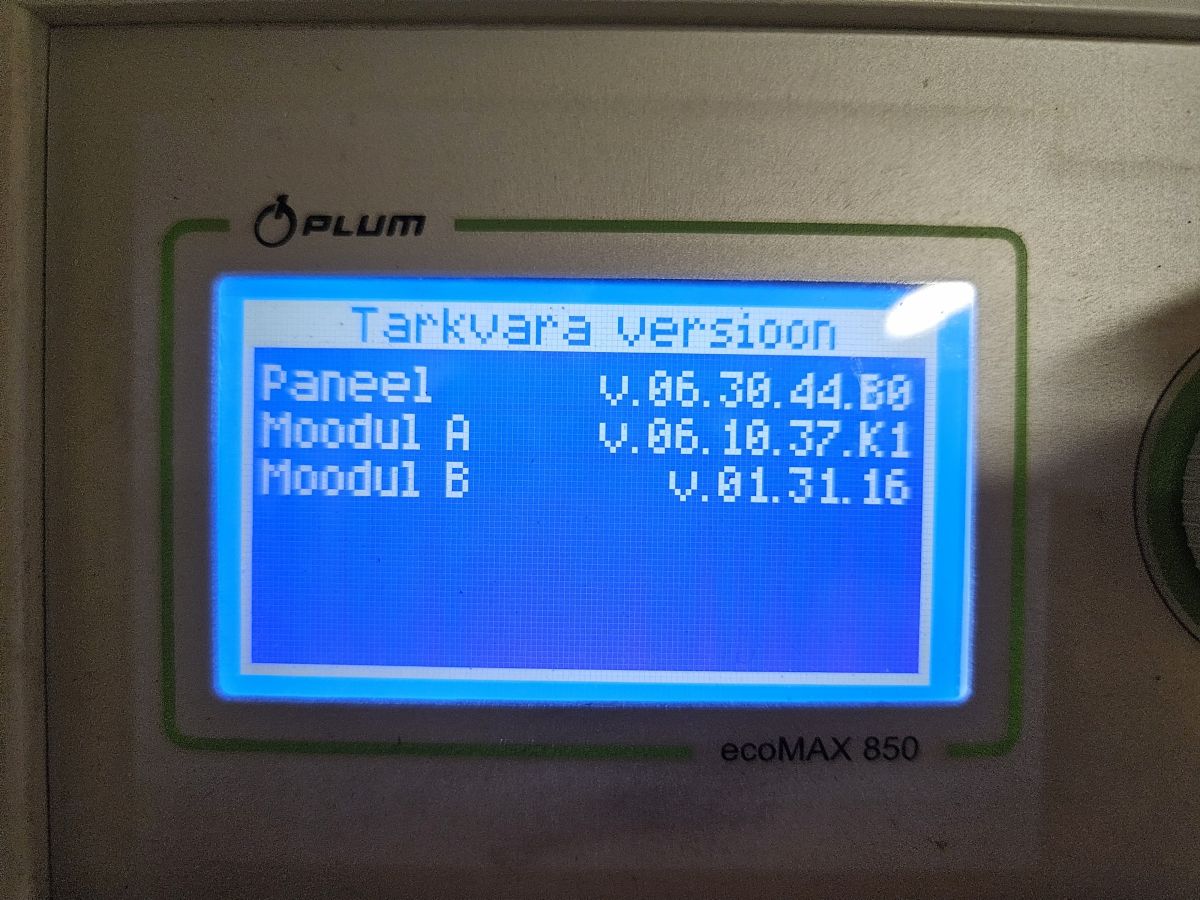
    Versions: Panel 6.30.44.K0, Module A 6.10.37.K1, Module B 1.31.16.
    Hydraulics: 3 circulation pumps - boiler/buffer circuit pump, radiator
    circuit pump (mixer 1), floor heating circuit pump (mixer 2).

    WHAT HAPPENED
    While experimenting with the protocol myself, I sent SET_PARAM (frame 0x33)
    writes to raw indices 144, 147, 148, 160 - my mistake, I hadn't verified
    these against the actual parameter table first. Both my own reconstructed
    editable-params table and PyPlumIO independently confirm this controller's
    editable-params table only goes up to index 138, so these writes targeted
    something outside the documented parameter space.

    SYMPTOMS
    - Entering the manual control menu now starts the boiler unexpectedly
    (shouldn't happen on this controller).
    - Active alarm: "max boiler temp exceeded [50C]".
    - Panel Info screen + live data show impossible readings.

    CONFIRMED DIAGNOSTIC DATA (cross-checked two independent ways: my own
    protocol reimplementation reading FRAME_GET_CURRPARAMSCONSTR/REGDATA, and
    separately via PyPlumIO - both agree):
    - heating_temp = ~2102 C (garbage)
    - feeder_temp = -1.76e+38 (raw float garbage, not the normal NaN
    "sensor absent" pattern)
    - outside_temp = -inf (garbage)
    - Everything else looks normal: mixer 1/2 current temps (~19C), buffer
    temps (~19C), all relay/output booleans, all 139 editable params (only
    2 minor out-of-own-range values, unrelated to the above, likely
    pre-existing).

    Notably, the corruption is NOT in the 4 indices I wrote to (144/147/148/160)
    - it shows up in a completely different part of the protocol (the 0x04xx
    regdata sensor block). The write sequence itself was also sloppy on my end
    (serial port closed/reopened between each of the 4 writes, no ack/response
    ever checked), so I can't even be fully sure all 4 writes landed cleanly.

    WHAT I'M HOPING TO FIND
    1. Since my panel has no SD card slot (just a mini-USB port on the board),
    I believe the update path for this variant is via an ecoLINK2 cable +
    PC-side update software rather than the SD-card method. Can anyone
    confirm this, and point me to the PC software and a genuine/official
    Module A firmware image for v6.10.37.K1 (or a safe version to reflash
    with)? Assuming a reflash re-initializes calibration/EEPROM data
    cleanly.
    2. Whether temperature sensor calibration data is universal per
    model/firmware version, or trimmed per physical unit at the factory -
    this would tell me whether a straight reflash should fully fix this.
    3. Whether anyone recognizes this exact garbage-float pattern (2102C /
    -1.76e38 / -inf across 3 sensor channels simultaneously) from a bad
    write - i.e. does an out-of-range SET_PARAM on this platform corrupt
    adjacent calibration memory?

    Happy to share my Python decode scripts (frame protocol + PyPlumIO-based)
    if useful to anyone else working on this. Thanks in advance for any help!
    Internet module ecoNet 300 and ecoLINK2

Topic summary

LABEL_AI_GENERATED
Discussion focused on the ecoNet 300 / ecoLINK2 ecosystem for Plum boiler controllers and how the internet module communicates with the furnace controller over RS485. The module was identified as a modified TP-Link router running custom firmware, with ecoLINK2 acting as more than a simple USB-to-RS485 converter because the controller only works when connected through the original ecoLINK2 chain. Participants intercepted and decoded the RS485 traffic, determined the frame format, CRC method, and serial settings, and mapped many boiler parameters such as temperatures, flame, blower, power, fuel usage, operating times, and ignition counts. Later posts showed that the ecoNet firmware could be extracted from a router image, that the web backend uses scripts and a parser for the controller data, and that the system can be adapted to home automation platforms like Domoticz and RRD. The thread also covered firmware update files, FTP/update access, MAC-based authorization, and hardware compatibility of TP-Link MR3020/OpenWRT-based replacements.
AI summary based on the discussion. May contain errors.

FAQ LABEL_AI_GENERATED

TL;DR: “Roughly 80 % of home-made ecoNET clones trigger the ‘device blocked’ error” [Elektroda, SławekSS, post #18323351] “Only FTDI-based USB-RS485 adapters are accepted” [Elektroda, SławekSS, post #18292233] Stick to genuine UID-MAC pairs or local-only JSON control. Why it matters: wrong hardware wastes time and can lock your controller.

Quick Facts

• Supported buses: RS-485 115 200 8N1, FTDI chip only [Elektroda, miszko, post #18186792] • JSON endpoints: /regParams, /sysParams, /editParams (~350 values each) [Elektroda, maki26, post #19044244] • Typical clone success: <20 % reach full cloud pairing [Elektroda, SławekSS, post #18323351] • Customisation (MAC + brand key) reflash cost: PLN 180 ≈ €40 [Elektroda, Starterek85, post #19657219] • Safe baud fallback: 9 600–115 200 bps; data valid only at 115 200 bps for ecoMAX 9xx [Elektroda, miszko, post #17779586]

How do I wire a USB-RS485 converter to the ecoMAX controller?

Match RS-485 A→D- and B→D+, leave GND unconnected. Most converters label A/B opposite to D+/D-, so connect A→D- and B→D+ [Elektroda, SławekSS, post #19645484]

Which USB-RS485 adapters work?

Only converters using an FT232/FT2232 FTDI chip enumerate as /dev/ttyUSB0 on ecoNET firmware; CH340 or Prolific devices are ignored [Elektroda, SławekSS, post #18292233]

Why does my clone show “device blocked” on econet24.com?

Plum’s server whitelists factory MAC ranges and brand keys. Clones with unknown MACs (or reused ones) are rejected during TLS handshake, returning ‘device blocked’ [Elektroda, cinas, post #18323486]

Can I still monitor the boiler locally when the cloud is blocked?

Yes. Point a browser to http:///econet/regParams. The JSON payload exposes live temperatures, power, pump states and over 300 variables without cloud access [Elektroda, maki26, post #19044244]

How do I change a parameter via HTTP?

Send: http:///econet/newParam?newParamName=CWU_SET_TEMP&newParamValue=44 . The module replies {result:"OK"}. Use rmCurrNewParam?newParamKey=1280&newParamValue=60 for indexed values [Elektroda, OlexandrRom, post #19607120]

The reply says OK but nothing changes—what’s wrong?

EditableParamsVer must be >0. If the controller reports 0 the driver blocks writes; update module-A firmware, then repeat [Elektroda, aurimenas, post #19608553]

How can I log data to Home Assistant or Domoticz?

  1. Install Python on a Raspberry Pi.
  2. Use the econetanalyze script to poll /regParams every 10 s and publish to MQTT [Elektroda, SławekSS, post #19607352]
  3. Add MQTT sensors in HA. A 24 h run logs ~8 000 frames (≈5 MB).

Is firmware update possible without ecoLINK2?

Yes. Copy the *.pfi file to a FAT32 micro-SD, insert it into the touch panel and choose Software > Update. Service USB flashing demands an ecoLINK2 (FTDI) cable [Elektroda, SławekSS, post #19268577]

What statistic shows clone risk?

Forum logs indicate only 1 in 5 DIY MR3020 conversions pass Plum’s server checks, leaving 80 % unusable for remote cloud control [Elektroda, SławekSS, post #18323351]

Edge case: what happens if baud or byte size is wrong?

Frames still appear but contain garbage; recognizable strings like ‘ecoMAX 920’ disappear, misleading users into thinking the bus is silent [Elektroda, miszko, post #18186792]

Can I integrate the ecoLAMBDA oxygen probe data?

Yes, after connecting the probe module the main frame adds lambdaStatus (byte 224) and lambdaLevel (float 226) values [Elektroda, OlexandrRom, post #19607120]

Quick 3-step test to verify bus health?

  1. Connect FTDI RS-485 A/B.
  2. Open serial 115 200 8N1; look for ‘TIME’ packets every second.
  3. Confirm CRC byte = XOR of previous bytes; value 0×2B appears in 300-byte frames [Elektroda, przemo_ns, post #18120336]
AI summary based on the discussion. May contain errors.
ADVERTISEMENT