logo elektroda
logo elektroda
X
logo elektroda

EARU SMTONOFF 3 Phase Energy Meter (CB3S/BK7231N) - 100A Firmware Backup

vincenzoernst1 4107 29
Best answers

How do I map the TuyaMCU data points on this EARU/SMTONOFF 3‑phase energy meter to voltage, current, and power in OpenBK7231T?

Use the meter’s raw VCP TuyaMCU packets on dpIDs 6, 7, and 8; `RAW_TAC2121C_VCP` is the supported parser, and it treats the channel you bind as the first channel in a 3-value block, with the next two channels automatically used for current and power [#21134949][#21379094] A working configuration was posted with consecutive channel blocks for each phase, e.g. `linkTuyaMCUOutputToChannel 6 RAW_TAC2121C_VCP 6` plus channel types/labels for 6/7/8, then similar blocks for the other phases on later channel numbers [#21150088] If the numbers look wrong, the thread suggests the scaling may need adjustment: one reply says to try adding `mult 10` and using a div-based channel type as a workaround, because the earlier `Current_div100` mapping was likely off [#21153135][#21150088] The later conclusion was that multiple VCP dpIDs can be used, but each one must start at the correct first channel so the parser can fill voltage, current, and power in order [#21379094]
Generated by the language model.
ADVERTISEMENT
  • #1 21114037
    vincenzoernst1
    Level 8  
    Posts: 85
    Help: 3
    Rate: 7
    This TUYA device is also labeled:
    - EARU EAEMP3-100-TY-W
    - SMTONOFF 3P4W G100A

    it has a RN8302B energy meter chip.
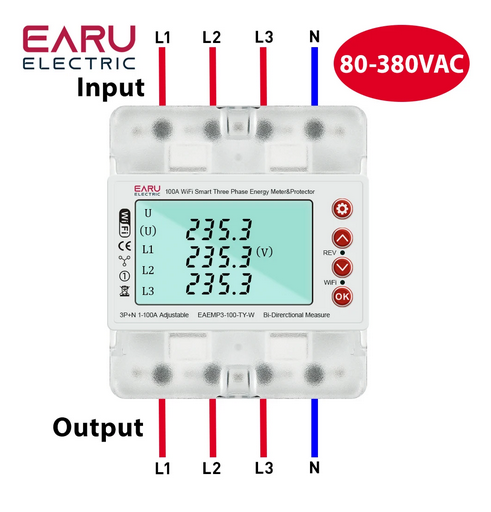
    EARU smart three-phase energy meter with display.

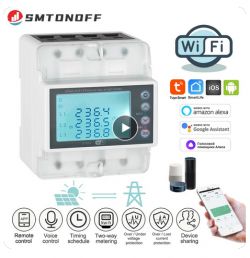
    SMTONOFF G100A smart energy meter with Wi-Fi functionality.

    I used the Itchiptool for communication, since its WAY better (than hiddownloader tool) when using Linux.

    Backup:
    Quote:
    Itchiptool flash read BK7231 backup.bin -d /dev/ttyUSB0

    Flash:
    Quote:
    ltchiptool flash write OpenBK7231N_QIO_1.17.308.bin -d /dev/ttyUSB0


    For now i see these IDs:

    
    Info:TuyaMCU:ParseState: id 127 type 4-enum len 1
    Info:TuyaMCU:ParseState: byte 0
    Info:TuyaMCU:Received: 55 AA 03 07 00 05 80 04 00 01 00 93 
    Info:TuyaMCU:ProcessIncoming[v=3]: cmd 7 (State) len 12
    Info:TuyaMCU:ParseState: id 128 type 4-enum len 1
    Info:TuyaMCU:ParseState: byte 0
    Info:TuyaMCU:Received: 55 AA 03 07 00 05 81 04 00 01 00 94 
    Info:TuyaMCU:ProcessIncoming[v=3]: cmd 7 (State) len 12
    Info:TuyaMCU:ParseState: id 129 type 4-enum len 1
    Info:TuyaMCU:ParseState: byte 0
    Info:TuyaMCU:Received: 55 AA 03 07 00 08 0D 02 00 04 00 00 00 00 24 
    Info:TuyaMCU:ProcessIncoming[v=3]: cmd 7 (State) len 15
    Info:TuyaMCU:ParseState: id 13 type 2-val len 4
    Info:TuyaMCU:ParseState: int32 0
    Info:TuyaMCU:Received: 55 AA 03 07 00 05 10 01 00 01 01 21 
    Info:TuyaMCU:ProcessIncoming[v=3]: cmd 7 (State) len 12
    Info:TuyaMCU:ParseState: id 16 type 1-bool len 1
    Info:TuyaMCU:ParseState: byte 1
    Info:TuyaMCU:Received: 55 AA 03 07 00 0C 06 00 00 08 09 29 00 01 B7 00 00 66 73 
    Info:TuyaMCU:ProcessIncoming[v=3]: cmd 7 (State) len 19
    Info:TuyaMCU:ParseState: id 6 type 0-raw len 8
    Info:TuyaMCU:Received: 55 AA 03 07 00 0C 07 00 00 08 00 00 00 00 00 00 00 00 24 
    Info:TuyaMCU:ProcessIncoming[v=3]: cmd 7 (State) len 19
    Info:TuyaMCU:ParseState: id 7 type 0-raw len 8
    Info:TuyaMCU:Received: 55 AA 03 07 00 0C 08 00 00 08 00 00 00 00 00 00 00 00 25 
    Info:TuyaMCU:ProcessIncoming[v=3]: cmd 7 (State) len 19
    Info:TuyaMCU:ParseState: id 8 type 0-raw len 8
    Info:TuyaMCU:Received: 55 AA 03 07 00 13 71 00 00 0F 09 29 00 01 B7 00 03 FC 00 00 00 03 E8 C3 32 65 
    Info:TuyaMCU:ProcessIncoming[v=3]: cmd 7 (State) len 26
    Info:TuyaMCU:ParseState: id 113 type 0-raw len 15
    Info:TuyaMCU:Received: 55 AA 03 07 00 13 72 00 00 0F 00 00 00 00 00 00 00 00 00 00 00 03 E8 C3 32 7D 
    Info:TuyaMCU:ProcessIncoming[v=3]: cmd 7 (State) len 26
    Info:TuyaMCU:ParseState: id 114 type 0-raw len 15
    Info:TuyaMCU:Received: 55 AA 03 07 00 13 73 00 00 0F 00 00 00 00 00 00 00 00 00 00 00 03 E8 C3 32 7E 
    Info:TuyaMCU:ProcessIncoming[v=3]: cmd 7 (State) len 26
    Info:TuyaMCU:ParseState: id 115 type 0-raw len 15
    Info:TuyaMCU:Received: 55 AA 03 07 00 08 6F 02 00 04 00 00 00 66 EC 
    Info:TuyaMCU:ProcessIncoming[v=3]: cmd 7 (State) len 15
    Info:TuyaMCU:ParseState: id 111 type 2-val len 4
    Info:TuyaMCU:ParseState: int32 102
    Info:TuyaMCU:Received: 55 AA 03 07 00 08 70 02 00 04 00 00 00 00 87 
    Info:TuyaMCU:ProcessIncoming[v=3]: cmd 7 (State) len 15
    Info:TuyaMCU:ParseState: id 112 type 2-val len 4
    Info:TuyaMCU:ParseState: int32 0
    Info:TuyaMCU:Received: 55 AA 03 07 00 08 76 02 00 04 00 00 03 E8 78 
    Info:TuyaMCU:ProcessIncoming[v=3]: cmd 7 (State) len 15
    Info:TuyaMCU:ParseState: id 118 type 2-val len 4
    Info:TuyaMCU:ParseState: int32 1000
    Info:TuyaMCU:Received: 55 AA 03 07 00 08 01 02 00 04 00 00 00 04 1C 
    Info:TuyaMCU:ProcessIncoming[v=3]: cmd 7 (State) len 15
    Info:TuyaMCU:ParseState: id 1 type 2-val len 4
    Info:TuyaMCU:ParseState: int32 4
    Info:TuyaMCU:Received: 55 AA 03 07 00 08 6E 02 00 04 00 00 00 00 85 
    Info:TuyaMCU:ProcessIncoming[v=3]: cmd 7 (State) len 15
    Info:TuyaMCU:ParseState: id 110 type 2-val len 4
    Info:TuyaMCU:ParseState: int32 0
    5
    Info:TuyaMCU:ParseState: id 17 type 0-raw len 4
    Info:TuyaMCU:ParseState: int32 83951701
    Info:TuyaMCU:Received: 55 AA 03 07 00 18 12 00 00 14 01 01 03 20 03 01 01 13 04 01 00 AF 02 00 00 14 05 00 00 00 53 
    Info:TuyaMCU:ProcessIncoming[v=3]: cmd 7 (State) len 31
    Info:TuyaMCU:ParseState: id 18 type 0-raw len 20
    Info:TuyaMCU:Received: 55 AA 03 07 00 10 7E 00 00 0C 01 00 00 00 02 00 00 14 03 00 00 64 21 
    Info:TuyaMCU:ProcessIncoming[v=3]: cmd 7 (State) len 23
    Info:TuyaMCU:ParseState: id 126 type 0-raw len 12
    Info:TuyaMCU:Received: 55 AA 03 07 00 08 77 02 00 04 00 00 00 05 93 
    Info:TuyaMCU:ProcessIncoming[v=3]: cmd 7 (State) len 15
    Info:TuyaMCU:ParseState: id 119 type 2-val len 4
    Info:TuyaMCU:ParseState: int32 5
    Info:TuyaMCU:Received: 55 AA 03 07 00 08 78 02 00 04 00 00 00 14 A3 
    Info:TuyaMCU:ProcessIncoming[v=3]: cmd 7 (State) len 15
    Info:TuyaMCU:ParseState: id 120 type 2-val len 4
    Info:TuyaMCU:ParseState: int32 20
    Info:TuyaMCU:Received: 55 AA 03 07 00 08 79 02 00 04 00 00 00 14 A4 
    Info:TuyaMCU:ProcessIncoming[v=3]: cmd 7 (State) len 15
    Info:TuyaMCU:ParseState: id 121 type 2-val len 4
    Info:TuyaMCU:ParseState: int32 20
    Info:TuyaMCU:Received: 55 AA 03 07 00 08 7A 02 00 04 00 00 00 14 A5 
    Info:TuyaMCU:ProcessIncoming[v=3]: cmd 7 (State) len 15
    Info:TuyaMCU:ParseState: id 122 type 2-val len 4
    Info:TuyaMCU:ParseState: int32 20
    Info:TuyaMCU:Received: 55 AA 03 07 00 08 7B 02 00 04 00 00 00 03 95 
    Info:TuyaMCU:ProcessIncoming[v=3]: cmd 7 (State) len 15
    Info:TuyaMCU:ParseState: id 123 type 2-val len 4
    Info:TuyaMCU:ParseState: int32 3
    Info:TuyaMCU:Received: 55 AA 03 07 00 08 7C 02 00 04 00 00 00 05 98 
    Info:TuyaMCU:ProcessIncoming[v=3]: cmd 7 (State) len 15
    Info:TuyaMCU:ParseState: id 124 type 2-val len 4
    Info:TuyaMCU:ParseState: int32 5
    Info:TuyaMCU:Received: 55 AA 03 07 00 08 7D 02 00 04 00 00 00 0A 9E 
    Info:TuyaMCU:ProcessIncoming[v=3]: cmd 7 (State) len 15
    Info:TuyaMCU:ParseState: id 125 type 2-val len 4
    Info:TuyaMCU:ParseState: int32 10
    Info:TuyaMCU:Received: 55 AA 03 07 00 05 09 05 00 01 00 1D 
    Info:TuyaMCU:ProcessIncoming[v=3]: cmd 7 (State) len 12
    Info:TuyaMCU:ParseState: id 9 type 5-bitmap len 1
    Info:TuyaMCU:ParseState: byte 0
    Info:TuyaMCU:Received: 55 AA 03 07 00 08 67 02 00 04 00 00 00 28 A6 
    Info:TuyaMCU:ProcessIncoming[v=3]: cmd 7 (State) len 15
    Info:TuyaMCU:ParseState: id 103 type 2-val len 4
    Info:TuyaMCU:ParseState: int32 40
    Info:TuyaMCU:Received: 55 AA 03 07 00 08 69 02 00 04 00 00 00 00 80 
    Info:TuyaMCU:ProcessIncoming[v=3]: cmd 7 (State) len 15
    Info:TuyaMCU:ParseState: id 105 type 2-val len 4
    Info:TuyaMCU:ParseState: int32 0
    Info:TuyaMCU:Received: 55 AA 03 07 00 14 6A 03 00 10 45 77 41 41 41 41 41 41 41 41 41 41 41 41 3D 3D DC 
    Info:TuyaMCU:ProcessIncoming[v=3]: cmd 7 (State) len 27
    Info:TuyaMCU:ParseState: id 106 type 3-str len 16
    Info:TuyaMCU:Received: 55 AA 03 07 00 08 6D 03 00 04 41 41 41 38 80 
    Info:TuyaMCU:ProcessIncoming[v=3]: cmd 7 (State) len 15
    Info:TuyaMCU:ParseState: id 109 type 3-str len 4
    Info:TuyaMCU:ParseState: int32 1094795576
    Info:TuyaMCU:Received: 55 AA 03 07 00 08 0D 02 00 04 00 00 00 00 24 
    Info:TuyaMCU:ProcessIncoming[v=3]: cmd 7 (State) len 15
    Info:TuyaMCU:ParseState: id 13 type 2-val len 4
    Info:TuyaMCU:ParseState: int32 0
    Info:TuyaMCU:Received: 55 AA 03 07 00 05 0C 01 00 01 00 1C 
    Info:TuyaMCU:ProcessIncoming[v=3]: cmd 7 (State) len 12
    Info:TuyaMCU:ParseState: id 12 type 1-bool len 1
    Info:TuyaMCU:ParseState: byte 0
    Info:TuyaMCU:Received: 55 AA 03 07 00 08 66 02 00 04 00 00 00 00 7D 
    Info:TuyaMCU:ProcessIncoming[v=3]: cmd 7 (State) len 15
    Info:TuyaMCU:ParseState: id 102 type 2-val len 4
    Info:TuyaMCU:ParseState: int32 0
    Info:TuyaMCU:Received: 55 AA 03 07 00 05 68 01 00 01 00 78 
    Info:TuyaMCU:ProcessIncoming[v=3]: cmd 7 (State) len 12
    Info:TuyaMCU:ParseState: id 104 type 1-bool len 1
    Info:TuyaMCU:ParseState: byte 0
    Info:TuyaMCU:Received: 55 AA 03 07 00 08 69 02 00 04 00 00 00 00 80 
    Info:TuyaMCU:ProcessIncoming[v=3]: cmd 7 (State) len 15


     id 1 
     type 2-val len 4
    int32 4
    
    id 6 
    type 0-raw len 8
    
     id 7 
     type 0-raw len 8
    
     id 8 
     type 0-raw len 8
    
     id 9 
     type 5-bitmap len 1
    byte 0
    
    id 12 
    type 1-bool len 1
    byte 0
    
    id 13 
    type 2-val len 4
    int32 0
    
     id 16 
     type 1-bool len 1
     byte 1
    
    id 17 
    type 0-raw len 4
     int32 83951701
    
     id 18 
     type 0-raw len 20
    
    id 103 
    type 2-val len 4
     int32 40      counts up
    
    id 102
    type 2-val len 4
    int32 0
    
    id 104 type 1-bool len 1
    byte 0
    
    id 105 
    type 2-val len 4
     int32 0
    
    id 106 
    type 3-str len 16
    
    id 109 
    type 3-str len 4
    int32 1094795576
    
    id 110 
    type 2-val len 4
    int32 0
    
    id 111 
    type 2-val len 4
     int32 102
    
    id 112 
    type 2-val len 4
    int32 0
    
     id 113 
     type 0-raw len 15
     
      id 114 
      type 0-raw len 15
      
     id 115 
     type 0-raw len 15
    
    id 118 
    type 2-val len 4
     int32 1000
    
    id 119 
    type 2-val len 4
     int32 5
    
    id 120 
    type 2-val len 4
    int32 20
    
     id 121 
     type 2-val len 4
     int32 20
    
     id 122
     type 2-val len 4
    int32 20
    
     id 123 
     type 2-val len 4
     int32 3
    
    id 124 
    type 2-val len 4
     int32 5
    
    
     id 125 
     type 2-val len 4
     int32 10
    
    id 126 
    type 0-raw len 12
    
    id 127 
    type 4-enum len 1
     byte 0
    
    id 128 
    type 4-enum len 1
    byte 0
    
    id 129 
    type 4-enum len 1
     byte 0


    Attached: orig fw backup
    Attachments:
    • backup.bin (2 MB) You must be logged in to download this attachment.
  • ADVERTISEMENT
  • #2 21115612
    vincenzoernst1
    Level 8  
    Posts: 85
    Help: 3
    Rate: 7

    atm i can't find any connection from dpid to any values. I started tuya driver at startup and tested a 100w bulb connected 3 phases but no values are near to some match.....???!!!
  • #3 21134949
    p.kaczmarek2
    Moderator Smart Home
    Posts: 14439
    Help: 650
    Rate: 12407
    I haven't seen your post. You should have sent me a link.

    Isn't this a RAW type packet with VCP?
    
    Info:TuyaMCU:ParseState: id 8 type 0-raw len 8
    Info:TuyaMCU:Received: 55 AA 03 07 00 13 71 00 00 0F 09 29 00 01 B7 00 03 FC 00 00 00 03 E8 C3 32 65 
    

    Maybe RAW_TAC2121C_VCP?

    We actually have it supported...
    
    
    						// voltage
    						iVal = data[ofs + 0 + 4] << 8 | data[ofs + 1 + 4];
    						CHANNEL_SetFirstChannelByType(ChType_Voltage_div10, iVal);
    						// current
    						iVal = data[ofs + 3 + 4] << 8 | data[ofs + 4 + 4];
    						CHANNEL_SetFirstChannelByType(ChType_Current_div1000, iVal);
    						// power
    						iVal = data[ofs + 6 + 4] << 8 | data[ofs + 7 + 4];
    						CHANNEL_SetFirstChannelByType(ChType_Power, iVal);
    

    if packet is:
    55 AA 03 07 00 13 71 00 00 0F 09 29 00 01 B7 00 03 FC 00 00 00 03 E8 C3 32 65
    then payload is:
    FC 00 00 00 03 E8 C3 32

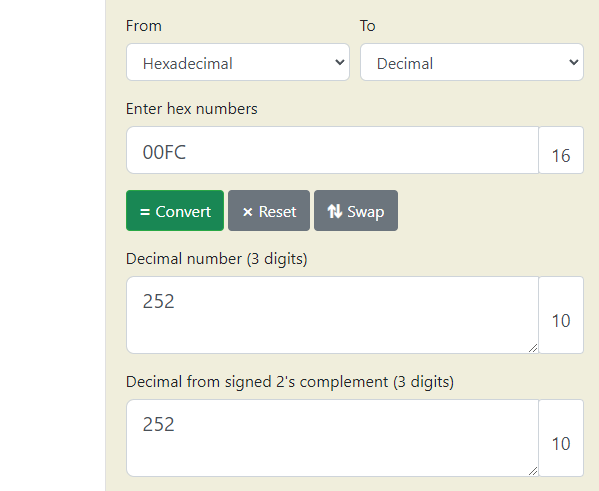
    FC 00 may be 252V?
    Hexadecimal to decimal conversion shows a result of 252.

    Added after 57 [seconds]:

    See:
    https://github.com/openshwprojects/OpenBK7231T_App/blob/main/docs/autoexecExamples.md
    Try TAC2121C_VCP for dpID 6 or 8
    Helpful post? Buy me a coffee.
  • ADVERTISEMENT
  • #4 21135582
    vincenzoernst1
    Level 8  
    Posts: 85
    Help: 3
    Rate: 7
    Thanks for the reply.

    252V would be a forbidden voltage in Europe. ;-) whatever I had attached it might have been 252W.
    I, right now, have an ESP module installed, so I can grep only data from there. Anyway, it shouldn't be different on the bus.

    What info do you need?

    update: no, i have to correct myself: 254V would be illegal in Europe, but 252V would also damage 1st grid devices.
  • Helpful post
    #5 21135819
    divadiow
    Level 38  
    Posts: 4874
    Help: 425
    Rate: 865
    uart boot log from that fw backup

    Code: Text
    Log in, to see the code
  • #6 21137413
    divadiow
    Level 38  
    Posts: 4874
    Help: 425
    Rate: 865
    vincenzoernst1 wrote:
    I used the Itchiptool for communication, since its WAY better (than hiddownloader tool) when using Linux


    There's also an official Beken Linux flasher available from the links in here https://www.elektroda.com/rtvforum/topic4059172.html

    It'd be good to see someone's experiences with it posted. I will get round to it someday hopefully.
  • #7 21137484
    vincenzoernst1
    Level 8  
    Posts: 85
    Help: 3
    Rate: 7
    Sorry but I didnt touch any Windoze and mono s**t for 20+ years. When will they (mostly the chinese) learn platform independent coding?
  • #9 21137598
    vincenzoernst1
    Level 8  
    Posts: 85
    Help: 3
    Rate: 7
    hmmm....ok....unknown program....nice.....what type of program/lang is this?
  • #10 21140239
    p.kaczmarek2
    Moderator Smart Home
    Posts: 14439
    Help: 650
    Rate: 12407
    This is a new flasher by Beken, a version for Linux, I guess. But has anyone actually tried it to Linux? Does it flash well?


    If not, maybe our old trusted flasher?
    https://github.com/OpenBekenIOT/hid_download_py
    Guide:


    Helpful post? Buy me a coffee.
  • #11 21141666
    vincenzoernst1
    Level 8  
    Posts: 85
    Help: 3
    Rate: 7
    Quote:
    This is a new flasher by Beken, a version for Linux, I guess. But has anyone actually tried it on Linux? Does it flash well?
    never tried. i have concerns running untrusted software on my main devices....
  • Helpful post
    #12 21141668
    p.kaczmarek2
    Moderator Smart Home
    Posts: 14439
    Help: 650
    Rate: 12407
    In case of hid_download_py, you can see the source code:
    https://github.com/OpenBekenIOT/hid_download_py
    Helpful post? Buy me a coffee.
  • ADVERTISEMENT
  • #13 21141669
    vincenzoernst1
    Level 8  
    Posts: 85
    Help: 3
    Rate: 7
    i know ;-)
  • #14 21147558
    vincenzoernst1
    Level 8  
    Posts: 85
    Help: 3
    Rate: 7
    today i swaped back to the CB3S and will test the settings....

    Added after 30 [minutes]:

    finding:
    // Mains relay on-off - Dpid 16 switch" -> channel 1
    linkTuyaMCUOutputToChannel 16 bool 1
    setChannelType 1 toggle
    setChannelLabel 1 "Mains relay"


    the device saves the relay state @ power off!!!!

    @p.kaczmarek2

    didnt get any data. tryed with dpid6 and:

    
    linkTuyaMCUOutputToChannel 113 RAW_TAC2121C_VCP
    setChannelType 113 Voltage
    setChannelLabel 113 "Voltage"
    
    setChannelType 114 Power
    setChannelLabel 114 "Power"
    
    setChannelType 115 Current
    setChannelLabel 115 "Current"


    but did not understand the code correctly imho.

    it uses the dpid 113 and extracts the values of 113,114,115, right? so i need to try this with ANY raw data channel?

    but anyway. at least one value should pop up ( the voltage), since this 3 phase i shoudl getthe voltage 3 times (i have the voltage connected to all 3 inputs) ??
  • ADVERTISEMENT
  • #15 21147732
    p.kaczmarek2
    Moderator Smart Home
    Posts: 14439
    Help: 650
    Rate: 12407
    This is incorrect:
    
    
    setChannelType 113 Voltage
    setChannelLabel 113 "Voltage"
    
    setChannelType 114 Power
    setChannelLabel 114 "Power"
    
    setChannelType 115 Current
    setChannelLabel 115 "Current"
    

    We don't have that much channels. Please try using any other channel numbers, like channels 10, 11, 12, etc. Also set correct channel type. Please see samples:
    https://github.com/openshwprojects/OpenBK7231T_App/blob/main/docs/autoexecExamples.md
    
    setChannelType 2 Voltage_div10
    setChannelType 3 Power
    setChannelType 4 Current_div1000
    linkTuyaMCUOutputToChannel 6 RAW_TAC2121C_VCP
    
    Helpful post? Buy me a coffee.
  • #16 21150088
    vincenzoernst1
    Level 8  
    Posts: 85
    Help: 3
    Rate: 7
    got something:


    startDriver TuyaMCU
    //tuyaMcu_setBaudRate 115200
    tuyaMcu_defWiFiState 4
    
    // --------------confirmed----working------------------
    // Mains relay on-off - Dpid 16 switch" -> channel 1
    linkTuyaMCUOutputToChannel 16 bool 1
    setChannelType 1 toggle
    setChannelLabel 1 "Mains relay"
    
    //---------------------------------------------
    
    linkTuyaMCUOutputToChannel 6 RAW_TAC2121C_VCP
    setChannelType 10 Voltage_div10
    setChannelLabel 10 "Voltage"
    setChannelType 11 Power
    setChannelLabel 11 "Power"
    setChannelType 12 Current_div100
    setChannelLabel 12 "Current"
    
    
    linkTuyaMCUOutputToChannel 7 RAW_TAC2121C_VCP
    setChannelType 13 Voltage_div10
    setChannelLabel 13 "Voltage"
    setChannelType 14 Power
    setChannelLabel 14 "Power"
    setChannelType 15 Current_div100
    setChannelLabel 15 "Current"
    
    
    linkTuyaMCUOutputToChannel 8 RAW_TAC2121C_VCP
    setChannelType 16 Voltage_div10
    setChannelLabel 16 "Voltage"
    setChannelType 17 Power
    setChannelLabel 17 "Power"
    setChannelType 18 "Current_div100
    setChannelLabel 18 "Current"


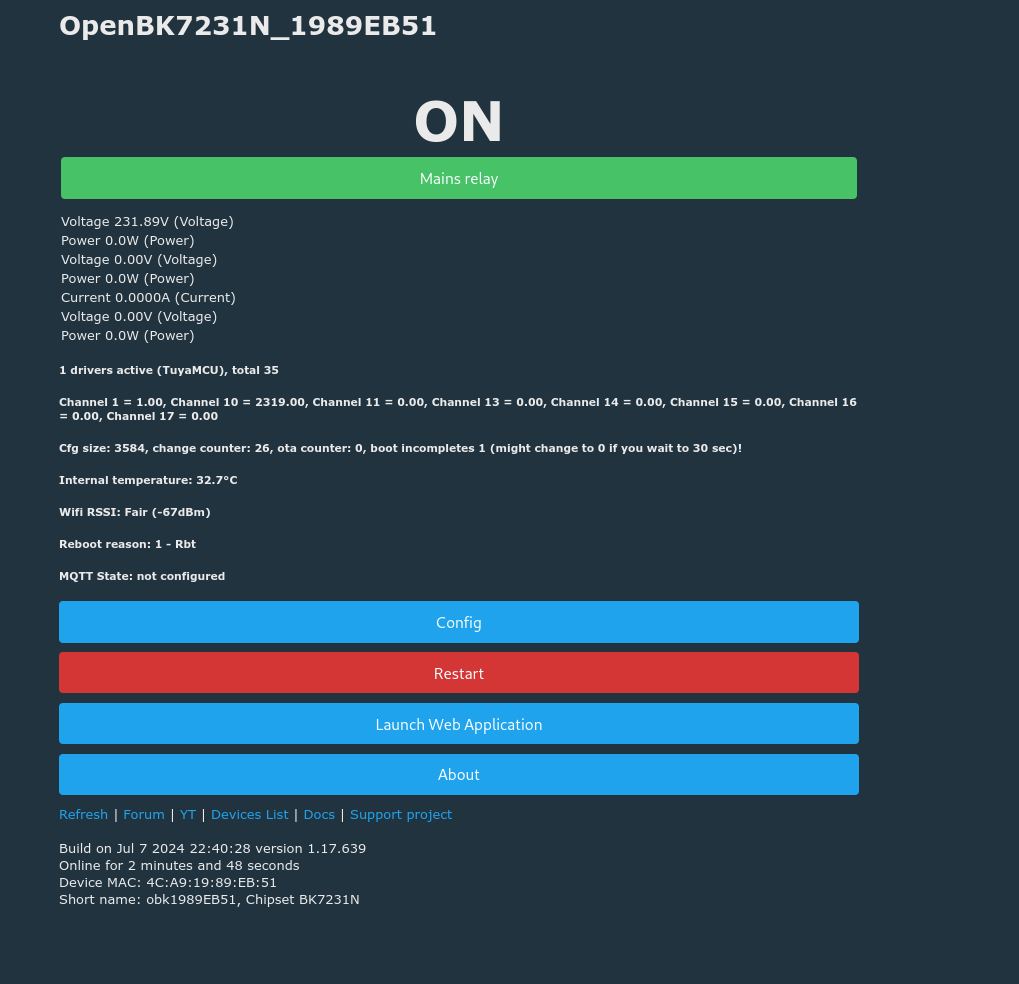
    i attached a 160W bulb which results in ~0,6A on phase 1. but the outputs are not right at all. while voltage seems to be ok, but only on phase 1

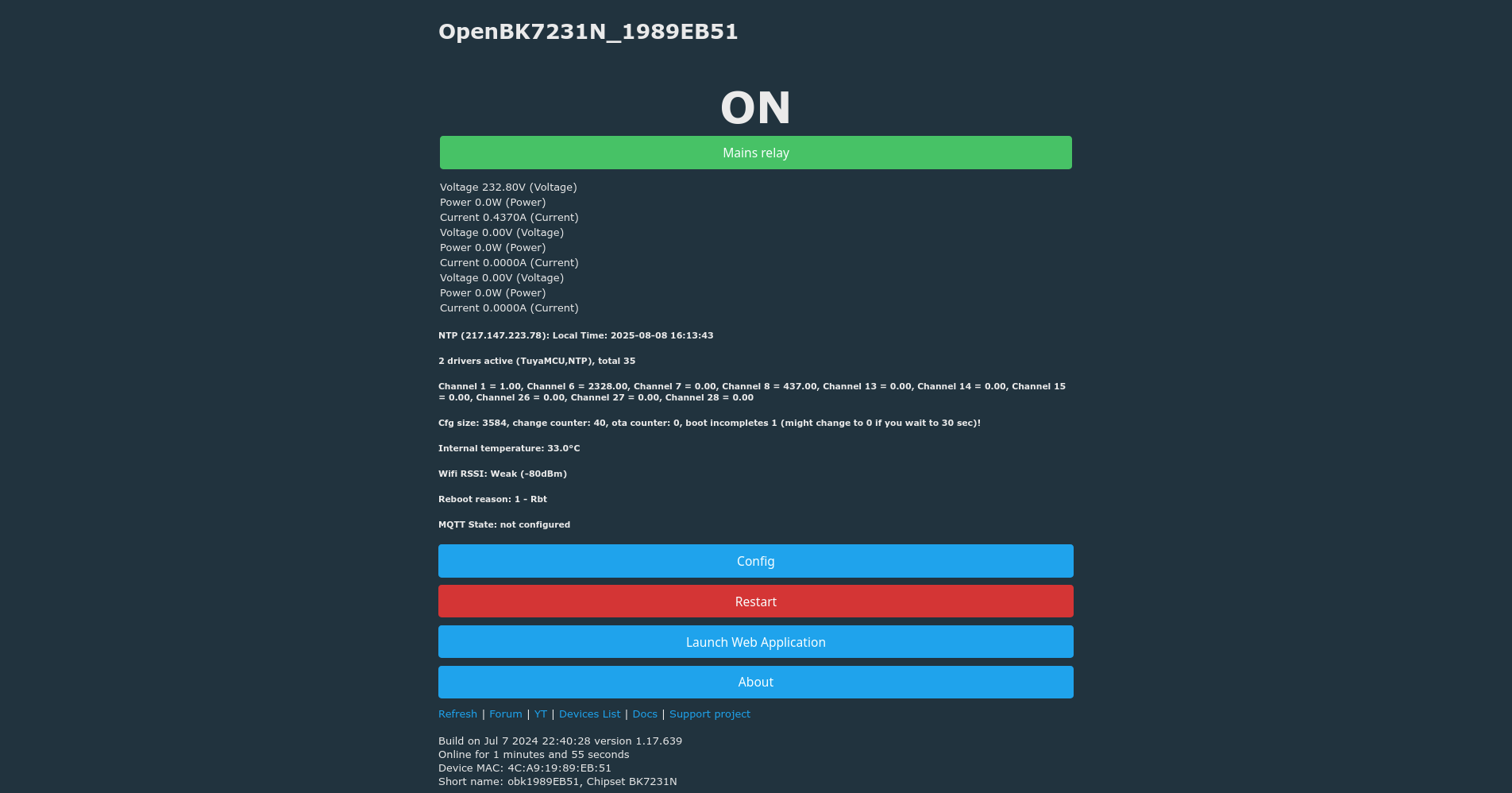
    Screenshot of OpenBK7231N interface with active mains relay and parameter readings.


    i saw 1,0W once so maybe we need Current without div.
  • #17 21153026
    vincenzoernst1
    Level 8  
    Posts: 85
    Help: 3
    Rate: 7
    oh. forgot to mention @p.kaczmarek2 in the last update post....
  • #18 21153135
    p.kaczmarek2
    Moderator Smart Home
    Posts: 14439
    Help: 650
    Rate: 12407
    Or maybe just add mult 10 in linkTuyaMCUOutputToChannel and then use div channel type as a workaround...
    https://github.com/openshwprojects/OpenBK7231T_App/blob/main/docs/commands.md
    Helpful post? Buy me a coffee.
  • #19 21158424
    vincenzoernst1
    Level 8  
    Posts: 85
    Help: 3
    Rate: 7
    @p.kaczmarek2

    no change. still only the voltage is shown on one phase.

    i tried
    linkTuyaMCUOutputToChannel 6 RAW_TAC2121C_VCP 0 10 
    and
    linkTuyaMCUOutputToChannel 6 RAW_TAC2121C_VCP 1 10


    linkTuyaMCUOutputToChannel 6 RAW_TAC2121C_VCP 1 10
    setChannelType 10 Voltage_div10
    setChannelLabel 10 "Voltage"
    setChannelType 11 Power
    setChannelLabel 11 "Power"
    setChannelType 12 Current_div100
    setChannelLabel 12 "Current"
    
    
    linkTuyaMCUOutputToChannel 7 RAW_TAC2121C_VCP 1 10
    setChannelType 13 Voltage_div10
    setChannelLabel 13 "Voltage"
    setChannelType 14 Power
    setChannelLabel 14 "Power"
    setChannelType 15 Current_div100
    setChannelLabel 15 "Current"
    
    
    linkTuyaMCUOutputToChannel 8 RAW_TAC2121C_VCP 1 10
    setChannelType 16 Voltage_div10
    setChannelLabel 16 "Voltage"
    setChannelType 17 Power
    setChannelLabel 17 "Power"
    setChannelType 18 "Current_div100
    setChannelLabel 18 "Current"


    here is 160W attachted to phase1:

    Info:TuyaMCU:ProcessIncoming[v=3]: cmd 43 (NetworkStatus) len 7
    Info:TuyaMCU:ProcessIncoming: (test for S09 calendar/IR device) received TUYA_CMD_NETWORK_STATUS 0x2B 
    Info:TuyaMCU:Received: 55 AA 03 00 00 01 01 04 
    Info:TuyaMCU:ProcessIncoming[v=3]: cmd 0 (Hearbeat) len 8
    Info:TuyaMCU:Received: 55 AA 03 00 00 01 01 04 
    Info:TuyaMCU:ProcessIncoming[v=3]: cmd 0 (Hearbeat) len 8
    Info:TuyaMCU:Received: 55 AA 03 00 00 01 01 04 
    Info:TuyaMCU:ProcessIncoming[v=3]: cmd 0 (Hearbeat) len 8
    Info:TuyaMCU:Received: 55 AA 03 00 00 01 01 04 
    Info:TuyaMCU:ProcessIncoming[v=3]: cmd 0 (Hearbeat) len 8
    Info:TuyaMCU:Received: 55 AA 03 2B 00 00 2D 
    Info:TuyaMCU:ProcessIncoming[v=3]: cmd 43 (NetworkStatus) len 7
    Info:TuyaMCU:ProcessIncoming: (test for S09 calendar/IR device) received TUYA_CMD_NETWORK_STATUS 0x2B 
    Info:TuyaMCU:Received: 55 AA 03 00 00 01 01 04 
    Info:TuyaMCU:ProcessIncoming[v=3]: cmd 0 (Hearbeat) len 8
    Info:TuyaMCU:Received: 55 AA 03 00 00 01 01 04 
    Info:TuyaMCU:ProcessIncoming[v=3]: cmd 0 (Hearbeat) len 8
    Info:TuyaMCU:Received: 55 AA 03 00 00 01 01 04 
    Info:TuyaMCU:ProcessIncoming[v=3]: cmd 0 (Hearbeat) len 8
    Info:TuyaMCU:Received: 55 AA 03 00 00 01 01 04 
    Info:TuyaMCU:ProcessIncoming[v=3]: cmd 0 (Hearbeat) len 8
    Info:TuyaMCU:Received: 55 AA 03 2B 00 00 2D 
    Info:TuyaMCU:ProcessIncoming[v=3]: cmd 43 (NetworkStatus) len 7
    Info:TuyaMCU:ProcessIncoming: (test for S09 calendar/IR device) received TUYA_CMD_NETWORK_STATUS 0x2B 
    Info:TuyaMCU:Received: 55 AA 03 00 00 01 01 04 
    Info:TuyaMCU:ProcessIncoming[v=3]: cmd 0 (Hearbeat) len 8
    Info:TuyaMCU:Received: 55 AA 03 00 00 01 01 04 
    Info:TuyaMCU:ProcessIncoming[v=3]: cmd 0 (Hearbeat) len 8
    Info:TuyaMCU:Received: 55 AA 03 00 00 01 01 04 
    Info:TuyaMCU:ProcessIncoming[v=3]: cmd 0 (Hearbeat) len 8
    Info:TuyaMCU:Received: 55 AA 03 00 00 01 01 04 
    Info:TuyaMCU:ProcessIncoming[v=3]: cmd 0 (Hearbeat) len 8
    Info:TuyaMCU:Received: 55 AA 03 2B 00 00 2D 
    Info:TuyaMCU:ProcessIncoming[v=3]: cmd 43 (NetworkStatus) len 7
    Info:TuyaMCU:ProcessIncoming: (test for S09 calendar/IR device) received TUYA_CMD_NETWORK_STATUS 0x2B 
    Info:TuyaMCU:Received: 55 AA 03 00 00 01 01 04 
    Info:TuyaMCU:ProcessIncoming[v=3]: cmd 0 (Hearbeat) len 8
    Info:TuyaMCU:Received: 55 AA 03 00 00 01 01 04 
    Info:TuyaMCU:ProcessIncoming[v=3]: cmd 0 (Hearbeat) len 8
    -raw len 15
    Info:TuyaMCU:Received: 55 AA 03 07 00 08 6F 02 00 04 00 00 00 9F 25 
    Info:TuyaMCU:ProcessIncoming[v=3]: cmd 7 (State) len 15
    Info:TuyaMCU:ParseState: id 111 type 2-val len 4
    Info:TuyaMCU:ParseState: int32 159
    Info:TuyaMCU:Received: 55 AA 03 07 00 08 70 02 00 04 00 00 00 00 87 
    Info:TuyaMCU:ProcessIncoming[v=3]: cmd 7 (State) len 15
    Info:TuyaMCU:ParseState: id 112 type 2-val len 4
    Info:TuyaMCU:ParseState: int32 0
    Info:TuyaMCU:Received: 55 AA 03 07 00 08 76 02 00 04 00 00 03 C9 59 
    Info:TuyaMCU:ProcessIncoming[v=3]: cmd 7 (State) len 15
    Info:TuyaMCU:ParseState: id 118 type 2-val len 4
    Info:TuyaMCU:ParseState: int32 969
    Info:TuyaMCU:Received: 55 AA 03 07 00 08 01 02 00 04 00 00 00 15 2D 
    Info:TuyaMCU:ProcessIncoming[v=3]: cmd 7 (State) len 15
    Info:TuyaMCU:ParseState: id 1 type 2-val len 4
    Info:TuyaMCU:ParseState: int32 21
    Info:TuyaMCU:Received: 55 AA 03 07 00 08 6E 02 00 04 00 00 00 00 85 
    Info:TuyaMCU:ProcessIncoming[v=3]: cmd 7 (State) len 15
    Info:TuyaMCU:ParseState: id 110 type 2-val len 4
    Info:TuyaMCU:ParseState: int32 0
    Info:TuyaMCU:Received: 55 AA 03 07 00 28 75 00 00 24 00 00 00 15 00 00 00 15 00 00 00 00 00 00 00 00 00 00 00 00 00 00 00 00 00 00 00 14 00 00 00 01 00 00 00 00 09 
    Info:TuyaMCU:ProcessIncoming[v=3]: cmd 7 (State) len 47
    Info:TuyaMCU:ParseState: id 117 type 0-raw len 36
    Info:TuyaMCU:Received: 55 AA 03 07 00 08 11 00 00 04 05 01 00 55 81 
    Info:TuyaMCU:ProcessIncoming[v=3]: cmd 7 (State) len 15
    Info:TuyaMCU:ParseState: id 17 type 0-raw len 4
    Info:TuyaMCU:ParseState: int32 83951701
    Info:TuyaMCU:Received: 55 AA 03 07 00 18 12 00 00 14 01 01 03 20 03 01 01 13 04 01 00 AF 02 00 00 14 05 00 00 00 53 
    Info:TuyaMCU:ProcessIncoming[v=3]: cmd 7 (State) len 31
    Info:TuyaMCU:ParseState: id 18 type 0-raw len 20
    Info:TuyaMCU:Received: 55 AA 03 07 00 10 7E 00 00 0C 01 00 00 00 02 00 00 14 03 00 00 64 21 
    Info:TuyaMCU:ProcessIncoming[v=3]: cmd 7 (State) len 23
    Info:TuyaMCU:ParseState: id 126 type 0-raw len 12
    Info:TuyaMCU:Received: 55 AA 03 07 00 08 77 02 00 04 00 00 00 05 93 
    Info:TuyaMCU:ProcessIncoming[v=3]: cmd 7 (State) len 15
    Info:TuyaMCU:ParseState: id 119 type 2-val len 4
    Info:TuyaMCU:ParseState: int32 5
    Info:TuyaMCU:Received: 55 AA 03 07 00 08 78 02 00 04 00 00 00 14 A3 
    Info:TuyaMCU:ProcessIncoming[v=3]: cmd 7 (State) len 15
    Info:TuyaMCU:ParseState: id 120 type 2-val len 4
    Info:TuyaMCU:ParseState: int32 20
    Info:TuyaMCU:Received: 55 AA 03 07 00 08 79 02 00 04 00 00 00 14 A4 
    Info:TuyaMCU:ProcessIncoming[v=3]: cmd 7 (State) len 15
    Info:TuyaMCU:ParseState: id 121 type 2-val len 4
    Info:TuyaMCU:ParseState: int32 20
    Info:TuyaMCU:Received: 55 AA 03 07 00 08 7A 02 00 04 00 00 00 14 A5 
    Info:TuyaMCU:ProcessIncoming[v=3]: cmd 7 (State) len 15
    Info:TuyaMCU:ParseState: id 122 type 2-val len 4
    Info:TuyaMCU:ParseState: int32 20
    Info:TuyaMCU:Received: 55 AA 03 07 00 08 7B 02 00 04 00 00 00 03 95 
    Info:TuyaMCU:ProcessIncoming[v=3]: cmd 7 (State) len 15
    Info:TuyaMCU:ParseState: id 123 type 2-val len 4
    Info:TuyaMCU:ParseState: int32 3
    Info:TuyaMCU:Received: 55 AA 03 07 00 08 7C 02 00 04 00 00 00 05 98 
    Info:TuyaMCU:ProcessIncoming[v=3]: cmd 7 (State) len 15
    Info:TuyaMCU:ParseState: id 124 type 2-val len 4
    Info:TuyaMCU:ParseState: int32 5
    Info:TuyaMCU:Received: 55 AA 03 07 00 08 7D 02 00 04 00 00 00 0A 9E 
    Info:TuyaMCU:ProcessIncoming[v=3]: cmd 7 (State) len 15
    Info:TuyaMCU:ParseState: id 125 type 2-val len 4
    Info:TuyaMCU:ParseState: int32 10
    Info:TuyaMCU:Received: 55 AA 03 07 00 05 09 05 00 01 00 1D 
    Info:TuyaMCU:ProcessIncoming[v=3]: cmd 7 (State) len 12
    Info:TuyaMCU:ParseState: id 9 type 5-bitmap len 1
    Info:TuyaMCU:ParseState: byte 0
    Info:TuyaMCU:Received: 55 AA 03 07 00 08 67 02 00 04 00 00 00 2C AA 
    Info:TuyaMCU:ProcessIncoming[v=3]: cmd 7 (State) len 15
    Info:TuyaMCU:ParseState: id 103 type 2-val len 4
    Info:TuyaMCU:ParseState: int32 44
    Info:TuyaMCU:Received: 55 AA 03 07 00 08 69 02 00 04 00 00 00 00 80 
    Info:TuyaMCU:ProcessIncoming[v=3]: cmd 7 (State) len 15
    Info:TuyaMCU:ParseState: id 105 type 2-val len 4
    Info:TuyaMCU:ParseState: int32 0
    Info:TuyaMCU:Received: 55 AA 03 00 00 01 01 04 
    Info:TuyaMCU:ProcessIncoming[v=3]: cmd 0 (Hearbeat) len 8
    Info:TuyaMCU:Received: 55 AA 03 00 00 01 01 04 
    Info:TuyaMCU:ProcessIncoming[v=3]: cmd 0 (Hearbeat) len 8
    Info:TuyaMCU:Received: 55 AA 03 03 00 00 05 
    Info:TuyaMCU:ProcessIncoming[v=3]: cmd 3 (WiFiState) len 7
    Info:TuyaMCU:Received: 55 AA 03 2B 00 00 2D 
    Info:TuyaMCU:ProcessIncoming[v=3]: cmd 43 (NetworkStatus) len 7
    Info:TuyaMCU:ProcessIncoming: (test for S09 calendar/IR device) received TUYA_CMD_NETWORK_STATUS 0x2B 
    Info:TuyaMCU:Received: 55 AA 03 00 00 01 01 04 
    Info:TuyaMCU:ProcessIncoming[v=3]: cmd 0 (Hearbeat) len 8
    Info:TuyaMCU:Received: 55 AA 03 00 00 01 01 04 
    Info:TuyaMCU:ProcessIncoming[v=3]: cmd 0 (Hearbeat) len 8
    Info:TuyaMCU:Received: 55 AA 03 00 00 01 01 04 
    Info:TuyaMCU:ProcessIncoming[v=3]: cmd 0 (Hearbeat) len 8
    Info:TuyaMCU:Received: 55 AA 03 00 00 01 01 04 
    Info:TuyaMCU:ProcessIncoming[v=3]: cmd 0 (Hearbeat) len 8
    Info:TuyaMCU:Received: 55 AA 03 2B 00 00 2D 
    Info:TuyaMCU:ProcessIncoming[v=3]: cmd 43 (NetworkStatus) len 7
    Info:TuyaMCU:ProcessIncoming: (test for S09 calendar/IR device) received TUYA_CMD_NETWORK_STATUS 0x2B 
    Info:TuyaMCU:Received: 55 AA 03 00 00 01 01 04 
    Info:TuyaMCU:ProcessIncoming[v=3]: cmd 0 (Hearbeat) len 8
    Info:TuyaMCU:Received: 55 AA 03 00 00 01 01 04 
    Info:TuyaMCU:ProcessIncoming[v=3]: cmd 0 (Hearbeat) len 8
    Info:TuyaMCU:Received: 55 AA 03 00 00 01 01 04 
    Info:TuyaMCU:ProcessIncoming[v=3]: cmd 0 (Hearbeat) len 8
    Info:TuyaMCU:Received: 55 AA 03 00 00 01 01 04 
    Info:TuyaMCU:ProcessIncoming[v=3]: cmd 0 (Hearbeat) len 8
    Info:TuyaMCU:Received: 55 AA 03 2B 00 00 2D 
    Info:TuyaMCU:ProcessIncoming[v=3]: cmd 43 (NetworkStatus) len 7
    Info:TuyaMCU:ProcessIncoming: (test for S09 calendar/IR device) received TUYA_CMD_NETWORK_STATUS 0x2B 
    Info:TuyaMCU:Received: 55 AA 03 00 00 01 01 04 
    Info:TuyaMCU:ProcessIncoming[v=3]: cmd 0 (Hearbeat) len 8
    Info:TuyaMCU:Received: 55 AA 03 00 00 01 01 04 
    Info:TuyaMCU:ProcessIncoming[v=3]: cmd 0 (Hearbeat) len 8
    Info:TuyaMCU:Received: 55 AA 03 00 00 01 01 04 
    Info:TuyaMCU:ProcessIncoming[v=3]: cmd 0 (Hearbeat) len 8
    Info:TuyaMCU:Received: 55 AA 03 00 00 01 01 04 
    Info:TuyaMCU:ProcessIncoming[v=3]: cmd 0 (Hearbeat) len 8
    Info:TuyaMCU:Received: 55 AA 03 2B 00 00 2D 
    Info:TuyaMCU:ProcessIncoming[v=3]: cmd 43 (NetworkStatus) len 7
    Info:TuyaMCU:ProcessIncoming: (test for S09 calendar/IR device) received TUYA_CMD_NETWORK_STATUS 0x2B 
    Info:TuyaMCU:Received: 55 AA 03 00 00 01 01 04 
    Info:TuyaMCU:ProcessIncoming[v=3]: cmd 0 (Hearbeat) len 8
    Info:TuyaMCU:Received: 55 AA 03 07 00 05 09 05 00 01 00 1D 
    Info:TuyaMCU:ProcessIncoming[v=3]: cmd 7 (State) len 12
    Info:TuyaMCU:ParseState: id 9 type 5-bitmap len 1
    Info:TuyaMCU:ParseState: byte 0
    Info:TuyaMCU:Received: 55 AA 03 00 00 01 01 04 
    Info:TuyaMCU:ProcessIncoming[v=3]: cmd 0 (Hearbeat) len 8
    Info:TuyaMCU:Received: 55 AA 03 00 00 01 01 04 
    Info:TuyaMCU:ProcessIncoming[v=3]: cmd 0 (Hearbeat) len 8
    nfo:TuyaMCU:ProcessIncoming[v=3]: cmd 7 (State) len 15
    Info:TuyaMCU:ParseState: id 123 type 2-val len 4
    Info:TuyaMCU:ParseState: int32 3
    Info:TuyaMCU:Received: 55 AA 03 07 00 08 7C 02 00 04 00 00 00 05 98 
    Info:TuyaMCU:ProcessIncoming[v=3]: cmd 7 (State) len 15
    Info:TuyaMCU:ParseState: id 124 type 2-val len 4
    Info:TuyaMCU:ParseState: int32 5
    Info:TuyaMCU:Received: 55 AA 03 07 00 08 7D 02 00 04 00 00 00 0A 9E 
    Info:TuyaMCU:ProcessIncoming[v=3]: cmd 7 (State) len 15
    Info:TuyaMCU:ParseState: id 125 type 2-val len 4
    Info:TuyaMCU:ParseState: int32 10
    Info:TuyaMCU:Received: 55 AA 03 07 00 05 09 05 00 01 00 1D 
    Info:TuyaMCU:ProcessIncoming[v=3]: cmd 7 (State) len 12
    Info:TuyaMCU:ParseState: id 9 type 5-bitmap len 1
    Info:TuyaMCU:ParseState: byte 0
    Info:TuyaMCU:Received: 55 AA 03 07 00 08 67 02 00 04 00 00 00 2E AC 
    Info:TuyaMCU:ProcessIncoming[v=3]: cmd 7 (State) len 15
    Info:TuyaMCU:ParseState: id 103 type 2-val len 4
    Info:TuyaMCU:ParseState: int32 46
    Info:TuyaMCU:Received: 55 AA 03 07 00 08 69 02 00 04 00 00 00 00 80 
    Info:TuyaMCU:ProcessIncoming[v=3]: cmd 7 (State) len 15
    Info:TuyaMCU:ParseState: id 105 type 2-val len 4
    Info:TuyaMCU:ParseState: int32 0
    Info:TuyaMCU:Received: 55 AA 03 07 00 14 6A 03 00 10 45 77 41 41 41 41 41 41 41 41 41 41 41 41 3D 3D DC 
    Info:TuyaMCU:ProcessIncoming[v=3]: cmd 7 (State) len 27
    Info:TuyaMCU:ParseState: id 106 type 3-str len 16
    Info:TuyaMCU:Received: 55 AA 03 07 00 08 6D 03 00 04 41 41 41 38 80 
    Info:TuyaMCU:ProcessIncoming[v=3]: cmd 7 (State) len 15
    Info:TuyaMCU:ParseState: id 109 type 3-str len 4
    Info:TuyaMCU:ParseState: int32 1094795576
    Info:TuyaMCU:Received: 55 AA 03 07 00 08 0D 02 00 04 00 00 00 00 24 
    Info:TuyaMCU:ProcessIncoming[v=3]: cmd 7 (State) len 15
    Info:TuyaMCU:ParseState: id 13 type 2-val len 4
    Info:TuyaMCU:ParseState: int32 0
    Info:TuyaMCU:Received: 55 AA 03 07 00 05 0C 01 00 01 00 1C 
    Info:TuyaMCU:ProcessIncoming[v=3]: cmd 7 (State) len 12
    Info:TuyaMCU:ParseState: id 12 type 1-bool len 1
    Info:TuyaMCU:ParseState: byte 0
    Info:TuyaMCU:Received: 55 AA 03 07 00 08 66 02 00 04 00 00 00 00 7D 
    Info:TuyaMCU:ProcessIncoming[v=3]: cmd 7 (State) len 15
    Info:TuyaMCU:ParseState: id 102 type 2-val len 4
    Info:TuyaMCU:ParseState: int32 0
    Info:TuyaMCU:Received: 55 AA 03 07 00 05 68 01 00 01 00 78 
    Info:TuyaMCU:ProcessIncoming[v=3]: cmd 7 (State) len 12
    Info:TuyaMCU:ParseState: id 104 type 1-bool len 1
    Info:TuyaMCU:ParseState: byte 0
    Info:TuyaMCU:Received: 55 AA 03 07 00 08 69 02 00 04 00 00 00 00 80 
    Info:TuyaMCU:ProcessIncoming[v=3]: cmd 7 (State) len 15
    Info:TuyaMCU:ParseState: id 105 type 2-val len 4
    Info:TuyaMCU:ParseState: int32 0
    Info:MAIN:Time 5, idle 51400/s, free 77632, MQTT 0(0), bWifi 0, secondsWithNoPing -1, socks 2/38 
    Info:MAIN:ssid:PHI Guest key:xah3shieh3
    Info:TuyaMCU:Received: 55 AA 03 00 00 01 01 04 
    Info:TuyaMCU:ProcessIncoming[v=3]: cmd 0 (Hearbeat) len 8
    Info:MAIN:Time 6, idle 179457/s, free 72376, MQTT 0(0), bWifi 0, secondsWithNoPing -1, socks 2/38 
    Info:MAIN:Boot complete time reached (5 seconds)
    Info:CFG:####### Set Boot Complete #######
    Info:TuyaMCU:Received: 55 AA 03 03 00 00 05 
    Info:TuyaMCU:ProcessIncoming[v=3]: cmd 3 (WiFiState) len 7
    Info:MAIN:Time 7, idle 180996/s, free 72376, MQTT 0(0), bWifi 0, secondsWithNoPing -1, socks 2/38 
    Info:MAIN:Time 8, idle 87048/s, free 72688, MQTT 0(0), bWifi 0, secondsWithNoPing -1, socks 2/38 
    Info:MAIN:Time 9, idle 0/s, free 72688, MQTT 0(0), bWifi 0, secondsWithNoPing -1, socks 2/38 
    Info:TuyaMCU:Received: 55 AA 03 00 00 01 01 04 
    Info:TuyaMCU:ProcessIncoming[v=3]: cmd 0 (Hearbeat) len 8
    Info:MAIN:Time 10, idle 0/s, free 72688, MQTT 0(0), bWifi 0, secondsWithNoPing -1, socks 2/38 
    Info:GEN:dhcp=0 ip=0.0.0.0 gate=0.0.0.0 mask=0.0.0.0 mac=4c:a9:19:89:eb:51
    Info:GEN:sta: 0, softap: 0, b/g/n
    Info:MAIN:Main_OnWiFiStatusChange - WIFI_STA_CONNECTING - 1
    Info:MAIN:Main_OnWiFiStatusChange - WIFI_STA_CONNECTED - 4
    Info:MAIN:Time 11, idle 89747/s, free 72832, MQTT 0(0), bWifi 1, secondsWithNoPing -1, socks 2/38 
    Info:MAIN:Main_OnWiFiStatusChange - WIFI_STA_CONNECTED - 4
    Info:MAIN:Time 12, idle 185385/s, free 72872, MQTT 0(0), bWifi 1, secondsWithNoPing -1, socks 2/38 
    Info:MQTT:mqtt_host empty, not starting mqtt
    Info:MAIN:Time 13, idle 192378/s, free 72872, MQTT 0(1), bWifi 1, secondsWithNoPing -1, socks 2/38 
    Info:TuyaMCU:Received: 55 AA 03 00 00 01 01 04 
    Info:TuyaMCU:ProcessIncoming[v=3]: cmd 0 (Hearbeat) len 8
    Info:MAIN:Time 14, idle 192458/s, free 72656, MQTT 0(1), bWifi 1, secondsWithNoPing -1, socks 3/38 
    Info:MAIN:Time 15, idle 186613/s, free 72872, MQTT 0(1), bWifi 1, secondsWithNoPing -1, socks 2/38 
    Info:MAIN:Time 16, idle 192891/s, free 72872, MQTT 0(1), bWifi 1, secondsWithNoPing -1, socks 2/38 
    Info:MAIN:Time 17, idle 191330/s, free 72872, MQTT 0(1), bWifi 1, secondsWithNoPing -1, socks 2/38 
    Info:TuyaMCU:Received: 55 AA 03 00 00 01 01 04 
    Info:TuyaMCU:ProcessIncoming[v=3]: cmd 0 (Hearbeat) len 8
    Info:MAIN:Time 18, idle 194150/s, free 64264, MQTT 0(1), bWifi 1, secondsWithNoPing -1, socks 3/38 
    Info:MAIN:Time 19, idle 190176/s, free 72872, MQTT 0(1), bWifi 1, secondsWithNoPing -1, socks 2/38 
    Info:MAIN:Time 20, idle 192679/s, free 72872, MQTT 0(1), bWifi 1, secondsWithNoPing -1, socks 2/38 
    Info:GEN:dhcp=0 ip=192.168.123.111 gate=192.168.123.1 mask=255.255.255.0 mac=4c:a9:19:89:eb:51
    Info:GEN:sta: 1, softap: 0, b/g/n
    Info:GEN:sta:rssi=-68,ssid=PHI Guest,bssid=e2:79:c9:0a:49:2f,channel=5,cipher_type:CCMP
    Info:TuyaMCU:Received: 55 AA 03 2B 00 00 2D 
    Info:TuyaMCU:ProcessIncoming[v=3]: cmd 43 (NetworkStatus) len 7
    Info:TuyaMCU:ProcessIncoming: (test for S09 calendar/IR device) received TUYA_CMD_NETWORK_STATUS 0x2B 
    Info:MAIN:Time 21, idle 187537/s, free 72872, MQTT 0(1), bWifi 1, secondsWithNoPing -1, socks 2/38 
    Info:TuyaMCU:Received: 55 AA 03 00 00 01 01 04 
    Info:TuyaMCU:ProcessIncoming[v=3]: cmd 0 (Hearbeat) len 8
    Info:MAIN:Time 22, idle 184656/s, free 72872, MQTT 0(1), bWifi 1, secondsWithNoPing -1, socks 2/38 
    Info:MAIN:Time 23, idle 194892/s, free 72872, MQTT 0(1), bWifi 1, secondsWithNoPing -1, socks 2/38 
    Info:MAIN:Time 24, idle 192085/s, free 72872, MQTT 0(1), bWifi 1, secondsWithNoPing -1, socks 2/38 
    Info:MAIN:Time 25, idle 191472/s, free 72872, MQTT 0(1), bWifi 1, secondsWithNoPing -1, socks 2/38 
    Info:TuyaMCU:Received: 55 AA 03 00 00 01 01 04 
    Info:TuyaMCU:ProcessIncoming[v=3]: cmd 0 (Hearbeat) len 8
    Info:MAIN:Time 26, idle 182495/s, free 72872, MQTT 0(1), bWifi 1, secondsWithNoPing -1, socks 2/38 
    Info:MAIN:Time 27, idle 203366/s, free 72872, MQTT 0(1), bWifi 1, secondsWithNoPing -1, socks 2/38 
    Info:MAIN:Time 28, idle 205696/s, free 72872, MQTT 0(1), bWifi 1, secondsWithNoPing -1, socks 2/38 
    Info:MQTT:mqtt_host empty, not starting mqtt
    Info:MAIN:Time 29, idle 186519/s, free 72872, MQTT 0(2), bWifi 1, secondsWithNoPing -1, socks 2/38 
    Info:TuyaMCU:Received: 55 AA 03 00 00 01 01 04 
    Info:TuyaMCU:ProcessIncoming[v=3]: cmd 0 (Hearbeat) len 8
    Info:MAIN:Time 30, idle 190969/s, free 72872, MQTT 0(2), bWifi 1, secondsWithNoPing -1, socks 2/38 
    Info:GEN:dhcp=0 ip=192.168.123.111 gate=192.168.123.1 mask=255.255.255.0 mac=4c:a9:19:89:eb:51
    Info:GEN:sta: 1, softap: 0, b/g/n
    Info:GEN:sta:rssi=-66,ssid=PHI Guest,bssid=e2:79:c9:0a:49:2f,channel=5,cipher_type:CCMP
    Info:MAIN:Time 31, idle 190884/s, free 72872, MQTT 0(2), bWifi 1, secondsWithNoPing -1, socks 2/38 
    Info:MAIN:Time 32, idle 194597/s, free 72872, MQTT 0(2), bWifi 1, secondsWithNoPing -1, socks 2/38 
    Info:MAIN:Time 33, idle 191164/s, free 72872, MQTT 0(2), bWifi 1, secondsWithNoPing -1, socks 2/38 
    Info:TuyaMCU:Received: 55 AA 03 00 00 01 01 04 
    Info:TuyaMCU:ProcessIncoming[v=3]: cmd 0 (Hearbeat) len 8
    Info:MAIN:Time 34, idle 191710/s, free 72872, MQTT 0(2), bWifi 1, secondsWithNoPing -1, socks 2/38 
    Info:MAIN:Time 35, idle 189292/s, free 72872, MQTT 0(2), bWifi 1, secondsWithNoPing -1, socks 2/38 
    Info:MAIN:Time 36, idle 191104/s, free 72872, MQTT 0(2), bWifi 1, secondsWithNoPing -1, socks 2/38 
    Info:TuyaMCU:Received: 55 AA 03 2B 00 00 2D 
    Info:TuyaMCU:ProcessIncoming[v=3]: cmd 43 (NetworkStatus) len 7
    Info:TuyaMCU:ProcessIncoming: (test for S09 calendar/IR device) received TUYA_CMD_NETWORK_STATUS 0x2B 
    Info:MAIN:Time 37, idle 189751/s, free 72872, MQTT 0(2), bWifi 1, secondsWithNoPing -1, socks 2/38 
    Info:TuyaMCU:Received: 55 AA 03 00 00 01 01 04 
    Info:TuyaMCU:ProcessIncoming[v=3]: cmd 0 (Hearbeat) len 8
    Info:MAIN:Time 38, idle 190646/s, free 72872, MQTT 0(2), bWifi 1, secondsWithNoPing -1, socks 2/38 
    Info:MAIN:Time 39, idle 189344/s, free 72872, MQTT 0(2), bWifi 1, secondsWithNoPing -1, socks 2/38 
    Info:MAIN:Time 40, idle 192776/s, free 72872, MQTT 0(2), bWifi 1, secondsWithNoPing -1, socks 2/38 
    Info:GEN:dhcp=0 ip=192.168.123.111 gate=192.168.123.1 mask=255.255.255.0 mac=4c:a9:19:89:eb:51
    Info:GEN:sta: 1, softap: 0, b/g/n
    Info:GEN:sta:rssi=-68,ssid=PHI Guest,bssid=e2:79:c9:0a:49:2f,channel=5,cipher_type:CCMP
    Info:MAIN:Time 41, idle 187612/s, free 72872, MQTT 0(2), bWifi 1, secondsWithNoPing -1, socks 2/38 
    Info:TuyaMCU:Received: 55 AA 03 00 00 01 01 04 
    Info:TuyaMCU:ProcessIncoming[v=3]: cmd 0 (Hearbeat) len 8
    Info:MAIN:Time 42, idle 191049/s, free 72872, MQTT 0(2), bWifi 1, secondsWithNoPing -1, socks 2/38 
    Info:MAIN:Time 43, idle 192117/s, free 72872, MQTT 0(2), bWifi 1, secondsWithNoPing -1, socks 2/38 
    Info:MAIN:Time 44, idle 191985/s, free 72872, MQTT 0(2), bWifi 1, secondsWithNoPing -1, socks 2/38 
    Info:MQTT:mqtt_host empty, not starting mqtt
    Info:MAIN:Time 45, idle 192342/s, free 72872, MQTT 0(3), bWifi 1, secondsWithNoPing -1, socks 2/38 
    Info:TuyaMCU:Received: 55 AA 03 00 00 01 01 04 
    Info:TuyaMCU:ProcessIncoming[v=3]: cmd 0 (Hearbeat) len 8
    Info:MAIN:Time 46, idle 191963/s, free 72872, MQTT 0(3), bWifi 1, secondsWithNoPing -1, socks 2/38 
    Info:MAIN:Time 47, idle 192520/s, free 72872, MQTT 0(3), bWifi 1, secondsWithNoPing -1, socks 2/38 
    Info:MAIN:Time 48, idle 191549/s, free 72872, MQTT 0(3), bWifi 1, secondsWithNoPing -1, socks 2/38 
    Info:MAIN:Time 49, idle 192779/s, free 72872, MQTT 0(3), bWifi 1, secondsWithNoPing -1, socks 2/38 
    Info:TuyaMCU:Received: 55 AA 03 00 00 01 01 04 
    Info:TuyaMCU:ProcessIncoming[v=3]: cmd 0 (Hearbeat) len 8
    Info:MAIN:Time 50, idle 188635/s, free 72872, MQTT 0(3), bWifi 1, secondsWithNoPing -1, socks 2/38 
    Info:GEN:dhcp=0 ip=192.168.123.111 gate=192.168.123.1 mask=255.255.255.0 mac=4c:a9:19:89:eb:51
    Info:GEN:sta: 1, softap: 0, b/g/n
    Info:GEN:sta:rssi=-68,ssid=PHI Guest,bssid=e2:79:c9:0a:49:2f,channel=5,cipher_type:CCMP
    Info:TuyaMCU:Received: 55 AA 03 07 00 05 09 05 00 01 00 1D 
    Info:TuyaMCU:ProcessIncoming[v=3]: cmd 7 (State) len 12
    Info:TuyaMCU:ParseState: id 9 type 5-bitmap len 1
    Info:TuyaMCU:ParseState: byte 0
    Info:MAIN:Time 51, idle 184489/s, free 72872, MQTT 0(3), bWifi 1, secondsWithNoPing -1, socks 2/38 
    Info:MAIN:Time 52, idle 192751/s, free 72872, MQTT 0(3), bWifi 1, secondsWithNoPing -1, socks 2/38 
    Info:TuyaMCU:Received: 55 AA 03 2B 00 00 2D 
    Info:TuyaMCU:ProcessIncoming[v=3]: cmd 43 (NetworkStatus) len 7
    Info:TuyaMCU:ProcessIncoming: (test for S09 calendar/IR device) received TUYA_CMD_NETWORK_STATUS 0x2B 
    Info:MAIN:Time 53, idle 201019/s, free 72872, MQTT 0(3), bWifi 1, secondsWithNoPing -1, socks 2/38 
    Info:TuyaMCU:Received: 55 AA 03 00 00 01 01 04 
    Info:TuyaMCU:ProcessIncoming[v=3]: cmd 0 (Hearbeat) len 8
    Info:MAIN:Time 54, idle 190852/s, free 72872, MQTT 0(3), bWifi 1, secondsWithNoPing -1, socks 2/38 
    Info:MAIN:Time 55, idle 196170/s, free 72872, MQTT 0(3), bWifi 1, secondsWithNoPing -1, socks 2/38 
    Info:MAIN:Time 56, idle 198782/s, free 72872, MQTT 0(3), bWifi 1, secondsWithNoPing -1, socks 2/38 
    Info:MAIN:Time 57, idle 189709/s, free 72872, MQTT 0(3), bWifi 1, secondsWithNoPing -1, socks 2/38 
    Info:TuyaMCU:Received: 55 AA 03 00 00 01 01 04 
    Info:TuyaMCU:ProcessIncoming[v=3]: cmd 0 (Hearbeat) len 8
    Info:MAIN:Time 58, idle 190056/s, free 72872, MQTT 0(3), bWifi 1, secondsWithNoPing -1, socks 2/38 
    Info:MAIN:Time 59, idle 191145/s, free 64264, MQTT 0(3), bWifi 1, secondsWithNoPing -1, socks 3/38 
    Info:MAIN:Time 60, idle 202320/s, free 72872, MQTT 0(3), bWifi 1, secondsWithNoPing -1, socks 2/38 
    Info:GEN:dhcp=0 ip=192.168.123.111 gate=192.168.123.1 mask=255.255.255.0 mac=4c:a9:19:89:eb:51
    Info:GEN:sta: 1, softap: 0, b/g/n
    Info:GEN:sta:rssi=-68,ssid=PHI Guest,bssid=e2:79:c9:0a:49:2f,channel=5,cipher_type:CCMP
    Info:MQTT:mqtt_host empty, not starting mqtt
    Info:MAIN:Time 61, idle 187898/s, free 72872, MQTT 0(4), bWifi 1, secondsWithNoPing -1, socks 2/38 
    Info:TuyaMCU:Received: 55 AA 03 00 00 01 01 04 
    Info:TuyaMCU:ProcessIncoming[v=3]: cmd 0 (Hearbeat) len 8
    Info:MAIN:Time 62, idle 189544/s, free 72872, MQTT 0(4), bWifi 1, secondsWithNoPing -1, socks 2/38 
    Info:MAIN:Time 63, idle 196112/s, free 72872, MQTT 0(4), bWifi 1, secondsWithNoPing -1, socks 2/38 
    Info:MAIN:Time 64, idle 192500/s, free 72872, MQTT 0(4), bWifi 1, secondsWithNoPing -1, socks 2/38 
    Info:MAIN:Time 65, idle 205599/s, free 72872, MQTT 0(4), bWifi 1, secondsWithNoPing -1, socks 2/38 
    Info:TuyaMCU:Received: 55 AA 03 00 00 01 01 04 
    Info:TuyaMCU:ProcessIncoming[v=3]: cmd 0 (Hearbeat) len 8
    Info:MAIN:Time 66, idle 188176/s, free 72872, MQTT 0(4), bWifi 1, secondsWithNoPing -1, socks 2/38 
    Info:MAIN:Time 67, idle 190575/s, free 61176, MQTT 0(4), bWifi 1, secondsWithNoPing -1, socks 3/38 
    Info:CMD:[WebApp Cmd 'logfeature 1 1' Result] OK
    Info:MAIN:Time 68, idle 188291/s, free 64264, MQTT 0(4), bWifi 1, secondsWithNoPing -1, socks 3/38 
    Info:TuyaMCU:Received: 55 AA 03 2B 00 00 2D 
    Info:TuyaMCU:ProcessIncoming[v=3]: cmd 43 (NetworkStatus) len 7
    Info:TuyaMCU:ProcessIncoming: (test for S09 calendar/IR device) received TUYA_CMD_NETWORK_STATUS 0x2B 
    Info:MAIN:Time 69, idle 185822/s, free 64264, MQTT 0(4), bWifi 1, secondsWithNoPing -1, socks 3/38 
    Info:CMD:[WebApp Cmd 'logfeature 1 0' Result] OK
    Info:TuyaMCU:Received: 55 AA 03 00 00 01 01 04 
    Info:TuyaMCU:ProcessIncoming[v=3]: cmd 0 (Hearbeat) len 8
    Info:MAIN:Time 70, idle 186483/s, free 72872, MQTT 0(4), bWifi 1, secondsWithNoPing -1, socks 2/38 
    Info:GEN:dhcp=0 ip=192.168.123.111 gate=192.168.123.1 mask=255.255.255.0 mac=4c:a9:19:89:eb:51
    Info:GEN:sta: 1, softap: 0, b/g/n
    Info:GEN:sta:rssi=-68,ssid=PHI Guest,bssid=e2:79:c9:0a:49:2f,channel=5,cipher_type:CCMP
    Info:MAIN:Time 71, idle 178664/s, free 72872, MQTT 0(4), bWifi 1, secondsWithNoPing 1, socks 2/38 
    Info:MAIN:Time 72, idle 194023/s, free 72872, MQTT 0(4), bWifi 1, secondsWithNoPing 2, socks 2/38 
    Info:MAIN:Time 73, idle 193666/s, free 72872, MQTT 0(4), bWifi 1, secondsWithNoPing 3, socks 2/38 
    Info:TuyaMCU:Received: 55 AA 03 00 00 01 01 04 
    Info:TuyaMCU:ProcessIncoming[v=3]: cmd 0 (Hearbeat) len 8
    Info:MAIN:Time 74, idle 191632/s, free 72872, MQTT 0(4), bWifi 1, secondsWithNoPing 4, socks 2/38 
    Info:MAIN:Time 75, idle 192613/s, free 72872, MQTT 0(4), bWifi 1, secondsWithNoPing 5, socks 2/38 
    Info:MAIN:Time 76, idle 193856/s, free 72872, MQTT 0(4), bWifi 1, secondsWithNoPing 6, socks 2/38 
    Info:MAIN:Time 77, idle 200190/s, free 72872, MQTT 0(5), bWifi 1, secondsWithNoPing 7, socks 2/38 
    Info:TuyaMCU:Received: 55 AA 03 00 00 01 01 04 
    Info:TuyaMCU:ProcessIncoming[v=3]: cmd 0 (Hearbeat) len 8
    Info:MAIN:Time 78, idle 189308/s, free 72872, MQTT 0(5), bWifi 1, secondsWithNoPing 8, socks 2/38 
    Info:MAIN:Time 79, idle 198312/s, free 72872, MQTT 0(5), bWifi 1, secondsWithNoPing 9, socks 2/38 
    Info:MAIN:Time 80, idle 190851/s, free 72872, MQTT 0(5), bWifi 1, secondsWithNoPing 10, socks 2/38 
    Info:GEN:dhcp=0 ip=192.168.123.111 gate=192.168.123.1 mask=255.255.255.0 mac=4c:a9:19:89:eb:51
    Info:GEN:sta: 1, softap: 0, b/g/n
    Info:GEN:sta:rssi=-68,ssid=PHI Guest,bssid=e2:79:c9:0a:49:2f,channel=5,cipher_type:CCMP
    Info:MAIN:Time 81, idle 186575/s, free 72872, MQTT 0(5), bWifi 1, secondsWithNoPing 11, socks 2/38 
    Info:TuyaMCU:Received: 55 AA 03 00 00 01 01 04 
    Info:TuyaMCU:ProcessIncoming[v=3]: cmd 0 (Hearbeat) len 8
    Info:MAIN:Time 82, idle 194371/s, free 72872, MQTT 0(5), bWifi 1, secondsWithNoPing 12, socks 2/38 
    Info:MAIN:Time 83, idle 189216/s, free 72872, MQTT 0(5), bWifi 1, secondsWithNoPing 13, socks 2/38 
    Info:MAIN:Time 84, idle 190444/s, free 72872, MQTT 0(5), bWifi 1, secondsWithNoPing 14, socks 2/38 
    Info:TuyaMCU:Received: 55 AA 03 03 00 00 05 
    Info:TuyaMCU:ProcessIncoming[v=3]: cmd 3 (WiFiState) len 7
    Info:TuyaMCU:Received: 55 AA 03 2B 00 00 2D 
    Info:TuyaMCU:ProcessIncoming[v=3]: cmd 43 (NetworkStatus) len 7
    Info:TuyaMCU:ProcessIncoming: (test for S09 calendar/IR device) received TUYA_CMD_NETWORK_STATUS 0x2B 
    Info:MAIN:Time 85, idle 190164/s, free 72872, MQTT 0(5), bWifi 1, secondsWithNoPing 15, socks 2/38 
    Info:TuyaMCU:Received: 55 AA 03 00 00 01 01 04 
    Info:TuyaMCU:ProcessIncoming[v=3]: cmd 0 (Hearbeat) len 8
    Info:MAIN:Time 86, idle 190419/s, free 72872, MQTT 0(5), bWifi 1, secondsWithNoPing 16, socks 2/38 
    Info:MAIN:Time 87, idle 193035/s, free 72872, MQTT 0(5), bWifi 1, secondsWithNoPing 17, socks 2/38 
    Info:MAIN:Time 88, idle 191765/s, free 72872, MQTT 0(5), bWifi 1, secondsWithNoPing 18, socks 2/38 
  • #20 21377686
    valstillhardt
    Level 3  
    Posts: 4
    It's a neat little device.

    I would love to see if there is any development going on :)

    One thing I'm curious about is, does the screen stop working when OpenBK7231T is flashed? Or is that independent?
  • Helpful post
    #21 21377743
    p.kaczmarek2
    Moderator Smart Home
    Posts: 14439
    Help: 650
    Rate: 12407
    Screen is controlled via MCU, we only flash WiFi module. This device should work good in OBK. I have a guide for similar one with screen:
    https://www.elektroda.com/rtvforum/topic4088414.html
    Helpful post? Buy me a coffee.
  • #22 21379080
    valstillhardt
    Level 3  
    Posts: 4
    >>21377743 >>21377743

    Thanks for replying.
    The last person said only *one* phase voltage worked, so my question is: Has this been worked out, so that at least all three phases (V/A) are reporting correctly? If so, I'll buy one to try and modify it.
  • #23 21379094
    p.kaczmarek2
    Moderator Smart Home
    Posts: 14439
    Help: 650
    Rate: 12407
    Yes, it is solved now, I've mentioned it in related threads, here are links:
    https://www.elektroda.com/rtvforum/topic3936455-30.html#21337927
    https://www.elektroda.com/rtvforum/topic3995777-120.html#21365381
    Basically, now that VCP dpID type takes index of first channel (voltage), but also sets next channel (current) and next-next channel (power), as in title, VCP, Voltage Current Power.

    So you can multiple VCP dpIDs and they will work.

    All thanks to @DarkMan1 for sending me device so I can work on it.
    Helpful post? Buy me a coffee.
  • #24 21379200
    valstillhardt
    Level 3  
    Posts: 4
    >>21379094 >>21379094

    Thank you! Cool! I will order one and report back!
  • #25 21379234
    p.kaczmarek2
    Moderator Smart Home
    Posts: 14439
    Help: 650
    Rate: 12407
    Sure, btw, if you can, document process step by step. Which one do you order - can you post offer screenshots? Once it arrives, can you make 2MB flash backup? I'll do my best to help you and make sure you'll get it supported well in cloud-free way.
    Helpful post? Buy me a coffee.
  • #26 21379331
    valstillhardt
    Level 3  
    Posts: 4
    >>21379234

    Yes, I can do that, considering I have the tools needed.
    I have a CH341A programmer, a FTDI/USB adapter, an oscilloscope w/2 channels, a soldering station and some other random less relevant stuff. I hope these will do the job.
    I'll update you once it arrives. Might take 3 weeks from now.

    Thanks in advance for your help!
  • #27 21629551
    vincenzoernst1
    Level 8  
    Posts: 85
    Help: 3
    Rate: 7
    @p.kaczmarek2

    i feel a little dump ...i cant find the mussing data

    from my dpld findings (1st post) it should be something like this:

    startDriver NTP
    startDriver TuyaMCU
    //tuyaMcu_setBaudRate 115200
    tuyaMcu_defWiFiState 4
    
    // --------------confirmed----working------------------
    // Mains relay on-off - Dpid 16 switch" -> channel 1
    linkTuyaMCUOutputToChannel 16 bool 1
    setChannelType 1 toggle
    setChannelLabel 1 "Mains relay"
    
    //---------------------------------------------


    linkTuyaMCUOutputToChannel 6 RAW_TAC2121C_VCP 6
    setChannelType 6 Voltage_div10
    setChannelLabel 6 "Voltage"
    setChannelType 7 Power
    setChannelLabel 7 "Power"
    setChannelType 8 Current_div1000
    setChannelLabel 8 "Current"
    
    
    linkTuyaMCUOutputToChannel 116 RAW_TAC2121C_VCP 
    setChannelType 13 Voltage_div10
    setChannelLabel 13 "Voltage"
    setChannelType 14 Power
    setChannelLabel 14 "Power"
    setChannelType 15 Current_div1000
    setChannelLabel 15 Current"
    
    
    linkTuyaMCUOutputToChannel 126 RAW_TAC2121C_VCP
    setChannelType 26 Voltage_div10
    setChannelLabel 26 "Voltage"
    setChannelType 27 Power
    setChannelLabel 27 "Power"
    setChannelType 28 Current_div1000
    setChannelLabel 28 Current"


    but no output

    OpenBK7231N web panel with relay ON and displayed channel data
  • #28 21775847
    szakalycsaba
    Level 2  
    Posts: 2
    Dear Colleagues!

    I have this type of electric measuring device: - EARU EAEMP3-100-TY-W

    I did everything for network stabilization for this device; unfortunately it goes offline mostly after one or two days. Wi‑Fi reset is just not helping; Wi‑Fi LED is OFF (not blinking). Only a full restart fixes it (but in my case, the whole house 3-phase is fully on this device and in this case I need to shut down everything in my house). Do you have anybody some firmware updates or ideas, what can I do for this to fix this problem?
    ChatGPT just wants to disassemble it and try to manually break just the Wi‑Fi module intake to indicate a proper restart.

    Please help me.

    Thanks in advance!

    Br.,

    Csaba
  • #29 21775876
    p.kaczmarek2
    Moderator Smart Home
    Posts: 14439
    Help: 650
    Rate: 12407
    Hey, do you have device with stock Tuya firmware, or with OBK?
    Helpful post? Buy me a coffee.
  • #30 21775878
    szakalycsaba
    Level 2  
    Posts: 2
    >>21775876

    Stock Tuya firmware

Topic summary

✨ The discussion focuses on the EARU SMTONOFF 3 Phase Energy Meter (CB3S/BK7231N), also labeled as EARU EAEMP3-100-TY-W and SMTONOFF 3P4W G100A, which uses the RN8302B energy meter chip. Users explored firmware backup and communication via Itchiptool on Linux, preferring it over hiddownloader. Initial challenges included mapping Tuya data point IDs (dpid) to meaningful values and interpreting RAW type packets with VCP protocol. The device sends voltage, current, and power data in RAW_TAC2121C_VCP format, requiring correct channel mapping and scaling (e.g., Voltage_div10, Current_div1000). Attempts to link dpids 6, 7, and 8 to channels for three-phase measurements showed partial success, with only one phase voltage initially visible. Adjustments to channel numbers and types, as well as using multiple VCP dpids, eventually enabled full three-phase voltage, current, and power reporting. The device’s relay state (dpid 16) was also identified and linked to a toggle channel. Firmware flashing tools discussed include the official Beken Linux flasher and the open-source hid_download_py, with preference for platform-independent and open-source solutions. The device’s screen is controlled by a separate MCU and remains functional when flashing the WiFi module with OpenBK7231T firmware. Users expressed interest in cloud-free support and step-by-step documentation for flashing and data extraction. The solution leverages OpenBK7231T firmware capabilities to decode and map Tuya MCU data points for comprehensive three-phase energy monitoring.
Generated by the language model.

FAQ

TL;DR: For Linux users working on this 100A three-phase EARU/SMTONOFF meter, the thread shows a usable OpenBeken path and the key fix: "VCP" now maps 3 values per dpID. Back up the original firmware first, flash BK7231N with ltchiptool, and assign each raw phase dpID to a starting channel so all three phases can report while the screen stays MCU-controlled. [#21379094]

Why it matters: This thread turns a partly working cloud-free conversion into a repeatable method for backing up, flashing, and correctly mapping a three-phase Tuya energy meter.

Linux flashing option Thread status Main takeaway
ltchiptool Confirmed used Preferred by the original tester for backup and flashing
hid_download_py Mentioned as trusted fallback Source-visible older flasher
Beken BKFIL for Linux Mentioned, not validated in-thread Treated cautiously on trust and reliability

Key insight: The early problem was not the screen or the relay. The real blocker was dpID parsing and channel indexing for multiple RAW_TAC2121C_VCP packets across three phases.

Quick Facts

  • The device appears under at least two labels: EARU EAEMP3-100-TY-W and SMTONOFF 3P4W G100A, and the opening teardown identifies an RN8302B energy-metering chip. [#21114037]
  • The stock Wi-Fi module is a CB3S / BK7231N platform, and the posted boot log reports flash ID 0xeb6015 plus Tuya IOT SDK V:2.3.3 built on 2023-11-07 14:04:04. [#21135819]
  • The mains relay uses dpID 16 and the relay state is reported to persist across power loss, which matters if the meter sits upstream of a large load. [#21147558]
  • A real test load of 160 W on phase 1 was expected to draw about 0.6 A, yet early OpenBeken readings still showed incorrect current and power values. [#21150088]

How do I back up the original firmware and flash OpenBK7231N on an EARU EAEMP3-100-TY-W / SMTONOFF 3P4W G100A with a CB3S/BK7231N module using ltchiptool on Linux?

Use ltchiptool over the serial adapter and save the original image before flashing. 1. Connect the BK7231N module to Linux as a serial device, such as /dev/ttyUSB0. 2. Read the backup with ltchiptool flash read BK7231 backup.bin -d /dev/ttyUSB0. 3. Write OpenBeken with ltchiptool flash write OpenBK7231N_QIO_1.17.308.bin -d /dev/ttyUSB0. The thread author explicitly preferred ltchiptool on Linux over the hidden downloader tool and attached the original firmware backup after testing. [#21114037]

What is the RN8302B chip in the EARU EAEMP3-100-TY-W, and what role does it play in 3-phase energy measurement?

"RN8302B" is an energy-metering IC that measures electrical parameters, a dedicated metrology chip used here alongside the Tuya Wi-Fi module. In this meter, it is the chip identified on the board that underpins the three-phase voltage, current, and power data later exposed through TuyaMCU dpIDs. The thread does not show its full datasheet, but it clearly distinguishes the RN8302B metering function from the separate CB3S/BK7231N Wi-Fi control path. [#21114037]

What is RAW_TAC2121C_VCP in OpenBK7231T/OpenBeken, and how does that dpID parser map voltage, current, and power channels?

"RAW_TAC2121C_VCP" is an OpenBeken raw dpID parser that decodes one TuyaMCU packet into three measurements, with one starting channel feeding voltage, the next current, and the next-next power. The updated explanation in the thread says the parser now takes the index of the first voltage channel and automatically fills the following current and power channels. That is why one raw phase dpID can populate a V-C-P triplet, and multiple VCP dpIDs can now coexist on a three-phase device. [#21379094]

ltchiptool vs hid_download_py vs the official Beken Linux flasher — which is better for backing up and flashing BK7231N devices on Linux?

The thread-backed winner is ltchiptool. It is the only Linux tool in this discussion that someone actually used to read a backup and flash the BK7231N device, and it was described as "WAY better" than the hidden downloader tool on Linux. The official Beken Linux flasher appears later, but nobody in-thread confirms real results with it. hid_download_py is mentioned as an older trusted option, yet this specific meter was backed up and flashed with ltchiptool. [#21114037]

Why were only one phase voltage readings showing up at first on the EARU SMTONOFF 3-phase meter after linking dpIDs 6, 7, and 8 with RAW_TAC2121C_VCP?

Only one phase showed up at first because the early setup mixed wrong channel assumptions with older VCP behavior. One reply points out that channels like 113, 114, and 115 were invalid choices, and the parser expected a valid starting channel such as 2, with the next channels used automatically. Later, OpenBeken changed VCP handling so multiple raw VCP dpIDs could each fill their own voltage, current, and power triplet. That update removed the one-phase-only limitation for this device class. [#21379094]

How should I correctly configure linkTuyaMCUOutputToChannel and setChannelType for a 3-phase TuyaMCU energy meter so that each VCP dpID fills voltage, current, and power channels properly?

Use one raw dpID per phase and give each one a valid starting channel. A working pattern is: linkTuyaMCUOutputToChannel 6 RAW_TAC2121C_VCP, then assign channels 10, 11, and 12 as voltage, power, and current; repeat for dpIDs 7 and 8 with new starting channels. The thread also confirms relay mapping separately with linkTuyaMCUOutputToChannel 16 bool 1. Do not use dpID numbers as channel numbers, because OpenBeken channels are local output slots, not raw Tuya identifiers. [#21150088]

Which Tuya dpIDs were identified on the EARU EAEMP3-100-TY-W backup, and which ones appear to correspond to the mains relay and measurement data?

The backup exposed at least these dpIDs: 1, 6, 7, 8, 9, 12, 13, 16, 17, 18, 102, 103, 104, 105, 106, 109, 110, 111, 112, 113, 114, 115, 118, 119, 120, 121, 122, 123, 124, 125, 126, 127, 128, and 129. Later testing confirms dpID 16 is the mains relay switch. The thread repeatedly treats dpIDs 6, 7, and 8 as raw measurement candidates for phase data, while 113, 114, and 115 also appeared as raw 15-byte measurement-like packets during initial logging. [#21114037]

Why do the power and current values look wrong when using Current_div100 or Current_div1000 with RAW_TAC2121C_VCP on this 3-phase energy meter?

They look wrong because the scaling or parser assignment was not yet matched to this meter’s packet format. In the 160 W bulb test, the user expected about 0.6 A on phase 1, but only one voltage looked plausible and the current and power outputs were clearly off. The same post even notes that a 1.0 W reading appeared once, which strongly suggests a factor or channel-type mismatch rather than a stable metrology failure. Voltage-first partial decoding was working before full three-phase mapping was fixed. [#21150088]

How does the updated OpenBeken VCP handling solve multiple RAW_TAC2121C_VCP dpIDs so all three phases can report correctly on this device?

The update solves it by making each VCP dpID start from one voltage channel and then automatically fill the next current and next-next power channels. The maintainer states that multiple VCP dpIDs now work, so a three-phase meter can decode several raw packets instead of collapsing into one visible phase. That change directly addresses the earlier EARU/SMTONOFF behavior where users saw incomplete readings after linking several phase dpIDs. [#21379094]

What does the UART boot log from the stock BK7231N firmware reveal about the module, flash chip, and Tuya SDK version in this energy meter?

The UART boot log identifies a BK7231N module running boot string V:BK7231N_1.0.1 with flash ID 0xeb6015. It also prints Tuya IOT SDK V:2.3.3 and a build timestamp of 2023_11_07_14_04_04. The same log shows BLE initialization, a MAC beginning with 4c-a9-19-89-eb-, and later runtime lines such as tcp_port:62642 and temperature_type=2. Those details confirm a stock Tuya firmware stack on the Wi-Fi side, separate from the energy metering MCU path. [#21135819]

How does the display behave after flashing OpenBK7231T/OpenBeken on the Wi-Fi module of the EARU EAEMP3-100-TY-W, and which part of the device still controls the screen?

The display should keep working because the MCU, not the Wi-Fi module, controls it. The maintainer answers this directly: only the Wi-Fi module gets flashed, while the screen remains under MCU control. That separation matters on this meter, because cloud-free firmware changes the BK7231N behavior without replacing the metrology/display controller that drives the front panel. [#21377743]

What is a CB3S module, and how is it related to the BK7231N Wi-Fi chip used in Tuya-based energy meters?

"CB3S" is a Tuya Wi‑Fi module that hosts a BK7231N radio/MCU, a small plug-in board used as the networked control side of many smart devices. In this thread, the meter is explicitly described as a CB3S/BK7231N design, and all backup and flashing commands target that Wi‑Fi module rather than the separate energy-metering silicon. In practice, CB3S is the removable Tuya module name, while BK7231N is the core chip running the stock or OpenBeken firmware. [#21114037]

Why might a stock Tuya EARU EAEMP3-100-TY-W go offline after one or two days with the Wi-Fi LED off, and what troubleshooting steps are worth trying before replacing firmware?

The thread documents the failure, but it does not provide a confirmed stock-firmware fix. One report says the meter goes offline after 1–2 days, the Wi‑Fi LED stays off, Wi‑Fi reset does not help, and only a full restart restores operation. Before replacing firmware, first verify that the failure really repeats after a clean reboot, confirm that a normal Wi‑Fi reset still does nothing, and document the exact uptime-to-failure because this meter may sit in the whole-house three-phase path. No update package or stock repair method is posted here. [#21775847]

What kind of Linux program is the official Beken BKFIL flasher, and how can I evaluate whether it is trustworthy before running it on my main system?

The thread treats BKFIL as an official Beken Linux flasher, but also as an unknown program that participants had not really validated. One user explicitly says they have concerns about running untrusted software on their main devices. In practical thread terms, that means you should not assume BKFIL is safe just because it is official. Treat it as unverified until you test it outside your main system and compare it with source-visible alternatives already known in this community. [#21141666]

What safety precautions should I take when testing or reflashing a whole-house 3-phase 100A EARU energy meter that switches the mains relay and stores relay state after power loss?

Treat it like a live mains control device, not a bench toy. This thread confirms the meter has a mains relay on dpID 16 and that it saves relay state after power loss, so an unsafe test can restore an unexpected ON state. Use a small known load first, as the thread did with a 160 W bulb, and avoid debugging with your full building load behind the relay. Back up the original firmware before any flash attempt and verify relay behavior separately from measurement parsing. [#21147558]
Generated by the language model.
ADVERTISEMENT