




logo elektroda
logo elektroda
X
logo elektroda

Where can I find a sketch giving the Esp32 CAM to the viewer/app?

pier 1542 11
ADVERTISEMENT
Treść została przetłumaczona polish » english Zobacz oryginalną wersję tematu
  • #1 19429108
    pier
    Level 24  
    Posts: 2446
    Help: 40
    Rate: 1893
    Hello.
    I wanted to use this webcam for simple viewing over a local WiFi network. The question is do you know where to get a reliable sketch that will allow viewing from this webcam in a browser or some application? All the ones I've tested so far either have the default lowest resolution set or they stutter for no reason.
  • ADVERTISEMENT
  • #2 19429271
    Anonymous
    Level 1  
  • #3 19429301
    pier
    Level 24  
    Posts: 2446
    Help: 40
    Rate: 1893
    khoam wrote:
    Have you tested the code from this project: Link
    .

    Rather not. I'll try
  • ADVERTISEMENT
  • #4 19432351
    pier
    Level 24  
    Posts: 2446
    Help: 40
    Rate: 1893
    I don't know how to use this sketch. Right on startup it howls that files such as esp_camera.h are missing. Adding this file does not change anything.
  • ADVERTISEMENT
  • #5 19432646
    Anonymous
    Level 1  
  • #6 19432744
    inot
    Level 38  
    Posts: 3558
    Help: 441
    Rate: 801
    The same example (link from post 2) can be loaded using the Arduino.
    Link .
  • #7 19434728
    pier
    Level 24  
    Posts: 2446
    Help: 40
    Rate: 1893
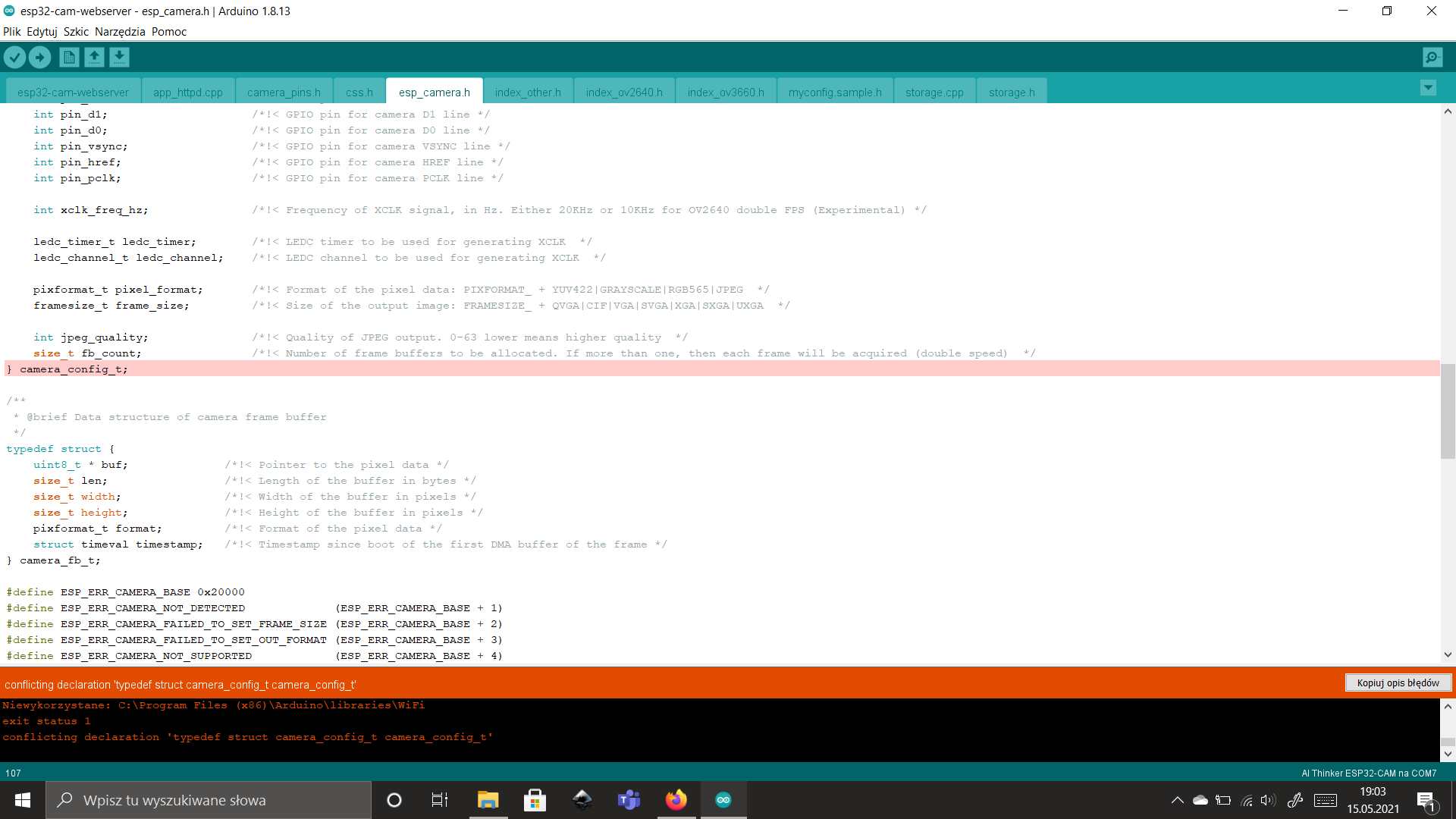
    Something compiles there but this time it stalls with an error at this point:
    Where can I find a sketch giving the Esp32 CAM to the viewer/app? .

    Khoam you Have partition options when compiling for Ai_Thinker ESP32-CAM?
  • #8 19434816
    inot
    Level 38  
    Posts: 3558
    Help: 441
    Rate: 801
    You can still with this Link .
    try.
  • #9 19434877
    Anonymous
    Level 1  
  • #10 19434921
    pier
    Level 24  
    Posts: 2446
    Help: 40
    Rate: 1893
    khoam wrote:
    pier wrote:
    Something there compiles but this time it gets an error at this location:
    .
    The file esp_camera.h should not be in this project. This is a library file from Core for ESP32. You have probably copied it and hence the error about the double type declaration now appears.

    pier wrote:
    You have partition options when compiling for Ai_Thinker ESP32-CAM?114bb1993 .
    For this board there is no such option and it does not matter. The program also compiles seamlessly for "AI Thinker ESP32-CAM":
    Code: C / C++
    Log in, to see the code
    .

    Added after 4 [minutes]:

    What version of Core for ESP32 do you have installed in the Arduino IDE. In my case it is 1.0.6.
    .

    Khoam as usual You are right. Now everything is compiling.
    Thanks.

    I think this board of mine is some kind of screwed up. After uploading it displays my page nicely but the image is missing. In the serial monitor I have the message:
    [E][camera.c:1483] esp_camera_fb_get(): Failed to get the frame on time!
    I've been looking for a solution because a lot of people are complaining about this but nothing sensible.
    Sometimes after a fart of tries the camera will catch on and it works.
  • #11 19435564
    Anonymous
    Level 1  
  • ADVERTISEMENT
  • #12 19435611
    pier
    Level 24  
    Posts: 2446
    Help: 40
    Rate: 1893
    Core version as you have 1.0.6.
    I tried adding another camera configuration but then it didn't detect it.
    I also thought about the power supply. I'll check it right away.

    Added after 20 [minutes]: .

    Neither changing the frequency nor a better power supply have any effect.

    But the strange thing is that until two days ago on basic sketch this camera was working.

    On the basic software it no longer works either.

Topic summary

✨ The discussion revolves around finding a reliable sketch for the ESP32 CAM to enable webcam viewing over a local WiFi network. Users report issues with existing sketches, such as low resolution and stuttering video. Suggestions include ensuring the correct board selection (ESP32 AI Thinker) with PSRAM enabled for high-resolution modes. Users also encounter errors related to missing files like esp_camera.h and issues with camera frame retrieval. Recommendations include adjusting the xclk_freq_hz parameter in the sketch and checking power supply quality. Despite troubleshooting, some users still face persistent issues with camera functionality.
Generated by the language model.

FAQ

TL;DR: To get stable high‑res streaming on ESP32‑CAM, select the AI Thinker (PSRAM) profile; the build uses 2,814,582 bytes (89%). “PSRAM enabled to use high resolution camera modes.” Choose the Huge APP partition for this ~3 MB sketch. [Elektroda, khoam, post #19432646]

Why it matters: This helps makers who ask “what sketch works and how do I fix stutter/timeouts?” by giving concrete setup and fix steps.

Quick Facts

Where can I get a reliable ESP32‑CAM sketch for viewing in a browser?

Try the easytarget/esp32-cam-webserver project recommended in the thread. It provides a ready web interface and works with Arduino IDE. [Elektroda, khoam, post #19429271]

Can I load that example directly in the Arduino IDE?

Yes. The same example from the link can be loaded using the Arduino IDE; follow the linked guide’s steps to upload. [Elektroda, inot, post #19432744]

How do I fix “esp_camera.h missing” or duplicate type errors?

Do not copy esp_camera.h into your sketch. Install the ESP32 core and remove any local esp_camera.h. “The file esp_camera.h should not be in this project.” [Elektroda, khoam, post #19434877]

Which board settings unlock higher resolutions without stutter?

Select an ESP32 board with PSRAM (e.g., AI Thinker). “Make sure that you have either selected ESP32 AI Thinker, or another board which has PSRAM enabled.” This enables high‑resolution camera modes. [Elektroda, khoam, post #19432646]

Which partition scheme should I choose for ESP32‑CAM?

Use the Huge APP scheme because the sketch is large. One build used 2,814,582 bytes (89%), leaving little headroom on smaller partitions. [Elektroda, khoam, post #19432646]

How do I fix “esp_camera_fb_get(): Failed to get the frame on time!”?

Lower the camera XCLK to 10 MHz; test 5 MHz if needed. Verify a strong 5 V supply to the board. If it still fails, the camera module may be marginal. [Elektroda, khoam, post #19435564]

How do I change the camera XCLK frequency to 10 MHz?

  1. Open esp32-cam-webserver.ino and find camera_config_t.
  2. Set config.xclk_freq_hz = 10000000 (try 5000000 if needed).
  3. Rebuild and upload the sketch, then test streaming again. [Elektroda, khoam, post #19435564]

Why do I get a blank image even though the web page loads?

The UI can load while the sensor times out. Reduce XCLK to 10 MHz, check power stability, and suspect a weak sensor if issues persist. [Elektroda, khoam, post #19435564]

Which Arduino‑ESP32 core version worked in the thread?

Version 1.0.6 compiled cleanly in the shared logs for the ESP32‑CAM webserver example. [Elektroda, khoam, post #19432646]

Do I need a custom myconfig.h for the webserver sketch?

No. The contributor built the project without creating a custom myconfig.h and it compiled successfully. [Elektroda, khoam, post #19432646]

I don’t see partition options for AI Thinker—Is that normal?

Yes. That board profile may not expose partition choices, yet the sketch still compiles and runs fine. [Elektroda, khoam, post #19434877]

Could my camera module be defective if timeouts persist?

Yes. After power and XCLK checks, persistent timeouts point to sensor quality. “More likely the camcorder is of poor quality.” [Elektroda, khoam, post #19435564]
Generated by the language model.
ADVERTISEMENT