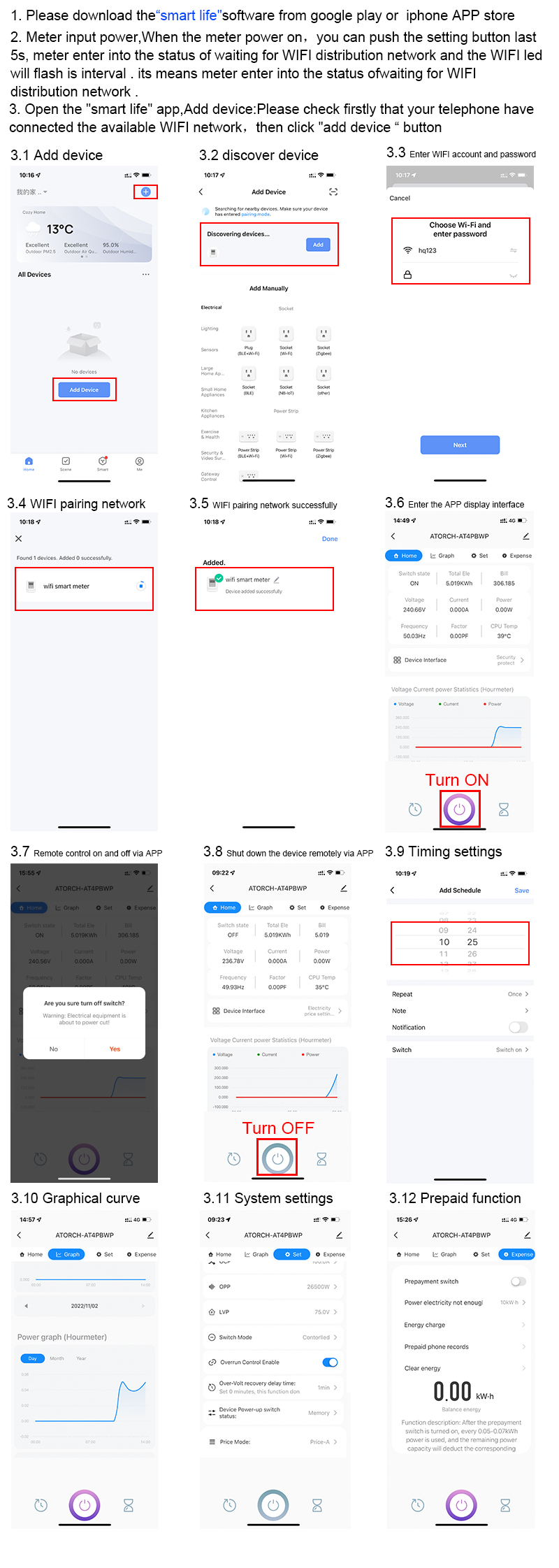
Was a manual included in the kit? Where was it purchased, did you try the seller's website to look for instructions?
Maybe this will help:
(manual from the vendor's listing AT4PW 100A Tuya WIFI bus Din smart remote control switch AC 220V 110V digital power Volt Amp Kwh frequency factor meter )
>>21799900 Enter the meter settings by long-pressing OK/Menu and enter the Wi-Fi reset item. In the app, remove the device and add it again with the new Wi-Fi network data.
Added after 2 minutes:
I should add that I wanted to connect it to a Wi-Fi network with WPA2/WPA3 security, but failed.