logo elektroda
logo elektroda
X
logo elektroda

Tasmota socket: Voltage reduction, schedule setting and dependence on voltage thresholds

grzesiekc33 3435 14
ADVERTISEMENT
Treść została przetłumaczona polish » english Zobacz oryginalną wersję tematu
  • #1 20561846
    grzesiekc33
    Level 3  
    Posts: 14
    Board Language: polish
    Hello, does anyone of you have a Tasmota socket for voltage reduction and can help me with the scheduling? I have set up a dependence that at a given voltage the device switches on, (to reduce voltage for photovoltaics) I would like to set up a schedule so that on one particular day the socket does not switch on at all, regardless of whether it exceeds a given voltage threshold, I have set up everything as in the video, I have chosen a particular day of the week and hours at which it should switch off, but it still works normally. Does anyone know if it is possible to set a shutdown schedule here if there is an over-voltage switch on? Thanks for your answers ;)
    https://youtu.be/GHYjum1DU7Y
  • ADVERTISEMENT
  • #3 20562182
    grzesiekc33
    Level 3  
    Posts: 14
    Board Language: polish
    xury wrote:
    I recommend studying https://tasmota.github.io/docs/Commands/
    Using rules you can do a lot of things:
    https://tasmota.github.io/docs/Commands/#rules
    If you want to disable the timer then read https://tasmota.github.io/docs/Commands/#timers


    I can't quite understand what it is about which command I have to enter to achieve what I want, could you help me how to do it with my example ?
  • ADVERTISEMENT
  • ADVERTISEMENT
  • Helpful post
    #6 20562433
    raks0
    Level 31  
    Posts: 764
    Help: 253
    Rate: 443
    Board Language: polish
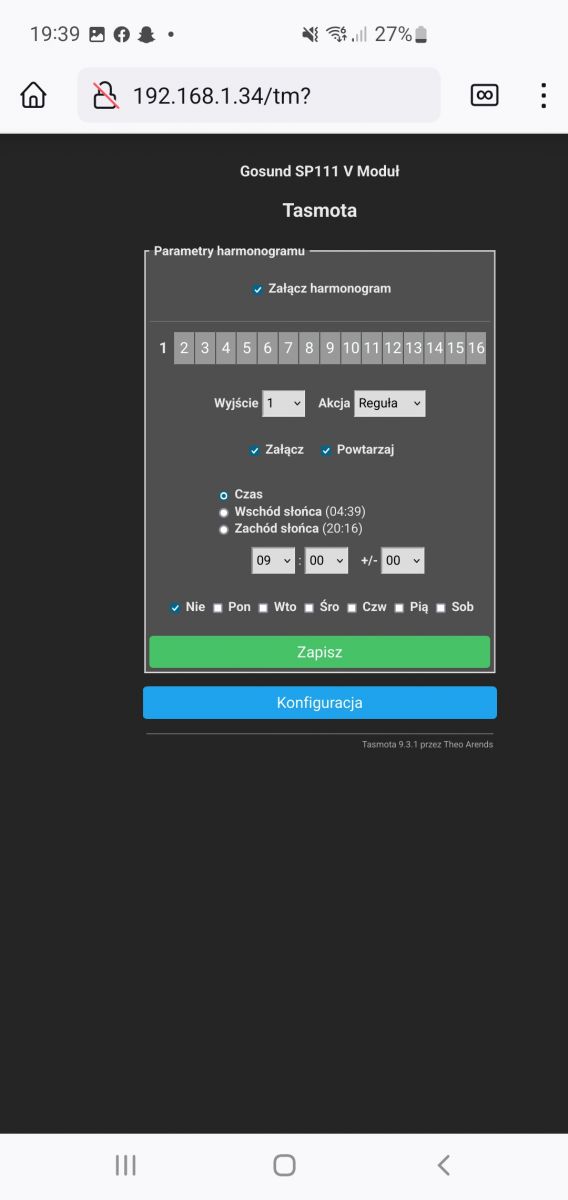
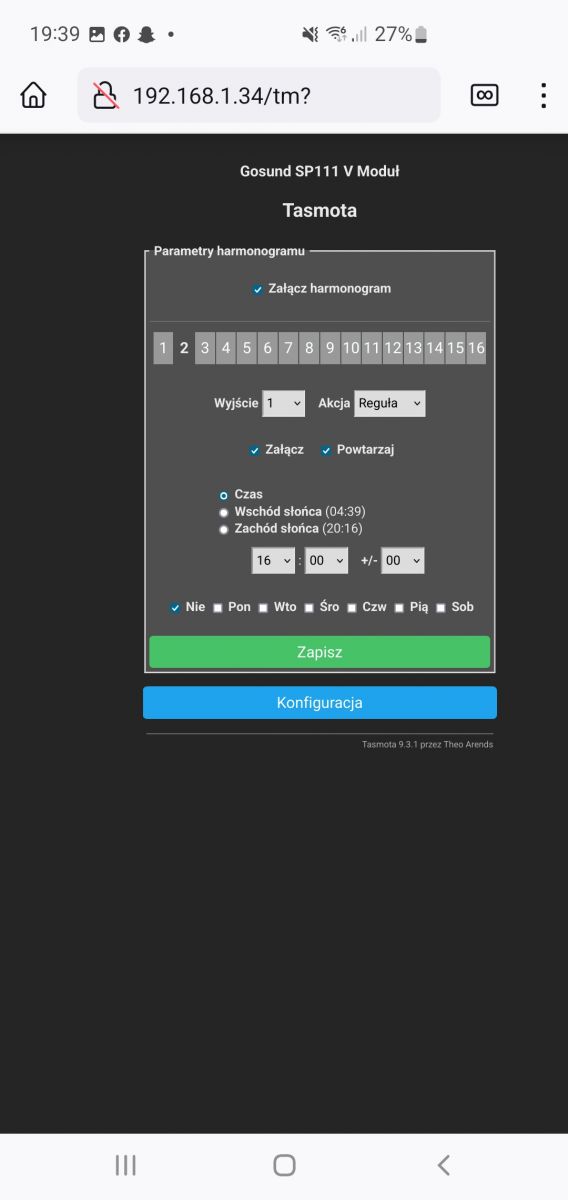
    First make a backup of your configuration, in case something goes wrong you can restore it. You have a rule 1 set up which controls the socket based on voltage. We will create rule 2 which will turn rule 1 on or off depending on the timers setting.
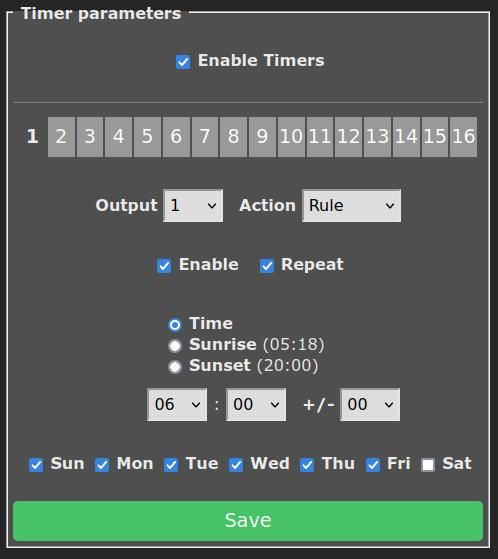
    Set Timer 1 which will switch rule 1 on
    Tasmota socket: Voltage reduction, schedule setting and dependence on voltage thresholds
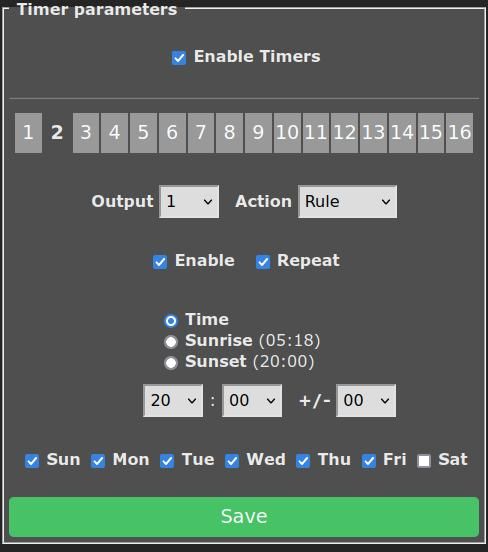
    Set Timer 2 which will switch rule 1 off
    Tasmota socket: Voltage reduction, schedule setting and dependence on voltage thresholds.
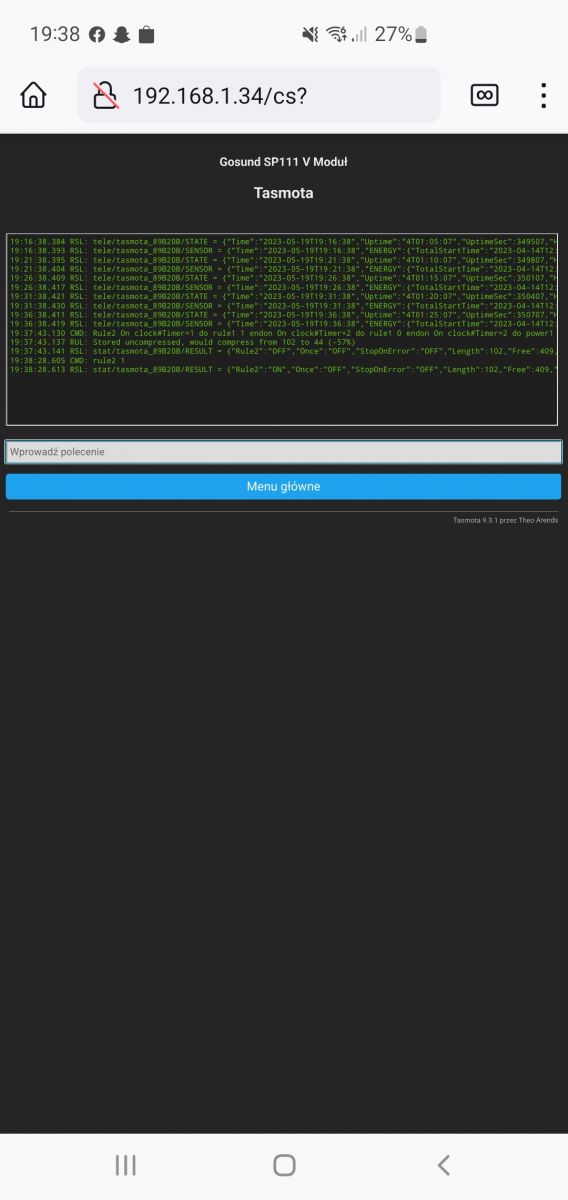
    Then in the console write rule 2
    Rule2 On clock#Timer=1 do rule1 1 endon On clock#Timer=2 do rule1 0 endon On clock#Timer=2 do power1 0 endon

    and turn it on

    Let us know if it works
  • ADVERTISEMENT
  • #7 20562463
    grzesiekc33
    Level 3  
    Posts: 14
    Board Language: polish
    raks0 wrote:
    First make a backup of your configuration, in case something goes wrong you can restore it.
    You have a rule 1 set up which controls the outlet based on voltage. We will create rule 2 which will turn rule 1 on or off depending on the timer's setting.
    Set Timer 1 which will turn on rule 1
    Tasmota socket: Voltage reduction, schedule setting and dependence on voltage thresholds
    Set Timer 2 which will turn off rule 1
    Tasmota socket: Voltage reduction, schedule setting and dependence on voltage thresholds
    Then we will write rule 2 in the console
    Rule2 On clock#Timer=1 do rule1 1 endon On clock#Timer=2 do rule1 0 endon On clock#Timer=2 do power1 0 endon

    and turn it on

    Let us know if it works


    Thanks, I will check it in my free time when I am at home, and tell me if it is possible to log on to the socket if we are not connected to the same WiFi network as the socket?
  • Helpful post
    #8 20564448
    raks0
    Level 31  
    Posts: 764
    Help: 253
    Rate: 443
    Board Language: polish
    Tasmota works locally, so it doesn't directly give you the possibility to control it from outside.
    You would need to install some other IoT system that gives you the possibility to operate it remotely and control Tasmota using the MQTT protocol.
    I have no experience with this type of system so I can't help too much.
  • #9 20587241
    grzesiekc33
    Level 3  
    Posts: 14
    Board Language: polish
    Sorry it took me so long to write, but I thought I would not have to use these schedules and yet...
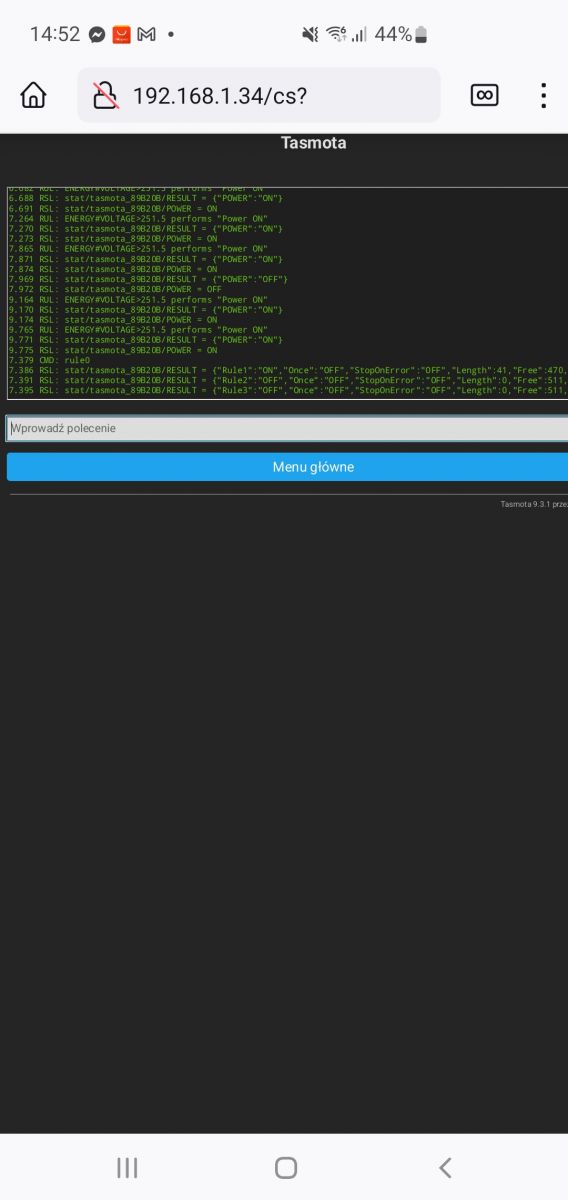
    I have done as you wrote. (I think I marked well, could you check?) I want the socket not to work only on Sundays from 9-16. I will let you know on Sunday when the sun will be sunny whether it works, I attach screenshots if you can see if I set it right. Thank you. Tasmota socket: Voltage reduction, schedule setting and dependence on voltage thresholds Tasmota socket: Voltage reduction, schedule setting and dependence on voltage thresholds Tasmota socket: Voltage reduction, schedule setting and dependence on voltage thresholds Tasmota socket: Voltage reduction, schedule setting and dependence on voltage thresholds .
  • #10 20587302
    raks0
    Level 31  
    Posts: 764
    Help: 253
    Rate: 443
    Board Language: polish
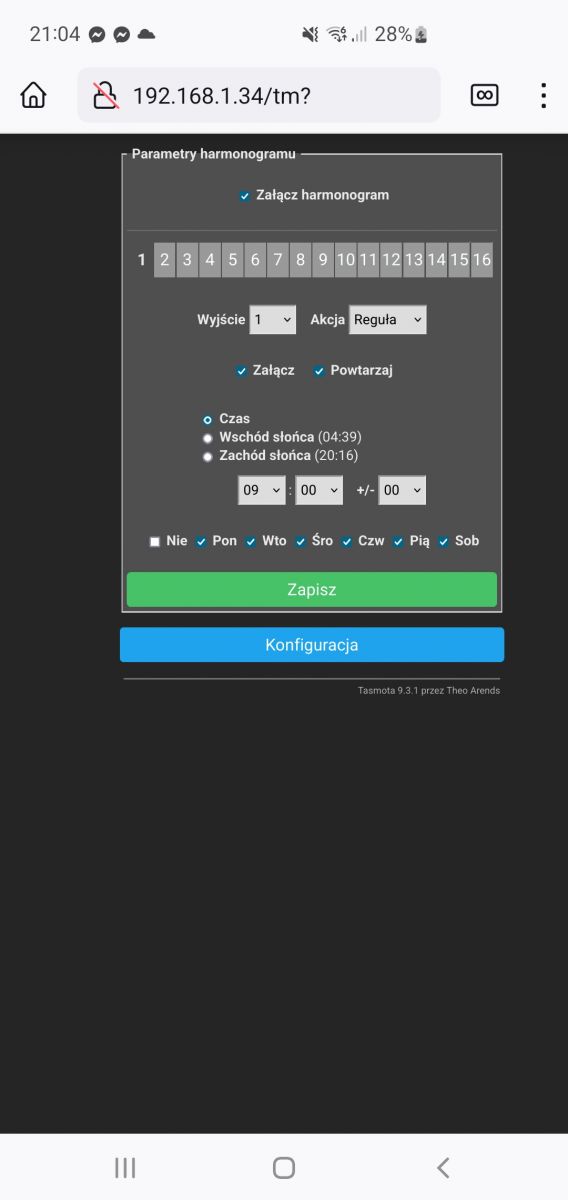
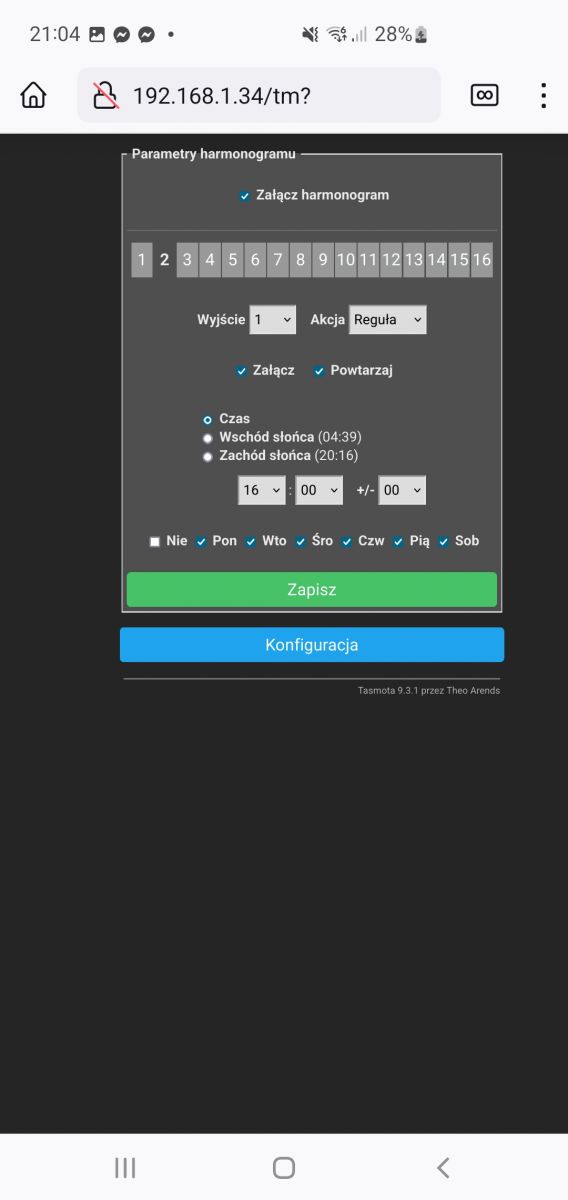
    In the schedule, you mark the days when the socket should operate and at what times, so you must mark all days except Sunday.
  • #11 20587355
    grzesiekc33
    Level 3  
    Posts: 14
    Board Language: polish
    raks0 wrote:
    In the schedule you mark the days when the outlet is supposed to work and at what times, so you have to mark all days except Sunday.


    Is it ok now ?
    Is these two commands typed again ? Tasmota socket: Voltage reduction, schedule setting and dependence on voltage thresholds Tasmota socket: Voltage reduction, schedule setting and dependence on voltage thresholds .
  • #12 20587363
    raks0
    Level 31  
    Posts: 764
    Help: 253
    Rate: 443
    Board Language: polish
    grzesiekc33 wrote:
    Is it good now ?
    We'll see on Sunday.
    grzesiekc33 wrote:
    And these two commands enter again ?

    We only enter the commands once, now everything graphically in the schedule
  • #13 20587371
    grzesiekc33
    Level 3  
    Posts: 14
    Board Language: polish
    raks0 wrote:
    grzesiekc33 wrote:
    Is it good now ?
    We'll see on Sunday.
    grzesiekc33 wrote:
    And these two commands enter again ?

    the commands are entered only once, now everything is already graphically in the schedule


    I have entered it once more before reading your answer.
    Well, we will see on Sunday if the sun will be shining because then the voltage will jump. Thanks and I will let you know ;) .
  • #14 20590310
    grzesiekc33
    Level 3  
    Posts: 14
    Board Language: polish
    Well it works, only the hours didn't match because it was already out of order from the morning, not as set from 9 ;) but it's ok. THANKS ;)
  • #15 20590562
    raks0
    Level 31  
    Posts: 764
    Help: 253
    Rate: 443
    Board Language: polish
    raks0 wrote:
    In the schedule you indicate the days when the socket should operate and at what times

    According to your schedule, the socket will operate between 9 am and 4 pm on Monday to Saturday. On Sundays, the outlet will not operate at all regardless of the hour.

Topic summary

✨ The discussion revolves around configuring a Tasmota socket for voltage reduction and scheduling its operation based on specific voltage thresholds. The user seeks assistance in setting a schedule to prevent the socket from activating on Sundays, despite exceeding the voltage threshold. Participants recommend utilizing Tasmota's rules and timers to manage the socket's behavior effectively. Instructions include creating a backup, setting up rules to control the socket based on voltage and timers, and ensuring the correct configuration for the desired schedule. The user confirms successful implementation but notes a discrepancy in the operational hours. The conversation highlights the importance of precise command entry and scheduling in Tasmota for effective device management.
Generated by the language model.

FAQ

TL;DR: Use 2 timers to toggle Rule1 and block Sundays; "First make a backup of your configuration." Then enable Rule2. [Elektroda, raks0, post #20562433]

Why it matters: This helps Tasmota smart-plug owners who automate voltage-threshold control for PV systems and need a no-operation day.

Quick Facts

How do I stop my Tasmota socket turning on from voltage on Sundays only?

Create Rule2 that reacts to Timer1 and Timer2 and toggles Rule1. Configure Timer1 for your allowed window. Configure Timer2 for the block window and add Power1 0 to force the relay off. Finally, enable Rule2 to enforce the schedule-based override. [Elektroda, raks0, post #20562433]

What exact Rule2 command should I use?

Use: Rule2 On clock#Timer=1 do rule1 1 endon On clock#Timer=2 do rule1 0 endon On clock#Timer=2 do power1 0 endon. Then enable with: rule2 1. This makes Timer1 turn Rule1 on, and Timer2 turn Rule1 off and force the relay off. [Elektroda, raks0, post #20562433]

Do I need to re-enter commands after I change the schedule days or hours?

No. Enter the rule and enable it once. After that, adjust days and hours only in the Schedule UI. The rule continues to enforce your timer-based logic automatically. [Elektroda, raks0, post #20587363]

How do I configure days so it never runs on Sunday?

Open Schedule and tick the days when the socket should operate. Leave Sunday unchecked. The socket will not switch at all on Sunday, regardless of voltage. [Elektroda, raks0, post #20587302]

Why did my socket stop earlier than 09:00?

Your schedule defines the active window for Monday–Saturday only. On Sundays, the outlet stays off the entire day, independent of time. Verify your selected days and window to match expectations. [Elektroda, raks0, post #20590562]

Can I control my Tasmota plug when I’m away from home Wi‑Fi?

Tasmota is local-first. "Tasmota works locally, so it doesn't directly give you the possibility to control it from outside." For remote control, integrate via MQTT into Home Assistant or Node‑RED. [Elektroda, raks0, post #20564448]

How can I view my current rule status or contents?

Open the Tasmota web console and type: rule0. It prints the state and contents of Rule1–Rule3. Share the output when troubleshooting or planning changes. [Elektroda, raks0, post #20562214]

How do I disable a timer quickly?

Open the Timers page and toggle Enable off, or send a command like: Timer1 {"Enable":0}. Timers rely on the device clock, so ensure time and timezone are correct to avoid hour mismatches. ["Tasmota Timers"]

How do I build a voltage‑threshold rule to reduce PV over‑voltage?

Use Rules to trigger actions when a sensor value crosses a threshold and issue Power1 commands. The Rules documentation shows event syntax and examples you can adapt to voltage readings. Pair this with scheduling as needed. ["Tasmota Rules"]

What happens to voltage-based switching when Rule1 is off?

It stops. "Rule 2 will turn rule 1 on or off depending on the timers setting." Add Power1 0 when disabling to ensure the relay turns off and stays off during the blocked window. [Elektroda, raks0, post #20562433]

How many timers can I use, and can I combine them?

Tasmota supports up to 16 timers. You can reference multiple Clock#Timer events in a single rule to orchestrate more complex allow/deny windows or staged actions. ["Tasmota Timers"]

Quick How‑To: Set up the Sunday block from scratch

  1. Create Timer1 for your allowed window on permitted days.
  2. Create Timer2 for the blocked window; add a Power1 0 action.
  3. Enter the Rule2 string shown above and run: rule2 1 in the console. [Elektroda, raks0, post #20562433]

Do rules and schedules require MQTT?

No. Rules and schedules run entirely on the device. MQTT is optional for remote control or integration with platforms like Home Assistant. [Elektroda, raks0, post #20564448]

Where can I learn the exact commands for Rules and Timers?

See the Tasmota Commands, Rules, and Timers documentation. As one expert put it, “Using rules you can do many things.” Start there for syntax and examples. [Elektroda, xury, post #20562162]
Generated by the language model.
ADVERTISEMENT