logo elektroda
logo elektroda
X
logo elektroda

Remote wicket opener from the 1990s - search for a Home Assistant-compatible device

bonss 1659 11
ADVERTISEMENT
Treść została przetłumaczona polish » english Zobacz oryginalną wersję tematu
  • #1 20762617
    bonss
    Level 8  
    Posts: 16
    Hi!
    I am looking for a solution that will enable me to open the wicket remotely. Due to the old installation (90s) I have given up on access control.

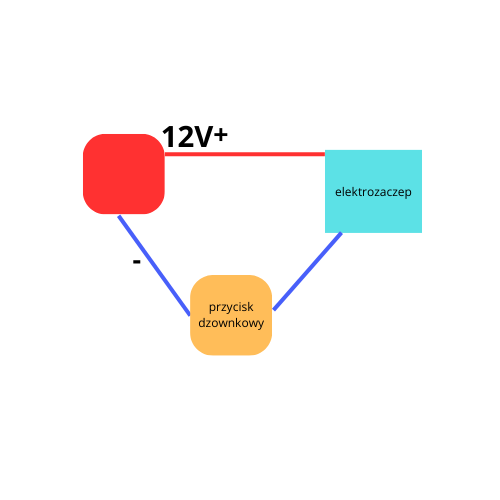
    The electric door opener can currently be released via a bell button at home. I am enclosing an amateur diagram.

    I searched for this type of "smart" button, but could not find one. I guessed that it would probably be equipped with a battery backup.

    I am looking for compatibility with a home assistant.
    Can you recommend any urgency?
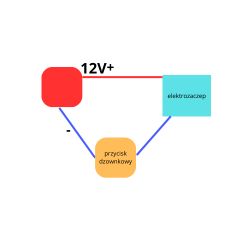
    Amateur schematic showing a circuit with a 12V-powered electric strike and a doorbell button. .
  • ADVERTISEMENT
  • #2 20762660
    sosarek

    Level 43  
    Posts: 83875
    Help: 9318
    Rate: 15430
    Don't you have a relay there with a hold?
    What KD are you talking about?
    There are relays operated remotely.
    Company Account:
    Z
    Pka, Poznań, 60-850
    Helpful post? Buy me a coffee.
  • ADVERTISEMENT
  • #3 20762781
    bonss
    Level 8  
    Posts: 16

    I have no backup. The installation, as I wrote, is from the 90's".

    I gave up on access control because somewhere the wires were damaged while doing the paving.
    I don't have the option of non-invasively pulling new ones, which would be the easiest way.

    So the only option I have is to replace the traditional bell button with some smart solution. So that I can remotely unlock the deadbolt on the electric door strike.
  • #4 20762822
    sosarek

    Level 43  
    Posts: 83875
    Help: 9318
    Rate: 15430
    You might as well add a remote control...
    What kind of cables did you have, how many wires are functional?
    Company Account:
    Z
    Pka, Poznań, 60-850
    Helpful post? Buy me a coffee.
  • #5 20764688
    12robert12
    Level 29  
    Posts: 1135
    Help: 134
    Rate: 178
    Search under the name "voltage free relay"

    Everyone has a "pulse" mode of operation

    Insert what you like, we will assess if it is suitable....
  • ADVERTISEMENT
  • #7 20772778
    12robert12
    Level 29  
    Posts: 1135
    Help: 134
    Rate: 178
    It looks ok,

    Of course if you would like to connect a physical button under S1 via the opening wires it will be on 230V .

    If you only want to open remotely via an app on your phone then this is sufficient - minus the delays.

    or with a battery operated button remotely .
  • #8 20772933
    bonss
    Level 8  
    Posts: 16
    Thanks,

    I understand that I can connect my electric door opener to COM and NC. However, then I still need to connect 230V to L and N?
  • ADVERTISEMENT
  • #9 20772953
    12robert12
    Level 29  
    Posts: 1135
    Help: 134
    Rate: 178
    Rather, the electric door opener is connected to COM and NO
    Because if you connect it to NC it will still be open 😜

    Yes, to L and N 230V AC must be connected
  • #10 20772974
    sosarek

    Level 43  
    Posts: 83875
    Help: 9318
    Rate: 15430
    12robert12 wrote:
    Rather, an electro-connector for COM and NO
    Rather, not quite....
    Company Account:
    Z
    Pka, Poznań, 60-850
    Helpful post? Buy me a coffee.
  • #11 20773072
    12robert12
    Level 29  
    Posts: 1135
    Help: 134
    Rate: 178
    sosarek wrote:
    12robert12 wrote:
    Rather, the solenoid switch to COM and NO
    Rather, not quite....


    We can guess without a diagram...
    In the first post the author wrote that he uses a "bell" button to release the electric strike which suggests NO to me.
    Finally it is possible to change NO/NC anyway.
  • #12 20773096
    sosarek

    Level 43  
    Posts: 83875
    Help: 9318
    Rate: 15430
    @12robert12 You have the drawing in the first post and now consider where your reasoning and method of connection is wrong and why.
    Company Account:
    Z
    Pka, Poznań, 60-850
    Helpful post? Buy me a coffee.

Topic summary

✨ A user seeks a solution to remotely open a wicket using a smart device compatible with Home Assistant, due to limitations from an outdated 1990s installation. The current setup allows operation via a traditional bell button, but the user cannot run new wires due to damage. Suggestions include using a voltage-free relay with a pulse mode, which can be connected to the electric door opener. A specific product, the OXT mini WiFi module from TUYA, is recommended for its compatibility. The discussion also covers wiring configurations, emphasizing the need for 230V AC connections and the importance of using normally open (NO) contacts for the electric strike.
Generated by the language model.

FAQ

TL;DR: Want to open a 1990s wicket remotely with Home Assistant? Use a Wi‑Fi voltage‑free relay; the module takes 230 V AC. "Yes, to L and N 230V AC must be connected." [Elektroda, 12robert12, post #20772953]

Why it matters: This helps owners of older electric door strikes add Home Assistant remote unlock without rewiring or replacing the whole access system.

Quick Facts

What’s the simplest way to add remote unlock to a 1990s wicket?

Install a Wi‑Fi dry‑contact (voltage‑free) relay set to pulse/momentary. It electrically replaces the bell button and briefly closes the strike circuit. This avoids rewiring and preserves your existing door hardware. Search for modules advertised as “voltage‑free” with pulse mode support. Mount near the current button or near the strike where power is available. [Elektroda, 12robert12, post #20764688]

Is the OXT mini Tuya dry‑contact module OK for this job?

Yes. It’s suitable for app‑controlled unlocking of an electric strike. Expect a small delay because it operates through the cloud. "this is sufficient - minus the delays" is a fair assessment for such modules. It’s a practical choice when you want quick results and basic Home Assistant integration via the Tuya platform. [Elektroda, 12robert12, post #20772778]

How should I wire COM, NO, and NC to the electric strike?

Use COM and NO to mimic a normally‑open bell button. The relay briefly closes the circuit to release the strike. Avoid NC for this application. If you use NC, the strike stays open, which is unsafe. Power the module separately on L and N. This mirrors how a bell button triggers the strike only during the press. [Elektroda, 12robert12, post #20772953]

Do I need to supply the relay with 230 V AC?

For the referenced Tuya/OXT module, yes. Connect 230 V AC to L and N to power the device. The relay side remains voltage‑free for the strike circuit. This is distinct from the strike’s own power wiring. "Yes, to L and N 230V AC must be connected." [Elektroda, 12robert12, post #20772953]

Will pulse (momentary) mode mimic my bell button?

Yes. Pulse mode briefly closes the contact, just like pressing and releasing the button. That’s exactly what an electric strike expects. As one expert noted, "Everyone has a 'pulse' mode of operation" for these relays. Enable momentary in the device app to avoid latching the circuit. [Elektroda, 12robert12, post #20764688]

My intercom wires are damaged—what’s the workaround without rewiring?

Replace the wall bell button with a smart dry‑contact relay to control the strike wires you still have. Then unlock remotely from the app. This approach avoids pulling new cables and keeps the existing strike. The original poster concluded the same: replace the traditional bell button with a smart solution. [Elektroda, bonss, post #20762781]

Can I add a wireless button instead of wiring S1?

Yes. Pair a battery‑powered remote button to the module and trigger unlock wirelessly. This avoids bringing mains to a wall switch input and keeps the strike wiring isolated. It’s a clean option when existing control wires are missing or unsafe to reuse. [Elektroda, 12robert12, post #20772778]

How do I integrate a Tuya/OXT Wi‑Fi relay with Home Assistant?

First, add the device in the Tuya app and confirm it toggles the relay. Then enable the official Tuya integration in Home Assistant and log in to link your account. The relay appears as a switch entity. Use an automation to turn it on briefly to unlock the strike. ["Tuya - Home Assistant"]

I want to avoid cloud delay—what local options work with Home Assistant?

Use a locally controlled dry‑contact relay that integrates natively with Home Assistant, such as Shelly 1. It offers local LAN control and a dedicated HA integration. This reduces latency and keeps unlock actions on your network. Create an automation to pulse the relay for a second. ["Shelly - Home Assistant"]

How do I wire the smart relay to replace my bell button? (3 steps)

  1. Cut power, then connect 230 V AC to the module’s L and N terminals to power it.
  2. Move the two bell‑button wires that go to the strike circuit onto the relay’s COM and NO.
  3. Restore power and use the app to trigger the relay; verify the strike releases. This replicates your button press electronically. [Elektroda, 12robert12, post #20772953]

What happens if I wire NC by mistake?

The strike will remain open because NC keeps the circuit closed until the relay energizes. That’s a security risk and can overheat the strike. Move the strike wires to COM and NO to ensure it stays locked until triggered. This also matches a typical bell button circuit. [Elektroda, 12robert12, post #20772953]

Could I use a handheld RF remote instead of Wi‑Fi?

Yes. You can add a remote control receiver to switch the strike via a relay. This avoids app or cloud delays. It’s convenient if you don’t need Home Assistant control. Keep in mind integration with HA would then require a compatible receiver or bridge. [Elektroda, sosarek, post #20762822]

How do I confirm my button is normally‑open (NO)?

Observe the existing behavior: if the strike releases only while the button is pressed, that’s NO. Wire the smart relay as COM/NO to match it. If needed, you can swap NO/NC on the relay to suit your circuit. That flexibility simplifies migration from the button. [Elektroda, 12robert12, post #20773072]
Generated by the language model.
ADVERTISEMENT