logo elektroda
logo elektroda
X
logo elektroda

How to connect the Hama control module to a current socket - Ground, Lout, N

grzegorzmaczura 1077 9
Best answers

How do I wire a Hama flush-mounted control module between the mains supply and a socket, and where do L, N, Lout, SW, and PE go?

Connect the module with live and neutral, send the switched live to the socket, and take PE directly to the socket without passing it through the module. [#20972528][#20971858] Wire the incoming L from the supply to the module’s Lin/L terminal and branch that same L to power the module electronics; wire the incoming N from the supply to the module’s N terminal and branch N to the socket as a continuous neutral. [#20971935][#20972528] The Lout terminal is not neutral: it is the switched phase output that goes to the socket. [#20971935][#20971869] The SW terminal is only for an external manual switch and can be left unused in this application. [#20972528] Do not interrupt the PE conductor; it should remain continuous to the socket. [#20972528][#20972246]
AI summary based on the discussion. May contain errors.
ADVERTISEMENT
This content has been translated flag-pl » flag-en View the original version here
  • Clarifying PE and N wiring for Hama module

    #1 20971826
    grzegorzmaczura
    Level 3  
    Posts: 6
    Hi.
    I have a problem with connecting the flush-mounted control module from Hama.
    I don't know if I understood the instructions correctly.
    I would only like to connect the module between the power cable and the socket - I'm not interested in connecting the light etc.
    I have attached a drawing and I would like to correct or confirm it if necessary.

    I have no idea where to plug in the earthing cable (PE - protective conductor).
    Also from the instructions it appears that on the output "Lout" I would have to plug in the neutral cable "N" - I do not know if this is a correct connection.

    Please help and possibly a breakdown of what to plug in where.

    I only want to control whether the socket will be powered or not.

    Greetings
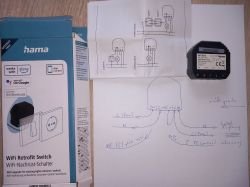
    Photo of a Hama control module with instructions and connection diagram. .
  • ADVERTISEMENT
  • #2 20971858
    freebsd
    Level 42  
    Posts: 6791
    Help: 766
    Rate: 2032
    grzegorzmaczura wrote:
    I have no idea where to plug in the earthing cable (PE - protective conductor).
    Directly into the socket. The control module does not require this connection.
  • ADVERTISEMENT
  • #3 20971869
    kaz69
    Level 37  
    Posts: 3341
    Help: 393
    Rate: 542
    As you can see, PE is not needed for this device. There is no "N" coming out of the lout, only the phase connected to the bulb as in the diagram. Look at how the bulb is switched on and how the switch is connected.
  • #4 20971935
    freebsd
    Level 42  
    Posts: 6791
    Help: 766
    Rate: 2032
    grzegorzmaczura wrote:
    Otherwise, from the instructions, I would have connected the neutral "N" cable to the "Lout" output - not sure if this is the correct connection.
    From the controller the output is the phase (L), which you connect to the socket. The other connection to the socket is the neutral (N) cable. This will supply a continuous N and intermittent L to the socket via the controller.
  • #5 20971936
    pikarel
    Level 39  
    Posts: 5031
    Help: 410
    Rate: 1846
    kaz69 wrote:
    As you can see PE is not needed for this device. (...)

    PE is a requirement for end devices, the overzealous even issue a PE point for plastic chandeliers where PE is bolted to this plastic.
    Miniature intermediate automation components are constructed without this madness yet, i.e. without attaching PE to the plastic module housings.
  • ADVERTISEMENT
  • #6 20972246
    gulson
    System Administrator
    Posts: 29446
    Help: 150
    Rate: 6093
    This was reported as harmful advice. If it is PE, then it must be used, this is what the manufacturer has deemed responsible for. Please do not be taken in by the above post.
  • #7 20972284
    grzegorzmaczura
    Level 3  
    Posts: 6

    >>20971935
    Only into which ports do I connect the cables that feed the L and N module?
    I have here 3 ports Sw Lout and Lin.
  • Safety warning against DIY mains wiring

    #8 20972418
    pikarel
    Level 39  
    Posts: 5031
    Help: 410
    Rate: 1846
    grzegorzmaczura wrote:
    >>20971935
    Only into which ports do I connect the cables that supply current to the L and N module?
    I have 3 ports here Sw Lout and Lin.

    If you don't understand the diagram and the posts describing what you have to do - have someone make the connections who has no problem with this.

    Topics like this should be removed from the forum, because this is promoting the making of installations by people who don't have the slightest idea about such installations.
    What someone does in the privacy of their own home, on their own, at their own responsibility - let it stay there, without promoting any do-it-yourself work on such a portal.
  • ADVERTISEMENT
  • Wiring L, N, and Lout for socket use

    #9 20972528
    freebsd
    Level 42  
    Posts: 6791
    Help: 766
    Rate: 2032
    grzegorzmaczura wrote:
    Only into which ports do I connect the cables supplying current to the L and N module?
    I have here 3 ports Sw Lout and Lin.
    The "SW" port is only used to connect a switch to control the module "manually", in addition to the remote control. This is an additional function that in this application:
    grzegorzmaczura wrote:
    I would only like to connect the module between the power cable and the current socket - I am not interested in connecting lights etc.

    It is unused.

    To the module you connect:
    SW port - You do not connect anything.
    Link port - You connect the "L" wire from the power cable.
    Port N - You connect the "N" wire from the power cable to the socket. You are additionally branching the "N" cable to the module (N port) in order to power its electronics.
    L port - You are branching the "L" cable from the power cable to the module (L port) in order to power its electronics.
    Lout port - You are connecting to the socket.
    Please note that connecting the "PE" cable to the socket is necessary. Do not interrupt the continuity of the "PE" wire.

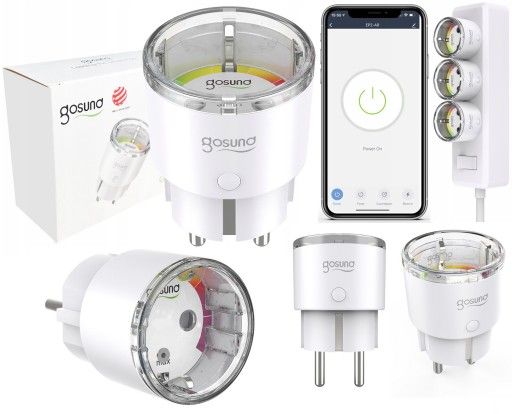
    A simple way to implement a socket in a smart home system is to buy something in a similar way to:
    Gosund smart plug with packaging and mobile app display.
    I mean the shape, size and method of connection. The specific choice is already up to the buyer :-) .
  • Request for wiring outline for flush-mounted module

    #10 20976626
    grzegorzmaczura
    Level 3  
    Posts: 6

    Thank you for your clear post.
    I know that this may already be too much, but if you could outline it for me I would be very grateful - I want to make sure I am not making a mistake.
    Of course I am aware that someone will immediately write about me that I am a layman and should not ask silly and seemingly obvious questions. He who asks... :)
    First of all, I do not expect too much - just do not write back as if anything.
    Thanks anyway for the earlier reply.
    With regard to the wifi-controlled socket - this is indeed a simple solution which I have already used elsewhere, but in this one case I must use the control of a flush-mounted module to be connected to a 220v socket.
    Greetings.

Topic summary

✨ The discussion revolves around connecting a Hama flush-mounted control module to a socket, specifically addressing the correct wiring of the module. The user seeks clarification on where to connect the earthing cable (PE) and the neutral cable (N) in relation to the output "Lout." Responses indicate that the PE connection is not required for the module, and the output "Lout" should connect to the socket while the neutral (N) should be connected to the corresponding port. Detailed instructions clarify that the "SW" port is for manual control and not needed in this setup. The importance of maintaining the PE continuity is emphasized, and users are advised to seek professional help if unsure about the connections.
AI summary based on the discussion. May contain errors.
ADVERTISEMENT