logo elektroda
logo elektroda
X
logo elektroda

[BK7231N] 12V Smart Switch Teardown

OxygenDesk 2616 15
ADVERTISEMENT
  • #1 21043447
    OxygenDesk
    Level 3  
    Posts: 6
    Rate: 1

    I got this 12V barrel smart switch from AliExpress. Mine arrived in a yellow envelope without any packaging or branding.

    It's easy to open. Just need to pry using the small flathead next to the wire strain relief. It's held by 4 clips.

    It's a BK7231N. Use TP5 for RX and TP4 for TX. I had to use an external power supply while flashing. Ended up using a 12V plugged into the barrel connector.

    ADVERTISEMENT


    The device doesn't seem to have the button configured or OpenBeken didn't pick it up but it was connected to P14. The boards has space for 3 more light channels but I didn't check if they were actually connected because I didn't need them.

    Texts on PCB: DLX-RGBCW BK7231N-B 5-24V

    Device configuration, as extracted from Tuya: 
    - LED Cool (Channel 4) on P8
    Device seems to be using CB3S module, which is using BK7231N.
    And the Tuya section starts, as usual, at 2023424


    Code: JSON
    Log in, to see the code


    [BK7231N] 12V Smart Switch Teardown [BK7231N] 12V Smart Switch Teardown [BK7231N] 12V Smart Switch Teardown [BK7231N] 12V Smart Switch Teardown [BK7231N] 12V Smart Switch Teardown
  • ADVERTISEMENT
  • #2 21043514
    p.kaczmarek2
    Moderator Smart Home
    Posts: 14393
    Help: 650
    Rate: 12313
    That's interesting, I would need to check why the button was not detected. Can you also attach Tuya config binary so I can investigate?


    Helpful post? Buy me a coffee.
  • ADVERTISEMENT
  • #3 21044098
    OxygenDesk
    Level 3  
    Posts: 6
    Rate: 1
    Here it is
    Attachments:
    • readResult_BK7231N_QIO_2024-09-4-18-32-25.bin (2 MB) You must be logged in to download this attachment.
  • #4 21044166
    divadiow
    Level 38  
    Posts: 4835
    Help: 420
    Rate: 852
    that's an interesting one. if you get the 72kb config file too, as seen in the video, is the gpio extraction the same? please post that file.
  • ADVERTISEMENT
  • #5 21044231
    p.kaczmarek2
    Moderator Smart Home
    Posts: 14393
    Help: 650
    Rate: 12313
    The 2MB backup file already contains that 72KB file so I am certain it would be the same.
    Helpful post? Buy me a coffee.
  • #6 21044270
    divadiow
    Level 38  
    Posts: 4835
    Help: 420
    Rate: 852
    Yes, sure. It's just the key in what is extractable seems to be something to do with an LSC Moodlight. I just didn't believe it and wanted another extraction.
  • #7 21044337
    OxygenDesk
    Level 3  
    Posts: 6
    Rate: 1

    Sorry, I've flashed ESPHome on it since. The 2 MB binary backup is the only copy I have of the original firmware.
  • #8 21044539
    divadiow
    Level 38  
    Posts: 4835
    Help: 420
    Rate: 852
    Oh!

    Interesting. All works ok?
  • ADVERTISEMENT
  • #9 21045133
    OxygenDesk
    Level 3  
    Posts: 6
    Rate: 1
    Yep, the button works and the light dims.
  • #10 21163777
    kovachpeter
    Level 2  
    Posts: 2
    >>21045133 Hi! I have the same device and would like to reflash with esphome. Could you share the yaml file?
  • #11 21165202
    OxygenDesk
    Level 3  
    Posts: 6
    Rate: 1
    >>21163777
    Here's what I used
    Attachments:
    • smartSwitch.zip (449 Bytes) You must be logged in to download this attachment.
  • #12 21165205
    divadiow
    Level 38  
    Posts: 4835
    Help: 420
    Rate: 852
    >>21165202

    don't forget to take a backup @OxygenDesk :)
  • #13 21165550
    OxygenDesk
    Level 3  
    Posts: 6
    Rate: 1
    >>21165205
    I think you mean @kovachpeter
    I shared my backup and already reflashed 🙂
  • #14 21165597
    divadiow
    Level 38  
    Posts: 4835
    Help: 420
    Rate: 852
    Oops Yes. Thank you
  • #15 21166020
    kovachpeter
    Level 2  
    Posts: 2
    Thanks for the files! I wont forget the backup :)
  • #16 21177108
    p.kaczmarek2
    Moderator Smart Home
    Posts: 14393
    Help: 650
    Rate: 12313
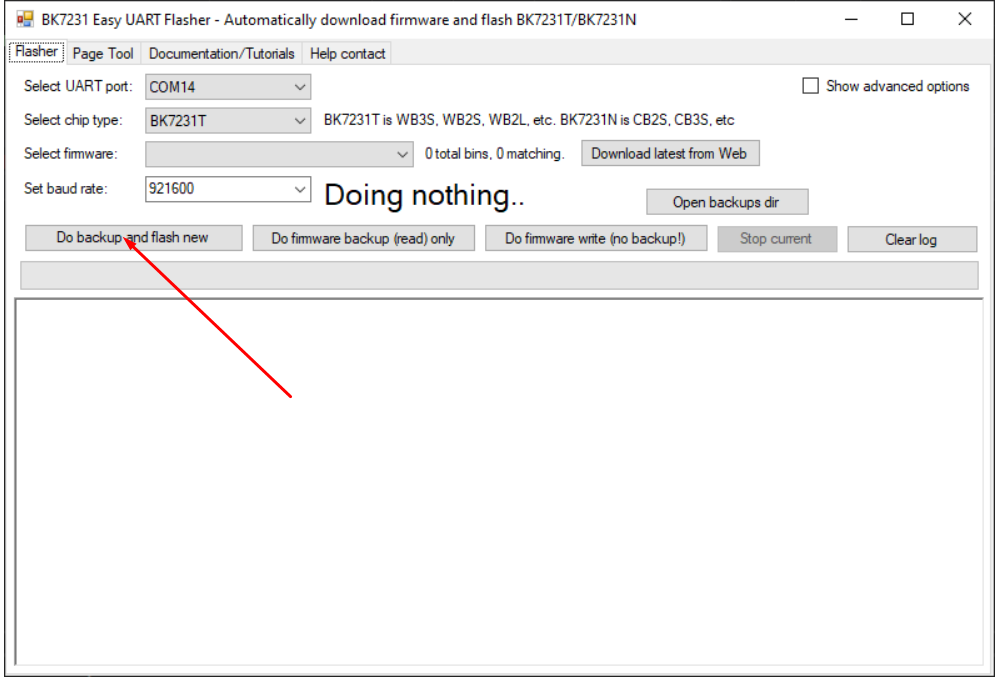
    BK7231GUIFlashTool, which is the best option for flashing this device, makes sure that you have a backup by giving an automatic "Do backup and flash new" procedure. The "no backup" option is not recommended:
    Screenshot of BK7231 Easy UART Flasher tool with Do backup and flash new option highlighted.
    Helpful post? Buy me a coffee.

Topic summary

✨ The discussion revolves around the teardown and flashing of a 12V smart switch utilizing the BK7231N chip, purchased from AliExpress. The device arrived unbranded and was easily opened by prying it apart. Users shared insights on flashing the device, with one individual successfully using an external power supply and ESPHome firmware. The original firmware configuration was discussed, including GPIO extraction and the presence of additional light channels on the PCB. Participants exchanged files, including Tuya configuration binaries and YAML files for ESPHome, emphasizing the importance of backing up the original firmware before flashing. The BK7231GUIFlashTool was recommended for flashing, which includes an automatic backup feature.
Generated by the language model.

FAQ

TL;DR: 5–24 V input, BK7231N-based; "Use TP5 for RX and TP4 for TX." This 12V barrel smart switch opens via four clips, flashes reliably with 12 V power, and exposes button P14 and LED Cool on P8. [Elektroda, OxygenDesk, post #21043447]

Why it matters: For tinkerers re-flashing BK7231N 12V barrel switches, this FAQ shows safe access, GPIO mapping, and backup steps.

Quick Facts

What’s inside this 12V smart switch (MCU, module, markings)?

It uses a BK7231N on a Tuya CB3S module. PCB silkscreen reads “DLX-RGBCW BK7231N-B 5–24V.” The board shows pads for three additional light channels, though connectivity wasn’t verified. This aligns it with Tuya RGB/CW designs. [Elektroda, OxygenDesk, post #21043447]

How do I open the case without damage?

Pry near the wire strain relief with a small flathead screwdriver. Four internal clips hold the shell together. Work around the seam to release each clip. The enclosure opens cleanly for access to the CB3S module and test pads. [Elektroda, OxygenDesk, post #21043447]

Which pads are TX/RX for UART flashing, and how should I power it?

Use TP5 for RX and TP4 for TX. Provide external power while flashing. The board was powered with 12 V through the barrel connector, matching the printed 5–24 V input range. [Elektroda, OxygenDesk, post #21043447]

What’s the best tool and a safe 3-step way to back up and flash?

Use BK7231GUIFlashTool. “Best option for flashing this device,” notes the maintainer. How-To: 1. Pick “Do backup and flash new.” 2. Connect power and UART to the module. 3. Run backup, then flash firmware. Avoid the “no backup” option. [Elektroda, p.kaczmarek2, post #21177108]

Does the full 2 MB backup include the 72 KB Tuya config?

Yes. “The 2MB backup file already contains that 72KB file.” One dump covers the firmware and the Tuya config block. This confirms a single archive preserves your settings snapshot. [Elektroda, p.kaczmarek2, post #21044231]

Which GPIOs control the button and LED in this unit?

The button is on P14. The Tuya-extracted config maps LED Cool (Channel 4) to P8. OpenBeken did not auto-detect the button, so manual assignment is required on this unit. [Elektroda, OxygenDesk, post #21043447]

Will ESPHome run, and what worked after flashing?

Yes. The user reflashed to ESPHome and confirmed, “the button works and the light dims.” This validates basic input and dimming control on the hardware. For configuration, align with the noted pin mapping. [Elektroda, OxygenDesk, post #21045133]

OpenBeken didn’t detect my button—how do I fix it?

Map the button manually. On this device, the button line is P14. If auto-detection misses it, set P14 as the button in your template. [Elektroda, OxygenDesk, post #21043447]

How should I power the board during flashing?

Use external power. The board accepted 12 V through the barrel jack during flashing. The PCB print states a 5–24 V input range. [Elektroda, OxygenDesk, post #21043447]

Can I use the extra RGB/CW channels on the PCB?

The PCB has footprints for three additional light channels. The author did not verify whether those channels are wired. Treat them as unpopulated unless you trace them yourself. [Elektroda, OxygenDesk, post #21043447]

Where does the Tuya config block start in the dump?

The author noted the Tuya section begins at offset 2023424 in the binary. This can help when parsing a raw backup for GPIO data. [Elektroda, OxygenDesk, post #21043447]

How was the device shipped (any branding or packaging)?

The unit arrived in a yellow envelope without packaging or branding. Expect minimal protection and no brand identification on arrival. [Elektroda, OxygenDesk, post #21043447]
Generated by the language model.
ADVERTISEMENT