logo elektroda
logo elektroda
X
logo elektroda

Hard disk drive electronics from 40MB to 10TB

TechEkspert 4107 26

TL;DR

  • Hard-disk-drive electronics are compared across models from 40MB to 10TB, showing how PCB layouts, interfaces, and head/motor control circuitry evolved over time.
  • Early 40MB drives use many discrete parts: parallel interface, 32k SRAM, ROM, and separate power circuits for the platter motor and heads.
  • A 40GB ATA133 drive provides transfers up to 10x faster than the 4GB predecessor, and the 80GB line moves to SATA with further integration.
  • The 10TB drive shows a drastically smaller PCB with three main circuits—controller, SDRAM, and power—raising the question of why the chips remain separate.
  • Spinning HDDs are increasingly displaced by FLASH memory, while helium-filled drives are sealed like a can of canned food.
Generated by the language model.
ADVERTISEMENT
This content has been translated flag-pl » flag-en View the original version here
📢 Listen (AI):
  • Circuit board from a 40MB hard drive with visible discrete components.
    As part of the device interiors section in this material you will find pictures of the electronics boards of several hard drives, we will see how HDD electronics have changed over the years.

    The first board is from a disk with a capacity of 40MB .
    Many discrete elements can be seen.

    1) parallel interface circuit
    2) RAM -. SRAM 32k 8b
    3) ROM
    4) "power" circuit to control the platter motor
    5) "power" circuit to control the heads

    . Image of a circuit board from a 40MB hard drive.


    On the other side of the board you will find no electronic components, only the contact fields for the platter motor and the contacts for controlling the head arm and communicating with the head. This is how it will look like for all other disks.
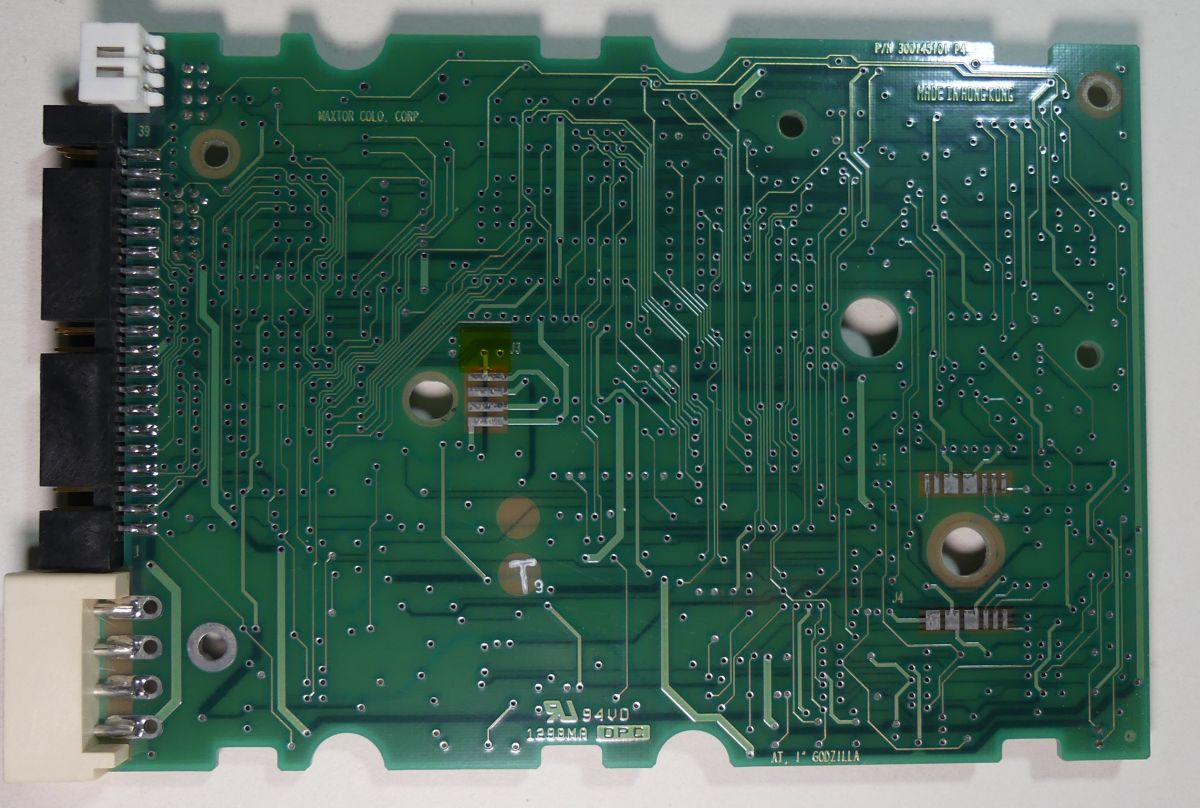
    View of the back side of a hard drive PCB with PATA interface, showing traces and contact points without visible electronic components.


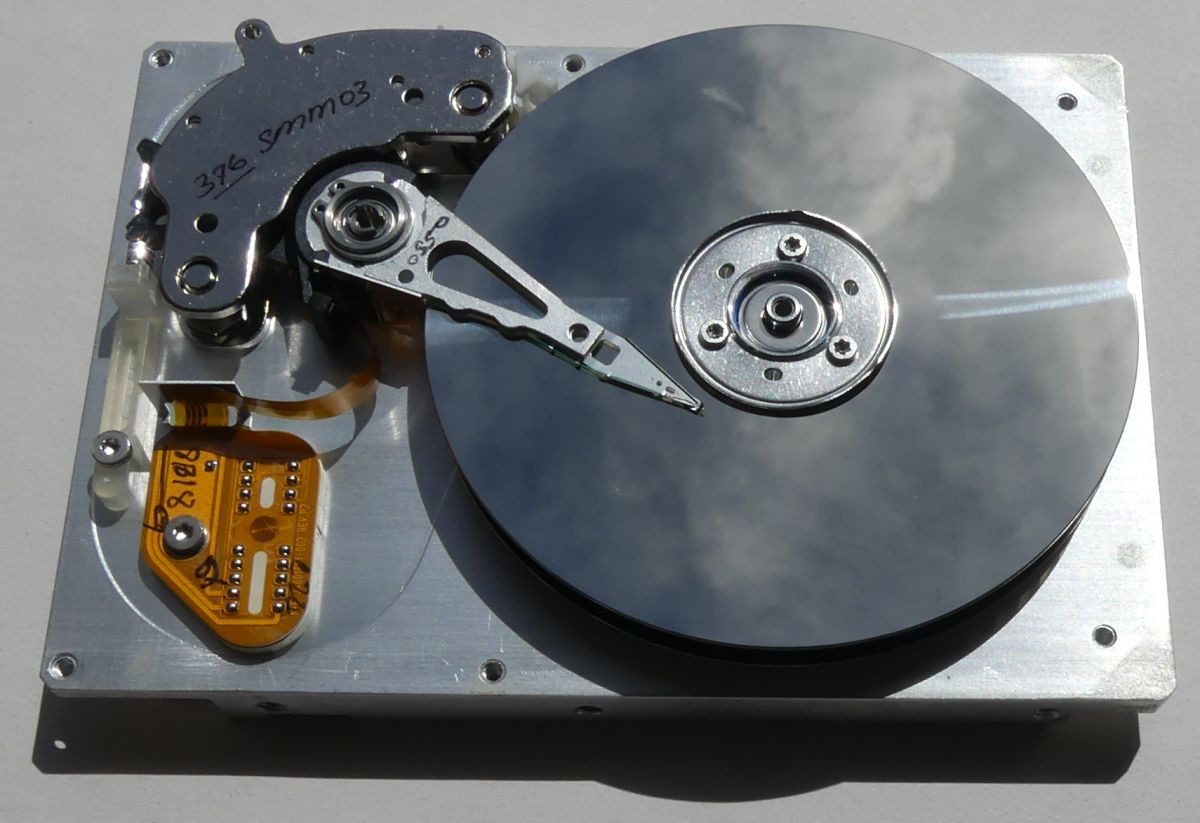
    Data is stored on one platter by two heads.

    Inside of a hard drive with visible platter and head arm.


    In the Ultra ATA drive 4GB a greater degree of integration can be seen, such drives used to achieve transfers in the order of 4MB/s which is nowadays a bandwidth often less than the speed of an internet connection...

    1) interface circuitry and arguably the drive control
    2) RAM - SRAM 64K x 16b
    3) ROM
    The rest of the circuitry is the control of the motor and head arm and the processing and generation of signals for the heads.
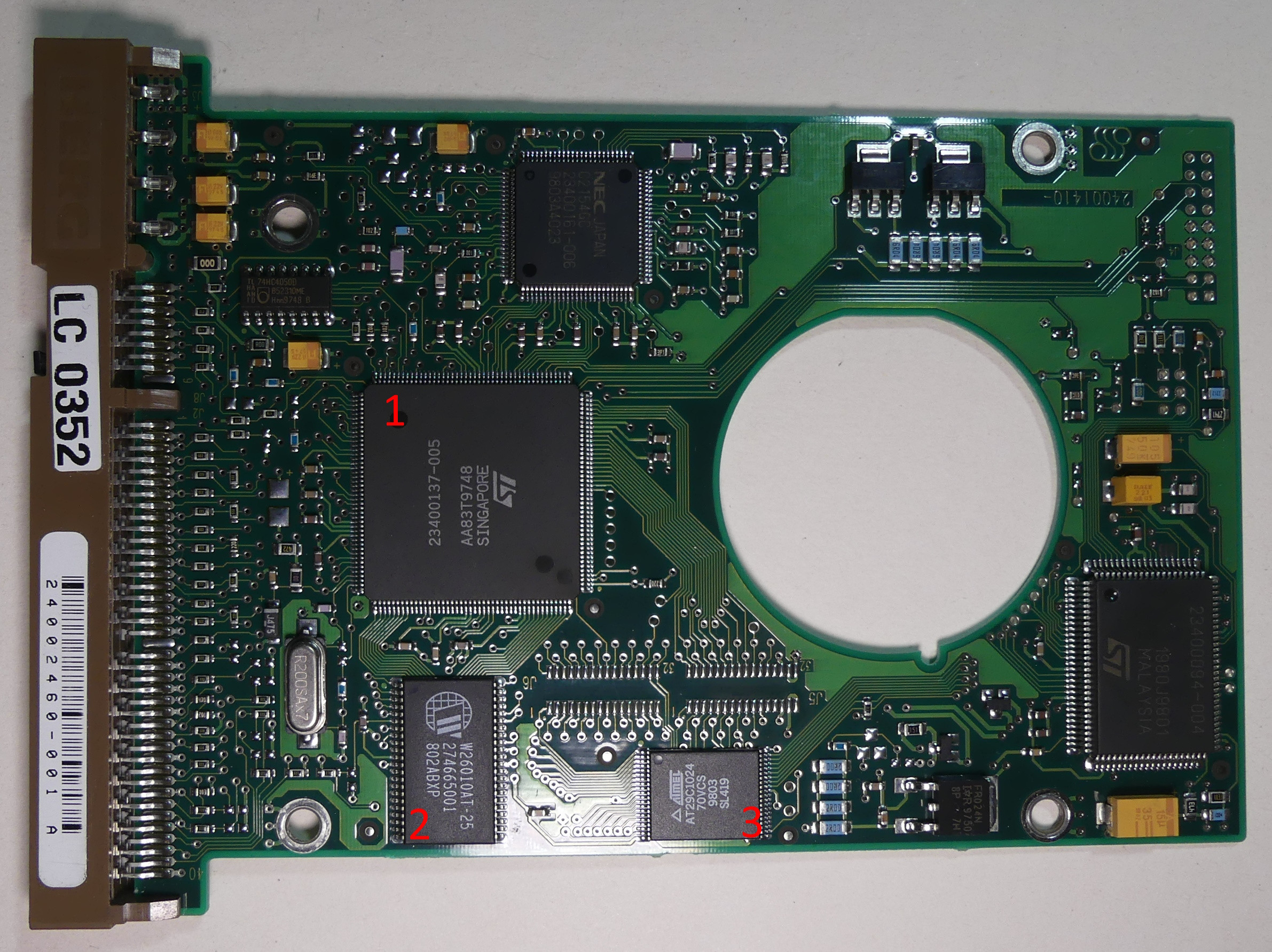
    Hard drive circuit board with marked integrated circuits.


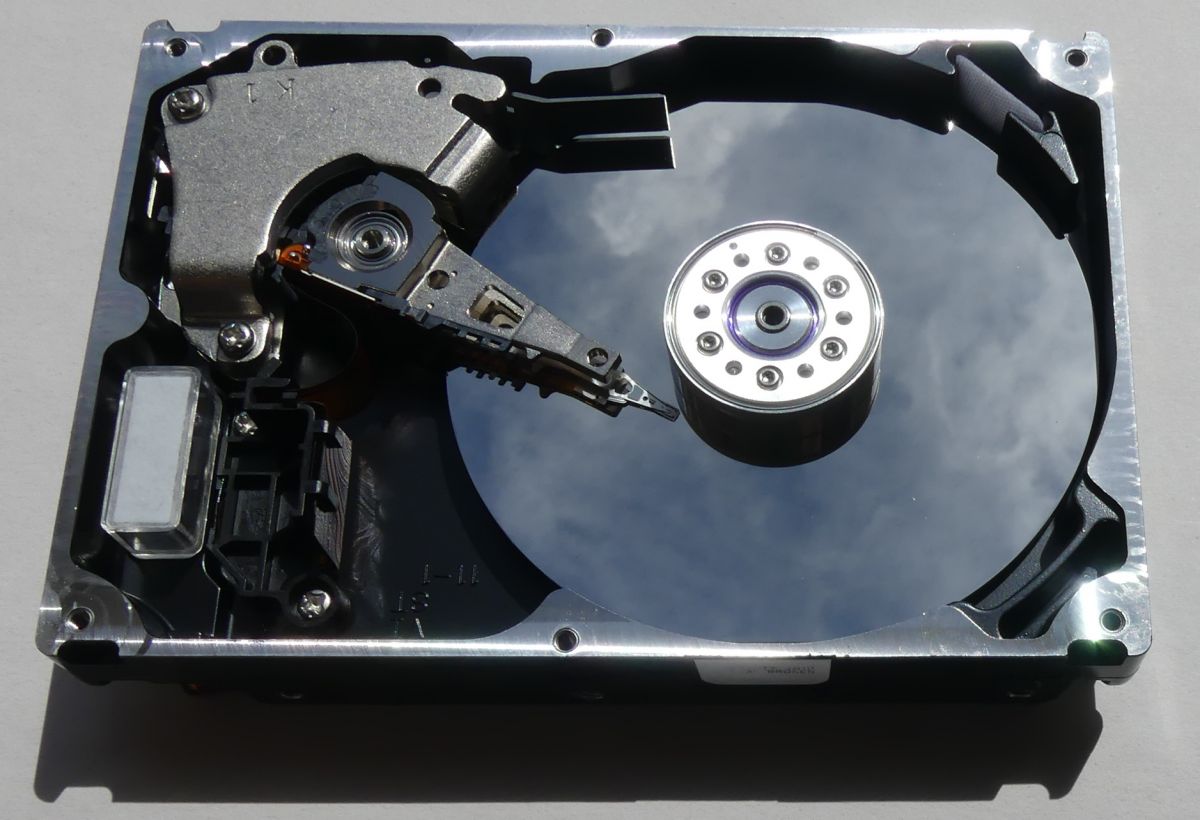
    Two platters and four heads.

    Image of a hard drive interior with a visible platter and read/write arm.


    W 40GB drive with ATA133 interface we see a further increase in the scale of integration. Such drives provided transfers up to 10x faster than the 4GB predecessor.

    1) interface chip and disk controller
    2) RAM - SDRAM 512k x16b
    3) power chip

    Printed circuit board of a hard disk drive with three main components labeled with numbers.


    One platter two heads.

    Interior of an open hard disk drive showing the platter and head.


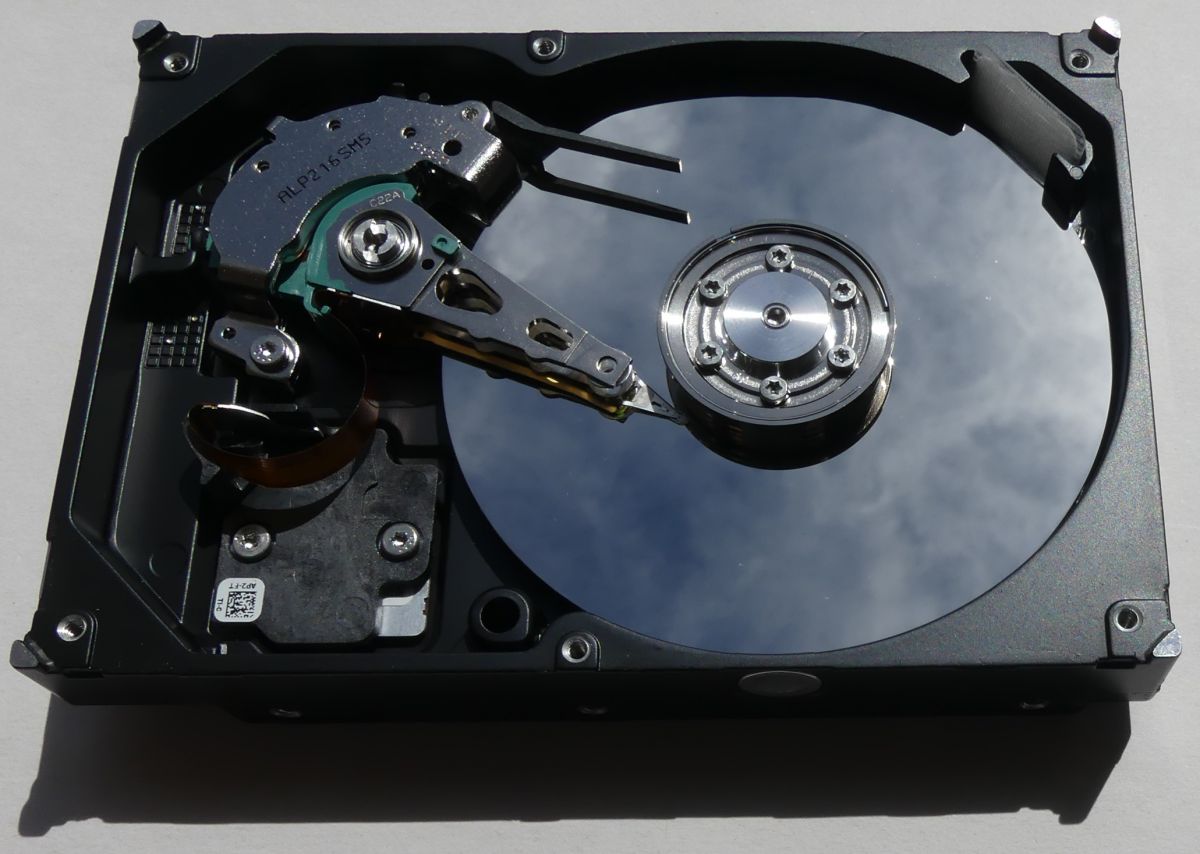
    One disc.

    Disk 80GB changed to serial SATA interface.
    1) interface circuit
    2) disk controller
    3) RAM - SDRAM 1M x 16b x 4 banks
    4) 'power' circuit.

    Hard disk drive circuit board with four marked integrated circuits.


    One plate and two heads.

    Interior of an open hard drive showing the platter and read/write arm.
    .

    Drive 80GB Newer generation SATA, further scale-up of integration is evident. Gone is the separate interface chip, now the disk controller chip is connected to the SATA interface. In this version, the electronics have moved to the side where the contact fields for the platter drive and head arm and the signals for the heads are located.

    1) controller
    2) RAM - SDRAM 1M x16b x4 banks
    3) 'power' circuit

    Hard drive PCB with labeled components.


    One platter and one head.

    Interior of a hard drive with visible platter and read/write arm.


    Disc. 10TB a drastic reduction in the size of the electronics board can be seen.

    Why are there still 3 main circuits on the PCB?

    PCB from a SATA hard drive featuring various integrated circuits and connectors.

    I suspect, that the "power" chip is made in a different process/lithography than the disk controller, as is the RAM, and it still pays to put two separate chips. RAM in a separate module is perhaps an easy production model with a different amount of cache?

    Today most of the media we use do not contain spinning platters, HDD are displaced by FLASH memory.

    Have you come across any interesting media designs
    or any design details of interest to you in the pictures in this material?

    If you prefer footage, below are attempts to identify the circuits used in the first of the 40MB HDDs:


    And the operation of the newer HDD with SATA interface:


    The helium-filled drives are sealed like a can of canned food :)


    Cool? Ranking DIY
About Author
TechEkspert
Editor
Offline 
TechEkspert wrote 7104 posts with rating 5485, helped 16 times. Been with us since 2014 year.
  • ADVERTISEMENT
  • #2 21072496
    Mateusz_konstruktor
    Level 37  
    Posts: 4170
    Help: 266
    Rate: 1100
    TechEkspert wrote:
    Have you come across any interesting media designs
    Yes: DVD-RAM.
  • ADVERTISEMENT
  • #3 21072594
    andrzejlisek
    Level 32  
    Posts: 3637
    Help: 82
    Rate: 707
    It may not be shown, but in my opinion, one thing hasn't changed: Every disk, different electronics. In the case of a working device, it doesn't matter much, but in the case of a hardware fault, this is a big problem.

    The same disk model is a necessary condition, but not sufficient for PCB interchangeability. Even if there are two disks from the same production batch, there is still no guarantee that after swapping the control electronics it will work, in many cases it is necessary to translate the ROM being on the electronics.

    As you can see, so far no standard for the disk electronics has been developed, and it would be useful. While traditional disks will still be produced (as they are increasingly being displaced by SSDs), the disk itself, could be just the platters, motor and head, with everything else already in the computer or as a separate component that would be interchangeable.
  • #4 21072636
    DJ_Opornik
    Level 21  
    Posts: 728
    Help: 33
    Rate: 77
    I also see a low noise LM358 on the first board. My guess is that it amplified the head read signal. There is also an LM324, surely it amplifies something, maybe it even generates the pad current....
  • ADVERTISEMENT
  • #5 21072679
    prosiak_wej
    Level 39  
    Posts: 5273
    Help: 501
    Rate: 1458
    Mateusz_konstruktor wrote:
    Yes: DVD-RAM.


    And interestingly - after 20 years it is still functional - it is possible to read files from it, freely delete and write. I have such a disc, which in my high school days was used as a "memory stick", it's already 20 years old...

    Some time ago I found several boxes of new discs in a junk shop. Among the DVD-Rs and CD-Rs were just DVD-RAM and DVD-Rs with Labelflash.

    And just who has used Labelflash, Disc T@2 or Labeltag (I don't mean Lightscribe) in practice?
  • #6 21072710
    ArturAVS
    Moderator
    Posts: 26098
    Help: 2295
    Rate: 7734
    TechEkspert wrote:
    Have you come across any interesting media designs

    In the years of my first contact with PCs on the hardware side, I got my hands on a few MFM disks where the head drive was a simple stepper motor. The disks were produced by IBM and had a "staggering" capacity of 10-40 MB :D . In slightly later designs, already with linear motors, I have seen a DAC0832 which issued the head position signal for the linear motor driver.
    DJ_Opornik wrote:
    On the first board I also see a low noise LM358. My guess is that it amplified the head read signal. There is also an LM324, surely it amplifies something, maybe it even generates the primer current...
    Rather doubtful, these op-amps are simply too slow. Special multi-channel read/write amplifier circuits for the heads were used.
  • #7 21073798
    DJ_Opornik
    Level 21  
    Posts: 728
    Help: 33
    Rate: 77
    Good point, the 358 hums low, but it is slow. The question is whether it is too slow on archaic 40MB disk electronics, where the read speed was in kB/s, i.e. the stream from the head did not exceed a few hundred kHz?
  • #8 21074276
    mmm777
    Level 31  
    Posts: 1823
    Help: 98
    Rate: 240
    I remember disks that had a knob on the outside connected to the head drive. When the drive was running, it was spinning amusingly :)
    I think I also remember drive electronics that had two(?) Z80s in them.
  • #9 21074531
    LEDówki
    Level 43  
    Posts: 9390
    Help: 1310
    Rate: 2543
    And I have a working 40MB conner drive. It sits in a working 486 40MHz and it barely works. Before ATA, SATA interfaces there were other weird and incompatible interfaces and also some of the control electronics were on controllers. I've mainly had to deal with ATA and SATA disks and even the M2 has come along.
  • #10 21076170
    kaleron

    HDD and data recovery specialist
    Posts: 7037
    Help: 960
    Rate: 2319
    andrzejlisek wrote:
    in case of a hardware fault, this is a big problem.
    - PCB interchangeability is much greater than head interchangeability.
    andrzejlisek wrote:
    The same model of drive is a necessary condition, but is not sufficient for PCB interchangeability.
    - not true - PCBs from other related models often fit, and if the PCBs are not interchangeable (e.g. have a different signal processor used) - it is worth reading the label more carefully. We often take as a model the trade name under which a given drive is sold, but this is misleading, as manufacturers sometimes sell technically different models of devices under one sticker. It also happens the other way around that the same model is sold under different brand names. In the case of hard drives, these are very rare cases, but in the case of SSDs, this is common practice. This is because different companies order exactly the same designs from exactly the same subcontractors, and the only things that differ are the model name displayed and the sticker on the case. And sometimes engravings on the chips, because Kingston, for example, is such a large customer that manufacturers agree to brand the chips with engravings specified by the customer.
    andrzejlisek wrote:
    it is necessary to reposition the ROM
    - this is related to the individual programming of each drive. If only because the individual platters differ in their signal response function, and in order for the signal processor to decode the signal correctly, it should receive a signal which is as normalised as possible. Therefore, the signal amplification parameters are programmed individually for each disc (so-called adapters). This became very important after the introduction of perpendicular recording, where an additional Soft UnderLayer (SUL) appeared, which is necessary to close the field lines induced by the head during recording, but also constitutes a significant source of electromagnetic interference. The simple interleaving of PCBs with a screwdriver ended 20 years ago, but that does not mean that PCBs as such are no longer compatible.
    andrzejlisek wrote:
    no standard for disk electronics has been developed, and it would be useful.
    - for what
    andrzejlisek wrote:
    How much longer will traditional disks be produced
    - oh, they will be around for a long time....
    andrzejlisek wrote:
    the drive itself, it could just be the platters, motor and head,
    - they have been around for a long time and the integration of the controller with the drive in the form of a PCB was an important component of the technical advances that led to the rapid development of hard disk drives in the '80s. It is enough that manufacturers are maintaining compatibility at the external interface and what happens inside is now too complex to be effectively, efficiently and reliably managed by something universal outside the drive.
    andrzejlisek wrote:
    an individual component that would be interchangeable.
    - the PCBs are interchangeable (yes, you have to re-solder the ROM, but that doesn't handicap the The fact that the PCB is interchangeable), and the heads too, in the sense of the entire block, because while there were professionals who replaced the heads on the block as recently as 30 years ago, this is no longer the practice. This is due, among other things, to the much lower flight height of the head above the platter surface, the higher recording density and the required higher sensitivity. Therefore, any deformation of the sliders during the eventual replacement of the head on the block would defeat the purpose of the whole operation.


    Yes, hard disk drive designs have evolved and the integration of integrated circuits has progressed. It used to be that separate chips were responsible for the write channel, read channel, servo signal handling, external interface handling...but slowly they were encapsulated in a single chip. The motor controller (this power circuit) will probably never make it into the processor, because it integrates quite powerful transistors responsible for feeding the relatively high currents consumed by the mechanical subsystem. And as a result, one, they heat up and two, they make noise. So it is better not to have them in the signal processor Well over half of the signal processor is responsible for reading, decoding and correcting errors in the read signal, The signal read by the heads from the platter is really heavily distorted and difficult to process, so it is better not to throw it over the hump if you don't have to.
    Company Account:
    Kaleron sp. z o. o.
    Hirszfelda 4/18, Jelcz-Laskowice, 55-231 | Tel.: 713XXXXXX (Show) | Company Website: https://kaleron.pl
  • #11 21077314
    TechEkspert
    Editor
    Posts: 7104
    Help: 16
    Rate: 5485
    Separating the hard disk from the controller were, for example, the ST225 https://www.os2museum.com/wp/seagate-st-225-just-wow/ with interfaces like the ST-506 MFM https://en.wikipedia.org/wiki/ST506/ST412.

    It seems that this worked similarly to the floppy disk drive, the FFD also required an external controller.

    In my opinion, integrating the controller into the disk and exposing a standardised data access interface allowed the rapid development of hard disk drives.
  • #12 21084426
    sq3evp
    Level 39  
    Posts: 6407
    Help: 212
    Rate: 843
    Mateusz_konstruktor wrote:
    TechEkspert wrote:
    Have you come across interesting media designs
    Yes: DVD-RAM.

    I have also seen magneto-optical disks and so-called ZIP drives.
  • ADVERTISEMENT
  • #13 21084798
    prosiak_wej
    Level 39  
    Posts: 5273
    Help: 501
    Rate: 1458
    DVD-RAM discs came in a cartridge version, requiring dedicated drives. Later they were as loose discs, and could be handled by ordinary DVD recorders.

    An example of a magneto-optical disc would be the quite popular audio recording format developed by Sony - MiniDisc (which, by the way, I like very much and still use to this day).

    Well, there was also a project to back up data on a VHS cassette using an ordinary VHS VCR. Anyway, the VHS cassette had enormous potential. For example, by Alesis, who made 8-track digital audio recorders, not to mention the D-VHS from JVC.
  • #14 21091687
    speedy9
    Helpful for users
    Posts: 12021
    Help: 1231
    Rate: 2416
    prosiak_wej wrote:
    Well, there was also a project to back up data on a VHS cassette using a gross VHS VCR.
    In Amiga it was used (Amiga VBS). Such a cassette held between 340 and 520MB of data, which for the second half of the 20th century was not a bad value, especially as cassettes were widely available.
  • #15 21092217
    CMS
    VIP Meritorious for electroda.pl
    Posts: 8441
    Help: 256
    Rate: 2581
    And then there were dedicated devices for backing up data on magnetic tape called Streamers. I even repaired a few back in the old days. Mainly banks used them.
  • #16 21092228
    kaleron

    HDD and data recovery specialist
    Posts: 7037
    Help: 960
    Rate: 2319
    CMS wrote:
    Mainly banks used them.
    - they still do.
    Company Account:
    Kaleron sp. z o. o.
    Hirszfelda 4/18, Jelcz-Laskowice, 55-231 | Tel.: 713XXXXXX (Show) | Company Website: https://kaleron.pl
  • #17 21092263
    prosiak_wej
    Level 39  
    Posts: 5273
    Help: 501
    Rate: 1458
    And I have an HP streamer on USB and some cassettes physically probably even identical to DAT, but with what to bite it...? Because ZIP floppy disks (like DVD-RAM) are handled like regular removable drives.
  • #18 21092318
    CMS
    VIP Meritorious for electroda.pl
    Posts: 8441
    Help: 256
    Rate: 2581
    kaleron wrote:
    CMS wrote:
    Mainly banks used them.
    - they still use them.

    This surprised me. I was sure these devices were already extinct. But since they haven't, that can only mean one thing - they are reliable and the carrier is long-lived.
  • #19 21092330
    LEDówki
    Level 43  
    Posts: 9390
    Help: 1310
    Rate: 2543
    They use a library with LTO3, LTO4 tapes. Copying drags on mercilessly, especially on old disk arrays crammed with millions of files.
  • #20 21092521
    stachu_l
    Level 38  
    Posts: 2964
    Help: 476
    Rate: 1110
    prosiak_wej wrote:
    And I have an HP streamer on USB and some cassettes physically probably even identical with DAT, but with what to bite it...?
    Maybe Unix/Linux and the tar command. Generally this command originates from the days of such tape memories with 1/2" tapes on spools much larger than in amateur reel-to-reel tape recorders.
  • #21 21092549
    TechEkspert
    Editor
    Posts: 7104
    Help: 16
    Rate: 5485
    Tape drives are still present,
    often as part of robots that translate tapes from storage bins to a group of drives.
    They have them at CERN or e.g. in Poland at CI TASK.

    Tapes are cheap, durable and do not draw electricity when put into storage....


    Noisy was the solution :)


  • #22 21093608
    CMS
    VIP Meritorious for electroda.pl
    Posts: 8441
    Help: 256
    Rate: 2581
    18TB on such a cartridge? That's something amazing, by what miracle I ask.
  • #23 21105739
    PPK
    Level 30  
    Posts: 1933
    Help: 94
    Rate: 422
    ST-225 - Seagate 20MB. MFM. The dial has a beautiful sound and serves as a 'chime' for the door.
    Attachments:
    • 1.mp3 (44.14 KB) You must be logged in to download this attachment.
  • #24 21105742
    speedy9
    Helpful for users
    Posts: 12021
    Help: 1231
    Rate: 2416
    >>21093608
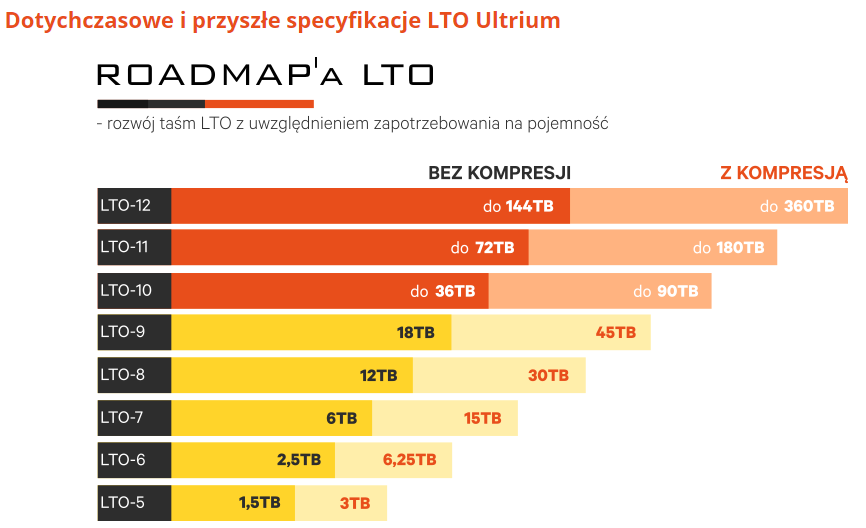
    Standard LTO9 tape capacity without compression. With compression it is 45TB.
    Graphic showing the specification of LTO Ultrium tape capacities from LTO-5 to LTO-12 in terabytes, with and without compression. .
  • #25 21105803
    andrzejlisek
    Level 32  
    Posts: 3637
    Help: 82
    Rate: 707
    speedy9 wrote:
    Standard LTO9 tape capacity without compression. With compression it is 45TB.
    While cartridges are relatively inexpensive per terabyte, the drives and equipment needed to write and read them, have very cosmic prices.

    Some time ago I wrote about the interchangeability of media and devices, in hard drives this is unlikely to work and is not easy to do (I do not know how the cost of production of the platters themselves with heads and the cost of production of all the rest is distributed), but in tapes, as much as possible. It's hard to imagine a 'drive' that would actually be a streamer with a built-in and non-replaceable tape, where one unit would cost several thousand or more. And so, someone being 'on the money' will buy one streamer and then, as needed, just buy tapes for a couple of hundred apiece. And if the streamer breaks down, there is no risk of losing the data, because the cassette can easily be restored in another device.
  • #26 21105813
    kaleron

    HDD and data recovery specialist
    Posts: 7037
    Help: 960
    Rate: 2319
    andrzejlisek wrote:
    production cost
    - is one thing, and the technical difficulty of replacement is another. If only the question of eccentricity and resealing. Half a century ago it was still possible to find disks where it was foreseen that the platters could be rearranged, but this is no longer coming back. Disks that have been mechanically tampered with only need to be reloaded, not used normally.
    Company Account:
    Kaleron sp. z o. o.
    Hirszfelda 4/18, Jelcz-Laskowice, 55-231 | Tel.: 713XXXXXX (Show) | Company Website: https://kaleron.pl
  • #27 21105820
    stachu_l
    Level 38  
    Posts: 2964
    Help: 476
    Rate: 1110
    andrzejlisek wrote:
    Some time ago I wrote about interchangeability of media and devices, in hard drives this is unlikely to work and is not easy to do
    Today it doesn't work but in the mainframe days (IBM 360/370 and derivative RIAD, ICL1900 and compatible ODRA 1300 and many other designs of the time) it was "hard drives" that had interchangeable platter packages (19" I think). In small systems there were single platters - e.g. MERA 300 - there was even a mixture - one platter permanently and the other interchangeable.
    Larger systems had packages of platters - several to a dozen and capacities somewhere up to 64MB.
    After miniaturisation, certainly the cost of mechanics and electronics decreased and the profitability of replacing packages of platters decreased and in addition it was increasingly difficult because portability requires accurate positioning correctly aligned on all drives. Higher data density means more accurate positioning.
    andrzejlisek wrote:
    It is difficult to imagine a "drive" that would actually be a streamer with a built-in and non-replaceable tape,
    It is difficult to imagine this because the access time would be nightmarish for many cases - an extreme case of reading alternately the first and last sectors/records.
  • 📢 Listen (AI):

    Topic summary

    ✨ The discussion focuses on the evolution of hard disk drive (HDD) electronics from early models with capacities as low as 40MB to modern drives reaching up to 10TB. Participants highlight the complexity and variability of HDD electronics, noting that even within the same model, PCB interchangeability is often problematic due to differences in ROM and signal processors. The conversation also touches on the historical use of various components, such as LM358 and LM324 op-amps, and the transition from older interfaces like MFM to modern standards like SATA and ATA. Additionally, there are mentions of other storage technologies, including DVD-RAM, magneto-optical disks, and tape drives, emphasizing their continued relevance in data storage solutions.
    Generated by the language model.

    FAQ

    TL;DR: From 40MB boards full of discrete parts to compact 10TB PCBs, HDD electronics moved toward tighter integration, yet one expert point remains: "the motor controller will probably never make it into the processor." This FAQ helps repair-minded readers, retro-computing fans, and storage learners understand why HDD controller design changed, why PCB swaps fail, and why tape still survives. [#21076170]

    Why it matters: If you repair, recover, collect, or compare storage hardware, the thread shows which HDD changes were evolutionary, which were compatibility traps, and which old media still make technical sense.

    Example from the thread Interface or format Electronics trend Notable detail
    40MB HDD Parallel Many discrete components SRAM 32k 8b, separate ROM, separate power stages
    4GB HDD Ultra ATA Higher integration Around 4MB/s transfer mentioned
    40GB HDD ATA133 Fewer main chips Up to 10x faster than the 4GB predecessor
    80GB HDD SATA Interface merged into controller Separate SATA chip disappears in newer generation
    10TB HDD SATA Much smaller PCB Still keeps controller, RAM, and power chips

    Key insight: HDD PCBs shrank, but they did not become generic. Modern drives still separate signal processing, cache memory, and motor power because those functions have different electrical and manufacturing needs. [#21072338]

    Quick Facts

    • The thread traces HDD electronics across 40MB, 4GB, 40GB, 80GB, and 10TB designs, showing a steady move from many discrete parts to three dominant chips on modern boards. [#21072338]
    • The 4GB Ultra ATA example is described as reaching about 4MB/s, while the 40GB ATA133 drive is said to deliver up to 10x that predecessor's transfer rate. [#21072338]
    • One 40MB board stores data on one platter with two heads; the 4GB example uses two platters and four heads. [#21072338]
    • LTO tape is still presented as practical archival media: one post states LTO-9 holds 18TB native or 45TB with compression. [#21105742]
    • A forum example of VHS-based backup on Amiga reports 340MB to 520MB per cassette, showing how large-capacity removable storage predated cheap flash media. [#21091687]

    How did hard disk drive electronics evolve from a 40MB parallel-interface HDD to a 10TB SATA drive?

    They evolved from many discrete chips to a compact, highly integrated PCB. The 40MB board had separate interface logic, 32k×8 SRAM, ROM, a platter-motor power stage, and a head-control power stage. The 4GB Ultra ATA board integrated more logic, the 40GB ATA133 board dropped to three main chips, and newer 80GB SATA boards folded the interface into the controller. By 10TB, the board became much smaller, but still kept three core functions separate: controller, RAM cache, and motor power. [#21072338]

    Why do modern 10TB HDD PCBs still use three main chips for the controller, RAM cache, and motor power stage?

    They stay separate because the jobs are electrically different. The thread explains that the motor controller handles relatively high currents, creates heat, and injects noise, so it is better kept away from the signal processor. RAM also remains separate because it is a different memory function and may support cache-size variants. As one expert put it, “the motor controller will probably never make it into the processor,” because mixing power switching with sensitive read-channel processing hurts design margins. [#21076170]

    What is ST-506 MFM, and how did drives like the Seagate ST-225 work with an external controller?

    “ST-506 MFM” is an HDD interface standard that connects early hard drives to an external controller, separating the drive mechanics from much of the control electronics. In the thread, the ST-225 is cited as a 20MB Seagate MFM drive. Participants compare it to a floppy drive model, where the drive needed a separate controller card rather than exposing a fully standardized high-level data interface on the drive itself. The thread also argues that integrating the controller into the HDD later accelerated hard-drive development. [#21077314]

    Why can't I usually swap a hard drive PCB just by matching the model number, and when does the ROM chip also need to be transferred?

    You usually cannot swap by model number alone because HDD electronics are often drive-specific. One post states that even two disks from the same production batch may fail after a plain PCB swap. In those cases, the ROM must also be moved because it carries individual programming data tied to that drive. The simple “same sticker, same board” rule stopped being reliable about 20 years ago, especially once per-drive adaptation data became critical for signal decoding. [#21072594]

    In what situations can HDD PCBs from related models be interchangeable, and what label details matter most?

    PCBs from related models can work when the underlying hardware family matches, not just the retail model name. The thread says boards from other related models often fit, but you must read the label carefully because one sticker can hide technically different designs, or identical hardware can ship under different names. The most important detail is whether the board uses the same signal processor family and matching firmware context. If not, a ROM transfer is still required even when the board looks physically compatible. [#21076170]

    What is the Soft UnderLayer (SUL) in perpendicular magnetic recording, and why does it matter for signal processing?

    “Soft UnderLayer (SUL) is a magnetic layer used in perpendicular recording that closes the field lines from the write head, but also adds electromagnetic interference that the read channel must handle.” The thread says SUL became important after perpendicular recording arrived, because it increased the need for individually programmed signal-amplification parameters, called adapters. That is one reason modern drives need per-drive tuning data and why careless PCB swapping fails even when the mechanical model appears identical. [#21076170]

    How do ATA, Ultra ATA, ATA133, and SATA HDD interfaces differ in controller integration and transfer speeds?

    The thread presents them as a progression in both bandwidth and integration. The 4GB Ultra ATA drive is described at about 4MB/s and still uses a separate interface/control area plus SRAM and ROM. The 40GB ATA133 example is said to be up to 10x faster than that 4GB predecessor and already collapses the board into three main chips. SATA then moves further by first using a distinct interface chip and later integrating SATA directly into the disk controller, reducing chip count again. [#21072338]

    What changed inside HDDs when manufacturers moved from separate interface chips to a single integrated SATA controller?

    Manufacturers removed one whole chip class from the PCB and pushed more logic into the main controller. In the first 80GB SATA example, the board still has a separate interface circuit, controller, SDRAM, and power chip. In the newer 80GB SATA generation, the separate interface chip disappears, the controller connects directly to SATA, and the electronics move to the side with the motor, actuator, and head contacts. That cut board complexity while keeping RAM and power handling separate. [#21072338]

    How were early MFM hard drives with stepper-motor head positioning different from later linear-motor designs?

    Early MFM drives used simpler mechanical positioning and later designs switched to more precise linear actuation. A participant recalls IBM 10MB to 40MB MFM disks where the head drive was a simple stepper motor. In slightly newer drives with linear motors, he saw a DAC0832 generating the head-position signal for the linear motor driver. Another user even remembered units with an external knob linked to the head drive, showing how visibly mechanical early designs could be. [#21072710]

    Could LM358 or LM324 op-amps really be used in old 40MB HDD read/write electronics, or were dedicated head amplifier ICs required?

    Dedicated head amplifier ICs were required for the actual read/write path. One user first suspected LM358 or LM324 devices on the 40MB PCB might amplify head signals, but another participant rejected that explanation because those op-amps were too slow. He states that special multi-channel read/write amplifier circuits were used for HDD heads. The later follow-up keeps the doubt alive only as a question, not as evidence, so the thread’s clearest answer favors dedicated head-channel ICs. [#21072710]

    What is DVD-RAM, and how is it different from DVD-R and other writable optical discs for long-term use?

    “DVD-RAM is a rewritable optical disc format that supports repeated file deletion and writing, and some versions were sold in protective cartridges.” In the thread, users contrast it with common DVD-R discs and note that a 20-year-old DVD-RAM still remains readable and writable. They also say early DVD-RAM media needed dedicated drives when sold in cartridges, while later loose discs could work in ordinary DVD recorders. That makes DVD-RAM sound more like removable storage than one-time-burn media. [#21084798]

    How were Labelflash, DiscT@2, and LabelTag actually used in practice compared with LightScribe?

    The thread raises them as niche labeling features, not mainstream storage workflows. One user asks who actually used Labelflash, DiscT@2, or LabelTag in practice and explicitly excludes LightScribe from the question. No one in the discussion then provides a real-world success case or workflow for those three systems. The practical takeaway is simple: unlike DVD-RAM, they appear in the thread as curiosity features for disc marking rather than important long-term data formats. [#21072679]

    ZIP drive vs DVD-RAM vs magneto-optical disc vs MiniDisc — which storage format was better for removable data archiving?

    No single format wins in the thread; each served a different niche. DVD-RAM is praised for surviving about 20 years with continued read, erase, and write capability. ZIP disks are described as removable drives handled like regular media. Magneto-optical formats appear as notable archival designs, and MiniDisc is cited as a still-liked Sony magneto-optical audio format. If you want the thread’s strongest archival vote, DVD-RAM gets the clearest durability endorsement, while ZIP gets the easiest-drive-handling comment. [#21084798]

    How do I read data from an old HP USB streamer or DAT-like tape cartridge on a modern Linux or Unix system?

    Use a tape-aware workflow rather than treating it like a normal USB disk. 1. Connect the HP USB streamer to a Linux or Unix system. 2. Use tape-oriented tools; the thread specifically suggests Unix/Linux and the tar command. 3. Expect streamer-style access, unlike ZIP or DVD-RAM, which behave more like regular removable drives. The key limit is usability: having the cartridge and drive is not enough if you lack the right tape workflow and software expectations. [#21092521]

    Why are LTO tape libraries still used at places like banks, CERN, and CI TASK instead of relying only on HDDs or SSDs?

    They remain useful because tapes are cheap per terabyte, durable in storage, and consume no power on the shelf. The thread says banks still use streamers, and another post cites CERN and CI TASK as examples of tape-library deployments. LTO-9 is quoted at 18TB native or 45TB compressed, which makes tapes attractive for large cold archives. The trade-off is speed and equipment cost: one user says copying can drag badly on old arrays with millions of files. [#21092549]
    Generated by the language model.
    ADVERTISEMENT