logo elektroda
logo elektroda
X
logo elektroda

LED lamp with Meko and Tuya TYWE3L module does not respond to remote control. What to do?

jakoku 1200 13
ADVERTISEMENT
Treść została przetłumaczona polish » english Zobacz oryginalną wersję tematu
  • #1 21429202
    jakoku
    Level 11  
    Posts: 37
    Rate: 6
    Led lamp - with Meko LED Driver module MKP060C1450BLTG-1.
    The lamp has stopped responding to the remote control.
    Inside the module ł Tuya TYWE3L .

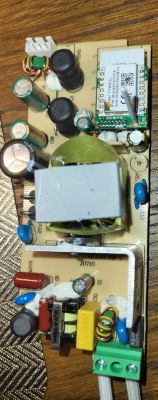
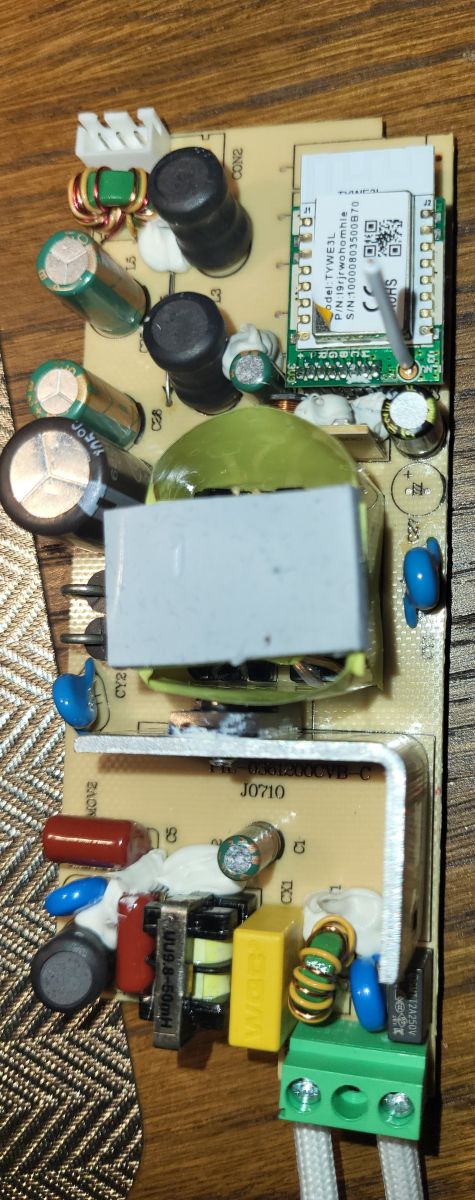
    LED driver module with electronic components and Tuya TYWE3L module. .
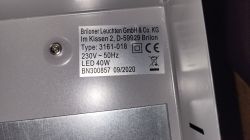
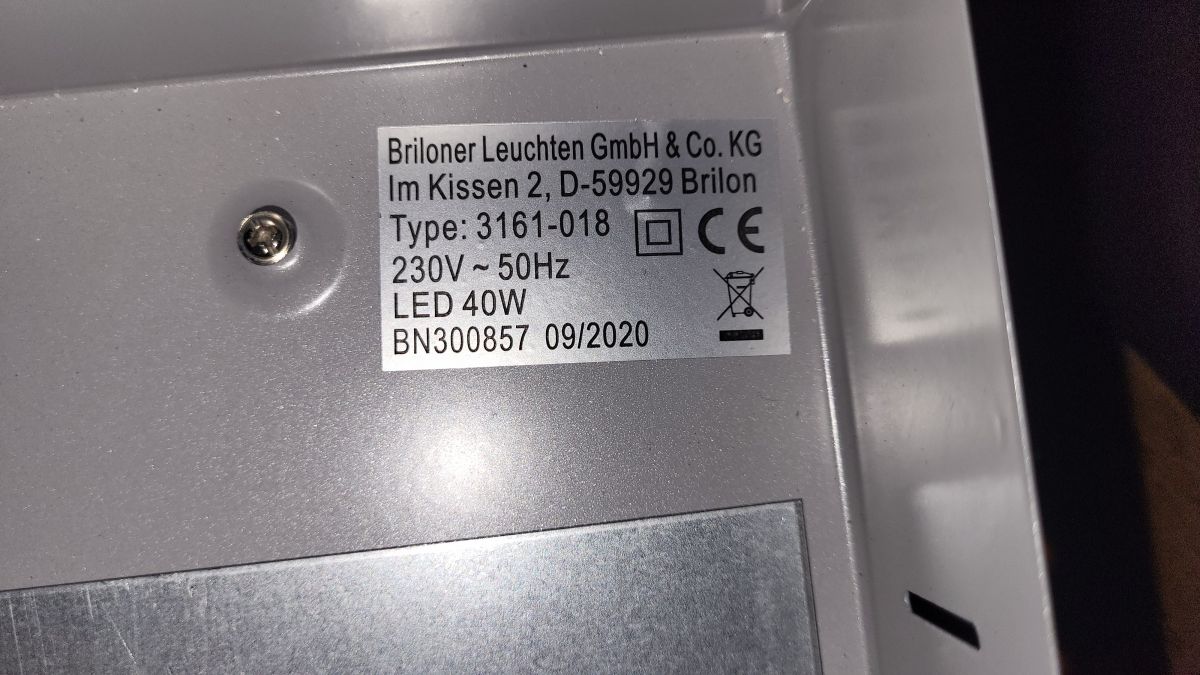
    Nameplate of LED lamp with technical data.
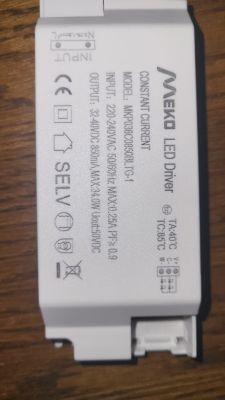
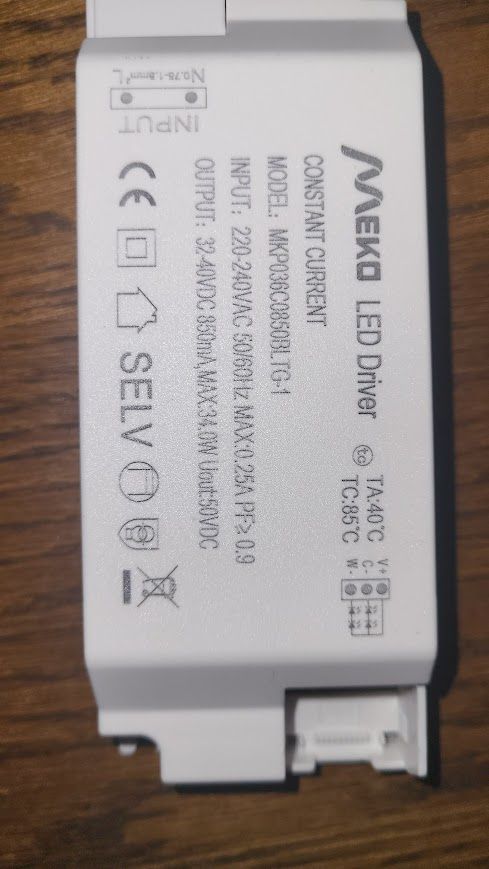
    Meko MKP060C1450BLTG-1 LED driver module on a wooden surface. .
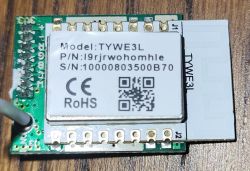
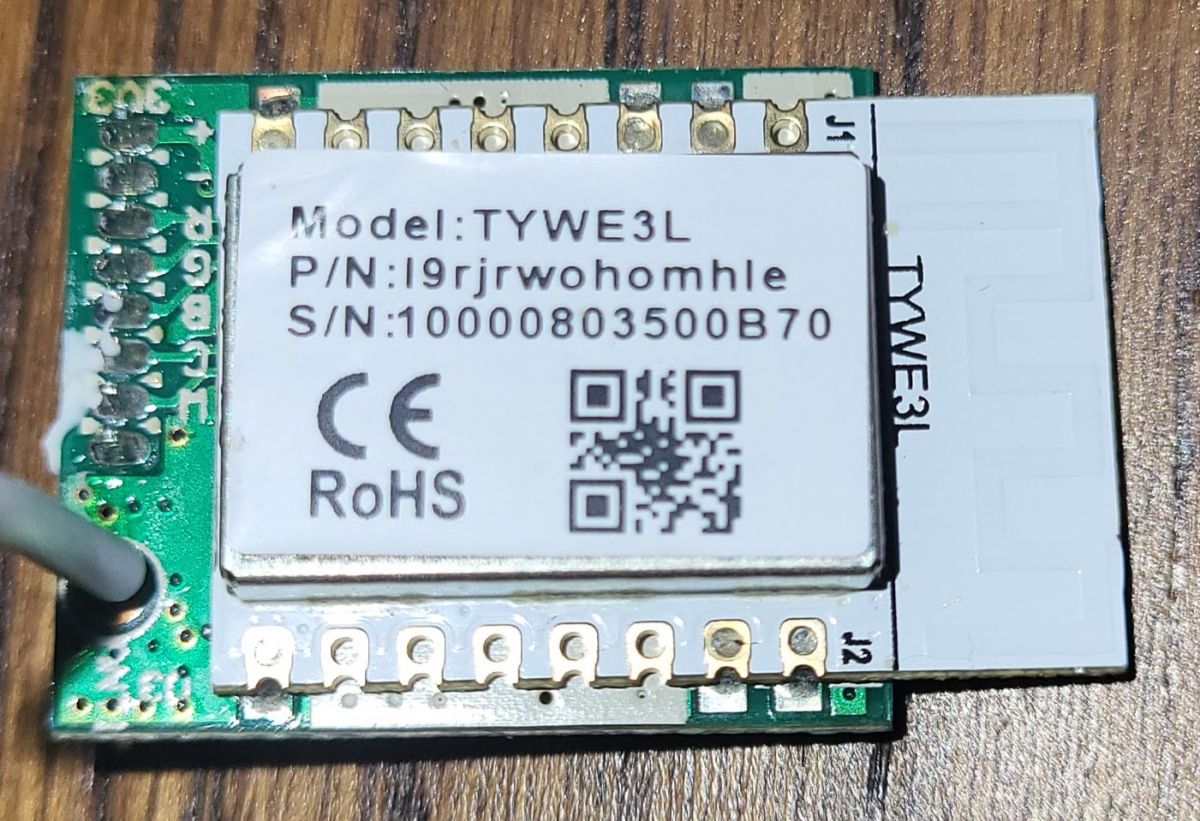
    Tuya TYWE3L module on a green circuit board. .

    Added after 43 [minutes]:

    The lamp works. Lights. Since the remote control malfunctioned it has been able to start in sequence off - on, off - on.
  • ADVERTISEMENT
  • #2 21430251
    p.kaczmarek2
    Moderator Smart Home
    Posts: 14416
    Help: 650
    Rate: 12371
    With the Tuya app still working?

    No swollen capacitors?
    How do I fix a smart device that crunches, squeaks and makes strange noises?
    Helpful post? Buy me a coffee.
  • ADVERTISEMENT
  • #3 21430527
    jakoku
    Level 11  
    Posts: 37
    Rate: 6
    It has stopped working.

    Added after 4 [minutes]:

    The application does not see the lamp.
    No damage was visible.
  • #4 21430566
    p.kaczmarek2
    Moderator Smart Home
    Posts: 14416
    Help: 650
    Rate: 12371
    Is it not possible to enter pairing mode?
    Helpful post? Buy me a coffee.
  • #5 21430603
    jakoku
    Level 11  
    Posts: 37
    Rate: 6
    Absolutely nothing.
  • ADVERTISEMENT
  • #6 21430614
    p.kaczmarek2
    Moderator Smart Home
    Posts: 14416
    Help: 650
    Rate: 12371
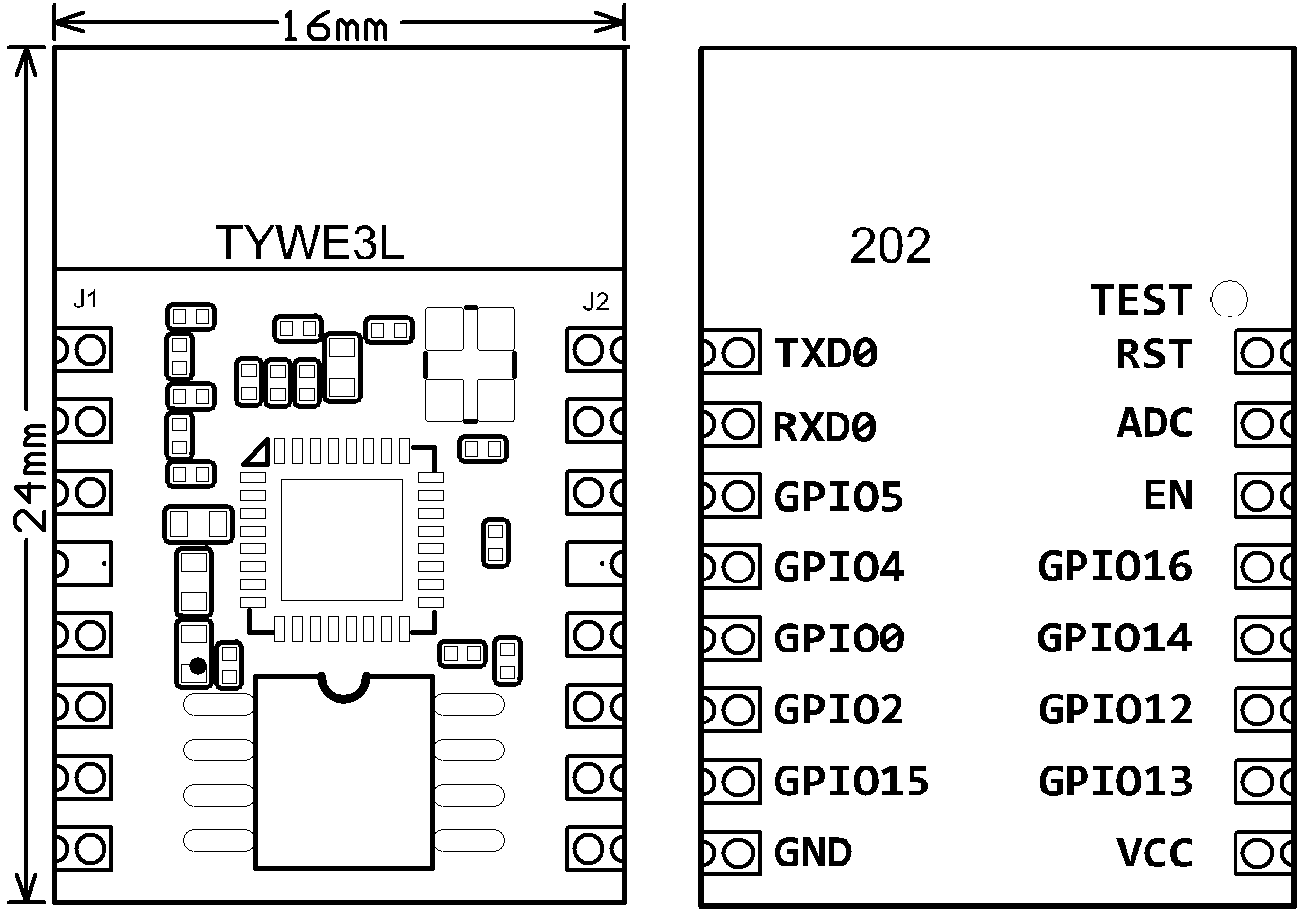
    The first thing I would start with is to disconnect the whole thing from the 230V mains and supply power (AFTER DISCONNECTING FROM THE NETWORK) from a good source of 3.3V to the GND and VDD pins from TYWE3L. This 3.3V must be able to provide adequate current, so do not take it e.g. the output of a USB to UART converter.
    Diagram of TYWE3L ESP8266 module with pin labels. .
    If the hardware then appears in the application, you can suspect that there is something wrong with the power supply. In the opposite situation, the WiFi module itself is to blame, maybe something software is broken.

    The TYWE3L is simply an ESP8266, so you can simply connect a USB to UART converter to it, connect GPIO0 to ground and read the flash. Make a copy of the 2MB batch and try uploading Tasmota, maybe with Tasmota this flash will work. It's hard to determine what's at fault for now. Of course Tasmota is not Tuya, but at least you will revive the hardware....
    Helpful post? Buy me a coffee.
  • #7 21430743
    jakoku
    Level 11  
    Posts: 37
    Rate: 6
    Thanks. Always something...
  • #8 21430753
    p.kaczmarek2
    Moderator Smart Home
    Posts: 14416
    Help: 650
    Rate: 12371
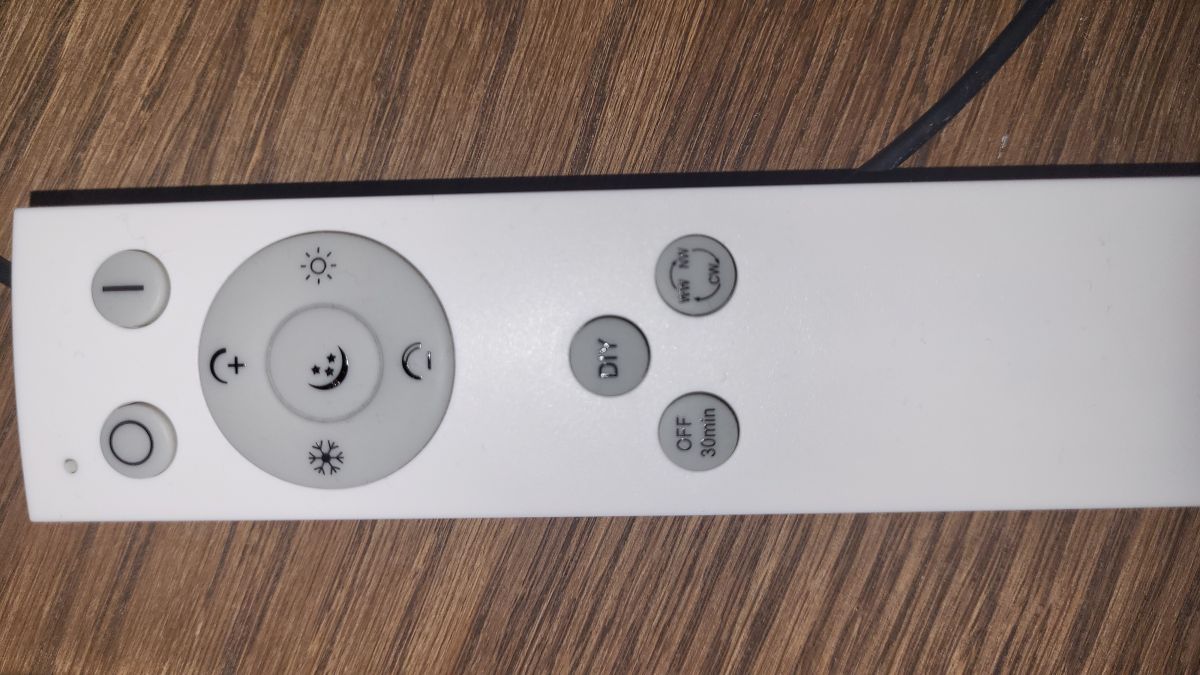
    And what kind of remote control did you have for that lamp there? I don't see an IR receiver on the board so I wonder if Tasmota will support it.

    If the WiFi module is quite damaged, you could solder a matching ESP12 in its place.
    Helpful post? Buy me a coffee.
  • #9 21431011
    jakoku
    Level 11  
    Posts: 37
    Rate: 6
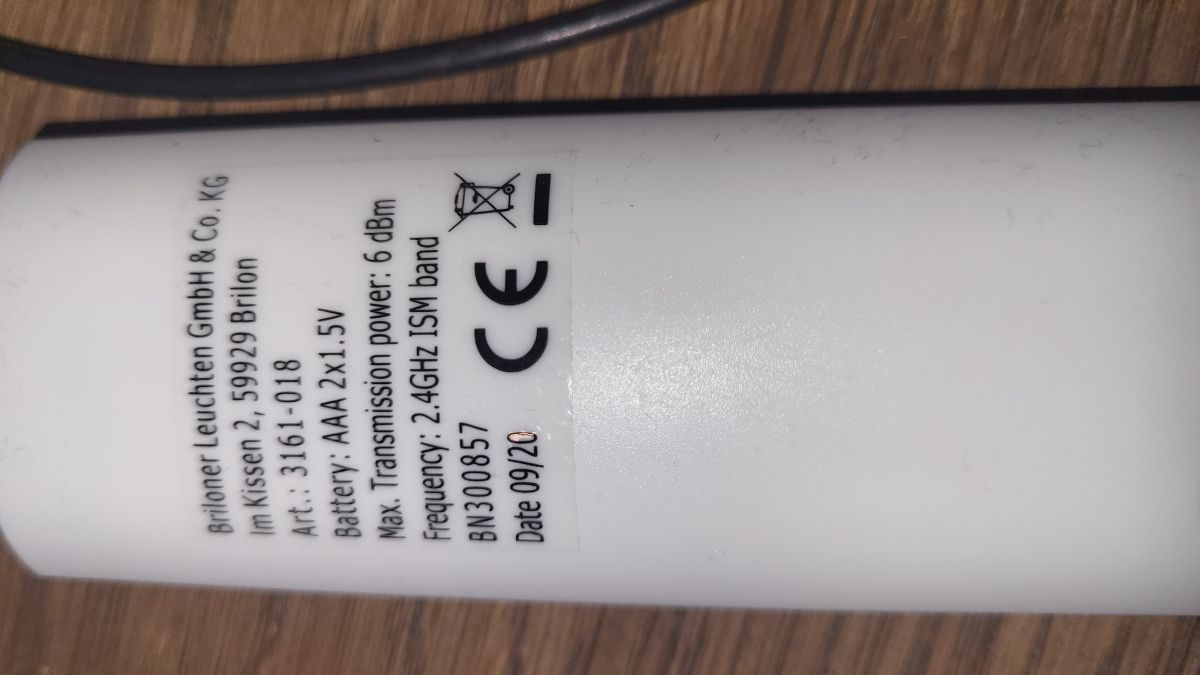
    Product label on a white device with technical information. .
    Remote control with various buttons for lighting, placed on a wooden surface.
  • #11 21449057
    p.kaczmarek2
    Moderator Smart Home
    Posts: 14416
    Help: 650
    Rate: 12371
    What exactly are you asking?

    Then dismantle the power supply and check the board, maybe it's something trivial, an electrolytic capacitor?
    Helpful post? Buy me a coffee.
  • #12 21450487
    jakoku
    Level 11  
    Posts: 37
    Rate: 6
    >>21449057 .
    I buy, remove the lamp, replace the power supply, fit the lamp in place :) .
    The worst thing about such failures is that the lamp has to hang and shine.... well it won't lie on the desk ;)
  • ADVERTISEMENT
  • #13 21475677
    jakoku
    Level 11  
    Posts: 37
    Rate: 6
    unfortunately, repairing this device is definitely a bit more ... soldering the esp12 module requires some pretty amazing skills


    and this "tyw3el" crap cannot be checked with a USB converter
  • #14 21475719
    p.kaczmarek2
    Moderator Smart Home
    Posts: 14416
    Help: 650
    Rate: 12371
    What do you want to check? How do you want to desolder it?

    You can either hot air, and if someone insists, they can even desolder it that way:


    .
    Only lift when the binder has melted, otherwise the pads will come off! No force can be used. .
    Helpful post? Buy me a coffee.

Topic summary

✨ A LED lamp equipped with a Meko LED Driver module MKP060C1450BLTG-1 and a Tuya TYWE3L WiFi module stopped responding to its remote control and became unresponsive to the Tuya app, which no longer detects the device. The lamp still powers on and cycles on/off manually but does not enter pairing mode or respond to any commands. No visible hardware damage or swollen capacitors were found. Suggested troubleshooting steps include disconnecting the lamp from mains and powering the TYWE3L module directly with a stable 3.3V supply to verify power supply issues. The TYWE3L module, based on the ESP8266 chip, can be interfaced via USB to UART for firmware backup or replacement with alternative firmware such as Tasmota, although compatibility with the original remote control is uncertain due to lack of an IR receiver. If the WiFi module is damaged, replacing it with an ESP12 module is an option, but requires advanced soldering skills. The power supply unit, possibly a Bluetooth LED power supply (30W, 400-750mA DC), is suspected to be faulty and may need replacement. Desoldering the TYWE3L module must be done carefully with hot air to avoid damaging PCB pads.
Generated by the language model.

FAQ

TL;DR: If your Tuya TYWE3L lamp stops responding, treat it like an ESP8266 with 2 MB flash—“The TYWE3L is simply an ESP8266”—and power‑test it at 3.3 V; if it appears, the PSU’s bad, else the module/firmware is. [Elektroda, p.kaczmarek2, post #21430614]

Why it matters: For DIY fixers of Meko/Tuya lamps, this guides safe, fast diagnosis without trial‑and‑error or risky mains probing.

Quick Facts

Why won’t my Tuya TYWE3L lamp respond to the remote or Tuya app?

Start by isolating mains and powering the TYWE3L from a stable 3.3 V source. If it shows up in the Tuya app, the internal power supply is failing. If it still doesn’t appear or pair, the Wi‑Fi module or its firmware likely failed. [Elektroda, p.kaczmarek2, post #21430614]

How do I power‑test the TYWE3L safely at 3.3 V?

Do this 3‑step check:
  1. Unplug the lamp from 230 V completely.
  2. Feed regulated 3.3 V to the TYWE3L VDD and GND with adequate current.
  3. Scan in the Tuya app; if it appears, suspect the PSU. Do not use a USB‑UART’s 3.3 V pin. [Elektroda, p.kaczmarek2, post #21430614]

The lamp won’t enter pairing mode at all—what should I check?

If pairing won’t start and the app never sees it, the control side is offline. Perform the 3.3 V bench‑power test on TYWE3L. If there’s still no broadcast or response, back up the flash and reflash or replace the module. [Elektroda, p.kaczmarek2, post #21430614]

Can I back up and flash TYWE3L via USB‑UART? How?

Yes. Wire GND and 3.3 V to VDD, and connect UART. Hold GPIO0 to GND to enter bootloader. Read and save the full 2 MB flash. You can temporarily flash Tasmota to confirm the hardware still works. [Elektroda, p.kaczmarek2, post #21430614]

Will flashing Tasmota restore Tuya remote/app control?

No. “Of course Tasmota is not Tuya.” It won’t pair with Tuya cloud or proprietary remotes. Use it to verify LEDs, driver, and module respond, and for basic on/off or dimming during diagnosis. [Elektroda, p.kaczmarek2, post #21430614]

Can my USB‑to‑UART adapter power the TYWE3L for testing?

Avoid that. Use a dedicated 3.3 V supply that can deliver sufficient current. As the expert put it, “do not take it e.g. the output of a USB to UART converter.” [Elektroda, p.kaczmarek2, post #21430614]

There’s no IR receiver on the board—what does that mean for the remote?

No IR receiver suggests the remote uses RF or Bluetooth handled by the smart module. In that case, Tasmota may not support the original remote protocol without extra hardware or drivers. [Elektroda, p.kaczmarek2, post #21430753]

Is the power supply the likely failure point?

Yes, if the module appears when bench‑powered at 3.3 V. Open the PSU and inspect for obvious issues, especially bulging or dried electrolytic capacitors. Replace failed parts or the entire driver as needed. [Elektroda, p.kaczmarek2, post #21449057]

Can I swap in a Bluetooth LED power supply? What spec should I match?

You can, provided the constant‑current rating and voltage range match your LED string. The linked option is 40 W, constant current 750–1050 mA. Verify mechanical fit, wiring, and control method compatibility before purchase. [“Zasilacz LED Bluetooth 40W 750–1050 mA staloprądowy”]

How do I safely remove the TYWE3L module without damaging pads?

Use hot air or a careful iron technique to melt all joints fully. “Only lift when the binder has melted, otherwise the pads will come off! No force.” That edge‑case failure ruins the PCB. [Elektroda, p.kaczmarek2, post #21475719]

My lamp still lights from mains but won’t respond—what does that suggest?

The LED engine and primary driver likely operate, but the control path is down. Focus on the TYWE3L and its 3.3 V rail using the bench‑power test to separate PSU from module faults. [Elektroda, p.kaczmarek2, post #21430614]

Can I replace a failed TYWE3L with an ESP‑12 module?

Yes. If the Wi‑Fi module is damaged, a matching ESP‑12 can be soldered in its place. Ensure footprint match and reconfigure firmware to drive your lamp’s channels correctly. [Elektroda, p.kaczmarek2, post #21430753]
Generated by the language model.
ADVERTISEMENT