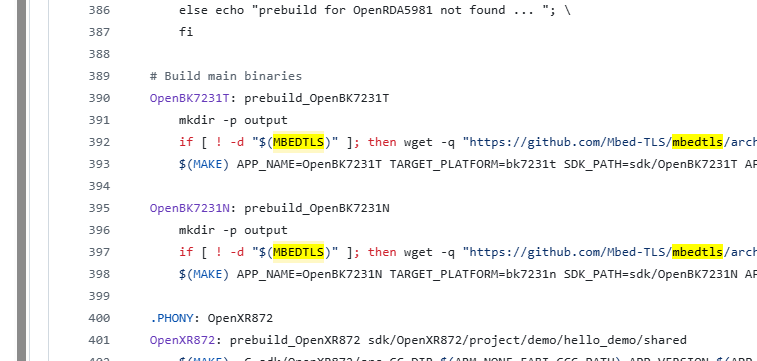
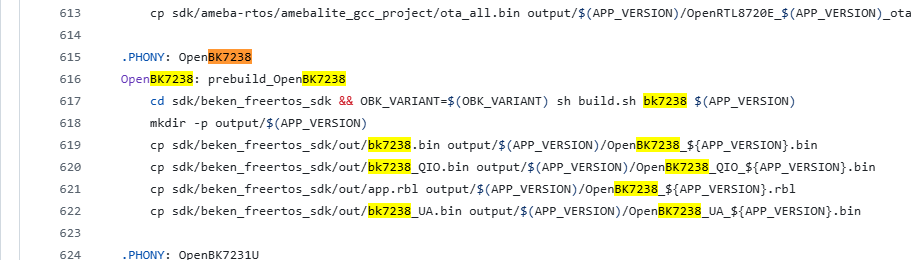
I would like to ask for help in building OpenBeken to use MQTT over TLS.
My device is a recent Tuya S06 Pro Temperature/Humidity/IR Sensor.
The device has a BK7238.
My current position:
- I have flashed my device with several of the latest firmware releases (up to 1.18.232).
- I have connected the device to my local MQTT server and Home Assistant.
- I can communicate with the device via MQTT and HTTP.
I wish to use the device in a location outside my local LAN.
The best path to follow here is to use:
- A third-party MQTT server (e.g., HiveMQ) or
- A Nabu Casa webhook (configured via a suitable CMD).
Unfortunately, either of these will require TLS support.
The default BK7238 build does not seem to support MQTT over TLS out-of-the-box.
I have seen references to the fact that this is possible via forum posts and the comments in /src/user_mbedtls_config.h.
This means building my own firmware version.
I know I can do this via a GitHub runner, but I decided to try and get this running locally for simplicity.
I am very comfortable with many of the tools involved (e.g., Docker).
So far I have:
- Installed a local Docker build environment (as per the GitHub).
- Successfully built and performed a successful OTA update of my own locally built firmware.
- Tested that this firmware works on the S06.
However, try as I might, I have been unable to build a version of the firmware that uses TLS.
I started using the build command:
To then add the TLS component, I added the option: --env MAKEFLAGS="-DCFG_USE_MBEDTLS"
To give the full build command:
The build completes successfully.
However, the .bin and .rbl files produced are the same size whether I use *CFG_USE_MBEDTLS* or not—I had expected a larger binary with TLS included.
With this firmware installed using OTA, the OpenBeken WebApp logfile shows the following:
When I look at the traffic sent to my MQTT server, I can still see the connection being attempted to port 8883 with non-encrypted username and password.
In addition, I see no options in the MQTT configuration to enable MQTT over TLS.
Therefore, I am fairly confident the firmware I have built does not utilize TLS.
Can anyone help me to understand how to build firmware which includes MQTT over TLS support?
AI: Have you made any changes to other configuration files, such as user_mbedtls_config.h or CMakeLists.txt, to explicitly enable mbedTLS or TLS support in your build, or have you only set the MAKEFLAGS environment variable?
51210453f27281f0740f385d3b36719ade38c090
AI: During the build process, did you notice any output, warnings, or errors related to mbedTLS or TLS support that might indicate whether it is being included or skipped in your firmware build?
No; my review of the code showed that the #define CFG_USE_MBEDTLS appeared to be the correct route.
My device is a recent Tuya S06 Pro Temperature/Humidity/IR Sensor.
The device has a BK7238.
My current position:
- I have flashed my device with several of the latest firmware releases (up to 1.18.232).
- I have connected the device to my local MQTT server and Home Assistant.
- I can communicate with the device via MQTT and HTTP.
I wish to use the device in a location outside my local LAN.
The best path to follow here is to use:
- A third-party MQTT server (e.g., HiveMQ) or
- A Nabu Casa webhook (configured via a suitable CMD).
Unfortunately, either of these will require TLS support.
The default BK7238 build does not seem to support MQTT over TLS out-of-the-box.
I have seen references to the fact that this is possible via forum posts and the comments in /src/user_mbedtls_config.h.
This means building my own firmware version.
I know I can do this via a GitHub runner, but I decided to try and get this running locally for simplicity.
I am very comfortable with many of the tools involved (e.g., Docker).
So far I have:
- Installed a local Docker build environment (as per the GitHub).
- Successfully built and performed a successful OTA update of my own locally built firmware.
- Tested that this firmware works on the S06.
However, try as I might, I have been unable to build a version of the firmware that uses TLS.
I started using the build command:
docker run -it -v "$(pwd)/..":/OpenBK7231T_App --env TARGET_SDKS="OpenBK7238" openbk_build
To then add the TLS component, I added the option: --env MAKEFLAGS="-DCFG_USE_MBEDTLS"
To give the full build command:
docker run -it -v "$(pwd)/..":/OpenBK7231T_App --env TARGET_SDKS="OpenBK7238" --env MAKEFLAGS="-DCFG_USE_MBEDTLS" openbk_build
The build completes successfully.
However, the .bin and .rbl files produced are the same size whether I use *CFG_USE_MBEDTLS* or not—I had expected a larger binary with TLS included.
With this firmware installed using OTA, the OpenBeken WebApp logfile shows the following:
    Info:MQTT:mqtt_userName <removed>
    mqtt_pass <removed>
    mqtt_clientID obk8C428848
    mqtt_host 192.168.7.205:8883
    Info:MAIN:Time 42, idle 120724/s, free 107896, MQTT 0(3), bWifi 1, secondsWithNoPing -1, socks 2/24
    Info:MQTT:mqtt_connection_cb: Disconnected, reason: 256(Disconnected)
    Info:MAIN:Time 43, idle 117295/s, free 108280, MQTT 0(3), bWifi 1, secondsWithNoPing -1, socks 2/24
When I look at the traffic sent to my MQTT server, I can still see the connection being attempted to port 8883 with non-encrypted username and password.
In addition, I see no options in the MQTT configuration to enable MQTT over TLS.
Therefore, I am fairly confident the firmware I have built does not utilize TLS.
Can anyone help me to understand how to build firmware which includes MQTT over TLS support?
AI: Have you made any changes to other configuration files, such as user_mbedtls_config.h or CMakeLists.txt, to explicitly enable mbedTLS or TLS support in your build, or have you only set the MAKEFLAGS environment variable?
51210453f27281f0740f385d3b36719ade38c090
AI: During the build process, did you notice any output, warnings, or errors related to mbedTLS or TLS support that might indicate whether it is being included or skipped in your firmware build?
No; my review of the code showed that the #define CFG_USE_MBEDTLS appeared to be the correct route.