











![Simple Python application for Fluke meters remote access via RS232 [early prototype]](https://obrazki.elektroda.pl/4431109600_1767465996.jpg "Simple Python application for Fluke meters remote access via RS232 [early prototype]")
I’d like to share an early prototype of a Python app designed for remote access to Fluke meters using RS232. At the moment, it supports basic communication and data retrieval. It's using CPL protocol over RS232 connection to send commands and receive information from scopemeter. So far, it was tested mostly on Fluke 199C.
![Simple Python application for Fluke meters remote access via RS232 [early prototype]](https://obrazki.elektroda.pl/9966223000_1767462933.jpg "Simple Python application for Fluke meters remote access via RS232 [early prototype]")
The app itself is written in Python with the help of AI by @DeDaMrAz, soon will be published on GitHub. Full script is in the topic attachment.
![Simple Python application for Fluke meters remote access via RS232 [early prototype]](https://obrazki.elektroda.pl/6163677800_1767469021.jpg "Simple Python application for Fluke meters remote access via RS232 [early prototype]")
CPL Protocol
Fluke CPL is a proprietary protocol Fluke uses to talk to their calibration instruments and run automated calibration procedures. It’s basically a command/response protocol that lets software set ranges, trigger measurements, read values, and control instrument state over GPIB, RS-232, or USB. It's documention has been released by Fluke, so it's possible to integrate Fluke devices into custom workflows.
![Simple Python application for Fluke meters remote access via RS232 [early prototype]](https://obrazki.elektroda.pl/3614988000_1767462850.png "Simple Python application for Fluke meters remote access via RS232 [early prototype]")
Device connection
Many Fluke devices can be connected to a PC via an optical USB interface rather than a direct electrical connection. This USB-IR cable is essentially a USB-to-serial adapter with an infrared transceiver, designed to mate with the optical port on Fluke meters and calibrators. On the PC side it appears as a virtual COM port, and CPL communication runs over it like standard serial, while the optical link provides isolation and avoids grounding issues.
![Simple Python application for Fluke meters remote access via RS232 [early prototype]](https://obrazki.elektroda.pl/2553626100_1767469223.jpg "Simple Python application for Fluke meters remote access via RS232 [early prototype]")
It's also possible to make a DIY version of this cable, as shown on schematic below:
![Simple Python application for Fluke meters remote access via RS232 [early prototype]](https://obrazki.elektroda.pl/4011044600_1767463220.png "Simple Python application for Fluke meters remote access via RS232 [early prototype]")
Program features
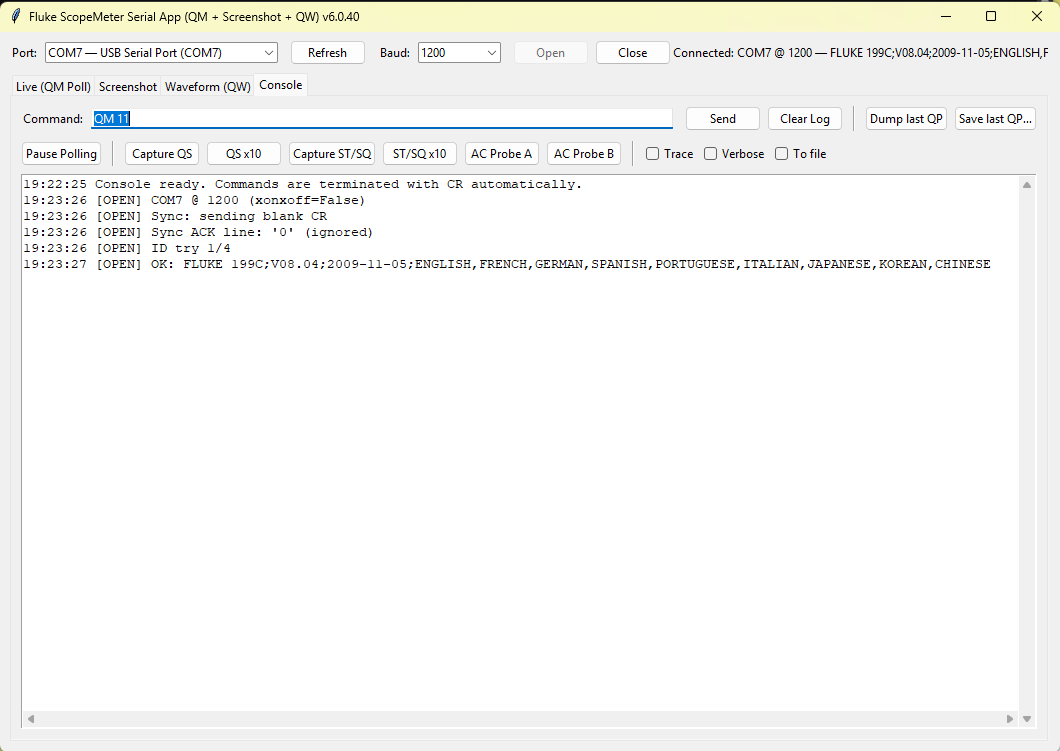
The top bar contains COM port enumeration, baud rate configuration, connection control (open/close), and device model information.
Then, there are separate tabs. First is Live (QM Poll):
![Simple Python application for Fluke meters remote access via RS232 [early prototype]](https://obrazki.elektroda.pl/1541772100_1767463157.png "Simple Python application for Fluke meters remote access via RS232 [early prototype]")
QM (Query measurements) and depending on the meter and measurement it exposes different indexes, for example, absolute measurement would be index 11, relative would be index 19 (or 21 on another meter). Usually you have min-max-total+absolute on some measurements so you'd have 4 indexes to read
Second tab is Screenshot:
![Simple Python application for Fluke meters remote access via RS232 [early prototype]](https://obrazki.elektroda.pl/4083641000_1767463161.png "Simple Python application for Fluke meters remote access via RS232 [early prototype]")
There you can grab the pixels data from the Fluke, so it's basically like a remote screen. It shows the same information that's on the physical screen. The only drawback is that it takes like 15 seconds to grab full screen at @19200bps. It probably could be improved by using other format than Epson Bitmap.
Third tab is Waveform:
![Simple Python application for Fluke meters remote access via RS232 [early prototype]](https://obrazki.elektroda.pl/1882763200_1767464043.png "Simple Python application for Fluke meters remote access via RS232 [early prototype]")
QW (query waveform) is implemented in 199C only. It allows faster access to waveform shown on the screen. Captured waveform can be exported, but currently only to raw binary format.
Usage
Just download script and run it with Python. You may also need to install dependencies:
py pip install pyserial numpy pillow matplotlib
Summary
This is the initial draft of Fluke Python tool. Not all commands are implemented, but it still provides a wide access to the variety of Fluke features. So far, it was tested mostly on Fluke 199C and Fluke 97. If anyone reading has another Fluke model that may be compatible, feel free to download the script and let us know how it works! Furthermore, which features do you think could be also useful and should be added in near future?
I am attaching the latest version of the script and Fluke documentation we used as reference.
Cool? Ranking DIY Helpful post? Buy me a coffee.

