I hope you all excuse me since I'm a bit of a beginner here.
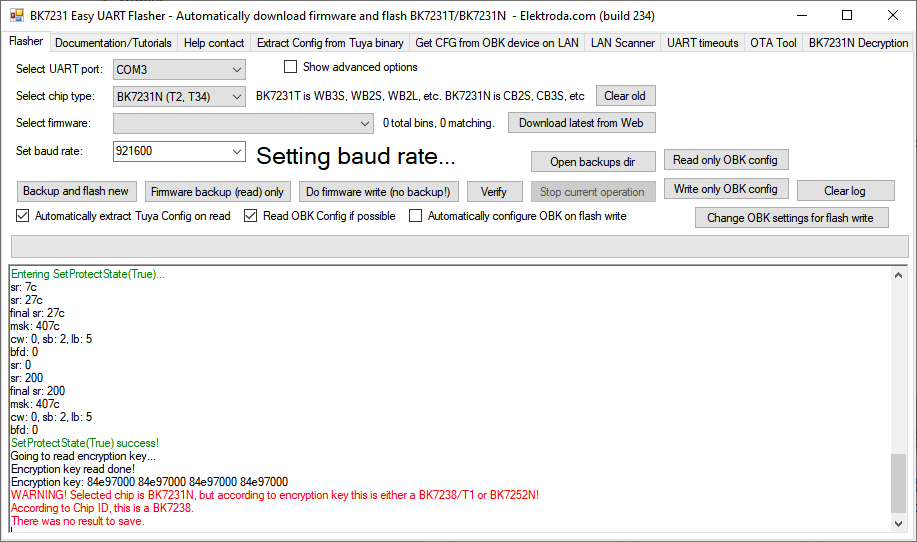
I have a small water leak sensor from AliExpress that I would like to re-flash with OpenBeken. It is branded as a Tuya device. Inside there is a T1 U HL chip which seems to correspond to a BK7238. I have a UART attached and am running BK7231Flasher.exe using mono under Linux. Communication seems to work at 921,600 baud without any glitches.
I copied the stock firmware but the Flasher app could not detect any Tuya configuration information. I installed OpenBK7238_QIU_1.18.248.bin. Just poking around the circuit I came to these conclusions:
pin 1 P14: 72 mV, goes to 0 V when device button is pushed
pin 2 P16: LED
pin 5 ADC/P20: maybe this is battery voltage related (measures 2.5 V)
pin 19 P21: This is 0 V and pulls to "high" when the water sensor is shorted.
I can't get any wifi communication going at all (yet). Nor have I had any luck with serial debug communication. So all of these changes I have tried, I tried with that "change OBK settings for flash write" button "write only OBK".
The thing is, with stock firmware P14 (pin 1) is "high" and pulled to 0 V when the device button is pushed. I tried adding Btn_ScriptOnly on channel 0 for P14, but it's still not pulled high (measures 72 mV and is pulled low from that low level by the button).
I figure it cannot work if the device thinks the button is pushed. So how do I set this pin to be pulled up internally?
If I can even start to get it working I will post pictures, at this stage I just have to see if there is any chance of even getting OpenBeken running at all first.
Is OpenBeken even running on the device you think? I can reflash it with stock firmware and it behaves like stock firmware again, so it's not broken.
I have a small water leak sensor from AliExpress that I would like to re-flash with OpenBeken. It is branded as a Tuya device. Inside there is a T1 U HL chip which seems to correspond to a BK7238. I have a UART attached and am running BK7231Flasher.exe using mono under Linux. Communication seems to work at 921,600 baud without any glitches.
I copied the stock firmware but the Flasher app could not detect any Tuya configuration information. I installed OpenBK7238_QIU_1.18.248.bin. Just poking around the circuit I came to these conclusions:
pin 1 P14: 72 mV, goes to 0 V when device button is pushed
pin 2 P16: LED
pin 5 ADC/P20: maybe this is battery voltage related (measures 2.5 V)
pin 19 P21: This is 0 V and pulls to "high" when the water sensor is shorted.
I can't get any wifi communication going at all (yet). Nor have I had any luck with serial debug communication. So all of these changes I have tried, I tried with that "change OBK settings for flash write" button "write only OBK".
The thing is, with stock firmware P14 (pin 1) is "high" and pulled to 0 V when the device button is pushed. I tried adding Btn_ScriptOnly on channel 0 for P14, but it's still not pulled high (measures 72 mV and is pulled low from that low level by the button).
I figure it cannot work if the device thinks the button is pushed. So how do I set this pin to be pulled up internally?
If I can even start to get it working I will post pictures, at this stage I just have to see if there is any chance of even getting OpenBeken running at all first.
Is OpenBeken even running on the device you think? I can reflash it with stock firmware and it behaves like stock firmware again, so it's not broken.