Hello everyone, in the following text I describe a problem concerning the ILI9486 display and the ESP32.
I have been trying to solve a somewhat complicated problem for a long time (something around half a year) - I have been trying to connect the display to the ESP32 so that I can get the desired result, initially to display shapes. I've tried searching for tutorials from the YouTube platform but it hasn't had much effect, most of the videos either do it with an Arduino UNO/MEGA or just have a different display, but after spending a long time doing this unsuccessful "research" I came across this certain video where the guy shows how to solve a problem I've been struggling with for a long time. Link to the video - https://www.youtube.com/watch?v=X3jjvWWvWzc
This video is very inaccurate, as the author didn't even show how he connected the power supply (which normally isn't a big problem, but here there is a problem between the 3.3 V and 5 V that the Arduino, to which the shield is dedicated, gives). I know you can see the VIN etc on the schematic from Fritzing, but I can't quite see it in real life as the pin layout is different.
After a long time of failures, I started to doubt the display's performance and thought the problem might be physical and it was the display that was faulty, so I checked the whole thing by connecting it to an Arduino UNO - the display worked perfectly. (This is the glue demo I uploaded from the MCUFRIEND library)
I also thought I'd include a link to the documentation from the shop page so that it's easier to identify this model - https://www.lcdwiki.com/res/MAR3501/3.5inch_Arduino_8BIT_Module_MAR3501_User_Manual_EN.pdf
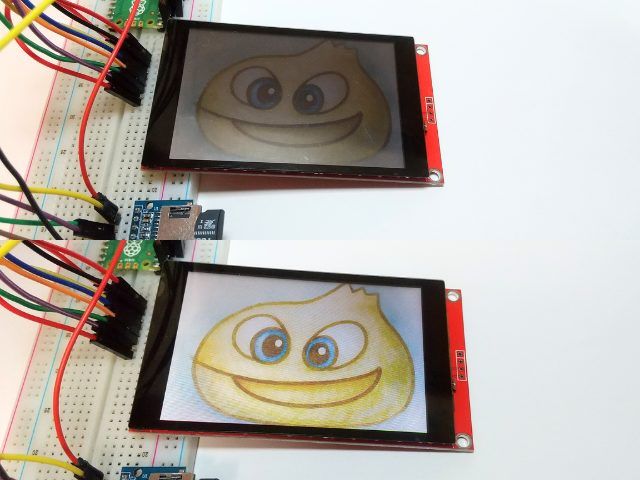
After connecting the display as in the video, adding 3.3 volts - 3.3 volts and GND - GND, as intuition says, the display starts and, moreover, displays shapes and what it should, but the image is DRAMATICALLY dark (compared to the same on the Arduino) - yet the colours are recognisable.
It seems to me (although I could be wrong) that the brightness (or rather darkness) is due to the insufficient voltage the ESP32 is giving, but I don't get a different result by connecting 3.3 V to the VIN (I deliberately don't connect 5 V to the VIN, because as far as I know the ESP32 does NOT operate on 5 V, but 3.3 V) and I don't want to experiment without, because I don't want to damage anything. - Or with too long cables (which I doubt).
I am also attaching some pictures of the whole thing at 48 MP for clarity.
 20260225_1..033.jpg (10.49 MB)You must be logged in to download this attachment.
  20260225_1..951.jpg (9.98 MB)You must be logged in to download this attachment.
  20260225_1..919.jpg (10.39 MB)You must be logged in to download this attachment.
  20260225_1..839.jpg (10.34 MB)You must be logged in to download this attachment.
  20260225_1..749.jpg (1.99 MB)You must be logged in to download this attachment.
  20260225_1..926.jpg (10.31 MB)You must be logged in to download this attachment.
If anyone has dealt with the whole thing (or not), but is familiar with the subject as well as with SD card modules for the Arduino running over SPI, I would like them to add how to display frames to this display to create animations. I would be very happy if someone, familiar with this library, would write a bit about reading touch from the display and useful commands, as I don't understand the examples I have tested from the library.
Thanks in advance for all the answers and best regards.
PS: I got kicked out of Elektroda a while ago and was terribly annoyed that I lost all the text, but I found a button to restore an unsaved message, so I'm very happy.
I have been trying to solve a somewhat complicated problem for a long time (something around half a year) - I have been trying to connect the display to the ESP32 so that I can get the desired result, initially to display shapes. I've tried searching for tutorials from the YouTube platform but it hasn't had much effect, most of the videos either do it with an Arduino UNO/MEGA or just have a different display, but after spending a long time doing this unsuccessful "research" I came across this certain video where the guy shows how to solve a problem I've been struggling with for a long time. Link to the video - https://www.youtube.com/watch?v=X3jjvWWvWzc
This video is very inaccurate, as the author didn't even show how he connected the power supply (which normally isn't a big problem, but here there is a problem between the 3.3 V and 5 V that the Arduino, to which the shield is dedicated, gives). I know you can see the VIN etc on the schematic from Fritzing, but I can't quite see it in real life as the pin layout is different.
After a long time of failures, I started to doubt the display's performance and thought the problem might be physical and it was the display that was faulty, so I checked the whole thing by connecting it to an Arduino UNO - the display worked perfectly. (This is the glue demo I uploaded from the MCUFRIEND library)
I also thought I'd include a link to the documentation from the shop page so that it's easier to identify this model - https://www.lcdwiki.com/res/MAR3501/3.5inch_Arduino_8BIT_Module_MAR3501_User_Manual_EN.pdf
After connecting the display as in the video, adding 3.3 volts - 3.3 volts and GND - GND, as intuition says, the display starts and, moreover, displays shapes and what it should, but the image is DRAMATICALLY dark (compared to the same on the Arduino) - yet the colours are recognisable.
It seems to me (although I could be wrong) that the brightness (or rather darkness) is due to the insufficient voltage the ESP32 is giving, but I don't get a different result by connecting 3.3 V to the VIN (I deliberately don't connect 5 V to the VIN, because as far as I know the ESP32 does NOT operate on 5 V, but 3.3 V) and I don't want to experiment without, because I don't want to damage anything. - Or with too long cables (which I doubt).
I am also attaching some pictures of the whole thing at 48 MP for clarity.
 20260225_1..033.jpg (10.49 MB)You must be logged in to download this attachment.
  20260225_1..951.jpg (9.98 MB)You must be logged in to download this attachment.
  20260225_1..919.jpg (10.39 MB)You must be logged in to download this attachment.
  20260225_1..839.jpg (10.34 MB)You must be logged in to download this attachment.
  20260225_1..749.jpg (1.99 MB)You must be logged in to download this attachment.
  20260225_1..926.jpg (10.31 MB)You must be logged in to download this attachment.
 If anyone has dealt with the whole thing (or not), but is familiar with the subject as well as with SD card modules for the Arduino running over SPI, I would like them to add how to display frames to this display to create animations. I would be very happy if someone, familiar with this library, would write a bit about reading touch from the display and useful commands, as I don't understand the examples I have tested from the library.
Thanks in advance for all the answers and best regards.
PS: I got kicked out of Elektroda a while ago and was terribly annoyed that I lost all the text, but I found a button to restore an unsaved message, so I'm very happy.