logo elektroda
logo elektroda
X
logo elektroda

Anenji 4200W - I replaced the standard WiFi EB-WFBLE-03 with an ESP32 module for HA

psalkiewicz 531 12
ADVERTISEMENT
This content has been translated flag-pl » flag-en View the original version here
  • #1 21878075
    psalkiewicz
    Level 2  
    Hi.

    I've been playing around with an Anenji 4200 W inverter lately and the new version of it, instead of an RS232 port, has a built-in Wi-Fi module that broadcasts forcefully to some crooked Chinese portal. I unscrewed this module, soldered the suspect CPU (EB-WFBLE-03) out of it and crammed in the JST 5-pin connector that corresponds to the RS232 from the inverter to the module. In this way I was able to replace this crap with an ESP32 module and thus put all the data (MODBUS-RTU) into the homeassistant. Despite the soldering out of the CPU the RS485 to the BMS still works.

    I'm throwing up a repo with what I was able to figure out:
    https://github.com/psalkiewicz/esphome-2026-anenji4200/

    Feel free to discuss if you have any ideas or similar thoughts with this repo.
  • ADVERTISEMENT
  • #2 21878332
    p.kaczmarek2
    Moderator Smart Home
    And what kind of Wi-Fi module is sitting there from the factory? Maybe there is an SDK for it? The name EB-WFBLE-03 says little, do you have any pictures?
    Helpful post? Buy me a coffee.
  • #3 21878350
    psalkiewicz
    Level 2  
    >>21878332
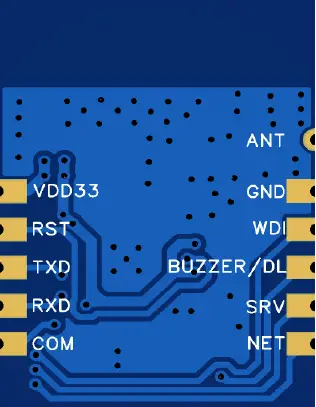
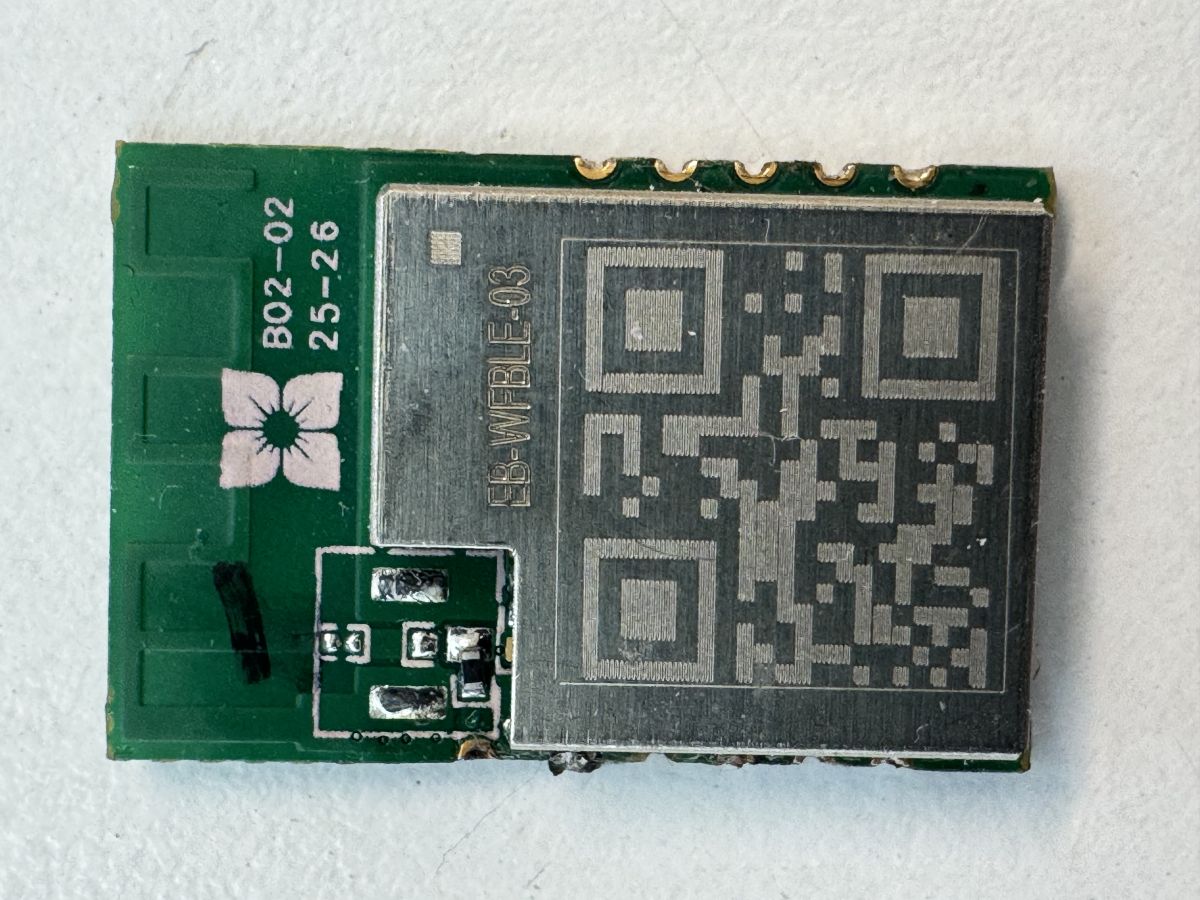
    Green PCB module with RF shield marked IB‑WIFIBLE‑03 and a large QR-code-like pattern

    Added after 7 minutes:

    >>21878350 It would seem the easiest thing to do would be to reflash it, but there's no word anywhere about this microcontroller (only in the context of the people who took Anenji apart). It's some kind of Eybond or something. A chip heavily hype in itself, which is why I preferred to substitute the well-known and well-liked ESP32.

    And it's probably pre-programmed to transmit to their cloud curve, as of the pins it only has vdd, gnd, rx, tx (rs232 to the inverter) and antenna. I don't think it can be easily re-flashed.

    Close-up of PCB area with labeled pins: VDD33, RST, TXD, RXD, COM, ANT, GND, BUZZER/DL, SRV, NET
  • #4 21878355
    p.kaczmarek2
    Moderator Smart Home
    Do you have the ability to take a picture of the screen to look there? Even if there is no SDK, maybe there is a flash bone to solder? Or is it something , which is already supported by our electrode project?
    Multi-platform IoT firmware supporting up to 32 platforms - summary of OBK 2025
    Helpful post? Buy me a coffee.
  • ADVERTISEMENT
  • #5 21878357
    psalkiewicz
    Level 2  
    I've soldered it out to be thrown away anyway, so when I find a moment I'll unsolder that screen, then I'll post what's inside.
  • #6 21878361
    p.kaczmarek2
    Moderator Smart Home
    Thanks, every new chip is a chance to expand the project. Probably @divadiow and @insmod would also be interested in at least a memory dump.
    Helpful post? Buy me a coffee.
  • #7 21878366
    psalkiewicz
    Level 2  
    >>21878361
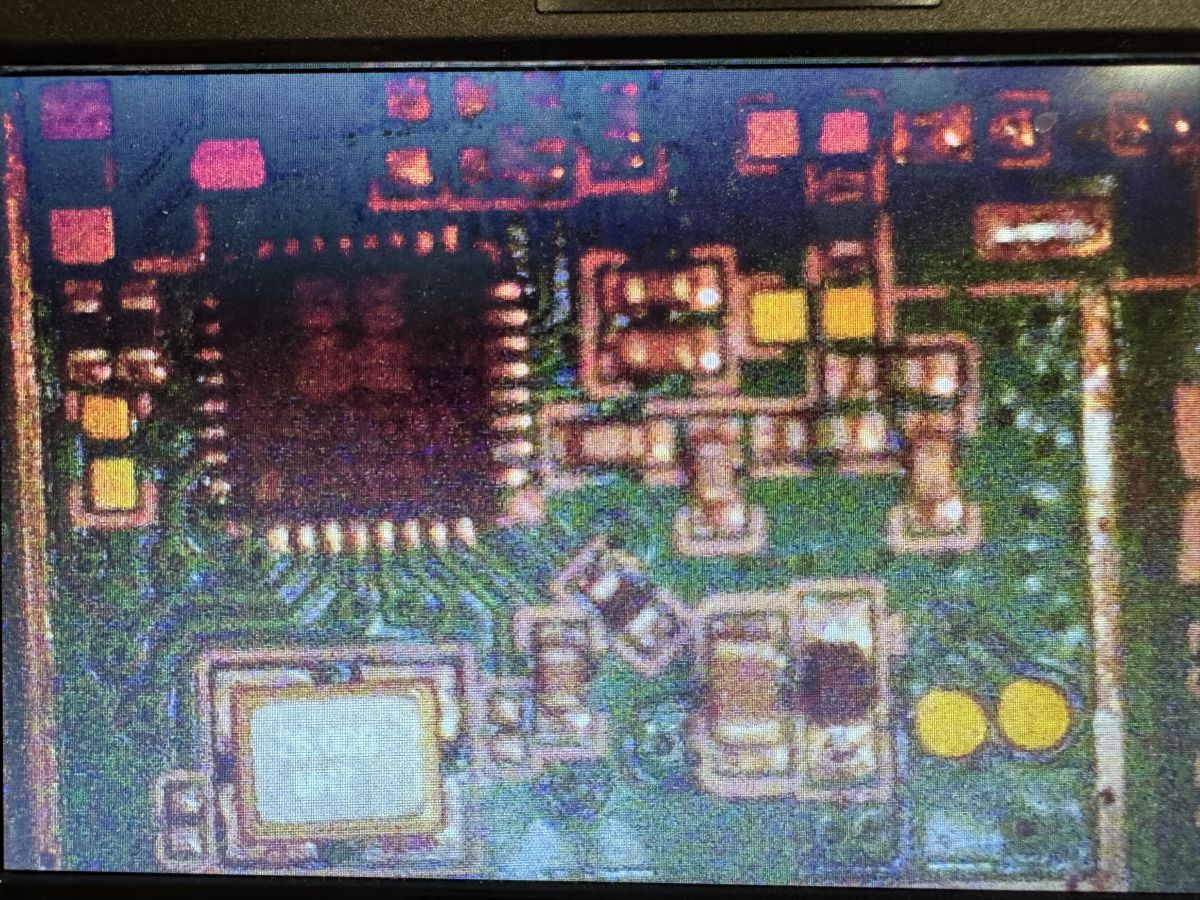
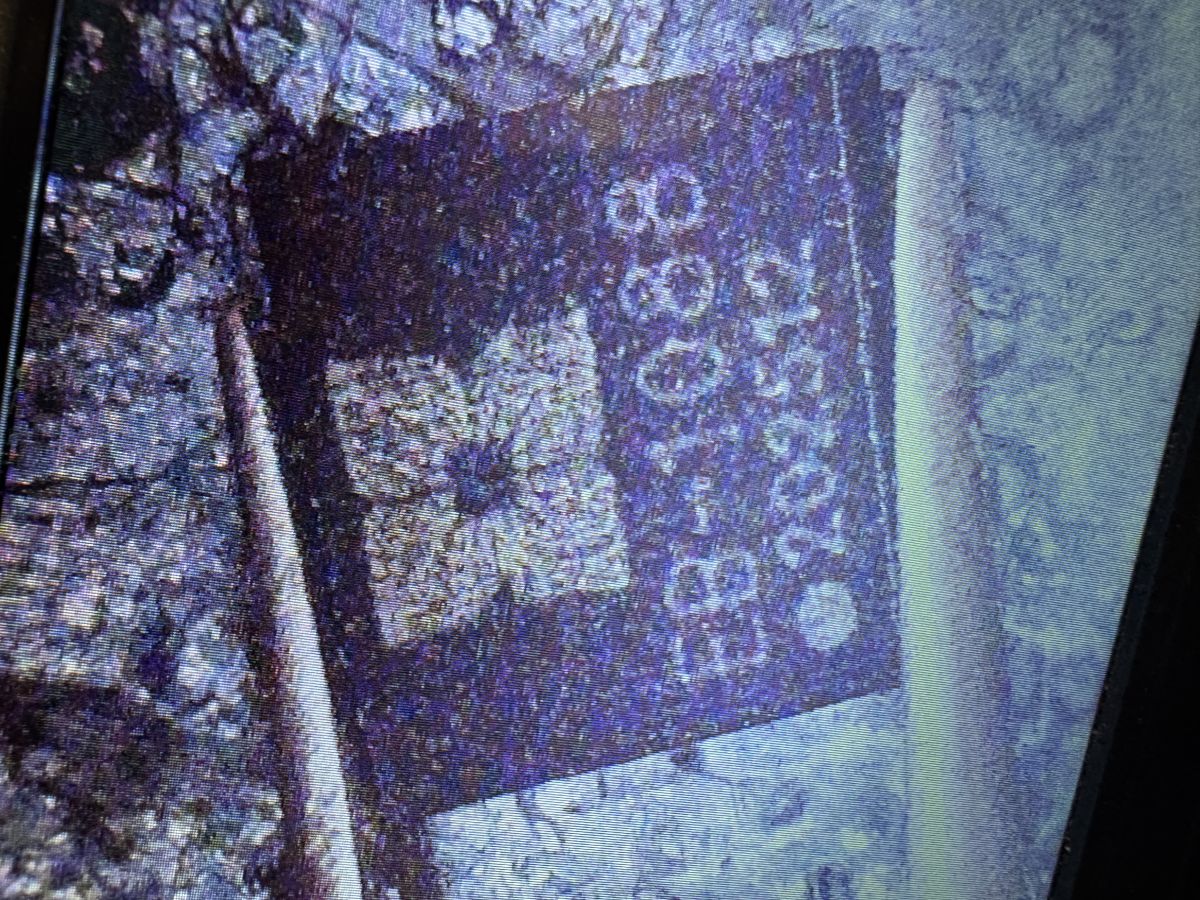
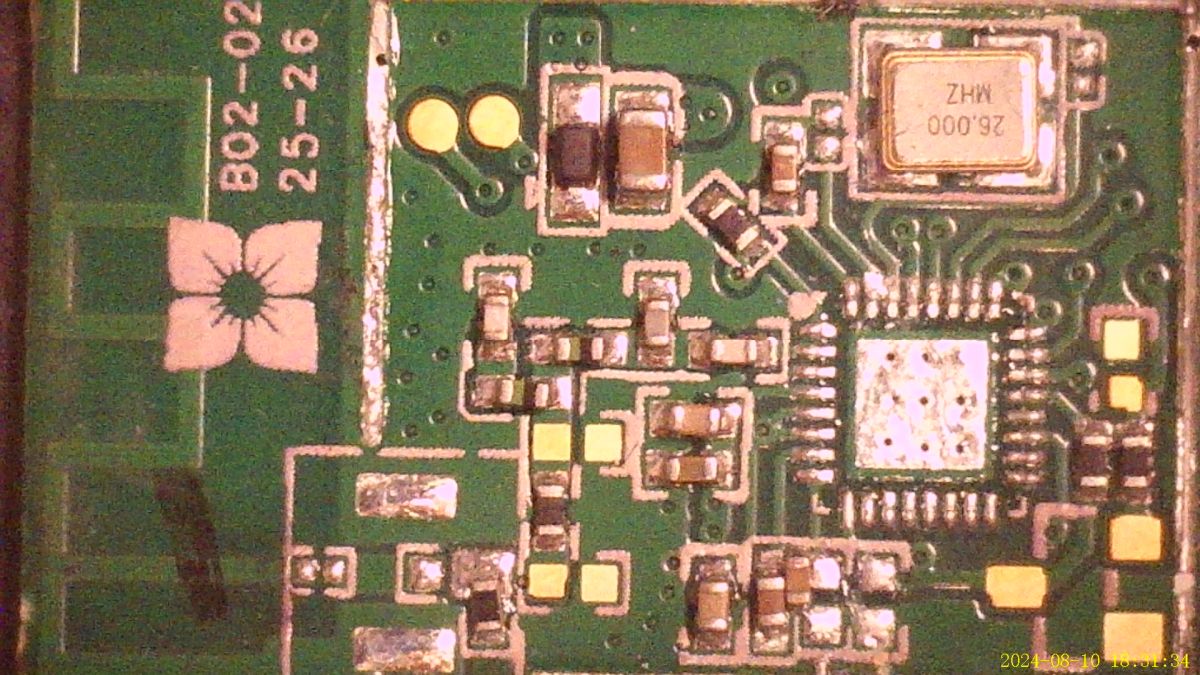
    Macro view of electronics on a green PCB with an integrated circuit and SMD components Close-up of a purple label with a code-like white print on a rough surface
  • ADVERTISEMENT
  • #8 21878369
    p.kaczmarek2
    Moderator Smart Home
    Very interesting, at first glance this layout does not even exist on Google. EB-1088
    Helpful post? Buy me a coffee.
  • ADVERTISEMENT
  • #9 21878370
    psalkiewicz
    Level 2  
    >>21878366 Sorry for the ugly pics, but I took a picture of a Chinese microscope with my phone. Inside is a 26 MHz quartz and some unknown processor. But it looks like some total crap - now I understand why it took ages to read the data from the inverter.

    Added after 4 [minutes]:

    That EB could mean EYBOND, the manufacturer of that whole Wi-Fi module. They could have printed their marks on some curvy chip. And below it looks like the date 2025-12, so it's possible this was made for a specific product a while back. That's how Anenji released the inverter at the end of the year, which had this crap instead of a derived RS-232.

    Added after 8 [minutes]:

    >>21878370 The logo matches the EYBOND logo. And the chip is probably OEM. Some kind of Beken 7231 or something like that, looking at the eye by the features, the number of pins and judging that it's rather nothing particularly new.
  • #10 21878380
    p.kaczmarek2
    Moderator Smart Home
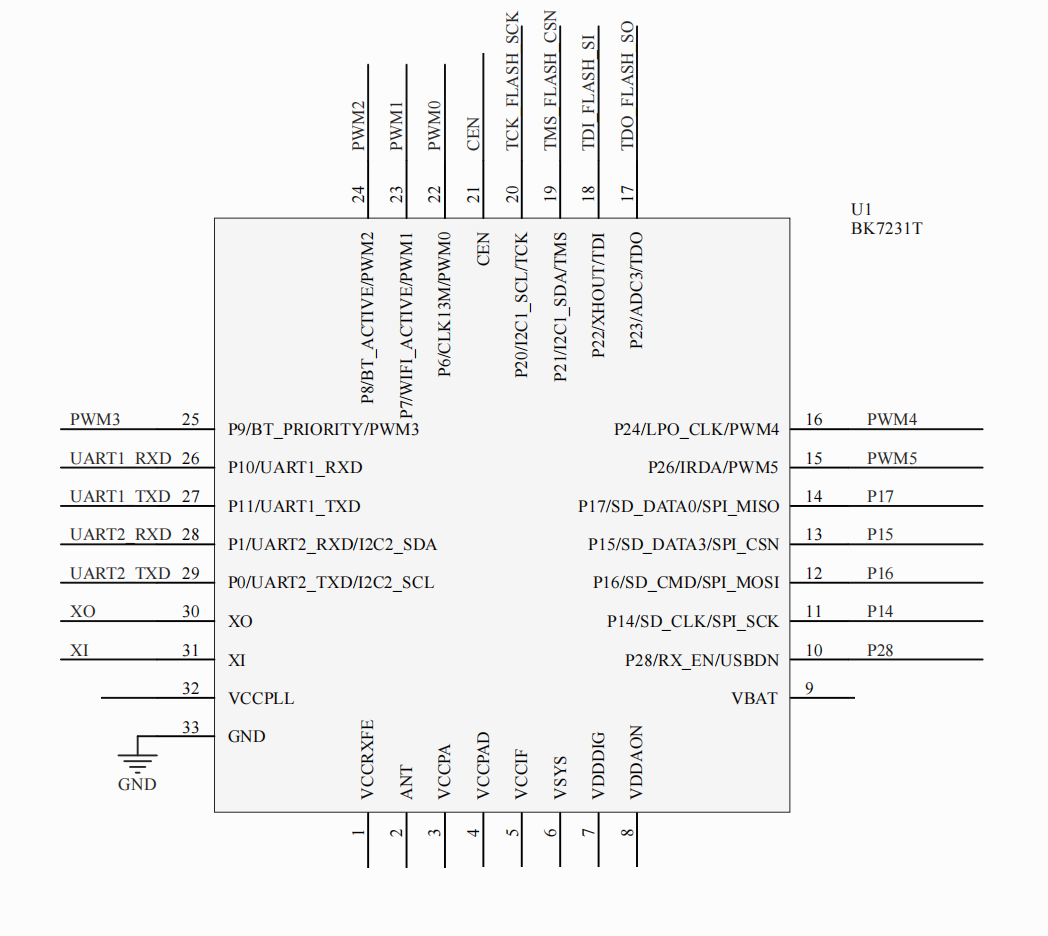
    And does the 'fingerprint' match? Beken has an oscillator on pins 30 and 31 (XO and XI):
    Pinout diagram of BK7231T showing XO and XI pins labeled 30 and 31
    Helpful post? Buy me a coffee.
  • #11 21878393
    psalkiewicz
    Level 2  
    >>21878380
    Close-up of a PCB with a QFN IC, 26.000 MHz crystal can, and surrounding SMD components

    As far as I can see, 31,32 go to the quartz.
  • #12 21878403
    divadiow
    Level 38  
    oh. you've unsoldered main IC :(

    did you capture boot log or anything from uarts?
  • #13 21878404
    p.kaczmarek2
    Moderator Smart Home
    But is 33 GND? It goes to the capacitor, which is more likely to have ground on the other side, so isn't that it?
    Helpful post? Buy me a coffee.

FAQ

TL;DR: For Anenji 4200W owners, the thread shows a 5-pin JST swap to ESP32 can replace the factory Wi-Fi path for local Home Assistant telemetry. As one expert put it, "the easiest thing" is replacing the unknown module, not chasing its firmware. This solves forced cloud reporting and exposes inverter MODBUS-RTU data locally. [#21878350]

Why it matters: This gives Anenji 4200W users a practical path from vendor cloud dependence to local, faster Home Assistant monitoring.

Option Hardware path Known interface Main limitation from thread Practical outcome
Factory EB-WFBLE-03 Built-in Wi‑Fi board VDD, GND, RX, TX, antenna Unknown CPU, no known SDK, cloud-oriented behavior Hard to reuse locally
ESP32 replacement Replaced via 5-pin JST/RS232 path MODBUS-RTU from inverter Requires soldering and custom config Local HA integration works

Key insight: The most valuable finding is not the exact identity of the EYBOND chip. It is that replacing the factory Wi‑Fi CPU with an ESP32 still leaves the inverter’s RS485 link to the BMS working, so local monitoring does not break battery communication. [#21878075]

Quick Facts

  • The modified path uses a 5-pin JST connector that matches the inverter’s RS232 link to the original module, letting an ESP32 read inverter data locally. [#21878075]
  • The stock board exposes only 5 visible connections in the thread description: VDD, GND, RX, TX, and antenna, which is why reflashing looked less practical than replacement. [#21878350]
  • After the Wi‑Fi CPU was removed, RS485 to the BMS still worked, so the module swap did not stop battery-side communication. [#21878075]
  • Reverse-engineering photos showed a 26 MHz quartz and an EB-1088-marked layout; one participant also noted pins 31 and 32 appeared to go to the crystal. [#21878393]
  • The shared starting point for ESPHome/Home Assistant work is the public repository esphome-2026-anenji4200, posted with the inverter findings. [#21878075]

How do I replace the factory EB-WFBLE-03 Wi-Fi module in an Anenji 4200W inverter with an ESP32 for Home Assistant integration?

You replace the factory board by reusing the inverter’s RS232 path and moving to an ESP32. 1. Unscrew the original Wi‑Fi module. 2. Desolder the EB-WFBLE-03 CPU and fit the matching 5-pin JST connector. 3. Connect an ESP32 so it can read MODBUS-RTU data and publish it to Home Assistant. The thread author confirmed this exact hardware swap worked on a newer Anenji 4200W. [#21878075]

What is the EB-WFBLE-03 module used in newer Anenji 4200W inverters, and why do some users replace it?

The EB-WFBLE-03 is the factory Wi‑Fi module fitted in newer Anenji 4200W units instead of a plain RS232 port. Users replace it because it appears tied to a vendor cloud workflow and uses an unknown EYBOND-marked CPU with no clear public tools. In the thread, the owner chose ESP32 because it is well-known and easier to integrate locally with Home Assistant. [#21878350]

Why does the Anenji 4200W Wi-Fi module appear to send data to a Chinese cloud service instead of working locally?

It appears cloud-oriented because the factory module was described as broadcasting data forcefully to a Chinese portal rather than exposing a simple local interface. The thread also notes the module has only VDD, GND, RX, TX, and antenna connections, which fits a preprogrammed bridge design more than a user-configurable local gateway. That makes local monitoring harder without replacing the board. [#21878350]

What wiring is needed between the Anenji inverter's 5-pin JST connector and an ESP32 to read MODBUS-RTU data?

The thread confirms you need the 5-pin JST that matches the inverter-to-module RS232 connection, then route that path to an ESP32. It does not publish a pin-by-pin map in the posts, so the safe takeaway is the connector mirrors the original module’s serial link. "MODBUS-RTU" is a serial fieldbus protocol that carries structured device registers over UART-style links, with deterministic framing for telemetry and control. [#21878075]

How can I keep RS485 communication to the BMS working after removing the original Wi-Fi CPU from the Anenji module board?

You keep it working by removing only the Wi‑Fi CPU path and leaving the board’s RS485-to-BMS side intact. The thread author explicitly reported that, even after desoldering the original CPU, RS485 communication to the BMS still worked. That makes the ESP32 swap attractive, because inverter telemetry can move locally without breaking battery communication already present on the hardware. [#21878075]

What is MODBUS-RTU, and how is it used by the Anenji 4200W inverter for telemetry?

MODBUS-RTU is the telemetry method the modified Anenji 4200W exposes over the inverter’s serial path to the replacement ESP32. "MODBUS-RTU" is a serial communications protocol that moves register-based measurements between devices, using binary frames and timing rules for reliable telemetry on simple wiring. In this thread, the ESP32 reads that data and sends it into Home Assistant for local monitoring. [#21878075]

ESP32 vs reflashing the stock EB-WFBLE-03 board: which approach is more practical for local Anenji 4200W monitoring?

ESP32 is the more practical approach in this thread. The stock EB-WFBLE-03 board had no known SDK, no public documentation, and only sparse hardware clues, while the ESP32 swap already worked with MODBUS-RTU into Home Assistant. The author also judged the factory module hard to reflash and preferred a known platform over an unknown EYBOND design. [#21878350]

Where can I find an SDK, firmware tools, or documentation for the Eybond EB-WFBLE-03 or EB-1088 chip?

The thread did not identify any SDK, firmware tools, or usable documentation for EB-WFBLE-03 or the EB-1088-marked device. One participant explicitly said there was “no word anywhere” about that microcontroller except teardown discussions around Anenji hardware. In practical terms, the thread offers photos and observations, not a documented software toolchain. [#21878350]

How do I identify whether the unknown EYBOND-marked Wi-Fi chip inside the Anenji module is related to a Beken BK7231 family device?

You compare its package layout and oscillator pin placement against known Beken footprints. In the discussion, one participant noted Beken uses the oscillator on pins 30 and 31, while the owner’s follow-up photo suggested pins 31 and 32 went to the crystal. That does not prove a BK7231 match, but it gives a concrete pinout check for ruling families in or out. [#21878393]

What does the 26 MHz quartz connection tell me when reverse-engineering the EB-1088 or Eybond Wi-Fi module?

It tells you where to start tracing the MCU’s clock pins and comparing the package against known Wi‑Fi SoCs. The board photos showed a 26 MHz quartz next to the unknown processor, and the follow-up inspection suggested pins 31 and 32 reached that crystal. That kind of clock routing helps narrow candidate chip families even when the top marking is vendor-specific or OEM. [#21878393]

How can I dump firmware or capture a boot log from the original Anenji Wi-Fi module before desoldering the main IC?

You need to probe the module before removing the main IC, because once it is off the board, boot output is gone. In the thread, another participant asked whether any boot log had been captured from the UARTs and regretted that the main IC had already been unsoldered. The key failure case is simple: desolder first, and you lose the easiest chance to read startup messages or dump memory. [#21878403]

What is OpenBeken, and could it be relevant when trying to support an unknown EYBOND or Beken-like Wi-Fi module?

Yes, OpenBeken could be relevant because one participant suggested the unknown module might match hardware already supported by that project. "OpenBeken" is multi-platform IoT firmware that targets many Wi‑Fi modules, especially Beken-like devices, and provides an alternative software base for reverse-engineered smart hardware. In this thread, it was raised as a way to check whether the mystery board already fit an existing support path. [#21878355]

Why might the factory Anenji Wi-Fi module read inverter data much more slowly than an ESP32 replacement?

The thread suggests the stock module is slow because it uses an unknown, low-confidence Wi‑Fi platform and likely forwards data through a cloud-oriented workflow. After inspecting the board, the owner said the hardware looked poor and that this explained why reading inverter data took ages. An ESP32 removes that opaque path and uses a familiar local integration route instead. [#21878370]

What troubleshooting steps help when an ESP32 connected to an Anenji 4200W over RS232 stops reporting data to Home Assistant?

Start with the hardware path the thread actually verified. 1. Recheck the 5-pin JST connection that mirrors the inverter’s RS232 link. 2. Confirm the original Wi‑Fi CPU was the only part removed, not the path that leaves RS485 to the BMS intact. 3. Compare your setup with the shared ESPHome repository. If BMS communication still works but HA data stops, the fault is likely on the ESP32 serial or config side. [#21878075]

Which ESPHome repository or example configuration can I use as a starting point for integrating an Anenji 4200W inverter into Home Assistant?

Use the repository named esphome-2026-anenji4200 that was posted with the hardware modification. The author shared it specifically as the place containing what had already been figured out for the Anenji 4200W ESP32 replacement. In this thread, that repo is the only explicit starting point for ESPHome and Home Assistant integration. [#21878075]
Generated by the language model.
ADVERTISEMENT