How can I prevent both relays in an OpenBK7231T Tuya shutter switch from being activated at the same time without replacing the chip or flashing Tasmota?
You can do this directly in OpenBK by making the relays mutually exclusive, so you do not need to replace the chip. One simple option is to set the relays as `Rel` and `Rel_n`, bind them to a single channel, and they will behave in an exclusive way [#20413848] If that does not fit your template, use `autoexec.bat` with change handlers so that when `Channel0` becomes `1`, it runs `SetChannel 1 0`, and when `Channel1` becomes `1`, it runs `SetChannel 0 0` [#20414125] A working example for a shutter switch also used `addChangeHandler Channel0 == 1 SetChannel 2 0` and the reverse, plus auto-cancel timers in `addRepeatingEventID` for the relay and cancel buttons [#20433363] If you need a safer solution with no brief overlap at all, a newer mutex driver was being worked on specifically to link two pins to one channel without triggering both inputs at the same time [#21599659]
AI summary based on the discussion. May contain errors.
I just flashed my tuya shutter switch with openbk7231t and everything is working correctly. but how can I prevent activating both relays at the same time? I need something like the shutter mode in tasmota. or is my only option to replace the WB3S chip with ESP and flash tasmota on it?
but again, if you have a specific use case in mind, I can write a dedicated driver for you, as long as you can explain how is it supposed to work. Show your device configuration, etc.
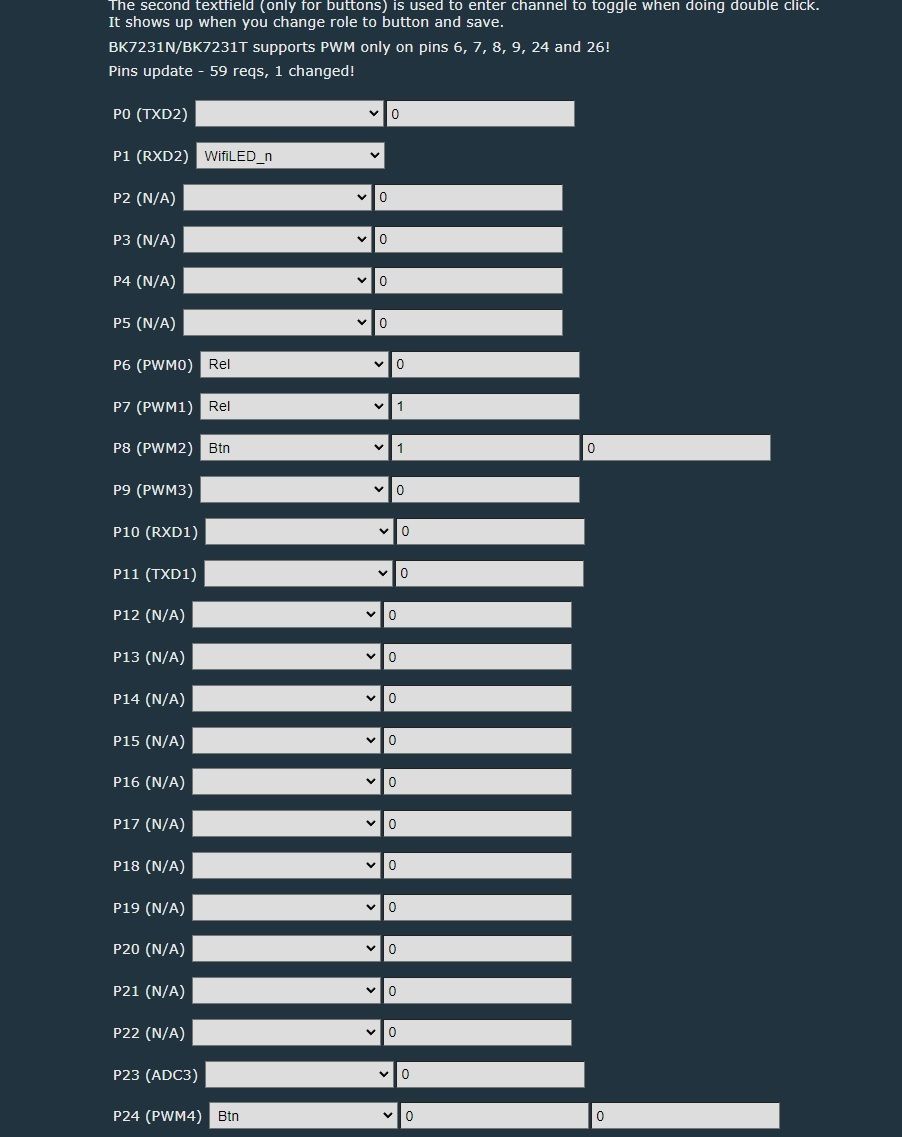
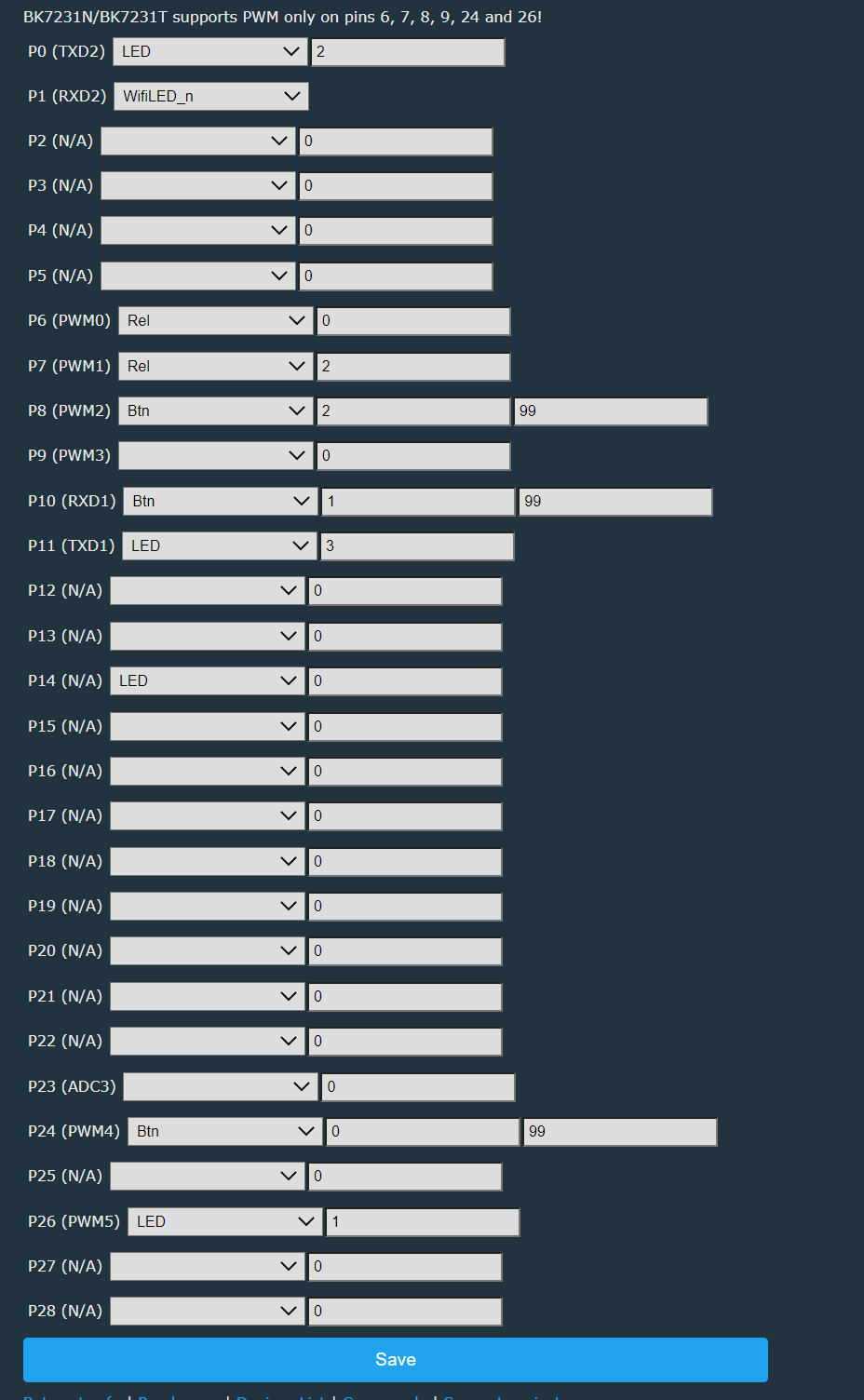
i tried setting them both to single channel but it still keeps one of them constantly on. i tried the scripting part but that is a bit complicated for me (i do know how to run them)
i'm using a switch like this and i need something like the InterLock setting in tasmota so that none can accidentally fire two relays on the physical touch buttons https://templates.blakadder.com/WF-CS01_EU.html
Wow, now I know how to use "alias" and "backlog", pretty powerful.
If I can suggest a use case to add in your demo, the possible mind changing of a user. (aka: I start to open my shutter but at the mid course I change my mind and decide to close it)
Thanks for your work for developing this firmware which saves a lot of my wifi OT, you rock.
I also need this, and the scripting works, but it triggers the relay before deactivating the second one.
This happens near instantly, but it still means both are on for a split second, does it not?
I cannot use the Rel Rel_n on the same channel, as I have two relays controlling my electric roller blinds going up or down.
I want to either send UP with rel1, or DOWN with rel2, or neither when idle. I do not want to send them either an ON or OFF signal at all times, I want to send no signals when idle (both relays off). I do not want them to ever be ON and OFF at the same time (already fried one relay).
The handler setchannel is my current solution for the time being, but I do hope I can hook something to turn the relay on another channel OFF before turning one ON.
EDIT: This code seems to not be enough, seems like the split moment is enough to break my relay and invert it, broke another one. I think I want a small delay of OFF on both relays before one triggers on, but I am lost as to how to do this on OBK.
I'm working on alternate solution for that - ability to link two pins to single channel and use 3 channel values for disabled, up or down.
Currently working self-test code:
✨ The discussion focuses on preventing both relays of a Tuya shutter switch from being activated at the same time after flashing OpenBK7231T. Suggested solutions include configuring the relays as mutually exclusive channels, using change handlers or scripts in autoexec.bat to force one relay off when the other turns on, and adding delayed auto-off behavior. The user confirms that a simple interlock-style script works like Tasmota’s InterLock feature and is sufficient for motor protection when blinds are controlled by Home Assistant. Later replies mention a more robust dedicated shutter/mutex driver approach in OpenBK7231T to safely link two pins to one channel with dead-time handling, avoiding simultaneous relay activation. AI summary based on the discussion. May contain errors.
TL;DR: To stop two relays energizing together, use a 100 ms dead time and “link two pins to a single channel.” For OBK/OpenBK7231T shutter switches, start with the PinMutex driver or a simple interlock script. [Elektroda, p.kaczmarek2, post #21594298]
Why it matters: Split-second overlap can damage shutter relays; enforced interlock protects motors and power supplies.
Risk alert: Momentary overlap can invert or destroy a relay; avoid ON+ON transitions. [Elektroda, spleefer90, #21587087
How do I prevent both relays from turning on at the same time in OpenBK/OpenBK7231T?
Use an interlock script in autoexec.bat (LittleFS). Add change-handlers so each relay forces the other OFF when it turns ON. Example logic: when Channel0 becomes 1, set Channel1 to 0; when Channel1 becomes 1, set Channel0 to 0. This mimics a mutual exclusion latch without extra hardware. It’s simple, fast, and suitable when you only need immediate opposite-off behavior. [Elektroda, p.kaczmarek2, post #20414125]
Is there a built-in way to add dead time between UP and DOWN?
Yes. Use the PinMutex driver to bind two output pins to one channel with a configurable dead time. Example: setMutex 0 0 100 10 11 adds 100 ms where both outputs are OFF before switching directions. The channel becomes 3-state: 0=disabled, 1=up, 2=down. This guarantees no overlap during reversals and protects relays and motors. [Elektroda, p.kaczmarek2, post #21594298]
Does the simple script ever energize both relays for a moment?
It can, because the off and on actions race. One user observed a near-instant overlap that still damaged a relay. That edge case appears when changing direction quickly. Use PinMutex to enforce an OFF dead time before the new direction turns ON. This eliminates split-moment simultaneous activation and stops relay inversion issues. [Elektroda, spleefer90, post #21587087]
Can OpenBK mimic Tasmota’s InterLock?
Yes. The two change-handlers provide the same behavior. A user confirmed, “this is the same as the interlock from tasmota and works like a charm.” Use the script for mutual exclusion, and let your automation platform handle timing if needed. [Elektroda, hoezyhoest, post #20414151]
How do I configure the PinMutex driver?
Run: startDriver PinMutex.
Link your channel and pins with dead time: setMutex 0 0 100 .
Drive the channel: setChannel 0 1 for UP, setChannel 0 2 for DOWN, setChannel 0 0 for idle.
This ensures both relays are OFF during the 100 ms transition window. Adjust the delay to match your hardware. [Elektroda, p.kaczmarek2, post #21594298]
Why doesn’t the Rel/Rel_n single‑channel method suit roller blinds?
Mapping both relays to one channel with Rel/Rel_n can leave one relay constantly ON. A user reported that outcome after trying the single-channel approach. Blinds need an idle state with both relays OFF, then a safe, exclusive UP or DOWN. Use PinMutex or a script that explicitly returns to idle. [Elektroda, hoezyhoest, post #20414102]
When should I use Rel and Rel_n on one channel?
Use Rel/Rel_n when you need simple mutual exclusion on one logical channel, and a constant ON state is acceptable for the load. Set one output to Rel and the other to Rel_n, mapped to the same channel. They will not be ON simultaneously, but consider idle behavior for your device. [Elektroda, p.kaczmarek2, post #20413848]
How do I add a travel timeout and a cancel button?
Add change-handlers that schedule an auto-off after the movement starts, plus a cancel button that stops motion and clears timers. Example values used: 34 s auto-off for travel and 5 s auto-reset of the cancel button. Also cancel any pending travel timers when cancel is pressed. These patterns protect motors from overrun. [Elektroda, maliciamrg, post #20433363]
How do I set a night LED and a long‑press toggle?
Set a startup LED value and add a hold event to toggle it. For example, SetStartValue on the LED channel enables a default state at boot. Then add an OnHold event that calls ToggleChannel on that LED channel. This recreates the OEM night-light behavior alongside your interlock logic. [Elektroda, maliciamrg, post #20433363]
Will Home Assistant timing work alongside the OBK interlock?
Yes. You can let Home Assistant handle timing while OBK handles safety interlock. A user confirmed using HA to time the relays, with the OBK script solely preventing accidental dual activation. This separation of concerns works well for blinds. [Elektroda, hoezyhoest, post #20414151]
How can I safely reverse direction mid‑travel?
Use PinMutex so both outputs go OFF for the configured dead time before changing direction. Dead time, such as 100 ms, prevents overlap and protects relays when users change their minds mid-course. “Dead time” enforces off-before-on, even during rapid toggles. [Elektroda, p.kaczmarek2, post #21594298]
How can I insert a delay in a script before switching relays?
Use a repeating event with a single count to schedule a delayed action. For example, addRepeatingEvent 1 SetChannel 0 turns a channel OFF after a delay. Chain this with a second action to switch the other relay after the off-delay. This creates a scripted dead time. [Elektroda, p.kaczmarek2, post #20414125]
Is there a demo shutter script I can study?
Yes. The developer posted a prototype/demo script that models shutter behavior in the project’s self-test area. It shows aliases, backlogs, and control flow for safe operation. Review it to adapt patterns to your device and channel mapping. [Elektroda, p.kaczmarek2, post #20433374]
Can I submit my script as a demo to the project?
Yes. The maintainer encouraged contributions: “you could submit it as another demo/self test (in separate file) via pull request.” Package your script and open a PR to share it with others. This helps standardize safe shutter control. [Elektroda, p.kaczmarek2, post #20433581]
Can I request a dedicated shutter driver?
Yes. The maintainer said, “I can write any driver for you if you want,” and asked for clear requirements. Share your wiring, channel plan, and desired behavior. A tailored driver can embed interlock and timing in one place. [Elektroda, p.kaczmarek2, post #20413848]
Is there a simplified setup using the new mutex driver?
Yes. A user confirmed the new mutex driver avoids simultaneous triggering and requires only a fraction of the scripting. It links both directions to one channel safely. Use it to replace complex interlock scripts with a concise configuration. [Elektroda, spleefer90, post #21599659]
AI summary based on the discussion. May contain errors.











 (i do know how to run them)