The video recorded with my assistant shows the process of changing the firmware of the WiFi module in the Tuya relay built on the BK7231 (here: BK7231N/CB2S) taking into account possible difficulties, such as additional elements that hinder programming connected to the paths from the UART.
A still from the film for encouragement:
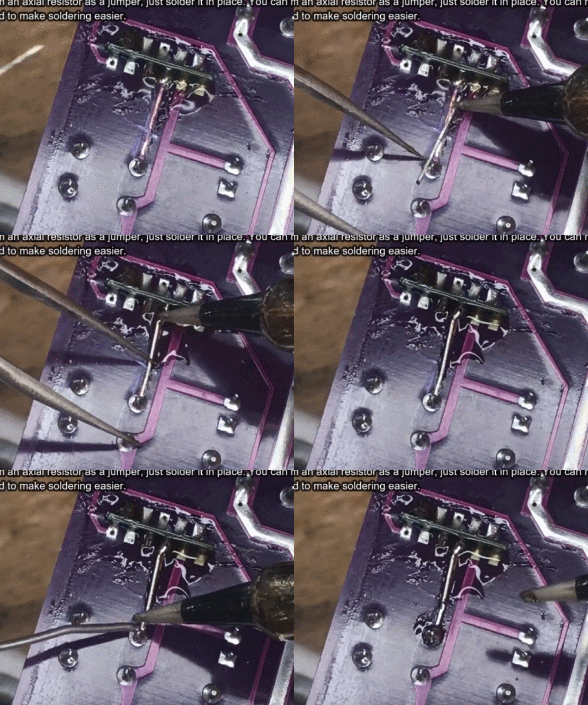
The difficulties shown in the video do not always occur, for example, there were none in
the once described Qihip relay . There, the RX and TX lines had no additional functions, it was enough to solder the wires and everything worked right away. I had a similar problem once when I changed the firmware of the device to ESP.
Similar difficulties may occur, for example, in devices with TuyaMCU - there, on the RX / TX lines used for programming, there is a microcontroller, which can also interfere with the change of the batch. Then you can also cut the paths, or unsolder this microcontroller, or put it in the RESET state.
These difficulties can scare a beginner because "
how is it, I connected everything according to the instructions and nothing works?! ", but it's really not difficult. You just need to trace the paths and cleverly remove what may interfere - see the video above. Outlet is not that difficult, reconstruction of the path is too.
If you like this form of presentation, it's worth watching the previous video in the series:
[Youtube] Removing the SMD module and changing the BK7231 firmware in the RGBCW LED lamp This film is somewhat complementary to the topics:
-
Light switch from USA - Gosund Smart Switch SW5-A-V2.1 - BK7231T -
Garden double relay Tuya CCWFIO232PK - BK7231T - programming Also, check out other topics about related products:
-
'Bulb' LED WiFi RGBCW Tuya - interior, programming, BK7231N -
Nous Smart WiFi Bulb P3 RGBCW - CB2L + BP5758 - firmware change and many other topics, not only mine, from the department
"Insides of Devices" .
It's worth getting to know the Home Assistant tutorial:
Tutorial Home Assistant - configuration, WiFi, MQTT, Zigbee, Tasmota Let's not forget about Tasmota - this firmware is my inspiration when creating OpenBeken, as well as e.g. OpenBeken is compatible with Tasmota through Tasmota Device Groups:
ESP8266 and Tasmota - controlling the WiFi relay step by step Links mentioned in the video:
- OpenBeken
https://github.com/openshwprojects/OpenBK7231T_App- hid_download_py:
https://github.com/OpenBekenIOT/hid_download_py - bkWriter 1.60:
https://github.com/openshwprojects/OpenBK7231T/blob/master/bk_writer1.60.zip - ready builds for various platforms (BK7231T, BK7231N, XR809, W800, W801, T34, BL602) to download:
https://github.com/openshwprojects/OpenBK7231T_App/releases Tuya-cloudcutter, an alternative way to upload firmware without soldering wires, but only for supported devices:
https://github.com/tuya-cloudcutter/tuya-cloudcutter And the contest:
Present your own construction or send an article and receive a 64GB SD card It also applies to topics placed in "
Equipment indoors ", i.e. descriptions of e.g. IoT gadgets, but not only.
Side news/organizational matters: 1. The BK7231N platform in OpenBeken will get a patch this week that significantly improves stability with a large number of MQTT events (problems were reported by several users, they are now fixed)
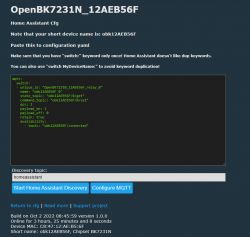
2. OpenBeken recently supports Home Assistant Discovery, so you don't have to manually copy the configuration. Config->Generate Home Assistant CFG and there you need to click the new button:
3. OpenBeken already supports the W600 and W601 WinnerMicro platform (thanks to the help of one of the contributors).
4. OpenBeken has recently supported an online device database (Launch Web Application->Config):
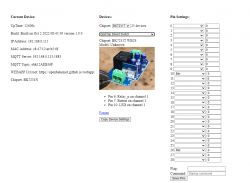
The database contains photos of devices, their templates, settings and scripts as well as links to Elektroda. Do you have any new device? Anyone can add them via pull request to:
https://github.com/OpenBekenIOT/webapp/blob/gh-pages/devices.json That's it for now, another video on the way, for now I will only reveal that it will be again with soldering and soldering / soldering the system in SOIC08 ...









Comments