logo elektroda
logo elektroda
X
logo elektroda
Dostępna jest polska wersja

Czy wolisz polską wersję strony elektroda?

Nie, dziękuję Przekieruj mnie tam

BK7231T/BK7231N WiFi, MQTT, template and IP configuration at flash time via UART - OpenBeken flasher

p.kaczmarek2  11 12618 Cool? (+4)
📢 Listen (AI):

TL;DR

  • BK7231T/BK7231N devices can be flashed and configured for OpenBeken entirely over UART with BK7231GUIFlashTool, without using the usual Open Access Point setup.
  • The workflow reads the existing OBK config, lets you edit WiFi, IP, MQTT, flags, and a short startup command on the PC, then writes the config back to flash.
  • Enable flag 31, "enable UART command line," if you want automatic restart behavior during flashing and configuration.
  • This method keeps you on the same WiFi connection, avoids battery-powered devices going back to sleep, and can help recover from bad settings or boot issues.
  • CEN reset or a power cycle may still be needed after reading or writing config unless UART command line is enabled.
Summary generated by AI based on the discussion content.
Close-up view of BK7231 chip on a circuit board.
BK7231GUIFlashTool allows you to configure OpenBeken at the flash time - there is no need for Open Access Point configuration, everything can be done on your PC. Here I will show you how to do it step by step.

Why?
The usual BK7231 flashing and configuration process is similar to Tasmota/Esphome/Etc. First you flash firmware via UART (there is also a wireless option, but this topic refers to wired method), then software creates open access point where you connect and configure your device.
However, there is an alternate way to do it in OpenBeken.
With OpenBeken, you can configure OBK at the flash time - that way you can read and write OBK config via UART.
This lets you skip the "open access point" part and enter your WiFi data from your PC.
This has several advantages, including:
- it is quicker than open access point method
- it does not disconnect you from internet, if you connect to web via the same WiFi you'd use for OBK
- if your device is battery powered, there is no risk of device going back to sleep
- this can help you recover from potential wrong configuration and boot problems
- this can be one of the ways of automatic GPIO config (but we'll cover it another time)
- soon this can help you batch-convert devices

Step 1: Flash your device via UART
Just do the usual process of programming BK7231, see our readme for more information:
https://github.com/openshwprojects/BK7231GUIFlashTool
You can also watch tutorials on our YT channel:
https://www.youtube.com/@elektrodacom

Step 2: Once OBK is flashed, do the OBK config read
Click "Read only OBK config" to read the OBK config from device flash to the application memory via UART:
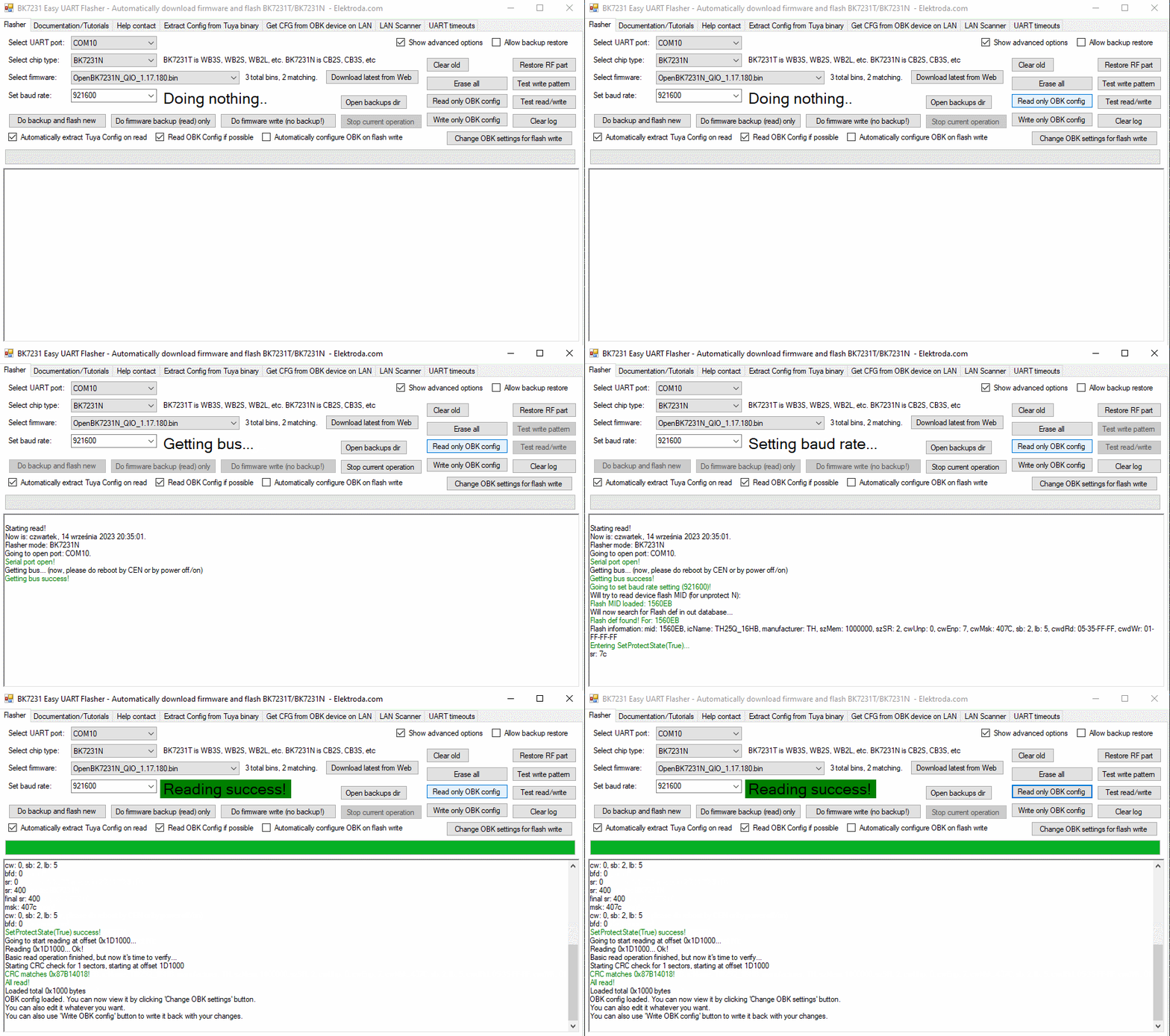
BK7231 Easy UART Flasher interface with configuration and flashing options.
Do the CEN reset or power cycle if required. If you want to have automatic restart while using BK7231GUIFlashTool flash tool, please enable flag 31 ("enable UART command line")

Step 3: Modify OBK config
Click "Change OBK settings" and change settings to suit your needs:
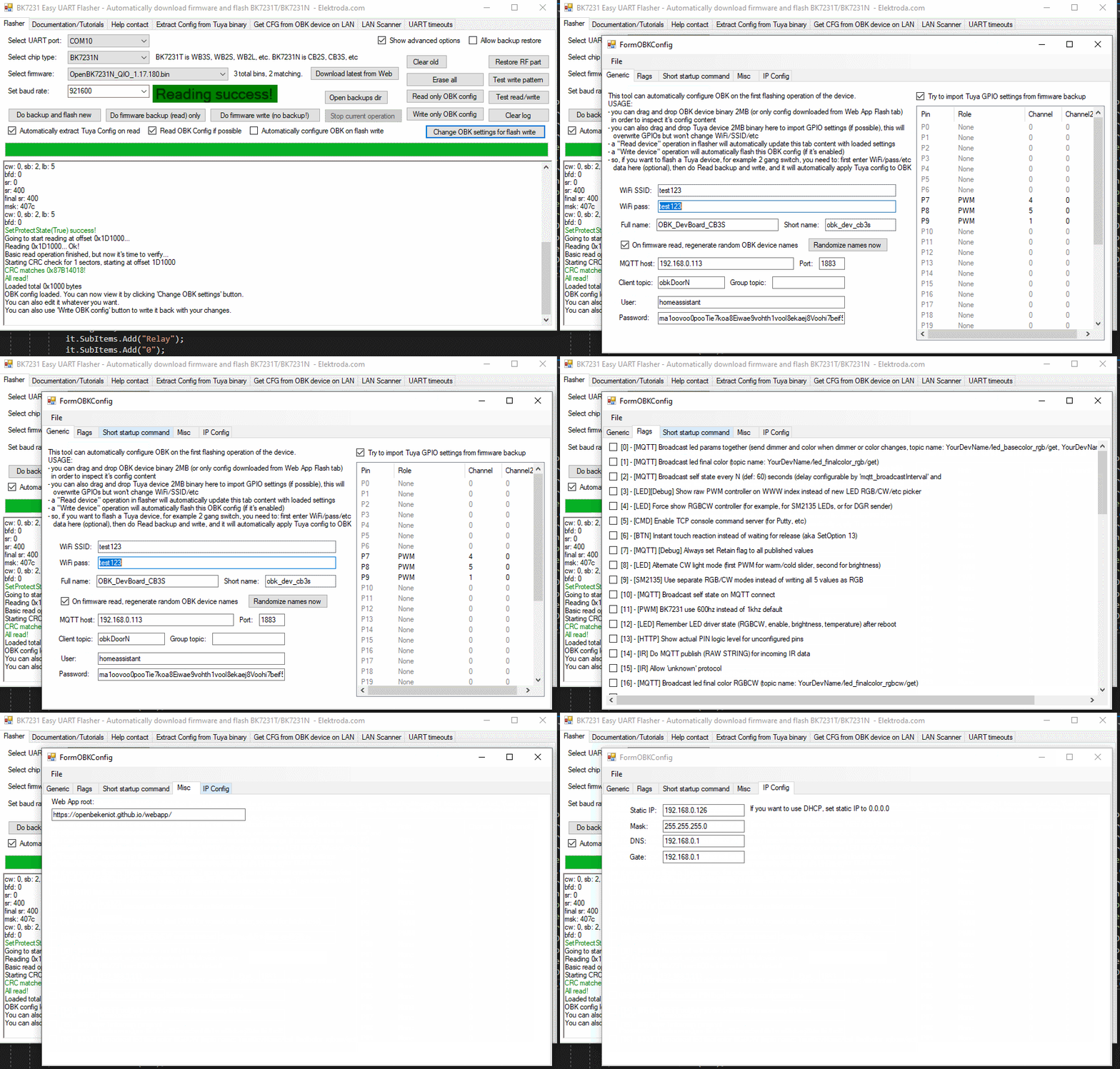
BK7231GUIFlashTool software interface displaying configuration read success.
Here you can enter your WiFi data, IP settings, MQTT settings, flags, and even a short startup command. More options will be added soon.

Step 4: Save back OBK config
Now, press "Write only OBK config" and do power cycle if needed (if UART command line is enabled, it will not be needed):
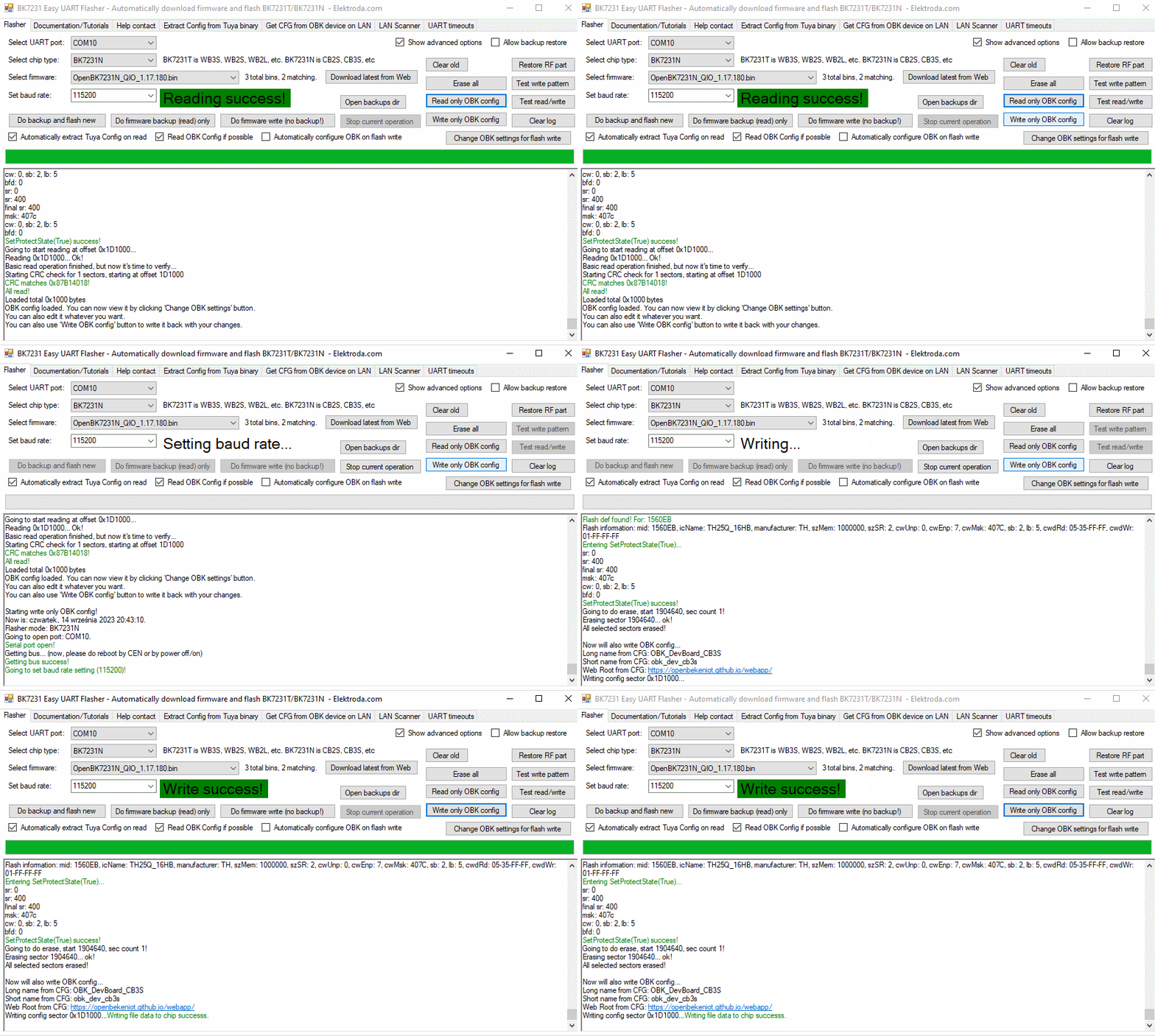
BK7231GUIFlashTool interface with successful OBK configuration read.


Summary
That's all! This way you can configure your OBK without even creating an access point, so there is also no potential security risk of someone else accessing it at the config time. This can be very hand for many users. Let me know what you think about this option.
Soon I will also cover more options of BK7231GUIFlashTool , so stay tuned for another topic! If you have any feature request, feel free to ask.


About Author
p.kaczmarek2
p.kaczmarek2 wrote 14677 posts with rating 12701 , helped 656 times. Been with us since 2014 year.

Comments

Tony2k 08 Nov 2023 09:28

I'm trying to flash a bk7231N smart switch but I have write fails. Changing baud rate only changes the sector at which the error occurs, this is the log: All selected sectors erased! Writing sector... [Read more]

p.kaczmarek2 08 Nov 2023 10:27

You can try to shorten the wires to the programmer. You can also use old hid_download_py method: Which USB to UART dongle are you using? [Read more]

Tony2k 08 Nov 2023 10:40

I use FT232 (probably not genuine). I'll try to shorten wires. [Read more]

p.kaczmarek2 08 Nov 2023 10:43

And how do you power the device? You can also try to set longer delays in one of the tabs of BK7231 flasher [Read more]

Tony2k 08 Nov 2023 10:49

I tried powering it both from FT232 and from the onboard power supply. Do you mean UART timeouts? I tried to set 10/10/5 but nothing. [Read more]

Tony2k 11 Nov 2023 14:03

@pkaczmarek262 could the problem be related to the MCU that is integrated on the mainboard and it's connected to the wifi module? https://obrazki.elektroda.pl/2704743200_1699707682_thumb.jpg [Read more]

p.kaczmarek2 11 Nov 2023 14:19

It indeed seems that RXD trace is used for some other purpose. Can you check where it leads? Maybe you need to temporarily cut it, just like we did on our video tutorial: [Read more]

Tony2k 11 Nov 2023 15:12

I cutted the trace (it goes to the button, now led doesn't works) but nothing changed. I also tried so set delay to 50 and now flash ends but I have CRC fail. [Read more]

divadiow 26 May 2024 13:17

please compile and release latest easy flasher with commits since last in December https://github.com/openshwprojects/BK7231GUIFlashTool/commit/29c2881a6e32b5f6e90e47fa65a0bc5378a2cc60#commitcomment-142314938 and... [Read more]

p.kaczmarek2 26 May 2024 14:15

Sure, here is a latest release, please check if it's ok: https://github.com/openshwprojects/BK7231GUIFlashTool What is the use case of custom offsets/lengths? PS: In general, please try to open requests... [Read more]

divadiow 26 May 2024 14:20

thank you. I can't recall most recent use, but when playing with flashing unknown or odd chips it's useful. I've used non-Easy Flasher tools in the past to achieve this. It's fine, most people won't... [Read more]

FAQ

TL;DR: In 4 steps, you can flash and preconfigure OpenBeken over UART without opening a temporary AP. The key switch is flag 31, and the developer notes it can "enable UART command line" so you can read, edit, and write WiFi, MQTT, IP, flags, and a startup command from your PC. This FAQ helps BK7231T/BK7231N users avoid setup friction and diagnose write failures. [#20733610]

Why it matters: Flash-time UART configuration is faster, avoids temporary WiFi handoff, and gives you a recovery path when AP-based setup or boot behavior becomes unreliable.

Method What you configure Extra connection step Reset behavior Best use case
BK7231GUIFlashTool over UART WiFi, IP, MQTT, flags, startup command None CEN reset or power cycle; often skipped with flag 31 Fast initial setup and recovery
Open access point method Device settings after first boot Connect to temporary AP Normal reboot flow Standard post-flash setup
hid_download_py Flashing and recovery path Wired flashing flow Manual recovery-oriented workflow Unreliable GUI flashing cases

Key insight: The thread’s main takeaway is simple: if UART flashing is unstable, fix the physical link first. Shorter wires, better UART hardware, longer delays, and isolating a shared RXD trace matter more than changing settings blindly.

Quick Facts

  • BK7231GUIFlashTool can read OBK config from flash into app memory, let you edit it on a PC, then write it back over UART without using an open access point. [#20733610]
  • The editable flash-time fields named in the thread are WiFi data, IP settings, MQTT settings, flags, and one short startup command. [#20733610]
  • If write fails appear, one reported error was serial.BytesToRead 1 (expected 15) with FF data in the UART buffer at sector 0x10000. [#20804942]
  • One troubleshooting attempt used UART timeout values 10/10/5 with no improvement, while increasing delay to 50 let flashing finish but ended in a CRC fail. [#20809793]
  • A newer Easy Flasher release was posted on 2024-05-26, and the maintainer explicitly said forum requests are checked more often than GitHub. [#21096373]

How do I configure WiFi, MQTT, IP settings, flags, and startup commands for OpenBeken at flash time using BK7231GUIFlashTool over UART?

Use BK7231GUIFlashTool after flashing OpenBeken, then edit OBK settings over UART. 1. Flash the device normally by UART. 2. Click Read only OBK config. 3. Click Change OBK settings, enter WiFi, IP, MQTT, flags, and a short startup command, then save with Write only OBK config. If UART command line is enabled, you may skip an extra restart. [#20733610]

What is BK7231GUIFlashTool, and how does it differ from configuring OpenBeken through the usual open access point method?

BK7231GUIFlashTool is a PC flasher that can also read and write OpenBeken configuration over UART. The usual method flashes firmware first, then makes an open access point for setup. This tool skips that AP step and lets you configure OBK directly from the PC at flash time. That change reduces setup friction and keeps configuration inside one wired workflow. [#20733610]

Why would OpenBeken UART configuration be preferable to the access point setup method on BK7231T or BK7231N devices?

UART configuration is preferable when you want a faster, more controlled setup path. The thread lists at least 6 benefits: it is quicker, keeps your PC online, avoids battery-powered devices falling asleep, helps recover from bad configuration, can support automatic GPIO work later, and may help batch conversion. It also avoids exposing a temporary open AP during configuration. [#20733610]

What is the "Read only OBK config" function in BK7231GUIFlashTool, and when should I use it after flashing?

"Read only OBK config" is a UART read function that copies the device’s stored OpenBeken configuration from flash into the flasher’s memory, without rewriting firmware. Use it right after OpenBeken is flashed and before editing settings. That gives you the current OBK state on the PC, so you can safely change WiFi, IP, MQTT, flags, or a startup command before writing the config back. [#20733610]

How does enabling flag 31 ("enable UART command line") affect resets and power cycling when reading or writing OBK config?

Enabling flag 31 reduces the need for manual restarts during OBK config operations. The thread says automatic restart while using BK7231GUIFlashTool requires flag 31, named "enable UART command line". Without it, you may need a CEN reset or a full power cycle after reading or writing config. With it enabled, those extra steps may not be needed. [#20733610]

Why does a BK7231N flash fail at different sectors with errors like "serial.BytesToRead 1 (expected 15)" and FF data in the UART buffer?

Those errors point to an unreliable UART path rather than a single bad setting. The reported log shows successful writes through sector 0xF000, then failure at 0x10000 with only 1 byte received instead of 15, plus FF data in the buffer. In the thread, suspected causes include long wires, weak UART hardware, timing issues, power instability, or another circuit sharing the RXD line. [#20804942]

Which troubleshooting steps help when BK7231GUIFlashTool write operations fail, such as shortening wires, changing baud rate, or adjusting UART delays and timeouts?

Start with the physical connection, then adjust timing. 1. Shorten the wires to the programmer. 2. Try longer delays or timeout settings inside BK7231GUIFlashTool. 3. If failures continue, switch to the older hid_download_py recovery method. Changing baud rate alone did not solve the reported case, and timeout values 10/10/5 also failed, so the thread points first to signal integrity and line contention. [#20805018]

What problems can a non-genuine FT232 USB-to-UART adapter cause when flashing a BK7231N smart switch, and what alternatives work better?

A questionable FT232 adapter can worsen unstable flashing because the UART link already fails under load. In the thread, the user reports an FT232 that is "probably not genuine" while seeing write errors at changing sectors. The maintainer’s practical alternative was not a named adapter model, but the older hid_download_py method, plus shorter wires and timing changes, which makes it the documented fallback here. [#20805031]

How does the power source during flashing—FT232 power versus the device's onboard supply—affect BK7231N write reliability and CRC errors?

The thread does not identify one power source as clearly better. The user tried both FT232 power and the device’s onboard supply, and write problems remained. Later, increasing delay to 50 let flashing complete but ended with a CRC fail, which suggests power source alone did not remove the underlying communication fault. In this case, timing and shared-line interference stayed higher-priority suspects. [#20805044]

In a BK7231N smart switch, how can an onboard MCU or a shared RXD trace interfere with UART flashing, and how do I trace or isolate that line safely?

An onboard MCU or another circuit can corrupt UART traffic if it shares the module’s RXD trace. In the thread, the maintainer says the RXD trace "is used for some other purpose" and advises checking where it leads. The safe workflow is: trace the RXD path, confirm whether another function is attached, and temporarily isolate that line if needed, as shown in the referenced video tutorial. [#20809704]

What does a CRC fail after a seemingly completed BK7231 flash usually indicate, and how should I diagnose it?

A CRC fail indicates the write completed procedurally, but the data read back did not verify correctly. In the reported case, raising delay to 50 let the flash finish, yet CRC still failed. Diagnose it by treating verification failure as a signal-quality problem: recheck wires, power stability, UART adapter quality, and whether RXD is shared or loaded by other circuitry on the board. [#20809793]

Between BK7231GUIFlashTool and the older hid_download_py method, which is better for unreliable BK7231T/BK7231N flashing and recovery work?

BK7231GUIFlashTool is better for normal flashing plus OBK preconfiguration, but hid_download_py is the thread’s fallback for unreliable recovery cases. The maintainer explicitly suggests the older method when GUI writes fail. Use the GUI tool when you want flash-time WiFi, MQTT, and IP setup. Switch to hid_download_py when sector writes keep failing after wire, delay, and power checks. [#20805018]

What is CEN reset in the BK7231 flashing process, and when should I use it instead of a full power cycle?

"CEN reset" is a hardware reset action that restarts the BK7231 without fully removing board power, which makes it a quicker recovery step during flashing or config work. Use it after Read only OBK config or Write only OBK config when the tool asks for a restart. If flag 31 is enabled, the thread says that extra reset may not be required. [#20733610]

When flashing unknown or unusual BK7231-based chips, what are custom offsets and lengths used for in flasher tools?

Custom offsets and lengths are used to target non-standard flash regions on unknown or unusual chips. In the thread, a user says they are useful when "playing with flashing unknown or odd chips" and had used non-Easy Flasher tools for that purpose before. The maintainer asks for the use case, which shows this is an advanced, optional feature rather than a mainstream requirement. [#21096376]

Where should feature requests and support questions for BK7231GUIFlashTool be posted for the fastest response: the Elektroda forum or GitHub?

Post them on the Elektroda forum for the fastest response. On 2024-05-26, the maintainer wrote, "please try to open requests on forum, as I am checking forum more often than Github." GitHub still hosts releases and issues, but the thread gives the forum as the higher-priority support channel for this tool. [#21096373]
Summary generated by AI based on the discussion content.
%}