logo elektroda
logo elektroda
X
logo elektroda

The second life of RC models, i.e. remote control by Frog_Qmak

Frog_Qmak  17 5964 Cool? (+16)
📢 Listen (AI):

TL;DR

  • A universal remote-control platform runs multiple RC models—a tank chassis, mini-car, 4x4 car, and fast boat—using one Arduino-based transmitter and interchangeable receivers.
  • An Arduino Nano transmitter with two joystick modules sends HC-12 commands, while identical receivers decode A/B/C/D control strings and auto-switch between car/tank and boat modes.
  • The selected HC-12 setup achieved at least 200 m range, with theoretical low-bitrate line-of-sight range up to one kilometer.
  • The big car gained WS2812B lights, the boat got servo steering plus low-voltage alarms, and the same firmware handled both vehicle types.
  • A switch between the battery and BMS caused charging problems, the servo library conflicted with WS2812 control, and the transmitter spiral antenna worked poorly.
Generated by the language model.
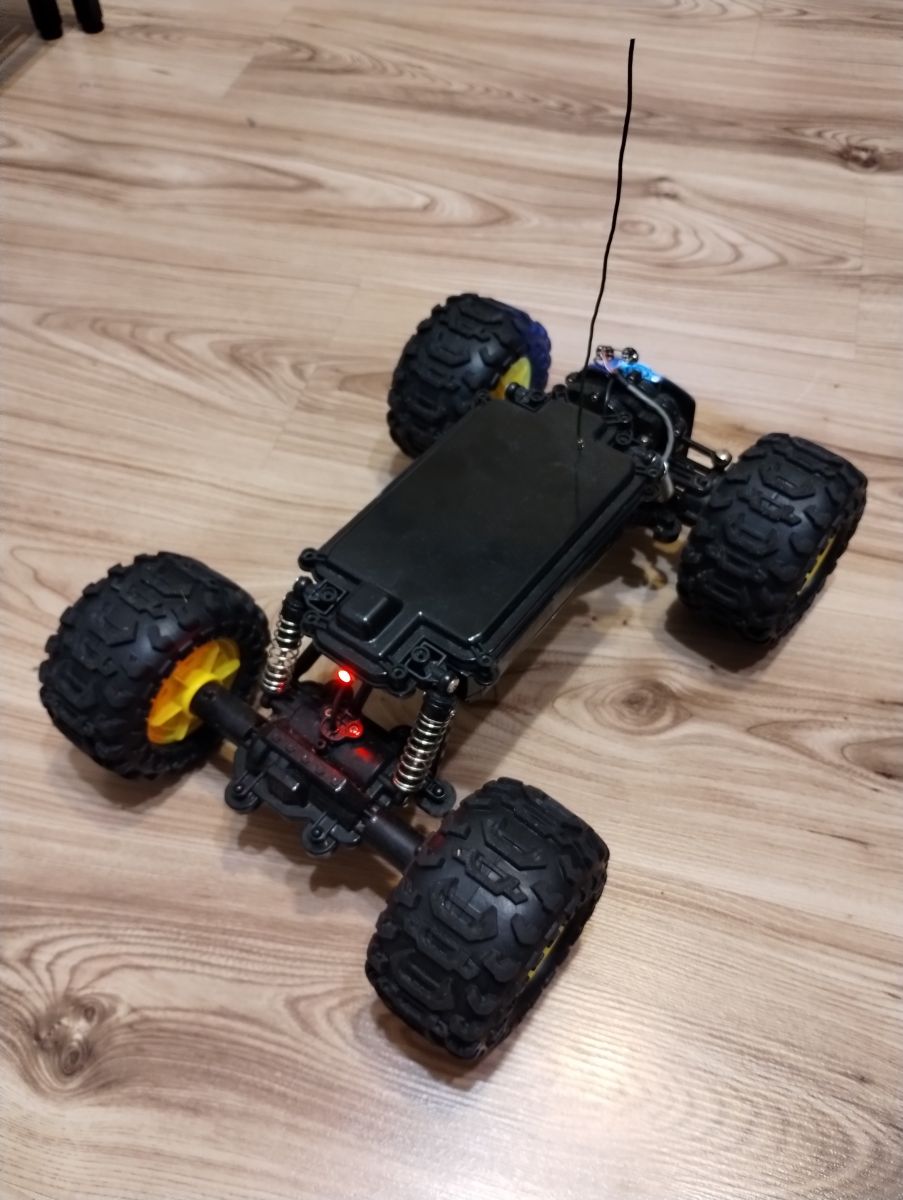
Remote-controlled off-road car with antenna, standing on a wooden floor.

Hello

I would like to present and share a universal platform for operating remotely controlled models.
I haven`t posted anything on the forum for many years - it doesn`t mean that nothing was happening, but it wasn`t always worth showing. ;)


It all started with the fact that I wanted to do something that would give me fun and be an inspiration to "fiddle" with cables and Arduino. So I ordered a tank chassis from a Chinese online store (sinoning.com) and that`s how the adventure began... after the tank, a mini-car appeared (also from the same store), and then, bought for 1/3 of the value of new vehicles, a full-fledged car with 4x4 drive and a remote-controlled fast boat, bought on Allegro as "damaged". The damage to the car consisted of water getting inside and seizing the engine (the car is theoretically waterproof and has positive buoyancy and can also "move" on water), which was revived (by force and then turning by hand), while the boat was theoretically damaged. control, but I didn`t check what happened because from the very beginning I wanted to install my own...

A few words about the control itself:
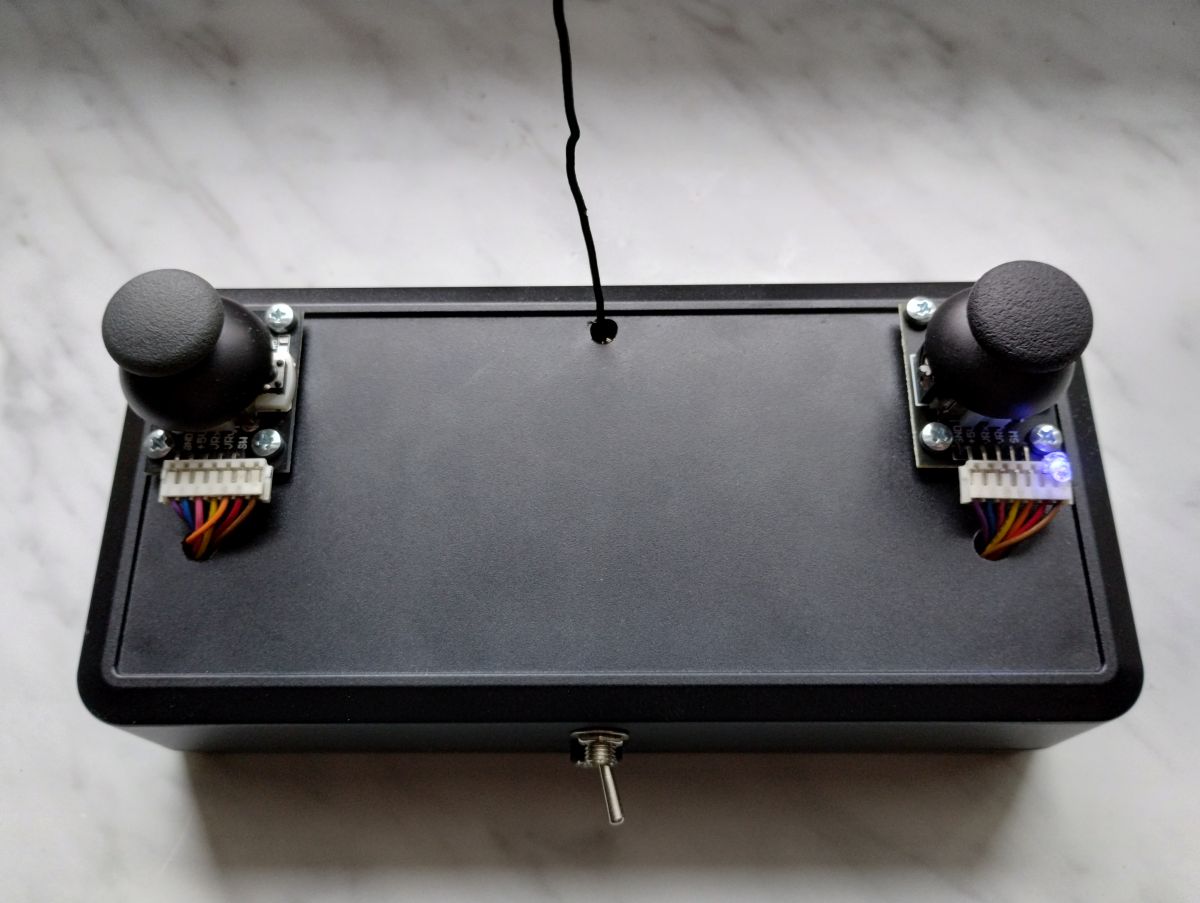
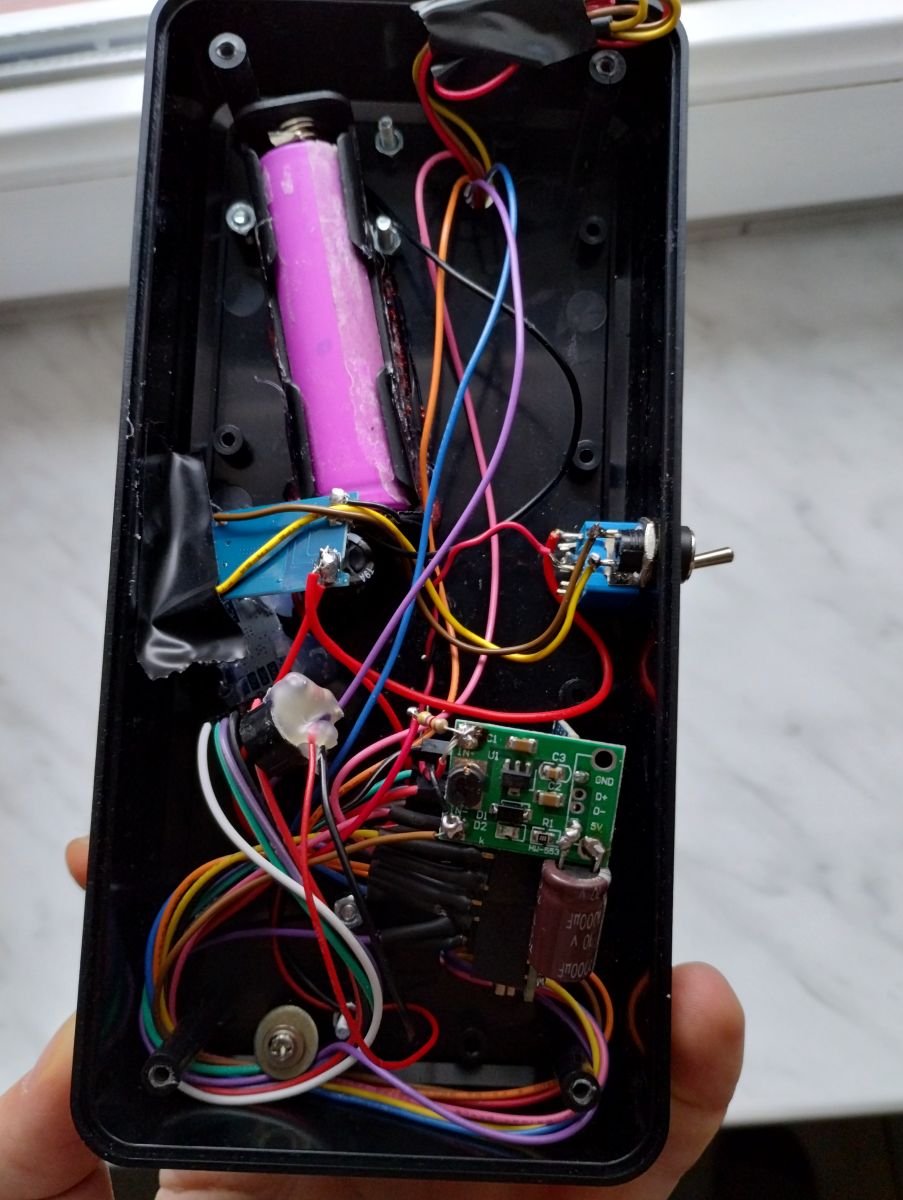
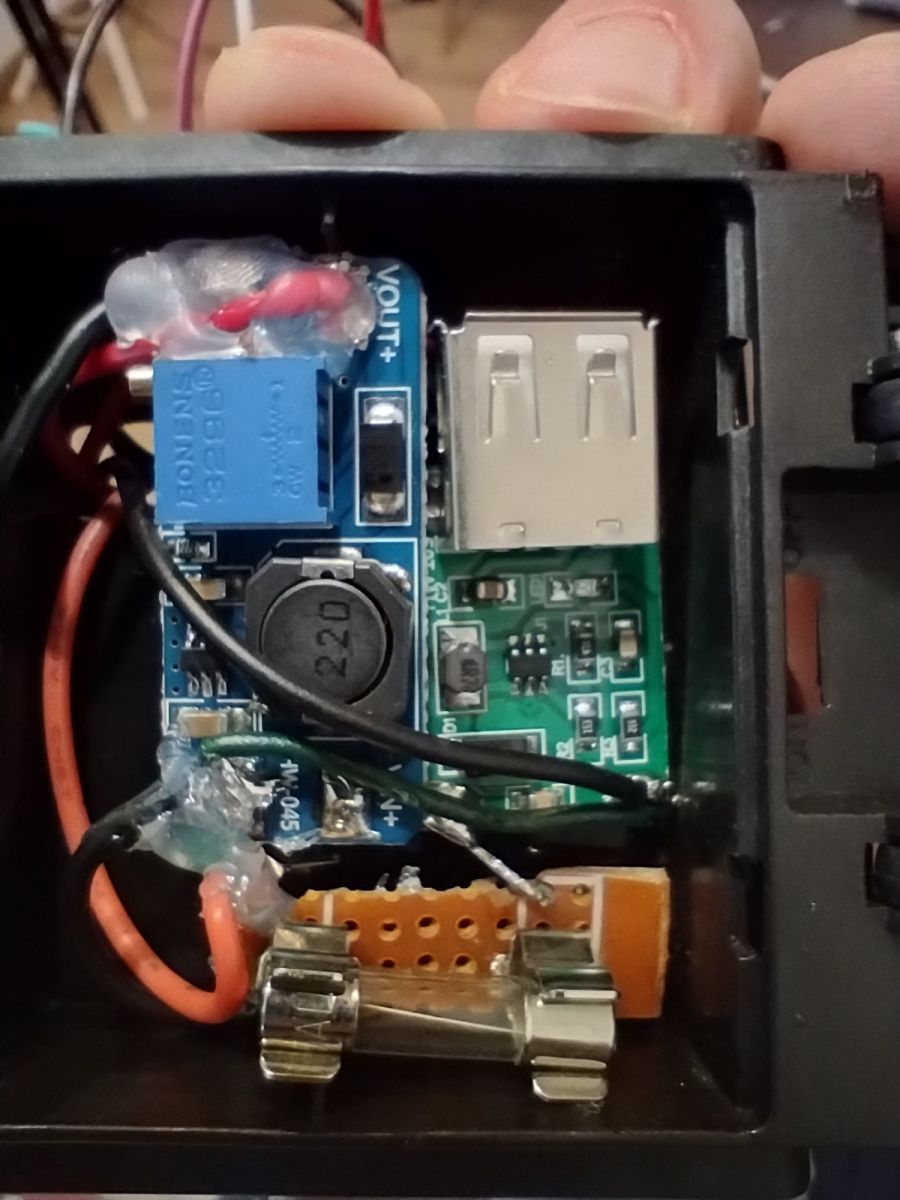
Remote consists of 2 joysticks (Arduino modules), Arduino Nano, Li-Ion battery, BMS system, 5V step-up converter and radio (HC-12 module). No rocket science. I had a huge problem diagnosing the problem that the BMS did not want to charge the battery - the diode was blinking very quickly, as if there was no contact somewhere, or the module was being energized. In desperation, I soldered it directly to the battery (previously through the switch) and this solved the problem. I don`t know why the switch caused such problems - perhaps the contacts provided some electrical resistance and the module was excited, e.g. by the radio or the converter. The remote control has two modes (the mode is changed by long pressing the left joystick): car/boat mode (default - left joystick forward/back, right joystick right/left) and tank mode (both front/rear joysticks for differential control). Holding the left joystick for a shorter time changes the lamp mode (bright/medium/off) in the big car.

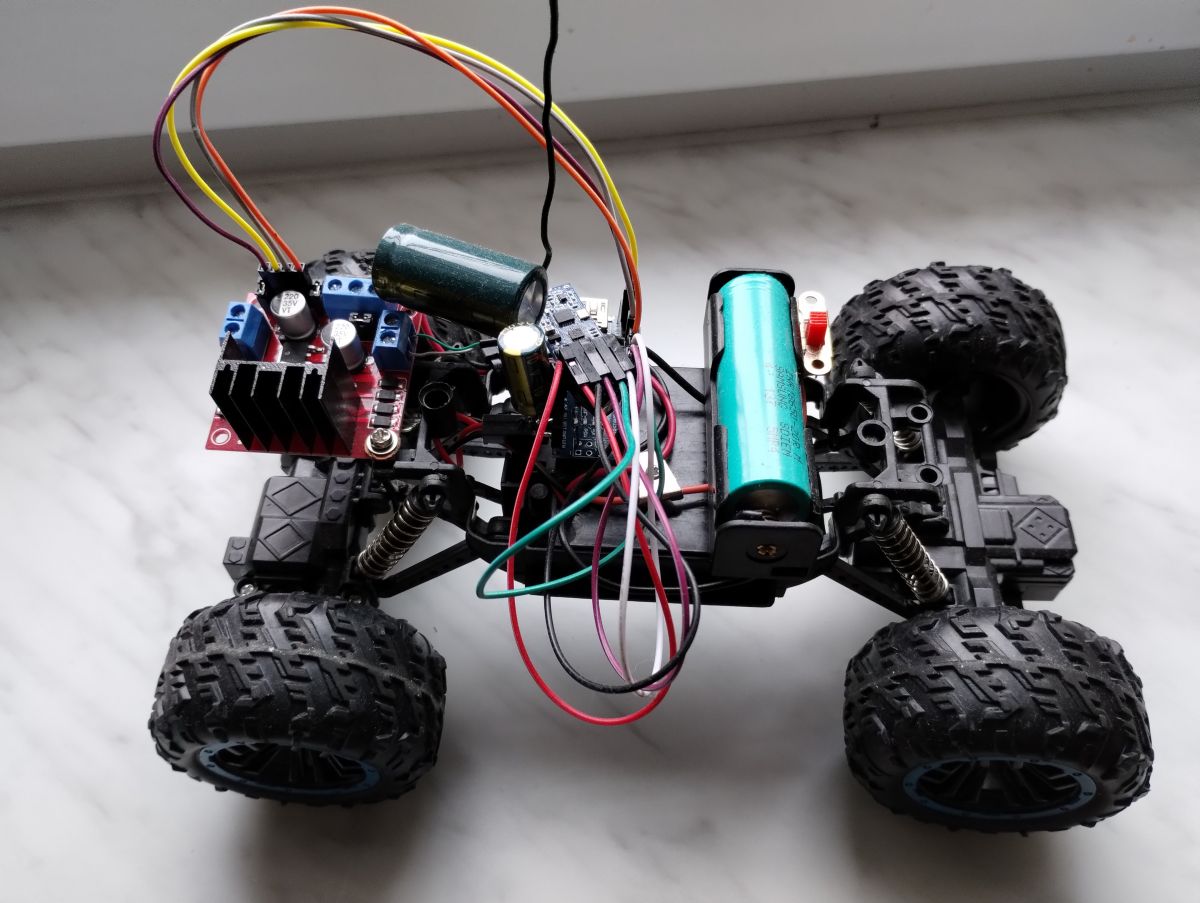
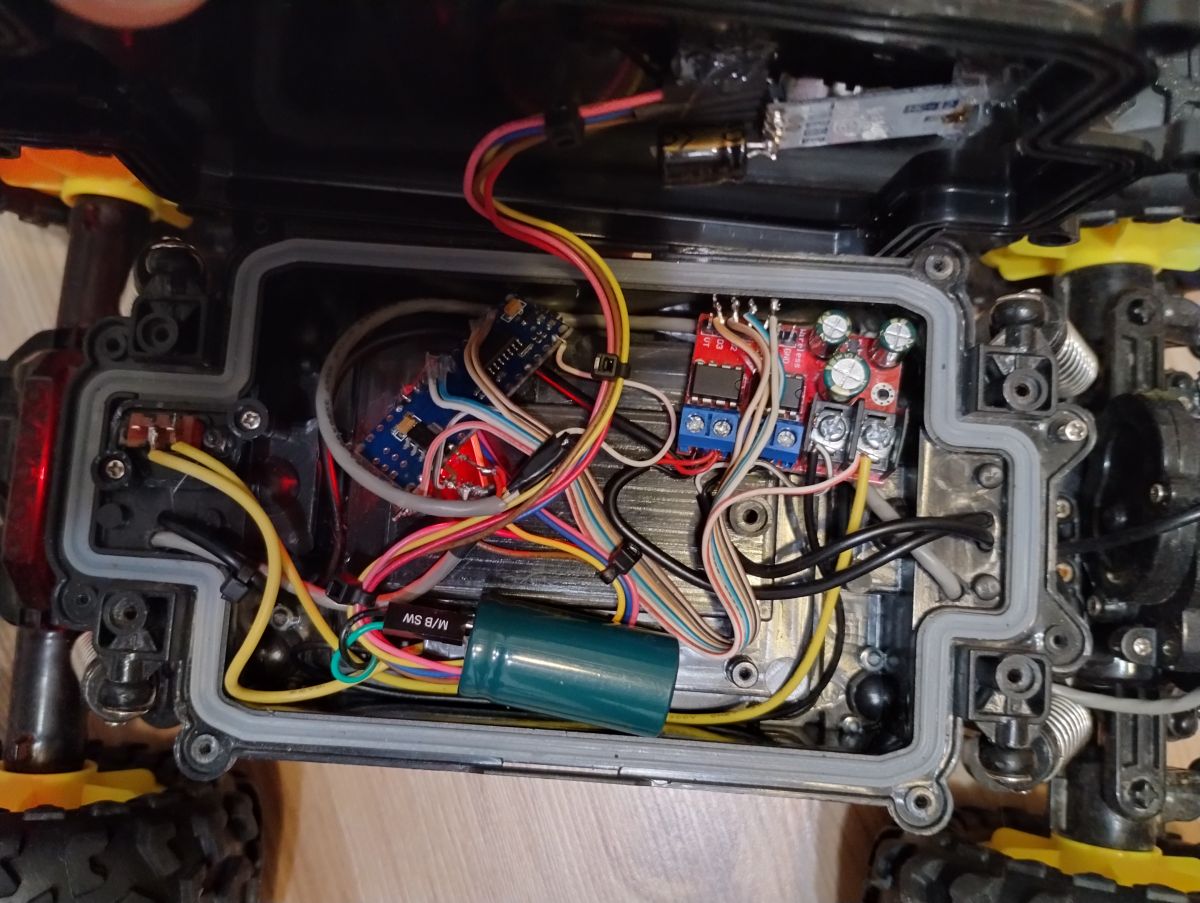
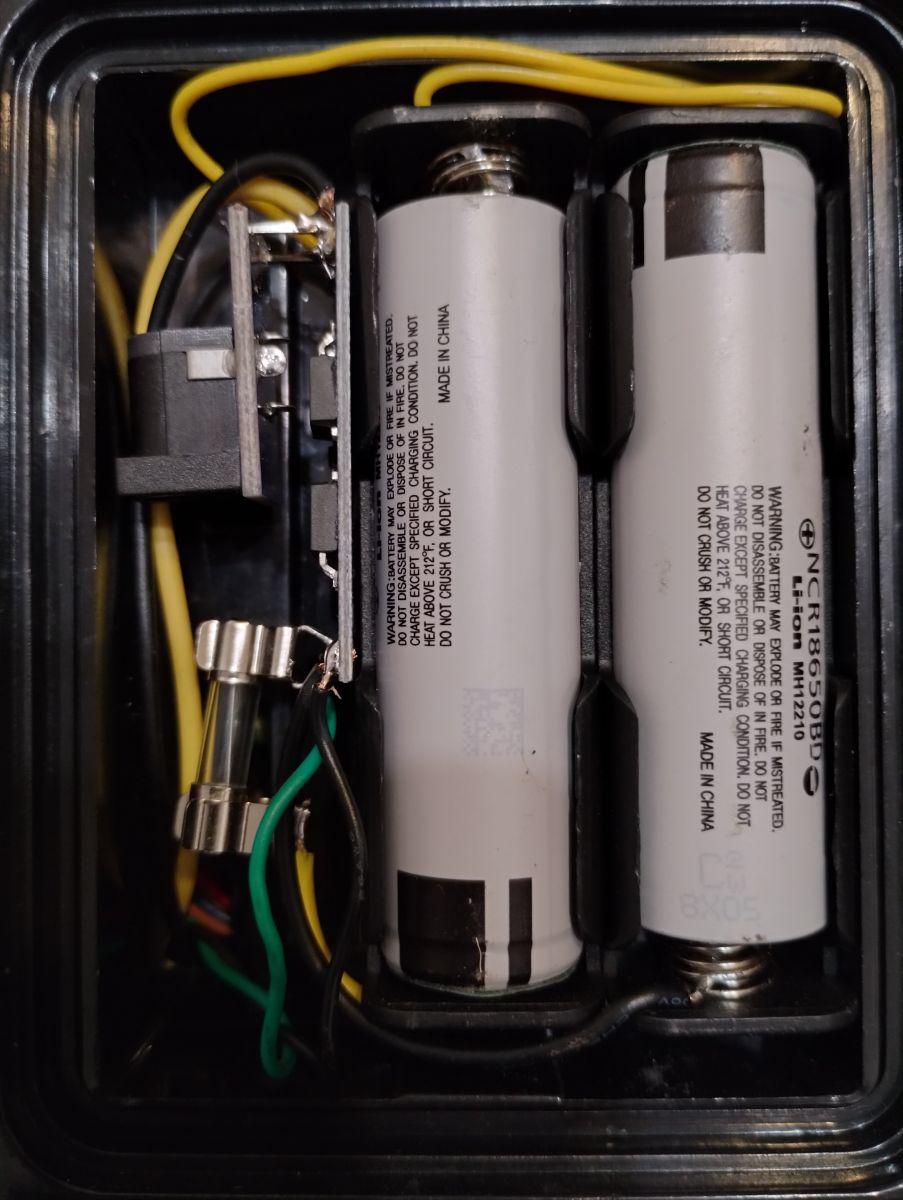
Receivers they also consist of Arduino Nano, HC-12, as well as (cars, tank) BMS and an H-bridge for controlling the engines (in a boat, the engine is operated by a servo). The smallest car is powered by one LI-ION cell and a STEP-UP converter, hence the large capacitor so that voltage drops do not reset the Arduino. The remaining models run on two 18650s (the large car also has a capacitor on the power supply, but it is not needed).

Additional information
The large car has lights based on WS2812B (two white at the front, one red at the rear).

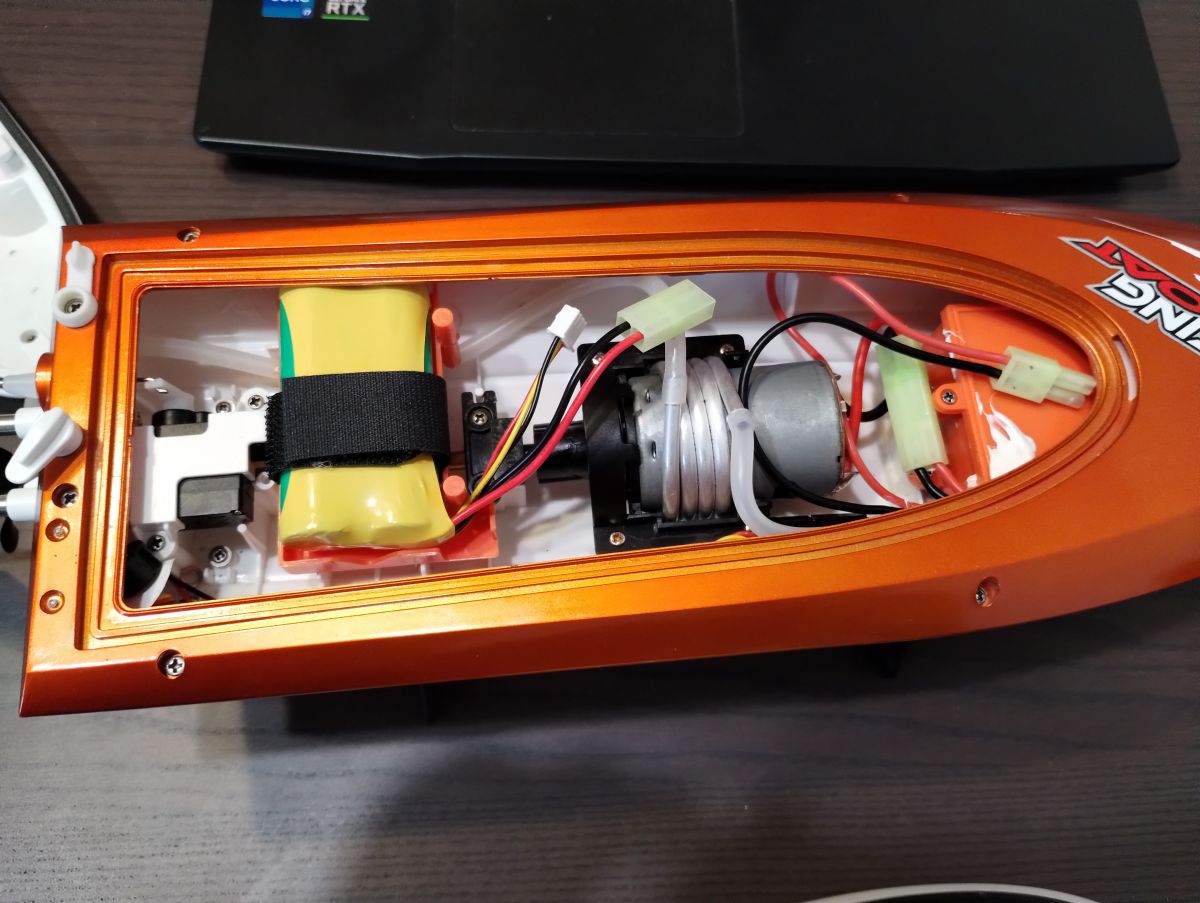
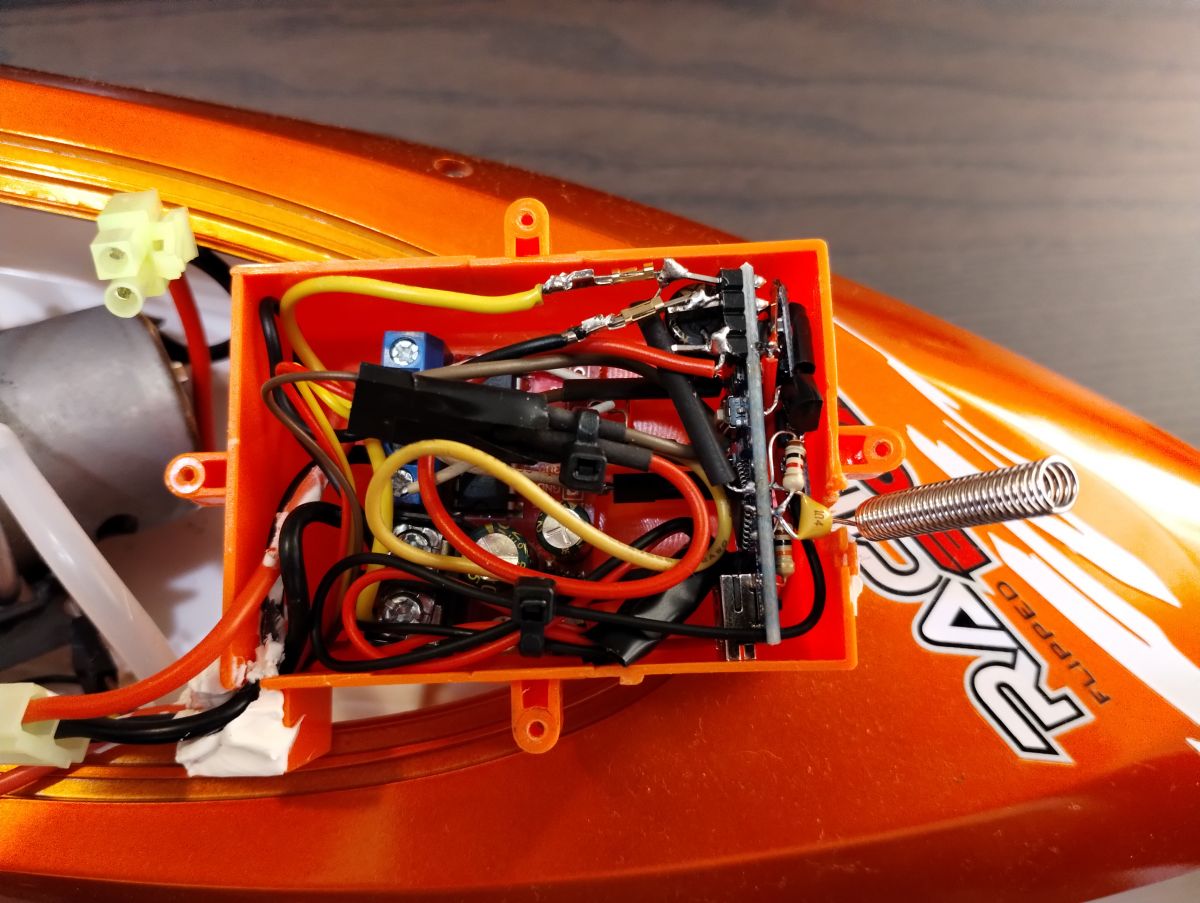
Boat steeringis more complicated because the "ordinary PWM code" cannot be used to operate the servo, as it is done in a different way. All receivers have an identical code; At startup, Arduino checks whether there is appropriate voltage on one of the pins (supplied from the 3.3V output) and if so, it activates the "boat mode". Other models do not have this pin bridged - this way the program is universal and there is no need to add another "mode" in the remote control.

The boat has protection against low battery voltage - it is measured by a voltage divider and has two activation thresholds. When the first one is reached, an acoustic signal is emitted for a few seconds (5V buzzer controlled by the BS170 transistor). When the second one is reached, the acoustic signal turns on permanently and the engine power is reduced (PWM max 50%). The BMS used in the factory cells does not cut off the power supply even in the event of deep discharge, which makes sense because it is better to kill the batteries than to get the boat stuck 10 meters from the shore...
The servo is controlled using a software library. This is because the default servo library had a conflict with the library responsible for controlling the WS2812 (probably a conflict due to the use of the same timer).

The program also has commented sections related to testing the battery in the boat - before I discovered that the BMS did not cut it off, I wrote a script that saved the lowest measured supply voltage in EEPROM and after connecting the Arduino to the computer, sent it via Serial. I wanted to know to what level the cells could be discharged to properly set the protection thresholds, but it turned out to be unnecessary.

The remote control and the large toy car have connectors for charging the batteries; there are chargers for a small car and a boat.

Generally, I discovered that the "spiral" antenna in the transmitter works poorly, but a regular wire of appropriate length works well. The antennas in the remote control and cars are mounted in goldpin sockets so that they can be easily removed for transport. The boat has a default spiral antenna. HC-12 radios are very cool, the theoretical range (at low bitrate, direct visibility) is up to one kilometer. I am attaching two documents that will be useful for their operation - they contain a description of the functions and configuration.

Calibration is needed to adapt the code to a given joystick (neutral point) and servo (also). The values are described in the comments.

I don`t have any diagrams, but I think you can easily figure out what and how based on the descriptions and photos. I know that (especially in the remote control) there is a spider`s web of cables, but I don`t waste my time designing boards, I enjoy electronics and writing programs.
The code is heavily commented (in English), so understanding the programs should not be a problem. The range in the selected configuration (radio bitrate, antenna) is at least 200m (maybe more, I haven`t checked, at such a distance it is difficult to control the model).
If anyone is interested, it is worth following this topic, if there is an update of the program(s), I will add it.

Below are the photos and code.
Remote control with two joysticks on a black box for remote-controlled devices.
Interior of a remote control with electronic components and connected wires.
Chassis of a remote-controlled car model with Arduino electronics and wires.
Close-up of the interior of an electronic project's enclosure with components.
Remote-controlled off-road car with antenna, standing on a wooden floor.
Electronic setup with Arduino modules inside a remote-controlled vehicle.
Close-up of dual Li-Ion battery cells mounted in a black case, surrounded by wires and a fuse.
Remote-controlled boat with visible interior and electronic components.
Close-up of electronics inside an orange remote-controlled boat.

TRANSMITTER
// delay(1);//It is necessary for proper message sending. Without this messages sometimes are merged.
//$$ separates values, ! ends the message


#include <SoftwareSerial.h>
SoftwareSerial mySerial(2, 3); //RX, TX

//L: 3-507-1017 --> 1020 for smooth operation [506;508]
//R: 3-526-1017 --> 1020 for smooth operation [525;527]
//STEER [R]: 0-517-1022 [521;523]
int ax; //analog read joystick A
byte af; //analog joystick A forward
byte ab; //analog joystick A backward

int bx; //analog read joystick B
byte bf; //analog joystick B forward
byte bb; //analog joystick B backward

boolean mode = false; //Tank or Car mode (default: car)
int buttontest; //conunting time of button being pressed

String toSend;


void setup()
{
  pinMode(4, OUTPUT);
  pinMode(12, OUTPUT);
  pinMode(11, OUTPUT);
  pinMode(10, OUTPUT);
  pinMode(9, OUTPUT);
  pinMode(5, OUTPUT);
  pinMode(6, OUTPUT);

  digitalWrite(4, HIGH); //DISABLE AT MODE
  digitalWrite(12, HIGH);//RIGHT JOYSTICK VCC
  digitalWrite(11, LOW);//RIGHT JOYSTICK GND
  digitalWrite(10, HIGH);//LEFT JOYSTICK VCC
  digitalWrite(9, LOW);//LEFT JOYSTICK GND
  digitalWrite(5, LOW);//BUZZER GND
  digitalWrite(6, LOW);//BUZZER VCC

  pinMode(A0, INPUT); //LEFT JOYSTICK BUTTON
  pinMode(A1, INPUT); //RIGHT JOYSTICK BUTTON
  pinMode(A5, INPUT); //RIGHT JOYSTICK FORWARD & BACKWARD
  pinMode(A6, INPUT); //RIGHT JOYSTICK RIGHT & LEFT
  pinMode(A2, INPUT); //LEFT JOYSTICK FORWARD & BACKWARD

  Serial.begin(9600);
  pinMode(4, OUTPUT); //for MODE setup
  digitalWrite(4, LOW); //ENTER AT MODE
  delay(50);//necessary to wait after mode change
  mySerial.begin(9600);//9600 adjust after adjusting communication speed using AT+BXXX
  mySerial.println("AT+FU3");
  delay(50);
  mySerial.println("AT+B9600");//9600
  delay(50);
  mySerial.println("AT+RX"); //AT MODE REQUIRED TO BE ON (4 LOW)
  delay(100);
  digitalWrite(4, HIGH); //EXIT AT MODE
  delay(50);//necessary to wait after mode change
}


void loop()
{
  //RESET OLD VALUES TO AVOID CONFLICTS
  af = 0;
  ab = 0;
  bf = 0;
  bb = 0;


  ////////////////////////////////STEERING MODE CHECK
  if (analogRead(A0) < 10) //BUTTON PRESSED

  {
    buttontest = buttontest + 1; //COUNTING TIME OF BUTTON BEING PRESSED
    mySerial.print("BUTTON PRESSED !");
    Serial.println("BUTTON PRESSED !");
  }
  else
  {
    buttontest = 0; //RESET IN CASE OF ACCIDENTAL CLICK
  }

  //Serial.println(buttontest);

  if (buttontest == 40 ) //BUTTON PRESSED - SENT LIGHT ADJUST SIGNAL
  {
    toSend = String("E") + "!"; 
    mySerial.print(toSend);
    delay(1);
    digitalWrite(6, HIGH);
    delay(100);
    digitalWrite(6, LOW);
    delay(100);
    digitalWrite(6, HIGH);
    delay(100);
    digitalWrite(6, LOW);
    delay(1000);
  }


  if (buttontest == 41) //BUTTON PRESSED - SENT LIGHT ON/OFF SIGNAL
  {
    toSend = toSend = String("F") + "!"; 
    mySerial.print(toSend);
    delay(1);
    digitalWrite(6, HIGH);
    delay(1000);
    digitalWrite(6, LOW);
  }


  if (buttontest >= 42) //BUTTON PRESSED - CHANGE TO TANK MODE
  {
    mode = !mode;
    buttontest = 0;
    mySerial.print("MODE CHANGED !");
    delay(1);
    Serial.println("MODE CHANGED !");
    digitalWrite(6, HIGH);
    delay(4000);
    digitalWrite(6, LOW);
  }


  ////////////////////////////////////////LEFT JOYSTICK READ & CALCULATE
  ax = analogRead(A2); //LEFT JOYSTICK
  //  if (mode == 1)
  //  {
  //    Serial.print("A2 LEFT:  ");
  //    Serial.println(ax);
  //  }
  //  else
  //  {
  //    Serial.print("A2 MOVE: ");
  //    Serial.println(ax);
  //  }


//Serial.print("AX READ: ");
//Serial.println(ax);

  //af is PWM for A engine forward
  if (ax > 508)
  {
    af = map(ax, 508, 1020, 0, 255); //af is PWM for A engine forward
    //Serial.print("LEFT FORWARD: ");
    //Serial.println(af);
    toSend = "A" + String(af, DEC) + "!"; 
    mySerial.print(toSend);
    delay(5);
  }

if (ax >= 506 && ax <=508) //to send zero command in case of neutral joistick position
{
     toSend = "A" + String(0, DEC) + "!";  
     mySerial.print(toSend);
     delay(5);
     toSend = "B" + String(0, DEC) + "!";  
     mySerial.print(toSend);
     delay(5);
}

  if (ax < 506)
  {
    ab = map(ax, 3, 506, 255, 0); //ab is PWM for A engine backward
    //Serial.print("LEFT BACKWARD: ");
    //Serial.println(ab);
    toSend = "B" + String(ab, DEC) + "!"; 
    mySerial.print(toSend);
    delay(5);
  }
  ////////////////////////////////END OF LEFT JOYSTICK READ & CALCULATE


  ////////////////////////////////////////RIGHT JOYSTICK READ & CALCULATE
  ///////////READING POSITION FROM CORRECT JOYSTICK OUTPUT
  if (mode == 1)
  {
    bx = analogRead(A5); //IF IN TANK MODE
    //    Serial.print("A5 RIGHT: ");
    //   Serial.println(bx);
  }
  else
  {
    bx = analogRead(A4); //IF IN CAR MODE
    //Serial.print("A6 STEER: ");
    //Serial.println(bx);
  }
  ///////////END OF READING FROM CORRECT JOYSTICK OUTPUT

  ///////////CALCULATING PWM ACCORDING TO
  //JOYSTICK'S ZERO CALIBRATION POSITION
  if (mode == 1) //IF IN TANK MODE
  {
    if (bx > 527)
    {
      bf = map(bx, 527, 1020, 0, 255); // bf is PWM for B engine forward
      //Serial.print("RIGHT FORWARD: ");
      //Serial.println(bf);
      toSend = "C" + String(bf, DEC) + "!"; 
      mySerial.print(toSend);
      delay(5);
    }

    if (bx < 525)
    {
      bb = map(bx, 3, 527, 255, 0); //bb is PWM for B engine backward
      //Serial.print("RIGHT BACKWARD: ");
      //Serial.println(bb);
      toSend = "D" + String(bb, DEC) + "!"; 
      mySerial.print(toSend);
      delay(5);
    }
  }
  else //IF IN CAR MODE
  {
    if (bx > 517)
    {
      bf = map(bx, 517, 1022, 0, 255); //bf is PWM for B engine forward
      //Serial.print("STEER RIGHT: ");
      //Serial.println(bf);
      toSend = "C" + String(bf, DEC) + "!"; 
      mySerial.print(toSend);
      //Serial.println(toSend);
      delay(5);
    }

if (bx >= 516 && bx <=517) //to send zero command in case of neutral joistick position
{
     toSend = "C" + String(0, DEC) + "!";  
     mySerial.print(toSend);
     delay(5);
     toSend = "D" + String(0, DEC) + "!";  
     mySerial.print(toSend);
     delay(5);
}

    if (bx < 516)
    {
      bb = map(bx, 0, 517, 255, 0); //bb is PWM for B engine backward
      //Serial.print("STEER LEFT: ");
      //Serial.println(bb);
      toSend = "D" + String(bb, DEC) + "!"; 
      mySerial.print(toSend);
      //Serial.println(toSend);
      delay(5);
    }
  }

  ////////////////RIGHT JOYSTICK DIAG
  //Serial.print("AX: ");
  //Serial.println(ax);
  //Serial.print("BX: ");
  //Serial.println(bx);
  /////////////////////////////////END OF LEFT JOYSTICK READ & CALCULATE


}// END OF LOOP


RECEIVER
#include <SoftwareSerial.h>
#include <Adafruit_NeoPixel.h>
//#include <EEPROM.h>
#include <PWMServo.h>//software PWM used because servo library had conflict with other used functions using PWM generated by the same internal closk
PWMServo myservo;  // create servo object to control a servo
SoftwareSerial mySerial(2, 3); //RX, TX
Adafruit_NeoPixel
strip = Adafruit_NeoPixel(3, 13, NEO_GRB + NEO_KHZ800); //NO of pixels, PIN
byte af, ab, bf, bb;
boolean light = 0; //LIGHT ON/OFF, default = OFF
boolean change = false; // flag to mark change to use WS2812B communication once for light ON/OFF. Constant communication interrupts message receiving
boolean lightadjustment = false; // flag to mark change to use WS2812B communication once for light level adjustment. Constant communication interrupts message receiving
byte xy; //light brightness pre set setting
byte brightness = 64; //brightness level (0-255), default = 64
boolean boatmode;// if true, then boat mode
byte modecount = 0; //no. of successful read sequences
int  bootval;// voltage check at boot to detect whether it is a boat or not
byte neutral = 85; //neutral position of servo
byte servoangle; //servo's angle
int serwoPWM;// calculated value to steer servo by generating PWM
unsigned long counter; //time from last message
unsigned long nowtime; //time now. Used further to calculate time past since previous loop
//unsigned long pinginterval; // for signalling range ping messages
float voltageread; //voltage read at input
float batvoltage; //calculated battery level (incl. calculated offset)
byte mediumdischargecount = 0; //to avoid one - time battery voltage drops,alarm will be activated after few times threshold is reached
byte deepdischargecount = 0; //to avoid one - time battery voltage drops,alarm will be activated after few times threshold is reached
long mediumbatlevelalarmtime; //time of buzzer's activation
boolean mediumbatlevelalarmactivation = false;
boolean deepdischargealarmactivation = false;

//int lowestbatvoltage; ////////////////////USED ONLY AT BOOT TO HAVE ANY VALUE FOR IF FUNCTION TO COMPARE TO
//int lowestbatEEPROM;


void setup()
{
  //writeIntIntoEEPROM(7000);//EEPROM LOW RESET USED TO START A NEW RECORDING
  //PIN D11 BURNT !!!!!!!!!!!!
  //PINS A6&A7 cannot be used as analog output in Arduino Nano
  pinMode(4, OUTPUT); //AT MODE SWITCH
  pinMode(5, OUTPUT);
  pinMode(6, OUTPUT);
  pinMode(10, OUTPUT);//SERVO
  pinMode(13, OUTPUT); //built in led + WS2812B
  pinMode(A1, OUTPUT); //GND for voltage sensing
  pinMode(A0, INPUT); //voltage check at boot to detect whether it is a boat or not
  pinMode(A2, INPUT); //battery voltage check
  pinMode(A5, OUTPUT); //low battery buzzer output
  digitalWrite(A1, LOW); //GND for voltage sensing
  digitalWrite(A5, LOW); //deactivate buzzer
  digitalWrite(4, LOW); //ENTER AT MODE
  delay(50);//necessary to wait after AT mode change

  Serial.begin(9600);
  mySerial.begin(9600);//adjust after adjusting communication speed using AT+BXXX
  mySerial.println("AT+FU3");
  delay(50);
  mySerial.println("AT+B9600");
  delay(50);
  mySerial.println("AT+RX"); //AT MODE REQUIRED TO BE ON (4 LOW)
  delay(100);
  digitalWrite(4, HIGH); //EXIT AT MODE
  delay(50);//necessary to wait after mode change\
  analogReference(INTERNAL); //1,1V
  modecheck(); //Function to detect whether hardware is a boat or not

  analogReference(INTERNAL); //1,1V for battery measurement

  if (boatmode == true)
  {
    myservo.attach(SERVO_PIN_B); //Library works only at PIN9 and 10 (already used)
    servostart(); //Sequence for servo movement at boat's boot
    testbeep(); //Test buzzer
    //Serial.print("LOWEST VOLTAGE FROM EEPROM: ");
    //Serial.println(readIntFromEEPROM());
  }
  else
  {
    strip.begin(); // INITIALIZE NeoPixel strip object
    strip.clear();
    strip.show();
    startsequence(); //LED BLINK at car's boot
  }
} ///////////////////////////////////////////END OF SETUP


void loop()
{
  ///////////////////////LOST CONNECTION PROTECTION
  nowtime = millis();
  if ((nowtime - counter) > 1000) //1000 MS SIGNAL LOST TRIGGER
  {
    //Serial.println(nowtime-counter);
    //Serial.println("CONNECTION LOST !!!");
    if (boatmode == false) //IF IN CAR MODE
    {
      digitalWrite(11, LOW);
      digitalWrite(10, LOW);
      digitalWrite(6, LOW);
      digitalWrite(5, LOW);
    }
    else //IF IN BOAT MODE
    {
      digitalWrite(6, LOW);
      digitalWrite(5, LOW);
    }
  }
  ///////////////////////END OF LOST CONNECTION PROTECTION

  //////////////////////////100 MS SIGNAL PING TRIGGER
  //    if ((nowtime - pinginterval) > 50)
  //    {
  //      //Serial.println("PING INTERVAL");
  //      //Serial.println(nowtime-pinginterval);//Loop time
  //      pinginterval = millis();
  //      ();
  //    }
  ///////////////////////END OF SIGNAL PING TRIGGER


  ////////////////////////////////////// MESSAGE RECEIVING
  while (mySerial.available())
  {
    static String receivedMessage = ""; // Store the received message
    char receivedChar = mySerial.read();

    if (receivedMessage.length() == 0)
    {
      if (receivedChar == 'A' || receivedChar == 'B' || receivedChar == 'C' || receivedChar == 'D')
      {
        receivedMessage = receivedChar; // Start building the message with the received character
      }
      if (receivedChar == 'F')
      {
        light = !light;
        change = true; // FLAG FOR LIGHT STATE CHANGE
        //Serial.println("LIGHT ON/OFF !");
      }
      if (receivedChar == 'E')
      {
        lightadjustment = true; // FLAG FOR LIGHT ADJUSTMENT
      }
    }//////////////END OF receivedMessage.length() == 0

    else
    {
      if (receivedChar == '!')
      {
        // Message received and ends with '!'
        Serial.println(receivedMessage);//////////////////////////////////////
        // Serial.println("MESSAGE RECEIVED, CONNECTION OK!");
        counter = millis();
        processMessage(receivedMessage, boatmode, neutral, deepdischargealarmactivation);
        receivedMessage = ""; // Clear the received message for the next one
      }
      else
      {
        receivedMessage += receivedChar;
      }
    }
  }//END OF WHILE
  /////////////////////////////////// END OF MESSAGE RECEIVING

  ////////////////////////////////// LIGHT ON&OFF
  if (light == true && change == true) //turn ON the light to the pre set level
  {
    change = false; //function activated only once
    lighton(); // turn ON the light function
  }

  if (light == false && change == true) //turn OFF the light
  {
    change = false; //function activated only once
    lightoff(); // turn the light OFF function
  }
  ////////////////////////////////// END OF LIGHT ON&OFF


  ////////////////////////////////// LIGHT LEVEL & ADJUST
  if (lightadjustment == true)
  {
    if (xy == 0)
    {
      Serial.println("MAX");
      strip.setBrightness(255);
      strip.show();
      xy = 1;
      lightadjustment = false;
    }
  }

  if (lightadjustment == true)
  {
    if (xy == 1)
    {
      Serial.println("DEFAULT");
      strip.setBrightness(64);
      strip.show();
      xy = 0;
      lightadjustment = false;
    }
  }
  ////////////////////////////////// END OF LIGHT LEVEL &ADJUST


  /////////////////////////////////// VOLTAGE READ AND BUZZER ACTIVATION
  if (boatmode == true)
  {
    voltageread = analogRead(A2);
    //Serial.println(voltageread);
    batvoltage = 10.88 * (long)voltageread * 1100 / 1024; //Convert voltageread to long to correctly handle multiplication (without int overflow). Voltage appplied through 1/10 divider. 0.88 after 10 for calibration
    //Serial.print("READ BATTERY VOLTAGE: ");
    //Serial.println(batvoltage);
  }

  //batvoltage=1.3;// BUZZER & LOW BATTERY PWM TEST


  if (batvoltage <= 6.6)
  {
    if (mediumbatlevelalarmactivation == false) //if medium battery level alarm has not been activated yet
    {
      mediumdischargecount = mediumdischargecount + 1;
      //Serial.print("MEDIUM BAT VOLTAGE COUNT:");
      //Serial.println(mediumdischargecount);
    }
  }

  if (batvoltage <= 5.8)
  {
    if (deepdischargealarmactivation == false) ////if battery deep discharge alarm has not been activated yet
    {
      deepdischargecount = deepdischargecount + 1;
      //Serial.print("DEEP BAT VOLTAGE COUNT:");
      //Serial.println(deepdischargecount);
    }
  }

  if (mediumdischargecount == 10) //medium battery level alarm activation
  {
    if (mediumbatlevelalarmactivation == false) //activate medium battery alarm only once
    {
      mediumbatlevelalarmtime = millis();
      Serial.println("MEDIUM BATTERY LEVEL ALARM !!!");
      digitalWrite(A5, HIGH); //activate buzzer
      mediumbatlevelalarmactivation = true; //medium battery alarm will not be activated again
    }
  }

  if (((millis() - mediumbatlevelalarmtime) > 10000 && (millis() - mediumbatlevelalarmtime) < 14000) ) //if alarm has been activated for more than 10 seconds but only once
  {
    digitalWrite(A5, LOW); //turn off the buzzer
  }

  if (deepdischargecount == 10) //low battery level alarm activation
  {
    digitalWrite(A5, HIGH); //activate buzzer
    if (deepdischargealarmactivation == false)
    {
      Serial.println("LOW BATTERY LEVEL ALARM !!!"); //send message only once
    }
    deepdischargealarmactivation = true;
    digitalWrite(A5, HIGH); //permanently activate the buzzer
  }

  /////////////////////////////////// END OF VOLTAGE READ AND BUZZER ACTIVATION

  //  /////////////////////////////////// VOLTAGE READ AND EEPROM READ&WRITE
  //  if (boatmode == true)
  //  {
  //    voltageread = analogRead(A2);
  //    Serial.print("ANALOG VOLTAGE: ");
  //    Serial.println(voltageread);
  //    batvoltage = 10.88 * (long)voltageread * 1100 / 1024; //Convert voltageread to long to correctly handle multiplication (without int overflow). Voltage appplied through 1/10 divider. 0.88 after 10 for calibration
  //    Serial.print("READ   VOLTAGE: ");
  //    Serial.println(batvoltage);
  //
  //    if (batvoltage > 3000) //to prevent from reading when battery is not connected (analog pin is grounded by 1k resistor)
  //    {
  //      if (batvoltage < lowestbatEEPROM) //if current voltage is lower than the lowest recorded in EEPROM
  //      {
  //        lowestbatvoltage = batvoltage;
  //        writeIntIntoEEPROM(lowestbatvoltage);
  //        Serial.print("!!!!!! NEW LOWEST VOLTAGE RECORDED: ");
  //        Serial.println(lowestbatvoltage);
  //      }
  //    }
  //
  //    Serial.print("LOWEST VOLTAGE: ");
  //    Serial.print(lowestbatvoltage);
  //    Serial.println(" (SINCE BOOT)");
  //    lowestbatEEPROM = readIntFromEEPROM(); //read lowest battery value stored in EEPROM
  //    Serial.print("LO BAT EEPROM : ");
  //    Serial.println(lowestbatEEPROM);
  //  }/////////////////////////////////// END OF VOLTAGE READ AND EEPROM READ&WRITE


}////////////////////////////////////END OF LOOP


////////////////////////////////////FUNCTIONS///////////////////////////////////////////

///////////////////////////////////////////PROCESS MESSAGE
void processMessage(String receivedMessage, boolean boatmode, byte bootval, boolean deepdischargealarmactivation)
{
  //Serial.println(receivedMessage); //////////////////////////////// RECEIVED MESSAGE

  if (receivedMessage.charAt(0) == 'A')
  {
    af = receivedMessage.substring(1).toInt();
  }

  if (receivedMessage.charAt(0) == 'B')
  {
    ab = receivedMessage.substring(1).toInt();
  }

  if (receivedMessage.charAt(0) == 'C')
  {
    bf = receivedMessage.substring(1).toInt();
  }

  if (receivedMessage.charAt(0) == 'D')
  {
    bb = receivedMessage.substring(1).toInt();
  }


  if (boatmode == false) //////////////////////PWM GENERATION IF IN CAR MODE
  {
    if (af > 3) //A FORWARD PWM&LOW
    {
      analogWrite(11, af);
      digitalWrite(10, LOW);
    }

    if (ab > 3) //A BACKWARD PWM&LOW
    {
      digitalWrite(11, LOW);
      analogWrite(10, ab);
    }

    if (bf > 3) //B FORWARD PWM&LOW
    {
      analogWrite(6, bf);
      digitalWrite(5, LOW);
    }

    if (bb > 3) //B BACKWARD ENGINE PWM&LOW
    {
      digitalWrite(6, LOW);
      analogWrite(5, bb);
    }

    if (bf <= 3 && bb <= 3) //FOR ZEROING AS PROGRAM DO NOT ZERO BY DEFAULT(DO NOT INTERPRETE "0" VALUE)
    {
      digitalWrite(6, LOW);
      digitalWrite(5, LOW);
    }

    if (af <= 3 && ab <= 3) //FOR ZEROING AS PROGRAM DO NOT ZERO BY DEFAULT (DO NOT INTERPRETE "0" VALUE)
    {
      digitalWrite(10, LOW);
      digitalWrite(11, LOW);
    }
  } ////////////////////////END OF CAR MODE PWM GENERATION

  else//////////////////////PWM GENERATION IF IN BOAT MODE
  {
    if (af > 3) //A FORWARD PWM&LOW
    {
      if (deepdischargealarmactivation == false) //if deep battery discharege alarm is not activated
      {
        analogWrite(5, af);
        digitalWrite(6, LOW);
      }
      else //if deep battery discharege alarm is activated
      {
        analogWrite(5, (af / 3)); //speed reduced by 33%
        digitalWrite(6, LOW);
      }
    }

    if (ab > 3) //A BACKWARD PWM&LOW
    {
      if (deepdischargealarmactivation == false) //if deep battery discharege alarm is not activated
      {
        digitalWrite(5, LOW);
        analogWrite(6, ab);
      }
      else //if deep battery discharege alarm is activated
      {
        digitalWrite(5, LOW);
        analogWrite(6, (ab / 3)); //speed reduced by 33%
      }
    }

    if (bf > 3) //B FORWARD PWM&LOW
    {
      servoangle = map(bf, 3, 255, neutral, (neutral - 55));
      myservo.write(servoangle);
    }

    if (bb > 3) //B BACKWARD ENGINE PWM&LOW
    {
      servoangle = map(bb, 3, 255, neutral, (neutral + 55));
      myservo.write(servoangle);
    }


    if (af <= 3 && ab <= 3) //FOR ZEROING AS PROGRAM DO NOT ZERO BY DEFAULT (DO NOT INTERPRETE "0" VALUE)
    {
      digitalWrite(5, LOW);
      digitalWrite(6, LOW);
    }

    if (bf <= 3 && bb <= 3) //FOR NEUTRAL POSITIONAS PROGRAM DO NOT ZERO BY DEFAULT(DO NOT INTERPRETE "0" VALUE)
    {
      myservo.write(neutral);
    }
  } ////////////////////////END OF BOAT MODE PWM GENERATION

  //    FOR DEBUG ONLY. USING INTERRUPTS RECEIVED SIGNAL & OPERATION
  //    Serial.print("AF: ");
  //    Serial.println(af);
  //    Serial.print("AB: ");
  //    Serial.println(ab);
  //    Serial.print("BF: ");
  //    Serial.println(bf);
  //    Serial.print("BB: ");
  //    Serial.println(bb);
  //    FOR DEBUG ONLY. USING INTERRUPTS RECEIVED SIGNAL & OPERATION
} /////////////////////////////////////////////////Process Message End

void lighton()
{
  strip.setBrightness(brightness);
  strip.setPixelColor(0, strip.Color(255, 255, 255));
  strip.setPixelColor(1, strip.Color(255, 255, 255));
  strip.setPixelColor(2, strip.Color(255, 0, 0));
  strip.show();
}

void lightoff()
{
  strip.setBrightness(0);
  strip.show();
}

void startsequence() //LED BLINK AT START
{
  digitalWrite(13, HIGH); //BUILT IN LED ON
  strip.setPixelColor(0, strip.Color(255, 255, 255));
  strip.setPixelColor(1, strip.Color(255, 255, 255));
  strip.setPixelColor(2, strip.Color(255, 0, 0));
  strip.show();
  delay(50);
  digitalWrite(13, LOW); //BUILT IN LED OFF
  strip.setBrightness(0);
  strip.show();
  delay(50);
  digitalWrite(13, HIGH); //BUILT IN LED ON
  strip.setBrightness(255);
  strip.setPixelColor(0, strip.Color(255, 255, 255));
  strip.setPixelColor(1, strip.Color(255, 255, 255));
  strip.setPixelColor(2, strip.Color(255, 0, 0));
  strip.show();
  delay(50);
  digitalWrite(13, LOW); //BUILT IN LED OFF
  strip.setBrightness(0);
  strip.show();
}

void servostart() //SEQUENCE OF SERVO MOVEMENTS AT START
{
  myservo.write(neutral + 55);                // sets the servo position according to the scaled value
  delay(200);
  myservo.write(neutral - 55);                // sets the servo position according to the scaled value
  delay(200);
  myservo.write(neutral); // sets the servo position according to the scaled value
  delay(100);
}

void testbeep()
{
    digitalWrite(A5, HIGH);
    delay(50);
    digitalWrite(A5, LOW);  
    delay(50);
    digitalWrite(A5, HIGH);
    delay(50);
    digitalWrite(A5, LOW);
    delay(50);
    digitalWrite(A5, HIGH);
    delay(50);
    digitalWrite(A5, LOW);  
}

boolean modecheck() //voltage check at boot to detect whether it is a boat or not
{
  for (byte i = 0; i < 5; i++)
  {
    bootval = analogRead(A0);
    if (bootval > 600 && bootval < 700) //A0 value at USB approx. 659. 655, 665, at boat different
    {
      modecount = modecount + 1;
    }
    delay(100);
  }

  if (modecount == 5)
  {
    boatmode = true;
    Serial.println("BOAT MODE !");
    return boatmode;
  }
  else
  {
    Serial.println("CAR MODE !");
  }
}// END OF MODE CHECK

//void writeIntIntoEEPROM(int lowestbatvoltage)
//{
//  EEPROM.update(0, lowestbatvoltage >> 8); //address, variable. Shift by 8n bite, meaning saving only firts 8 bits from the digit in the first (out of two) bytes
//  EEPROM.update(0 + 1, lowestbatvoltage & 0xFF); //For the second byte, we make an AND operation with 0xFF, which is the hexadecimal representation of 255 (you could write “& 255” instead of “& 0xFF”). This way, we only get the 8 bits on the right.
//}
//
//int readIntFromEEPROM()
//{
//  return lowestbatEEPROM = (EEPROM.read(0) << 8) + EEPROM.read(0 + 1);
//}

//void sendping()
//{
//  mySerial.print("XXXXX");
//  Serial.println("!"); //////////////////////////////// PING SENT
//}
Attachments:
  • HC-12_manual.pdf (281.76 KB) You must be logged in to download this attachment.
  • HC-12 Documentation and AT Commands.pdf (237.13 KB) You must be logged in to download this attachment.

About Author
Frog_Qmak
Frog_Qmak wrote 1322 posts with rating 295 , helped 7 times. Live in city Kraków. Been with us since 2007 year.

Comments

gulson 30 Nov 2023 17:42

Thank you very much for your presentations. There haven`t been any projects related to RC models for a long time. Write to me parcel locker and I will send you a small gift! [Read more]

Karol966 30 Nov 2023 18:54

One of the stores wrote: "Transmission range: from 1 m to 1000 m (less than 1 meter, it may not work properly)", seriously, as much as 1000 meters can be achieved with this? [Read more]

Frog_Qmak 30 Nov 2023 19:03

I haven t try any further) with the "spiral" antenna on the receiver, partially hidden in a plastic boat and additionally covered by me (I was walking with my back to the transmitter, carrying it in my... [Read more]

Jawi_P 01 Dec 2023 10:35

I haven ll try it someday. It`s nice that the RC project has appeared. [Read more]

ArturAVS 01 Dec 2023 11:42

@frogqmak Żabko_croaking :D , have you considered using LoRa modules? Or e.g. nRF24L01? I had some stuff accumulated and I would build something. [Read more]

Frog_Qmak 01 Dec 2023 18:03

I found a tutorial for this radio on the Internet :) I tried NRF once, but I couldn t tried LoRa and I don`t know how expensive they are :) [Read more]

bb84 01 Dec 2023 23:26

Something like this would be useful to control a submarine at a depth of 2-3 m. [Read more]

Krzysztof Kamienski 02 Dec 2023 04:45

@frogqmak, maybe it`s not stupid, but with the editing style you ruined my appetite for breakfast. Sorry. [Read more]

Frog_Qmak 02 Dec 2023 10:55

@krzysztofkamienski, I know it`s not great inside, ;) but excessive pampering does not give me satisfaction, I prefer to develop the program or new models and have fun with it, rather than force myself... [Read more]

OPservator 02 Dec 2023 16:29

What is the maximum speed? [Read more]

Frog_Qmak 03 Dec 2023 07:38

A boat (Feilun FT009) supposedly 30 km/h, a large car (Revell Aqua Crawler) supposedly 20 km/h :) I will only test the boat outdoors, but it has a specific engine with water cooling, it consumes 8-12 ... [Read more]

mpier 07 Dec 2023 17:34

Hello I don t looked into the code too much, but the sending method used in the program may have (has?) a significant drawback - the high overhead of the si4463 protocol. In addition, there is the delay... [Read more]

Frog_Qmak 07 Dec 2023 18:03

Hello, thank you for your valuable attention. In the case of a large model (which could, for example, be a threat due to its weight) or other applications where reliability is important, this would need... [Read more]

Frog_Qmak 15 Apr 2024 17:31

Hello, I am adding updated (improved) versions of the software for the transmitter and receiver. Main changes: 1. I added support for model engine controllers (ESC), as an alternative to H-bridges.... [Read more]

Slawek K. 16 Apr 2024 05:55

It`s hard to call it optimization until you eliminate a lot of delay from your code, especially the receiver. Do this exercise and send each time an incremented counter of sent frames in a frame on the... [Read more]

Frog_Qmak 16 Apr 2024 21:53

Thanks for your comment, it is true that the code could be further optimized, but it would require significant modifications. So far it works fine, the range is more than sufficient, so there is no need... [Read more]

Frog_Qmak 15 Jun 2024 16:28

Welcome, I am adding another revision of the receiver code. In addition to minor improvements, there are two significant changes. 1. as the boat is VERY manoeuvrable, i.e. at high speed and rudder... [Read more]

FAQ

TL;DR: With 200 m+ practical range and a “regular wire works well” antenna tweak, this Arduino Nano + HC-12 platform lets hobbyists reuse RC cars, a tank, and a boat from one transmitter. It solves mixed-model control, battery protection, and mode switching without separate codebases. [#20840288]

Why it matters: This project shows how one low-cost Arduino RC architecture can control very different vehicles while staying serviceable, hackable, and easy to expand.

Option In this project Practical takeaway
HC-12 Used in transmitter and receivers Confirmed workable at at least 200 m in the chosen setup
nRF24L01 Tried earlier, not made to work by the author Viable in general, but not proven here
LoRa Considered in discussion, not tested Mentioned as an alternative, with no build data in-thread

Key insight: The real strength is not raw speed or maximum range. It is a universal receiver/transmitter logic that reuses almost the same Arduino Nano code for cars, a tank, and a boat, then adapts behavior through startup detection, calibration, and small hardware differences.

Quick Facts

  • The stated practical control range is at least 200 m, while the HC-12 marketing figure discussed in the thread reaches up to 1000 m under low bitrate and line-of-sight conditions. [#20840288]
  • The boat’s low-battery protection uses two thresholds: first an audible warning, then permanent alarm plus motor power reduction to 50% max PWM in the original version. [#20840288]
  • The boat mentioned is a Feilun FT009 with claimed speed of 30 km/h and motor current of about 8–12 A. [#20843857]
  • The large car is a Revell Aqua Crawler with claimed speed of 20 km/h; its lights use 3 WS2812B LEDs: two white front lights and one red rear light. [#20843857]
  • The large car, tank, and boat receivers use 2×18650 Li-Ion cells, while the smallest car runs from 1 cell plus a step-up converter and a large capacitor to prevent Arduino resets during voltage dips. [#20840288]

How is this universal Arduino Nano and HC-12 remote-control platform built for cars, a tank, and a boat?

It uses one handheld transmitter and several similar receivers built around Arduino Nano and HC-12 radios. The transmitter has 2 joystick modules, an Arduino Nano, a Li-Ion battery, BMS, 5 V step-up converter, and HC-12. Each receiver also uses Arduino Nano and HC-12, then adds either H-bridges or an ESC for drive control. The large car adds 3 WS2812B LEDs, and the boat uses a servo for steering. The same receiver code adapts itself at startup, so one software base serves cars, a tank, and a boat. [#20840288]

What is the practical control range of the HC-12 module in RC models, and how much do antenna type and bitrate affect it?

The practical range shown here is at least 200 m, not the full 1000 m often advertised. The author confirmed stable control beyond 200 m in the chosen setup and said a simple straight wire antenna worked better than the compact spiral antenna. He also noted the theoretical maximum applies at low bitrate and direct visibility. A spiral antenna inside a plastic boat still worked over 200 m, but the author did not test farther. That makes antenna choice and radio settings more important than the headline range number. [#20840483]

Why would a Li-Ion BMS fail to charge correctly through a switch in the transmitter, but start working when wired directly to the battery?

In this build, the BMS likely became unstable because the switch path added unwanted resistance or intermittent behavior. The author saw very fast LED blinking during charging, as if contact was poor or the module was being excited by the radio or step-up converter. Wiring the BMS directly to the battery solved the issue immediately. The thread does not give a lab measurement, so the safest conclusion is practical: avoid extra series resistance in the charge path if the BMS behaves erratically. [#20840288]

How do you switch between car/boat mode and tank mode on this Arduino-based RC transmitter, and what does each joystick do in each mode?

You switch modes by holding the left joystick button long enough to trigger a mode change. In car or boat mode, the left joystick controls forward and reverse, while the right joystick handles right and left steering. In tank mode, both joysticks control tracks differentially, each with forward and reverse motion. A shorter hold on the left joystick changes the large car’s lamp mode. 1. Press briefly for light control. 2. Hold longer to toggle tank mode. 3. Release and drive with the new joystick mapping. [#20840288]

What is the maximum speed of the Feilun FT009 boat and the Revell Aqua Crawler in this project?

The boat is stated at 30 km/h and the large car at 20 km/h. The author identified the boat as a Feilun FT009 and the large car as a Revell Aqua Crawler. He also noted that the boat would be fully tested outdoors and that its water-cooled motor draws about 8–12 A. Those are the only speed figures given in the thread, so they are best treated as claimed model specifications used in this project. [#20843857]

How does the receiver automatically detect boat mode at startup using a voltage check on an Arduino Nano pin?

The receiver reads a dedicated Arduino Nano input during boot and checks whether the measured value falls inside a preset range. In the original receiver code, Arduino samples pin A0 and treats values around roughly 600–700 as the boat signature. Other models leave that pin unbridged, so they do not match the threshold. That lets one receiver program decide at startup whether to enable boat-specific behavior such as servo steering and battery alarms, without adding another transmitter mode. [#20840288]

Why was the standard Arduino Servo library replaced with PWMServo in this project, and how does that avoid conflicts with WS2812B control?

The standard Servo library was replaced because it conflicted with the WS2812B LED control library. The author states that both likely fought over the same timer, which caused functional issues. "PWMServo is a software PWM library that drives servos without relying on the same internal timer resources as the default Servo library, reducing timer conflicts with other timing-sensitive code." In this project, that change let the boat servo and the large car’s WS2812B lights coexist in one codebase. [#20840288]

What is an HC-12 module, and why is it useful for remote control of RC models?

An HC-12 is a serial radio module that sends and receives UART data over a longer-range wireless link. "HC-12 is a transparent serial radio module that carries Arduino data wirelessly, supports configurable bitrate, and can reach long line-of-sight distances with simple antennas." It is useful here because the transmitter can send compact joystick messages such as A, B, C, and D commands to multiple model types. The author calls HC-12 “very cool” and reports at least 200 m real range in the chosen configuration. [#20840288]

What is an ESC in RC electronics, and why did the author switch from H-bridges to a Redox Ultra 45 controller?

An ESC is an electronic speed controller used to drive RC motors with a servo-like control signal. "An ESC is a motor controller that regulates speed and direction from an RC-style control pulse, and it replaces simpler driver stages when current and transients become too severe." The author switched because H-bridges kept burning out when the boat motor drew about 10–13 A and generated strong overvoltages. He says transils and extra capacitors did not solve it, while the Redox Ultra 45 worked once armed with the required startup sequence. [#21046407]

HC-12 vs LoRa vs nRF24L01: which radio module makes more sense for DIY Arduino RC models?

HC-12 makes the most sense in this thread because it is the only option that was built, tuned, and range-tested. The author says he once tried nRF24L01 but never got it working, and LoRa was only mentioned as a possible alternative without cost or test data. That means HC-12 is the proven choice here for Arduino RC models, especially when you want simple serial control and at least 200 m practical range. The discussion does not provide enough real build data to rank LoRa or nRF24L01 above it. [#20841809]

How do you calibrate joystick neutral points and servo center values in this RC transmitter and receiver code?

You calibrate them by reading real analog values, then editing the threshold and neutral constants in code comments and variables. The transmitter comments list measured joystick centers such as 506–508 and 525–527, and the receiver uses a servo neutral around 85 or 86 depending on revision. The author says calibration is necessary for both joystick neutral and servo center. 1. Read the actual idle values. 2. Set neutral windows and map limits. 3. Test motion and adjust until the model stays still at center. [#20840288]

What can cause lost end-of-message characters in HC-12 serial communication, and why did adding a second "!" improve stability?

Lost terminators can happen when serial timing is tight and the receiver misses a message-ending character. In April 2024, the author reported that a single “!” sometimes disappeared, causing two messages to merge. That created servo vibrations and short motor interruptions. He solved it by sending two “!” characters at the end of each transmitter packet. The receiver still treats “!” as the terminator, so the extra character adds redundancy without changing packet meaning. In this project, that simple change removed the instability immediately. [#21046407]

How should battery undervoltage protection be implemented in an RC boat so it warns first and then reduces motor power instead of shutting down completely?

Use two thresholds, not a hard cutoff. In the original boat logic, the receiver measures battery voltage through a divider. At the first threshold, it sounds a buzzer for a few seconds. At the second threshold, it keeps the buzzer on and limits propulsion to 50% PWM. That avoids stranding the boat 10 m from shore, which the author explicitly wanted to prevent because the built-in BMS did not cut power even in deep discharge. This staged response protects batteries while preserving enough control to return the model. [#20840288]

What is the best way to send control data for multiple RC channels over HC-12: separate short packets or one combined frame with checksum and frame counter?

A combined frame with checksum and frame counter is the stronger design, even though this project currently uses short separate packets. A forum reply explains that per-channel packets add protocol overhead and can hide missing critical commands if only less important packets arrive. The same reply recommends one frame carrying all channels, plus checksum and packet number, to improve speed, error detection, and signal-quality tracking. The author accepted that point for higher-reliability builds, even though his non-stop retransmission strategy was good enough for casual use. [#20850945]

How could a similar radio-control system be adapted for a submarine operating 2-3 meters underwater, and what communication limits would matter most?

This thread does not show a proven underwater version, so the main limit would be whether the radio link still works through 2–3 m of water. A commenter suggested submarine use, but no one posted test results, antenna placement data, or successful underwater range figures. That means adaptation would require fresh validation of signal penetration, failsafe behavior, and low-battery recovery before any practical use. In this thread, HC-12 is only demonstrated in air and near the water surface, not for submerged control. [#20842248]
Generated by the language model.
%}