logo elektroda
logo elektroda
X
logo elektroda

Controlling external blinds with Raspberry Pi 3 - how to connect the relay?

Shouces 5283 22
ADVERTISEMENT
Treść została przetłumaczona polish » english Zobacz oryginalną wersję tematu
  • #1 15707472
    Shouces
    Level 10  
    At the outset I would like to point out that I am inexperienced in the subject of wider electronics and ask for your understanding :)

    Well, I would like to build myself a "smart home" system based on a raspberry pi v3. I mainly want to be able to control external blinds from bash (and some kind of web interface in the future). At the moment I don't actually have anything yet, but I'm planning to buy and install blinds controlled by some simple button on the wall. Add a relay to this. Of course, I would like to leave the button on the wall fully functional, so the question arises. Can I connect the voltage from the relay to the button, which would be all the time, and when there is a signal on the relay, this voltage would be transferred by the second pin directly to the roller shutter? I would be happy to draw a diagram of how I imagine this but it would be an abstraction rather than a correct diagram....
    Second question, by deriving the voltage from the pin directly on the raspberry (5v) can I feed it to several relays at different distances?

    The whole thing would have a few more relays and other variations but I think based on the answers to the questions already asked the rest will clear up on its own. :)
  • ADVERTISEMENT
  • #2 15707756
    dedito
    Level 39  
    Shouces wrote:
    Can I connect the voltage from the relay to the button, which would be all the time, and when there is a signal on the relay, this voltage would be transferred by the second pin directly to the roller shutter?

    Depends on the roller shutter controller.
    Shouces wrote:
    Second question, by deriving the voltage from the pin directly on the raspberry (5v), can I feed it to several relays at different distances?

    You will burn up the output.
  • #3 15707767
    pawel3110
    Level 15  
    It is better to respond based on a schematic than an abstraction. Controlling directly from the Rpi and especially over longer distances is a poor idea - see the loadability of the outputs.
  • #4 15707914
    Shouces
    Level 10  
    So yes, the distance from the "control panel" to the furthest relay would be about 10m. In general I would like to install a total of 8-10 modules (single) to control various things, mainly blinds, lights and one more thing.... Boiler for heating water and here another question arises, is such a relay even suitable for this type of application?

    Back on topic, I assume that the factory control of the roller shutter would be directly on a regular wall switch (just like a regular light). Can I plug this relay into this type of design?

    If the raspberry control is a poor idea then what do you recommend? I have seen some videos starring this hardware, so I was thinking of building a system based on it :) When choosing hardware, I have only one condition, it must be Linux.
  • ADVERTISEMENT
  • #5 15707929
    dedito
    Level 39  
    Shouces wrote:
    Is such a relay even suitable for this type of application?

    Such as what?
    Shouces wrote:
    Can I plug this relay into this type of design?
    Yes
    Shouces wrote:
    Since controlling a raspberry is a poor idea what do you recommend?
    A colleague wrote about something completely different:
    pawel3110 wrote:
    look at the loadability of the outputs

    For the "malinka", you can buy ready-made relay modules prepared for control from this platform.
  • #6 15707944
    Shouces
    Level 10  
    I now see that the moderator has removed the link to allegro :)
    I guess there's a reason? Can't you define the subject of discussion any other way? [retrofood]
    I've been talking about a ready-made relay module all along (allegro: 5V 10A AVR ARM ARDUINO 2-channel relay module). I understand that such an rpi will drive without problems?
  • #7 15707954
    dedito
    Level 39  
    Shouces wrote:
    I understand that such an rpi will drive without problem?
    Yes.
  • #8 15707966
    Shouces
    Level 10  
    So back to the question about powering the modules (5v). Any suggestion on how to power several modules with only the standard two 5v outputs on the raspberry?
  • #9 15707982
    dedito
    Level 39  
    Shouces wrote:
    Any suggestion on how to power several modules with only the standard two 5v outputs in the raspberry?
    Where does this information come from?
    I suggest you read a little about GPIO first.

    If the limitation is due to the fact that other IO's are already occupied then we can control a group of others with one module.

    PS.Volt units are written with a capital letter.
  • #10 15708003
    Shouces
    Level 10  
    I was referring to the power supply for the relay itself. From what I understood I need 3 wires for it, 5V, GPIO and ground. What I mean all along is just powering this relay with 5V :) That I need to connect each to a separate GPIO output I know.


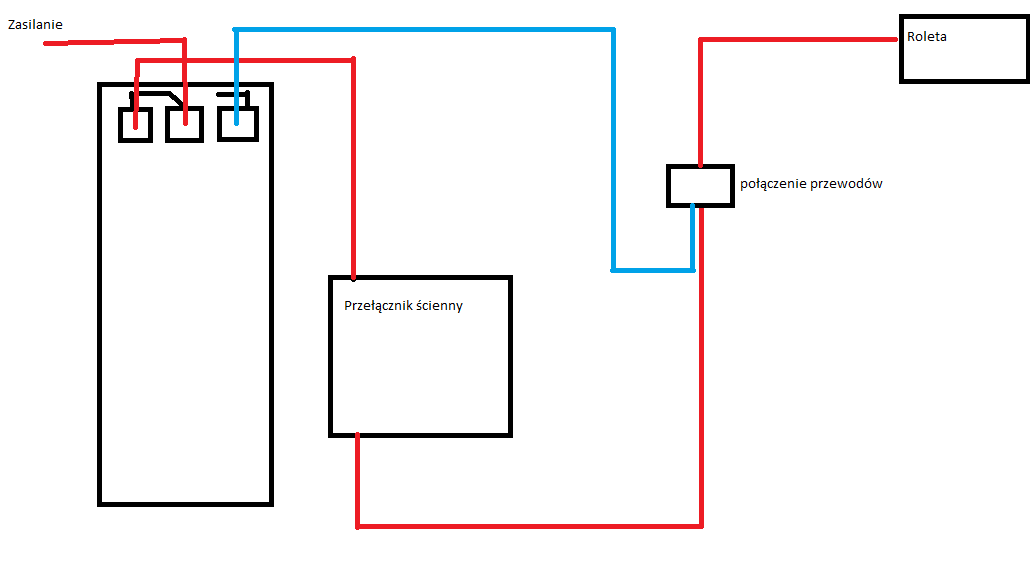
    I've still drawn a diagram of just connecting the relay to the roller shutter (just asking for your understanding... )
    Controlling external blinds with Raspberry Pi 3 - how to connect the relay?
  • #12 15708282
    zmyslonyy
    Level 27  
    By the way, it's quite interesting that someone wants to build a smart home system without any assumptions and without much knowledge even in drawing a schematic diagram...because it's not yet known how with programming? :D
    Normally the work of the engineering team developing all these systems is simply unnecessary and pointless...because any ignoramus will do it himself and certainly better...:D
  • ADVERTISEMENT
  • #13 15708526
    lukaszrzepinski
    Level 10  
    If you're using those Chinese blue relays that come with the Raspberry or Arduino, they'll also work on 3.3V. It would be more elegant to use a 220v socket, e.g. radio-controlled. For the RPI you can buy a 433MHz transmitter for 1 USD, there are libraries and you distribute the devices in this way, no wires...
    Alternatively over WIFI - I have 220V sockets on WiFi and connected to OpenHab on RPI via MQTT protocol.
    You have to choose the software on the RPI: OpenHab is a big combo - you have to work for a week (depending on how you feel about Linux), there is also Domoticz and others. On the plus side, you have device logic, graphs, Android applications and cloud output to the internet. The downside is that it is a lot of work. You can always play around with Python at the beginning for prototyping, but then you have to move on to more decent software.
  • #14 15708615
    Shouces
    Level 10  
    Well, yes, after all it is abnormal for someone to want to expand their knowledge. When I read a statement like that, I get the impression that I should already know everything before I ask the question, but then why should I?

    No, the googles are not broken. I've written before that I've read up on the subject but as a rule these are "installations" that eliminate manual control of the roller shutter with a simple wall button.

    I wrote in the first post that I ask for your understanding because I don't know anything about it. Of course, I could buy an off-the-shelf solution and even hire a professional company to install it for me, but I won't learn anything that way.


    @lukaszrzepinski:
    Thanks very much for the tips :) I feel at home in Linux because I use it on a daily basis :) Admittedly not in terms of programming but I think I will manage somehow.
    I've assumed that I'll be using wired controlled modules because it's safer than something run over the ether. As far as electrical sockets I can do it this way, but I would prefer to control roller shutters "analogue".
  • #15 15708773
    retrofood
    VIP Meritorious for electroda.pl
    Shouces wrote:
    Well, after all, it is abnormal for someone to want to expand their knowledge.


    Buddy, broaden without knowing the basics? It's like you want to go straight to university without passing middle school. And yet screaming that they don't want to accept you. Have a little humility.
  • ADVERTISEMENT
  • #16 15709028
    zmyslonyy
    Level 27  
    Fellow @Shouces expand your knowledge? Probably learn electronics, electrics and/or programming from scratch. Then add years of practice and so maybe somewhere in 10-20 years you have a chance to build something like a "smart home". Otherwise, as I understand it, you wait for others to suggest solutions or even draw up electronic/electrical schematics for this smart home...:D
    ...but it is not customary for the help here to do the projects for someone.
  • #17 15709523
    Shouces
    Level 10  
    I have openly stated from the outset that I do not know anything about this and do not expect any ready-made solutions or diagrams. I asked the question whether it would work in this way but unfortunately I was met with a wave of criticism. I drew a pseudo-scheme - also wrong. It is easy to do what we already know how to do. I know as much as I need to know so far in life and thanks to such posts I have no chance to expand my knowledge unless "in 10-20 years" because everything is "basics"....

    Please help me in a matter-of-fact way and if anyone would like to convince me that I don't know anything, please don't bother.
  • #18 15709641
    zmyslonyy
    Level 27  
    If you really wanted to learn something, you would start by reading the basics of electronics yourself and focusing on some simple projects. With some basic knowledge and practice, you would be able to ask questions about specific problems in the construction of a "smart home", and you ask questions about the basics of electronics. The smart home project itself, on the other hand, is simply too difficult for someone who is just starting to play with electronics and it is worth realising this.
    Nevertheless, I wish you good luck because you will definitely need it...:D
  • #19 15710546
    Voder
    Level 11  
    @Shouces - take an interest in the WiringPI library http://wiringpi.com/ - it will make it easier to get started with GPIO on Raspberry PI. Second thing - take an interest in a solution such as Domoticz. It's software that has GPIO support implemented quite simply, and you'll connect a lot of off-the-shelf actuators too. Basically, this combined with WiringPI will allow you to move forward on this topic without much programming knowledge. If you type "domoticz + wiringpi" into google, you will find several articles including a Polish blog that cover this topic. There are also quite a few publications on the topic of building smart homes on raspberry, mostly English language but I think I've seen some Polish books. Start there and you will find answers to most of the questions you asked.
  • #20 15711081
    ditomek
    Level 22  
    @Shouces initially I wasn't going to write anything because colleagues had already "gone"
    Substantively about the schematic.
    The board you didn't describe is probably a relay. Here you still stick to the number of leads. Another one: a flush-mounted switch, Still the number of leads agrees. Now the most interesting thing: you go to a single wire diagram using a magic box to go to the roller shutter motor (which requires 3 wires, I omit PE) with only one.

    "roller shutter connection" - type it into google, select "images" and you'll know how to wire it properly without a raspberry and relays. If you bend over the circuit and analyse the operation you will figure out where to give the relays. If you don't do it yourself, you should really consider letting someone else do the wiring. Another matter is to write code for the Rpi which will issue appropriate states to specific GPIO pins. You may be able to handle this. But start with the basics.
  • #21 15712093
    Shouces
    Level 10  
    I have omitted drawing the 'ground'. I only drew one wire (say to lower the roller shutter) because there is only one relay. It is known that in reality it will be a module with two relays and there will be 4 wires going into the roller shutter. My point now is whether I can make such a "loop" by connecting a button on the wall under the relay, which will have power coming from it all the time and under the other output (activated when a high/low state appears on the relay) directly the roller shutter.

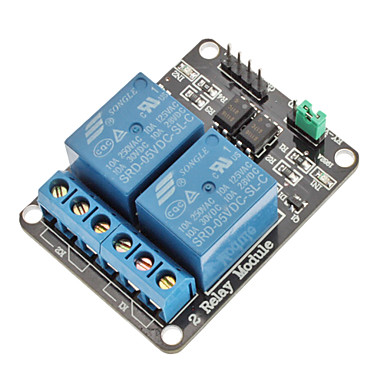
    I pasted a link to a specific relay but it has been removed twice so it is unclear what it is about because as you can see I can't describe it in words so I will try to paste a photo:
    Controlling external blinds with Raspberry Pi 3 - how to connect the relay?
  • #22 15713047
    ditomek
    Level 22  
    @Shouces I read your posts and completely fail to understand why you don't want to draw what you are writing about. Exactly, including every wire, So that forumers can clearly determine if your proposed solution will work.
  • #23 15713547
    Voder
    Level 11  
    As if the picture has disappeared again this is it: 2 relay module Arduino
    It will not disappear because it was finally posted correctly. [retrofood]
    @Shouces the button should be connected to the GPIO on the raspberry PI and via a resistor to VCC.

    Here is an example of how to connect the button to the PI:
    https://www.cl.cam.ac.uk/projects/raspberrypi/tutorials/robot/buttons_and_switches/

    You connect IN1/IN2 on the module to the next GPIO.

    Connect the outputs - the ARK connector (the one with the screws) like this - COM - Common Pin and choose one NC - normally closed or NO - normally open.

    In the case of NC - the voltage is always on, when you drive the relay there will be a break.

    With NO - the opposite - there is a break in the output circuit, when you apply voltage to the relay coil - the circuit closes.

    In your case, you would probably choose the normally open output, i.e. NO and COM.

    Assuming the device is 220V - phase wire to NO, from COM to device e.g. motor, from device to N wire

    How it works - you press a button - this "triggers" on the GPIO set to the input state, the "information" that this button has been pressed. You react in your program on another GPIO that serves as an output by changing its state - which will, for example, turn on the relay coil, which will again close the 220V circuit and start the motor.

    You can supply the module with 5V from the PI.

    However, the diagram you posted is for nothing. With the above information in hand, draw yourself a schematic, if only online in EasyEDA, and post it here before you connect anything.
ADVERTISEMENT