logo elektroda
logo elektroda
X
logo elektroda

Connecting ESP8266 to 10016BH display - how to read the status?

evolucja 1767 20
Best answers

How can I connect an ESP8266 to a 7-segment display so it can read the state of each segment from the controller board?

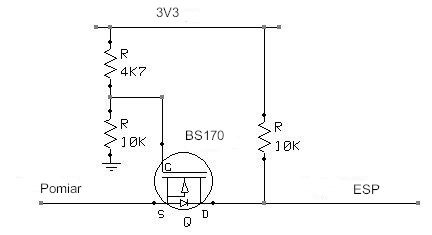
If the display is driven by a 74HC595, the cleanest solution is to read the data going into that register instead of probing the LED segment lines: connect the ESP8266 to the 595’s serial input, clock, and latch signals and use SPI slave mode to capture what the controller sends [#18648704] If the logic levels differ, add level shifting; one reply suggests a 1.9V-to-3.3V converter and notes that the ESP and controller grounds must be connected together [#18646324] If you still tap the segment lines directly, keep the ESP inputs high-impedance and protect them with series resistors or Schottky diodes, because the display is common-anode and the active segment state is logic 0 [#18648150]
Generated by the language model.
ADVERTISEMENT
Treść została przetłumaczona polish » english Zobacz oryginalną wersję tematu
  • #1 18645646
    evolucja
    Level 20  
    Posts: 552
    Help: 3
    Rate: 25
    Hi,
    I have this problem.

    I would like to read the status of a 7 segment display from one device (controlled by a controller from the board of that device, you know) using an external ESP8266.

    The model of the display is 10016BH (10 pin).

    How can and should I hook up to this display to read the state of each segment using the GPIO on the ESP8266?


    Thank you in advance :) .
  • ADVERTISEMENT
  • #2 18645712
    dasej
    Level 32  
    Posts: 1905
    Help: 165
    Rate: 265
    Welcome.

    How many digits?
  • #3 18645717
    BlueDraco
    MCUs specialist
    Posts: 6479
    Help: 939
    Rate: 421
    You look at the leads in the datasheet and already know where to pin. You read the state of the 7 lines and compare with the prepared pattern board to find the displayed digit.
  • #4 18645758
    evolucja
    Level 20  
    Posts: 552
    Help: 3
    Rate: 25
    dasej wrote:
    How many digits?

    One :) .

    BlueDraco wrote:
    You look at the leads in the datasheet and already know where to clip. You read the state of the 7 lines and compare with the prepared pattern table to find the displayed digit.
    .
    So I can directly connect the GPIO to the display lead? Nothing will happen to the other controller and the display if the GPIO on the ESP8266 accidentally acts as an output and not an input and a voltage appears?
  • #5 18645781
    dasej
    Level 32  
    Posts: 1905
    Help: 165
    Rate: 265
    As the GPIO in the ESP will be as output there may be a problem.
    Therefore, give resistors.
    This is how you can connect.
  • #6 18645785
    Anonymous
    Level 1  
  • #7 18645801
    evolucja
    Level 20  
    Posts: 552
    Help: 3
    Rate: 25
    khoam wrote:
    If it "works" as an output in the GPIO of the ESP8266, that would be a problem. I don't really understand how this could happen "by accident", but programmatically it is possible What voltage is supplied to the diodes in the display segments?
    .
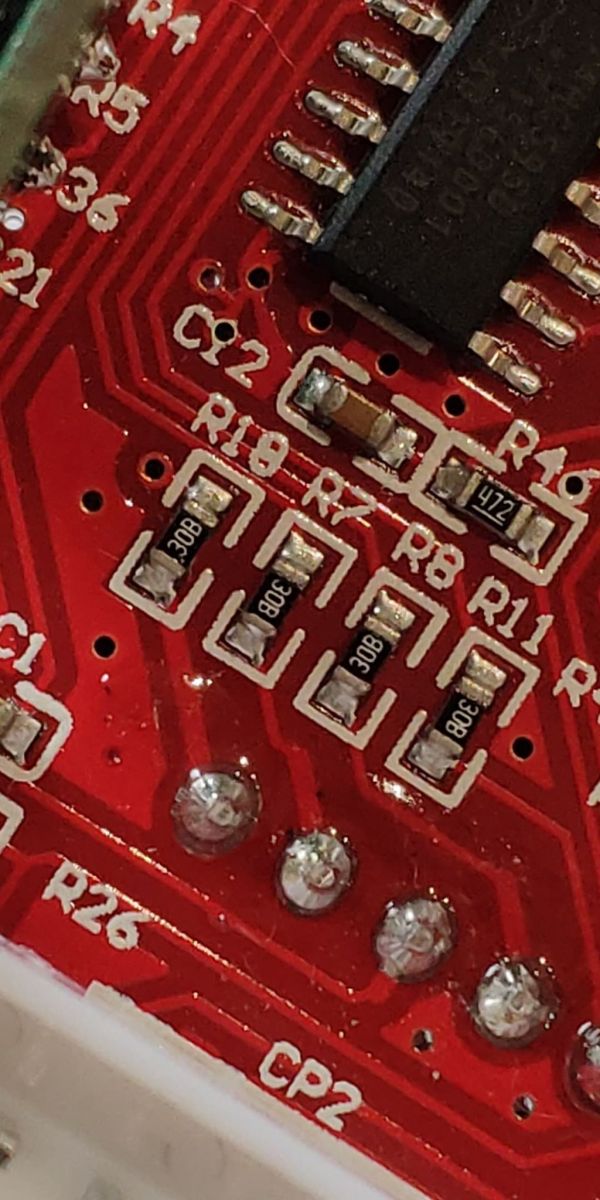
    On the meter 5V before the resistor, ~2V after the resistor, SMD resistor 308 - that is probably 3GΩ.

    On the display + is common, - flies through the resistor

    ESP is obviously running at 3.3V.

    As for the case, I would prefer to protect myself, I don't know what happens to the ESP pins when programming etc.... I don't want to mess up the other board. Would a diode, for example, fit so that only one way the signal flies, or am I thinking too simply? :)
  • ADVERTISEMENT
  • #8 18645808
    Anonymous
    Level 1  
  • #9 18645819
    dasej
    Level 32  
    Posts: 1905
    Help: 165
    Rate: 265
    evolucja wrote:
    .... SMD resistor 308 - which is probably 3GΩ.
    ....
    Would a diode, for example, fit so that only one way the signal flies, or am I thinking too simply? :)
    .

    SMD 308 is a code designation not a value.
    The diode falls off.

    308 or 30B ( 2Koms) measure!
  • #10 18645842
    evolucja
    Level 20  
    Posts: 552
    Help: 3
    Rate: 25
    dasej wrote:
    308 or 30B ( 2Koms) headed!


    Actually 30B. You can clearly see.

    Connecting ESP8266 to 10016BH display - how to read the status? .

    That is, the diodes are flying on 5V with a 2kΩ resistor, and a 3.3V signal would have to go to the ESP. Any ideas? :(
  • ADVERTISEMENT
  • #11 18645994
    Anonymous
    Level 1  
  • #12 18646107
    evolucja
    Level 20  
    Posts: 552
    Help: 3
    Rate: 25
    khoam wrote:
    what voltage value would be the "high" state and what would be the "low" state.
    .
    For the ESP or this STC? How do you measure this? :(

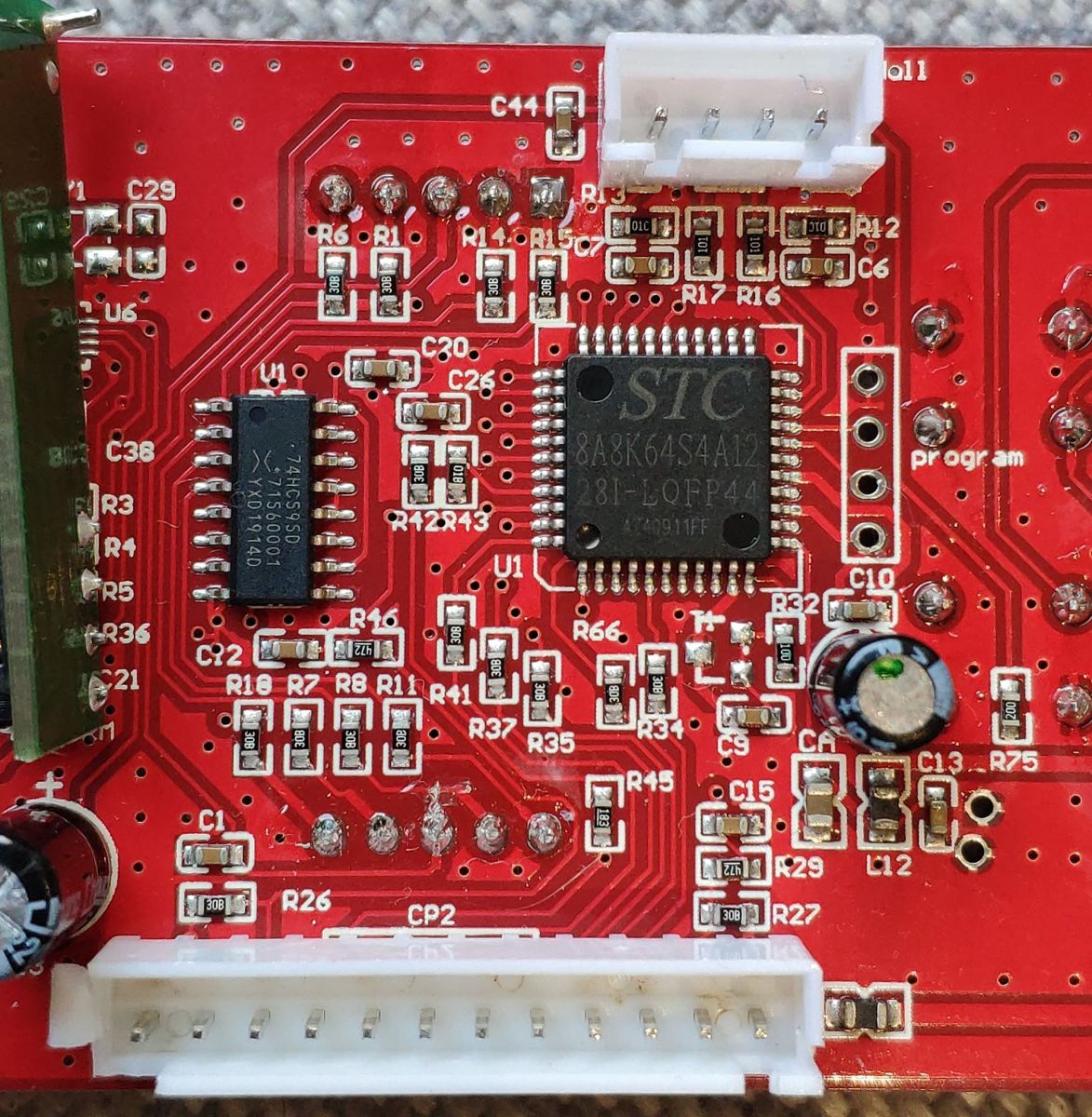
    I am attaching a picture of the board. Maybe from this it will be easier to determine something.
    The main controller is an STC8A8K64S4A12.
    The diodes are connected to something called a "74HC595 sliding register".

    Connecting ESP8266 to 10016BH display - how to read the status? .
  • #13 18646116
    Anonymous
    Level 1  
  • #14 18646196
    evolucja
    Level 20  
    Posts: 552
    Help: 3
    Rate: 25
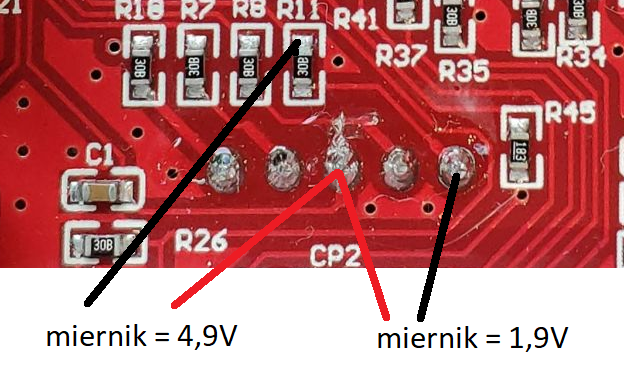
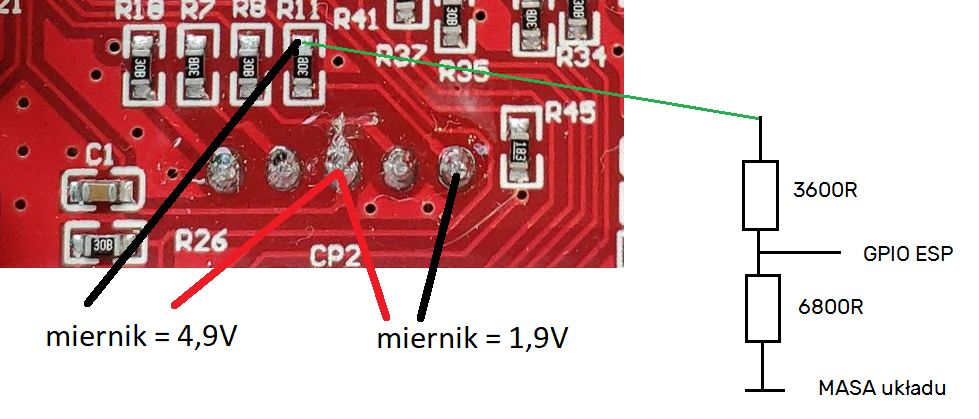
    When the segment is lit, there is 1.9V behind the 30B resistor and 4.9V in front of the resistor.
    Values from a plug-in meter as shown in the photo.
    When the segment is not lit, it is 0V.

    Connecting ESP8266 to 10016BH display - how to read the status? .
  • ADVERTISEMENT
  • #15 18646324
    Anonymous
    Level 1  
  • #16 18646398
    dasej
    Level 32  
    Posts: 1905
    Help: 165
    Rate: 265
    Give the resistors alone and it will be OK.

    Connecting ESP8266 to 10016BH display - how to read the status? .
  • #17 18646414
    Anonymous
    Level 1  
  • #18 18648150
    ArturAVS
    Moderator
    Posts: 26008
    Help: 2294
    Rate: 7711
    If it's a display with a common anode, the active state is logic 0(the 595 register at the output of the active segment gives an L state). The easiest way is to enable the pull-ups in the ESP(high state forcing) and through the shottky diodes connect to 595(the active output will pull down to logic zero the ESP input).
  • #19 18648428
    Anonymous
    Level 1  
  • #20 18648704
    tmf
    VIP Meritorious for electroda.pl
    Posts: 14318
    Help: 2090
    Rate: 2203
    evolucja wrote:
    Diodes are plugged into something called a "74HC595 sliding register".
    .
    If you've got a 595 register there, then instead of combining, hook up to the serial input of that register - you've got SCK, MOSI, SS - you hook that up to SPI in slave mode and you've got a readout of what the processor is sending to the latch. Even if you need to convert levels, you only have 3 signals, not 7 or 8.
  • #21 18648712
    ArturAVS
    Moderator
    Posts: 26008
    Help: 2294
    Rate: 7711
    Just add some more series resistors which will limit the "collision" current . Although it might be worthwhile, instead of reading the state of the segments, to simply listen for transmissions to the 595?

Topic summary

✨ The discussion revolves around connecting an ESP8266 microcontroller to a 10016BH 7-segment display to read the status of its segments. The user seeks guidance on how to hook up the ESP8266 GPIO pins to the display leads without damaging either device. Responses suggest checking the display's datasheet for pin configuration and using resistors for protection. Concerns are raised about the ESP8266 GPIO accidentally acting as an output, which could cause issues. Voltage measurements indicate that the display operates at 5V with a 2kΩ resistor, while the ESP8266 operates at 3.3V. Suggestions include using Schottky diodes for signal protection and considering a logic level converter to ensure compatibility between the 5V display and the 3.3V ESP8266. Additionally, connecting to the 74HC595 shift register used in the display is proposed as an alternative method to read the segment states.
Generated by the language model.

FAQ

TL;DR: Need to read a 10016BH 7‑seg with ESP8266? Expect ~1.9 V segment level; "The ESP and controller grounds must be connected." Use Schottky/series protection or tap the 74HC595 serial lines to avoid back‑driving. [Elektroda, khoam, post #18646324]

Why it matters: This prevents 5 V–to–3.3 V mistakes that can damage your ESP8266 or the host device, while giving reliable reads for hobby and repair work.

Quick Facts

Can I connect ESP8266 GPIO directly to the 10016BH segment pins?

No. A misconfigured ESP output can fight the display driver. "Therefore, give resistors." Insert series resistors or Schottky isolation when sensing. Prefer tapping the driver or its bus, not LED pins. [Elektroda, dasej, post #18645781]

What voltages will I see on the segment lines?

One measurement showed ~4.9 V before the resistor and ~1.9 V across a lit LED. The same point read 0 V when that segment was off. Use these levels to choose level shifting or diode logic for your inputs. [Elektroda, evolucja, post #18646196]

Which ESP8266 pins should I use for safe sensing or SPI sniffing?

Avoid GPIO0, GPIO2, and GPIO15 because they control boot and can toggle at reset. Prefer GPIO4, GPIO5, GPIO12, GPIO13, or GPIO14 for inputs. Configure them as INPUT or INPUT_PULLUP as needed. Edge case: some pins briefly drive at boot, risking collisions. [“ESP8266 Pinout Reference”]

How do I read a common‑anode display driven by 74HC595 without level issues?

Enable pull‑ups on ESP inputs and add Schottky diodes from each 74HC595 output. Common‑anode segments are active‑low at the driver. The active output pulls the ESP input down through the diode, giving isolation and correct logic. [Elektroda, ArturAVS, post #18648150]

How do I prevent damage if the ESP pin accidentally becomes an output?

Add series resistors on each sense line. They limit the "collision" current if an ESP pin drives accidentally. This protects both controllers during programming or resets. [Elektroda, ArturAVS, post #18648712]

Do I need a level shifter when a segment reads about 1.9 V?

Yes. About 1.9 V is not a valid high for ESP8266. Use a MOSFET translator, such as a BSS138 level shifter. "Feeding 1V9 to the input ... will result in 3V3 at the output." Tie grounds together. [Elektroda, khoam, post #18646324]

Is sniffing the 74HC595 data easier than probing each segment?

Yes. Connect to SER, SRCLK, and RCLK to capture display data. Configure the ESP as an SPI‑slave sniffer to read what the MCU sends. This uses three lines and avoids LED‑level quirks. [Elektroda, tmf, post #18648704]

Do I need to connect grounds between the ESP8266 and the display board?

Yes. "The ESP and controller grounds must be connected." Shared ground ensures correct logic thresholds and stable readings. Without it, level shifters and inputs misbehave. [Elektroda, khoam, post #18646324]

How do I map segment states to digits programmatically?

Sample the seven segment lines and compare against a lookup table. Invert bits if your hardware is common‑anode. This quickly translates segment patterns into digits. [Elektroda, BlueDraco, post #18645717]

What does the “30B/308” marking on the resistor mean?

It’s an SMD code, not the value itself. "308 is a code designation not a value." Boards here used about 2 kΩ, but always measure to confirm. Do not rely on marking alone. [Elektroda, dasej, post #18645819]

How do I sniff the 74HC595 with the ESP8266? (3 steps)

  1. Identify SER, SRCLK, and RCLK on the board and wire them to ESP inputs.
  2. Set the ESP to SPI‑slave and sample on SRCLK; latch on RCLK edges.
  3. Decode the shifted byte in firmware to segment states. [Elektroda, tmf, post #18648704]

Is the active segment state logic low on common‑anode setups?

Yes. The 74HC595 sinks current to light a segment in this configuration. The driver output goes low for a lit segment. Design code and diode sensing for active‑low logic. [Elektroda, ArturAVS, post #18648150]
Generated by the language model.
ADVERTISEMENT