




logo elektroda
logo elektroda
X
logo elektroda

Factory-style 5-10 ESP8266 Smart Home Display With Buttons for Thermostat Control

JanuszKornas 1638 14
ADVERTISEMENT
Treść została przetłumaczona polish » english Zobacz oryginalną wersję tematu
  • #1 19132466
    JanuszKornas
    Level 11  
    Posts: 120
    Help: 6
    Rate: 25
    Board Language: polish
    I want to make my own thermostats to control the floor electroswitch. I've come up with this to be on an ESP 8266, and I've bought a Shelly 2.5 treating it as hardware. Thinking in the old fashioned way I would like to have some sort of one/two display in the house that would show the current temperatures, maybe also the set points and some sort of buttons/encoder that would allow householders unfamiliar with Android apps to increase/decrease the temperature.

    Has anyone seen that maybe some Chinese manufacture a 5-10 inch display that has ESP on the back, nice casing, looks aesthetically pleasing, can be easily programmed and will look like it came from the factory?
  • ADVERTISEMENT
  • #2 19133214
    xury
    Automation specialist
    Posts: 7068
    Help: 876
    Rate: 1486
    Board Language: polish
    It is unlikely that I have come across any. The closest to your requirements are Nextion displays.
    However, quite expensive so it's better to just use some cheap tablet.
  • ADVERTISEMENT
  • #3 19133898
    krzysiek_krm
    Level 40  
    Posts: 4612
    Help: 716
    Rate: 598
    Board Language: polish
    JanuszKornas wrote:
    a 5-10 inch display that has an ESP on the back
    .
    How about buying a display with a front bezel, with an FT8xx controller that is controlled via SPI and connect the ESP to it yourself.
  • #4 19134118
    Anonymous
    Level 1  
  • #5 19405800
    Ondo
    Level 12  
    Posts: 99
    Help: 3
    Rate: 16
    Board Language: polish
    I have a similar dilemma with a display, I'm looking for something that was ready made, nice to mount on the wall and reasonably easily repairable. Unfortunately the lifespan declared by the manufacturer is only of the order of 1-2 years. After this time the complete display may not be commercially available, so I would prefer if the matrix or backlight itself could be replaced like a typical HD44780 clone display. For the project I unfortunately need a touch matrix to simulate a numeric keypad on the screen.
  • ADVERTISEMENT
  • ADVERTISEMENT
  • #7 19406018
    Slawek K.
    Level 35  
    Posts: 3015
    Help: 259
    Rate: 1297
    Board Language: polish
    To the Nextion, just connect the ESP over Serial and you're done. You can even make a TCP/Serial bridge on the ESP and send data to the LCD wirelessly. The price difference between the Nextion and the FT8xx is not much, and in the Nextion you have an additional uC which can be easily programmed to handle it without the need for an ESP, and a simple connection (Rx and Tx) and simple data sending over Serial.

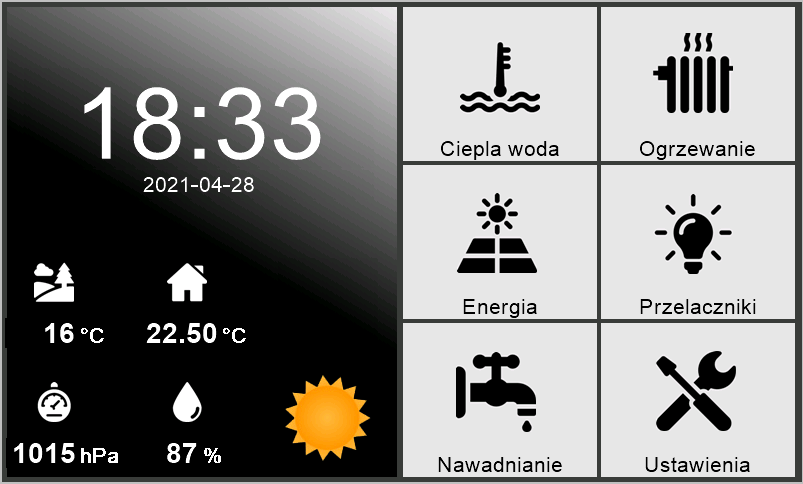
    I have a Nextion 7" 800x480 for home automation and the main screen looks like this :

    Factory-style 5-10 ESP8266 Smart Home Display With Buttons for Thermostat Control .

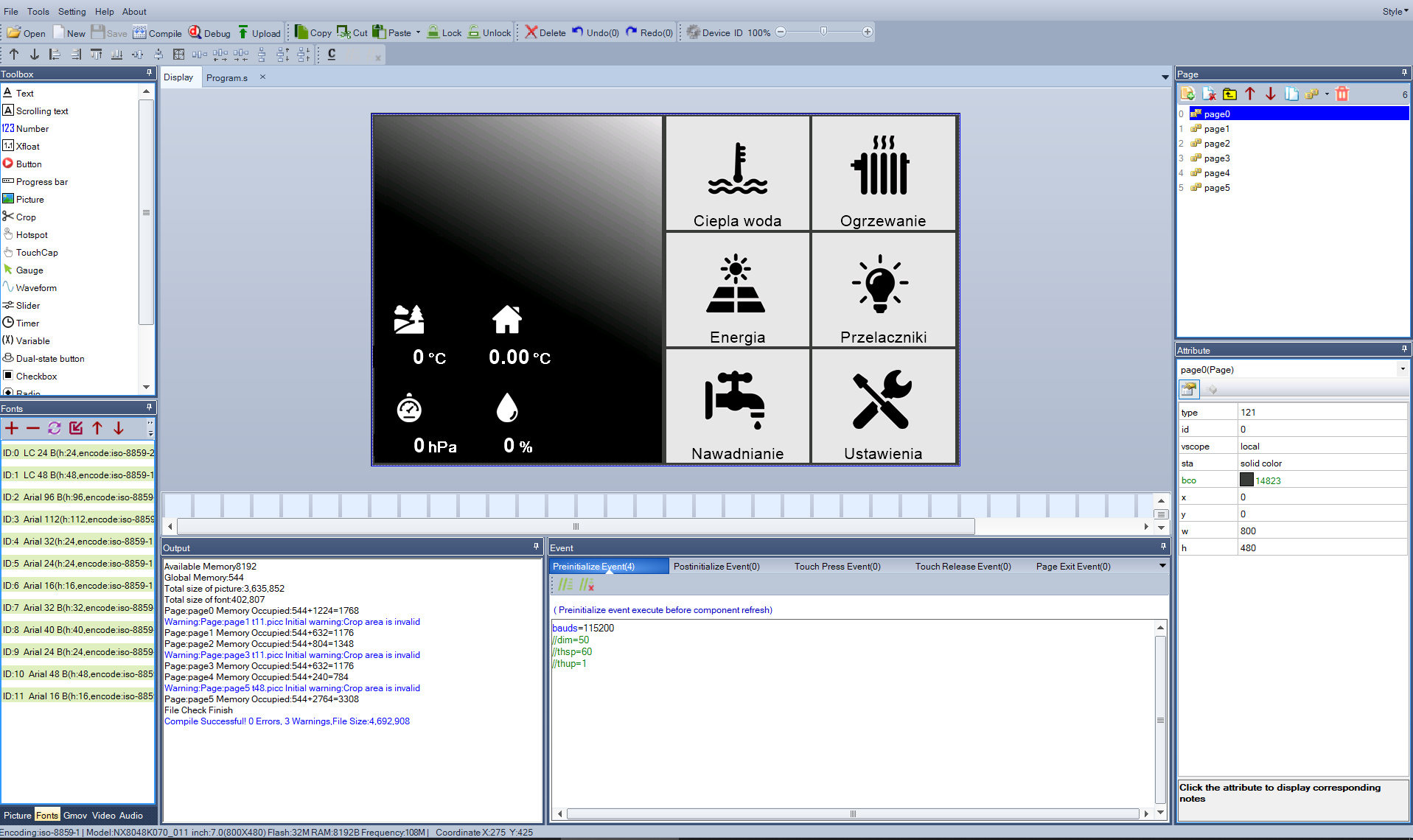
    And this is how it looks in the interface design software :

    Factory-style 5-10 ESP8266 Smart Home Display With Buttons for Thermostat Control .

    I bought from elty.pl
    You have a version right away with an enclosure https://elty.pl/pl/p/-Wyswietlacz-Nextion-Enh...ezystancyjny-panel-dotykowy-oraz-obudowa/2019 - I made my own.
    Here you have without the casing cheaper https://elty.pl/pl/p/Wyswietlacz-Nextion-Basi...-NX8048T070-rezystancyjny-panel-dotykowy/1625

    Best regards
  • #8 19406154
    krzbor
    Level 29  
    Posts: 1731
    Help: 40
    Rate: 1044
    Board Language: polish
    I propose another solution - an unused tablet with a TFT matrix. For this you need to buy a case and take it apart so that only the plastic frame remains. The frame is screwed to the wall and the tablet is put into the frame. We install Chrome on the tablet and connect to our web server which is the intermediary with the other ESPs. This could be a PC, Pi or something else. The application is written in HTML+javascript, and on the server side it's whatever you like (I have PHP). When you open the page, Chrome has a cool option - pin the page to the start screen. The cumbersome address bar then disappears, and everything looks like an app. This solution also has the advantage that changing the application is simply changing the web page, and on the tablet you close the page and reopen it.
    I currently have 2 tablets - one in the hallway showing all the functions and one in the bedroom showing the time, outside and inside temperature and data from Google's RSS feed.
    A larger smartphone can be used instead of the tablet, but better without the OLED matrix (it doesn't like the long display).
    The whole thing works well, although the app (which is basically Chrome) can shut down once every few weeks. This is not a problem, just click on the icon that is pulled out.
  • #9 19406531
    Ondo
    Level 12  
    Posts: 99
    Help: 3
    Rate: 16
    Board Language: polish
    Thanks for the tips, but unfortunately they don't solve the problem of aging equipment that is supposed to work 24/7. In tablets/phones, batteries wear out, batteries swell, the micro-usb power cable looks bad. In Nextion or 4D Systems products, the display also has a finite life, the manufacturer guarantees a drop of up to 50% brightness in a year or two. Some manufacturers guarantee the availability of the hardware for a few years, but then what? You have to do an overhaul because the flush-mounted display box doesn't fit the new display?
  • #10 19406584
    Anonymous
    Level 1  
  • #11 19406675
    krzbor
    Level 29  
    Posts: 1731
    Help: 40
    Rate: 1044
    Board Language: polish
    JanuszKornas wrote:
    Has anyone seen that maybe some Chinese manufacture a 5-10 inch display that has ESP on the back, a nice casing, looks aesthetically pleasing, can be easily programmed and will look like it came from the factory?
    .
    I don't quite understand you - do you think that if you buy something like this it will work for years, while a Lenovo or Samsung tablet will "die" after a year? I'm afraid it will be exactly the opposite. It's not from today that electronic photo frames are produced that work 24 hours. Of course, these should not be products with an OLED matrix - there such an effect can occur. The batteries work properly, although their capacity may drop when in a constant state of charge. However, this is not a problem - the system is non-stop powered from the mains. I have never had a tablet or phone battery swell.
    I have one of my tablets with the screen off. It is woken up by the PIR detector from the alarm. Waking it up is simple - I cut the power to it for a while and switch it on - then the tablet wakes up. This unfortunately gives a delay of 2-3s.
  • #12 19406777
    Slawek K.
    Level 35  
    Posts: 3015
    Help: 259
    Rate: 1297
    Board Language: polish
    I don't really understand, I haven't seen a home automation screen that shines at full brightness 24 hours a day. It would be impossible to sleep at night with something like that, so usually the screen either wakes up with a touch or automatically dims/brights up based on a light sensor or with the help of an astronomical clock. I think the author's colleague is somewhat artificially building a problem that doesn't exist.
    Also, there is no device that will work indefinitely without a battery or mains supply, so your criteria are rather impossible to meet in the current state of technology.

    Best regards
  • #13 19413036
    Ondo
    Level 12  
    Posts: 99
    Help: 3
    Rate: 16
    Board Language: polish
    krzbor wrote:
    I don't really understand you - you think that if you buy something like this, it will work for years, while a Lenovo or Samsung tablet will "die" after a year?
    It's not supposed to last forever, but as I wrote above, the display or backlight should be easily "repairable" by replacing a component that is relatively cheap and readily available.

    Slawek K. wrote:
    I don't really understand, I haven't seen a home automation screen that shines full brightness around the clock. At night you wouldn't be able to sleep with something like that, so usually the screen either wakes up with a touch or automatically dims/brights up based on the light sensor or using an astronomical clock.
    Nhere did I say that the display should be at maximum brightness 24/7, but dimming at night is not something that will significantly increase the operating time. I expect my screen to be readable 24/7 and if I want to check the temperature I won't have to press buttons on the panel to turn the display on.
  • #14 19413249
    Slawek K.
    Level 35  
    Posts: 3015
    Help: 259
    Rate: 1297
    Board Language: polish
    So cheers to you finding something that meets your expectations. Share the information on how you find it, I'd love to use it.

    Best regards
  • #15 19620944
    pitron
    Level 24  
    Posts: 811
    Help: 51
    Rate: 99
    Board Language: polish
    Nextion is cool but unfortunately expensive I used a 2.4inch a few years ago to control among other servos.
    When I moved everything to ha it stopped making sense.

Topic summary

✨ The discussion revolves around creating a smart home thermostat system using ESP8266 and Shelly 2.5, with a focus on finding an aesthetically pleasing display for temperature control. Suggestions include using Nextion displays, which are noted for their ease of integration but are considered expensive. Alternatives like Riverdi 5" displays with ESP32 chips and FT8xx controller displays were mentioned. Some participants proposed using repurposed tablets for a more cost-effective solution, while concerns about the longevity and repairability of displays were raised. The need for a display that can function continuously and be easily maintained was emphasized, with suggestions for dimming features and the possibility of using simple LED indicators instead of a full display.
Generated by the language model.

FAQ

TL;DR: Nextion 7-inch 800×480 HMI is a pragmatic choice — “just connect the ESP over Serial and you're done.” Add a TCP/Serial bridge for wireless control and design the UI in the editor. [Elektroda, Slawek K., post #19406018]

Why it matters: This FAQ helps DIYers pick a reliable, wall-friendly ESP display for thermostats and status without forcing phone apps.

Quick Facts

What’s the best 5–10 inch ESP-based wall display option right now?

There isn’t a common off‑the‑shelf 5–10" display with an ESP on the back. The closest is Nextion HMI. It’s not cheap, so many builders instead wall‑mount a low‑cost Android tablet and use a web UI. This balances price, size, and ease of deployment. [Elektroda, xury, post #19133214]

How do I wire an ESP8266/ESP32 to a Nextion HMI?

Use RX and TX for a direct serial link. “Just connect the ESP over Serial and you’re done.” You can also run a TCP/Serial bridge on the ESP to send data wirelessly to the screen. Nextion’s onboard MCU handles UI logic, reducing ESP code. [Elektroda, Slawek K., post #19406018]

Why pick Nextion instead of an FT8xx SPI panel?

Nextion adds an onboard microcontroller and editor, so UI runs locally. The connection is just serial, which simplifies wiring and firmware. The price gap versus FT8xx isn’t large, so the integration savings can outweigh parts cost in many builds. [Elektroda, Slawek K., post #19406018]

How can I use an FT8xx LCD with an ESP over SPI?

Buy a display with a front bezel and an FT8xx controller. Drive it via SPI from the ESP. This gives you flexibility and a clean front panel, but you handle graphics and touch in your firmware. [Elektroda, krzysiek_krm, post #19133898]

Is there an official ESP32 touch HMI devkit I can buy?

Yes. Espressif announced the ESP32‑S2‑HMI‑DevKit‑1, featuring a 480×800 touch display. It’s designed for fast UX prototyping with ESP32‑S2 and provides a supported reference platform. [Elektroda, khoam, post #19405984]

Can I get a ready 5-inch ESP32 display module locally?

Yes. Riverdi offers 5" panels that integrate an ESP32 module. They are sold as panel units and available in Poland, making sourcing and support easier for EU builders. [Elektroda, khoam, post #19134118]

Should I just repurpose a tablet for my smart‑home UI?

It’s a proven path. Mount a tablet in a wall frame, run Chrome, and pin your web app to the start screen. Serve the UI from a PC, Raspberry Pi, or similar; build it with HTML+JS. The app may close once every few weeks, but relaunching is one tap. [Elektroda, krzbor, post #19406154]

Will OLED phones burn in as wall panels?

Avoid OLED for always‑on or long‑display scenarios. Use LCD‑based tablets or phones instead. OLED panels don’t tolerate prolonged static content well, which makes them poor choices for fixed dashboards. [Elektroda, krzbor, post #19406154]

How do I mount a tablet cleanly on the wall?

Buy a case, remove everything but the front frame, and screw that frame to the wall. Drop the tablet into the frame for a tidy, serviceable installation that hides edges and cables. [Elektroda, krzbor, post #19406154]

Can I auto‑wake a wall tablet with motion?

Yes. One approach is using a PIR to momentarily cut and restore power, which wakes the tablet. Expect a wake delay around 2–3 seconds with this method. [Elektroda, krzbor, post #19406675]

Do smart‑home panels need to be readable 24/7 at full brightness?

No. Typical practice is wake‑on‑touch or automatic dimming/brightening using a light sensor or astronomical clock. Full brightness overnight is unnecessary. Also, no device runs indefinitely without power or maintenance. [Elektroda, Slawek K., post #19406777]

What about lifespan, brightness drop, and hardware availability?

Plan for aging. Some manufacturers declare 1–2 years of life with up to 50% brightness reduction. Whole modules may become unavailable, so prefer designs where the matrix or backlight can be replaced. Tablets also raise concerns like swollen batteries and weak micro‑USB power. [Elektroda, Ondo, post #19406531]

Can I avoid a built‑in display to sidestep aging issues?

Yes. Keep physical feedback minimal, for example with LEDs, and move visualization to phones or tablets via Wi‑Fi. This avoids flush‑mount cutout lock‑in and future overhauls if panels change size. [Elektroda, khoam, post #19406584]

Quick setup: Nextion + ESP in three steps

  1. Wire Nextion TX→ESP RX and Nextion RX→ESP TX.
  2. Design the UI in the Nextion editor and upload it.
  3. Send serial commands from the ESP, or add a TCP/Serial bridge for wireless updates. [Elektroda, Slawek K., post #19406018]

Is Nextion worth it if I’m moving to Home Assistant?

If you centralize control in Home Assistant, a dedicated Nextion panel can become redundant. Builders report dropping small Nextion setups after migrating interfaces into HA, given cost and overlapping functionality. [Elektroda, pitron, post #19620944]

Where can I buy Nextion screens and enclosures?

Vendors like elty.pl carry Nextion panels. You can get versions with enclosures or save by buying the bare display. Some makers also print or build custom housings for a tailored fit and finish. [Elektroda, Slawek K., post #19406018]
Generated by the language model.
ADVERTISEMENT