logo elektroda
logo elektroda
X
logo elektroda

Connecting two sensors to the ExtendedIO on the ESP32-2432So35 board - Can it be done? How?

CC_PL 1491 16
Best answers

Can I connect a GPS sensor and an encoder at the same time to the ESP32-2432So35 ExtendedIO, and how should I wire them?

Yes — use the ExtendedIO pins IO21, IO22 and IO35 for the encoder, and connect the GPS to the P1 serial connector [#20506686] P1 pin 1 is the supply pin, while P1 pins 2 and 3 are the 3.3 V serial communication lines suitable for the MATEKSYS SAM-M8Q GPS [#20506743] Do not expect USB serial and the P1 RX/TX link to work at the same time [#20506743]
Generated by the language model.
ADVERTISEMENT
Treść została przetłumaczona polish » english Zobacz oryginalną wersję tematu
  • #1 20506577
    CC_PL
    Level 13  
    Posts: 484
    Help: 4
    Rate: 56
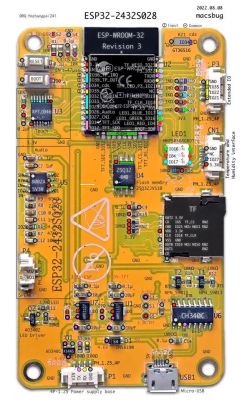
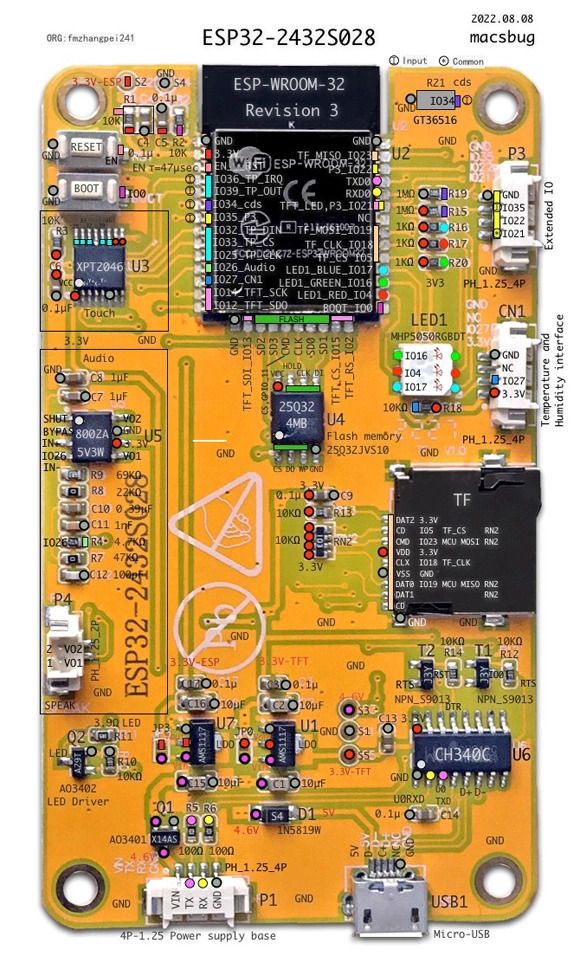
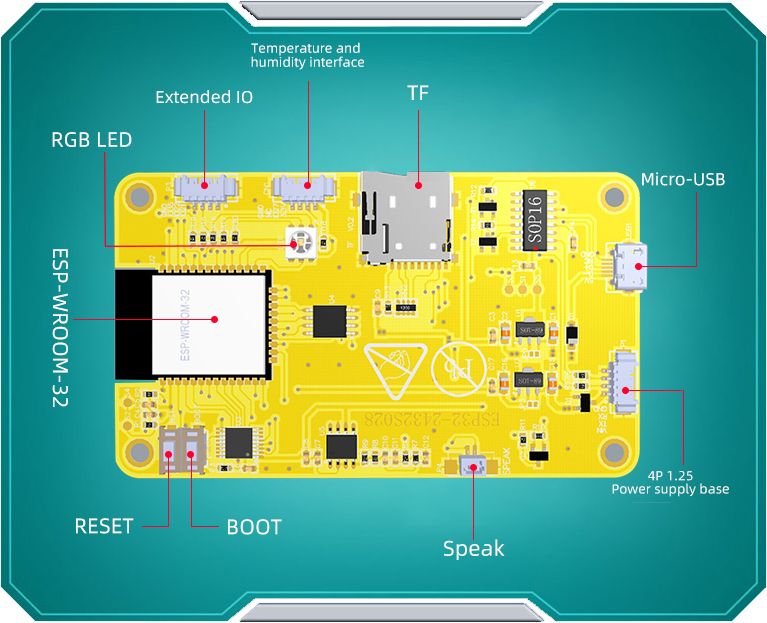
    I have ESP32-2432So35 developer boards (from China), more or less such (from this series):
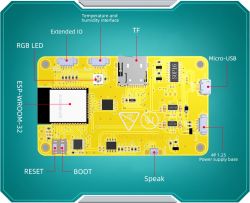
    Connecting two sensors to the ExtendedIO on the ESP32-2432So35 board - Can it be done? How?

    Connecting two sensors to the ExtendedIO on the ESP32-2432So35 board - Can it be done? How?


    One has inputs for a humidity/temperature sensor, speaker and ExtendedIO as a "general purpose connector".

    The question is whether it is possible, and if so, then how to use this ExtendedIO to connect simultaneously a GPS sensor and an encoder?

    I am browsing the web, there is some information about this board, mainly about its touchscreen display. I have the documentation from their Google Drive page, but nowhere stammered how to use the ExtendedIO 🙂

    Anybody know something, maybe knows this board (or similar) and is able to help?

    The ExtendedIO outputs are 4 pins:

    - GND


    - IO21

    - IO22

    - IO35

    Here are the docs - https://drive.google.com/drive/folders/1S9Joi...1zA?spm=a2g0o.detail.1000023.1.17102169vREj5d

    Directory with 35 at the end in the name. ESP32-2432So35


    Will it be possible to connect at the same time GPS and encoder under this board?


    Thanks in advance for your help!
  • ADVERTISEMENT
  • Helpful post
    #2 20506686
    Zdzicho
    Level 25  
    Posts: 551
    Help: 77
    Rate: 70
    Encoder - P3 IO21,IO22,IO35
    a GPS - P1 RX
  • #3 20506712
    CC_PL
    Level 13  
    Posts: 484
    Help: 4
    Rate: 56
    The GPS is the SAM-M8Q (MATEKSYS). It has 4 pins. And P1 is generally for battery power, the chip is supposed to work "in the field" (so somehow I would have to power via micro USB).
  • Helpful post
    #4 20506743
    Zdzicho
    Level 25  
    Posts: 551
    Help: 77
    Rate: 70
    P1, pin 1 of which is the power supply and pins 2 and 3 of which are the RS232 serial communication port with a 3.3V voltage standard, just right for MATEKSYS
    and one more remark, you cannot use the USB communication and RX/TX of the P1 connector at the same time.
  • #5 20506758
    CC_PL
    Level 13  
    Posts: 484
    Help: 4
    Rate: 56
    The GPS module is this one: http://www.mateksys.com/?portfolio=sam-m8q I'm specifying just to be sure.


    So I just need to take care of the power supply on the microUSB. I'm glad that this will be going soon (I still have to order special plugs for these sockets)...

    Thank you very much for your reply!
    Added after 1 [minute]:
    Zdzicho wrote:
    and one more note, you cannot use USB and RX/TX communication of the P1 connector at the same time

    OK, I understand. This will not be needed. As I wrote above the USB will be used to power the 1S 3.7V Li-Pol battery.
  • ADVERTISEMENT
  • #6 20512423
    CC_PL
    Level 13  
    Posts: 484
    Help: 4
    Rate: 56
    One more question: those white sockets on the board are JST SH1.0-4P ? I wouldn't ask this, but I already bought the cables, they came and .... they turned out to be too small. He wants to make sure now! :) I am asking about the white ExtendedIO and Power Supply sockets.
  • ADVERTISEMENT
  • Helpful post
    #7 20512719
    Anonymous
    Level 1  
  • #8 20512784
    CC_PL
    Level 13  
    Posts: 484
    Help: 4
    Rate: 56
    I know they are available to buy, but what are they called? ;) The raster is 1.25mm, 4-pin, but what is their professional name?, as there are dozens of types in the shops and several are quite similar. Probably these are the ones: JST XH 1.25mm 4pin (??)
  • #9 20512820
    Anonymous
    Level 1  
  • ADVERTISEMENT
  • #11 20516488
    CC_PL
    Level 13  
    Posts: 484
    Help: 4
    Rate: 56
    Thank you Zdzicho

    I bought the JST XH 1.25mm 4pin, it arrived today and is OK - finally!
  • #12 20527034
    CC_PL
    Level 13  
    Posts: 484
    Help: 4
    Rate: 56
    Zdzicho wrote:
    P1 whose pin 1 is the power supply while pins 2 and 3 are the RS232 serial communication port with 3.3V voltage standard just right for MATEKSYS and one more remark, it is not possible to use simultaneous communication over USB and RX/TX of P1 connector


    I don't know which numbers, pin designations to use in the application for TX and RX. I connected the GPS to the board and it doesn't detect it - error "check wiring".

    I use the TinyGPSPlus library: https://github.com/mikalhart/TinyGPSPlus

    What about simultaneous RX/TX communication in P1 and USB, I understand that I won't be able to view the result on the Monitor (Serial Monitor in Arduino IDE)?

    ---
    Here are the docs: http://pan.jczn1688.com/directlink/1/ESP32%20...d21CmARCmARXj&file=3.5inch_ESP32-3248S035.zip

    Tile auction

    Added after 1 [hour] 16 [minutes]:

    Here's some info: https://dzen.ru/a/ZBs49e6DKmsHHVQk

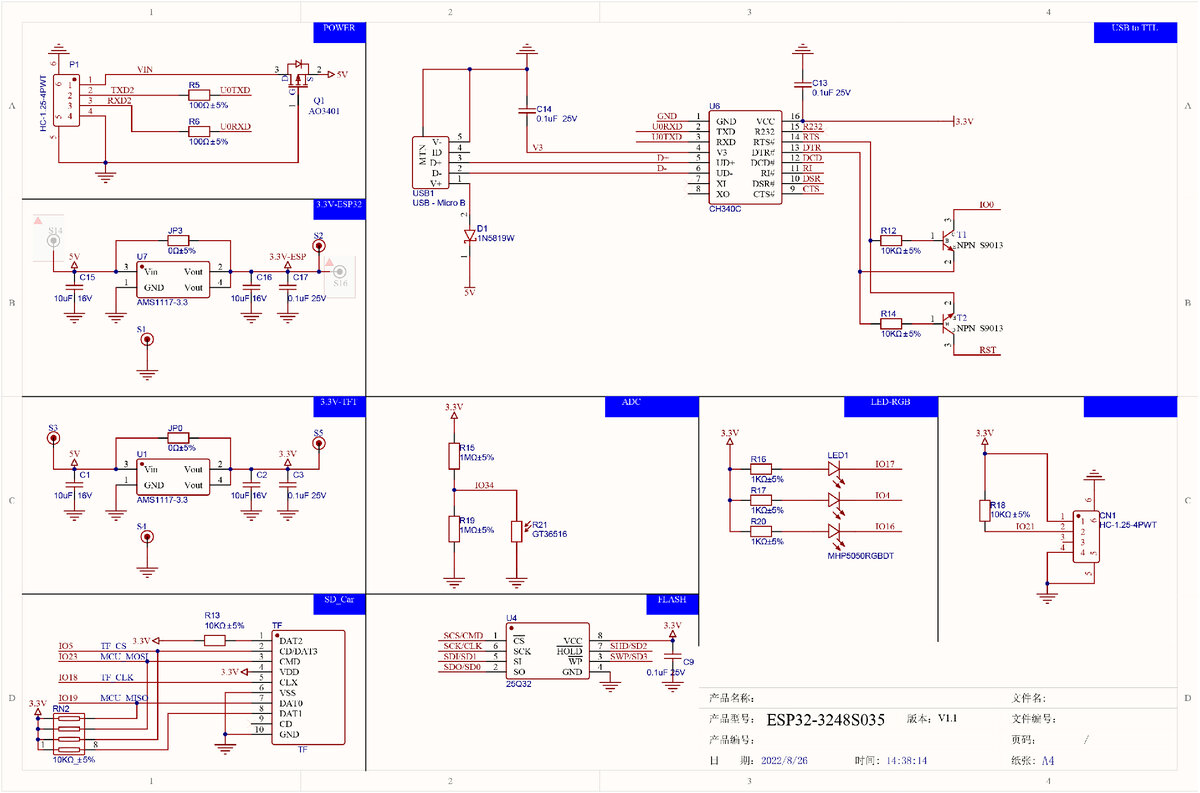
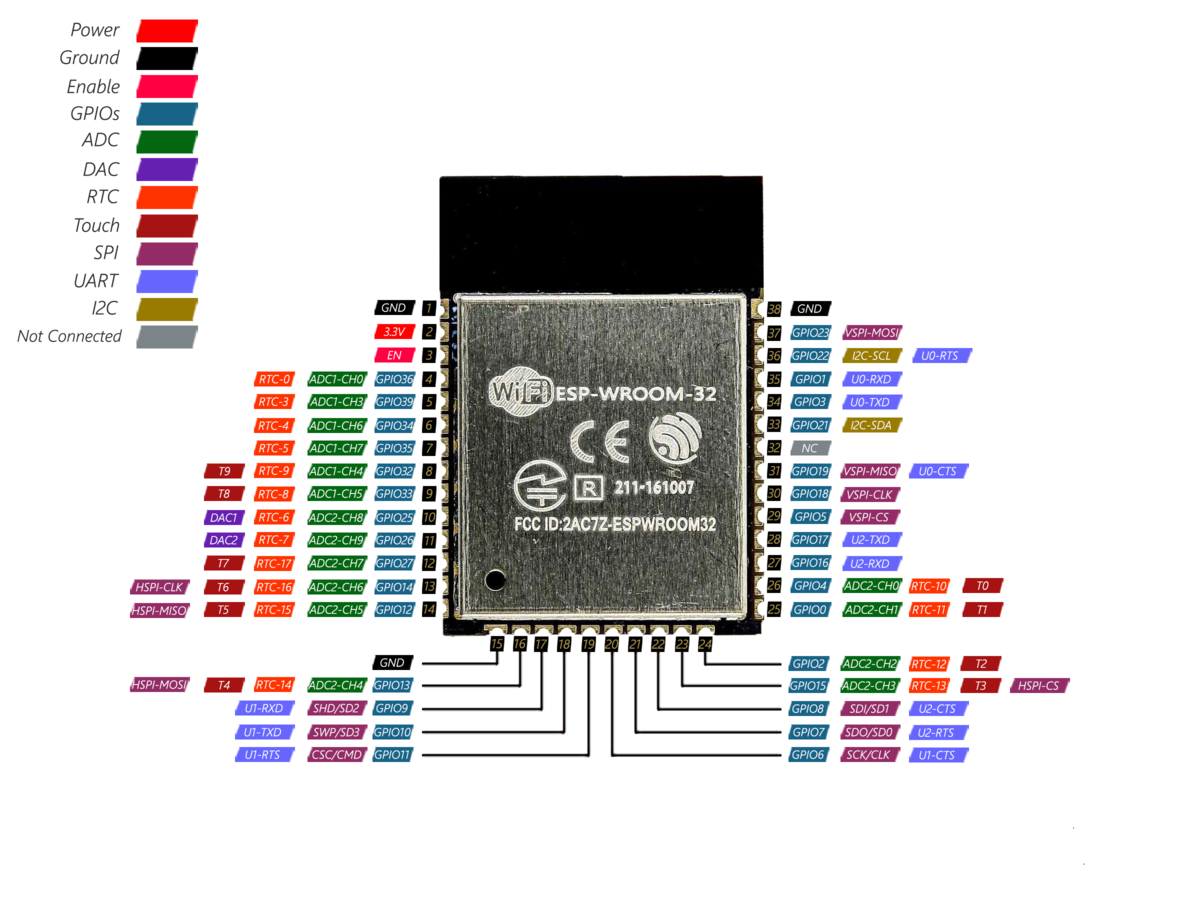
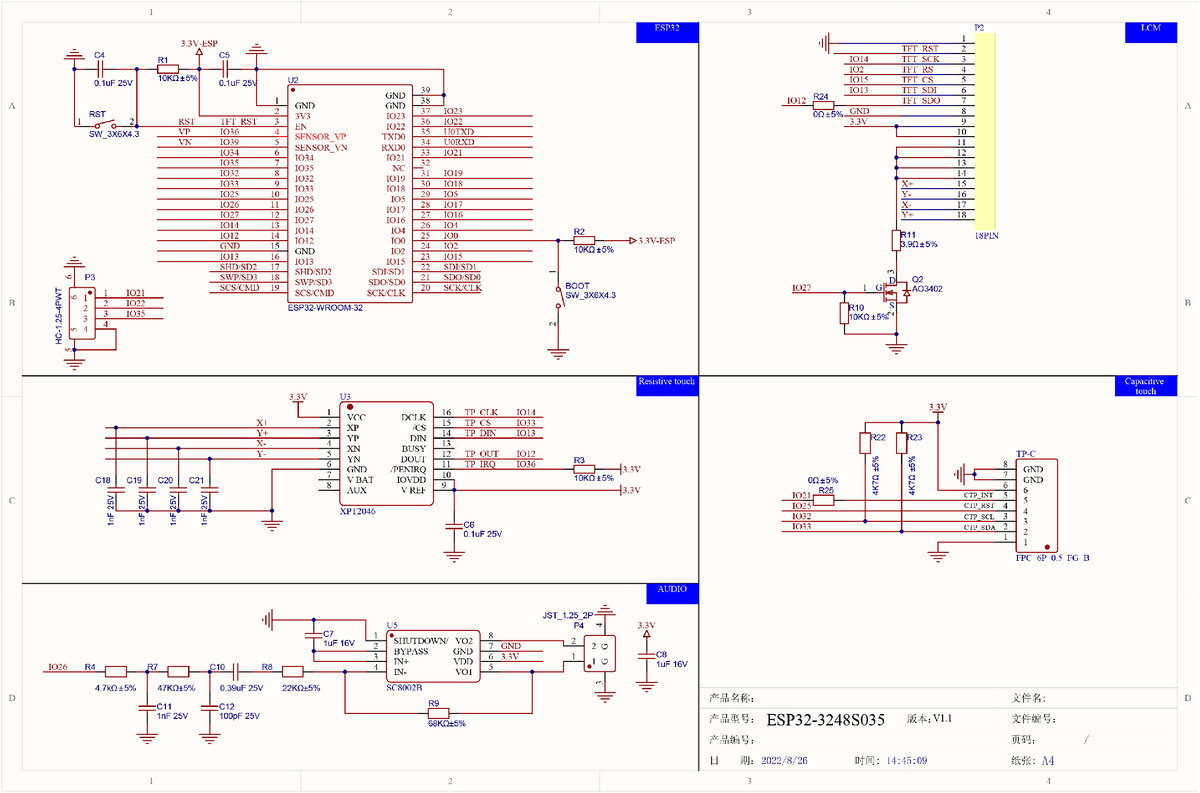
    I schematy:

    Connecting two sensors to the ExtendedIO on the ESP32-2432So35 board - Can it be done? How?

    Connecting two sensors to the ExtendedIO on the ESP32-2432So35 board - Can it be done? How?

    Connecting two sensors to the ExtendedIO on the ESP32-2432So35 board - Can it be done? How?
  • #13 20527185
    Zdzicho
    Level 25  
    Posts: 551
    Help: 77
    Rate: 70
    Personally, I would knock out that led1 tricolour and use two of the three ports to communicate with the GPS
  • #14 20527279
    CC_PL
    Level 13  
    Posts: 484
    Help: 4
    Rate: 56
    Zdzicho, I would not want to interfere so much with the board :)

    In post #4:

    Quote:
    P1 of which pin 1 is the power supply while pins 2 and 3 are the RS232 serial communication port with a 3.3V voltage standard just right for MATEKSYS and one more note, it is not possible to use simultaneously USB communication and RX/TX of P1 connector


    you have recommended P1 connector and I would like to use it
    . Only I don't know what pin numbers are assigned to the outputs in P1.

    U0-RXD - 35 and U0-TXD - 34?? .
  • #15 20527325
    Zdzicho
    Level 25  
    Posts: 551
    Help: 77
    Rate: 70
    Standard, i.e. RxD - GPIO 03 and TxD - GPIO 01
  • #16 20528169
    Anonymous
    Level 1  
  • #17 20528178
    CC_PL
    Level 13  
    Posts: 484
    Help: 4
    Rate: 56
    The socket named ExtendedIO will be used for another sensor. It is already occupied.

Topic summary

✨ The discussion revolves around connecting a GPS sensor (MATEKSYS SAM-M8Q) and an encoder to the ExtendedIO of the ESP32-2432So35 board. The ExtendedIO has four pins: GND, IO21, IO22, and IO35. It is noted that the GPS module requires power from the P1 connector, which is primarily for battery power, and that USB communication cannot be used simultaneously with RX/TX on the P1 connector. The user seeks clarification on the pin designations for TX and RX, with suggestions to use GPIO 21/22 for UART1 communication with the GPS to avoid conflicts with the Serial Monitor. Additionally, there is a discussion about the correct type of connectors for the board, confirming that the ExtendedIO sockets are JST XH 1.25mm 4-pin.
Generated by the language model.

FAQ

TL;DR: Yes—you can run GPS and an encoder together. Use the 3.3 V UART on P1 for GPS; “you cannot use USB and RX/TX at the same time.” This FAQ explains pinouts, connectors, and wiring for ESP32‑2432S035 owners. [Elektroda, Zdzicho, post #20506743]

Why it matters: It shows ESP32‑2432S035 users how to wire GPS + encoder without serial conflicts.

Quick Facts

Can I connect a GPS and a rotary encoder at the same time on the ESP32‑2432S035?

Yes. Use the ExtendedIO (P3) header for the encoder on IO21, IO22, and IO35. Connect the GPS to the P1 header’s UART pins. This keeps the peripherals separate and avoids pin contention. [Elektroda, Zdzicho, post #20506686]

What pins are available on the ExtendedIO (P3) connector?

ExtendedIO brings out four pins: GND, IO21, IO22, and IO35. These give you two convenient digital I/Os plus one more input, along with ground. Assign them in code based on your sensor needs. [Elektroda, CC_PL, post #20506577]

How do I wire a rotary encoder to P3?

Wire the encoder’s two signal lines to IO21 and IO22. Use IO35 as an additional input if your encoder provides a third signal. Configure your firmware to read these pins and handle debouncing or interrupts as needed. [Elektroda, Zdzicho, post #20506686]

Which pins on P1 are RX/TX and what voltage level do they use?

P1 pin 1 is the power input. Pins 2 and 3 form a UART interface at 3.3 V logic, suitable for the MATEKSYS SAM‑M8Q. Note: you cannot use USB serial and P1 RX/TX at the same time. [Elektroda, Zdzicho, post #20506743]

Which GPIO numbers map to the default UART used on P1?

Use the standard UART0 pins: RxD on GPIO3 and TxD on GPIO1. Set your serial port accordingly in your firmware to read GPS data. These are the default boot UART pins on this board. [Elektroda, Zdzicho, post #20527325]

How do I wire the SAM‑M8Q GPS to P1 (How‑To)?

  1. Connect GPS TX to GPIO3 (P1 RX0).
  2. Connect GPS RX to GPIO1 (P1 TX0).
  3. Connect grounds together and power the board. This aligns the GPS module with the ESP32’s default UART0 pins for data exchange. [Elektroda, Zdzicho, post #20527325]

TinyGPSPlus reports "check wiring" — what should I verify?

Set your serial to the correct pins: Rx on GPIO3 and Tx on GPIO1. Ensure you cross TX to RX and RX to TX between GPS and ESP32. Verify common ground and that your serial port matches in code. [Elektroda, Zdzicho, post #20527325]

Why doesnt Serial Monitor show GPS data when I use P1?

USB serial shares the same UART, so the monitor will clash with GPS. As the expert noted, “you cannot use USB communication and RX/TX of P1 connector at the same time.” Disconnect USB serial or move GPS to another UART. [Elektroda, Zdzicho, post #20506743]

How can I keep USB Serial Monitor and still read GPS?

Assign UART1 to other pins and use that for GPS. A practical pick is to map UART1 to GPIO21 and GPIO22, then keep UART0 free for USB. This avoids the USB conflict entirely. [Elektroda, khoam, post #20528169]

What connector pitch and type fit the white P1 and ExtendedIO sockets?

Use 4P‑1.25 mm connectors; JST SH 1.0 mm will not fit. Order cables or housings specified as 1.25 mm pitch to match the board’s sockets. That 1.25 mm statistic is critical for a proper fit. [Elektroda, khoam, post #20512719]

Which plug or cable did users confirm works on this board?

A user reported success with a “JST XH 1.25 mm 4‑pin” cable for these sockets. If your previous cable was too small, ensure it’s the 1.25 mm pitch version. Verify fit before committing to bulk purchases. [Elektroda, CC_PL, post #20516488]

P1 is busy or inconvenient — can I repurpose other pins for GPS?

One suggestion was to remove the onboard tricolor LED and repurpose two of its ports for GPS communication. This is an advanced hardware modification and not required if other UART pins are free. [Elektroda, Zdzicho, post #20527185]
Generated by the language model.
ADVERTISEMENT