logo elektroda
logo elektroda
X
logo elektroda

Code for GPS NEO 6M with TinyGPSPlus, display of latitude and longitude

CC_PL 1890 15
ADVERTISEMENT
Treść została przetłumaczona polish » english Zobacz oryginalną wersję tematu
  • #1 20566891
    CC_PL
    Level 13  
    Posts: 484
    Help: 4
    Rate: 56
    I have the following code:

    
    #include <TinyGPSPlus.h>
    #include <SoftwareSerial.h>
    
    static const int RXPin = 4, TXPin = 3;
    static const uint32_t GPSBaud = 4800;
    
    TinyGPSPlus gps;
    SoftwareSerial ss(RXPin, TXPin);
    
    void setup()
    {
      Serial.begin(115200);
      ss.begin(GPSBaud);
    }
    
    
    char buffer[25];
    
    void showData()
    {
    
      if (gps.location.isValid() && (gps.location.age() < 2000))
       {
       sprintf(buffer, "LATITUDE-%f", gps.location.lat());
       Serial.println(buffer);
    
       sprintf(buffer, "LONGITUDE-%f", gps.location.lng());
       Serial.println(buffer);
    }
    
      if (millis() > 5000 && gps.charsProcessed() < 10)
      {
        Serial.println(F("No GPS detected: check wiring."));
        while(true);
      }
    }


    But firing the ShowData(); function does not have the desired effect. What could be the reason for this? I don't get the GPS coordinates...

    Thanks in advance for the hints!
  • ADVERTISEMENT
  • #2 20566935
    JacekCz
    Level 42  
    Posts: 8670
    Help: 760
    Rate: 1460
    CC_PL wrote:
    But firing the ShowData(); function does not produce the desired effects.


    It is not anyone's responsibility to wonder what you think the "desired effects" are. - and what those "undesirable effects" are
    You have some diagnostics, but we are supposed to guess.

    CC_PL wrote:
    I have the following code:


    This formula usually means "I plucked the code from the net somewhere". Thanks for the honesty.

    ps. I don't see f. loop()
  • #3 20566948
    CC_PL
    Level 13  
    Posts: 484
    Help: 4
    Rate: 56
    The desired effects are to display the LATNG coordinates :) And the example is simply an example for the library.

    loop() is not there because I only pasted part of the code. When I fire up the example from Git Hub it still gets:

    No GPS detected: check wiring.


    I have checked the wiring many times :) .
  • Helpful post
    #4 20566991
    Anonymous
    Level 1  
  • #5 20567002
    CC_PL
    Level 13  
    Posts: 484
    Help: 4
    Rate: 56
    #include <TinyGPSPlus.h>
    
    #define RXD2 16
    #define TXD2 17
    static const uint32_t GPSBaud = 9600;
    
    
    TinyGPSPlus gps;
    
    void setup() {
      Serial.begin(115200);
      Serial2.begin(GPSBaud, SERIAL_8N1, RXD2, TXD2);
    }
    
    void loop()
    {
    
      while (Serial2.available() > 0)
    
        if (gps.encode(Serial2.read()))
    
          displayInfo();


      if (millis() > 5000 && gps.charsProcessed() < 10)
    
      {
    
        Serial.println(F("No GPS detected: check wiring."));
    
        while(true);
    
      }
    
    }
    
    void displayInfo()
    
    {
    
      Serial.print(F("Location: "));
    
      if (gps.location.isValid())
    
      {
    
        Serial.print(gps.location.lat(), 6);
    
        Serial.print(F(","));
    
        Serial.print(gps.location.lng(), 6);
    
      }
    
      else
    
      {
    
        Serial.print(F("INVALID"));
    
      }
    
      Serial.print(F("  Date/Time: "));
    
      if (gps.date.isValid())
    
      {
    
        Serial.print(gps.date.month());
    
        Serial.print(F("/"));
    
        Serial.print(gps.date.day());
    
        Serial.print(F("/"));
    
        Serial.print(gps.date.year());
    
      }
    
      else
    
      {
    
        Serial.print(F("INVALID"));
    
      }
    
      Serial.print(F(" "));
    
      if (gps.time.isValid())
    
      {
    
        if (gps.time.hour() < 10) Serial.print(F("0"));
    
        Serial.print(gps.time.hour());
    
        Serial.print(F(":"));
    
        if (gps.time.minute() < 10) Serial.print(F("0"));
    
        Serial.print(gps.time.minute());
    
        Serial.print(F(":"));
    
        if (gps.time.second() < 10) Serial.print(F("0"));
    
        Serial.print(gps.time.second());
    
        Serial.print(F("."));
    
        if (gps.time.centisecond() < 10) Serial.print(F("0"));
    
        Serial.print(gps.time.centisecond());
    
      }
      else
    
      {
        Serial.print(F("INVALID"));
    
      }
    
      Serial.println("OK");
    
    }
    

    Also not working :( .
  • ADVERTISEMENT
  • Helpful post
    #6 20567038
    Anonymous
    Level 1  
  • #7 20567048
    CC_PL
    Level 13  
    Posts: 484
    Help: 4
    Rate: 56
    I supply 3.3V. I have two modules (NEO6M and SAM M8Q), I soldered the cables and nothing

    Still GPS not detected, check wiring.
  • ADVERTISEMENT
  • Helpful post
    #8 20567054
    Anonymous
    Level 1  
  • ADVERTISEMENT
  • #9 20567064
    CC_PL
    Level 13  
    Posts: 484
    Help: 4
    Rate: 56
    Yes, as it is in the UART,

    Added after 7 [hours] 56 [minutes]:

    I tried this code:

    Quote:
    #include
    #include

    HardwareSerial GPSSerial (2);
    TinyGPSPlus gps;

    void setup()
    {
    Serial.begin(9600);
    GPSSerial.begin ( 9600, SERIAL_8N1, 16, 17 ); // begin GPS hardware serial
    }

    void loop()
    {

    Serial.begin(9600);
    // This sketch displays information every time a new sentence is correctly encoded.
    while (GPSSerial.available() > 0)
    if (gps.encode(GPSSerial.read()))
    displayInfo();

    if (millis() > 10000 && gps.charsProcessed() < 10)
    {
    Serial.println(F("No GPS detected: check wiring."));
    while(true);
    }
    }

    void displayInfo()
    {
    Serial.print(F("Location: "));
    if (gps.location.isValid()))
    {
    Serial.print(gps.location.lat(), 9);
    Serial.print(F(","));
    Serial.print(gps.location.lng(), 9);
    }
    else
    {
    Serial.print(F("INVALID"));
    }
    }


    and same error: Check wiring

    I still used the "echo" test:
    Quote:

    #define RXDATA 16 //pin where data from GPS is received, default for Serial2, but can be changed
    #define TXDATA 17 //pin where data is sent to GPS, default for Serial2, but can be changed

    void loop()
    {
    while (Serial2.available())
    {
    Serial.write(Serial2.read());
    }
    }

    void setup()
    {
    Serial2.begin(9600, SERIAL_8N1, RXDATA, TXDATA); //serial for GPS

    Serial.begin(115200);
    Serial.println();
    Serial.println("GPS_Echo Starting");
    }


    I get:

    Quote:

    08:19:15.815 ->
    08:19:15.815 -> rst:0x1 (POWERON_RESET),boot:0x13 (SPI_FAST_FLASH_BOOT)
    08:19:15.815 -> configsip: 0, SPIWP:0xee
    08:19:15.815 -> clk_drv:0x00,q_drv:0x00,d_drv:0x00,cs0_drv:0x00,hd_drv:0x00,wp_drv:0x00
    08:19:15.849 -> mode:D IO, clock div:1
    08:19:15.849 -> load:0x3fff0030,len:1344
    08:19:15.849 -> load:0x40078000,len:13924
    08:19:15.849 -> ho 0 tail 12 room 4
    08:19:15.849 -> load:0x40080400,len:3600
    08:19:15.849 -> entry 0x400805f0
    08:19:15.948 ->
    08:19:15.948 -> GPS_Echo Starting
    08:19:15.948 ->


    Added after 2 [hours] 33 [minutes]:

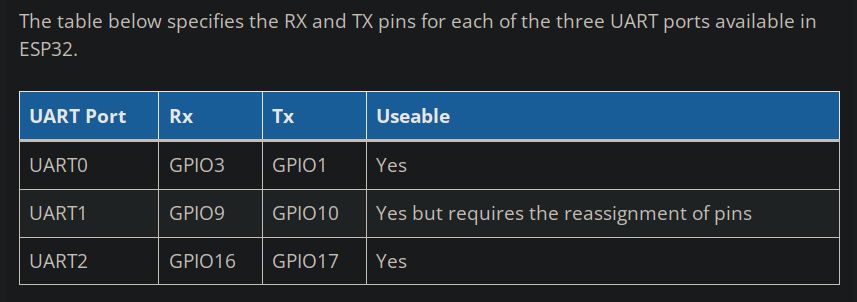
    On the ESP32 forum I got the answer that PIN 17 cannot be used.... Are they writing the truth? From the pinout of this board, it appears that this is the TX from UART2.
  • #10 20567380
    Anonymous
    Level 1  
  • #11 20567402
    CC_PL
    Level 13  
    Posts: 484
    Help: 4
    Rate: 56
    Thanks for the tables

    This is the main Esspressif forum. I think the guy was referring to some rare PSRAM memory board.
  • #12 20567405
    Anonymous
    Level 1  
  • #14 20567457
    Anonymous
    Level 1  
  • #15 20567561
    CC_PL
    Level 13  
    Posts: 484
    Help: 4
    Rate: 56
    I have a Neo 6M and two SAM M8Q.

    Added after 52 [minutes]:

    I have a new set of cables. The power is working at last (the red LED on the GPS is on). The blue one should still be on.

    In the serial monitor I have: "coordinates wrong". - Location Invalid.
  • #16 20567737
    Anonymous
    Level 1  

Topic summary

✨ The discussion revolves around issues with a GPS NEO 6M module using the TinyGPSPlus library for Arduino. The user is attempting to display latitude and longitude coordinates but encounters a "No GPS detected: check wiring" error. Various responses suggest checking wiring connections, using appropriate pins for SoftwareSerial on ESP32, and ensuring the correct voltage supply (3.3V). The user confirms connections are correct and mentions using two GPS modules (NEO 6M and SAM M8Q). Despite troubleshooting, the GPS module fails to acquire a signal, leading to invalid location readings. Suggestions include repositioning the module for better satellite signal reception.
Generated by the language model.

FAQ

TL;DR: ESP32 has 3 UARTs; use HardwareSerial (Serial2) instead of SoftwareSerial on GPIO 3/4. "ESP32 has more than one HardwareSerial." Cross TX/RX, set 9600, power 3.3 V, and wait for lock. This fixes missing lat/long on TinyGPSPlus. [Elektroda, khoam, post #20566991]

Why it matters: This FAQ helps ESP32 + NEO‑6M/SAM‑M8Q + TinyGPSPlus users fix "no GPS" and "INVALID" location issues fast.

Quick Facts

How do I wire a NEO‑6M to an ESP32 to get TinyGPSPlus data?

Cross the UART lines: GPS TX to ESP32 RX, and GPS RX to ESP32 TX. Also connect GND-to-GND and a stable 3.3 V supply. Use a hardware UART (e.g., Serial2) and set the RX/TX pins in Serial2.begin(...). “TX from the Neo to the RX in the ESP” is required. [Elektroda, khoam, post #20567054]

Why do I see “No GPS detected: check wiring.” in TinyGPSPlus?

That message triggers when the sketch sees fewer than 10 characters after 10 seconds (gps.charsProcessed() < 10). It means the ESP32 is not receiving NMEA data. Fix wiring, verify RX/TX are crossed, match the baud (e.g., 9600), and use Serial2. [Elektroda, CC_PL, post #20567064]

Can I use SoftwareSerial on ESP32 GPIO 3/4 for GPS?

No. Those pins are the wrong choice on ESP32 for SoftwareSerial. Use a hardware UART instead. “ESP32 has more than one HardwareSerial (Serial, Serial1, Serial2).” Configure Serial2 with proper pins and baud for reliable NMEA reads. [Elektroda, khoam, post #20566991]

What baud rate should I use with NEO‑6M and TinyGPSPlus on ESP32?

Use 9600 bps unless you’ve reconfigured the GPS. Initialize Serial2 with Serial2.begin(9600, SERIAL_8N1, RX, TX). Feed bytes to TinyGPSPlus with gps.encode(Serial2.read()) in loop(). This matches common examples and works with standard NMEA output. [Elektroda, CC_PL, post #20567002]

My serial monitor shows “Location: INVALID.” What does it mean and how do I fix it?

It means the GPS has no satellite lock yet. Move the antenna to a clear-sky location and wait; first fix can take many minutes. “Sometimes it takes many minutes and reposition helps.” Keep reading and parsing while waiting for a valid fix. [Elektroda, khoam, post #20567737]

How do I quickly debug “No GPS detected” on ESP32 + NEO‑6M?

  1. Run an echo test: while(Serial2.available()) Serial.write(Serial2.read()); to confirm NMEA output. 2. If no data, swap RX/TX and recheck grounds. 3. Use Serial2 at 9600 8N1 with set RX/TX pins; keep reading in loop(). [Elektroda, CC_PL, post #20567064]

What voltage should I power the GPS module from when using ESP32?

Power the module at 3.3 V if your board supports it, and share ground with the ESP32. The user supplied 3.3 V in testing. Ensure adequate current and stable wiring before diagnosing software issues. [Elektroda, CC_PL, post #20567048]

I still get no data on Serial2 with pins set—what else could be wrong?

Faulty jumpers are common. Replace cables, verify the GPS power LED is on, and retry the echo test. After fixing cabling, you may see “Location: INVALID” until the receiver locks satellites outdoors. [Elektroda, CC_PL, post #20567561]

Is GPIO17 unsuitable for Serial2 TX on ESP32 DevKit V1?

On typical ESP32 DevKit V1 (ESP‑WROOM‑32), Serial2 works and should start immediately when wired and configured. Claims that GPIO17 cannot be used were dismissed; confirm your board’s pin map if behavior differs. [Elektroda, khoam, post #20567380]

How should I feed TinyGPSPlus so it can parse coordinates?

Continuously read bytes from the GPS UART and pass each to gps.encode(). Only print coordinates when gps.encode(...) returns true and fields are valid. Use Serial2.available() > 0 with gps.encode(Serial2.read()). [Elektroda, CC_PL, post #20567002]

Do I need a loop() that continuously reads from the GPS?

Yes. Without a proper loop() that reads from Serial and calls gps.encode(), TinyGPSPlus will not parse sentences, and outputs will be empty. A missing or inactive loop prevents updates entirely. [Elektroda, JacekCz, post #20566935]

How can I confirm the right ESP32 pins for UART on my specific board?

Check a trusted ESP32 pinout reference and your board’s schematic. Verify pin capabilities, strapping pins, and any board-specific reservations before assigning RX/TX to GPS. “ESP32 Pinout Reference.” [ESP32 Pinout Reference]
Generated by the language model.
ADVERTISEMENT