FAQ 
TL;DR: These 33-LED Globe Fairy Lights use a 3-wire string, and one tester said it "worked like a charm" only after rewiring the strip to an ESP32. This FAQ helps BK7231T owners when GPIO templates, TuyaMCU detection, CloudCutter, and PWM tests all fail because the lights are addressable LEDs, not simple PWM channels. [#20825703]
Why it matters: If you treat this controller like a normal PWM RGB board, you can waste hours on wrong GPIO roles, wrong tools, and firmware paths that will never light the strip.
| Option |
What the thread confirmed |
Result |
| OpenBeken GPIO/PWM discovery |
Buttons were found, but no PWM pin lit the LEDs |
Not usable for direct LED control |
| OpenBK7231T ALT + PixelAnim |
Partial progress on BK7231T, but users still reported broken control and random LEDs after reboot |
Experimental/problematic |
| ESP32 + ESPHome |
Rewired 3 strip wires to ESP32 and got on/off, color, and scenes working on first try |
Best confirmed workaround |
Key insight: The board inputs work, but the light string is the real issue. A 3-wire V+, LED, GND string with individually addressable bulbs points to WS2812B-class control, so PWM templates and TuyaMCU checks do not solve it.
Quick Facts
- GPIO Doctor identified P7 = Music, P9 = Colour, and P24 = On/Off on the BK7231T board. [#20658806]
- The light string exposes 3 wires labeled V+, LED, and GND, which strongly indicates an addressable LED data line rather than separate PWM color channels. [#20658887]
- A working ESP32 rewire used LED → GPIO19, V+ → VIN (5V), and GND → GND, powered from a 5V USB supply. [#20825703]
- One owner saw the device described in Tuya IoT as *"33IC MSL5", and another confirmed the set had 33 LEDs**. [#20675737]
- Successful UART flashing of the WB8/BK7231T module was reported with 3.3V, RX1, TX1, and GND on test pads, without the barrel plug connected. [#21373382]
How can I find the correct GPIO configuration for BK7231T Globe Fairy Lights when the Tuya config binary from the WebApp won’t open in Easy UART Flasher?
Start with hardware probing, not the WebApp binary. In this thread, the usable path was: 1. run GPIO Doctor, 2. identify button inputs, 3. open the controller and inspect the LED wiring. That process found valid buttons on P7, P9, and P24, but also showed the strip was a 3-wire addressable string, so a normal GPIO template was never going to reveal PWM LED channels.
[#20658887]
Why does OpenBeken show 'Consumed 256 unwanted non-header byte in Tuya MCU buffer' on BK7231T fairy lights, and what does that indicate about TuyaMCU compatibility?
It indicates the board is not speaking a valid TuyaMCU serial protocol. The log repeatedly showed OpenBeken consuming 256 unwanted non-header bytes and skipping long runs of 00 data, which means the firmware saw no real TuyaMCU frames. In practice, that ruled out TuyaMCU as the active LED control path on this fairy-light controller.
[#20658806]
What is TuyaMCU, and how can I tell whether a BK7231T fairy lights controller is actually using it?
"TuyaMCU" is a secondary microcontroller interface that exchanges structured serial packets with the Wi‑Fi chip, letting a device offload button, relay, or light control to a separate controller. If enabling the TuyaMCU driver only produces repeated 256-byte non-header junk and no valid headers, the controller is not using TuyaMCU for the light engine.
[#20658806]
What is Tuya CloudCutter, and why might the tuya-generic-msl6-globe-fairy-lights profile fail to reveal a usable pin configuration?
"Tuya CloudCutter" is a profile-based Tuya provisioning and analysis tool that matches known devices to canned definitions, but it only helps when the target hardware follows the same pin and feature model. Here, the generic MSL6 fairy-lights profile showed nothing useful because this board drove a 3-wire addressable string, not simple PWM outputs.
[#20658283]
Which GPIO pins were identified for the ON/OFF, Colour, and Music buttons on this BK7231T fairy lights board, and how do I test them with GPIO Doctor?
The buttons mapped to P24 for On/Off, P9 for Colour, and P7 for Music. Test them by opening GPIO Doctor, watching for state changes, and pressing each physical button one at a time. Those three pins reacted reliably, which confirmed the inputs were discoverable even though the LEDs were not.
[#20658806]
Why don’t any PWM pin assignments light up these Globe Fairy Lights, even though the board has working button inputs?
No PWM assignment works because the lights are not driven as separate PWM color channels. The board exposed only 3 strip wires—V+, LED, and GND—and later testing confirmed WS2812B LEDs, which need a serial data stream instead of plain PWM duty changes on 3 color pins.
[#20754527]
How do I determine whether a 3-wire fairy light string labeled V+, LED, and GND is using WS2812B or another addressable LED driver?
Check whether the bulbs can show different colors individually and whether the strip uses only V+, data, and GND. In this case, both clues were present: the bulbs displayed different colors per LED, and the wiring was 3-wire, so the thread concluded the string had an onboard driver like WS2812B rather than a direct PWM layout.
[#20658944]
What happens if I cut out one LED from an individually addressable fairy light string like WS2812B while trying to identify the controller?
The rest of the string should still work, just one LED shorter. The thread’s expert reply said that if the string behaves like WS2812B, removing one LED should only shorten the chain by one pixel while effects continue on the remaining LEDs. That makes a single-LED test a practical diagnostic step.
[#20659400]
How can I test a suspected WS2812B fairy light string with an Arduino or NodeMCU without destroying the original light set?
Use an external controller and test the strip before committing to a full rebuild. The suggested method was to desolder the strip from the IoT board, connect GND, proper power, and the data line to an Arduino or NodeMCU, then run a basic WS2812B tutorial sketch. That confirms the LED protocol without opening every bulb.
[#20659424]
What does the Tuya IoT description '33*IC MSL5' mean, and how useful is it for identifying the LED controller inside Globe Fairy Lights?
It is only a weak clue, not a usable controller ID. The thread reported the Tuya IoT label "33*IC MSL5," which likely reflects a 33-IC light set, but nobody used that string alone to derive a working GPIO map or firmware setup. Practical identification still came from wiring inspection and later WS2812B confirmation.
[#20675737]
What’s the best way to rewire a BK7231T fairy light strip to an ESP32, including which strip wires go to GPIO, 5V, and GND?
Connect the strip exactly as follows: LED to GPIO19, V+ to VIN, and GND to GND on an ESP32 powered from 5V USB. One user desoldered the 3 strip wires from the Tuya board, moved them to an ESP32, and got basic on/off, color, and scenes working on the first try.
[#20825703]
ESPHome fastled vs esp32_rmt_led_strip vs WLED with MQTT: which approach works best for replacing a BK7231T fairy lights controller with an ESP32?
ESPHome was the best proven option in this thread. The user tested esp32_rmt_led_strip first and said it "worked like a charm," then confirmed FastLED also worked perfectly, while WLED with MQTT was listed only as a future option. So the strongest evidence favors ESPHome because two ESPHome light methods were actually validated.
[#20825703]
Why is WS2812 animation support available on OpenBeken for BK7231N but still problematic or pending on BK7231T devices?
Because BK7231T support arrived later and remained less mature. The thread explicitly said WS2812 with animations was supported on BK7231N, while BK7231T was still pending in September 2024; later posts showed ALT-firmware progress, but users still reported bugs such as a stuck last LED and broken animations above half brightness.
[#21722531]
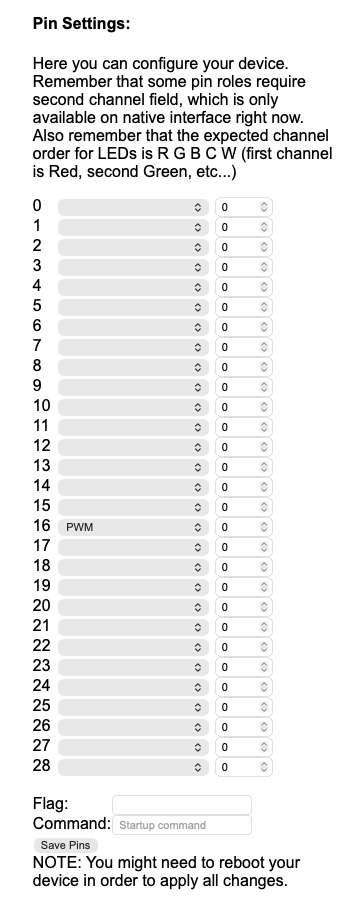
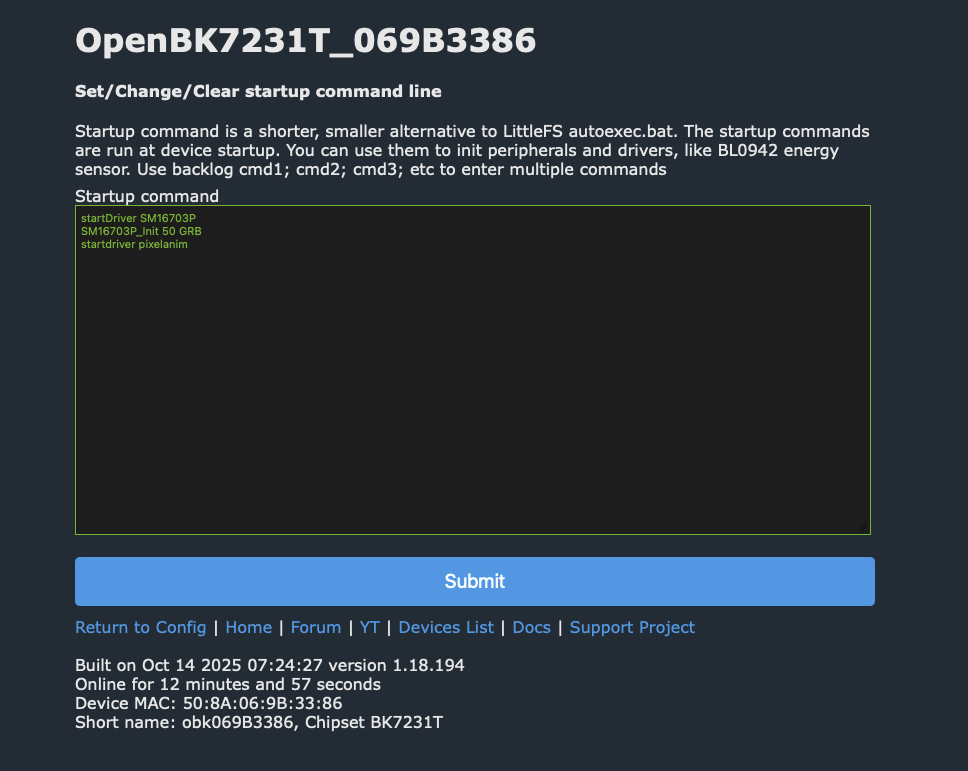
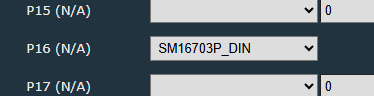
How do I configure OpenBK7231T ALT firmware for addressable fairy lights using SM16703P_Init and PixelAnim, and what role does P16 play on BK7231T boards?
Use the ALT firmware, then add startup commands for the SPI LED driver and animation engine. The posted sequence was
startDriver SM16703P,
SM16703P_Init {LEDs} GRB, and
startDriver PixelAnim. P16 matters because one developer stated that, on Beken, the only SPI output is on P16, so that is the expected data path for this setup.
[#21720699]
Why do some LEDs randomly light up after reboot on BK7231T ALT firmware while the GUI sliders and toggle controls still don’t properly control the fairy lights?
Because the BK7231T implementation was still incomplete and buggy. Users reported random white, red, blue, or mixed LEDs after reboot, no reliable response to GUI sliders, and the need to press Toggle Light before reboot to see any LEDs light at all. Another tester also reported a permanently lit last LED and animation faults above 50% brightness.
[#21722225]
AI summary based on the discussion. May contain errors.