






logo elektroda
logo elektroda
X
logo elektroda

TL;DR

  • An ESP8266-based "supervisor detector" logs nearby cell phones by scanning Wi‑Fi MAC addresses and RSSI, then sends the collected data to a server.
  • The ESP runs in WIFI_AP_STA dual mode, using one radio for access point login and the other for periodic Wi‑Fi sniffing and transmission.
  • The code extends MAC collection to 1 minute and remembers only the strongest RSSI plus hit count for each MAC address; ArduinoJson needed updates for newer libraries.
  • Phones with active Wi‑Fi were detected reliably near the house, with RSSI above -75 meaning close and above -70 meaning at or inside the building.
  • Randomized MACs limit identification outside a phone's own network, so the system mainly sees nearby devices associated with a known Wi‑Fi network.
Generated by the language model.
ADVERTISEMENT
Treść została przetłumaczona polish » english Zobacz oryginalną wersję tematu
📢 Listen (AI):
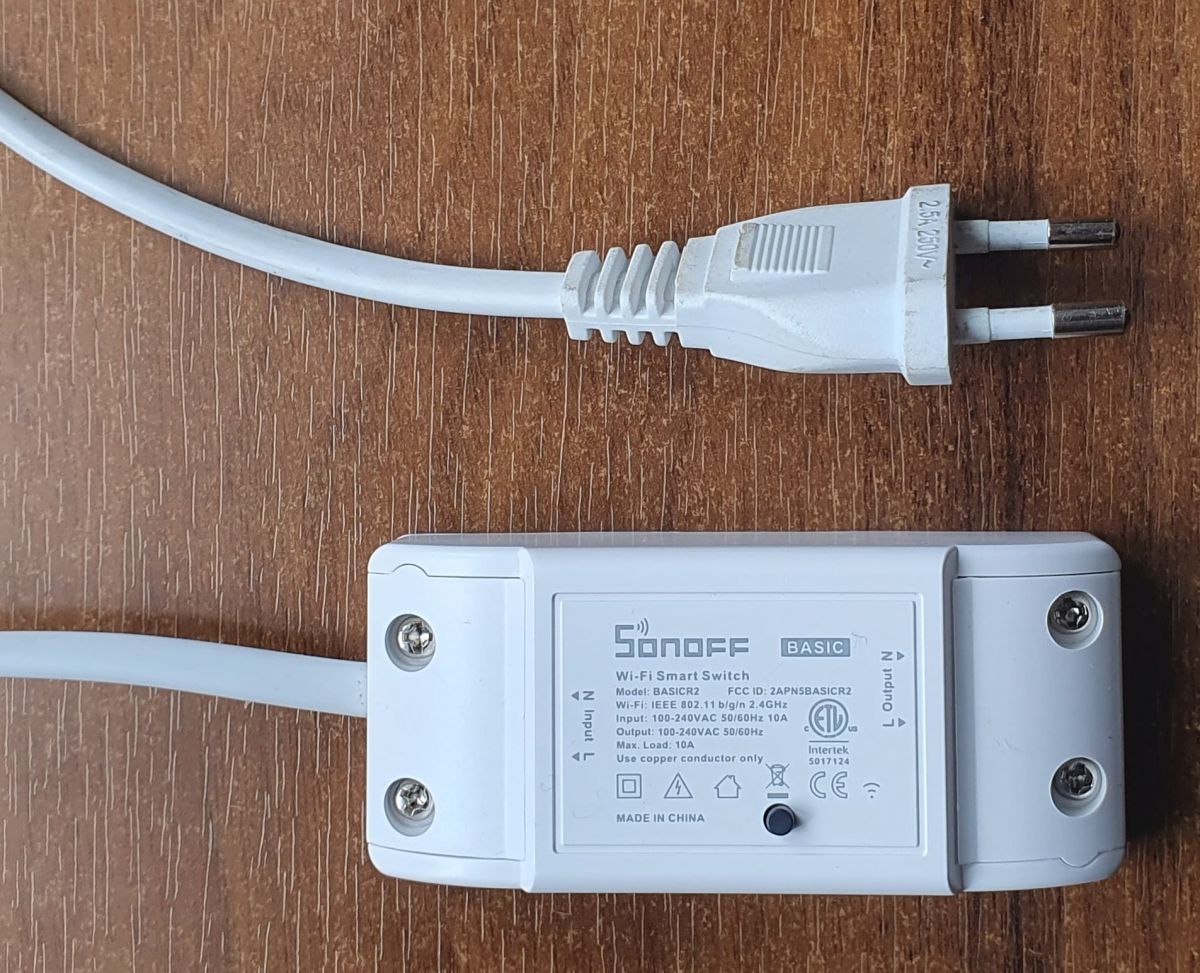
  • Sonoff Basic – Wi-Fi Smart Switch with attached power cord
    Recently it appeared in the DIY section "Supervisor Detector" by @szdom. The topic aroused great interest, including mine. However, I decided to approach the problem differently - ESP was to collect data and periodically send it to the server. The main task is to detect the presence of someone`s cell phone nearby. This is possible thanks to the RSSI information. Generally, weak RSSI (small RSSI value) means greater distance between the transmitter and receiver. It may also result from an unusual pattern of occlusions and reflections. Therefore, this is a poor indicator. A high RSSI value indicates the proximity of the transmitter and receiver. This is rather a certain fact - I ignore directional antennas, etc.
    I searched the Internet for code - how to acquire data and send it. I was thinking about constantly switching between listening and sending mode. The solution turned out to be much simpler - it is the WIFI_AP_STA mode, i.e. dual mode in which ESP works as both AP and STA.
    Below is the original code that I found on several websites:
    Code: Arduino
    Log in, to see the code

    I failed to compile it in the original version - the reason was the newer ArduinoJson library. I also made a number of changes:
    - blinking of the built-in diode - signaling the start, connection to WiFi and each sending,
    - initial login using wifiManager,
    - extension of MAC address collection time to 1 minute,
    - for a given MAC, only one item is remembered, containing the highest RSSI value and the number of occurrences of a given address. Arduino code:
    Code: Arduino
    Log in, to see the code

    Below is an example code in PHP that receives data and writes it to a log file:
    Code: PHP
    Log in, to see the code


    Hardware
    The hardware is so trivial that I did not dare to present this article as a DIY :) . For some time now I have been using SONOFFs as a base for projects based on ESP8266. Sonoff provides me with ESP, power and housing. The only thing left for me to do was add a power cable. In the presented system, the relay is not used.

    MAC devices
    Current cells use random MAC addresses when trying to connect:
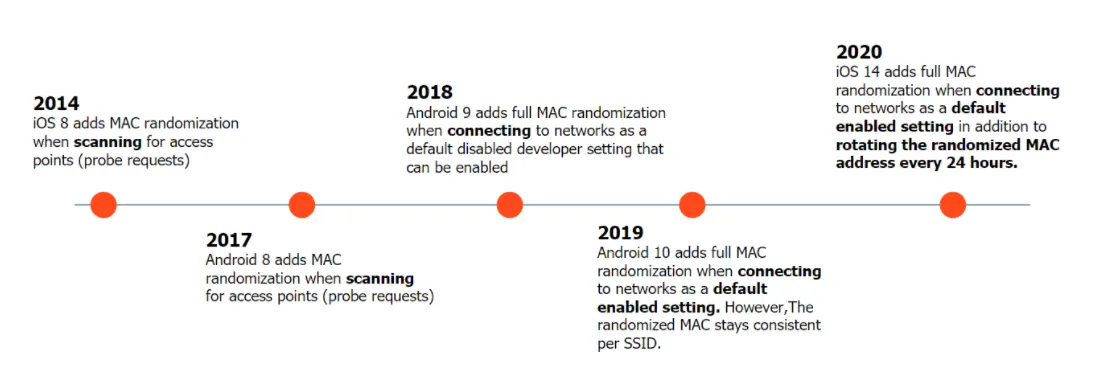
    Timeline with information on MAC address randomization in iOS and Android systems.
    Random MAC addresses are easy to recognize - if the second MAC digit is 2, 6, A, or E, it is a random MAC address. As you can see from the diagram above, Android introduced random MAC addresses in connection attempts in 2017. Interestingly, random MAC addresses have also been used since 2019 when connecting to a WiFi network. However, there is an exception here - the randomly selected address is constant for a given SSID. This solution is necessary due to access points presenting regulations or requiring consent. We find this type of access in hotels, restaurants and other public access points. A permanent change to the MAC would require constant confirmation of the regulations. There will probably be changes in this respect, e.g. MAC address randomization if you have not logged in to a given network for a given period (e.g. 24 hours). So, can the “supervisor detector” work? Well, if a phone with active WiFi is within the range of its network, it can be identified. However, if it is outside "its" WiFi network, this is not possible.

    Because the log contains information about all "caught" MAC addresses, if they are not random, you can identify the manufacturer of the WiFi card, and sometimes also the manufacturer of the equipment. However, these will mainly be routers and other stationary equipment.

    However, my goal was to use the system for some kind of supervision. After placing it in a building (preferably inside), it can tell us whether any cell was near the house or even inside. I use it in a newly built house and I can say that it detected my (and not only my) presence. Of course, RSSI thresholds need to be established. In my case, it turned out that non-stationary devices with RSSI above -75 mean they are close to home. RSSI above -70 is directly at the house or inside the building. Cells are very talkative. A connection attempt is recorded practically every minute. By looking at the table, I can determine the time of arrival, stay and departure from the house.
    If you liked the article or contained useful information, give it a "plus"

    Cool? Ranking DIY
    About Author
    krzbor
    Level 29  
    Offline 
    krzbor wrote 1731 posts with rating 1041, helped 40 times. Been with us since 2004 year.
  • ADVERTISEMENT
  • #2 20998163
    gulson
    System Administrator
    Posts: 29221
    Help: 148
    Rate: 5977
    Board Language: polish
    Thanks for developing the idea, I also think that user @szdom`s idea deserves further development.
    If you give me the Parcel Locker, I will send you a small gift! :)
  • ADVERTISEMENT
  • #3 20998656
    krzbor
    Level 29  
    Posts: 1731
    Help: 40
    Rate: 1041
    Board Language: polish
    I use a system to detect whether someone is near or inside the house. As I wrote, the MAC address in the WiFi network in which we are logged in, although random, is permanent. If we assign such a MAC to a specific person, we can determine which household member is at home (if they did not forget to take their cell phone). In a block of flats you can check whether your neighbor has returned from work. The tracking possibilities are huge and a little scary...
  • ADVERTISEMENT
  • #4 21000665
    szdom
    Level 12  
    Posts: 37
    Rate: 43
    Board Language: polish
    @krzbor Nice project. Thanks for reminding me about the WIFI_AP_STA mode, I forgot that this mode existed.
    The tracking possibilities are truly enormous. By installing several/dozen such devices in an office building, we can track the location of a specific person in almost real time.
    The ability to connect to the server provides new functionalities - e.g. verification of authorizations.
    It can be used for specific access control, e.g. entering a company parking lot (of course, this would require forcing the user to turn off MAC randomization).
  • ADVERTISEMENT
  • #5 21001626
    krzbor
    Level 29  
    Posts: 1731
    Help: 40
    Rate: 1041
    Board Language: polish
    An interesting development of the project may be replacing the sending of information to the server with MQTT. Instead of a minute, we can collect data for a second. Our MQTT client on ESP can subscribe to the "interesting MACi" channel and publish MAC and RSSI when an interesting MAC appears. With MQTT we can do everything, e.g. in HA.
  • #6 21105014
    pitsa
    Level 12  
    Posts: 32
    Help: 3
    Rate: 12
    Board Language: polish
    If someone's arduino code wasn't working, a small correction needs to be made, in two places.
    Such was:
    HTTPClient http;
    ...
    http.begin(host);

    Replace with this:
    WiFiClient client;
    HTTPClient http;
    ...
    http.begin(client, host);
    .
📢 Listen (AI):

FAQ

TL;DR: One ESP8266 in WIFI_AP_STA mode can log 60+ probe requests per minute [Elektroda, krzbor, post #20996869]; "tracking possibilities are truly enormous" [Elektroda, szdom, post #21000665] The project sends minute-bundled JSON to a server, detects devices via RSSI, and flags presence.

Why it matters: Cheap hardware becomes a real-time people-presence sensor with serious privacy impact.

Quick Facts

• RSSI filter: non-stationary devices stronger than –75 dBm ≈ near house; stronger than –70 dBm ≈ inside [Elektroda, krzbor, post #20996869] • Compile fix: use http.begin(client, host) with WiFiClient object for ArduinoJson v7+ [Elektroda, pitsa, post #21105014] • Sonoff Basic (ESP8266, 230 V PSU, case) costs ≈ US $5–7 [Itead, 2024] • Random MACs have bit-2 set (2/6/A/E) per IEEE OUI rule [IEEE, 2022] • MQTT can cut latency to 1 s bursts instead of 60 s batches [Elektroda, krzbor, post #21001626]

What is WIFI_AP_STA mode and why use it here?

WIFI_AP_STA lets an ESP8266 act as Access Point and Station simultaneously. While the STA side sends data to your router, the AP side stays in sniffing mode and receives probe requests from nearby devices. This avoids constant role switching and keeps packet loss low [Elektroda, krzbor, post #20996869]

How does the detector estimate distance?

It stores the strongest RSSI seen for each MAC during a 60-second window. Values stronger than –75 dBm indicate the phone is near the building, stronger than –70 dBm usually mean it is inside [Elektroda, krzbor, post #20996869] RSSI varies with walls and antenna patterns, so calibrate on-site.

Why didn’t my sketch compile with ArduinoJson v7?

The original code used the deprecated DynamicJsonBuffer API. Upgrade by replacing DynamicJsonBuffer with JsonDocument, allocate memory with StaticJsonDocument or heap, and call serializeJson() instead of printTo(). The forum example already shows these changes [Elektroda, krzbor, post #20996869]

I still get http.begin errors—what’s wrong?

ArduinoHttpClient 2.x needs a WiFiClient object. Declare it and pass both parameters:
  1. WiFiClient client;
  2. http.begin(client, host); Without this, compilation fails with ‘no matching function’ [Elektroda, pitsa, post #21105014]

How can I spot random MAC addresses?

If the second nibble of the first MAC byte equals 2, 6, A, or E, the address is locally administered (random). Android started sending random probe MACs in 2017 and per-SSID random MACs from 2019 [Elektroda, krzbor, post #20996869]

Are random MACs always changing?

For probe frames they change frequently, but for a saved SSID the phone reuses the same random address to avoid captive-portal loops. You can still map that constant random MAC to a user after first detection [Elektroda, krzbor, post #20998656]

What privacy or legal issues arise?

Logging device identifiers can constitute personal data under GDPR when the data allows tracking a person. Store hashes or truncate MACs, display notices, and get consent where required. Several EU watchdogs fined companies for Wi-Fi tracking in 2020 [CNIL, 2020].

Can MQTT replace HTTP posting?

Yes. Collect for one second, then publish {mac,rssi} to a broker. Subscribe ESPs to a ‘watchlist’ topic for instant alerts. This lowers latency and integrates natively with Home Assistant [Elektroda, krzbor, post #21001626]

What RSSI thresholds should I start with indoors?

Typical ESP8266 modules read –30 dBm at 1 m line-of-sight, –70 dBm through two brick walls, and drop below –90 dBm outside most homes [Espressif, 2023]. Start with –75 dBm for ‘near’ and adjust ±5 dB after field tests.

Could an attacker spoof or silence their MAC?

Yes. A user can disable Wi-Fi, use airplane mode, or send crafted probe frames with fake MACs. Thus the system cannot guarantee presence; it only indicates likely presence. Treat absence data with caution—false negatives occur [Edge-case fact].

How do I deploy the detector in three steps?

  1. Flash modified firmware onto a Sonoff Basic (GPIO0 held low during power-up). 2. Power device, join the WiFiManager portal, and enter your router SSID/password. 3. Mount the Sonoff indoors, LED blinks twice when server upload succeeds. Now view the server log or MQTT topic.

What hardware modifications are required on a Sonoff Basic?

None for detection; the onboard 3.3 V regulator powers the ESP, and the relay remains unused. Optionally solder header pins for easier flashing [Elektroda, krzbor, post #20996869] "The hardware is so trivial that I did not dare to present this article as DIY" [Elektroda, krzbor, post #20996869]

How much storage does the log need?

Assuming 60 probe entries per minute and 60-byte JSON each, one detector produces ~5.2 MB/day. A 16 GB card stores over eight years of raw logs, but rotate files weekly for easier analysis [Calculation based on data rate].

What happens if no MACs are seen for a while?

The code skips empty uploads until 60 consecutive silent minutes elapse, then sends an empty [] JSON to indicate liveness. This prevents flooding the server with useless packets [Elektroda, krzbor, post #20996869]
Generated by the language model.
ADVERTISEMENT