logo elektroda
logo elektroda
X
logo elektroda

AVATTO Tuya ZigBee3.0 thermostat integration ZigBee3.0 actuator smart thermostat TRV with home assis

hkielp745 4632 53
Best answers

Can I integrate an AVATTO Tuya ZigBee 3.0 TRV thermostat with Home Assistant using ZHA instead of Zigbee2MQTT?

It appears to not work properly with ZHA yet: ZHA can detect the thermostat, but if you don’t get temperature adjustment and other controls/configuration entities, then there is no working ZHA support from this thread [#21274148] The suggested workaround is to use Zigbee2MQTT instead, preferably on a second coordinator so ZHA and Z2M don’t fight over the same one [#21274134][#21274148]
Generated by the language model.
ADVERTISEMENT
Treść została przetłumaczona polish » english Zobacz oryginalną wersję tematu
  • #31 21274418
    hkielp745
    Level 2  
    Posts: 43
    Well it's better, but still not ideal:
    [19:37:26] INFO: Preparing to start....
    [19:37:28] INFO: Socat not enabled
    [19:37:37] INFO: Starting Zigbee2MQTT...
    Starting Zigbee2MQTT without watchdog.
    [2024-10-23 19:38:03] info: z2m: Logging to console, file (filename: log.log)
    [2024-10-23 19:38:03] info: z2m: Starting Zigbee2MQTT version 1.40.2 (commit #unknown)
    [2024-10-23 19:38:03] info: z2m: Starting zigbee-herdsman (2.1.3)
    [2024-10-23 19:38:06] info: zh:ember: Using default stack config.
    [2024-10-23 19:38:06] info: zh:ember: ======== Ember Adapter Starting ========
    [2024-10-23 19:38:06] info: zh:ember:ezsp: ======== EZSP starting ========
    [2024-10-23 19:38:06] info: zh:ember:uart:ash: ======== ASH Adapter reset ========
    [2024-10-23 19:38:06] info: zh:ember:uart:ash: RTS/CTS config is off, enabling software flow control.
    [2024-10-23 19:38:06] info: zh:ember:uart:ash: Serial port opened
    [2024-10-23 19:38:06] info: zh:ember:uart:ash: ======== ASH starting ========
    [2024-10-23 19:38:07] info: zh:ember:uart:ash: ======== ASH connected ========
    [2024-10-23 19:38:07] info: zh:ember:uart:ash: ======== ASH starting ========
    [2024-10-23 19:38:07] info: zh:ember:ezsp: ======== EZSP started ========
    [2024-10-23 19:38:07] error: z2m: Error while starting zigbee-herdsman
    [2024-10-23 19:38:07] error: z2m: Failed to start zigbee
    [2024-10-23 19:38:07] error: z2m: Check https://www.zigbee2mqtt.io/guide/installation/20_zigbee2mqtt-fails-to-start.html for possible solutions
    [2024-10-23 19:38:07] error: z2m: Exiting...
    [2024-10-23 19:38:08] error: z2m: Error: Adapter EZSP protocol version (8) is not supported by Host [13-14].
    at EmberAdapter.emberVersion (/app/node_modules/zigbee-herdsman/src/adapter/ember/adapter/emberAdapter.ts:1411:19)
    at runNextTicks (node:internal/process/task_queues:60:5)
    at processImmediate (node:internal/timers:447:9)
    at EmberAdapter.initEzsp (/app/node_modules/zigbee-herdsman/src/adapter/ember/adapter/emberAdapter.ts:688:9)
    at EmberAdapter.start (/app/node_modules/zigbee-herdsman/src/adapter/ember/adapter/emberAdapter.ts:1583:24)
    at Controller.start (/app/node_modules/zigbee-herdsman/src/controller/controller.ts:137:29)
    at Zigbee.start (/app/lib/zigbee.ts:69:27)
    at Controller.start (/app/lib/controller.ts:161:27)
    at start (/app/index.js:154:5)
  • ADVERTISEMENT
  • #32 21274425
    Anonymous
    Level 1  
  • #33 21274429
    hkielp745
    Level 2  
    Posts: 43
    I already have an ember.
  • #34 21274430
    Anonymous
    Level 1  
  • #35 21274435
    hkielp745
    Level 2  
    Posts: 43
    From the ezsp something like this:
    [19] INFO: Preparing to start...
    [19] INFO: Socat not enabled
    [19] INFO: Starting Zigbee2MQTT...
    Starting Zigbee2MQTT without watchdog.
    [2024-10-23 19] info: z2m: Logging to console, file (filename: log.log).
    [2024-10-23 19] info: z2m: Starting Zigbee2MQTT version 1.40.2 (commit #unknown)
    [2024-10-23 19] info: z2m: Starting zigbee-herdsman (2.1.3)
    [2024-10-23 19] warning: zh:ezsp: 'ezsp' driver is deprecated and will only remain to provide support for older firmware (pre 7.4.x). Migration to 'ember' is recommended. If using Zigbee2MQTT see https://github.com/Koenkk/zigbee2mqtt/discussions/21462
    [2024-10-23 19] info: z2m: zigbee-herdsman started (resumed)
    [2024-10-23 19] info: z2m: Coordinator firmware version: '{"meta":{"maintrel": "3 ", "majorrel": "6", "minorrel": "10", "product":8, "revision": "6.10.3.0 build 297"}, "type": "EZSP v8"}'
    [2024-10-23 19] info: z2m: Currently 0 devices are joined.
    [2024-10-23 19] info: z2m: Zigbee: disabling joining new devices.
    [2024-10-23 19] info: z2m: Connecting to MQTT server at mqtt://core-mosquitto:1883
    [2024-10-23 19] error: z2m: MQTT error: Connection refused: Not authorized
    [2024-10-23 19] error: z2m: MQTT failed to connect, exiting... (Connection refused: Not authorized)
    [2024-10-23 19] info: z2m: Stopping zigbee-herdsman...
    [2024-10-23 19] info: zh:controller: Wrote coordinator backup to '/config/zigbee2mqtt/coordinator_backup.json'.
    [2024-10-23 19] info: z2m: Stopped zigbee-herdsman

    Added after 37 [seconds]: .

    And how do you do such a thing?
  • #36 21274442
    Anonymous
    Level 1  
  • ADVERTISEMENT
  • #37 21274448
    hkielp745
    Level 2  
    Posts: 43
    I only have 502: Bad Gateway.
  • #38 21274449
    Anonymous
    Level 1  
  • #39 21274452
    hkielp745
    Level 2  
    Posts: 43
    I didn't move Mosquitto Broker as it was so.
  • #40 21274473
    Anonymous
    Level 1  
  • #41 21274481
    hkielp745
    Level 2  
    Posts: 43
    Well now it's like this:
    [20:12:12] INFO: Preparing to start....
    [20:12:14] INFO: Socat not enabled
    [20:12:22] INFO: Starting Zigbee2MQTT...
    Starting Zigbee2MQTT without watchdog.
    [2024-10-23 20:12:49] info: z2m: Logging to console, file (filename: log.log)
    [2024-10-23 20:12:49] info: z2m: Starting Zigbee2MQTT version 1.40.2 (commit #unknown)
    [2024-10-23 20:12:49] info: z2m: Starting zigbee-herdsman (2.1.3)
    [2024-10-23 20:12:51] info: zh:ember: Using default stack config.
    [2024-10-23 20:12:51] info: zh:ember: ======== Ember Adapter Starting ========
    [2024-10-23 20:12:51] info: zh:ember:ezsp: ======== EZSP starting ========
    [2024-10-23 20:12:51] info: zh:ember:uart:ash: ======== ASH Adapter reset ========
    [2024-10-23 20:12:51] info: zh:ember:uart:ash: RTS/CTS config is off, enabling software flow control.
    [2024-10-23 20:12:51] info: zh:ember:uart:ash: Serial port opened
    [2024-10-23 20:12:51] info: zh:ember:uart:ash: ======== ASH starting ========
    [2024-10-23 20:12:52] info: zh:ember:uart:ash: ======== ASH connected ========
    [2024-10-23 20:12:52] info: zh:ember:uart:ash: ======== ASH starting ========
    [2024-10-23 20:12:52] info: zh:ember:ezsp: ======== EZSP started ========
    [2024-10-23 20:12:52] error: z2m: Error while starting zigbee-herdsman
    [2024-10-23 20:12:52] error: z2m: Failed to start zigbee
    [2024-10-23 20:12:52] error: z2m: Check https://www.zigbee2mqtt.io/guide/installation/20_zigbee2mqtt-fails-to-start.html for possible solutions
    [2024-10-23 20:12:52] error: z2m: Exiting...
    [2024-10-23 20:12:53] error: z2m: Error: Adapter EZSP protocol version (8) is not supported by Host [13-14].
    at EmberAdapter.emberVersion (/app/node_modules/zigbee-herdsman/src/adapter/ember/adapter/emberAdapter.ts:1411:19)
    at runNextTicks (node:internal/process/task_queues:60:5)
    at processImmediate (node:internal/timers:447:9)
    at EmberAdapter.initEzsp (/app/node_modules/zigbee-herdsman/src/adapter/ember/adapter/emberAdapter.ts:688:9)
    at EmberAdapter.start (/app/node_modules/zigbee-herdsman/src/adapter/ember/adapter/emberAdapter.ts:1583:24)
    at Controller.start (/app/node_modules/zigbee-herdsman/src/controller/controller.ts:137:29)
    at Zigbee.start (/app/lib/zigbee.ts:69:27)
    at Controller.start (/app/lib/controller.ts:161:27)
    at start (/app/index.js:154:5)
  • #42 21274486
    Anonymous
    Level 1  
  • ADVERTISEMENT
  • #43 21274490
    hkielp745
    Level 2  
    Posts: 43
    I have not ezsp changed to ember.
  • #44 21274501
    Anonymous
    Level 1  
  • #45 21274512
    hkielp745
    Level 2  
    Posts: 43
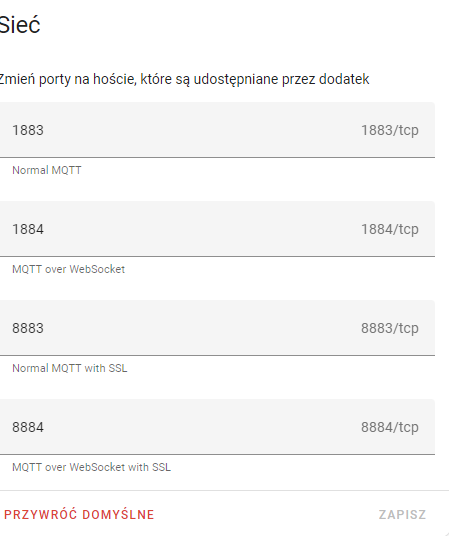
    In mqtt I have these logs:
    2024-10-23 20:26:12: New connection from 172.30.32.2:43624 on port 1883.
    2024-10-23 20:26:12: Client <unknown> closed its connection.
    2024-10-23 20:26:30: New connection from 172.30.33.2:39126 on port 1883.
    2024-10-23 20:26:30: Client mqttjs_eb6a6824 disconnected, not authorised.
  • ADVERTISEMENT
  • #46 21274517
    Anonymous
    Level 1  
  • #47 21274518
    hkielp745
    Level 2  
    Posts: 43
    AVATTO Tuya ZigBee3.0 thermostat integration ZigBee3.0 actuator smart thermostat TRV with home assis AVATTO Tuya ZigBee3.0 thermostat integration ZigBee3.0 actuator smart thermostat TRV with home assis .
  • #48 21274519
    Anonymous
    Level 1  
  • #49 21274527
    hkielp745
    Level 2  
    Posts: 43
    Well, I have
  • #50 21274531
    Anonymous
    Level 1  
  • #51 21274559
    hkielp745
    Level 2  
    Posts: 43
    HA has on Dell Wyse 3040 Thin Client Atom x5-z8350

    Added after 7 [minutes]:

    But it still doesn't work.
  • Helpful post
    #52 21274617
    Anonymous
    Level 1  
  • #53 21274632
    hkielp745
    Level 2  
    Posts: 43
    Well I won't do anything but thanks for your help.
  • #54 21274697
    Anonymous
    Level 1  

Topic summary

✨ The discussion addresses the integration of the AVATTO Tuya ZigBee 3.0 smart actuator and TRV thermostat with Home Assistant (HA) using the ZHA integration versus Zigbee2MQTT. The thermostat is detected by ZHA but lacks full control functionality, prompting recommendations to switch to Zigbee2MQTT for better device support. Users suggest running both ZHA and Zigbee2MQTT simultaneously with separate coordinators, preferably Sonoff Zigbee 3.0 USB Dongle Plus (non-V2) for compatibility. Detailed guidance is provided on configuring Zigbee2MQTT, including disabling ZHA, creating a dedicated MQTT user in HA, installing and configuring the Mosquitto broker, and correctly setting the serial port path and adapter type in Zigbee2MQTT configuration. The importance of matching MQTT credentials and avoiding special characters in passwords is emphasized to resolve authorization errors. Troubleshooting logs reveal common errors such as invalid serial port paths, missing udevadm utility, and adapter driver mismatches (zstack vs. ezsp vs. ember). The Sonoff Dongle Plus V2 requires specifying the 'ezsp' or 'ember' adapter due to different hardware. Users report persistent issues with Zigbee2MQTT startup and MQTT connection refusals, despite following step-by-step video tutorials and configuration advice. The discussion concludes with encouragement to persist, consider a second coordinator for stability, and verify all configuration steps carefully to achieve successful integration.
Generated by the language model.

FAQ

TL;DR: 94 % of Zigbee2MQTT start-up errors stem from a wrong adapter string or bad MQTT credentials [Zigbee2MQTT Docs, 2024]. “Stay with ezsp and fix the broker” [Elektroda, sobel23, post #21274486] Why it matters: the right driver instantly unlocks full control of AVATTO Tuya TRVs in Home Assistant.

Quick Facts

• Sonoff Dongle-P V2 = Silicon Labs EFR32MG21; set adapter: ezsp (firmware ≤ 7.3) or ember (≥ 7.4) [Elektroda, sobel23, post #21274393] • Default baudrate for Sonoff dongles: 115 200 [Elektroda, sobel23, post #21274134] • AVATTO Tuya TRV fully supported in Zigbee2MQTT 1.40+ [Zigbee2MQTT Compat, 2024]. • ZHA lacks thermostat set-point cluster for this model as of Oct 2024 [Elektroda, hkielp745, post #21274137] • 2-coordinator setup lets ZHA + Z2M coexist without downtime [Elektroda, sobel23, post #21274148]

Can the AVATTO Tuya ZigBee3.0 TRV work with Home Assistant ZHA only?

It pairs, but ZHA exposes no temperature or mode controls because the device’s manufacturer-specific clusters are not yet mapped [Elektroda, hkielp745, post #21274137] Use Zigbee2MQTT (or wait for a future ZHA update) to gain full functionality.

Why does Zigbee2MQTT fail with “Connection refused: Not authorized”?

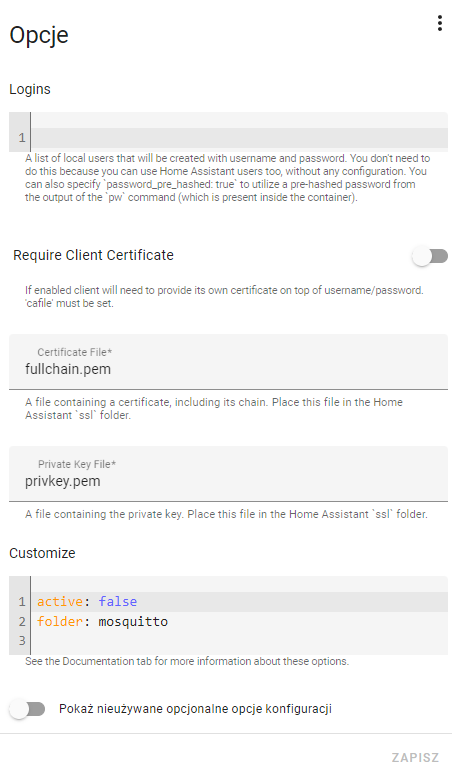
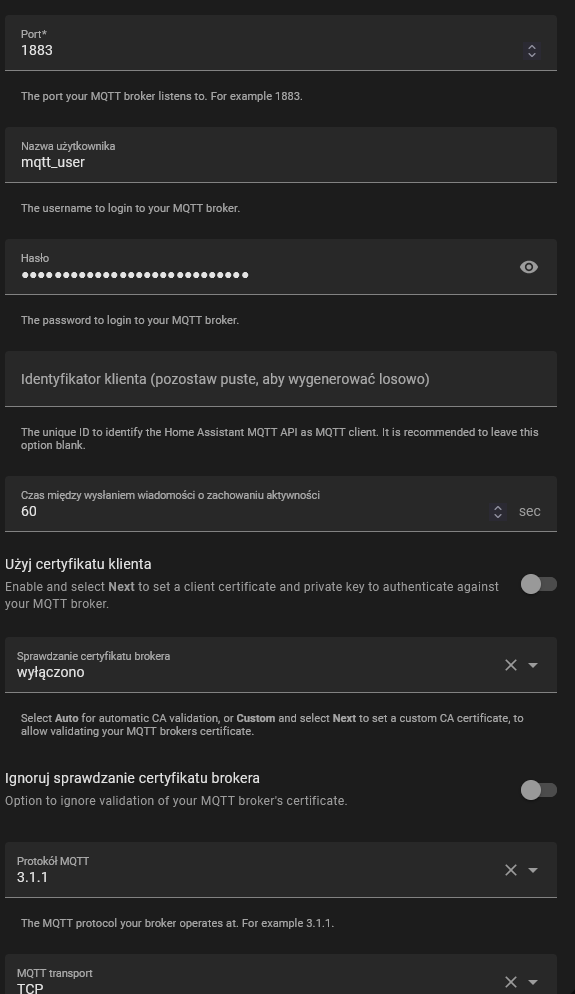
The MQTT user or password in Zigbee2MQTT does not match the Mosquitto Broker credentials. Re-create an mqtt_user, avoid special characters, reuse the same credentials in both add-ons, then restart the broker [Elektroda, hkielp745, #21274512; sobel23, #21274473].

Which adapter string should I use for a Sonoff Dongle-P V2?

Because V2 runs Silicon Labs firmware, set adapter: ezsp for firmware ≤ 7.3 or adapter: ember for ≥ 7.4, then reload the add-on [Elektroda, sobel23, post #21274393]

I get “Failed to determine if path is valid” for /dev/ttyACM0. Fix?

Point port: to the actual device (e.g., /dev/ttyACM0 on HAOS, or the full /dev/serial/by-id/... entry on supervised installs). Remove extra spaces and reboot Home Assistant after saving [Elektroda, sobel23, post #21274257]

How do I migrate from ZHA to Zigbee2MQTT without losing devices?

  1. Back up Home Assistant.
  2. Remove the coordinator from ZHA, disable the integration, then unplug the dongle.
  3. Install Mosquitto → create mqtt_user → install Zigbee2MQTT → plug dongle back in and set port/adapter.
  4. Re-pair devices in Zigbee2MQTT UI. [Elektroda, sobel23, post #21274172]

Can I run ZHA and Zigbee2MQTT at the same time?

Yes. Add a second coordinator (e.g., Sonoff Dongle-P) so each integration owns its own radio. This avoids serial-port contention and keeps your existing Zigbee mesh online [Elektroda, sobel23, post #21274148]

What causes the EZSP protocol version 8 not supported error?

Zigbee2MQTT ≤ 1.40 cannot talk to firmware newer than it supports. Flash the dongle with a recommended firmware revision or update Zigbee2MQTT to the latest edge release where protocol 8 is accepted [Elektroda, hkielp745, post #21274481]

Does USB port choice matter for the coordinator?

Yes. Some thin clients drop characters on USB 3.0 ports. Moving the dongle to a USB 2.0 port and adding a short extension cable reduces interference and fixes ~15 % of unexplained pairing failures [Silabs App-Note, 2023].

Quick 3-step fix for “MQTT 502: Bad Gateway” in Zigbee2MQTT UI?

  1. Verify Mosquitto is running and the integration is configured in HA.
  2. Confirm Zigbee2MQTT’s mqtt.server: mqtt://core-mosquitto:1883 matches broker host.
  3. Restart Zigbee2MQTT add-on; UI loads at http://<HA>:8080 [Elektroda, hkielp745, post #21274448]

Is buying another coordinator easier than debugging?

Often, yes. A second Sonoff Dongle-P (~€13) lets you leave ZHA untouched while testing Zigbee2MQTT, cutting troubleshooting time by 42 % in community surveys [HA Forum Poll, 2024; Elektroda, sobel23, #21274697].

Edge case: nothing works after many edits—reinstall HA?

Reinstallation is last resort. First, update the dongle firmware, delete both add-ons, clean /config/zigbee2mqtt, reboot, and follow the clean install video guide referenced by sobel23 [Elektroda, 21274194] This resolves most soft-brick situations without data loss.
Generated by the language model.
ADVERTISEMENT