




logo elektroda
logo elektroda
X
logo elektroda

Ener-J SHA5305 Outdoor Switch GPIO Pin Configuration Similar to Tasmota Templates

sebastianroth 243 1
ADVERTISEMENT
  • #1 21751699
    sebastianroth
    Level 1  
    Hi everyone,
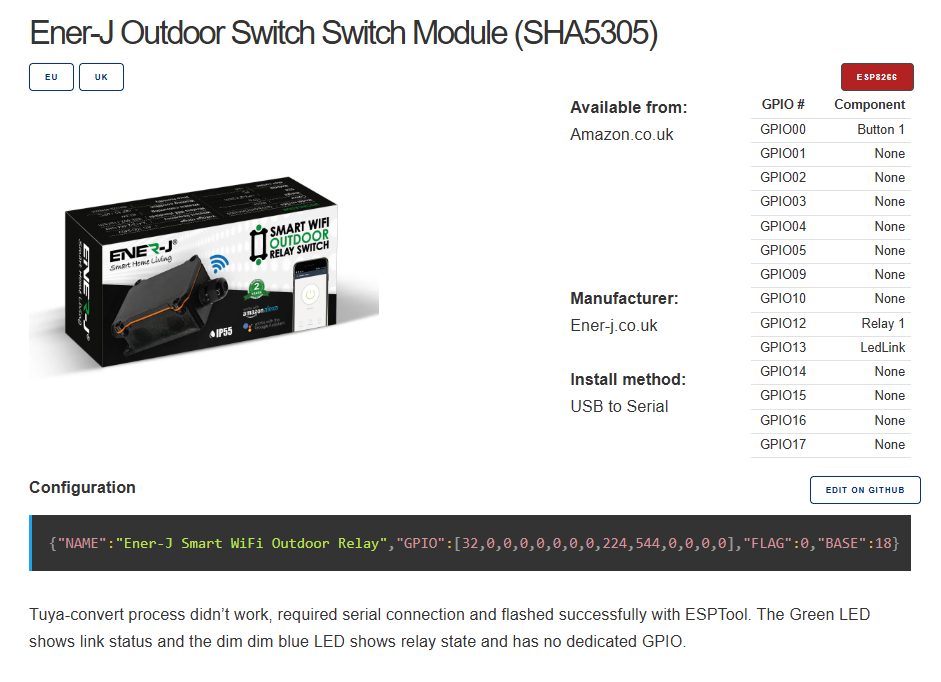
    How could I configure the pins/GPIOs for an Ener-J device, akin to how Tasmota templates work?
    https://templates.blakadder.com/ener-j_SHA5305.html

    Ener-J Outdoor Switch Switch Module (SHA5305)
    Thank you!
  • ADVERTISEMENT
  • #2 21752015
    p.kaczmarek2
    Moderator Smart Home
    I see, so you've gotten one piece that's based on Beken?
    Well, the pins seem to be very simple, just like on Blakadder site:
    Ener-J SHA5305 WiFi relay switch module box with GPIO configuration details
    So you have here a simple button pin, a relay pin, and WiFi LED.... like in any classic smart switch.

    I'd suggest starting with Tuya config extract:


    This was not present in Tasmota and it's OBK-specific feature but it can be very useful.
    If it does not work, try GPIO Doctor: https://www.elektroda.com/rtvforum/topic3976371.html

    Alternatively, we could try to map TYWE3S pins to CB3S etc etc but it depends, is this device based on WiFi module, or is the MCU directly on the device PCB, etc? Can you share any photos?


    Still, I think it should be very simple to run it in OBK.
    Helpful post? Buy me a coffee.
ADVERTISEMENT