Hello, I have successfully ported the cloudcutter exploit to the RTL8720CF and flashed my Carro ceiling fan with openbeken.
It's a TuyaMCU ceiling fan with a light attached to it, with an independently controlled "white" and "warm" LED. The fan also is reversible and has an oscillation mode. There apprently is a timer based on the DPIDs but nothing I could control from the remote and I'm not sure what it does.
This is my configuration I have hacked together: (autoexec.bat)
I am not totally happy with it, since Fan Speed is an enum but really it should be a value between 0 and 10, I just couldn't figure out how to get it working.
For reference here is the tuya local configuration which matches what I have: https://github.com/make-all/tuya-local/issues/930
and also the device.json from cloudcutter:
EDIT: I tried cleaning up my script, now it seems like it broke the UI. I can't load the site without getting connection reset. I also can see that it thinks the fan is a dimmer rather than a fan on HomeAssistant:
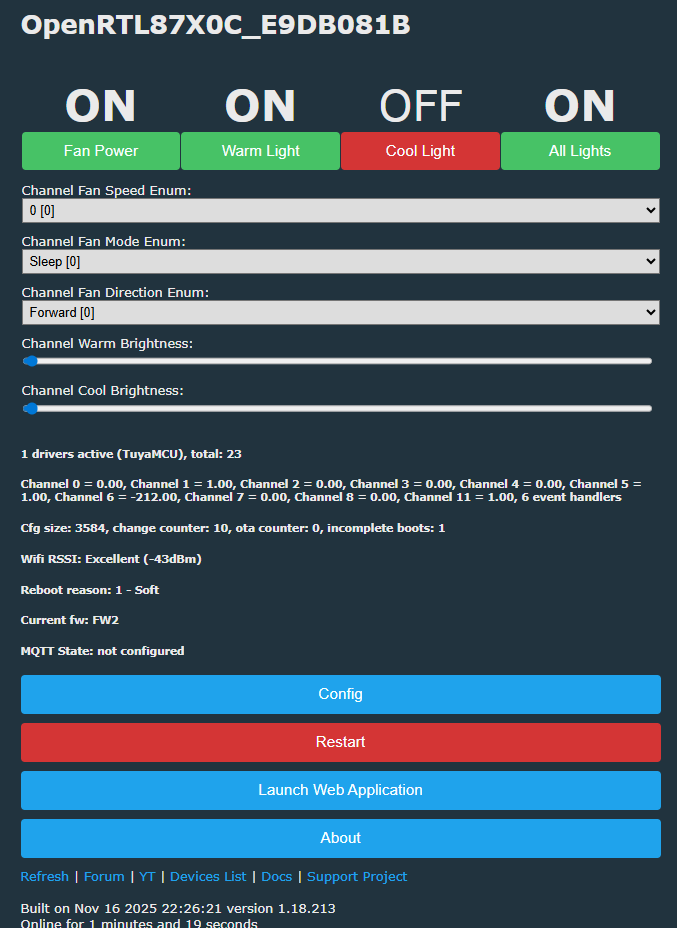
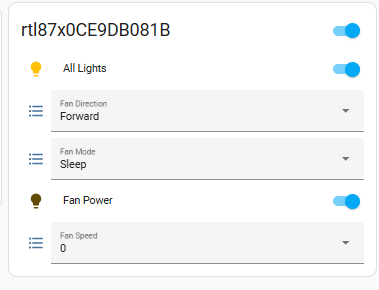
EDIT2: The broken UI was not caused by my current script, it was leftover configuration. After running the ClearIO command, everything started working again. Here is my current script. The only issues I have are the fan speed being an enum (more of a minor annoyance), and the fact that homeassistant gets totally confused about what is what. It thinks the color brightness is a dimmer control for the fan (which it thinks is a lightbulb)! It would be nice for it to just treat it as a single light bulb with adjustable brightness and color temperature.
It's a TuyaMCU ceiling fan with a light attached to it, with an independently controlled "white" and "warm" LED. The fan also is reversible and has an oscillation mode. There apprently is a timer based on the DPIDs but nothing I could control from the remote and I'm not sure what it does.
This is my configuration I have hacked together: (autoexec.bat)
startDriver TuyaMCU

# ------------------------------------------------------
# Fan power (DP 1)
# ------------------------------------------------------
setChannelType 1 Toggle
SetChannelLabel 1 "Fan Power"
linkTuyaMCUOutputToChannel 1 1 1


# ------------------------------------------------------
# Fan speed (DP 3) - enum 1..10
# ------------------------------------------------------
setChannelType 2 Enum
SetChannelLabel 2 "Fan Speed"
SetChannelEnum 2 0:0 1:1 2:2 3:3 4:4 5:5 6:6 7:7 8:8 9:9 10:10
linkTuyaMCUOutputToChannel 3 4 2


# ------------------------------------------------------
# Fan mode (DP 2) - enum sleep/normal/nature
# ------------------------------------------------------
setChannelType 3 Enum
SetChannelLabel 3 "Fan Mode"
SetChannelEnum 3 0:Sleep 1:Normal 2:Nature
linkTuyaMCUOutputToChannel 2 4 3


# ------------------------------------------------------
# Fan direction (DP 103) - enum forward/reverse
# ------------------------------------------------------
setChannelType 4 Enum
SetChannelLabel 4 "Fan Direction"
SetChannelEnum 4 0:Forward 1:Reverse
linkTuyaMCUOutputToChannel 103 4 4


# ------------------------------------------------------
# Warm light (DP 9 switch, DP 10 brightness)
# ------------------------------------------------------
setChannelType 5 Toggle
SetChannelLabel 5 "Warm Light"
linkTuyaMCUOutputToChannel 9 1 5

setChannelType 6 Dimmer1000
SetChannelLabel 6 "Warm Brightness"
linkTuyaMCUOutputToChannel 10 2 6


# ------------------------------------------------------
# Cool light (DP 101 switch, DP 102 brightness)
# ------------------------------------------------------
setChannelType 7 Toggle
SetChannelLabel 7 "Cool Light"
linkTuyaMCUOutputToChannel 101 1 7

setChannelType 8 Dimmer1000
SetChannelLabel 8 "Cool Brightness"
linkTuyaMCUOutputToChannel 102 2 8


# ------------------------------------------------------
# Tell OBK our brightness scale
# ------------------------------------------------------
tuyaMcu_setDimmerRange 10 1000


# ------------------------------------------------------
# Countdown (DP 6 enum hours 0-8)
# ------------------------------------------------------
setChannelType 9 Enum
SetChannelLabel 9 "Countdown (h)"
SetChannelEnum 9 0:Off 1:"1h" 2:"2h" 3:"3h" 4:"4h" 5:"5h" 6:"6h" 7:"7h" 8:"8h"
linkTuyaMCUOutputToChannel 6 4 9


# ------------------------------------------------------
# Countdown remaining (DP 7 minutes, read-only)
# ------------------------------------------------------
setChannelType 10 ReadOnly
SetChannelLabel 10 "Countdown Left (min)"
linkTuyaMCUOutputToChannel 7 2 10
I am not totally happy with it, since Fan Speed is an enum but really it should be a value between 0 and 10, I just couldn't figure out how to get it working.
For reference here is the tuya local configuration which matches what I have: https://github.com/make-all/tuya-local/issues/930
{
  "result": {
    "model": "{\"modelId\":\"0000003ncr\",\"services\":[{\"actions\":[],\"code\":\"\",\"description\":\"\",\"events\":[],\"name\":\"默认服务\",\"properties\":[
{\"abilityId\":1,\"accessMode\":\"rw\",\"code\":\"switch\",\"description\":\"【必选】\\n风扇开关\",\"extensions\":{\"iconName\":\"icon-power\",\"attribute\":\"1\"},\"name\":\"开关\",\"typeSpec\":{\"type\":\"bool\",\"typeDefaultValue\":false}},
{\"abilityId\":2,\"accessMode\":\"rw\",\"code\":\"mode\",\"description\":\"正常风\\n睡眠风\\n自然风\",\"extensions\":{\"iconName\":\"icon-fengli\"},\"name\":\"工作模式\",\"typeSpec\":{\"range\":[\"sleep\",\"normal\",\"nature\"],\"type\":\"enum\",\"typeDefaultValue\":\"sleep\"}},
{\"abilityId\":3,\"accessMode\":\"rw\",\"code\":\"fan_speed\",\"description\":\"【必选】可根据实际档位需求扩展\",\"extensions\":{\"iconName\":\"icon-a_fan_low\",\"attribute\":\"4\"},\"name\":\"风速\",\"typeSpec\":{\"range\":[\"1\",\"2\",\"3\",\"4\",\"5\",\"6\",\"7\",\"8\",\"9\",\"10\"],\"type\":\"enum\",\"typeDefaultValue\":\"1\"}},
{\"abilityId\":6,\"accessMode\":\"rw\",\"code\":\"countdown\",\"description\":\"0:取消\\n1:1小时\\n2:2小时\\n.....\",\"extensions\":{\"iconName\":\"icon-dp_time2\"},\"name\":\"倒计时\",\"typeSpec\":{\"range\":[\"0\",\"1\",\"2\",\"3\",\"4\",\"5\",\"6\",\"7\",\"8\"],\"type\":\"enum\",\"typeDefaultValue\":\"0\"}},
{\"abilityId\":7,\"accessMode\":\"ro\",\"code\":\"countdown_left\",\"description\":\"\",\"extensions\":{\"iconName\":\"icon-dp_time3\"},\"name\":\"倒计时剩余时间\",\"typeSpec\":{\"max\":480,\"min\":0,\"scale\":0,\"step\":1,\"type\":\"value\",\"typeDefaultValue\":0,\"unit\":\"分钟\"}},
{\"abilityId\":9,\"accessMode\":\"rw\",\"code\":\"light\",\"description\":\"黄灯开关\",\"extensions\":{\"iconName\":\"icon-tcl_function_light\",\"attribute\":\"20\"},\"name\":\"黄灯\",\"typeSpec\":{\"type\":\"bool\",\"typeDefaultValue\":false}},
{\"abilityId\":10,\"accessMode\":\"rw\",\"code\":\"bright_value\",\"description\":\"\",\"extensions\":{\"iconName\":\"icon-liangdu\"},\"name\":\"灯光亮度\",\"typeSpec\":{\"max\":1000,\"min\":10,\"scale\":0,\"step\":1,\"type\":\"value\",\"typeDefaultValue\":10,\"unit\":\"\"}},
{\"abilityId\":101,\"accessMode\":\"rw\",\"code\":\"whitelight_switch\",\"description\":\"\",\"extensions\":{\"iconName\":\"icon-tcl_function_light\",\"attribute\":\"20\"},\"name\":\"白灯\",\"typeSpec\":{\"type\":\"bool\",\"typeDefaultValue\":false}},
{\"abilityId\":102,\"accessMode\":\"rw\",\"code\":\"whitebright_value\",\"description\":\"\",\"name\":\"白光亮度\",\"typeSpec\":{\"max\":1000,\"min\":10,\"scale\":0,\"step\":1,\"type\":\"value\",\"typeDefaultValue\":10,\"unit\":\"%\"}},
{\"abilityId\":103,\"accessMode\":\"rw\",\"code\":\"fan_direction\",\"description\":\"正转\\n反转\",\"extensions\":{\"iconName\":\"icon-a_function_vs\",\"attribute\":\"4\"},\"name\":\"风向\",\"typeSpec\":{\"range\":[\"forward\",\"reverse\"],\"type\":\"enum\",\"typeDefaultValue\":\"forward\"}}]}]}"
  },
  "success": true,
  "t": 1690425453193,
  "tid": "89fcd1bf2c2611ee9fecaa50f188a4b0"
}
and also the device.json from cloudcutter:
{
    "manufacturer": "Carro",
    "name": "Ceiling Fan v2.5.2",
    "key": "keyjkajwawthq4f5",
    "ap_ssid": "SmartLife",
    "github_issues": [],
    "image_urls": [
        "https://tuya-cloudcutter.github.io/images/tuya-generic-yd001-motion-night-light.jpg"
    ],
    "profiles": [{
            "slug": "rtl8720cf-common-user-config-ty-2.5.2-sdk-2.3.0-40.00",
            "name": "2.5.2 RTL8720CF",
            "type": "CLASSIC",
            "sub_name": "rtl8720cf_common_user_config_ty",
            "icon": "memory"
        }
    ],
    "schemas": {
        "0000003ncr": [{
                "mode": "rw",
                "property": {
                    "type": "bool"
                },
                "id": 1,
                "type": "obj"
            }, {
                "mode": "rw",
                "property": {
                    "range": ["sleep", "normal", "nature"],
                    "type": "enum"
                },
                "id": 2,
                "type": "obj"
            }, {
                "mode": "rw",
                "property": {
                    "range": ["1", "2", "3", "4", "5", "6", "7", "8", "9", "10"],
                    "type": "enum"
                },
                "id": 3,
                "type": "obj"
            }, {
                "mode": "rw",
                "property": {
                    "range": ["0", "1", "2", "3", "4", "5", "6", "7", "8"],
                    "type": "enum"
                },
                "id": 6,
                "type": "obj"
            }, {
                "mode": "ro",
                "property": {
                    "min": 0,
                    "max": 480,
                    "scale": 0,
                    "step": 1,
                    "type": "value"
                },
                "id": 7,
                "type": "obj"
            }, {
                "mode": "rw",
                "property": {
                    "type": "bool"
                },
                "id": 9,
                "type": "obj"
            }, {
                "mode": "rw",
                "property": {
                    "min": 10,
                    "max": 1000,
                    "scale": 0,
                    "step": 1,
                    "type": "value"
                },
                "id": 10,
                "type": "obj"
            }, {
                "mode": "rw",
                "property": {
                    "type": "bool"
                },
                "id": 101,
                "type": "obj"
            }, {
                "mode": "rw",
                "property": {
                    "min": 10,
                    "max": 1000,
                    "scale": 0,
                    "step": 1,
                    "type": "value"
                },
                "id": 102,
                "type": "obj"
            }, {
                "mode": "rw",
                "property": {
                    "range": ["forward", "reverse"],
                    "type": "enum"
                },
                "id": 103,
                "type": "obj"
            }
        ]
    },
    "slug": "rtl8720cf-common-user-config-ty-2.5.2-sdk-2.3.0-40.00",
    "image_url": "https://tuya-cloudcutter.github.io/images/thumbs/tuya-generic-yd001-motion-night-light.jpg"
}
EDIT: I tried cleaning up my script, now it seems like it broke the UI. I can't load the site without getting connection reset. I also can see that it thinks the fan is a dimmer rather than a fan on HomeAssistant:
EDIT2: The broken UI was not caused by my current script, it was leftover configuration. After running the ClearIO command, everything started working again. Here is my current script. The only issues I have are the fan speed being an enum (more of a minor annoyance), and the fact that homeassistant gets totally confused about what is what. It thinks the color brightness is a dimmer control for the fan (which it thinks is a lightbulb)! It would be nice for it to just treat it as a single light bulb with adjustable brightness and color temperature.
startDriver TuyaMCU

# ------------------------------------------------------
# Fan power (DP 1)
# ------------------------------------------------------
setChannelType 1 Toggle
SetChannelLabel 1 "Fan"
linkTuyaMCUOutputToChannel 1 bool 1


# ------------------------------------------------------
# Fan speed (DP 3) - enum 1..10
# ------------------------------------------------------
setChannelType 2 Enum
SetChannelLabel 2 "Fan Speed"
SetChannelEnum 2 0:0 1:1 2:2 3:3 4:4 5:5 6:6 7:7 8:8 9:9 10:10
linkTuyaMCUOutputToChannel 3 enum 2


# ------------------------------------------------------
# Fan mode (DP 2) - enum sleep/normal/nature
# ------------------------------------------------------
setChannelType 3 Enum
SetChannelLabel 3 "Fan Mode"
SetChannelEnum 3 0:Sleep 1:Normal 2:Nature
linkTuyaMCUOutputToChannel 2 enum 3


# ------------------------------------------------------
# Fan direction (DP 103) - enum forward/reverse
# ------------------------------------------------------
setChannelType 4 Enum
SetChannelLabel 4 "Fan Direction"
SetChannelEnum 4 0:Forward 1:Reverse
linkTuyaMCUOutputToChannel 103 enum 4


# ------------------------------------------------------
# Warm light (DP 9 switch, DP 10 brightness)
# ------------------------------------------------------
setChannelType 5 Toggle
SetChannelLabel 5 "Warm Light"
SetChannelPrivate 5 1
linkTuyaMCUOutputToChannel 9 bool 5

setChannelType 6 Dimmer1000
SetChannelLabel 6 "Warm Brightness"
linkTuyaMCUOutputToChannel 10 val 6


# ------------------------------------------------------
# Cool light (DP 101 switch, DP 102 brightness)
# ------------------------------------------------------
setChannelType 7 Toggle
SetChannelLabel 7 "Cool Light"
SetChannelPrivate 7 1
linkTuyaMCUOutputToChannel 101 bool 7

setChannelType 8 Dimmer1000
SetChannelLabel 8 "Cool Brightness"
linkTuyaMCUOutputToChannel 102 val 8


# ------------------------------------------------------
# Tell OBK our brightness scale
# ------------------------------------------------------
tuyaMcu_setDimmerRange 10 1000

# ------------------------------------------------------
# All lights master toggle (bidirectional)
# ------------------------------------------------------
setChannelType 11 Toggle
SetChannelLabel 11 "Light"

# When All Lights is turned ON, turn both lights ON
AddChangeHandler Channel11 == 1 backlog SetChannel 5 1;SetChannel 7 1

# When All Lights is turned OFF, turn both lights OFF
AddChangeHandler Channel11 == 0 backlog SetChannel 5 0;SetChannel 7 0

# If either individual light is turned ON, set All Lights = ON
AddChangeHandler Channel5 == 1 SetChannel 11 1
AddChangeHandler Channel7 == 1 SetChannel 11 1

# If a light is turned OFF, and BOTH are now OFF, set All Lights = OFF
AddChangeHandler Channel5 == 0 if $CH5==0&&$CH7==0 then SetChannel 11 0
#AddChangeHandler Channel7 == 0 if $CH5==0&&$CH7==0 then SetChannel 11 0

# Optional: sync All Lights at boot based on current light states
if $CH5!=0||$CH7!=0 then SetChannel 11 1
if $CH5==0&&$CH7==0 then SetChannel 11 0