Why does MQTT discovery ignore a device name when I enter Brazilian accented characters in the Configure Names field, and how can I make it work?
MQTT discovery uses the short name for internal MQTT/entity IDs, and that part currently works reliably only with ASCII/single-byte characters, so accented characters like `ã` in the short name can break discovery [#21799107][#21800308] The full name can still keep the accented text for display, but the short name should be sanitized so the generated ID becomes something like `Sal_o_de_Festas_relay_1` instead of containing accents [#21800308][#21800943] After the patch, the test build worked again, and the change was being prepared for release [#21800909][#21801304]
AI summary based on the discussion. May contain errors.
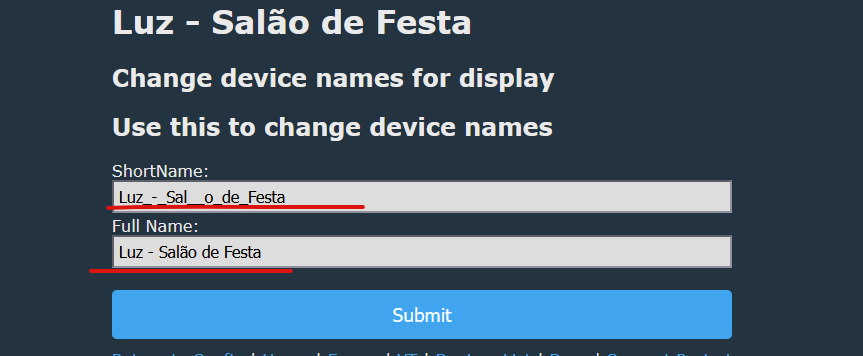
When I add a Brazilian accent to a letter on configure names, for example Full Name: Luz - Salão de Festas and try to discover at MQTT the firmware not send, if I take out the accent and leave Salao de Festa, it appears on MQTT. At Tasmota it works for example with space and ~ç´` etc
So, if you have this character in name, and do HASS discovery, can you use HA MQTT "listen" tool to see what's published, so we can investigate? Or is there no message at all?
Maybe it breaks because I can't have special char there?
Code: C / C++
Log in, to see the code
Added after 1 [minutes]:
SO it would mean:
- we already can have special chars in quotes ids list for HA
- but we can't use them (obviously) in internal entity names, so i need to prune them
Added after 11 [minutes]:
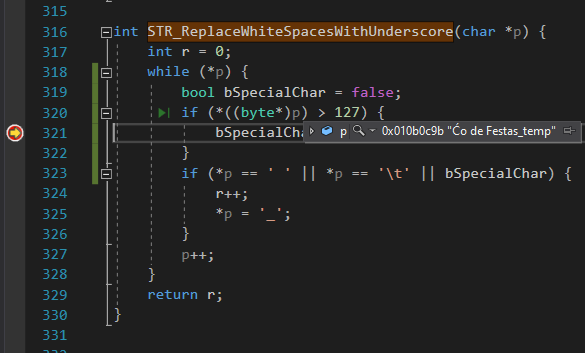
I probably could patch STR_ReplaceWhiteSpacesWithUnderscore to prune those characters
Added after 16 [minutes]:
Like this:
and then rename command to "sanitize"
Added after 10 [minutes]:
@tadeu1@divadiow can you check?
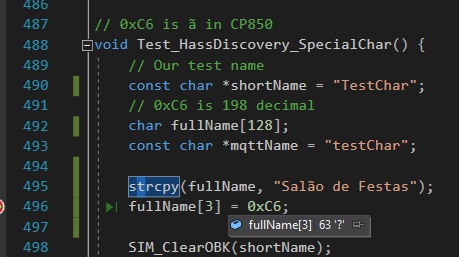
https://github.com/openshwprojects/OpenBK7231T_App/pull/1934 Set full name:
Salão de Festas
Set single pin with relay.
Expected behaviour:
- uniq_id for HA will have special chars stripped, so it will work , it will turn into Sal_o_de_Festas_relay_1
- the ids string for HA (the one I expect to be human-readable) will have this string as is
I am not sure whether we need to escape this char futher
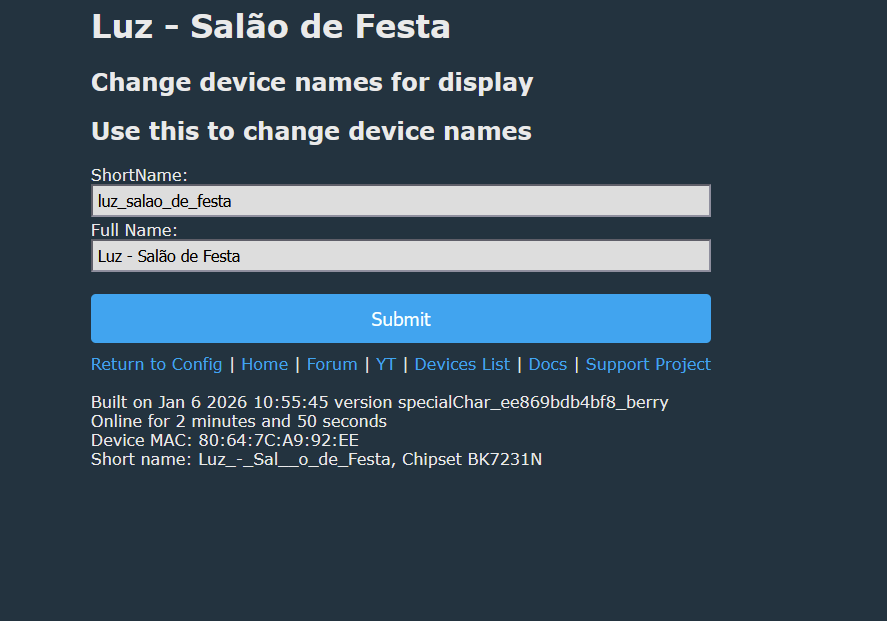
So, it's okay now? Is it ready to merge? I see short name got corrected, but short name is used for MQTT, I don't think there is a way around it. Long name is for display, I think.
First of all, if you want to measure power of Wi-Fi module, you need to turn off the LEDs in the firmware first.
Then, make sure you use PowerSave 1 feature of OBK. It's a great feature that can prolong the life of many devices. I really recommend it. Check this topic to see what happens if you overload Tuya power supply (or sometimes it happens just on its own, those devices are cheap):
https://www.elektroda.com/rtvforum/topic3898805.html
It sounds like the issue is related to character encoding in the MQTT implementation. Some firmware may not fully support UTF-8 or extended Latin characters, which is why accents are being stripped or ignored. Ensuring the MQTT client and broker both handle UTF-8 properly could allow names with accents to be transmitted correctly.
The discussion investigates why MQTT discovery does not publish device names containing Brazilian accented characters in the short/configure name field, while plain ASCII names work. It is determined that the issue is related to character encoding and likely limited support for non-ASCII bytes in the MQTT/JSON publishing path, with suspicion falling on `print_string_ptr` from cJSON. A self-test and an online build from a pull request are used to reproduce and verify the fix. After testing, the accented character issue is confirmed resolved in the new build, and it is clarified that the short name is used for MQTT while the long name is mainly for display. The topic then shifts briefly to power measurement behavior on different modules and recommendations such as disabling LEDs and enabling PowerSave mode. AI summary based on the discussion. May contain errors.
TL;DR: Fix MQTT discovery failures with accented device names in OpenBeken by using the PR-1934 build; 0xC6 = 198 (“ã”), and “uniq_id will have special chars stripped.” [Elektroda, p.kaczmarek2, post #21800308]
Why it matters: This helps Home Assistant users whose MQTT discovery breaks when device names include accents, cedillas, or tildes.
Quick Facts
Symptom: MQTT discovery didn’t publish when the full device name contained accents (e.g., “Salão de Festas”). [Elektroda, tadeu1, post #21798559]
How do I fix MQTT discovery not sending when my device name has accents?
Flash the PR-1934 artifact build for OpenBeken. Set your long name with accents. The firmware strips specials in unique_id, while keeping the display name intact. This restores Home Assistant discovery while preserving readability. “uniq_id will have special chars stripped.” [Elektroda, p.kaczmarek2, post #21800308]
Why are accents allowed in HA device IDs but not in MQTT unique_id?
The HA dev IDs array is human-readable and can include accents. The internal unique_id must be sanitized for reliability. The PR strips non-ASCII in unique_id but preserves the displayed name. [Elektroda, p.kaczmarek2, post #21800308]
Can I keep my long display name with accents like “Salão de Festas”?
Yes. The long device name remains as you type it for display and Home Assistant’s human-readable fields. The unique_id is sanitized, not the display string. [Elektroda, p.kaczmarek2, post #21800308]
What character encoding detail was tested here?
The maintainer validated that 0xC6 (decimal 198) corresponds to “ã” and ensured publishing worked with it in names after sanitization logic. [Elektroda, p.kaczmarek2, post #21800308]
How can I see what’s actually published during Home Assistant discovery?
Use Home Assistant’s MQTT “Listen” tool in Developer Tools. Subscribe to the discovery topics to inspect payloads for your device. Share captures if nothing appears. [Elektroda, p.kaczmarek2, post #21800237]
What code change made this work?
The update prunes special characters when generating unique_id (sanitization), replacing earlier whitespace-only handling. It keeps quoted IDs readable and safe for MQTT. [Elektroda, p.kaczmarek2, post #21800308]
Did a user confirm the fix works on real hardware?
Yes. A user flashed the PR artifact, re-tested with accented names, and reported, “now its working,” including screenshots of the entities. [Elektroda, tadeu1, post #21800909]
What if I still see no MQTT message at all after updating?
Check that your short device name lacks special characters. Short names form MQTT topics and cannot retain accents, so keep them ASCII-only. [Elektroda, p.kaczmarek2, post #21800943]
What is OpenBeken (OBK)?
OpenBeken is the firmware discussed here that integrates with MQTT and Home Assistant. The project provides online builds and PR artifacts for testing. [Elektroda, p.kaczmarek2, post #21800538]
Do I need to escape special characters in JSON myself?
No extra escaping is required for the human-readable IDs. Use the PR build so unique_id gets sanitized automatically while the readable name stays intact. [Elektroda, p.kaczmarek2, post #21800308]
What unique_id format should I expect after sanitization?
Expect underscores replacing and stripping specials, for example: Sal_o_de_Festas_relay_1. The display name remains “Salão de Festas.” [Elektroda, p.kaczmarek2, post #21800308]
AI summary based on the discussion. May contain errors.