logo elektroda
logo elektroda
X
logo elektroda

[Solved] [BK7231N] Aubess Mini Smart Switch 16A LED1 Irregular Blinking, C9 Voltage Fluctuates

martinspukitismail 603 8
ADVERTISEMENT
  • #1 21866269
    martinspukitismail
    Level 2  
    Posts: 7
    Rate: 1
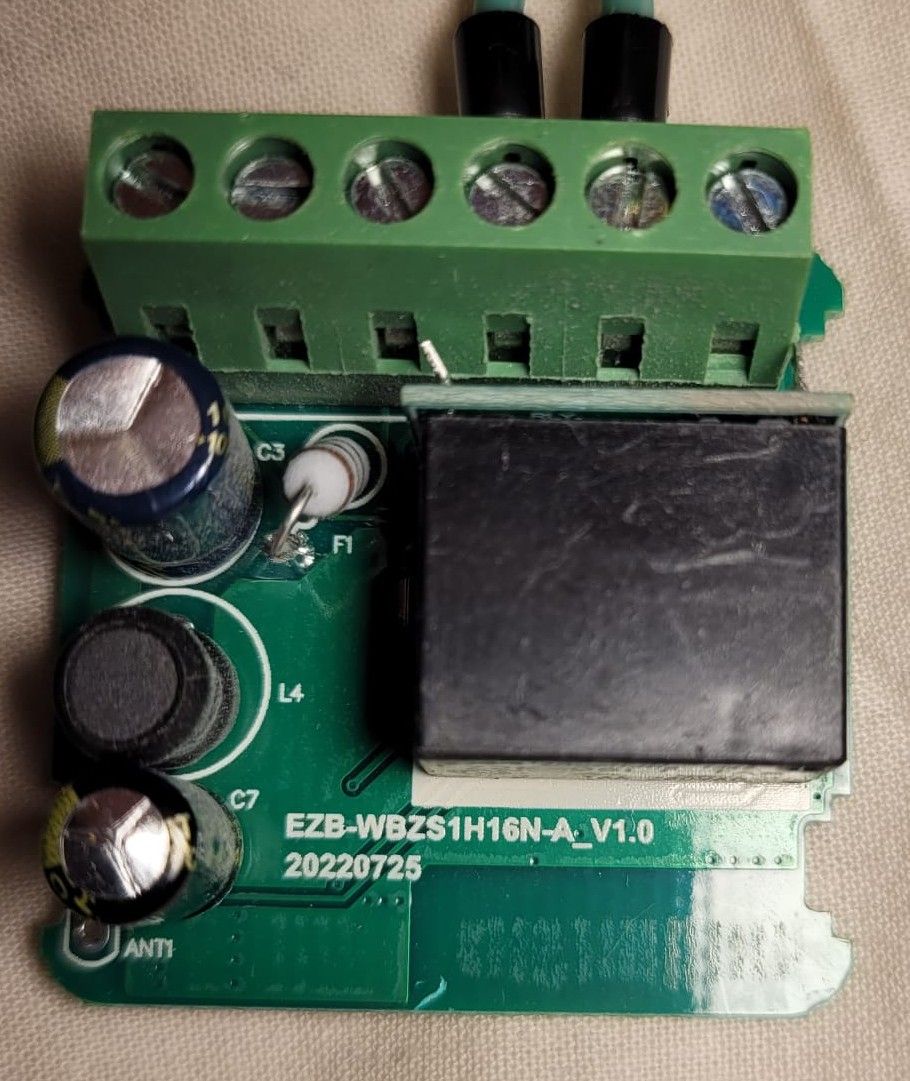
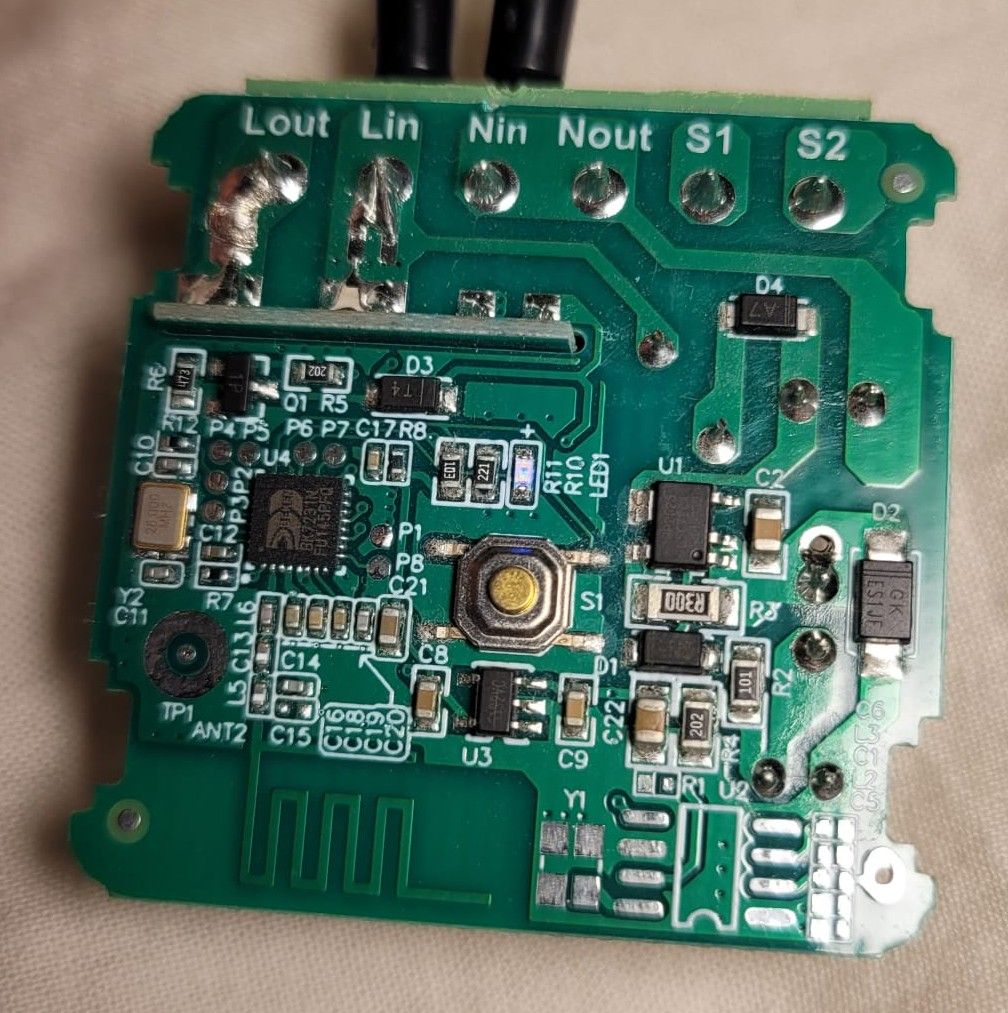
    [BK7231N] Aubess Mini Smart Switch 16A (EZB-WBZS1H16N-A V1.0) not working and LED1 blinks with irregular pattern (off, dim, off, dim several times, then off, bright, then again off, dim several times).
    Voltage on C8 is stable 3.3 V, voltage on C9 fluctuates around 4.5 V. I'm a noob, sorry if dumb questions will occur. What to check next?

    Close-up of a PCB with a green screw terminal block, a black relay, and cylindrical capacitors Close-up of a PCB with SMD parts, a push button, and solder pads labeled Lout, Lin, Nin, Nout, S1, S2.
    AI: How are you powering the switch, and have you double-checked that the wiring is correct according to the manual?
    Yes
    AI: Have you tried any troubleshooting steps already, like resetting the device, changing the load, or re-flashing the firmware? If so, what happened?
    It is hardware fault, not firmware. No load attached.
  • ADVERTISEMENT
  • Helpful post
    #2 21867580
    p.kaczmarek2
    Moderator Smart Home
    Posts: 14416
    Help: 650
    Rate: 12371
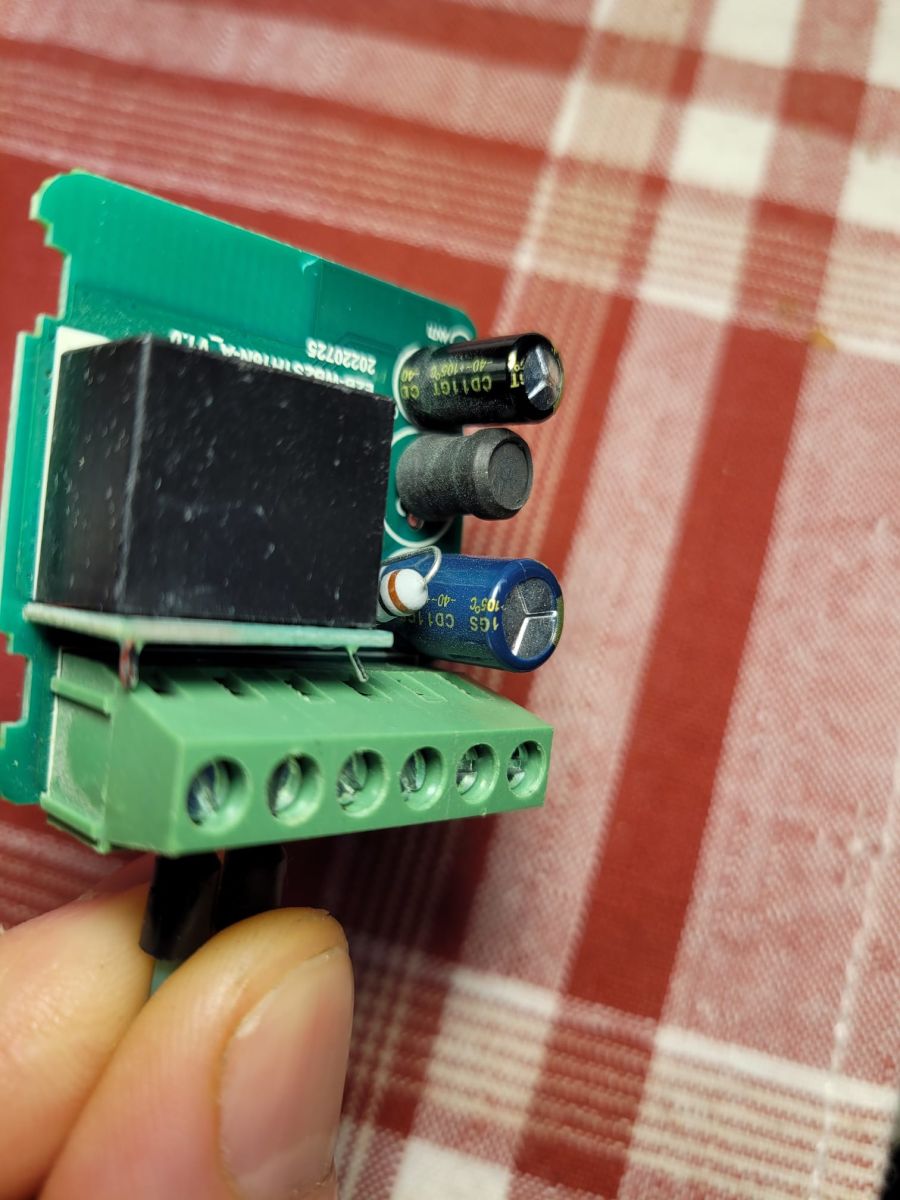
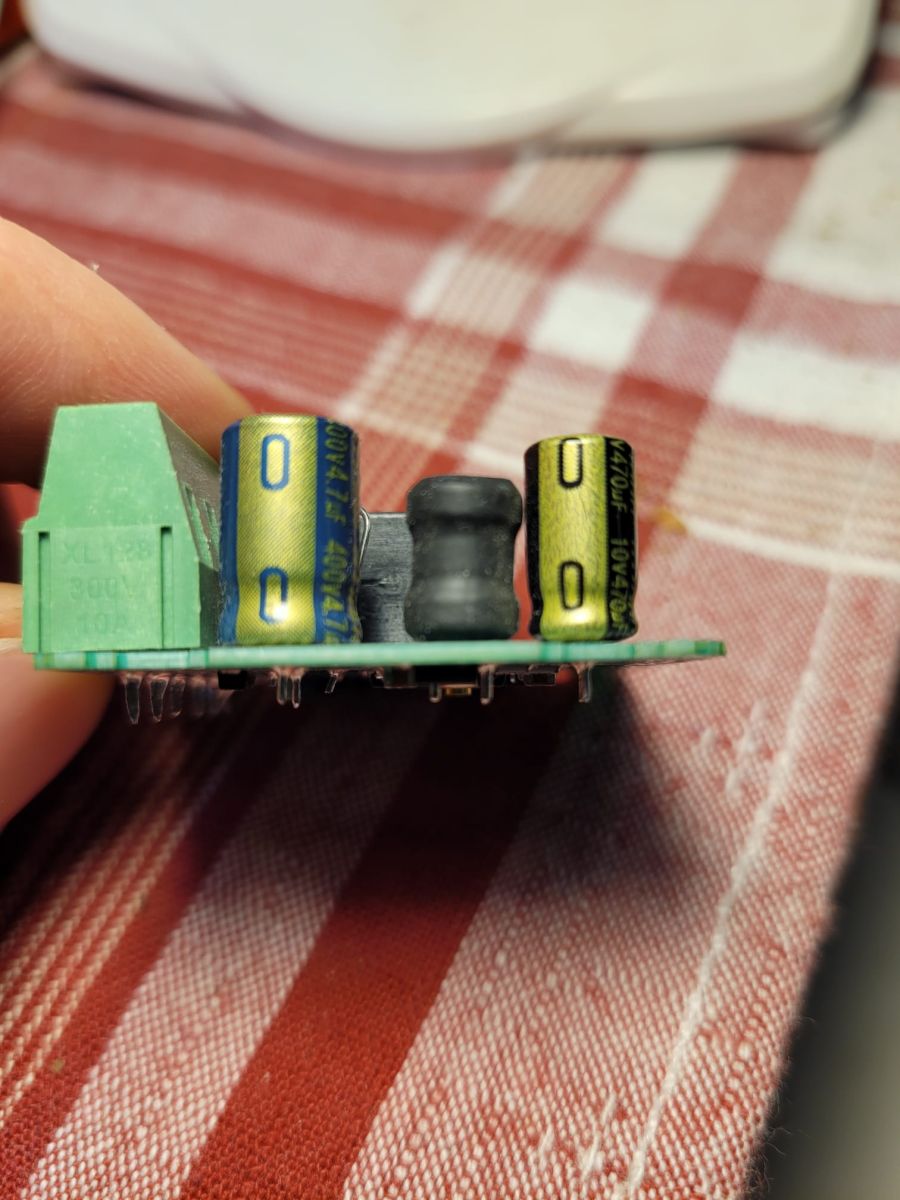
    Can you make a photo of capacitors from side? Probably faulty capacitor.
    https://www.elektroda.com/rtvforum/topic3898805.html
    Helpful post? Buy me a coffee.
  • ADVERTISEMENT
  • #3 21867584
    martinspukitismail
    Level 2  
    Posts: 7
    Rate: 1
    Close-up of a PCB with a green terminal block, two capacitors, and a black inductor on a red checkered cloth. Close-up of a PCB with a green screw terminal block, black relay, and capacitors, held in a hand
  • Helpful post
    #4 21867698
    max4elektroda
    Level 24  
    Posts: 745
    Help: 47
    Rate: 183
    As @p.kaczmarek2 said: The black capacitor on the lower left corner in the first picture: is the upside bulged (not flat)? The picture is not totally clear. Then you will probably need to replace it.
  • ADVERTISEMENT
  • #5 21867700
    martinspukitismail
    Level 2  
    Posts: 7
    Rate: 1
    Yes, it seems to be a little bulged. Will test and replace, if necessary, thanks.
  • #6 21869614
    martinspukitismail
    Level 2  
    Posts: 7
    Rate: 1
    I replaced C7 - it was faulty. When I plugged in the device, LED1 was blinking fast, it connected to Wi-Fi, got IP address from DHCP server, but there was no ping. When I power-cycle the device now, it doesn't connect any more and LED1 doesn't blink. Voltage on C8 is stable 3.3 V, voltage on C9 is stable 4.78 V. If I press S1, LED1 changes its state as does the relay, so the device seems to be alive, just Wi-Fi doesn't work. It was running ESPHome before it broke.
  • #7 21869630
    max4elektroda
    Level 24  
    Posts: 745
    Help: 47
    Rate: 183
    Has esphome also the possibility to reset to default?
    Then maybe you should try that or check, if it did reset already to the situation before (broken capacitor might have caused many incomplete starts) by simply checking if the device will act as access point to be configured from scratch.
  • ADVERTISEMENT
  • #8 21869919
    martinspukitismail
    Level 2  
    Posts: 7
    Rate: 1
    I'm able to make the device try to connect by shorting S1 with S2 several times. With a Wi-Fi sniffer I see this:
    
    No.    Time                  Source                Destination              Protocol  Length Info
    97     08:08:29,262836871    TuyaSmart_0f:4e:8c    Routerboardc_46:8b:93    802.11    146    Authentication, SN=1177, FN=0, Flags=........
    98     08:08:29,263244543    10.155.172.2          TuyaSmart_0f:4e:8c       802.11    118    Acknowledgement, Flags=........
    99     08:08:29,263807295    TuyaSmart_0f:4e:8c    Routerboardc_46:8b:93    802.11    146    Authentication, SN=1177, FN=0, Flags=....R...
    100    08:08:29,264155357    10.155.172.2          TuyaSmart_0f:4e:8c       802.11    118    Acknowledgement, Flags=........
    101    08:08:29,264666099    TuyaSmart_0f:4e:8c    Routerboardc_46:8b:93    802.11    146    Authentication, SN=1177, FN=0, Flags=....R...
    102    08:08:29,264967701    10.155.172.2          TuyaSmart_0f:4e:8c       802.11    118    Acknowledgement, Flags=........
    103    08:08:29,265577563    TuyaSmart_0f:4e:8c    Routerboardc_46:8b:93    802.11    146    Authentication, SN=1177, FN=0, Flags=....R...
    104    08:08:29,265918065    10.155.172.2          TuyaSmart_0f:4e:8c       802.11    118    Acknowledgement, Flags=........
    105    08:08:29,266493397    TuyaSmart_0f:4e:8c    Routerboardc_46:8b:93    802.11    146    Authentication, SN=1177, FN=0, Flags=....R...
    106    08:08:29,266809469    10.155.172.2          TuyaSmart_0f:4e:8c       802.11    118    Acknowledgement, Flags=........
    107    08:08:29,267432842    TuyaSmart_0f:4e:8c    Routerboardc_46:8b:93    802.11    146    Authentication, SN=1177, FN=0, Flags=....R...
    108    08:08:29,267934194    10.155.172.2          TuyaSmart_0f:4e:8c       802.11    118    Acknowledgement, Flags=........
    

    It means BK7231N doesn't hear acknowledgements and retransmits Authentication. The signal in the sniffer is good from both BK7231N and access point. The devices are close to each other.
    Edit: same with an old 802.11n access point TP-Link TL-WR1043ND v1 and with mobile hotspot on android phone.

    Added after 2 [hours] 34 [minutes]:

    I was able to put the BK7231N in AP (slow blink) mode. I connected to AP (SmartLife-4684) with the phone. Phone got IP address 192.168.175.100, gateway 192.168.175.1. Ping to 192.168.175.1 works, but there is no web server there.

    Added after 2 [hours] 50 [minutes]:

    I was able to flash ESPHome-Kickstart firmware using tuya-cloudcutter, then flashed a new esphome firmware. BK7231N is now able to connect to AP.
  • #9 21870210
    martinspukitismail
    Level 2  
    Posts: 7
    Rate: 1
    Hardware issue solved by replacing C7.
    Wi-Fi connection failure solved by putting device in AP mode, flashing ESPHome-Kickstart firmware using tuya-cloudcutter, followed by flashing ESPHome firmware.

Topic summary

✨ The Aubess Mini Smart Switch 16A (model EZB-WBZS1H16N-A V1.0) exhibits irregular LED1 blinking patterns (off, dim, off, dim multiple times, then off, bright, then off again) and unstable voltage on pin C9 fluctuating around 4.5 V, while pin C8 maintains a stable 3.3 V. The device is confirmed to have a hardware fault, as no load is attached and firmware issues have been ruled out. The user has verified correct wiring and power supply according to the manual. Troubleshooting steps such as resetting, load changes, or firmware reflashing were not applicable due to the hardware nature of the fault.
Generated by the language model.
ADVERTISEMENT