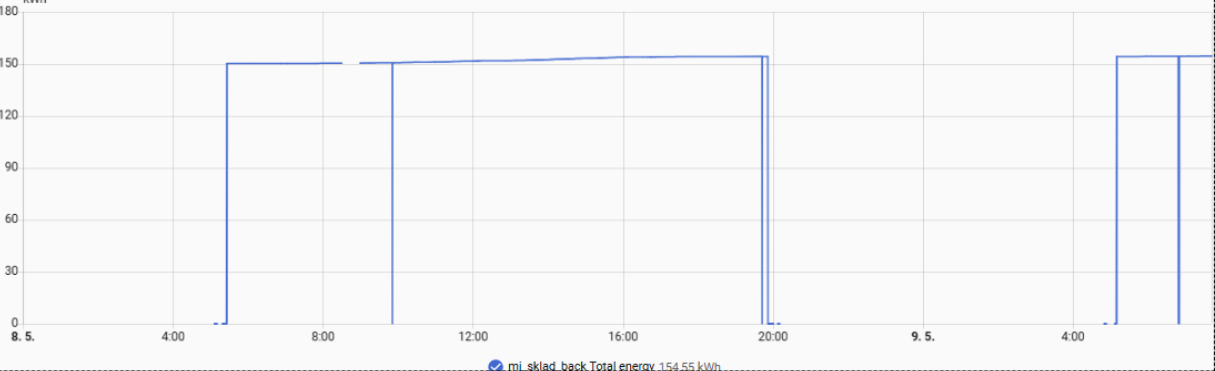
Description:I am using a TuyaMCU-based smart energy meter with the latest OpenBeken build (1.18.288). Many TuyaMCU devices report a "0" value for Total Energy (dpID 105/2) for several seconds after a power cycle or reboot before the real value is synchronized from the MCU.
The Problem:This initial "0" is immediately published to MQTT and, if persistence is not available or scripts fail, it overwrites the cumulative energy data in Home Assistant, causing massive negative spikes in Energy Dashboards.
Proposed Solution:
Internal Filter: Implement a flag or setting for linkTuyaMCUOutputToChannel that ignores "0" values if the previous known value was higher than zero.
Persistence improvements:
Ensure that even on builds where setChannelPersistence is missing, the energy driver can maintain the last known value during the boot-up handshake with TuyaMCU.Consistent
Scripting: Ensure that addChangeHandler with conditional logic (e.g., if $CH5 < $CH10) is supported across all builds, including those with limited memory.
Device Info:Build: May 3 2026 13:32:48 version 1.18.288Chip: BK7231 (T/N)
What is the exact brand/model of the TuyaMCU energy meter (or the Tuya product/module ID), and can you confirm whether this happens on every reboot/power cycle or only on this specific device?
I am using a WVC Microinverter (equipped with a CBU IPEX module, BK7231N) running OpenBeken version 1.18.288. Because this is a solar device, it power-cycles frequently (every morning or during low light).
Can you post the relevant OpenBeken config/script and a short boot log or MQTT trace showing dpID 105/2 publishing 0 first and then the real total energy value (including your linkTuyaMCUOutputToChannel / addChangeHandler setup, if any)?
00:00:01 - Device starts, NTP syncs.
00:00:03 - TuyaMCU driver sends first update:
Info:TuyaMCU:Processing DP 105 (Type 2): Value 0
Info:MQTT:Publishing val 0 to mi_sklad_back/5/get retain=1 <-- THIS IS THE PROBLEM
00:00:08 - TuyaMCU finally syncs real internal memory:
Info:TuyaMCU:Processing DP 105 (Type 2): Value 15420
Info:MQTT:Publishing val 154.20 to mi_sklad_back/5/get retain=1
The Problem:This initial "0" is immediately published to MQTT and, if persistence is not available or scripts fail, it overwrites the cumulative energy data in Home Assistant, causing massive negative spikes in Energy Dashboards.
Proposed Solution:
Internal Filter: Implement a flag or setting for linkTuyaMCUOutputToChannel that ignores "0" values if the previous known value was higher than zero.
Persistence improvements:
Ensure that even on builds where setChannelPersistence is missing, the energy driver can maintain the last known value during the boot-up handshake with TuyaMCU.Consistent
Scripting: Ensure that addChangeHandler with conditional logic (e.g., if $CH5 < $CH10) is supported across all builds, including those with limited memory.
Device Info:Build: May 3 2026 13:32:48 version 1.18.288Chip: BK7231 (T/N)
What is the exact brand/model of the TuyaMCU energy meter (or the Tuya product/module ID), and can you confirm whether this happens on every reboot/power cycle or only on this specific device?
I am using a WVC Microinverter (equipped with a CBU IPEX module, BK7231N) running OpenBeken version 1.18.288. Because this is a solar device, it power-cycles frequently (every morning or during low light).
Can you post the relevant OpenBeken config/script and a short boot log or MQTT trace showing dpID 105/2 publishing 0 first and then the real total energy value (including your linkTuyaMCUOutputToChannel / addChangeHandler setup, if any)?
startDriver TuyaMCU
startDriver NTP
tuyaMcu_setBaudRate 115200
tuyaMcu_defWiFiState 4

linkTuyaMCUOutputToChannel 101 1 1
linkTuyaMCUOutputToChannel 102 2 2
linkTuyaMCUOutputToChannel 103 2 3
linkTuyaMCUOutputToChannel 18 2 4
linkTuyaMCUOutputToChannel 2 2 5
linkTuyaMCUOutputToChannel 105 2 6

setChannelType 1 Toggle
setChannelType 2 Power_div10
setChannelType 3 Power_div10
setChannelType 4 Temperature
setChannelType 5 EnergyTotal_kWh_div100
setChannelType 6 Dimmer

setChannelLabel 1 "Switch"
setChannelLabel 2 "Power DC"
setChannelLabel 3 "Power"
setChannelLabel 4 "Temperature"
setChannelLabel 5 "Total energy"
setChannelLabel 6 "Limit %"

setFlag 7 1
setFlag 10 1
setFlag 21 1
setFlag 40 1
setFlag 19 1
setFlag 35 1
setFlag 37 1
setFlag 51 1
setFlag 29 1

MqttClient mi_sklad_back
ShortName mi_sklad_back
00:00:01 - Device starts, NTP syncs.
00:00:03 - TuyaMCU driver sends first update:
Info:TuyaMCU:Processing DP 105 (Type 2): Value 0
Info:MQTT:Publishing val 0 to mi_sklad_back/5/get retain=1 <-- THIS IS THE PROBLEM
00:00:08 - TuyaMCU finally syncs real internal memory:
Info:TuyaMCU:Processing DP 105 (Type 2): Value 15420
Info:MQTT:Publishing val 154.20 to mi_sklad_back/5/get retain=1