logo elektroda
logo elektroda
X
logo elektroda

OpenBeken Support for Tuya 3 Phase Powermeter (ZGMISMART-SPM02)?

vincenzoernst1 4590 45
Best answers

Can OpenBeken display all three phases from a Tuya 3‑phase powermeter, including voltage, current, power, frequency, and forward/reverse energy?

Yes—OpenBeken can handle a 3‑phase Tuya powermeter with separate channels for each phase, and it also supports scriptable TuyaMCU handling plus a custom HTML panel, so you can make it work even if the firmware build does not already have an exact device template [#21091190][#21091338] In the thread, the device was mapped successfully with per-phase frequency, voltages, currents, and powers, and the missing L3 voltage was traced to a dpID typo rather than a firmware limitation [#21094785][#21102601][#21102909] The replies also confirmed that dpID 111 is total power, dpID 1 is total forward energy, and OpenBeken can forward raw values or use custom HASS discovery if a built-in channel type is missing [#21095147][#21095192][#21091338] For derived values like total current, you can script a repeating calculation in autoexec.bat, e.g. sum the phase current channels every second [#21095192][#21095219]
Generated by the language model.
ADVERTISEMENT
  • #1 21090978
    vincenzoernst1
    Level 8  
    Posts: 85
    Help: 3
    Rate: 7
    Hi guys,

    I have 3 phase tuya powermeter (ZGMISMART-SPM02) and already modded it with an esp. But sadly the tasmota community is not able (or willing) to support 3 phases on tuya mcu.

    So my question is before I swap and flash the module again: is openbeken able to handle/display 3 phase (power, voltage, current forward and reverse) and frequency?

    Sash


    Current autoexec.bat:
    
    
    startDriver TuyaMCU
    
    // Frequency
    setChannelLabel 1 "Frequency"
    setChannelType 1 Frequency_div100
    linkTuyaMCUOutputToChannel 101 val 1 
    
    
    // L1 voltage
    setChannelLabel 2 "L1 Voltage"
    setChannelType 2 Voltage_div10
    linkTuyaMCUOutputToChannel 102 val 2 
    
    // L1 Current
    setChannelLabel 3 "L1 Current"
    setChannelType 3 Current_div100
    linkTuyaMCUOutputToChannel 103 val 3
    
    // L1 Power 
    setChannelLabel 4 "L1 Power"
    setChannelType 4 Power
    linkTuyaMCUOutputToChannel 104 val 4
    
    // L2 voltage
    setChannelLabel 5 "L2 Voltage"
    setChannelType 5 Voltage_div10
    linkTuyaMCUOutputToChannel 105 val 5 
    
    // L2 Current
    setChannelLabel 6 "L2 Current"
    setChannelType 6 Current_div100
    linkTuyaMCUOutputToChannel 106 val 6
    
    // L2 power
    setChannelLabel 7 "L2 Power"
    setChannelType 7 Power
    linkTuyaMCUOutputToChannel 107 val 7
    
    // L3 Voltage
    setChannelLabel 8 "L3 Voltage"
    setChannelType 8 Voltage_div10
    linkTuyaMCUOutputToChannel 108 val 8 
    
    // L3 Current
    setChannelLabel 9 "L3 Current"
    setChannelType 9 Current_div100
    linkTuyaMCUOutputToChannel 109 val 9
    
    // L3 Power
    setChannelLabel 10 "L3 Power"
    setChannelType 10 Power
    linkTuyaMCUOutputToChannel 110 val 10
    
    // Power Total
    setChannelLabel 11 "Power Total"
    setChannelType 11 Power
    linkTuyaMCUOutputToChannel 111 val 11 
    
    // Energy Total
    setChannelLabel 12 "Energy Total"
    setChannelType 12 EnergyTotal_kWh_div1000
    linkTuyaMCUOutputToChannel 1 val 12 
    
    // Leakage Current
    setChannelLabel 13 "Leakage Current"
    setChannelType 13 Current_div1000
    linkTuyaMCUOutputToChannel 15 val 13


    Orig fw backup: zgmismart-...backup.bin (2 MB)You must be logged in to download this attachment.
  • ADVERTISEMENT
  • #2 21091190
    p.kaczmarek2
    Moderator Smart Home
    Posts: 14394
    Help: 650
    Rate: 12316
    Even if it's not able to, then I can make it able to, for you. Let's flash it and give it a go. I am available daily to help solve issues.

    Futhermore, OBK supports scriptable TuyaMCU interface and can host custom HTML panel, so you can easily get it going on OBK even without changing the firmware build.

    So, let's start with some photos and with DPid list. Do you have a full list?

    Here is a generic TuyaMCU guide:
    TuyaMCU flashing, setup and configuration guide - configure dpIDs for Home Assistant
    Here OBK command to access raw DPs:
    How to get dpID list of types and values for flashed TuyaMCU devices with OpenBeken
    Here is a sample page made for device:
    OpenBeken on BW-AF1 fryer with WiFi - interior, TYWE3S/WB3S, configuration
    Alternative control html page for TOMPD-63-WIFI
    Helpful post? Buy me a coffee.
  • #3 21091280
    vincenzoernst1
    Level 8  
    Posts: 85
    Help: 3
    Rate: 7

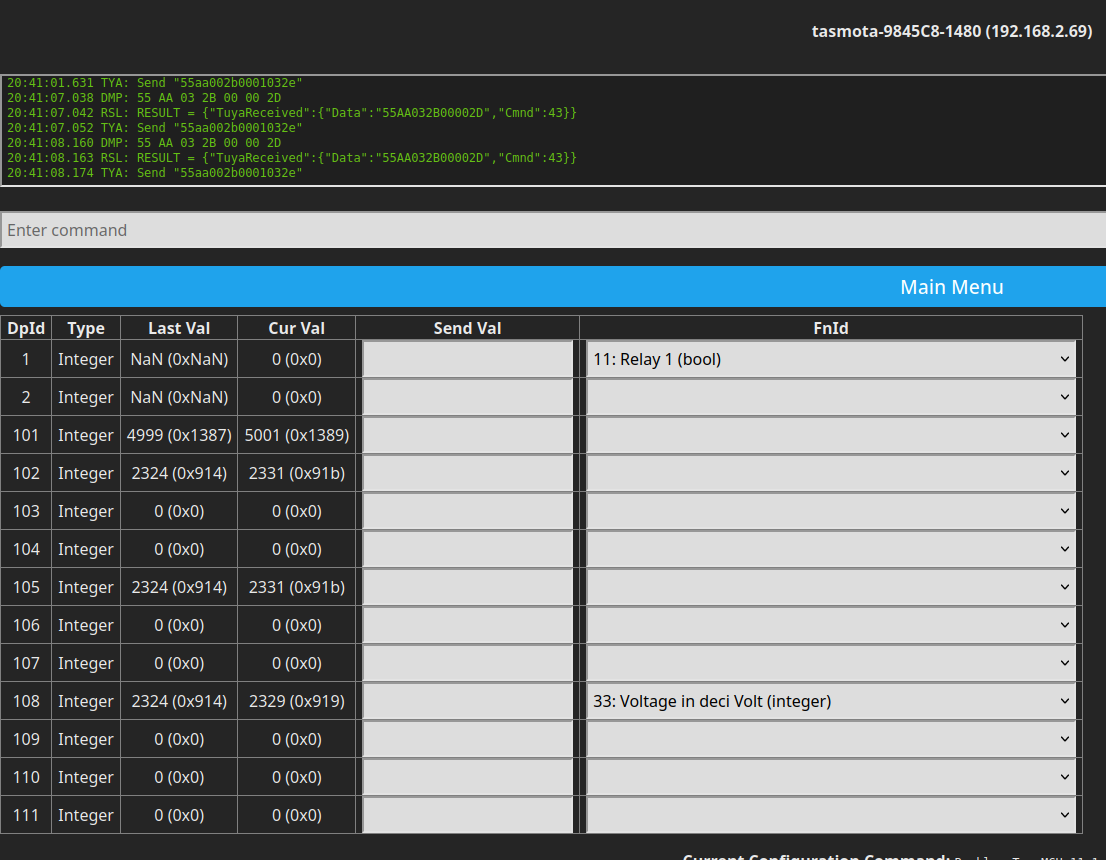
    this is the tasmota tuya dpld

    Tasmota user interface with DP data and configuration.

    102, 105, 108 seems clearly to be voltage with /10 divider. 101 is frequency with /100 divider. 1 is not a relay cause there is no relay onboard.
    for current and thus power i have to create a special wiring.....maybe tomorrow.

    my tasmota discussion is here and a related discussion here
  • #4 21091295
    p.kaczmarek2
    Moderator Smart Home
    Posts: 14394
    Help: 650
    Rate: 12316
    Sure, no problem, I think you can easily have multiple Voltage_div10 channels in OpenBeken, because why not? Are you saying it's not possible to do the same in Tasmota?

    And even if not, then you can have a generic channel type and just set a label or create custom page with any unit you'd like...

    So let's start with making 2MB backup of your BK7231 flash and then flash OBK.

    EDIT: The linked discussion seems to mention something about new TuyaMCU protocol changes, what are they exactly? Would you be able to provide UART packet captures if needed? Or is the core TuyaMCU communication still the same?
    Helpful post? Buy me a coffee.
  • #5 21091304
    vincenzoernst1
    Level 8  
    Posts: 85
    Help: 3
    Rate: 7

    p.kaczmarek2 wrote:
    Sure, no problem, I think you can easily have multiple Voltage_div10 channels in OpenBeken, because why not? Are you saying it's not possible to do the same in Tasmota?
    sadly yes, you can have only ONE channel for voltage, current and power at the moment. but for relays or switches etc you can have up to 8. 🤦
  • #6 21091338
    p.kaczmarek2
    Moderator Smart Home
    Posts: 14394
    Help: 650
    Rate: 12316
    Well, in OBK, you can have any possible combination of channel types with mostly no restrictions. We still have single VCP, but that's for BL0942/BL0937, not for TuyaMCU.

    Futhermore, in OBK, you can just ignore the dpID mapping types altogether and just operate on raw values, without interpreting them.

    I have also recently added ability to do "custom" HASS discovery from a LittleFS, so even if you don't have a Channel Type for your requirement, you can do custom one... just write custom JSON and publish... but a tutorial for that is yet to be posted.

    So let's give it a go and we will see how it goes. I have some doubts about that "new Tuya protocol" but we will see along the way.
    Helpful post? Buy me a coffee.
  • ADVERTISEMENT
  • #7 21091999
    vincenzoernst1
    Level 8  
    Posts: 85
    Help: 3
    Rate: 7
    so here we have the orig backup file. attached to the initial post.
  • #8 21092004
    p.kaczmarek2
    Moderator Smart Home
    Posts: 14394
    Help: 650
    Rate: 12316
    Good, now proceed with flashing, I'm really curious to see what they mean by "new TuyaMCU"...
    Helpful post? Buy me a coffee.
  • #9 21092438
    vincenzoernst1
    Level 8  
    Posts: 85
    Help: 3
    Rate: 7
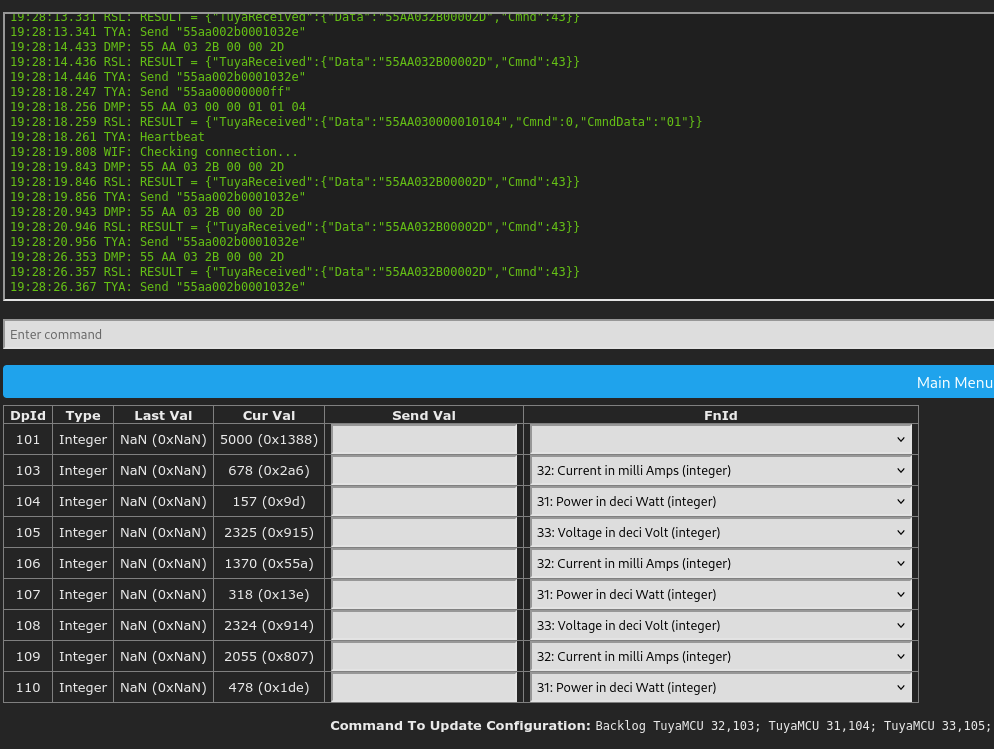
    1st i checked the correct dplds

    Interface showing measurement data and logs in text format.

    i had only 1 phase for testing.
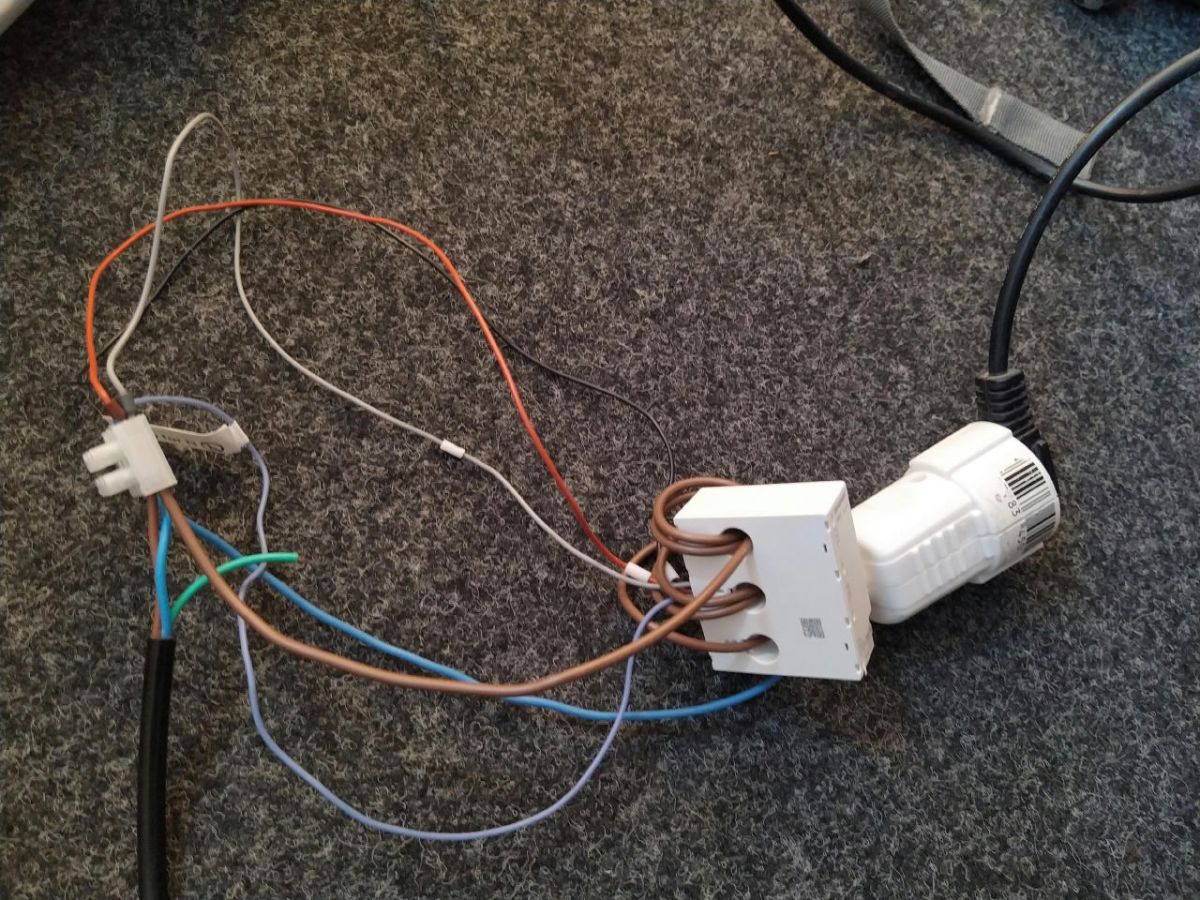
    so i did the wiring so that the current doubles while passing L1(x), L2(y), L3(z). and thus also power does. now identification was easy and is like shown on the picture. lowest value is x, highest is z

    Close-up of an electrical wiring setup with wires connected to an adapter.

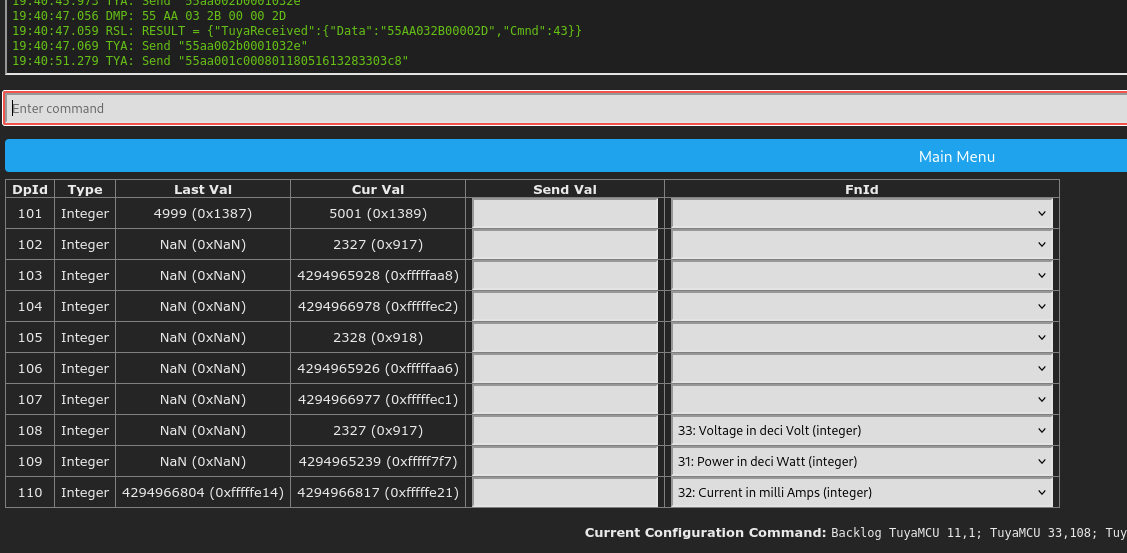
    it's also able to do negative flow:

    Program interface with a table of values and commands for device configuration.

    openbeken is flashed but i had no time to swap boards.
  • #10 21092513
    p.kaczmarek2
    Moderator Smart Home
    Posts: 14394
    Help: 650
    Rate: 12316
    What kind of WiFi module is inside? CB3S?
    Helpful post? Buy me a coffee.
  • #11 21092641
    vincenzoernst1
    Level 8  
    Posts: 85
    Help: 3
    Rate: 7
    CB2S  so 7231N
  • ADVERTISEMENT
  • #12 21092650
    p.kaczmarek2
    Moderator Smart Home
    Posts: 14394
    Help: 650
    Rate: 12316
    As, CB2S, that's good. It's much easier to desolder and swap CB2S (TYWE2S, WB2S, etc) than a CB3S (TYWE3S, etc)
    Helpful post? Buy me a coffee.
  • #13 21094785
    vincenzoernst1
    Level 8  
    Posts: 85
    Help: 3
    Rate: 7
    here we are

    
    len 15
    Info:TuyaMCU:ParseState: id 105 type 2-val len 4
    Info:TuyaMCU:ParseState: int32 2342
    Info:GEN:CHANNEL_Set channel 2 has changed to 2342 (flags 0)
    
    Info:MQTT:Channel has changed! Publishing 2342 to channel 2 
    Info:TuyaMCU:Received: 55 AA 03 07 00 08 6A 02 00 04 00 00 05 62 E8 
    Info:TuyaMCU:ProcessIncoming[v=3]: cmd 7 (State) len 15
    Info:TuyaMCU:ParseState: id 106 type 2-val len 4
    Info:TuyaMCU:ParseState: int32 1378
    Info:GEN:CHANNEL_Set channel 6 has changed to 1378 (flags 0)
    
    Info:TuyaMCU:Received: 55 AA 03 07 00 08 6B 02 00 04 00 00 01 42 C5 
    Info:TuyaMCU:ProcessIncoming[v=3]: cmd 7 (State) len 15
    Info:TuyaMCU:ParseState: id 107 type 2-val len 4
    Info:TuyaMCU:ParseState: int32 322
    Info:GEN:CHANNEL_Set channel 7 has changed to 322 (flags 0)
    
    Info:MQTT:Channel has changed! Publishing 322 to channel 7 
    Info:TuyaMCU:Received: 55 AA 03 07 00 08 6C 02 00 04 00 00 09 26 B2 
    Info:TuyaMCU:ProcessIncoming[v=3]: cmd 7 (State) len 15
    Info:TuyaMCU:ParseState: id 108 type 2-val len 4
    Info:TuyaMCU:ParseState: int32 2342
    Info:GEN:CHANNEL_Set channel 5 has changed to 2342 (flags 0)
    
    Info:MQTT:Channel has changed! Publishing 2342 to channel 5 
    Info:TuyaMCU:Received: 55 AA 03 07 00 08 6D 02 00 04 00 00 08 13 9F 
    Info:TuyaMCU:ProcessIncoming[v=3]: cmd 7 (State) len 15
    Info:TuyaMCU:ParseState: id 109 type 2-val len 4
    Info:TuyaMCU:ParseState: int32 2067
    Info:GEN:CHANNEL_Set channel 9 has changed to 2067 (flags 0)
    
    Info:TuyaMCU:Received: 55 AA 03 07 00 08 6E 02 00 04 00 00 01 E4 6A 
    Info:TuyaMCU:ProcessIncoming[v=3]: cmd 7 (State) len 15
    Info:TuyaMCU:ParseState: id 110 type 2-val len 4
    Info:TuyaMCU:ParseState: int32 484
    Info:GEN:CHANNEL_Set channel 10 has changed to 484 (flags 0)
    
    Info:MQTT:Channel has changed! Publishing 484 to channel 10 
    Info:TuyaMCU:Received: 55 AA 03 07 00 08 65 02 00 04 00 00 13 85 14 
    Info:TuyaMCU:ProcessIncoming[v=3]: cmd 7 (State) len 15
    Info:TuyaMCU:ParseState: id 101 type 2-val len 4
    Info:TuyaMCU:ParseState: int32 4997
    Info:GEN:CHANNEL_Set channel 1 has changed to 4997 (flags 0)
    
    Info:MQTT:Channel has changed! Publishing 4997 to channel 1 
    Info:MAIN:Time 5, idle 99314/s, free 77336, MQTT 0(0), bWifi 0, secondsWithNoPing -1, socks 2/38 
    Info:MAIN:ssid:PHI Guest key:xah3shieh3
    Info:TuyaMCU:Received: 55 AA 03 00 00 01 01 04 
    Info:TuyaMCU:ProcessIncoming[v=3]: cmd 0 (Hearbeat) len 8
    Info:MAIN:Time 6, idle 179830/s, free 72088, MQTT 0(0), bWifi 0, secondsWithNoPing -1, socks 2/38 
    Info:MAIN:Boot complete time reached (5 seconds)
    Info:CFG:####### Set Boot Complete #######
    Info:TuyaMCU:Received: 55 AA 03 03 00 00 05 
    Info:TuyaMCU:ProcessIncoming[v=3]: cmd 3 (WiFiState) len 7
    Info:TuyaMCU:Received: 55 AA 03 2B 00 00 2D 
    Info:TuyaMCU:ProcessIncoming[v=3]: cmd 43 (NetworkStatus) len 7
    Info:TuyaMCU:ProcessIncoming: (test for S09 calendar/IR device) received TUYA_CMD_NETWORK_STATUS 0x2B 
    Info:MAIN:Time 7, idle 176244/s, free 72088, MQTT 0(0), bWifi 0, secondsWithNoPing -1, socks 2/38 
    Info:TuyaMCU:Received: 55 AA 03 2B 00 00 2D 
    Info:TuyaMCU:ProcessIncoming[v=3]: cmd 43 (NetworkStatus) len 7
    Info:TuyaMCU:ProcessIncoming: (test for S09 calendar/IR device) received TUYA_CMD_NETWORK_STATUS 0x2B 

    Info:MAIN:Time 8, idle 83061/s, free 72400, MQTT 0(0), bWifi 0, secondsWithNoPing -1, socks 2/38 
    Info:MAIN:Time 9, idle 0/s, free 72400, MQTT 0(0), bWifi 0, secondsWithNoPing -1, socks 2/38 
    Info:TuyaMCU:Received: 55 AA 03 00 00 01 01 04 
    Info:TuyaMCU:ProcessIncoming[v=3]: cmd 0 (Hearbeat) len 8
    Info:MAIN:Time 10, idle 0/s, free 72400, MQTT 0(0), bWifi 0, secondsWithNoPing -1, socks 2/38 
    Info:GEN:dhcp=0 ip=0.0.0.0 gate=0.0.0.0 mask=0.0.0.0 mac=b8:06:0d:27:3a:6b
    Info:GEN:sta: 0, softap: 0, b/g/n
    Info:MAIN:Main_OnWiFiStatusChange - WIFI_STA_CONNECTING - 1
    Info:MAIN:Main_OnWiFiStatusChange - WIFI_STA_CONNECTED - 4
    Info:MAIN:Time 11, idle 86207/s, free 72528, MQTT 0(0), bWifi 1, secondsWithNoPing -1, socks 2/38 
    Info:MAIN:Main_OnWiFiStatusChange - WIFI_STA_CONNECTED - 4
    Info:MAIN:Time 12, idle 184511/s, free 72568, MQTT 0(0), bWifi 1, secondsWithNoPing -1, socks 2/38 
    Info:MQTT:mqtt_host empty, not starting mqtt
    Info:MAIN:Time 13, idle 184615/s, free 72568, MQTT 0(1), bWifi 1, secondsWithNoPing -1, socks 2/38 
    Info:TuyaMCU:Received: 55 AA 03 00 00 01 01 04 
    Info:TuyaMCU:ProcessIncoming[v=3]: cmd 0 (Hearbeat) len 8
    Info:TuyaMCU:Received: 55 AA 03 2B 00 00 2D 
    Info:TuyaMCU:ProcessIncoming[v=3]: cmd 43 (NetworkStatus) len 7
    Info:TuyaMCU:ProcessIncoming: (test for S09 calendar/IR device) received TUYA_CMD_NETWORK_STATUS 0x2B 
    Info:MAIN:Time 14, idle 187199/s, free 72568, MQTT 0(1), bWifi 1, secondsWithNoPing -1, socks 2/38 
    Info:TuyaMCU:Received: 55 AA 03 2B 00 00 2D 
    Info:TuyaMCU:ProcessIncoming[v=3]: cmd 43 (NetworkStatus) len 7
    Info:TuyaMCU:ProcessIncoming: (test for S09 calendar/IR device) received TUYA_CMD_NETWORK_STATUS 0x2B 

    Info:MAIN:Time 15, idle 183022/s, free 72568, MQTT 0(1), bWifi 1, secondsWithNoPing -1, socks 2/38 
    Info:MAIN:Time 16, idle 184110/s, free 72568, MQTT 0(1), bWifi 1, secondsWithNoPing -1, socks 2/38 
    Info:MAIN:Time 17, idle 188890/s, free 72568, MQTT 0(1), bWifi 1, secondsWithNoPing -1, socks 2/38 
    Info:TuyaMCU:Received: 55 AA 03 00 00 01 01 04 
    Info:TuyaMCU:ProcessIncoming[v=3]: cmd 0 (Hearbeat) len 8
    Info:MAIN:Time 18, idle 185580/s, free 72568, MQTT 0(1), bWifi 1, secondsWithNoPing -1, socks 2/38 
    Info:MAIN:Time 19, idle 183296/s, free 72568, MQTT 0(1), bWifi 1, secondsWithNoPing -1, socks 2/38 
    Info:TuyaMCU:Received: 55 AA 03 2B 00 00 2D 
    Info:TuyaMCU:ProcessIncoming[v=3]: cmd 43 (NetworkStatus) len 7
    Info:TuyaMCU:ProcessIncoming: (test for S09 calendar/IR device) received TUYA_CMD_NETWORK_STATUS 0x2B 
    Info:MAIN:Time 20, idle 183804/s, free 72568, MQTT 0(1), bWifi 1, secondsWithNoPing -1, socks 2/38 
    Info:GEN:dhcp=0 ip=192.168.123.66 gate=192.168.123.1 mask=255.255.255.0 mac=b8:06:0d:27:3a:6b
    Info:GEN:sta: 1, softap: 0, b/g/n
    Info:GEN:sta:rssi=-65,ssid=PHI Guest,bssid=e2:79:c9:0a:49:2f,channel=5,cipher_type:CCMP
    Info:MAIN:Time 21, idle 187377/s, free 72568, MQTT 0(1), bWifi 1, secondsWithNoPing -1, socks 2/38 
    Info:TuyaMCU:Received: 55 AA 03 00 00 01 01 04 
    Info:TuyaMCU:ProcessIncoming[v=3]: cmd 0 (Hearbeat) len 8
    Info:TuyaMCU:Received: 55 AA 03 2B 00 00 2D 
    Info:TuyaMCU:ProcessIncoming[v=3]: cmd 43 (NetworkStatus) len 7
    Info:TuyaMCU:ProcessIncoming: (test for S09 calendar/IR device) received TUYA_CMD_NETWORK_STATUS 0x2B 

    Info:MAIN:Time 22, idle 188351/s, free 72568, MQTT 0(1), bWifi 1, secondsWithNoPing -1, socks 2/38 
    Info:MAIN:Time 23, idle 189017/s, free 72568, MQTT 0(1), bWifi 1, secondsWithNoPing -1, socks 2/38 
    Info:MAIN:Time 24, idle 188727/s, free 72568, MQTT 0(1), bWifi 1, secondsWithNoPing -1, socks 2/38 
    Info:MAIN:Time 25, idle 188296/s, free 72568, MQTT 0(1), bWifi 1, secondsWithNoPing -1, socks 2/38 
    Info:TuyaMCU:Received: 55 AA 03 00 00 01 01 04 
    Info:TuyaMCU:ProcessIncoming[v=3]: cmd 0 (Hearbeat) len 8
    Info:MAIN:Time 26, idle 185727/s, free 72568, MQTT 0(1), bWifi 1, secondsWithNoPing -1, socks 2/38 
    Info:TuyaMCU:Received: 55 AA 03 2B 00 00 2D 
    Info:TuyaMCU:ProcessIncoming[v=3]: cmd 43 (NetworkStatus) len 7
    Info:TuyaMCU:ProcessIncoming: (test for S09 calendar/IR device) received TUYA_CMD_NETWORK_STATUS 0x2B 

    Info:MAIN:Time 27, idle 186436/s, free 72568, MQTT 0(1), bWifi 1, secondsWithNoPing -1, socks 2/38 
    Info:TuyaMCU:Received: 55 AA 03 2B 00 00 2D 
    Info:TuyaMCU:ProcessIncoming[v=3]: cmd 43 (NetworkStatus) len 7
    Info:TuyaMCU:ProcessIncoming: (test for S09 calendar/IR device) received TUYA_CMD_NETWORK_STATUS 0x2B 

    Info:MAIN:Time 28, idle 187615/s, free 72568, MQTT 0(1), bWifi 1, secondsWithNoPing -1, socks 2/38 
    Info:MQTT:mqtt_host empty, not starting mqtt
    Info:MAIN:Time 29, idle 188339/s, free 60872, MQTT 0(2), bWifi 1, secondsWithNoPing -1, socks 3/38 
    Info:TuyaMCU:Received: 55 AA 03 00 00 01 01 04 
    Info:TuyaMCU:ProcessIncoming[v=3]: cmd 0 (Hearbeat) len 8
    Info:MAIN:Time 30, idle 186810/s, free 72568, MQTT 0(2), bWifi 1, secondsWithNoPing -1, socks 2/38 
    Info:GEN:dhcp=0 ip=192.168.123.66 gate=192.168.123.1 mask=255.255.255.0 mac=b8:06:0d:27:3a:6b
    Info:GEN:sta: 1, softap: 0, b/g/n
    Info:GEN:sta:rssi=-65,ssid=PHI Guest,bssid=e2:79:c9:0a:49:2f,channel=5,cipher_type:CCMP
    Info:MAIN:Time 31, idle 182787/s, free 72568, MQTT 0(2), bWifi 1, secondsWithNoPing -1, socks 2/38 
    Info:MAIN:Time 32, idle 188975/s, free 72568, MQTT 0(2), bWifi 1, secondsWithNoPing -1, socks 2/38 
    Info:TuyaMCU:Received: 55 AA 03 2B 00 00 2D 
    Info:TuyaMCU:ProcessIncoming[v=3]: cmd 43 (NetworkStatus) len 7
    Info:TuyaMCU:ProcessIncoming: (test for S09 calendar/IR device) received TUYA_CMD_NETWORK_STATUS 0x2B 
    Info:MAIN:Time 33, idle 186467/s, free 72568, MQTT 0(2), bWifi 1, secondsWithNoPing -1, socks 2/38 
    Info:TuyaMCU:Received: 55 AA 03 00 00 01 01 04 
    Info:TuyaMCU:ProcessIncoming[v=3]: cmd 0 (Hearbeat) len 8
    Info:MAIN:Time 34, idle 188863/s, free 72568, MQTT 0(2), bWifi 1, secondsWithNoPing -1, socks 2/38 
    Info:TuyaMCU:Received: 55 AA 03 2B 00 00 2D 
    Info:TuyaMCU:ProcessIncoming[v=3]: cmd 43 (NetworkStatus) len 7
    Info:TuyaMCU:ProcessIncoming: (test for S09 calendar/IR device) received TUYA_CMD_NETWORK_STATUS 0x2B 
    Info:MAIN:Time 35, idle 183692/s, free 72568, MQTT 0(2), bWifi 1, secondsWithNoPing -1, socks 2/38 
    Info:MAIN:Time 36, idle 202872/s, free 72352, MQTT 0(2), bWifi 1, secondsWithNoPing -1, socks 2/38 
    Info:MAIN:Time 37, idle 187937/s, free 72568, MQTT 0(2), bWifi 1, secondsWithNoPing -1, socks 2/38 
    Info:TuyaMCU:Received: 55 AA 03 00 00 01 01 04 
    Info:TuyaMCU:ProcessIncoming[v=3]: cmd 0 (Hearbeat) len 8
    Info:MAIN:Time 38, idle 189369/s, free 72568, MQTT 0(2), bWifi 1, secondsWithNoPing -1, socks 2/38 
    Info:MAIN:Time 39, idle 187918/s, free 72568, MQTT 0(2), bWifi 1, secondsWithNoPing -1, socks 2/38 
    Info:TuyaMCU:Received: 55 AA 03 2B 00 00 2D 
    Info:TuyaMCU:ProcessIncoming[v=3]: cmd 43 (NetworkStatus) len 7
    Info:TuyaMCU:ProcessIncoming: (test for S09 calendar/IR device) received TUYA_CMD_NETWORK_STATUS 0x2B 
    
    Info:TuyaMCU:Received: 55 AA 03 2B 00 00 2D 
    Info:TuyaMCU:ProcessIncoming[v=3]: cmd 43 (NetworkStatus) len 7
    Info:TuyaMCU:ProcessIncoming: (test for S09 calendar/IR device) received TUYA_CMD_NETWORK_STATUS 0x2B 
    Info:TuyaMCU:Received: 55 AA 03 00 00 01 01 04 
    Info:TuyaMCU:ProcessIncoming[v=3]: cmd 0 (Hearbeat) len 8
    Info:TuyaMCU:Received: 55 AA 03 00 00 01 01 04 
    Info:TuyaMCU:ProcessIncoming[v=3]: cmd 0 (Hearbeat) len 8
    Info:TuyaMCU:Received: 55 AA 03 2B 00 00 2D 
    Info:TuyaMCU:ProcessIncoming[v=3]: cmd 43 (NetworkStatus) len 7
    Info:TuyaMCU:ProcessIncoming: (test for S09 calendar/IR device) received TUYA_CMD_NETWORK_STATUS 0x2B 
    Info:TuyaMCU:Received: 55 AA 03 2B 00 00 2D 
    Info:TuyaMCU:ProcessIncoming[v=3]: cmd 43 (NetworkStatus) len 7
    Info:TuyaMCU:ProcessIncoming: (test for S09 calendar/IR device) received TUYA_CMD_NETWORK_STATUS 0x2B 
    Info:TuyaMCU:Received: 55 AA 03 00 00 01 01 04 
    Info:TuyaMCU:ProcessIncoming[v=3]: cmd 0 (Hearbeat) len 8
    Info:TuyaMCU:Received: 55 AA 03 2B 00 00 2D 
    Info:TuyaMCU:ProcessIncoming[v=3]: cmd 43 (NetworkStatus) len 7
    Info:TuyaMCU:ProcessIncoming: (test for S09 calendar/IR device) received TUYA_CMD_NETWORK_STATUS 0x2B 
    Info:TuyaMCU:Received: 55 AA 03 00 00 01 01 04 
    Info:TuyaMCU:ProcessIncoming[v=3]: cmd 0 (Hearbeat) len 8
    Info:TuyaMCU:Received: 55 AA 03 2B 00 00 2D 
    Info:TuyaMCU:ProcessIncoming[v=3]: cmd 43 (NetworkStatus) len 7
    Info:TuyaMCU:ProcessIncoming: (test for S09 calendar/IR device) received TUYA_CMD_NETWORK_STATUS 0x2B 
    Info:TuyaMCU:Received: 55 AA 03 00 00 01 01 04 
    Info:TuyaMCU:ProcessIncoming[v=3]: cmd 0 (Hearbeat) len 8
    Info:TuyaMCU:Received: 55 AA 03 2B 00 00 2D 
    Info:TuyaMCU:ProcessIncoming[v=3]: cmd 43 (NetworkStatus) len 7
    Info:TuyaMCU:ProcessIncoming: (test for S09 calendar/IR device) received TUYA_CMD_NETWORK_STATUS 0x2B 
    Info:TuyaMCU:Received: 55 AA 03 2B 00 00 2D 
    Info:TuyaMCU:ProcessIncoming[v=3]: cmd 43 (NetworkStatus) len 7
    Info:TuyaMCU:ProcessIncoming: (test for S09 calendar/IR device) received TUYA_CMD_NETWORK_STATUS 0x2B 
    Info:TuyaMCU:Received: 55 AA 03 00 00 01 01 04 
    Info:TuyaMCU:ProcessIncoming[v=3]: cmd 0 (Hearbeat) len 8
    Info:TuyaMCU:Received: 55 AA 03 00 00 01 01 04 
    Info:TuyaMCU:ProcessIncoming[v=3]: cmd 0 (Hearbeat) len 8
    Info:TuyaMCU:Received: 55 AA 03 2B 00 00 2D 
    Info:TuyaMCU:ProcessIncoming[v=3]: cmd 43 (NetworkStatus) len 7
    Info:TuyaMCU:ProcessIncoming: (test for S09 calendar/IR device) received TUYA_CMD_NETWORK_STATUS 0x2B 
    Info:TuyaMCU:Received: 55 AA 03 2B 00 00 2D 
    Info:TuyaMCU:ProcessIncoming[v=3]: cmd 43 (NetworkStatus) len 7
    Info:TuyaMCU:ProcessIncoming: (test for S09 calendar/IR device) received TUYA_CMD_NETWORK_STATUS 0x2B 
    Info:TuyaMCU:Received: 55 AA 03 00 00 01 01 04 
    Info:TuyaMCU:ProcessIncoming[v=3]: cmd 0 (Hearbeat) len 8
    Info:TuyaMCU:Received: 55 AA 03 2B 00 00 2D 
    Info:TuyaMCU:ProcessIncoming[v=3]: cmd 43 (NetworkStatus) len 7
    Info:TuyaMCU:ProcessIncoming: (test for S09 calendar/IR device) received TUYA_CMD_NETWORK_STATUS 0x2B 
    Info:TuyaMCU:Received: 55 AA 03 00 00 01 01 04 
    Info:TuyaMCU:ProcessIncoming[v=3]: cmd 0 (Hearbeat) len 8
    Info:TuyaMCU:Received: 55 AA 03 2B 00 00 2D 
    Info:TuyaMCU:ProcessIncoming[v=3]: cmd 43 (NetworkStatus) len 7
    Info:TuyaMCU:ProcessIncoming: (test for S09 calendar/IR device) received TUYA_CMD_NETWORK_STATUS 0x2B 
    Info:TuyaMCU:Received: 55 AA 03 00 00 01 01 04 
    Info:TuyaMCU:ProcessIncoming[v=3]: cmd 0 (Hearbeat) len 8
    Info:TuyaMCU:Received: 55 AA 03 2B 00 00 2D 
    Info:TuyaMCU:ProcessIncoming[v=3]: cmd 43 (NetworkStatus) len 7
    Info:TuyaMCU:ProcessIncoming: (test for S09 calendar/IR device) received TUYA_CMD_NETWORK_STATUS 0x2B 
    Info:TuyaMCU:Received: 55 AA 03 2B 00 00 2D 
    Info:TuyaMCU:ProcessIncoming[v=3]: cmd 43 (NetworkStatus) len 7
    Info:TuyaMCU:ProcessIncoming: (test for S09 calendar/IR device) received TUYA_CMD_NETWORK_STATUS 0x2B 
    Info:TuyaMCU:Received: 55 AA 03 00 00 01 01 04 
    Info:TuyaMCU:ProcessIncoming[v=3]: cmd 0 (Hearbeat) len 8
    Info:TuyaMCU:Received: 55 AA 03 00 00 01 01 04 
    Info:TuyaMCU:ProcessIncoming[v=3]: cmd 0 (Hearbeat) len 8
    Info:TuyaMCU:Received: 55 AA 03 2B 00 00 2D 
    Info:TuyaMCU:ProcessIncoming[v=3]: cmd 43 (NetworkStatus) len 7
    Info:TuyaMCU:ProcessIncoming: (test for S09 calendar/IR device) received TUYA_CMD_NETWORK_STATUS 0x2B 
    Info:TuyaMCU:Received: 55 AA 03 2B 00 00 2D 
    Info:TuyaMCU:ProcessIncoming[v=3]: cmd 43 (NetworkStatus) len 7
    Info:TuyaMCU:ProcessIncoming: (test for S09 calendar/IR device) received TUYA_CMD_NETWORK_STATUS 0x2B 
    Info:TuyaMCU:Received: 55 AA 03 00 00 01 01 04 
    Info:TuyaMCU:ProcessIncoming[v=3]: cmd 0 (Hearbeat) len 8
    Info:TuyaMCU:Received: 55 AA 03 2B 00 00 2D 
    Info:TuyaMCU:ProcessIncoming[v=3]: cmd 43 (NetworkStatus) len 7
    Info:TuyaMCU:ProcessIncoming: (test for S09 calendar/IR device) received TUYA_CMD_NETWORK_STATUS 0x2B 
    Info:TuyaMCU:Received: 55 AA 03 00 00 01 01 04 
    Info:TuyaMCU:ProcessIncoming[v=3]: cmd 0 (Hearbeat) len 8
    Info:TuyaMCU:Received: 55 AA 03 2B 00 00 2D 
    Info:TuyaMCU:ProcessIncoming[v=3]: cmd 43 (NetworkStatus) len 7
    Info:TuyaMCU:ProcessIncoming: (test for S09 calendar/IR device) received TUYA_CMD_NETWORK_STATUS 0x2B 
    Info:TuyaMCU:Received: 55 AA 03 00 00 01 01 04 
    Info:TuyaMCU:ProcessIncoming[v=3]: cmd 0 (Hearbeat) len 8
    Info:TuyaMCU:Received: 55 AA 03 2B 00 00 2D 
    Info:TuyaMCU:ProcessIncoming[v=3]: cmd 43 (NetworkStatus) len 7
    Info:TuyaMCU:ProcessIncoming: (test for S09 calendar/IR device) received TUYA_CMD_NETWORK_STATUS 0x2B 
    Info:TuyaMCU:Received: 55 AA 03 2B 00 00 2D 
    Info:TuyaMCU:ProcessIncoming[v=3]: cmd 43 (NetworkStatus) len 7
    Info:TuyaMCU:ProcessIncoming: (test for S09 calendar/IR device) received TUYA_CMD_NETWORK_STATUS 0x2B 
    Info:TuyaMCU:Received: 55 AA 03 00 00 01 01 04 
    Info:TuyaMCU:ProcessIncoming[v=3]: cmd 0 (Hearbeat) len 8
    Info:TuyaMCU:Received: 55 AA 03 2B 00 00 2D 
    Info:TuyaMCU:ProcessIncoming[v=3]: cmd 43 (NetworkStatus) len 7
    Info:TuyaMCU:ProcessIncoming: (test for S09 calendar/IR device) received TUYA_CMD_NETWORK_STATUS 0x2B 
    Info:TuyaMCU:Received: 55 AA 03 00 00 01 01 04 
    Info:TuyaMCU:ProcessIncoming[v=3]: cmd 0 (Hearbeat) len 8
    Info:TuyaMCU:Received: 55 AA 03 2B 00 00 2D 
    Info:TuyaMCU:ProcessIncoming[v=3]: cmd 43 (NetworkStatus) len 7
    Info:TuyaMCU:ProcessIncoming: (test for S09 calendar/IR device) received TUYA_CMD_NETWORK_STATUS 0x2B 
    Info:TuyaMCU:Received: 55 AA 03 00 00 01 01 04 
    Info:TuyaMCU:ProcessIncoming[v=3]: cmd 0 (Hearbeat) len 8
    Info:TuyaMCU:Received: 55 AA 03 2B 00 00 2D 
    Info:TuyaMCU:ProcessIncoming[v=3]: cmd 43 (NetworkStatus) len 7
    Info:TuyaMCU:ProcessIncoming: (test for S09 calendar/IR device) received TUYA_CMD_NETWORK_STATUS 0x2B 
    Info:TuyaMCU:Received: 55 AA 03 2B 00 00 2D 
    Info:TuyaMCU:ProcessIncoming[v=3]: cmd 43 (NetworkStatus) len 7
    Info:TuyaMCU:ProcessIncoming: (test for S09 calendar/IR device) received TUYA_CMD_NETWORK_STATUS 0x2B 
    Info:TuyaMCU:Received: 55 AA 03 00 00 01 01 04 
    Info:TuyaMCU:ProcessIncoming[v=3]: cmd 0 (Hearbeat) len 8
    Info:TuyaMCU:Received: 55 AA 03 00 00 01 01 04 
    Info:TuyaMCU:ProcessIncoming[v=3]: cmd 0 (Hearbeat) len 8
    Info:TuyaMCU:Received: 55 AA 03 03 00 00 05 
    Info:TuyaMCU:ProcessIncoming[v=3]: cmd 3 (WiFiState) len 7
    Info:TuyaMCU:Received: 55 AA 03 2B 00 00 2D 
    Info:TuyaMCU:ProcessIncoming[v=3]: cmd 43 (NetworkStatus) len 7
    Info:TuyaMCU:ProcessIncoming: (test for S09 calendar/IR device) received TUYA_CMD_NETWORK_STATUS 0x2B 
    Info:TuyaMCU:Received: 55 AA 03 2B 00 00 2D 
    Info:TuyaMCU:ProcessIncoming[v=3]: cmd 43 (NetworkStatus) len 7
    Info:TuyaMCU:ProcessIncoming: (test for S09 calendar/IR device) received TUYA_CMD_NETWORK_STATUS 0x2B 
    Info:TuyaMCU:Received: 55 AA 03 00 00 01 01 04 
    Info:TuyaMCU:ProcessIncoming[v=3]: cmd 0 (Hearbeat) len 8
    Info:TuyaMCU:Received: 55 AA 03 2B 00 00 2D 
    Info:TuyaMCU:ProcessIncoming[v=3]: cmd 43 (NetworkStatus) len 7
    Info:TuyaMCU:ProcessIncoming: (test for S09 calendar/IR device) received TUYA_CMD_NETWORK_STATUS 0x2B 
    Info:TuyaMCU:Received: 55 AA 03 00 00 01 01 04 
    Info:TuyaMCU:ProcessIncoming[v=3]: cmd 0 (Hearbeat) len 8
    Info:TuyaMCU:Received: 55 AA 03 2B 00 00 2D 
    Info:TuyaMCU:ProcessIncoming[v=3]: cmd 43 (NetworkStatus) len 7
    Info:TuyaMCU:ProcessIncoming: (test for S09 calendar/IR device) received TUYA_CMD_NETWORK_STATUS 0x2B 
    Info:TuyaMCU:Received: 55 AA 03 00 00 01 01 04 
    Info:TuyaMCU:ProcessIncoming[v=3]: cmd 0 (Hearbeat) len 8
    Info:TuyaMCU:Received: 55 AA 03 2B 00 00 2D 
    Info:TuyaMCU:ProcessIncoming[v=3]: cmd 43 (NetworkStatus) len 7
    Info:TuyaMCU:ProcessIncoming: (test for S09 calendar/IR device) received TUYA_CMD_NETWORK_STATUS 0x2B 
    Info:TuyaMCU:Received: 55 AA 03 2B 00 00 2D 
    Info:TuyaMCU:ProcessIncoming[v=3]: cmd 43 (NetworkStatus) len 7
    Info:TuyaMCU:ProcessIncoming: (test for S09 calendar/IR device) received TUYA_CMD_NETWORK_STATUS 0x2B 
    Info:TuyaMCU:Received: 55 AA 03 00 00 01 01 04 
    Info:TuyaMCU:ProcessIncoming[v=3]: cmd 0 (Hearbeat) len 8
    Info:TuyaMCU:Received: 55 AA 03 00 00 01 01 04 
    Info:TuyaMCU:ProcessIncoming[v=3]: cmd 0 (Hearbeat) len 8
    Info:TuyaMCU:Received: 55 AA 03 2B 00 00 2D 
    Info:TuyaMCU:ProcessIncoming[v=3]: cmd 43 (NetworkStatus) len 7
    Info:TuyaMCU:ProcessIncoming: (test for S09 calendar/IR device) received TUYA_CMD_NETWORK_STATUS 0x2B 
    Info:TuyaMCU:Received: 55 AA 03 2B 00 00 2D 
    Info:TuyaMCU:ProcessIncoming[v=3]: cmd 43 (NetworkStatus) len 7
    Info:TuyaMCU:ProcessIncoming: (test for S09 calendar/IR device) received TUYA_CMD_NETWORK_STATUS 0x2B 
    Info:TuyaMCU:Received: 55 AA 03 00 00 01 01 04 
    Info:TuyaMCU:ProcessIncoming[v=3]: cmd 0 (Hearbeat) len 8
    Info:TuyaMCU:Received: 55 AA 03 2B 00 00 2D 
    Info:TuyaMCU:ProcessIncoming[v=3]: cmd 43 (NetworkStatus) len 7
    Info:TuyaMCU:ProcessIncoming: (test for S09 calendar/IR device) received TUYA_CMD_NETWORK_STATUS 0x2B 
    Info:TuyaMCU:Received: 55 AA 03 00 00 01 01 04 
    Info:TuyaMCU:ProcessIncoming[v=3]: cmd 0 (Hearbeat) len 8
    Info:TuyaMCU:Received: 55 AA 03 2B 00 00 2D 
    Info:TuyaMCU:ProcessIncoming[v=3]: cmd 43 (NetworkStatus) len 7
    Info:TuyaMCU:ProcessIncoming: (test for S09 calendar/IR device) received TUYA_CMD_NETWORK_STATUS 0x2B 
    Info:TuyaMCU:Received: 55 AA 03 00 00 01 01 04 
    Info:TuyaMCU:ProcessIncoming[v=3]: cmd 0 (Hearbeat) len 8
    Info:TuyaMCU:Received: 55 AA 03 2B 00 00 2D 
    Info:TuyaMCU:ProcessIncoming[v=3]: cmd 43 (NetworkStatus) len 7
    Info:TuyaMCU:ProcessIncoming: (test for S09 calendar/IR device) received TUYA_CMD_NETWORK_STATUS 0x2B 
    Info:TuyaMCU:Received: 55 AA 03 2B 00 00 2D 
    Info:TuyaMCU:ProcessIncoming[v=3]: cmd 43 (NetworkStatus) len 7
    Info:TuyaMCU:ProcessIncoming: (test for S09 calendar/IR device) received TUYA_CMD_NETWORK_STATUS 0x2B 
    Info:TuyaMCU:Received: 55 AA 03 00 00 01 01 04 
    Info:TuyaMCU:ProcessIncoming[v=3]: cmd 0 (Hearbeat) len 8
    Info:TuyaMCU:Received: 55 AA 03 00 00 01 01 04 
    Info:TuyaMCU:ProcessIncoming[v=3]: cmd 0 (Hearbeat) len 8
    Info:TuyaMCU:Received: 55 AA 03 2B 00 00 2D 
    Info:TuyaMCU:ProcessIncoming[v=3]: cmd 43 (NetworkStatus) len 7
    Info:TuyaMCU:ProcessIncoming: (test for S09 calendar/IR device) received TUYA_CMD_NETWORK_STATUS 0x2B 
    Info:TuyaMCU:Received: 55 AA 03 2B 00 00 2D 
    Info:TuyaMCU:ProcessIncoming[v=3]: cmd 43 (NetworkStatus) len 7
    Info:TuyaMCU:ProcessIncoming: (test for S09 calendar/IR device) received TUYA_CMD_NETWORK_STATUS 0x2B 
    Info:TuyaMCU:Received: 55 AA 03 00 00 01 01 04 
    Info:TuyaMCU:ProcessIncoming[v=3]: cmd 0 (Hearbeat) len 8
    Info:TuyaMCU:Received: 55 AA 03 2B 00 00 2D 
    Info:TuyaMCU:ProcessIncoming[v=3]: cmd 43 (NetworkStatus) len 7
    Info:TuyaMCU:ProcessIncoming: (test for S09 calendar/IR device) received TUYA_CMD_NETWORK_STATUS 0x2B 
    Info:TuyaMCU:Received: 55 AA 03 2B 00 00 2D 
    Info:TuyaMCU:ProcessIncoming[v=3]: cmd 43 (NetworkStatus) len 7
    Info:TuyaMCU:ProcessIncoming: (test for S09 calendar/IR device) received TUYA_CMD_NETWORK_STATUS 0x2B 
    Info:TuyaMCU:Received: 55 AA 03 00 00 01 01 04 
    Info:TuyaMCU:ProcessIncoming[v=3]: cmd 0 (Hearbeat) len 8
    Info:TuyaMCU:Received: 55 AA 03 00 00 01 01 04 
    Info:TuyaMCU:ProcessIncoming[v=3]: cmd 0 (Hearbeat) len 8
    Info:TuyaMCU:Received: 55 AA 03 2B 00 00 2D 
    Info:TuyaMCU:ProcessIncoming[v=3]: cmd 43 (NetworkStatus) len 7
    Info:TuyaMCU:ProcessIncoming: (test for S09 calendar/IR device) received TUYA_CMD_NETWORK_STATUS 0x2B 
    Info:TuyaMCU:Received: 55 AA 03 2B 00 00 2D 
    Info:TuyaMCU:ProcessIncoming[v=3]: cmd 43 (NetworkStatus) len 7
    Info:TuyaMCU:ProcessIncoming: (test for S09 calendar/IR device) received TUYA_CMD_NETWORK_STATUS 0x2B 
    Info:TuyaMCU:Received: 55 AA 03 00 00 01 01 04 
    Info:TuyaMCU:ProcessIncoming[v=3]: cmd 0 (Hearbeat) len 8
    Info:TuyaMCU:Received: 55 AA 03 2B 00 00 2D 
    Info:TuyaMCU:ProcessIncoming[v=3]: cmd 43 (NetworkStatus) len 7
    Info:TuyaMCU:ProcessIncoming: (test for S09 calendar/IR device) received TUYA_CMD_NETWORK_STATUS 0x2B 
    Info:TuyaMCU:Received: 55 AA 03 00 00 01 01 04 
    Info:TuyaMCU:ProcessIncoming[v=3]: cmd 0 (Hearbeat) len 8
    Info:TuyaMCU:Received: 55 AA 03 2B 00 00 2D 
    Info:TuyaMCU:ProcessIncoming[v=3]: cmd 43 (NetworkStatus) len 7
    Info:TuyaMCU:ProcessIncoming: (test for S09 calendar/IR device) received TUYA_CMD_NETWORK_STATUS 0x2B 
    Info:TuyaMCU:Received: 55 AA 03 00 00 01 01 04 
    Info:TuyaMCU:ProcessIncoming[v=3]: cmd 0 (Hearbeat) len 8
    Info:TuyaMCU:Received: 55 AA 03 2B 00 00 2D 
    Info:TuyaMCU:ProcessIncoming[v=3]: cmd 43 (NetworkStatus) len 7
    Info:TuyaMCU:ProcessIncoming: (test for S09 calendar/IR device) received TUYA_CMD_NETWORK_STATUS 0x2B 
    Info:TuyaMCU:Received: 55 AA 03 2B 00 00 2D 
    Info:TuyaMCU:ProcessIncoming[v=3]: cmd 43 (NetworkStatus) len 7
    Info:TuyaMCU:ProcessIncoming: (test for S09 calendar/IR device) received TUYA_CMD_NETWORK_STATUS 0x2B 
    Info:TuyaMCU:Received: 55 AA 03 00 00 01 01 04 
    Info:TuyaMCU:ProcessIncoming[v=3]: cmd 0 (Hearbeat) len 8
    Info:TuyaMCU:Received: 55 AA 03 00 00 01 01 04 
    Info:TuyaMCU:ProcessIncoming[v=3]: cmd 0 (Hearbeat) len 8
    Info:TuyaMCU:Received: 55 AA 03 2B 00 00 2D 
    Info:TuyaMCU:ProcessIncoming[v=3]: cmd 43 (NetworkStatus) len 7
    Info:TuyaMCU:ProcessIncoming: (test for S09 calendar/IR device) received TUYA_CMD_NETWORK_STATUS 0x2B 
    Info:TuyaMCU:Received: 55 AA 03 2B 00 00 2D 
    Info:TuyaMCU:ProcessIncoming[v=3]: cmd 43 (NetworkStatus) len 7
    Info:TuyaMCU:ProcessIncoming: (test for S09 calendar/IR device) received TUYA_CMD_NETWORK_STATUS 0x2B 
    Info:TuyaMCU:Received: 55 AA 03 00 00 01 01 04 
    Info:TuyaMCU:ProcessIncoming[v=3]: cmd 0 (Hearbeat) len 8
    Info:TuyaMCU:Received: 55 AA 03 03 00 00 05 
    Info:TuyaMCU:ProcessIncoming[v=3]: cmd 3 (WiFiState) len 7
    Info:TuyaMCU:Received: 55 AA 03 2B 00 00 2D 
    Info:TuyaMCU:ProcessIncoming[v=3]: cmd 43 (NetworkStatus) len 7
    Info:TuyaMCU:ProcessIncoming: (test for S09 calendar/IR device) received TUYA_CMD_NETWORK_STATUS 0x2B 
    Info:TuyaMCU:Received: 55 AA 03 00 00 01 01 04 
    Info:TuyaMCU:ProcessIncoming[v=3]: cmd 0 (Hearbeat) len 8
    Info:TuyaMCU:Received: 55 AA 03 2B 00 00 2D 
    Info:TuyaMCU:ProcessIncoming[v=3]: cmd 43 (NetworkStatus) len 7
    Info:TuyaMCU:ProcessIncoming: (test for S09 calendar/IR device) received TUYA_CMD_NETWORK_STATUS 0x2B 
    Info:TuyaMCU:Received: 55 AA 03 00 00 01 01 04 
    Info:TuyaMCU:ProcessIncoming[v=3]: cmd 0 (Hearbeat) len 8
    Info:TuyaMCU:Received: 55 AA 03 2B 00 00 2D 
    Info:TuyaMCU:ProcessIncoming[v=3]: cmd 43 (NetworkStatus) len 7
    Info:TuyaMCU:ProcessIncoming: (test for S09 calendar/IR device) received TUYA_CMD_NETWORK_STATUS 0x2B 
    Info:TuyaMCU:Received: 55 AA 03 2B 00 00 2D 
    Info:TuyaMCU:ProcessIncoming[v=3]: cmd 43 (NetworkStatus) len 7
    Info:TuyaMCU:ProcessIncoming: (test for S09 calendar/IR device) received TUYA_CMD_NETWORK_STATUS 0x2B 
    Info:TuyaMCU:Received: 55 AA 03 00 00 01 01 04 
    Info:TuyaMCU:ProcessIncoming[v=3]: cmd 0 (Hearbeat) len 8
    Info:TuyaMCU:Received: 55 AA 03 00 00 01 01 04 
    Info:TuyaMCU:ProcessIncoming[v=3]: cmd 0 (Hearbeat) len 8
    Info:TuyaMCU:Received: 55 AA 03 2B 00 00 2D 
    Info:TuyaMCU:ProcessIncoming[v=3]: cmd 43 (NetworkStatus) len 7
    Info:TuyaMCU:ProcessIncoming: (test for S09 calendar/IR device) received TUYA_CMD_NETWORK_STATUS 0x2B 
    Info:TuyaMCU:Received: 55 AA 03 2B 00 00 2D 
    Info:TuyaMCU:ProcessIncoming[v=3]: cmd 43 (NetworkStatus) len 7
    Info:TuyaMCU:ProcessIncoming: (test for S09 calendar/IR device) received TUYA_CMD_NETWORK_STATUS 0x2B 
    Info:TuyaMCU:Received: 55 AA 03 00 00 01 01 04 
    Info:TuyaMCU:ProcessIncoming[v=3]: cmd 0 (Hearbeat) len 8
    Info:TuyaMCU:Received: 55 AA 03 2B 00 00 2D 
    Info:TuyaMCU:ProcessIncoming[v=3]: cmd 43 (NetworkStatus) len 7
    Info:TuyaMCU:ProcessIncoming: (test for S09 calendar/IR device) received TUYA_CMD_NETWORK_STATUS 0x2B 
    Info:TuyaMCU:Received: 55 AA 03 2B 00 00 2D 
    Info:TuyaMCU:ProcessIncoming[v=3]: cmd 43 (NetworkStatus) len 7
    Info:TuyaMCU:ProcessIncoming: (test for S09 calendar/IR device) received TUYA_CMD_NETWORK_STATUS 0x2B 
    Info:TuyaMCU:Received: 55 AA 03 00 00 01 01 04 
    Info:TuyaMCU:ProcessIncoming[v=3]: cmd 0 (Hearbeat) len 8
    Info:TuyaMCU:Received: 55 AA 03 00 00 01 01 04 
    Info:TuyaMCU:ProcessIncoming[v=3]: cmd 0 (Hearbeat) len 8
    Info:TuyaMCU:Received: 55 AA 03 2B 00 00 2D 
    Info:TuyaMCU:ProcessIncoming[v=3]: cmd 43 (NetworkStatus) len 7
    Info:TuyaMCU:ProcessIncoming: (test for S09 calendar/IR device) received TUYA_CMD_NETWORK_STATUS 0x2B 
    Info:TuyaMCU:Received: 55 AA 03 2B 00 00 2D 
    Info:TuyaMCU:ProcessIncoming[v=3]: cmd 43 (NetworkStatus) len 7
    Info:TuyaMCU:ProcessIncoming: (test for S09 calendar/IR device) received TUYA_CMD_NETWORK_STATUS 0x2B 
    Info:TuyaMCU:Received: 55 AA 03 00 00 01 01 04 
    Info:TuyaMCU:ProcessIncoming[v=3]: cmd 0 (Hearbeat) len 8
    Info:TuyaMCU:Received: 55 AA 03 2B 00 00 2D 
    Info:TuyaMCU:ProcessIncoming[v=3]: cmd 43 (NetworkStatus) len 7
    Info:TuyaMCU:ProcessIncoming: (test for S09 calendar/IR device) received TUYA_CMD_NETWORK_STATUS 0x2B 
    Info:TuyaMCU:Received: 55 AA 03 00 00 01 01 04 
    Info:TuyaMCU:ProcessIncoming[v=3]: cmd 0 (Hearbeat) len 8
    Info:TuyaMCU:Received: 55 AA 03 2B 00 00 2D 
    Info:TuyaMCU:ProcessIncoming[v=3]: cmd 43 (NetworkStatus) len 7
    Info:TuyaMCU:ProcessIncoming: (test for S09 calendar/IR device) received TUYA_CMD_NETWORK_STATUS 0x2B 
    Info:TuyaMCU:Received: 55 AA 03 00 00 01 01 04 
    Info:TuyaMCU:ProcessIncoming[v=3]: cmd 0 (Hearbeat) len 8
    Info:TuyaMCU:Received: 55 AA 03 2B 00 00 2D 
    Info:TuyaMCU:ProcessIncoming[v=3]: cmd 43 (NetworkStatus) len 7
    Info:TuyaMCU:ProcessIncoming: (test for S09 calendar/IR device) received TUYA_CMD_NETWORK_STATUS 0x2B 
    Info:TuyaMCU:Received: 55 AA 03 2B 00 00 2D 
    Info:TuyaMCU:ProcessIncoming[v=3]: cmd 43 (NetworkStatus) len 7
    Info:TuyaMCU:ProcessIncoming: (test for S09 calendar/IR device) received TUYA_CMD_NETWORK_STATUS 0x2B 
    Info:TuyaMCU:Received: 55 AA 03 00 00 01 01 04 
    Info:TuyaMCU:ProcessIncoming[v=3]: cmd 0 (Hearbeat) len 8
    Info:TuyaMCU:Received: 55 AA 03 00 00 01 01 04 
    Info:TuyaMCU:ProcessIncoming[v=3]: cmd 0 (Hearbeat) len 8
    Info:TuyaMCU:Received: 55 AA 03 2B 00 00 2D 
    Info:TuyaMCU:ProcessIncoming[v=3]: cmd 43 (NetworkStatus) len 7
    Info:TuyaMCU:ProcessIncoming: (test for S09 calendar/IR device) received TUYA_CMD_NETWORK_STATUS 0x2B 
    Info:TuyaMCU:Received: 55 AA 03 2B 00 00 2D 
    Info:TuyaMCU:ProcessIncoming[v=3]: cmd 43 (NetworkStatus) len 7
    Info:TuyaMCU:ProcessIncoming: (test for S09 calendar/IR device) received TUYA_CMD_NETWORK_STATUS 0x2B 
    Info:TuyaMCU:Received: 55 AA 03 00 00 01 01 04 
    Info:TuyaMCU:ProcessIncoming[v=3]: cmd 0 (Hearbeat) len 8
    Info:TuyaMCU:Received: 55 AA 03 2B 00 00 2D 
    Info:TuyaMCU:ProcessIncoming[v=3]: cmd 43 (NetworkStatus) len 7
    Info:TuyaMCU:ProcessIncoming: (test for S09 calendar/IR device) received TUYA_CMD_NETWORK_STATUS 0x2B 
    Info:TuyaMCU:Received: 55 AA 03 00 00 01 01 04 
    Info:TuyaMCU:ProcessIncoming[v=3]: cmd 0 (Hearbeat) len 8
    Info:TuyaMCU:Received: 55 AA 03 2B 00 00 2D 
    Info:TuyaMCU:ProcessIncoming[v=3]: cmd 43 (NetworkStatus) len 7
    Info:TuyaMCU:ProcessIncoming: (test for S09 calendar/IR device) received TUYA_CMD_NETWORK_STATUS 0x2B 
    Info:TuyaMCU:Received: 55 AA 03 00 00 01 01 04 
    Info:TuyaMCU:ProcessIncoming[v=3]: cmd 0 (Hearbeat) len 8
    Info:TuyaMCU:Received: 55 AA 03 2B 00 00 2D 
    Info:TuyaMCU:ProcessIncoming[v=3]: cmd 43 (NetworkStatus) len 7
    Info:TuyaMCU:ProcessIncoming: (test for S09 calendar/IR device) received TUYA_CMD_NETWORK_STATUS 0x2B 
    Info:TuyaMCU:Received: 55 AA 03 2B 00 00 2D 
    Info:TuyaMCU:ProcessIncoming[v=3]: cmd 43 (NetworkStatus) len 7
    Info:TuyaMCU:ProcessIncoming: (test for S09 calendar/IR device) received TUYA_CMD_NETWORK_STATUS 0x2B 
    Info:TuyaMCU:Received: 55 AA 03 00 00 01 01 04 
    Info:TuyaMCU:ProcessIncoming[v=3]: cmd 0 (Hearbeat) len 8
    Info:TuyaMCU:Received: 55 AA 03 00 00 01 01 04 
    Info:TuyaMCU:ProcessIncoming[v=3]: cmd 0 (Hearbeat) len 8
    Info:TuyaMCU:Received: 55 AA 03 2B 00 00 2D 
    Info:TuyaMCU:ProcessIncoming[v=3]: cmd 43 (NetworkStatus) len 7
    Info:TuyaMCU:ProcessIncoming: (test for S09 calendar/IR device) received TUYA_CMD_NETWORK_STATUS 0x2B 
    Info:TuyaMCU:Received: 55 AA 03 2B 00 00 2D 
    Info:TuyaMCU:ProcessIncoming[v=3]: cmd 43 (NetworkStatus) len 7
    Info:TuyaMCU:ProcessIncoming: (test for S09 calendar/IR device) received TUYA_CMD_NETWORK_STATUS 0x2B 
    Info:TuyaMCU:Received: 55 AA 03 00 00 01 01 04 
    Info:TuyaMCU:ProcessIncoming[v=3]: cmd 0 (Hearbeat) len 8
    Info:TuyaMCU:Received: 55 AA 03 2B 00 00 2D 
    Info:TuyaMCU:ProcessIncoming[v=3]: cmd 43 (NetworkStatus) len 7
    Info:TuyaMCU:ProcessIncoming: (test for S09 calendar/IR device) received TUYA_CMD_NETWORK_STATUS 0x2B 
    Info:TuyaMCU:Received: 55 AA 03 2B 00 00 2D 
    Info:TuyaMCU:ProcessIncoming[v=3]: cmd 43 (NetworkStatus) len 7
    Info:TuyaMCU:ProcessIncoming: (test for S09 calendar/IR device) received TUYA_CMD_NETWORK_STATUS 0x2B 
    Info:TuyaMCU:Received: 55 AA 03 00 00 01 01 04 
    Info:TuyaMCU:ProcessIncoming[v=3]: cmd 0 (Hearbeat) len 8
    Info:TuyaMCU:Received: 55 AA 03 00 00 01 01 04 
    Info:TuyaMCU:ProcessIncoming[v=3]: cmd 0 (Hearbeat) len 8
    Info:TuyaMCU:Received: 55 AA 03 2B 00 00 2D 
    Info:TuyaMCU:ProcessIncoming[v=3]: cmd 43 (NetworkStatus) len 7
    Info:TuyaMCU:ProcessIncoming: (test for S09 calendar/IR device) received TUYA_CMD_NETWORK_STATUS 0x2B 
    Info:TuyaMCU:Received: 55 AA 03 03 00 00 05 
    Info:TuyaMCU:ProcessIncoming[v=3]: cmd 3 (WiFiState) len 7
    Info:TuyaMCU:Received: 55 AA 03 2B 00 00 2D 
    Info:TuyaMCU:ProcessIncoming[v=3]: cmd 43 (NetworkStatus) len 7
    Info:TuyaMCU:ProcessIncoming: (test for S09 calendar/IR device) received TUYA_CMD_NETWORK_STATUS 0x2B 
    Info:TuyaMCU:Received: 55 AA 03 00 00 01 01 04 
    Info:TuyaMCU:ProcessIncoming[v=3]: cmd 0 (Hearbeat) len 8
    Info:TuyaMCU:Received: 55 AA 03 00 00 01 01 04 
    Info:TuyaMCU:ProcessIncoming[v=3]: cmd 0 (Hearbeat) len 8
    Info:TuyaMCU:Received: 55 AA 03 2B 00 00 2D 
    Info:TuyaMCU:ProcessIncoming[v=3]: cmd 43 (NetworkStatus) len 7
    Info:TuyaMCU:ProcessIncoming: (test for S09 calendar/IR device) received TUYA_CMD_NETWORK_STATUS 0x2B 
    Info:TuyaMCU:Received: 55 AA 03 2B 00 00 2D 
    Info:TuyaMCU:ProcessIncoming[v=3]: cmd 43 (NetworkStatus) len 7
    Info:TuyaMCU:ProcessIncoming: (test for S09 calendar/IR device) received TUYA_CMD_NETWORK_STATUS 0x2B 
    Info:TuyaMCU:Received: 55 AA 03 00 00 01 01 04 
    Info:TuyaMCU:ProcessIncoming[v=3]: cmd 0 (Hearbeat) len 8
    Info:TuyaMCU:Received: 55 AA 03 2B 00 00 2D 
    Info:TuyaMCU:ProcessIncoming[v=3]: cmd 43 (NetworkStatus) len 7
    Info:TuyaMCU:ProcessIncoming: (test for S09 calendar/IR device) received TUYA_CMD_NETWORK_STATUS 0x2B 
    Info:TuyaMCU:Received: 55 AA 03 2B 00 00 2D 
    Info:TuyaMCU:ProcessIncoming[v=3]: cmd 43 (NetworkStatus) len 7
    Info:TuyaMCU:ProcessIncoming: (test for S09 calendar/IR device) received TUYA_CMD_NETWORK_STATUS 0x2B 
    Info:TuyaMCU:Received: 55 AA 03 00 00 01 01 04 
    Info:TuyaMCU:ProcessIncoming[v=3]: cmd 0 (Hearbeat) len 8
    Info:TuyaMCU:Received: 55 AA 03 00 00 01 01 04 
    Info:TuyaMCU:ProcessIncoming[v=3]: cmd 0 (Hearbeat) len 8
    Info:TuyaMCU:Received: 55 AA 03 2B 00 00 2D 
    Info:TuyaMCU:ProcessIncoming[v=3]: cmd 43 (NetworkStatus) len 7
    Info:TuyaMCU:ProcessIncoming: (test for S09 calendar/IR device) received TUYA_CMD_NETWORK_STATUS 0x2B 
    Info:TuyaMCU:Received: 55 AA 03 2B 00 00 2D 
    Info:TuyaMCU:ProcessIncoming[v=3]: cmd 43 (NetworkStatus) len 7
    Info:TuyaMCU:ProcessIncoming: (test for S09 calendar/IR device) received TUYA_CMD_NETWORK_STATUS 0x2B 
    Info:TuyaMCU:Received: 55 AA 03 00 00 01 01 04 
    Info:TuyaMCU:ProcessIncoming[v=3]: cmd 0 (Hearbeat) len 8
    Info:TuyaMCU:Received: 55 AA 03 2B 00 00 2D 
    Info:TuyaMCU:ProcessIncoming[v=3]: cmd 43 (NetworkStatus) len 7
    Info:TuyaMCU:ProcessIncoming: (test for S09 calendar/IR device) received TUYA_CMD_NETWORK_STATUS 0x2B 
    Info:TuyaMCU:Received: 55 AA 03 00 00 01 01 04 
    Info:TuyaMCU:ProcessIncoming[v=3]: cmd 0 (Hearbeat) len 8
    Info:TuyaMCU:Received: 55 AA 03 2B 00 00 2D 
    Info:TuyaMCU:ProcessIncoming[v=3]: cmd 43 (NetworkStatus) len 7
    Info:TuyaMCU:ProcessIncoming: (test for S09 calendar/IR device) received TUYA_CMD_NETWORK_STATUS 0x2B 
    Info:TuyaMCU:Received: 55 AA 03 00 00 01 01 04 
    Info:TuyaMCU:ProcessIncoming[v=3]: cmd 0 (Hearbeat) len 8
    Info:TuyaMCU:Received: 55 AA 03 2B 00 00 2D 
    Info:TuyaMCU:ProcessIncoming[v=3]: cmd 43 (NetworkStatus) len 7
    Info:TuyaMCU:ProcessIncoming: (test for S09 calendar/IR device) received TUYA_CMD_NETWORK_STATUS 0x2B 
    Info:TuyaMCU:Received: 55 AA 03 2B 00 00 2D 
    Info:TuyaMCU:ProcessIncoming[v=3]: cmd 43 (NetworkStatus) len 7
    Info:TuyaMCU:ProcessIncoming: (test for S09 calendar/IR device) received TUYA_CMD_NETWORK_STATUS 0x2B 
    Info:TuyaMCU:Received: 55 AA 03 00 00 01 01 04 
    Info:TuyaMCU:ProcessIncoming[v=3]: cmd 0 (Hearbeat) len 8
    Info:TuyaMCU:Received: 55 AA 03 00 00 01 01 04 
    Info:TuyaMCU:ProcessIncoming[v=3]: cmd 0 (Hearbeat) len 8
    Info:TuyaMCU:Received: 55 AA 03 2B 00 00 2D 
    Info:TuyaMCU:ProcessIncoming[v=3]: cmd 43 (NetworkStatus) len 7
    Info:TuyaMCU:ProcessIncoming: (test for S09 calendar/IR device) received TUYA_CMD_NETWORK_STATUS 0x2B 
    Info:TuyaMCU:Received: 55 AA 03 2B 00 00 2D 
    Info:TuyaMCU:ProcessIncoming[v=3]: cmd 43 (NetworkStatus) len 7
    Info:TuyaMCU:ProcessIncoming: (test for S09 calendar/IR device) received TUYA_CMD_NETWORK_STATUS 0x2B 


    my 1st try for autoexec.bat ist as followes:

    .....moved to initial post.....

    now i have to find out how to set dividers on each channel....
  • #14 21094828
    p.kaczmarek2
    Moderator Smart Home
    Posts: 14394
    Help: 650
    Rate: 12316
    There are hardcoded channel types for that, but we could just script them manually as well to just forward data to Home Assistant.

    Are the values themselves shown correctly?
    Helpful post? Buy me a coffee.
  • #15 21094902
    vincenzoernst1
    Level 8  
    Posts: 85
    Help: 3
    Rate: 7
    almost


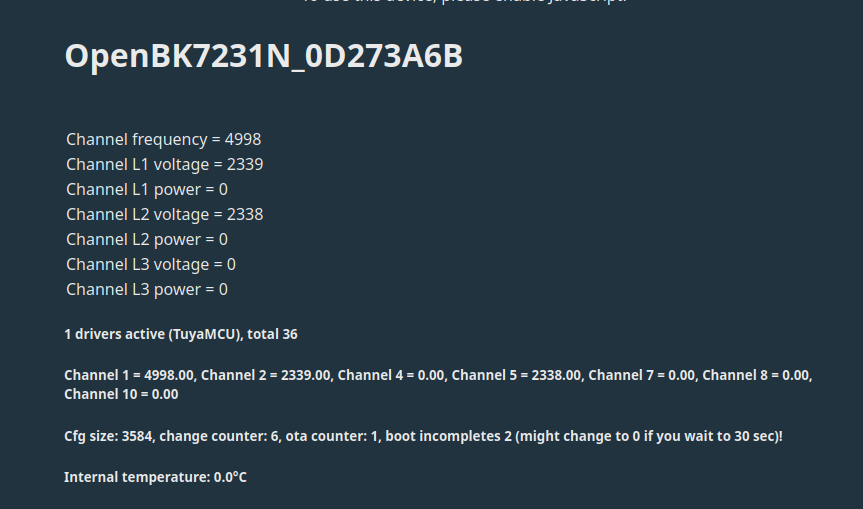
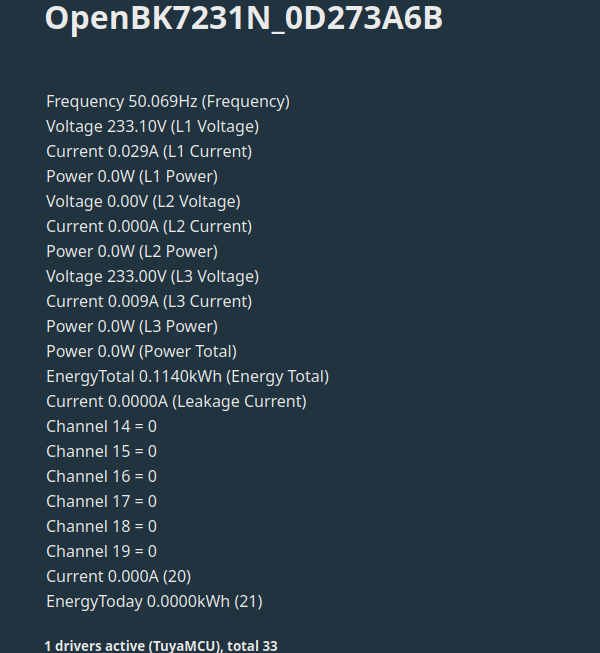
    Screenshot showing diagnostic data of the device OpenBK7231N_0D273A6B, indicating no voltage on channel L3.


    L3 voltage is missing...but gut be a faulty cable connection. no current cause there is nothing attached right now.
  • #16 21095113
    p.kaczmarek2
    Moderator Smart Home
    Posts: 14394
    Help: 650
    Rate: 12316
    Here are predefined channel types:
    https://github.com/openshwprojects/OpenBK7231T_App/blob/main/docs/channelTypes.md
    You can also try using tuyaMcu_sendQueryState to query all data points from MCU per request.
    Helpful post? Buy me a coffee.
  • ADVERTISEMENT
  • #17 21095131
    vincenzoernst1
    Level 8  
    Posts: 85
    Help: 3
    Rate: 7

    very cool! that's easy!

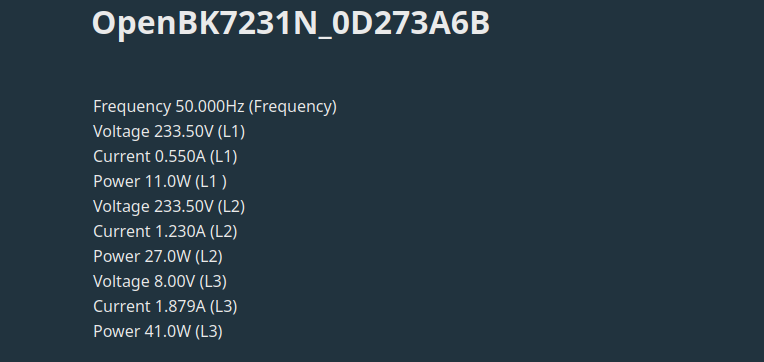
    Screenshot displaying measurement data from the OpenBK7231N_0D273A6B module, showing frequency, voltages, currents, and power for different power lines.

    voltage L3 has a bug though. But current/power L3 are correct! Got it.....dpld typo.

    what's left : dpld 1, 2, 111. any idea what they are used to?
  • #18 21095134
    p.kaczmarek2
    Moderator Smart Home
    Posts: 14394
    Help: 650
    Rate: 12316
    Do we know what are the meaning of dpID 1, 2 and 111? Didn't you map 111 as voltage?
    
    // L3 voltage
    setChannelLabel 8 "L3 voltage"
    setChannelType 8 ReadOnly
    linkTuyaMCUOutputToChannel 111 val 8 
    

    Or are you referring to the fact that it is showing 8V?
    Helpful post? Buy me a coffee.
  • #19 21095139
    vincenzoernst1
    Level 8  
    Posts: 85
    Help: 3
    Rate: 7

    111 was wrong. voltage is 108.

    moved the current autoexec.bat config to the 1st post.

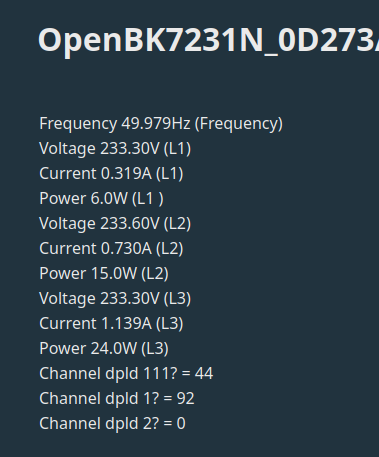
    Screenshot with data on voltage, current, and power from various channels.

    maybe energy total, energy today? would make sense
  • Helpful post
    #20 21095146
    divadiow
    Level 38  
    Posts: 4839
    Help: 420
    Rate: 852
    I've been playing with the bin you posted and the Tuya API response for firmware and product key that was in there. This is GPT summarised but I've checked a couple of dpIDs against the info above and they match. But take it all with a pinch of salt. Sorry if this isn't helpful at all and just muddies the discussion. Can delete to keep thread focussed if need be.

    Code: JSON
    Log in, to see the code
  • Helpful post
    #21 21095147
    p.kaczmarek2
    Moderator Smart Home
    Posts: 14394
    Help: 650
    Rate: 12316
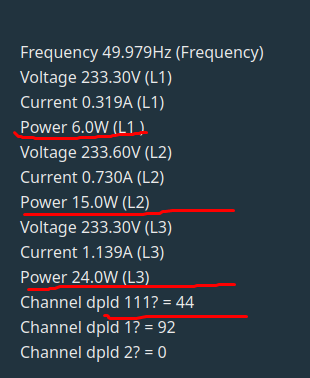
    So 111 is just a sum of those powers:
    Screenshot of electrical parameters readings with highlighted power values.

    Added after 1 [minutes]:

    6+15+24 seems to be 45 and not 44 but maybe it's due to the rounding...
    Helpful post? Buy me a coffee.
  • #22 21095149
    vincenzoernst1
    Level 8  
    Posts: 85
    Help: 3
    Rate: 7

    summed power over all phases. makes sense. this one is indeed missing and a useful info. i can verify with changing the load.

    you are right! removing the load brings it instantly to 0! so this is total power.

    divadiow wrote:
    I've been playing with the bin you posted and the Tuya API response for firmware and product key that was in there. This is GPT summarized but I've checked a couple of dpIDs against the info above and they match. But take it all with a pinch of salt. Sorry if this isn't helpful at all and just muddies the discussion. Can delete to keep thread focused if need be.


    thx! i guess everything is useful info on new devices.


    what we're missing is total current (while not physically correct), energy today now. can we script that?
  • #23 21095192
    p.kaczmarek2
    Moderator Smart Home
    Posts: 14394
    Help: 650
    Rate: 12316
    What about dpID 1, total_forward_energy? I think you need to configure it first.

    Total current could be done manually, without dpID, just something like setChannel 10 $CH11+$CH12+$CH13, of course, channel numbers are to be changed. This could be done, for example, every second.
    Helpful post? Buy me a coffee.
  • #24 21095197
    vincenzoernst1
    Level 8  
    Posts: 85
    Help: 3
    Rate: 7

    p.kaczmarek2 wrote:
    What about dpID 1, total_forward_energy? I think you need to configure it first.
    .

    done

    Quote:

    Total current could be done manually, without dpID, just something like setChannel 10 $CH11+$CH12+$CH13, of course, channel numbers are to be changed. This could be done, for example, every second.


    ah. got it. create a channel in autoexec.bat and do some calc like u showed.
  • Helpful post
    #25 21095219
    p.kaczmarek2
    Moderator Smart Home
    Posts: 14394
    Help: 650
    Rate: 12316
    Yes, but in order to do that every second, you need to either create a loop or a repeating event:
    https://github.com/openshwprojects/OpenBK7231T_App/blob/main/docs/autoexecExamples.md
    Helpful post? Buy me a coffee.
  • #26 21095259
    vincenzoernst1
    Level 8  
    Posts: 85
    Help: 3
    Rate: 7

    as i can see in the examples. u can do sort of bash scripting (light?)

    if $CH2!=0 then do_tick
    delay_s 1
    goto again


    is there a documentation what can be done exactly? what options are there? what's possible? what's not?
  • Helpful post
    #27 21095474
    p.kaczmarek2
    Moderator Smart Home
    Posts: 14394
    Help: 650
    Rate: 12316
    Documentation is currently being extended, so the best knowledge source is the autoexec.bat samples page I mentioned. You can also see our commands list:
    https://github.com/openshwprojects/OpenBK7231T_App/blob/main/docs/commands.md
    and you can try out the scripting in the Simulator: https://www.elektroda.com/rtvforum/topic4046056.html
    Helpful post? Buy me a coffee.
  • #28 21102601
    vincenzoernst1
    Level 8  
    Posts: 85
    Help: 3
    Rate: 7
    i see a problem with displaying all 3 voltages correctly. currently L2 voltage doest show.

    Screenshot of OpenBK7231N interface showing electrical measurements, including voltage readings for phases L1, L2 (0V), and L3.

    but dpld 108 (voltage L2) shows correlty up in the logs:

    Info:TuyaMCU:ProcessIncoming: (test for S09 calendar/IR device) received TUYA_CMD_NETWORK_STATUS 0x2B 
    Info:TuyaMCU:Received: 55 AA 03 00 00 01 01 04 
    Info:TuyaMCU:ProcessIncoming[v=3]: cmd 0 (Hearbeat) len 8
    Info:TuyaMCU:Received: 55 AA 03 07 00 08 6F 02 00 04 00 00 00 00 86 
    Info:TuyaMCU:ProcessIncoming[v=3]: cmd 7 (State) len 15
    Info:TuyaMCU:ParseState: id 111 type 2-val len 4
    Info:TuyaMCU:ParseState: int32 0
    Info:TuyaMCU:Received: 55 AA 03 07 00 08 66 02 00 04 00 00 09 1C A2 
    Info:TuyaMCU:ProcessIncoming[v=3]: cmd 7 (State) len 15
    Info:TuyaMCU:ParseState: id 102 type 2-val len 4
    Info:TuyaMCU:ParseState: int32 2332
    Info:TuyaMCU:Received: 55 AA 03 07 00 08 67 02 00 04 00 00 00 00 7E 
    Info:TuyaMCU:ProcessIncoming[v=3]: cmd 7 (State) len 15
    Info:TuyaMCU:ParseState: id 103 type 2-val len 4
    Info:TuyaMCU:ParseState: int32 0
    Info:TuyaMCU:Received: 55 AA 03 07 00 08 68 02 00 04 00 00 00 00 7F 
    Info:TuyaMCU:ProcessIncoming[v=3]: cmd 7 (State) len 15
    Info:TuyaMCU:ParseState: id 104 type 2-val len 4
    Info:TuyaMCU:ParseState: int32 0
    Info:TuyaMCU:Received: 55 AA 03 07 00 08 69 02 00 04 00 00 09 1C A5 
    Info:TuyaMCU:ProcessIncoming[v=3]: cmd 7 (State) len 15
    Info:TuyaMCU:ParseState: id 105 type 2-val len 4
    Info:TuyaMCU:ParseState: int32 2332
    Info:TuyaMCU:Received: 55 AA 03 07 00 08 6A 02 00 04 00 00 00 01 82 
    Info:TuyaMCU:ProcessIncoming[v=3]: cmd 7 (State) len 15
    Info:TuyaMCU:ParseState: id 106 type 2-val len 4
    Info:TuyaMCU:ParseState: int32 1
    Info:TuyaMCU:Received: 55 AA 03 07 00 08 6B 02 00 04 00 00 00 00 82 
    Info:TuyaMCU:ProcessIncoming[v=3]: cmd 7 (State) len 15
    Info:TuyaMCU:ParseState: id 107 type 2-val len 4
    Info:TuyaMCU:ParseState: int32 0
    Info:TuyaMCU:Received: 55 AA 03 07 00 08 6C 02 00 04 00 00 09 1C A8 
    Info:TuyaMCU:ProcessIncoming[v=3]: cmd 7 (State) len 15
    [b]Info:TuyaMCU:ParseState: id 108 type 2-val len 4
    Info:TuyaMCU:ParseState: int32 2332[/b]
    Info:TuyaMCU:Received: 55 AA 03 07 00 08 6D 02 00 04 00 00 00 03 87 
    Info:TuyaMCU:ProcessIncoming[v=3]: cmd 7 (State) len 15
    Info:TuyaMCU:ParseState: id 109 type 2-val len 4
    Info:TuyaMCU:ParseState: int32 3
    Info:TuyaMCU:Received: 55 AA 03 07 00 08 6E 02 00 04 00 00 00 00 85 
    Info:TuyaMCU:ProcessIncoming[v=3]: cmd 7 (State) len 15
    Info:TuyaMCU:ParseState: id 110 type 2-val len 4
    Info:TuyaMCU:ParseState: int32 0
    Info:TuyaMCU:Received: 55 AA 03 07 00 08 65 02 00 04 00 00 13 8E 1D 
    Info:TuyaMCU:ProcessIncoming[v=3]: cmd 7 (State) len 15
    Info:TuyaMCU:ParseState: id 101 type 2-val len 4
    Info:TuyaMCU:ParseState: int32 5006
    Info:TuyaMCU:Received: 55 AA 03 00 00 01 01 04 
    Info:TuyaMCU:ProcessIncoming[v=3]: cmd 0 (Hearbeat) len 8
    Info:TuyaMCU:Received: 55 AA 03 07 00 08 01 02 00 04 00 00 00 72 8A 
    Info:TuyaMCU:ProcessIncoming[v=3]: cmd 7 (State) len 15
    Info:TuyaMCU:ParseState: id 1 type 2-val len 4
    Info:TuyaMCU:ParseState: int32 114
    Info:TuyaMCU:Received: 55 AA 03 07 00 08 02 02 00 04 00 00 00 00 19 
    Info:TuyaMCU:ProcessIncoming[v=3]: cmd 7 (State) len 15
    Info:TuyaMCU:ParseState: id 2 type 2-val len 4
    Info:TuyaMCU:ParseState: int32 0
    Info:TuyaMCU:Received: 55 AA 03 07 00 0C 06 00 00 08 09 1D 00 00 00 00 00 00 49 
    Info:TuyaMCU:ProcessIncoming[v=3]: cmd 7 (State) len 19
    Info:TuyaMCU:ParseState: id 6 type 0-raw len 8
    Info:TuyaMCU:Received: 55 AA 03 07 00 0C 07 00 00 08 09 1D 00 00 00 00 00 00 4A 
    Info:TuyaMCU:ProcessIncoming[v=3]: cmd 7 (State) len 19
    Info:TuyaMCU:ParseState: id 7 type 0-raw len 8
    Info:TuyaMCU:Received: 55 AA 03 07 00 0C 08 00 00 08 09 1C 00 00 00 00 00 00 4A 
    Info:TuyaMCU:ProcessIncoming[v=3]: cmd 7 (State) len 19
    Info:TuyaMCU:ParseState: id 8 type 0-raw len 8
    Info:TuyaMCU:Received: 55 AA 03 07 00 08 0F 02 00 04 00 00 00 00 26 
    Info:TuyaMCU:ProcessIncoming[v=3]: cmd 7 (State) len 15
    Info:TuyaMCU:ParseState: id 15 type 2-val len 4
    Info:TuyaMCU:ParseState: int32 0
    Info:TuyaMCU:Received: 55 AA 03 03 00 00 05 
    Info:TuyaMCU:ProcessIncoming[v=3]: cmd 3 (WiFiState) len 7
    Info:TuyaMCU:Received: 55 AA 03 00 00 01 01 04 
    Info:TuyaMCU:ProcessIncoming[v=3]: cmd 0 (Hearbeat) len 8
    Info:TuyaMCU:Received: 55 AA 03 2B 00 00 2D 
    Info:TuyaMCU:ProcessIncoming[v=3]: cmd 43 (NetworkStatus) len 7
    Info:TuyaMCU:ProcessIncoming: (test for S09 calendar/IR device) received TUYA_CMD_NETWORK_STATUS 0x2B 
    Info:TuyaMCU:Received: 55 AA 03 07 00 08 6F 02 00 04 00 00 00 00 86 
    Info:TuyaMCU:ProcessIncoming[v=3]: cmd 7 (State) len 15
    Info:TuyaMCU:ParseState: id 111 type 2-val len 4
    Info:TuyaMCU:ParseState: int32 0
    Info:TuyaMCU:Received: 55 AA 03 07 00 08 66 02 00 04 00 00 09 1D A3 
    Info:TuyaMCU:ProcessIncoming[v=3]: cmd 7 (State) len 15
    Info:TuyaMCU:ParseState: id 102 type 2-val len 4
    Info:TuyaMCU:ParseState: int32 2333
    Info:TuyaMCU:Received: 55 AA 03 07 00 08 67 02 00 04 00 00 00 01 7F 
    Info:TuyaMCU:ProcessIncoming[v=3]: cmd 7 (State) len 15
    Info:TuyaMCU:ParseState: id 103 type 2-val len 4
    Info:TuyaMCU:ParseState: int32 1
    Info:TuyaMCU:Received: 55 AA 03 07 00 08 68 02 00 04 00 00 00 00 7F 
    Info:TuyaMCU:ProcessIncoming[v=3]: cmd 7 (State) len 15
    Info:TuyaMCU:ParseState: id 104 type 2-val len 4
    Info:TuyaMCU:ParseState: int32 0
    Info:TuyaMCU:Received: 55 AA 03 07 00 08 69 02 00 04 00 00 09 1D A6 
    Info:TuyaMCU:ProcessIncoming[v=3]: cmd 7 (State) len 15
    Info:TuyaMCU:ParseState: id 105 type 2-val len 4
    Info:TuyaMCU:ParseState: int32 2333
    Info:TuyaMCU:Received: 55 AA 03 07 00 08 6A 02 00 04 00 00 00 02 83 
    Info:TuyaMCU:ProcessIncoming[v=3]: cmd 7 (State) len 15
    Info:TuyaMCU:ParseState: id 106 type 2-val len 4
    Info:TuyaMCU:ParseState: int32 2
    Info:TuyaMCU:Received: 55 AA 03 07 00 08 6B 02 00 04 00 00 00 00 82 
    Info:TuyaMCU:ProcessIncoming[v=3]: cmd 7 (State) len 15
    Info:TuyaMCU:ParseState: id 107 type 2-val len 4
    Info:TuyaMCU:ParseState: int32 0
    Info:TuyaMCU:Received: 55 AA 03 07 00 08 6C 02 00 04 00 00 09 1D A9 
    Info:TuyaMCU:ProcessIncoming[v=3]: cmd 7 (State) len 15
    Info:TuyaMCU:ParseState: id 108 type 2-val len 4
    Info:TuyaMCU:ParseState: int32 2333
    Info:TuyaMCU:Received: 55 AA 03 07 00 08 6D 02 00 04 00 00 00 01 85 
    Info:TuyaMCU:ProcessIncoming[v=3]: cmd 7 (State) len 15
    Info:TuyaMCU:ParseState: id 109 type 2-val len 4
    Info:TuyaMCU:ParseState: int32 1
    Info:TuyaMCU:Received: 55 AA 03 07 00 08 6E 02 00 04 00 00 00 00 85 
    Info:TuyaMCU:ProcessIncoming[v=3]: cmd 7 (State) len 15
    Info:TuyaMCU:ParseState: id 110 type 2-val len 4
    Info:TuyaMCU:ParseState: int32 0
    Info:TuyaMCU:Received: 55 AA 03 07 00 08 65 02 00 04 00 00 13 8F 1E 
    Info:TuyaMCU:ProcessIncoming[v=3]: cmd 7 (State) len 15
    Info:TuyaMCU:ParseState: id 101 type 2-val len 4
    Info:TuyaMCU:ParseState: int32 5007
    Info:TuyaMCU:Received: 55 AA 03 07 00 08 01 02 00 04 00 00 00 72 8A 
    Info:TuyaMCU:ProcessIncoming[v=3]: cmd 7 (State) len 15
    Info:TuyaMCU:ParseState: id 1 type 2-val len 4
    Info:TuyaMCU:ParseState: int32 114
    Info:TuyaMCU:Received: 55 AA 03 07 00 08 02 02 00 04 00 00 00 00 19 
    Info:TuyaMCU:ProcessIncoming[v=3]: cmd 7 (State) len 15
    Info:TuyaMCU:ParseState: id 2 type 2-val len 4
    Info:TuyaMCU:ParseState: int32 0
    Info:TuyaMCU:Received: 55 AA 03 07 00 0C 06 00 00 08 09 1D 00 00 00 00 00 00 49 
    Info:TuyaMCU:ProcessIncoming[v=3]: cmd 7 (State) len 19
    Info:TuyaMCU:ParseState: id 6 type 0-raw len 8
    Info:TuyaMCU:Received: 55 AA 03 07 00 0C 07 00 00 08 09 1D 00 00 00 00 00 00 4A 
    Info:TuyaMCU:ProcessIncoming[v=3]: cmd 7 (State) len 19
    Info:TuyaMCU:ParseState: id 7 type 0-raw len 8
    Info:TuyaMCU:Received: 55 AA 03 07 00 0C 08 00 00 08 09 1C 00 00 00 00 00 00 4A 
    Info:TuyaMCU:ProcessIncoming[v=3]: cmd 7 (State) len 19
    Info:TuyaMCU:ParseState: id 8 type 0-raw len 8
    Info:TuyaMCU:Received: 55 AA 03 07 00 08 0F 02 00 04 00 00 00 00 26 
    Info:TuyaMCU:ProcessIncoming[v=3]: cmd 7 (State) len 15
    Info:TuyaMCU:ParseState: id 15 type 2-val len 4
    Info:TuyaMCU:ParseState: int32 0
    Info:TuyaMCU:Received: 55 AA 03 2B 00 00 2D 
    Info:TuyaMCU:ProcessIncoming[v=3]: cmd 43 (NetworkStatus) len 7
    Info:TuyaMCU:ProcessIncoming: (test for S09 calendar/IR device) received TUYA_CMD_NETWORK_STATUS 0x2B 
    Info:TuyaMCU:Received: 55 AA 03 00 00 01 01 04 
    Info:TuyaMCU:ProcessIncoming[v=3]: cmd 0 (Hearbeat) len 8
    Info:TuyaMCU:Received: 55 AA 03 00 00 01 01 04 
    Info:TuyaMCU:ProcessIncoming[v=3]: cmd 0 (Hearbeat) len 8
    Info:TuyaMCU:Received: 55 AA 03 07 00 08 01 02 00 04 00 00 00 72 8A 
    Info:TuyaMCU:ProcessIncoming[v=3]: cmd 7 (State) len 15
    Info:TuyaMCU:ParseState: id 1 type 2-val len 4
    Info:TuyaMCU:ParseState: int32 114
    Info:TuyaMCU:Received: 55 AA 03 07 00 08 02 02 00 04 00 00 00 00 19 
    Info:TuyaMCU:ProcessIncoming[v=3]: cmd 7 (State) len 15
    Info:TuyaMCU:ParseState: id 2 type 2-val len 4
    Info:TuyaMCU:ParseState: int32 0
    Info:TuyaMCU:Received: 55 AA 03 07 00 0C 06 00 00 08 09 1C 00 00 00 00 00 00 48 
    Info:TuyaMCU:ProcessIncoming[v=3]: cmd 7 (State) len 19
    Info:TuyaMCU:ParseState: id 6 type 0-raw len 8
    Info:TuyaMCU:Received: 55 AA 03 07 00 0C 07 00 00 08 09 1D 00 00 00 00 00 00 4A 
    Info:TuyaMCU:ProcessIncoming[v=3]: cmd 7 (State) len 19
    Info:TuyaMCU:ParseState: id 7 type 0-raw len 8
    Info:TuyaMCU:Received: 55 AA 03 07 00 0C 08 00 00 08 09 1C 00 00 00 00 00 00 4A 
    Info:TuyaMCU:ProcessIncoming[v=3]: cmd 7 (State) len 19
    Info:TuyaMCU:ParseState: id 8 type 0-raw len 8
    Info:TuyaMCU:Received: 55 AA 03 07 00 08 0F 02 00 04 00 00 00 00 26 
    Info:TuyaMCU:ProcessIncoming[v=3]: cmd 7 (State) len 15
    Info:TuyaMCU:ParseState: id 15 type 2-val len 4
    Info:TuyaMCU:ParseState: int32 0
    Info:TuyaMCU:Received: 55 AA 03 2B 00 00 2D 
    Info:TuyaMCU:ProcessIncoming[v=3]: cmd 43 (NetworkStatus) len 7
    Info:TuyaMCU:ProcessIncoming: (test for S09 calendar/IR device) received TUYA_CMD_NETWORK_STATUS 0x2B 
    Info:TuyaMCU:Received: 55 AA 03 00 00 01 01 04 
    Info:TuyaMCU:ProcessIncoming[v=3]: cmd 0 (Hearbeat) len 8
    Info:TuyaMCU:Received: 55 AA 03 07 00 08 01 02 00 04 00 00 00 72 8A 
    Info:TuyaMCU:ProcessIncoming[v=3]: cmd 7 (State) len 15
    Info:TuyaMCU:ParseState: id 1 type 2-val len 4
    Info:TuyaMCU:ParseState: int32 114
    Info:TuyaMCU:Received: 55 AA 03 07 00 08 02 02 00 04 00 00 00 00 19 
    Info:TuyaMCU:ProcessIncoming[v=3]: cmd 7 (State) len 15
    Info:TuyaMCU:ParseState: id 2 type 2-val len 4
    Info:TuyaMCU:ParseState: int32 0
    Info:TuyaMCU:Received: 55 AA 03 07 00 0C 06 00 00 08 09 1D 00 00 00 00 00 00 49 
    Info:TuyaMCU:ProcessIncoming[v=3]: cmd 7 (State) len 19
    Info:TuyaMCU:ParseState: id 6 type 0-raw len 8
    Info:TuyaMCU:Received: 55 AA 03 07 00 0C 07 00 00 08 09 1D 00 00 00 00 00 00 4A 
    Info:TuyaMCU:ProcessIncoming[v=3]: cmd 7 (State) len 19
    Info:TuyaMCU:ParseState: id 7 type 0-raw len 8
    Info:TuyaMCU:Received: 55 AA 03 07 00 0C 08 00 00 08 09 1C 00 00 00 00 00 00 4A 
    Info:TuyaMCU:ProcessIncoming[v=3]: cmd 7 (State) len 19
    Info:TuyaMCU:ParseState: id 8 type 0-raw len 8
    Info:TuyaMCU:Received: 55 AA 03 07 00 08 0F 02 00 04 00 00 00 00 26 
    Info:TuyaMCU:ProcessIncoming[v=3]: cmd 7 (State) len 15
    Info:TuyaMCU:ParseState: id 15 type 2-val len 4
    Info:TuyaMCU:ParseState: int32 0
    Info:TuyaMCU:Received: 55 AA 03 2B 00 00 2D 
    Info:TuyaMCU:ProcessIncoming[v=3]: cmd 43 (NetworkStatus) len 7
    Info:TuyaMCU:ProcessIncoming: (test for S09 calendar/IR device) received TUYA_CMD_NETWORK_STATUS 0x2B 
    Info:TuyaMCU:Received: 55 AA 03 00 00 01 01 04 
    Info:TuyaMCU:ProcessIncoming[v=3]: cmd 0 (Hearbeat) len 8
    Info:TuyaMCU:Received: 55 AA 03 00 00 01 01 04 
    Info:TuyaMCU:ProcessIncoming[v=3]: cmd 0 (Hearbeat) len 8
    Info:TuyaMCU:Received: 55 AA 03 2B 00 00 2D 
    Info:TuyaMCU:ProcessIncoming[v=3]: cmd 43 (NetworkStatus) len 7
    Info:TuyaMCU:ProcessIncoming: (test for S09 calendar/IR device) received TUYA_CMD_NETWORK_STATUS 0x2B 
    Info:TuyaMCU:Received: 55 AA 03 07 00 08 6F 02 00 04 00 00 00 00 86 
    Info:TuyaMCU:ProcessIncoming[v=3]: cmd 7 (State) len 15
    Info:TuyaMCU:ParseState: id 111 type 2-val len 4
    Info:TuyaMCU:ParseState: int32 0
    Info:TuyaMCU:Received: 55 AA 03 07 00 08 66 02 00 04 00 00 09 1C A2 
    Info:TuyaMCU:ProcessIncoming[v=3]: cmd 7 (State) len 15
    Info:TuyaMCU:ParseState: id 102 type 2-val len 4
    Info:TuyaMCU:ParseState: int32 2332
    Info:TuyaMCU:Received: 55 AA 03 07 00 08 67 02 00 04 00 00 00 03 81 
    Info:TuyaMCU:ProcessIncoming[v=3]: cmd 7 (State) len 15
    Info:TuyaMCU:ParseState: id 103 type 2-val len 4
    Info:TuyaMCU:ParseState: int32 3
    Info:TuyaMCU:Received: 55 AA 03 07 00 08 68 02 00 04 00 00 00 00 7F 
    Info:TuyaMCU:ProcessIncoming[v=3]: cmd 7 (State) len 15
    Info:TuyaMCU:ParseState: id 104 type 2-val len 4
    Info:TuyaMCU:ParseState: int32 0
    Info:TuyaMCU:Received: 55 AA 03 07 00 08 69 02 00 04 00 00 09 1D A6 
    Info:TuyaMCU:ProcessIncoming[v=3]: cmd 7 (State) len 15
    Info:TuyaMCU:ParseState: id 105 type 2-val len 4
    Info:TuyaMCU:ParseState: int32 2333
    Info:TuyaMCU:Received: 55 AA 03 07 00 08 6A 02 00 04 00 00 00 02 83 
    Info:TuyaMCU:ProcessIncoming[v=3]: cmd 7 (State) len 15
    Info:TuyaMCU:ParseState: id 106 type 2-val len 4
    Info:TuyaMCU:ParseState: int32 2
    Info:TuyaMCU:Received: 55 AA 03 07 00 08 6B 02 00 04 00 00 00 00 82 
    Info:TuyaMCU:ProcessIncoming[v=3]: cmd 7 (State) len 15
    Info:TuyaMCU:ParseState: id 107 type 2-val len 4
    Info:TuyaMCU:ParseState: int32 0
    Info:TuyaMCU:Received: 55 AA 03 07 00 08 6C 02 00 04 00 00 09 1C A8 
    Info:TuyaMCU:ProcessIncoming[v=3]: cmd 7 (State) len 15
    Info:TuyaMCU:ParseState: id 108 type 2-val len 4
    Info:TuyaMCU:ParseState: int32 2332
    Info:TuyaMCU:Received: 55 AA 03 07 00 08 6D 02 00 04 00 00 00 03 87 
    Info:TuyaMCU:ProcessIncoming[v=3]: cmd 7 (State) len 15
    Info:TuyaMCU:ParseState: id 109 type 2-val len 4
    Info:TuyaMCU:ParseState: int32 3
    Info:TuyaMCU:Received: 55 AA 03 07 00 08 6E 02 00 04 00 00 00 00 85 
    Info:TuyaMCU:ProcessIncoming[v=3]: cmd 7 (State) len 15
    Info:TuyaMCU:ParseState: id 110 type 2-val len 4
    Info:TuyaMCU:ParseState: int32 0
    Info:TuyaMCU:Received: 55 AA 03 07 00 08 65 02 00 04 00 00 13 8E 1D 
    Info:TuyaMCU:ProcessIncoming[v=3]: cmd 7 (State) len 15
    Info:TuyaMCU:ParseState: id 101 type 2-val len 4
    Info:TuyaMCU:ParseState: int32 5006
    Info:TuyaMCU:Received: 55 AA 03 07 00 08 01 02 00 04 00 00 00 72 8A 
    Info:TuyaMCU:ProcessIncoming[v=3]: cmd 7 (State) len 15
    Info:TuyaMCU:ParseState: id 1 type 2-val len 4
    Info:TuyaMCU:ParseState: int32 114
    Info:TuyaMCU:Received: 55 AA 03 07 00 08 02 02 00 04 00 00 00 00 19 
    Info:TuyaMCU:ProcessIncoming[v=3]: cmd 7 (State) len 15
    Info:TuyaMCU:ParseState: id 2 type 2-val len 4
    Info:TuyaMCU:ParseState: int32 0
    Info:TuyaMCU:Received: 55 AA 03 07 00 0C 06 00 00 08 09 1D 00 00 00 00 00 00 49 
    Info:TuyaMCU:ProcessIncoming[v=3]: cmd 7 (State) len 19
    Info:TuyaMCU:ParseState: id 6 type 0-raw len 8
    Info:TuyaMCU:Received: 55 AA 03 07 00 0C 07 00 00 08 09 1D 00 00 00 00 00 00 4A 
    Info:TuyaMCU:ProcessIncoming[v=3]: cmd 7 (State) len 19
    Info:TuyaMCU:ParseState: id 7 type 0-raw len 8
    Info:TuyaMCU:Received: 55 AA 03 07 00 0C 08 00 00 08 09 1C 00 00 00 00 00 00 4A 
    Info:TuyaMCU:ProcessIncoming[v=3]: cmd 7 (State) len 19
    Info:TuyaMCU:ParseState: id 8 type 0-raw len 8
    Info:TuyaMCU:Received: 55 AA 03 07 00 08 0F 02 00 04 00 00 00 00 26 
    Info:TuyaMCU:ProcessIncoming[v=3]: cmd 7 (State) len 15
    Info:TuyaMCU:ParseState: id 15 type 2-val len 4
    Info:TuyaMCU:ParseState: int32 0
    Info:TuyaMCU:Received: 55 AA 03 00 00 01 01 04 
    Info:TuyaMCU:ProcessIncoming[v=3]: cmd 0 (Hearbeat) len 8
    Info:TuyaMCU:Received: 55 AA 03 2B 00 00 2D 
    Info:TuyaMCU:ProcessIncoming[v=3]: cmd 43 (NetworkStatus) len 7
    Info:TuyaMCU:ProcessIncoming: (test for S09 calendar/IR device) received TUYA_CMD_NETWORK_STATUS 0x2B 
    Info:TuyaMCU:Received: 55 AA 03 00 00 01 01 04 
    Info:TuyaMCU:ProcessIncoming[v=3]: cmd 0 (Hearbeat) len 8
    Info:TuyaMCU:Received: 55 AA 03 07 00 08 01 02 00 04 00 00 00 72 8A 
    Info:TuyaMCU:ProcessIncoming[v=3]: cmd 7 (State) len 15
    Info:TuyaMCU:ParseState: id 1 type 2-val len 4
    Info:TuyaMCU:ParseState: int32 114
    Info:TuyaMCU:Received: 55 AA 03 07 00 08 02 02 00 04 00 00 00 00 19 
    Info:TuyaMCU:ProcessIncoming[v=3]: cmd 7 (State) len 15
    Info:TuyaMCU:ParseState: id 2 type 2-val len 4
    Info:TuyaMCU:ParseState: int32 0
    Info:TuyaMCU:Received: 55 AA 03 07 00 0C 06 00 00 08 09 1D 00 00 00 00 00 00 49 
    Info:TuyaMCU:ProcessIncoming[v=3]: cmd 7 (State) len 19
    Info:TuyaMCU:ParseState: id 6 type 0-raw len 8
    Info:TuyaMCU:Received: 55 AA 03 07 00 0C 07 00 00 08 09 1D 00 00 00 00 00 00 4A 
    Info:TuyaMCU:ProcessIncoming[v=3]: cmd 7 (State) len 19
    Info:TuyaMCU:ParseState: id 7 type 0-raw len 8
    Info:TuyaMCU:Received: 55 AA 03 07 00 0C 08 00 00 08 09 1D 00 00 00 00 00 00 4B 
    Info:TuyaMCU:ProcessIncoming[v=3]: cmd 7 (State) len 19
    Info:TuyaMCU:ParseState: id 8 type 0-raw len 8
    Info:TuyaMCU:Received: 55 AA 03 07 00 08 0F 02 00 04 00 00 00 00 26 
    Info:TuyaMCU:ProcessIncoming[v=3]: cmd 7 (State) len 15
    Info:TuyaMCU:ParseState: id 15 type 2-val len 4
    Info:TuyaMCU:ParseState: int32 0
    Info:TuyaMCU:Received: 55 AA 03 2B 00 00 2D 
    Info:TuyaMCU:ProcessIncoming[v=3]: cmd 43 (NetworkStatus) len 7
    Info:TuyaMCU:ProcessIncoming: (test for S09 calendar/IR device) received TUYA_CMD_NETWORK_STATUS 0x2B 
    Info:TuyaMCU:Received: 55 AA 03 00 00 01 01 04 
    Info:TuyaMCU:ProcessIncoming[v=3]: cmd 0 (Hearbeat) len 8
    v=3]: cmd 43 (NetworkStatus) len 7
    Info:TuyaMCU:ProcessIncoming: (test for S09 calendar/IR device) received TUYA_CMD_NETWORK_STATUS 0x2B 
    Info:TuyaMCU:Received: 55 AA 03 00 00 01 01 04 
    Info:TuyaMCU:ProcessIncoming[v=3]: cmd 0 (Hearbeat) len 8
    Info:TuyaMCU:Received: 55 AA 03 07 00 08 01 02 00 04 00 00 00 72 8A 
    Info:TuyaMCU:ProcessIncoming[v=3]: cmd 7 (State) len 15
    Info:TuyaMCU:ParseState: id 1 type 2-val len 4
    Info:TuyaMCU:ParseState: int32 114
    Info:TuyaMCU:Received: 55 AA 03 07 00 08 02 02 00 04 00 00 00 00 19 
    Info:TuyaMCU:ProcessIncoming[v=3]: cmd 7 (State) len 15
    Info:TuyaMCU:ParseState: id 2 type 2-val len 4
    Info:TuyaMCU:ParseState: int32 0
    Info:TuyaMCU:Received: 55 AA 03 07 00 0C 06 00 00 08 09 1D 00 00 00 00 00 00 49 
    Info:TuyaMCU:ProcessIncoming[v=3]: cmd 7 (State) len 19
    Info:TuyaMCU:ParseState: id 6 type 0-raw len 8
    Info:TuyaMCU:Received: 55 AA 03 07 00 0C 07 00 00 08 09 1D 00 00 00 00 00 00 4A 
    Info:TuyaMCU:ProcessIncoming[v=3]: cmd 7 (State) len 19
    Info:TuyaMCU:ParseState: id 7 type 0-raw len 8
    Info:TuyaMCU:Received: 55 AA 03 07 00 0C 08 00 00 08 09 1D 00 00 00 00 00 00 4B 
    Info:TuyaMCU:ProcessIncoming[v=3]: cmd 7 (State) len 19
    Info:TuyaMCU:ParseState: id 8 type 0-raw len 8
    Info:TuyaMCU:Received: 55 AA 03 07 00 08 0F 02 00 04 00 00 00 00 26 
    Info:TuyaMCU:ProcessIncoming[v=3]: cmd 7 (State) len 15
    Info:TuyaMCU:ParseState: id 15 type 2-val len 4
    Info:TuyaMCU:ParseState: int32 0
    Info:TuyaMCU:Received: 55 AA 03 2B 00 00 2D 
    Info:TuyaMCU:ProcessIncoming[v=3]: cmd 43 (NetworkStatus) len 7
    Info:TuyaMCU:ProcessIncoming: (test for S09 calendar/IR device) received TUYA_CMD_NETWORK_STATUS 0x2B 
    Info:TuyaMCU:Received: 55 AA 03 00 00 01 01 04 
    Info:TuyaMCU:ProcessIncoming[v=3]: cmd 0 (Hearbeat) len 8
    Info:TuyaMCU:Received: 55 AA 03 07 00 08 6F 02 00 04 00 00 00 00 86 
    Info:TuyaMCU:ProcessIncoming[v=3]: cmd 7 (State) len 15
    Info:TuyaMCU:ParseState: id 111 type 2-val len 4
    Info:TuyaMCU:ParseState: int32 0
    Info:TuyaMCU:Received: 55 AA 03 07 00 08 66 02 00 04 00 00 09 1D A3 
    Info:TuyaMCU:ProcessIncoming[v=3]: cmd 7 (State) len 15
    Info:TuyaMCU:ParseState: id 102 type 2-val len 4
    Info:TuyaMCU:ParseState: int32 2333
    Info:TuyaMCU:Received: 55 AA 03 07 00 08 67 02 00 04 00 00 00 02 80 
    Info:TuyaMCU:ProcessIncoming[v=3]: cmd 7 (State) len 15
    Info:TuyaMCU:ParseState: id 103 type 2-val len 4
    Info:TuyaMCU:ParseState: int32 2
    Info:TuyaMCU:Received: 55 AA 03 07 00 08 68 02 00 04 00 00 00 00 7F 
    Info:TuyaMCU:ProcessIncoming[v=3]: cmd 7 (State) len 15
    Info:TuyaMCU:ParseState: id 104 type 2-val len 4
    Info:TuyaMCU:ParseState: int32 0
    Info:TuyaMCU:Received: 55 AA 03 07 00 08 69 02 00 04 00 00 09 1D A6 
    Info:TuyaMCU:ProcessIncoming[v=3]: cmd 7 (State) len 15
    Info:TuyaMCU:ParseState: id 105 type 2-val len 4
    Info:TuyaMCU:ParseState: int32 2333
    Info:TuyaMCU:Received: 55 AA 03 07 00 08 6A 02 00 04 00 00 00 02 83 
    Info:TuyaMCU:ProcessIncoming[v=3]: cmd 7 (State) len 15
    Info:TuyaMCU:ParseState: id 106 type 2-val len 4
    Info:TuyaMCU:ParseState: int32 2
    Info:TuyaMCU:Received: 55 AA 03 07 00 08 6B 02 00 04 00 00 00 00 82 
    Info:TuyaMCU:ProcessIncoming[v=3]: cmd 7 (State) len 15
    Info:TuyaMCU:ParseState: id 107 type 2-val len 4
    Info:TuyaMCU:ParseState: int32 0
    Info:TuyaMCU:Received: 55 AA 03 07 00 08 6C 02 00 04 00 00 09 1D A9 
    Info:TuyaMCU:ProcessIncoming[v=3]: cmd 7 (State) len 15
    [b]Info:TuyaMCU:ParseState: id 108 type 2-val len 4
    Info:TuyaMCU:ParseState: int32 2333[/b]
    Info:TuyaMCU:Received: 55 AA 03 07 00 08 6D 02 00 04 00 00 00 03 87 
    Info:TuyaMCU:ProcessIncoming[v=3]: cmd 7 (State) len 15
    Info:TuyaMCU:ParseState: id 109 type 2-val len 4
    Info:TuyaMCU:ParseState: int32 3
    Info:TuyaMCU:Received: 55 AA 03 07 00 08 6E 02 00 04 00 00 00 00 85 
    Info:TuyaMCU:ProcessIncoming[v=3]: cmd 7 (State) len 15
    Info:TuyaMCU:ParseState: id 110 type 2-val len 4
    Info:TuyaMCU:ParseState: int32 0
    Info:TuyaMCU:Received: 55 AA 03 07 00 08 65 02 00 04 00 00 13 8E 1D 
    Info:TuyaMCU:ProcessIncoming[v=3]: cmd 7 (State) len 15
    Info:TuyaMCU:ParseState: id 101 type 2-val len 4
    Info:TuyaMCU:ParseState: int32 5006
    Info:TuyaMCU:Received: 55 AA 03 07 00 08 01 02 00 04 00 00 00 72 8A 
    Info:TuyaMCU:ProcessIncoming[v=3]: cmd 7 (State) len 15
    Info:TuyaMCU:ParseState: id 1 type 2-val len 4
    Info:TuyaMCU:ParseState: int32 114
    Info:TuyaMCU:Received: 55 AA 03 07 00 08 02 02 00 04 00 00 00 00 19 
    Info:TuyaMCU:ProcessIncoming[v=3]: cmd 7 (State) len 15
    Info:TuyaMCU:ParseState: id 2 type 2-val len 4
    Info:TuyaMCU:ParseState: int32 0
    Info:TuyaMCU:Received: 55 AA 03 07 00 0C 06 00 00 08 09 1D 00 00 00 00 00 00 49 
    Info:TuyaMCU:ProcessIncoming[v=3]: cmd 7 (State) len 19
    Info:TuyaMCU:ParseState: id 6 type 0-raw len 8
    Info:TuyaMCU:Received: 55 AA 03 07 00 0C 07 00 00 08 09 1C 00 00 00 00 00 00 49 
    Info:TuyaMCU:ProcessIncoming[v=3]: cmd 7 (State) len 19
    Info:TuyaMCU:ParseState: id 7 type 0-raw len 8
    Info:TuyaMCU:Received: 55 AA 03 07 00 0C 08 00 00 08 09 1C 00 00 00 00 00 00 4A 
    Info:TuyaMCU:ProcessIncoming[v=3]: cmd 7 (State) len 19
    Info:TuyaMCU:ParseState: id 8 type 0-raw len 8
    Info:TuyaMCU:Received: 55 AA 03 07 00 08 0F 02 00 04 00 00 00 00 26 
    Info:TuyaMCU:ProcessIncoming[v=3]: cmd 7 (State) len 15
    Info:TuyaMCU:ParseState: id 15 type 2-val len 4
    Info:TuyaMCU:ParseState: int32 0


    autoexec is set to:

    // L2 voltage
    setChannelLabel 5 "L2 Voltage"
    setChannelType 5 Voltage_div10
    linkTuyaMCUOutputToChannel 108 val 5 


    doublechecked autoexec for wrong config. i also saw L1 voltage missing while L2 votage was ok. dont know whats going on....?
  • #29 21102669
    p.kaczmarek2
    Moderator Smart Home
    Posts: 14394
    Help: 650
    Rate: 12316
    maybe you've mapped something else to channel 5 as well, save config and reboot whole device
    Helpful post? Buy me a coffee.
  • #30 21102679
    vincenzoernst1
    Level 8  
    Posts: 85
    Help: 3
    Rate: 7

    nope. double checked that. was also my 1st thought.
    see:
    
    startDriver TuyaMCU
    // Frequency
    setChannelLabel 1 "Frequency"
    setChannelType 1 Frequency_div100
    linkTuyaMCUOutputToChannel 101 val 1 
    // L1 voltage
    setChannelLabel 2 "L1 Voltage"
    setChannelType 2 Voltage_div10
    linkTuyaMCUOutputToChannel 105 val 2 
    // L1 Current
    setChannelLabel 3 "L1 Current"
    setChannelType 3 Current_div100
    linkTuyaMCUOutputToChannel 103 val 3
    // L1 Power 
    setChannelLabel 4 "L1 Power"
    setChannelType 4 Power
    linkTuyaMCUOutputToChannel 104 val 4
    // L2 voltage
    setChannelLabel 5 "L2 Voltage"
    setChannelType 5 Voltage_div10
    linkTuyaMCUOutputToChannel 108 val 5 
    // L2 Current
    setChannelLabel 6 "L2 Current"
    setChannelType 6 Current_div100
    linkTuyaMCUOutputToChannel 106 val 6
    // L2 power
    setChannelLabel 7 "L2 Power"
    setChannelType 7 Power
    linkTuyaMCUOutputToChannel 107 val 7
    // L3 Voltage
    setChannelLabel 8 "L3 Voltage"
    setChannelType 8 Voltage_div10
    linkTuyaMCUOutputToChannel 108 val 8 
    // L3 Current
    setChannelLabel 9 "L3 Current"
    setChannelType 9 Current_div100
    linkTuyaMCUOutputToChannel 109 val 9
    // L3 Power
    setChannelLabel 10 "L3 Power"
    setChannelType 10 Power
    linkTuyaMCUOutputToChannel 110 val 10
    // Power Total
    setChannelLabel 11 "Power Total"
    setChannelType 11 Power
    linkTuyaMCUOutputToChannel 111 val 11 
    // Energy Total
    setChannelLabel 12 "Energy Total"
    setChannelType 12 EnergyTotal_kWh_div1000
    linkTuyaMCUOutputToChannel 1 val 12 
    // Leakage Current
    setChannelLabel 13 "Leakage Current"
    setChannelType 13 Current_div1000
    linkTuyaMCUOutputToChannel 15 val 13


    did save config and rebooted...no change

Topic summary

✨ The discussion revolves around the compatibility of OpenBeken firmware with the Tuya 3 Phase Powermeter model ZGMISMART-SPM02. The user seeks to determine if OpenBeken can effectively handle and display metrics for three-phase power, voltage, current (both forward and reverse), and frequency, given that Tasmota does not support this functionality. Participants in the forum provide insights on flashing the device with OpenBeken, configuring the TuyaMCU interface, and creating custom HTML panels. They discuss the mapping of data points (dpIDs) for voltage and current readings, troubleshooting issues with displaying all three voltages, and scripting capabilities for data processing. The conversation also touches on the need for proper channel types and the potential for custom scripting to enhance functionality.
Generated by the language model.

FAQ

TL;DR: If you want a Tuya 3-phase meter in OpenBeken, this thread shows 13 mapped channels and confirms that “you can have any possible combination of channel types” on TuyaMCU devices. It solves the exact problem of showing L1/L2/L3 voltage, current, power, total power, frequency, energy, and leakage current on ZGMISMART/Zemismart SPM02-family meters. [#21091338]

Why it matters: This thread documents a working path from BK7231-based Tuya hardware to a usable 3-phase OpenBeken setup, including dpID mapping, troubleshooting, and Home Assistant caveats.

Option 3-phase voltage/current/power handling Thread outcome
OpenBeken + TuyaMCU Multiple mapped channels with labels and dividers Confirmed workable on SPM02-family devices
Tasmota + TuyaMCU Only one voltage, current, and power channel at that time Reported limitation for 3-phase use

Key insight: OpenBeken worked because it treated each TuyaMCU data point as a separate channel, not as a single shared voltage/current/power slot. The main failures in this thread came from dpID typos and mapping mistakes, not from a hard 3-phase limitation. [#21091338]

Quick Facts

  • The working OpenBeken example mapped 13 channels: frequency, 3 voltages, 3 currents, 3 powers, total power, total energy, and leakage current. [#21095139]
  • The first tested unit used a CB2S module with BK7231N, which was described as easier to desolder and swap than CB3S-class modules. [#21092650]
  • One verified live reading showed 234.2 V, 13.78 A, 322 W, and 49.97 Hz on mapped TuyaMCU channels before final refinement. [#21094785]
  • The later hardware revision exposed a much larger map, including per-phase import/export energy, with dpIDs reaching at least 130 and a configurable report interval of 225–3600 seconds. [#21792941]
  • The raw phase packet format described for another revision used 8 bytes per phase: 2 bytes voltage, 3 bytes current, and 3 bytes active power. [#21819489]

How do I configure OpenBeken for a Tuya 3-phase power meter like the ZGMISMART-SPM02 so it shows all three phases of voltage, current, power, total power, frequency, and leakage current?

Map each TuyaMCU dpID to its own OpenBeken channel in autoexec.bat. A working example used frequency on dpID 101, voltages on 102/105/108, currents on 103/106/109, powers on 104/107/110, total power on 111, total energy on 1, and leakage current on 15. Use channel types such as Frequency_div100, Voltage_div10, Current_div100, Power, EnergyTotal_kWh_div1000, and Current_div1000. The thread’s final config exposed 13 useful channels from one SPM02-family meter. [#21095139]

What is a TuyaMCU dpID, and how do I find the correct dpID mappings for a Tuya power meter after flashing OpenBeken?

A TuyaMCU dpID is a device-specific data point identifier that carries one value, such as voltage, current, or a raw packet. After flashing OpenBeken, use raw DP access and inspect the live TuyaMCU log while applying known loads. In this thread, the user identified phase channels by wiring one test phase so current doubled across L1, L2, and L3, then matched the lowest and highest readings to each phase. That method made dpID identification practical before final mapping. [#21092438]

Why can OpenBeken handle multiple voltage, current, and power channels on a TuyaMCU device while Tasmota struggles with 3-phase power meters?

OpenBeken can map many TuyaMCU outputs to separate channels, while Tasmota was reported here as allowing only one voltage, one current, and one power channel at that time. The thread states that OpenBeken has “any possible combination of channel types” for this use, and it can also ignore fixed dpID mapping types and forward raw values instead. That difference is why the same 3-phase meter was considered workable in OpenBeken but blocked in Tasmota. [#21091338]

What is autoexec.bat in OpenBeken, and how do I use it to map TuyaMCU outputs to channels with the right dividers and labels?

autoexec.bat is OpenBeken’s startup script that defines drivers, channel labels, channel types, and dpID links. In this thread, the pattern was simple: startDriver TuyaMCU, then setChannelLabel, setChannelType, and linkTuyaMCUOutputToChannel <dpid> val <channel>. For example, voltage used Voltage_div10, frequency used Frequency_div100, and energy used EnergyTotal_kWh_div1000. That gives you readable names such as “L1 Voltage” and correct scaling from raw TuyaMCU values. [#21090978]

What's the step-by-step process to back up the original BK7231 firmware, flash OpenBeken, and start testing a CB2S-based Tuya power meter safely?

Use a three-step process. 1. Make a full 2 MB backup of the original BK7231 flash before any change. 2. Flash OpenBeken and confirm the module type; this unit used CB2S / BK7231N. 3. Start with one known phase and inspect live dpIDs before moving to full 3-phase mains. The thread also recommends photos, a dpID list, and live logs early in the process. That sequence reduced risk and preserved a recovery path. [#21091295]

How can I troubleshoot missing or incorrect L1, L2, or L3 voltage readings in OpenBeken when the TuyaMCU logs show the dpID values correctly?

Check the mapping first, because a displayed voltage can disappear even when the dpID value is present in logs. In this thread, the logs clearly showed dpID 108 reporting 233.2–233.3 V, but the UI still missed a phase because the user had swapped voltage dpIDs by mistake. The final root cause was a typo in autoexec.bat, not a TuyaMCU failure. Save config, reboot, and re-read every linkTuyaMCUOutputToChannel line when one phase vanishes. [#21102909]

Which OpenBeken channel types should I use for 3-phase meter values like Voltage_div10, Current_div100 or div1000, Frequency_div100, Power, and EnergyTotal?

Use the divider that matches the meter’s actual dpID scale. In this thread, one SPM02 mapping used Voltage_div10, Current_div100, Frequency_div100, Power, EnergyTotal_kWh_div1000, and Current_div1000 for leakage current. A later revision used Current_div1000, PowerFactor_div100, and EnergyTotal_kWh_div100 for several values. The right answer depends on the specific hardware revision and its dpID scales, not just the product family name. [#21792941]

How do I use tuyaMcu_sendQueryState and verbose logging in OpenBeken to discover all data points from a TuyaMCU-based electricity meter?

Run tuyaMcu_sendQueryState and enable verbose logging, then watch the TuyaMCU parser report each dpID, type, and value. The thread explicitly recommends tuyaMcu_sendQueryState for querying all data points from the MCU on demand. That helps when a meter only pushes some values periodically or when you need to confirm whether a missing UI value is a mapping issue or a reporting issue. It is the fastest way to inventory dpIDs after flashing. [#21095113]

What do dpIDs 1, 2, 6, 7, 8, 9, 17, 18, 19, and 111 mean on the ZGMISMART or Zemismart SPM02 family of 3-phase meters?

On the original mapping discussed here, dpID 1 was total forward energy, 2 was neutral current, 6/7/8 were raw phase packets, 9 was a fault bitmap, 17 and 18 were alarm-setting raw values, 19 was breaker or device ID, and 111 was total active power. The thread later verified 111 by changing load and seeing it drop instantly to 0 when the load was removed. Those meanings fit one SPM02-family revision, not every revision sold under similar branding. [#21095146]

How can I create calculated channels in OpenBeken, such as total current or derived values, using autoexec.bat loops or repeating events?

Create an extra channel and update it from existing channels with a repeating script. The thread gives a concrete example for total current: setChannel 10 $CH11+$CH12+$CH13, with the note that you should run it every 1 second using a loop or repeating event. The same approach works for derived totals or synthetic sensors that the meter never reports directly. You do not need a native dpID for every displayed value. [#21095192]

Why does Home Assistant show the OpenBeken build as 'unknown' or miss the device IP until publishAll is run, and how can that MQTT discovery issue be fixed?

The thread points to an MQTT discovery bug or incomplete state broadcast. In the reported case, Home Assistant showed the OpenBeken build as “unknown” until publishAll was executed, and the build then appeared correctly. The device IP still did not show afterward, so the “Visit” link kept using the wrong address. The maintainer suspected publishAll should match the normal “broadcast self state on MQTT connect” behavior, which suggests a bug rather than intended behavior. [#21275585]

How should I display raw, bitmap, and string TuyaMCU dpIDs in OpenBeken for values like phase_a/phase_b/phase_c, fault alarms, and breaker_id?

Map string dpIDs directly, use read-only channels for opaque values, and expect some UI labels to be generic. In this thread, the user linked breaker_id from dpID 19 as a string and a fault value from dpID 9 as a bitmap. A raw phase value was also tested with OpenClosed_Inv, but the UI showed CLOSED (ch14) instead of the custom label, which made it unsuitable for meaningful phase display. That is a display limitation, not proof the dpID is wrong. [#21274110]

What is the difference between CB2S, CB3S, and BK7231N modules when modding Tuya devices, and why was CB2S considered easier to swap here?

In this thread, CB2S was the favorable module because it used BK7231N and was physically easier to desolder and swap than CB3S-class boards. The maintainer explicitly said CB2S, TYWE2S, and WB2S are easier to replace than CB3S or TYWE3S. That mattered because the project involved removing the stock Wi-Fi module and fitting a flashed OpenBeken-compatible one. The hardware convenience, not a feature difference in metering, drove that preference. [#21092650]

How do different hardware revisions of the Zemismart or Yagusmart SPM02 end up with completely different dpID maps, and how can I identify the right mapping for my unit?

Different revisions can ship with different TuyaMCU firmware and product definitions, so the same SPM02-family label does not guarantee the same dpID map. A later buyer reported a unit sold as Yagusmart or Zemismart SPM02-D2TW with a “totally different” map, including total reverse energy on dpID 23, frequency on 32, and per-phase voltage starting at 103, 112, and 121. Identify your unit by backing up original firmware, querying all dpIDs, and testing each value under controlled loads. [#21792941]

What is the best way to decode Tuya raw phase packets and bitmap alarm fields from a 3-phase meter into separate OpenBeken channels or Home Assistant entities?

Decode them from the vendor’s packet definition, then split them before publishing. “TuyaMCU is a serial protocol bridge that exchanges typed dpIDs between the Wi-Fi module and the metering MCU, including value, raw, bitmap, and string payloads.” In the later revision, each raw phase packet used 8 bytes: 2 bytes voltage, 3 bytes current, and 3 bytes active power, all big-endian. The fault bitmap defined up to 17 labels, including overload, undervoltage, and phase-loss alarms. That makes raw-to-entity parsing feasible, but it needs custom handling outside simple one-line channel links. [#21819489]
Generated by the language model.
ADVERTISEMENT