







Hello all, this is my first post here and I show up with a big mess that happened by itself here. I have a typical case of self eating original firmware as it seems. I have a Lytmi Neo 3 Sync Box here and for quite a while the WIFI connection went from working to way too unstable and now to not working at all. The Chinese support told me that they have no clue why the device does not work anymore. Now I wanted to give OpenBeken a shot and tried to dump the Tuya CBU on it with the Windows software. Problem is that every dump results in a different firmware checksum. I then gave the pcb to someone who is way more skilled with such devices and electronics and this is what he found out:
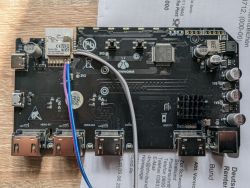
We read a BK7231N with 2 MiB SPI flash via UART.
Chip detection:
The problem occurred reproducibly only at the beginning of the flash:
Normal reading starting from 0x011000, on the other hand, worked flawlessly. Therefore, we read the dump in two modes:
1. For the boot/initial area, especially 0x000000, we disabled the BK7231N boot_protection_bypass.
2. For the remaining flash starting from 0x011000, we used the normal BK7231N read with active bypass.
3. Each 4K page was verified via chip CRC.
4. In the end, a complete 2 MiB image was assembled.
The crucial point: In bk7231tools, boot_protection_bypass is active by default. During this, flash addresses are internally shifted by the flash size to bypass the BK7231N boot protection. For the first block 0x000000, this led to CRC mismatches on this device. With the bypass disabled, this block could be read correctly.
The first 4K block was successfully read twice and was byte-identical:
The full dump:
Summary:
The Windows tool presumably fails because it always reads the BK7231N boot area at 0x000000 with active bootloader-protection-bypass or with an inappropriate addressing. On this device, the first boot area must be read without bypass, otherwise the read data and the CRC calculated by the chip do not match. Starting from 0x011000, the normal bypass mode is correct and stable.
Recommended tool change:
Therefore, the CRC errors do not indicate a defective chip as we thought at first, but rather a special handling of the BK7231N boot area that the Windows tool probably does not perform correctly yet.
The full dump can be found here: https://dreimer.eu/bk7231n_full_verified.bin
I hope this helps you in what he did to even read the firmware at all. Sadly this dump really is sort of dead somehow. I flashed it onto a new CBU I bought specifically for testing and the device does not react at all with it, too. Now I test flashed both the new and the soldered in CBU with OpenBeken and both happily show up as WIFI hotspots. So it really is a dead firmware in the end. But as there seems to be no way to get a working one I thought that maybe OpenBeken can help me getting back control of the device.... But I have NO CLUE at all what to do now.
The Windows Flashing tool from here https://github.com/openshwprojects/BK7231GUIFlashTool seems to read quite some information from OBK that I immediately can associate with the HDMI Sync Box and the settings inside the Android app. Still this is the answer of the App:
Here the JSON output:
Btw, here the result of the Online OBK Template Converter:
The author of the Windows Flasher sent me over here to ask you guys for some help. Any idea what I can do to get this one working again? I have a not really working firmware dump for you posted above and all the data I was able to get. Now how do I get this all together do someting with TuyaMCU driver activated on startup (I hope I managed to do this at least by now...)
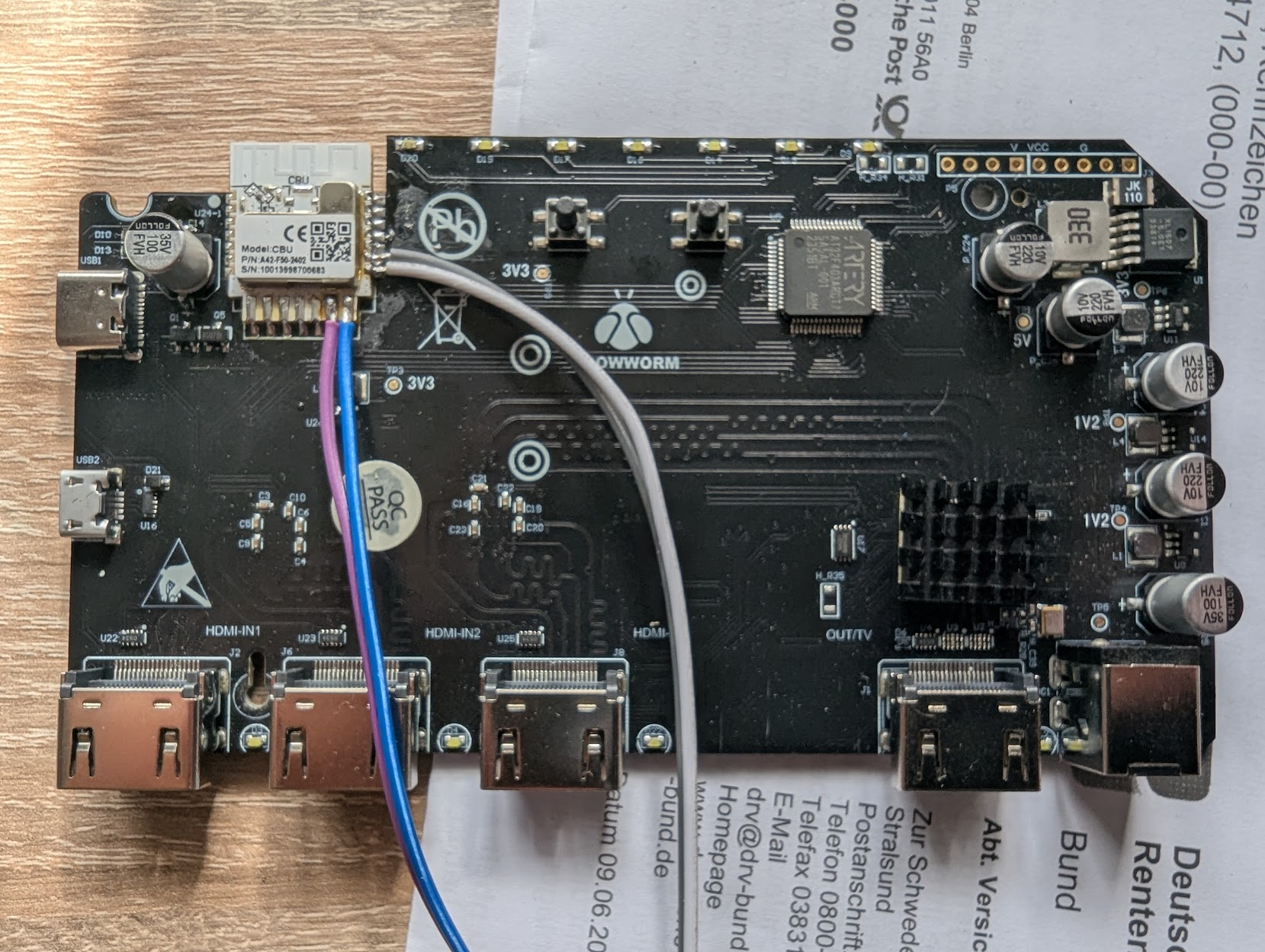
We read a BK7231N with 2 MiB SPI flash via UART.
Chip detection:
Chip: BK7231N
Flash ID: eb 60 15
Flash size: 0x200000
Protocol: FULL
The problem occurred reproducibly only at the beginning of the flash:
Reading 4k page at 0x000000
Chip CRC value ... does not match calculated CRC value ...
Normal reading starting from 0x011000, on the other hand, worked flawlessly. Therefore, we read the dump in two modes:
1. For the boot/initial area, especially 0x000000, we disabled the BK7231N boot_protection_bypass.
2. For the remaining flash starting from 0x011000, we used the normal BK7231N read with active bypass.
3. Each 4K page was verified via chip CRC.
4. In the end, a complete 2 MiB image was assembled.
The crucial point: In bk7231tools, boot_protection_bypass is active by default. During this, flash addresses are internally shifted by the flash size to bypass the BK7231N boot protection. For the first block 0x000000, this led to CRC mismatches on this device. With the bypass disabled, this block could be read correctly.
The first 4K block was successfully read twice and was byte-identical:
Address: 0x000000..0x000FFF
CRC32: 0x4925897D
SHA256: 8e542a09fbc4cb59a59b95cb7a89ed2a4fe90ff2bdec826c473e12bc8291751d
The full dump:
File: dumps/bk7231n_full_verified.bin
Size: 0x200000 = 2,097,152 bytes
Pages: 512 × 4096 bytes
Address range: 0x000000..0x1FFFFF
Image CRC32: 0xD5AD5A3A
SHA256: 2cd6cc75288d9b86fefd454369c0e8d03b48226eafaa6100b0ec15223814d5e4
Summary:
The Windows tool presumably fails because it always reads the BK7231N boot area at 0x000000 with active bootloader-protection-bypass or with an inappropriate addressing. On this device, the first boot area must be read without bypass, otherwise the read data and the CRC calculated by the chip do not match. Starting from 0x011000, the normal bypass mode is correct and stable.
Recommended tool change:
If chip is BK7231N / FULL protocol:
- read 0x000000..0x010FFF with boot_protection_bypass disabled
- read 0x011000..flash_end with boot_protection_bypass enabled
- verify each 4K page individually
- retry pages independently
Therefore, the CRC errors do not indicate a defective chip as we thought at first, but rather a special handling of the BK7231N boot area that the Windows tool probably does not perform correctly yet.
The full dump can be found here: https://dreimer.eu/bk7231n_full_verified.bin
I hope this helps you in what he did to even read the firmware at all. Sadly this dump really is sort of dead somehow. I flashed it onto a new CBU I bought specifically for testing and the device does not react at all with it, too. Now I test flashed both the new and the soldered in CBU with OpenBeken and both happily show up as WIFI hotspots. So it really is a dead firmware in the end. But as there seems to be no way to get a working one I thought that maybe OpenBeken can help me getting back control of the device.... But I have NO CLUE at all what to do now.
The Windows Flashing tool from here https://github.com/openshwprojects/BK7231GUIFlashTool seems to read quite some information from OBK that I immediately can associate with the HDMI Sync Box and the settings inside the Android app. Still this is the answer of the App:
Sorry, no meaningful pins data found. This device may be TuyaMCU or a custom one with no Tuya config data.
No module information found.
Device internal platform - bk7231n, equals BK7231N.
And the Tuya section starts, as usual, at 2023424 (0x1EE000)
Here the JSON output:
{
  "gw_bi": {
    "uuid": "d1fb6421515cb2a8",
    "psk_key": "Ckp7D7aOrsuITifMj3iDNlN8YrimPnPDdWwV1",
    "auth_key": "lah9e2k0MaHA6GRpSRNAL84mD1qEwwuY",
    "ap_ssid": "SmartLife",
    "ap_passwd": null,
    "country_code": "CN",
    "bt_mac": null,
    "bt_hid": null,
    "prod_test": false,
    "fac_pin": "f1h4ipevgf1o9nec"
  },
  "gw_di": {
    "abi": 0,
    "id": "bfce4c07b26ead8d2blrrs",
    "swv": "3.0.7",
    "bv": "40.00",
    "pv": "2.2",
    "lpv": "3.3",
    "pk": "yd55ju6nkkzqes7a",
    "firmk": null,
    "cadv": "1.0.4",
    "cdv": "1.0.0",
    "dev_swv": "3.0.7",
    "s_id": "fcfvo0",
    "dtp": 0,
    "sync": 0,
    "attr_num": 2,
    "mst_tp_0": 9,
    "mst_ver_0": "1.0.50",
    "mst_tp_1": 10,
    "mst_ver_1": "1.0.9",
    "mst_tp_2": 0,
    "mst_ver_2": null,
    "mst_tp_3": 0,
    "mst_ver_3": null
  },
  "tls_ca_cnt": 0,
  "timer_arr": {
    "lastFetchTime": 0,
    "cnt": 0
  },
  "gw_wsm": {
    "nc_tp": 9,
    "ssid": "QXNnYWFyZA==",
    "passwd": "cmVpbWVyMTIxOA==",
    "md": 0,
    "random": 0,
    "wfb64": 1,
    "stat": 2,
    "token": "h1aLUJMD",
    "region": "EU",
    "reg_key": "2O3c",
    "dns_prio": 0
  },
  "wf_start_md": 3,
  "fcfvo0": [
    {
      "mode": "rw",
      "property": {
        "type": "bool"
      },
      "id": 20,
      "type": "obj"
    },
    {
      "mode": "rw",
      "property": {
        "range": [
          "white",
          "colour",
          "scene",
          "music"
        ],
        "type": "enum"
      },
      "id": 21,
      "type": "obj"
    },
    {
      "mode": "rw",
      "property": {
        "min": 10,
        "max": 1000,
        "scale": 0,
        "step": 1,
        "type": "value"
      },
      "id": 22,
      "type": "obj"
    },
    {
      "mode": "rw",
      "property": {
        "type": "string",
        "maxlen": 255
      },
      "id": 24,
      "type": "obj"
    },
    {
      "mode": "rw",
      "property": {
        "type": "string",
        "maxlen": 255
      },
      "id": 25,
      "type": "obj"
    },
    {
      "mode": "rw",
      "property": {
        "min": 0,
        "max": 86400,
        "scale": 0,
        "step": 1,
        "type": "value"
      },
      "id": 26,
      "type": "obj"
    },
    {
      "mode": "wr",
      "property": {
        "type": "string",
        "maxlen": 255
      },
      "id": 27,
      "type": "obj"
    },
    {
      "mode": "wr",
      "property": {
        "type": "string",
        "maxlen": 255
      },
      "id": 28,
      "type": "obj"
    },
    {
      "mode": "rw",
      "property": {
        "min": 0,
        "max": 1,
        "scale": 0,
        "step": 1,
        "type": "value"
      },
      "id": 101,
      "type": "obj"
    },
    {
      "mode": "rw",
      "property": {
        "min": 0,
        "max": 1,
        "scale": 1,
        "step": 1,
        "type": "value"
      },
      "id": 102,
      "type": "obj"
    },
    {
      "mode": "wr",
      "property": {
        "min": 0,
        "max": 2,
        "scale": 1,
        "step": 1,
        "type": "value"
      },
      "id": 103,
      "type": "obj"
    },
    {
      "mode": "wr",
      "property": {
        "range": [
          "screen",
          "music",
          "rainbow",
          "fire",
          "lighting",
          "firework",
          "star",
          "water",
          "particle",
          "fluid",
          "gravity",
          "swing",
          "breath",
          "color"
        ],
        "type": "enum"
      },
      "id": 104,
      "type": "obj"
    },
    {
      "mode": "rw",
      "property": {
        "min": 0,
        "max": 3,
        "scale": 0,
        "step": 1,
        "type": "value"
      },
      "id": 105,
      "type": "obj"
    },
    {
      "mode": "rw",
      "id": 106,
      "type": "raw"
    },
    {
      "mode": "rw",
      "property": {
        "type": "bool"
      },
      "id": 107,
      "type": "obj"
    },
    {
      "mode": "rw",
      "property": {
        "min": 0,
        "max": 1000,
        "scale": 1,
        "step": 10,
        "type": "value"
      },
      "id": 108,
      "type": "obj"
    },
    {
      "mode": "rw",
      "property": {
        "type": "bool"
      },
      "id": 109,
      "type": "obj"
    },
    {
      "mode": "wr",
      "property": {
        "range": [
          "DIR_UP",
          "DIR_RIGHT",
          "DIR_DOWN",
          "DIR_LEFT",
          "FUNC_OK",
          "FUNC_BACK",
          "FUNC_HOME",
          "FUNC_POWER",
          "SOUND_ADD",
          "SOUND_SUB",
          "SOUND_OP",
          "SETTING"
        ],
        "type": "enum"
      },
      "id": 110,
      "type": "obj"
    },
    {
      "mode": "wr",
      "property": {
        "range": [
          "HOTKEY0",
          "HOTKEY1"
        ],
        "type": "enum"
      },
      "id": 111,
      "type": "obj"
    },
    {
      "mode": "rw",
      "property": {
        "type": "bool"
      },
      "id": 112,
      "type": "obj"
    },
    {
      "mode": "rw",
      "property": {
        "min": 0,
        "max": 1000,
        "scale": 0,
        "step": 1,
        "type": "value"
      },
      "id": 113,
      "type": "obj"
    },
    {
      "mode": "ro",
      "property": {
        "type": "string",
        "maxlen": 255
      },
      "id": 120,
      "trigger": "direct",
      "type": "obj"
    }
  ],
  "is_stride": 0,
  "gw_ai": {
    "key": "C6qU+rRpV*}rzHH7",
    "lckey": "hyU)R@Bqh:f!{.:\u0060",
    "h_url": "http://a.tuyaeu.com/d.json",
    "h_ip": "35.159.150.3",
    "hs_url": null,
    "hs_ip": null,
    "hs_psk": "https://a3.tuyaeu.com/d.json",
    "hs_psk_ip": "18.198.62.99",
    "mqs_url": null,
    "mqs_ip": null,
    "mq_url": "m2.tuyaeu.com:1883",
    "mq_ip": "3.66.126.37",
    "ai_sp": null,
    "ai_sp_ip": null,
    "mq_psk": "m2.tuyaeu.com:8886",
    "mq_psk_ip": "3.66.126.37",
    "lp_url": "baal.tuyaeu.com:443",
    "lp_ip": "3.120.17.197",
    "time_z": "+01:00",
    "s_time_z": "[[1774746000,1792890000],[1806195600,1824944400]]",
    "wx_app_id": null,
    "wx_uuid": null,
    "dy_tls_m": 2,
    "cloud_cap": 1025,
    "psk21_key": null
  },
  "ble_beaconkey": "69D059AAF22EE6D60543083681466345",
  "astro_timer": {
    "timestamp": 1769120251,
    "index": 0
  },
  "em_sys_env": "bk7231n",
  "mf_test_close": true
}
Btw, here the result of the Online OBK Template Converter:
[17:28:32] Processing dropped file: bk7231n_full_verified.bin
[17:28:33] Starting Tuya Config Decryption (KV Storage Mode)...
[17:28:33] Magic found at 2023456. Config starts at 2023424.
[17:28:33] Secondary key derived.
[17:28:33] Decrypted and parsed 14 data blocks.
[17:28:33] Recovered 13 files: gw_bi, gw_di, tls_ca_cnt, timer_arr, gw_wsm, wf_start_md, fcfvo0, is_stride, gw_ai, ble_beaconkey, astro_timer, em_sys_env, mf_test_close
[17:28:33] user_param_key not found in KV storage.
[17:28:33] Available files:
[17:28:33] File: gw_bi (258 bytes)
[17:28:33] File: gw_di (348 bytes)
[17:28:33] File: tls_ca_cnt (5 bytes)
[17:28:33] File: timer_arr (28 bytes)
[17:28:33] File: gw_wsm (162 bytes)
[17:28:33] File: wf_start_md (2 bytes)
[17:28:33] File: fcfvo0 (2103 bytes)
[17:28:33] File: is_stride (2 bytes)
[17:28:33] File: gw_ai (587 bytes)
[17:28:33] File: ble_beaconkey (35 bytes)
[17:28:33] File: astro_timer (34 bytes)
[17:28:33] File: em_sys_env (20 bytes)
[17:28:33] File: mf_test_close (5 bytes)
[17:28:33] Failed to extract config from binary.
The author of the Windows Flasher sent me over here to ask you guys for some help. Any idea what I can do to get this one working again? I have a not really working firmware dump for you posted above and all the data I was able to get. Now how do I get this all together do someting with TuyaMCU driver activated on startup (I hope I managed to do this at least by now...)
