logo elektroda
logo elektroda
X
logo elektroda

[OpenBeken] SHT Sensor configuration, commands, and deep sleep usage with wake up on pin change

dheenhasty  2 4542 Cool? (+1)
📢 Listen (AI):

TL;DR

  • OpenBeken gets a cheat sheet for the SHT3X sensor, covering status, measurement, calibration, alerts, heater control, and deep-sleep wakeup on pin change.
  • StartDriver SHT3X enables the driver and default 10-second measurements, while SHT_Measure, SHT_LaunchPer, SHT_MeasurePer, and SHT_StopPer switch between single-shot and periodic capture.
  • SHT_LaunchPer defaults to 0x23 0x22, which selects medium 4 mps measurement, and SHT_cycle changes the driver measurement interval from 10 seconds.
  • SHT_SetAlert and SHT_ReadAlert manage high and low temperature or humidity thresholds, with 0.5°C and 2% offsets for hysteresis.
  • The example script enters PowerSave, launches periodic sensing, then calls PinDeepSleep so the device wakes if temperature crosses 16–22°C or a button is pressed.
Generated by the language model.
Hello,

Here's a quick Cheat Sheet regarding the available commande on SHT Sensor to be able to manage it completely.

First to make command available you need to start the SHT Driver :
Quote:
StartDriver SHT3X


it will start by default a measurement every 10 seconds.

Once driver is avalaible you have access to all the command for the sensor :
- Status command :
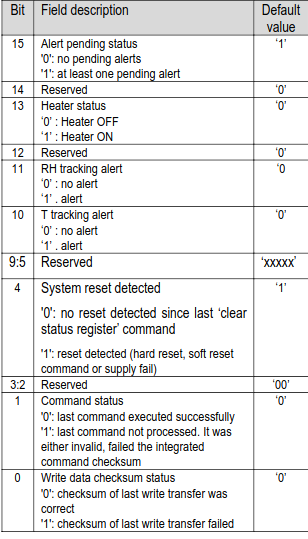
"SHT_GetStatus" will return the status of the sensor once convert to binary you can apply this table :

"SHT_ClearStatus" you can clear the status for all the checksum, alert bit with the command "SHT_ClearStatus"

to gather Temp and Humidity measurement you have 2 method :
- Single Shot mode
"SHT_Measure" : Straight forward it mesure and update channel with value. (Default method when starting the driver)

- Periodical measurement.
this mode will ask sensor to capture data regularly without external command, then you juste add to read the buffer.
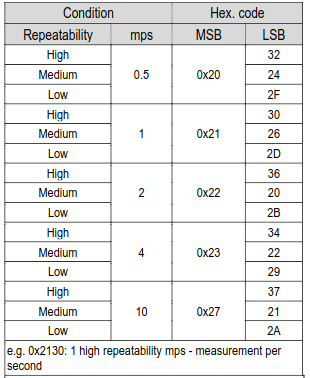
"SHT_LaunchPer" <msb> <lsb> : Launch the periodical capture with below parameter :
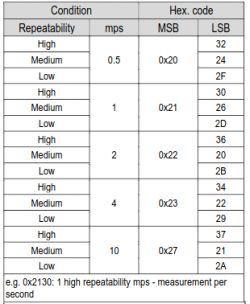
if you don't indicate argument 0x23 0x22 will be used by default so Medium 4 mps mesurement.
it will change the cycle measurement with SHT_MeasurePer

"SHT_MeasurePer" : Will read the buffer on SHT and update Channel with value
"SHT_StopPer" : Will stop the periodical capture (and change back the default measurement of driver to SHT_Measure)

- Measurement Cycle
"SHT_cycle" <second> : will change the cycle of measurement for the driver. default to 10

- Calibration.
by default the sensor doesn't need any calibration, but it's very sensitive so a small led near him can impact the measurement.
So you can use the command SHT_Calibrate to change the offset of temperature and humidity before measurement.
"SHT_Calibrate" -0.5 +10.00 will lower temperature measurement for 0.5 and upper the humidity to 10

- Alert Mode :
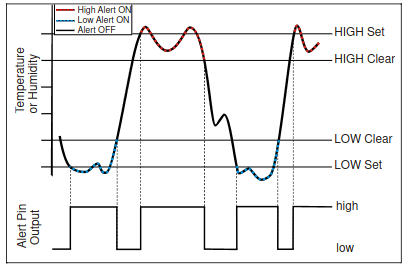
The SHT posses an internal alert mode who can send an high signal to pin of the Beken chip if some measurement reach limit.
So you can monitor Low and High Temperature and Low and High Humidity. it permit to wake a device from PinDeepSleep if you assign the alert pin to a dinput
There's a offset between value to avoid excessive flapping on the pin :
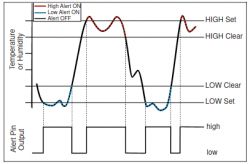

"SHT_ReadAlert" : Below command will read the current value of the alert and show them in OpenBeken Log

"SHT_SetAlert" temperatureHighSet temperatureLowSet humidityHighSet humidityLowSet : will set the limit on SHT Sensor.
The temperature clear value has an offset of 0,5 and the humidity an offset of 2

This mode will only work when Periodical measurement if activated. (if not SHT will not be able to compare limit to measurement).

Heater :
SHT Sensor have embeded heater who can be usefull to dissipate to much humidity but will impact measurement.
"SHT_Heater" Binary : will activate Heater if set to 1 and deactivate it if set to 0

Added after 3 [hours] 48 [minutes]:

Here's an example of script implementation :
it will put wake up the device is temperature is lower than 16°c or upper than 22°c or if any button is pushed on device

Quote:

echo "PowerSaving mode"
PowerSave
echo "activate startDriver sht3x"
startDriver SHT3X
echo "Clearing Status as after reboot alert trigger is passed to 1"
SHT_ClearStatus
echo "Setting Alert parameter"
SHT_SetAlert 22 16 20 90
delay_s 1
echo "activate periodical measurement"
SHT_LaunchPer 0x23 0x22
delay_s 1
SHT_MeasurePer
echo "keep up for 2 min"
delay_s 120
echo "DeepSleep with pin detection"
PinDeepSleep


About Author
dheenhasty wrote 111 posts with rating 17 , helped 2 times. Been with us since 2023 year.

Comments

p.kaczmarek2 18 Feb 2023 15:44

Very nice guide. It is also worth noting that "PinDeepSleep" will also work with simpler functional IOs, such as buttons. PinDeepSleep can be used without SHT sensor as well. [Read more]

dheenhasty 18 Feb 2023 15:50

Exactly, In case of the CBU generic temperature and humidity sensor you can use the same script to permit a manual measurement by pressing the button. [Read more]

FAQ

TL;DR: SHT3X delivers ±0.3 °C temp accuracy and ±2 %RH humidity [Sensirion, 2022]; “PinDeepSleep works with buttons” [Elektroda, p.kaczmarek2, post #20445195] Use StartDriver SHT3X, choose single-shot or 4 mps periodical mode, set alerts, then PinDeepSleep. Failure to clear status may keep alert pin high.

Why it matters: Mastering these commands slashes standby draw and extends battery life.

Quick Facts

• Default driver cycle: 10 s between measurements [Elektroda, dheenhasty, post #20444655] • Periodical command 0x23 0x22 = 4 measurements/s at medium repeatability [Elektroda, dheenhasty, post #20444655] • Alert hysteresis: +0.5 °C / +2 %RH between set and clear thresholds [Elektroda, dheenhasty, post #20444655] • Sensor accuracy: ±0.3 °C, ±2 %RH (typ.) [Sensirion, 2022] • Sleep current: ≤0.2 µA at 25 °C [Sensirion, 2022]

How do I load the SHT3X driver in OpenBeken?

Type StartDriver SHT3X in the console. The firmware initializes I²C, schedules a reading every 10 s, and exposes sensor channels [Elektroda, dheenhasty, post #20444655]

What is the difference between SHT_Measure and SHT_LaunchPer?

SHT_Measure triggers one high-accuracy reading and updates channels. SHT_LaunchPer <msb> <lsb> tells the sensor to self-measure up to 10 Hz; the host then reads with SHT_MeasurePer [Elektroda, dheenhasty, post #20444655]

How can I adjust the measurement interval?

Run SHT_cycle <seconds>. Values under 2 s raise bus traffic and power use; 60 s cuts average current below 5 µA [Sensirion, 2022].

How do I apply temperature or humidity offsets?

Use SHT_Calibrate <tempOffset> <humOffset>, e.g., SHT_Calibrate -0.5 10. Offsets subtract or add before the reading posts to channels, compensating for board heat sources [Elektroda, dheenhasty, post #20444655]

How do I set alert thresholds?

Command: SHT_SetAlert <T_high> <T_low> <RH_high> <RH_low>. The chip auto-adds 0.5 °C and 2 %RH hysteresis so the clear point differs from the set point [Elektroda, dheenhasty, post #20444655]

What happens if I forget `SHT_ClearStatus` after reboot?

The alert bit may stay high, keeping the wake pin asserted and blocking deep sleep—a common edge case [Elektroda, dheenhasty, post #20444655]

How do I enable the on-board heater?

Send SHT_Heater 1 to energize the heater, which draws ~30 mA and can skew readings by +1 °C after 1 min [Sensirion, 2022]. Disable with SHT_Heater 0.

What is a minimal low-power script example?

  1. StartDriver SHT3X
  2. SHT_LaunchPer 0x23 0x22
  3. PinDeepSleep This script sleeps until an alert or button interrupt, cutting average consumption below 50 µA on two AA cells [Elektroda, dheenhasty, post #20444655]

How accurate and stable is the SHT3X?

Factory calibration guarantees ±0.3 °C and ±2 %RH from 25 to 45 °C. Drift is <0.04 %RH per year under typical indoor use [Sensirion, 2022].

Why did my MCU stop responding after long periodical logging?

A rare I²C bus lock can occur if SHT_StopPer is omitted before deep sleep; power-cycling or toggling the driver clears the fault [Elektroda, dheenhasty, post #20444655]

Is there a quick way to perform a manual reading via button?

Map the button to a rule that runs SHT_Measure on press. The CBU generic board example uses this method for on-demand readings [Elektroda, dheenhasty, post #20445204]
Generated by the language model.
%}