Sharing EV Chargers using OpenBeken - charging limiter
The use of Electric Vehicles (EVs) is increasing rapidly. However, this growth comes with challenges related to charging infrastructure and battery limitations.
The worst nightmare for owners of electric vehicles is being left without power. Wouldn't it be nice if people were willing to share some electricity for those in need?
Private charging stations, while convenient, have their drawbacks. They often require a high upfront cost (including installation), and for individuals living in apartments or without private parking, installing a home charger is not an option.
You might consider purchasing a larger battery to extend driving range, but this will increase weight and cost.
Shared EV chargers can provide a small contribution to creating a more accessible charging infrastructure.
Electrical Situation and types of chargers
Let's consider a regular situation with a single-phase installation. In this scenario, "slow charging" typically occurs with a level 2 charger that uses AC power. The charger is integrated within the vehicle, while the charge controller determines the maximum power that can be drawn. The maximum current is usually set between 10 and 32 A, resulting in a charging power starting at 3.7 kW. To manage the operation of the charger, and to manage the PWM signal to indicate the maximum power, controllers like the EKEPC2-C/S are often used.
However, a controller alone is insufficient as you also need features like galvanic disconnect, current measurement, leak current protection, and overcurrent protection. That is why I would refrain from building one yourself. Getting all parts and certification ( insurance ) would be expensive as well.
Chargers are often expensive due to their "smart" features, such as an LCD screen, a (privacy invading) mobile app, bluetooth, Wi-Fi, NFC, and a ( closed down, yet another dependency) cloud-based platform for charger management and tracking sessions. These smart chargers can easily cost around 1000 euros.
On the other hand, there are also more reasonable chargers like those made by
doktorvolt.pl, which come fully assembled with all required protections and the corresponding controller built in. These types of chargers are easy in operation and have no more than a start/stop button, an indicator LED, and a socket for the charging cable.
Apart from that we should consider the right to repair and the e-waste : a fully packed custom board leaves us with no other option than to replace the whole charger. Using standard DIN components is really a better choice.
While you may opt for a "smart" charger promising flawless global sharing, there are numerous suppliers offering peer-to-peer EV charging, but as this market gets saturated, there will likely be a major consolidation. Betting on the right platform is not easy, and even promised interoperability through OCPP or the new IEC 63110 protocol does not mean that operation or integration will be easy.
What we are looking for is a simple way to limit the use of a shared resource.
Sharing the charger
If you intend to share your charger, you might think of the following scenarios:
1. Sharing with someone you know and establishing an agreement about the costs.
2. Sharing with visiting guests, friends, or family.
3. Sharing with clients in exchange for expenditures at your business, such as a café or hotel.
Scenario 1 may involve some hassle and requires a level of trust, but it is completely feasible. For instance, you could use two energy meters that can be switched between users.
Scenario 2 promotes friendly and social behavior, but you don't want to bankrupt yourself over it.
Scenario 3 would also require some form of limitation, as charging 10 kWh for a single cup of coffee can quickly undermine your business model.
Using OBK
Openbeken (OBK) is an alternative firmware for smart IOT devices.
Let's assume you have an OBK-enabled Tuya-based Power Meter / Switch / Protector like the Tomzn TOML-VA (
Link), providing access to total power data through a Tuya channel.
Further we assume that your minimal version is OpenBeken release 1.17.213, where the chargingLimit driver was introduced. See
the code
As a charger we assume you have a Single phase charger (max 32 A , 7.3 kW) . We do not modify the charger. The power meter is installed in front of the charger. You can set the built in protections from the meter.
(Warning / Disclaimer: You must follow all regulations, permissions, contractual obligations, warranty, and safety procedures specific to your situation. Chargers should be installed and checked by a qualified installer.)
For scenario 1, scripting an OBK-enabled meter with different users can be an option. OBK would post the totals of each charging session, along with the "userid" variable, to a web-based data collection endpoint. This would also allow for registering different tariffs, although I have not found an existing script to fulfill this functionality yet.
For scenario 2, the "
ChargeLimit" driver in OBK can be used. It enables setting a maximum power limit and/or time window for supplying power to the charger. For example, you can restrict the charging time to a maximum of 60 minutes and the power to a maximum of 10 kWh. If either limit is reached, the charging session automatically stops by disconnecting the power to the charger.
In both scenarios, when starting the charging session either via MQTT or the OBK GUI, the person wishing to charge would simply connect the cable between their vehicle and the charger to initiate charging.
For scenario 3, the "ChargeLimit" driver can also be employed. Presets can be easily set up with scripting in OBK, such as an "electrical step" that requires more time but less power, or a "small client" preset that allows for a maximum of 30 minutes and 5 kWh. If you want to charge, you can select a preset like "20 kWh, 2 hours charge (10 EUR)".
At any time, you can remotely stop the charging session or monitor how much power and time remain.
Setting up OBK
The minimal setup would look like this :
// start the Chargginglimit driver
startDriver ChargingLimit

// set up the limit
// suppose the total power is measured in channel 5
// chSetupLimit (channel to watch)  (max power) (max time) action to perform
chSetupLimit 5 5000 3600 "POWER OFF"
In this case it would mean we monitor channel 5 for power, and allow maximum 5000 Wh = 5KWh or maximum 3600 seconds (1 hour)
You can find more at
github
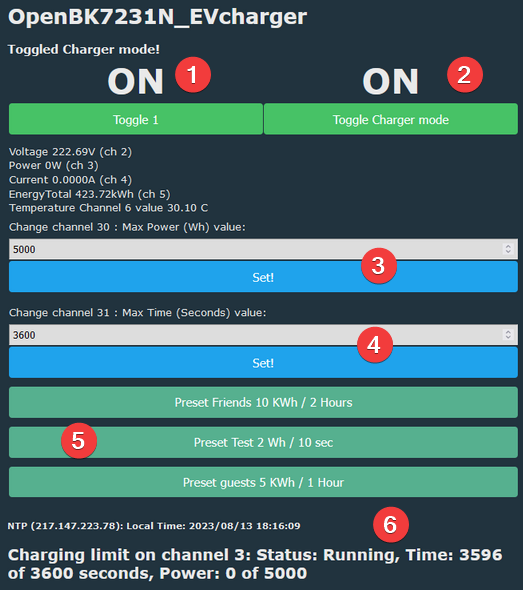
An example of how that would look (with presets via scripting) :
(1) re(start) charging session
(2) enable/disable charger mode
(3) set maximum power for the session
(4) set maximum time for the session
(5) or select a preset
(6) current status of the session, how much power or time is left
Possible Improvements
One significant challenge is load balancing. If your total system has a hard limit, such as an electricity contract allowing 5.7 kW (25A) maximum, but you want to provide the maximum power available for charging when no other users (e.g., water boiler) are consuming power, you will need two power meters and a way to communicate the maximum allowed current to the controller. Some smart chargers offer an RS485 current meter that communicates with the charger, but this needs to be done fast (reading every second) to prevent tripping the main fuse.
Summary
Using OBK provides a low-tech (or more appropriately, appropriate tech) option for sharing your EV charger. With its powerful scripting capabilities and flexible driver system, OBK serves as a good starting point for adding additional functionality to your charger. Moreover, since the limits you set can be assigned to a non-power metering Tuya channel, this functionality can be extended to limit other sensor values as well.
Any suggestion or improvement is welcome.
Thanks to
openshwprojects
Autoexec.bat :
startDriver httpButtons
startDriver TuyaMCU
startDriver NTP

linkTuyaMCUOutputToChannel 16 1 1
setChannelType 1 toggle

setChannelType 2 Voltage_div10

setChannelType 3 Power

setChannelType 4 Current_div1000

linkTuyaMCUOutputToChannel 1 0 5
setChannelType 5 EnergyTotal_kWh_div100

linkTuyaMCUOutputToChannel 6 RAW_TAC2121C_VCP

linkTuyaMCUOutputToChannel 101 0 6
setChannelType 6 Temperature_div10

setChannelType 7 Error


// *******************************
// Charger setup

// We use toggle 29 to enable/disable the charger mode
// while enabling, we start a new cycle immediately

setChannelType 29 Toggle
SetChannelLabel 29 "Charger mode"
addChangeHandler Channel29 == 1 startchargermode
addChangeHandler Channel29 == 0 stopchargermode

// disable driver by default after restart
SetChannel 29 0

// (re)start session when toggled
addChangeHandler Channel1 == 1 startsession
addChangeHandler Channel1 == 0 stopsession

// disable output by default after restart
setChannel 1 0

// we keep the maximum time in channel 30 ( $CH30)
setChannelType 30 TextField
SetChannelLabel 30 "30 : Max Power (Wh)"
setChannel 30 2

// we keep the maximum time in channel 31 ( $CH31)
setChannelType 31 TextField
SetChannelLabel 31 "31 : Max Time (Seconds)"
setChannel 31 60

// chargermode

alias startchargermode backlog startDriver ChargingLimit; publish charging/driver "started";  startsession;
alias stopchargermode backlog stopDriver ChargingLimit; publish charging/driver "stopped"; stopsession;

// charging sessions

alias startsession backlog setChannel 1 1; chSetupLimit 3 $CH30 $CH31 "POWER OFF"; publish charging/status "started" ; publish charging/status/starthour $hour ; publish charging/status/startminute $minute ; publish charging/status/stophour 0; publish charging/status/stopminute 0;

alias stopsession backlog setChannel 1 0; publish charging/status "stopped"; publish charging/status/stophour $hour; publish charging/status/stopminute $minute;
// todo : timestamp instead of hour minute

// some presets
alias presetguests backlog setChannel 30 5000; setChannel 31 3600;
alias presetfriends backlog setChannel 30 10000; setChannel 31 7200;
alias presettest backlog setChannel 30 2; setChannel 31 10;

setButtonEnabled 0 1
setButtonLabel 0 "Preset guests 5 KWh / 1 Hour"
setButtonCommand 0 presetguests
setButtonColor 0 "#56b08f"

setButtonEnabled 1 1
setButtonLabel 1 "Preset Friends 10 KWh / 2 Hours"
setButtonCommand 1 presetfriends
setButtonColor 1 "#56b08f"

setButtonEnabled 2 1
setButtonLabel 2 "Preset Test 2 Wh / 10 sec"
SetButtonCommand 2 presettest
setButtonColor 2 "#56b08f"







Comments
It would be better to post the article in the original language - English. The machine-translated one requires knowledge of both Polish and English (to be able to "decode" the original word and make... [Read more]
You're right, the original is here: https://www.elektroda.com/rtvforum/topic3996220.html I like the idea of sharing and sharing the electrical installation for the EV charger. If you can do simple... [Read more]
Everything is fine, but now rather work is being carried out on how to prevent charging electricians from sources other than those indicated. In short, now a bigger part of the price of petrol is tax and... [Read more]