FAQ
TL;DR: OpenBeken exposes logs on TCP port 9000, and one user said it "works like a charm." This shortcut helps Linux, Windows, Cygwin, PowerShell, and PuTTY users inspect, save, or filter OBK logs without opening the web app, especially for long-running checks such as DS1820 debugging. [#21307105]
Why it matters: Direct TCP log streaming gives faster, scriptable troubleshooting when you only need live output, filtering, or capture.
| Method |
Platform |
Typical command or action |
Best use |
nc / netcat |
Linux |
nc <IP> 9000 \| grep DS1820 |
Fast live filtering |
BusyBox sh + nc |
Windows |
Same nc command inside BusyBox shell |
Windows without WSL |
| PowerShell |
Windows |
TcpClient + keyword filter loop |
Interactive filtering |
Cygwin + nc + awk |
Windows |
nc <IP> 9000 \| awk ... |
Complex parsing |
| PuTTY |
Windows |
Raw TCP session to port 9000 |
Quick manual viewing |
Key insight: Port 9000 log streaming is excellent for waiting on specific events and filtering them live, but it does not replace the hardware UART log for full debugging coverage.
Quick Facts
- OpenBeken devices in the thread stream logs over TCP port 9000, which lets users inspect output without opening the web application's Logs page. [#21244934]
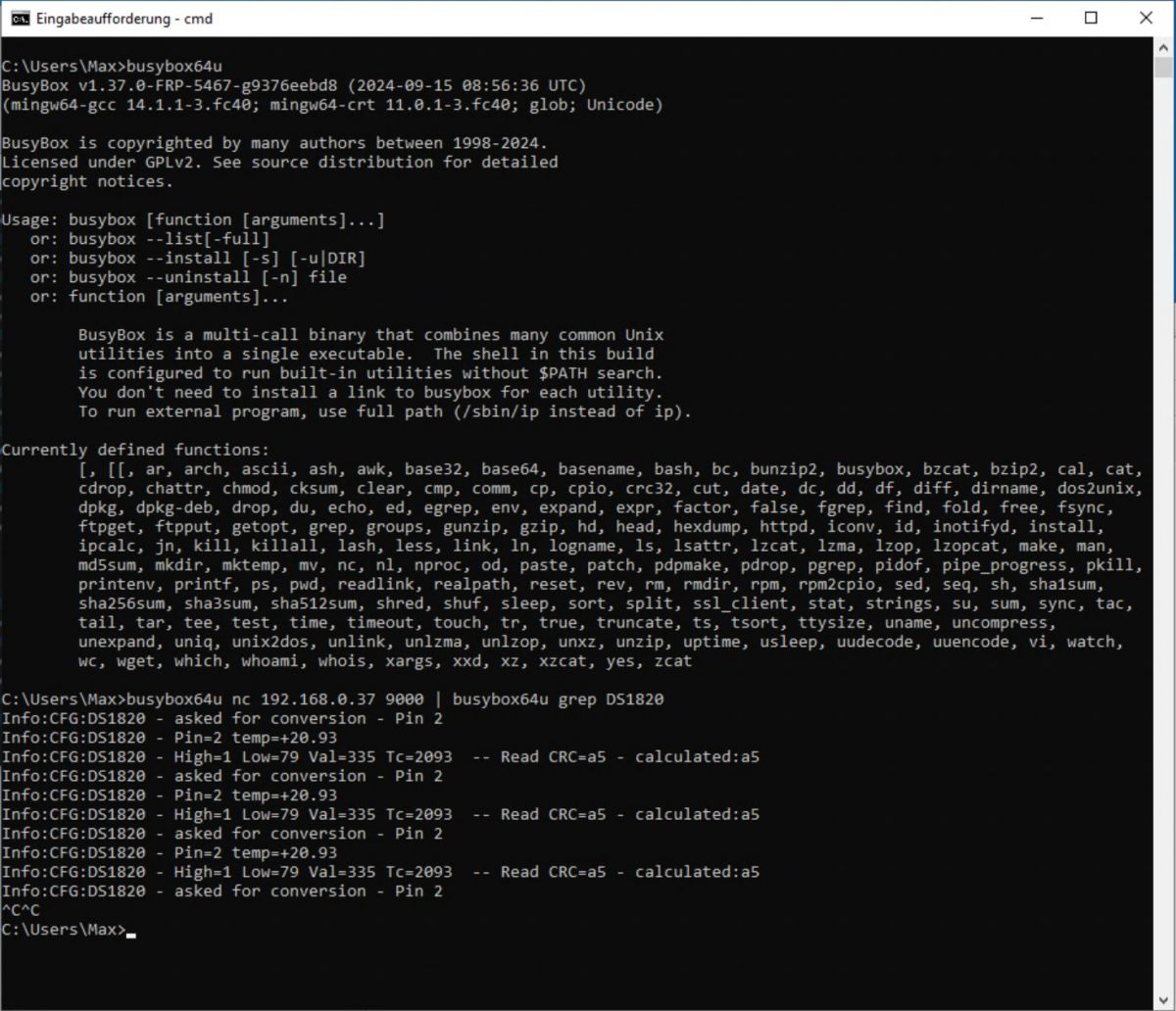
- A Linux example filters DS1820 activity live with
nc 192.168.0.37 9000 | grep DS1820, showing repeated messages such as Pin 2 and temp=+19.37. [#21244934]
- Windows users reported three working paths: BusyBox, PowerShell, and PuTTY; each connects to the same log stream on port
9000. [#21246726]
- A Cygwin example parsed energy-related lines that included 242.087265 V, 0.166671 A, and 1.210776 W, showing that command-line tools can extract specific values in real time. [#21263048]
How do I inspect OpenBeken logs directly with ncat or netcat without opening the Web application?
Connect directly to the device on TCP port 9000 and read the live stream. 1. Find the device IP, such as
192.168.0.37. 2. Run
nc 192.168.0.37 9000. 3. Add a filter like
| grep DS1820 if needed. This avoids opening the web UI and works well for short checks or long captures.
[#21244934]
What is the OpenBeken log stream on port 9000, and how does it differ from the logs shown in the web UI?
The port 9000 stream is a direct network log feed from the device. It lets you read logs without starting the web application or opening its Logs menu. The thread presents it as a faster shortcut for live monitoring and filtering, not as a separate log format. Its key difference is access method: TCP client instead of browser UI.
[#21244934]
Why is port 9000 useful for monitoring OBK logs over a longer period or filtering them in real time?
Port 9000 is useful because you can leave a TCP client running and pipe output into filters or files. That makes long waits easier when you need one event, one driver message, or one keyword. The thread explicitly recommends it for saving logs and filtering them over longer periods.
[#21244934]
What's the best way to filter OpenBeken logs for DS1820 messages on Linux using nc and grep?
Use
nc <device-ip> 9000 | grep DS1820 on Linux. The shared example was
nc 192.168.0.37 9000 | grep DS1820, and it returned repeated DS1820 lines such as
Pin 2 and
temp=+19.37. That gives a narrow, readable stream while the device keeps sending other log lines.
[#21244934]
How can I view OpenBeken logs on Windows without WSL by using BusyBox and a netcat-style command?
Run BusyBox for Windows, open its shell with
busybox sh, and use the same
nc command used on Linux. The thread describes BusyBox as a convenient Windows workaround when WSL is not installed. That means
nc <device-ip> 9000 works from the BusyBox shell without the OBK web page.
[#21244934]
What is BusyBox for Windows, and why do users call it a 'swiss army knife' for tools like nc, awk, sed, and md5sum?
BusyBox for Windows is a compact command-line bundle that groups many Unix-style utilities into one binary. In the thread, it is called a “swiss army knife” because it provides
nc,
awk,
sed, and
md5sum together, so one download covers several troubleshooting tasks on Windows.
[#21244934]
How do I use PowerShell to connect to an OpenBeken device on port 9000 and filter log lines by keyword?
Use a PowerShell script that opens a
System.Net.Sockets.TcpClient to the device IP on port 9000, reads each line, and prints only matches. The shared script prompts for the IP, sets
$port = 9000, then asks for a keyword until you type
exit. That gives interactive filtering without installing
grep or
awk.
[#21246726]
Why isn't the network log on port 9000 a full replacement for the hardware UART log in OpenBeken debugging?
The port 9000 stream is helpful, but it does not replace the hardware UART log. The thread states this limit directly and still recommends network logging for waiting on specific entries.
"UART is a hardware logging interface that exposes device output directly, with access independent of the web app or TCP viewer." Use UART when you need the fuller debugging path.
[#21244934]
What is LittleFS, and how could storing filtered debug logs there help with OpenBeken troubleshooting?
LittleFS was suggested as a place to store filtered logs for debugging.
"LittleFS is a storage layer mentioned for keeping selected debug logs on-device, with filtering to reduce write load and avoid wearing flash too fast." In the thread, this idea would help when you need logs preserved beyond the live port 9000 stream.
[#21246672]
How can I use Cygwin with nc and awk to filter OpenBeken log entries in real time on Windows?
Install
nc in Cygwin, then pipe the port 9000 stream into
awk. One reported example was
nc 192.168.1.250 9000 | awk '/SENSOR NOT/ {print}'. Another version added
gsub and field extraction, proving Cygwin can do real-time filtering and parsing on Windows without the web UI.
[#21263048]
Why does awk filtering for 'SENSOR NOT' in OBK logs show lines like 'cmd SENSOR NOT found', and what does that indicate?
It shows those lines because the filter matches the exact text
SENSOR NOT wherever it appears. In the shared output, the device emitted
Error:CMD:cmd SENSOR NOT found, so
awk printed it. That indicates your pattern is broad, and it can capture error messages as well as sensor-related lines.
[#21263048]
How do I extract a specific field such as ConsumptionTotal from OpenBeken energy logs using awk on the command line?
Use
awk to normalize separators, then print the field position that contains the value. The thread's example was
nc 192.168.1.250 9000 | awk '/SENSOR NOT/ {gsub(/,/," ");print $16}', which returned values like
"ConsumptionTotal":2053.459472. That method works when the log line structure stays consistent.
[#21263048]
What are the differences between PuTTY, PowerShell, netcat, and Cygwin for viewing OpenBeken logs on Windows?
PuTTY is the quickest manual viewer, PowerShell adds an interactive keyword loop, BusyBox or native
netcat gives simple stream access, and Cygwin adds richer parsing with
awk. All four approaches target the same port, 9000. Choose PuTTY for quick viewing, PowerShell for prompts, and Cygwin or netcat for repeatable command-line filters.
[#21307105]
Which approach works better for OpenBeken troubleshooting: streaming logs over TCP port 9000 or reading logs from the hardware UART?
Use TCP port 9000 for convenience, but use hardware UART when you need the fuller debugging path. The thread strongly praises the network stream for waiting on entries and filtering them live. It also states clearly that the network log is not a full replacement for the hardware UART log.
[#21244934]
What troubleshooting steps should I try if I connect to an OpenBeken device with nc or PuTTY on port 9000 and no logs appear?
First, verify the device IP and port 9000, because every working example used a direct IP such as
192.168.0.37 or
192.168.1.250. Second, remove filters like
grep DS1820 or
awk '/SENSOR NOT/', which can hide unrelated output. Third, try another client, such as PuTTY or PowerShell, to rule out a tool issue. If you still see nothing, switch to hardware UART because port 9000 is not a complete replacement.
[#21244934]
AI summary based on the discussion. May contain errors.







 .
.
Comments
Very nice method, even I was not aware about that! Still, it could be also good to have logs stored in LittleFS, maybe? At least for debugging purposes and with some filtering, so we don't wear out flash... [Read more]
Cool! You could also do it with PowerShell # Prompt the user to enter the IP address $ip = Read-Host -Prompt "Enter the IP address to get logs from" $port = 9000 $client = New-Object System.Net.Sockets.TcpClient($ip,... [Read more]
I have CYGWIN in my Windows machine. Added nc and now it becomes very handy to filter log entries in real time. $ nc 192.168.1.250 9000 | awk '/SENSOR NOT/ {print}' Error:CMD:cmd... [Read more]
I've just tried this with PuTTy and works like a charm: https://obrazki.elektroda.pl/6384735500_1731864901_thumb.jpg https://obrazki.elektroda.pl/2622612300_1731864923_thumb.jpg [Read more]