logo elektroda
logo elektroda
X
logo elektroda

esp8266-12f - no communication via UART despite correct connection

oczkers 4593 19
ADVERTISEMENT
Treść została przetłumaczona polish » english Zobacz oryginalną wersję tematu
  • #1 15604251
    oczkers
    Level 10  
    According to the specifications I connect:
    GND - GND
    VCC - VCC (3.3v)
    RST - HIGH
    EN - HIGH
    GPIO15 - LOW
    GPIO0 - LOW
    GPIO2 - HIGH
    TX - RX
    RX - TX

    pull-ups done via 10k resistors, additional voltage source added and a capacitor on the power line close to the module.

    I'm trying to communicate by sending both end of line characters and I've checked on probably all possible speeds but every time it looks the same - on the converter (ftdi232) the led indicates sending data but the return is no longer visible.
    By changing the operating mode (e.g. to flash mode instead of uart download) you can see the change in current consumption, and in normal operating mode you can see the network created by the module and you can connect to it via wifi so it looks working.
    Finally I set the speed to 74880, which theoretically was supposed to show the logs of the boot process but also nothing arrives.

    What have I overlooked or am I doing wrong?
  • ADVERTISEMENT
  • #3 15605133
    globalinfo
    Level 13  
    oczkers wrote:
    According to the specification I connect:
    GND - GND
    VCC - VCC (3.3v)
    RST - HIGH
    EN - HIGH
    GPIO15 - LOW
    GPIO0 - LOW
    GPIO2 - HIGH
    TX - RX
    RX - TX

    pull-ups done via 10k resistors, additional voltage source added and a capacitor on the power line close to the module.

    I'm trying to communicate by sending both end of line characters and I've checked on probably all possible speeds but every time it looks the same - on the converter (ftdi232) the led indicates sending data but the return is no longer visible.
    By changing the operating mode (e.g. to flash mode instead of uart download) you can see the change in current consumption, and in normal operating mode you can see the network created by the module and you can connect to it via wifi so it looks working.
    Finally I set the speed to 74880, which theoretically was supposed to show the logs of the boot process but also nothing arrives.

    What have I missed or am I doing wrong?


    I also have this problem. :?:
  • #4 15605208
    oczkers
    Level 10  
    Turns out the converter is broken - it sends data but sees no response. After connecting it to the arduino (tx to tx, crosswise doesn't work) you can see the botting logs when the speed is set to 74880, no response to AT commands still but it's probably a matter of getting the right speed and maybe a firmware update.
  • ADVERTISEMENT
  • #5 15605267
    globalinfo
    Level 13  
    oczkers wrote:
    It turned out that the converter is broken - it sends data but sees no response. After connecting to the Arduino (tx to tx, cross doesn't work) you can see the botting logs when the speed is set to 74880, no response to AT commands still but it's probably a matter of getting the right speed and maybe a firmware update.

    I can't upload the program from the Arduino IDE.
    I have added a reset button, after resetting on the serial monitor only "bushes" pop up and nothing else. i have changed the speeds but also nothing helps.
  • #6 15605329
    oczkers
    Level 10  
    Quote:
    on the serial monitor only "bushes"
    pop up
    Cracks means wrong speed - test all possible with emphasis on 74880, 9600, 115200
  • #7 15605916
    globalinfo
    Level 13  
    oczkers wrote:
    Quote:
    on the serial monitor only "bushes"
    pop up
    Cracks meaning wrong speed - test all possible with emphasis on 74880, 9600, 115200


    I try on different speeds (Esplorer, Arduino IDE) and nothing further bushes.

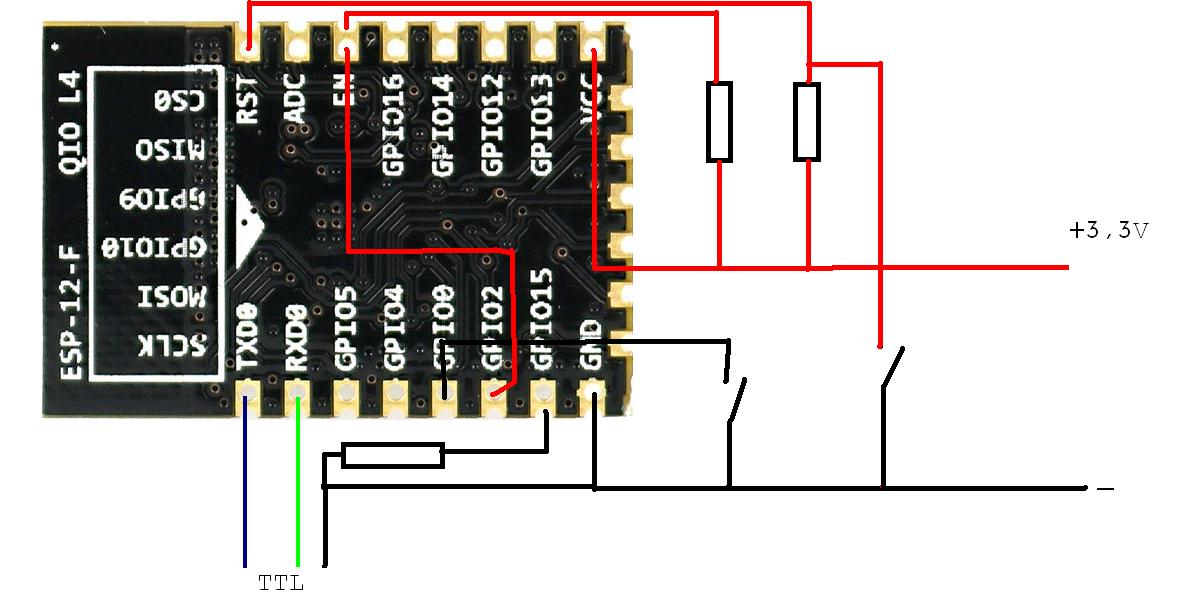
    I have connected like this:
    esp8266-12f - no communication via UART despite correct connection
  • #8 15605966
    madejpm
    Level 11  
    Disconnect the EN and GPIO2 pins, GPIO2 is the TX of UART1 and during start-up the first few lines fly to both UARTs.
  • ADVERTISEMENT
  • #9 15609951
    globalinfo
    Level 13  
    madejpm wrote:
    Disconnect the EN and GPIO2 pins, GPIO2 is the TX of UART1 and at boot time the first few lines fly to both UARTs.

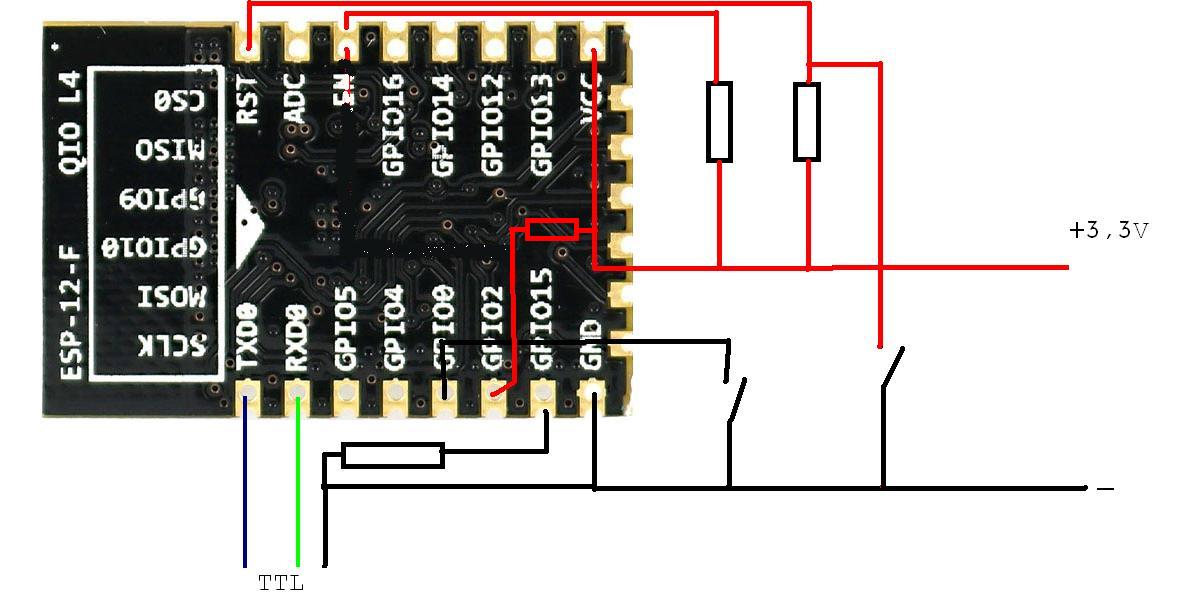
    I did it like this:
    esp8266-12f - no communication via UART despite correct connection

    Unfortunately the same thing continues. :cry:

    Quote:

    warning: espcomm_sync failed
    error: espcomm_open failed


    Added after 1 [hour] 7 [minutes]:

    globalinfo wrote:
    madejpm wrote:
    Disconnect the EN and GPIO2 pins, GPIO2 is the TX of UART1 and at boot time the first few lines fly to both UARTs.

    I did it like this:
    esp8266-12f - no communication via UART despite correct connection

    Unfortunately the same thing continues. :cry:
    On the Arduino IDE I have this message when sending the program.
    Quote:

    warning: espcomm_sync failed
    error: espcomm_open failed


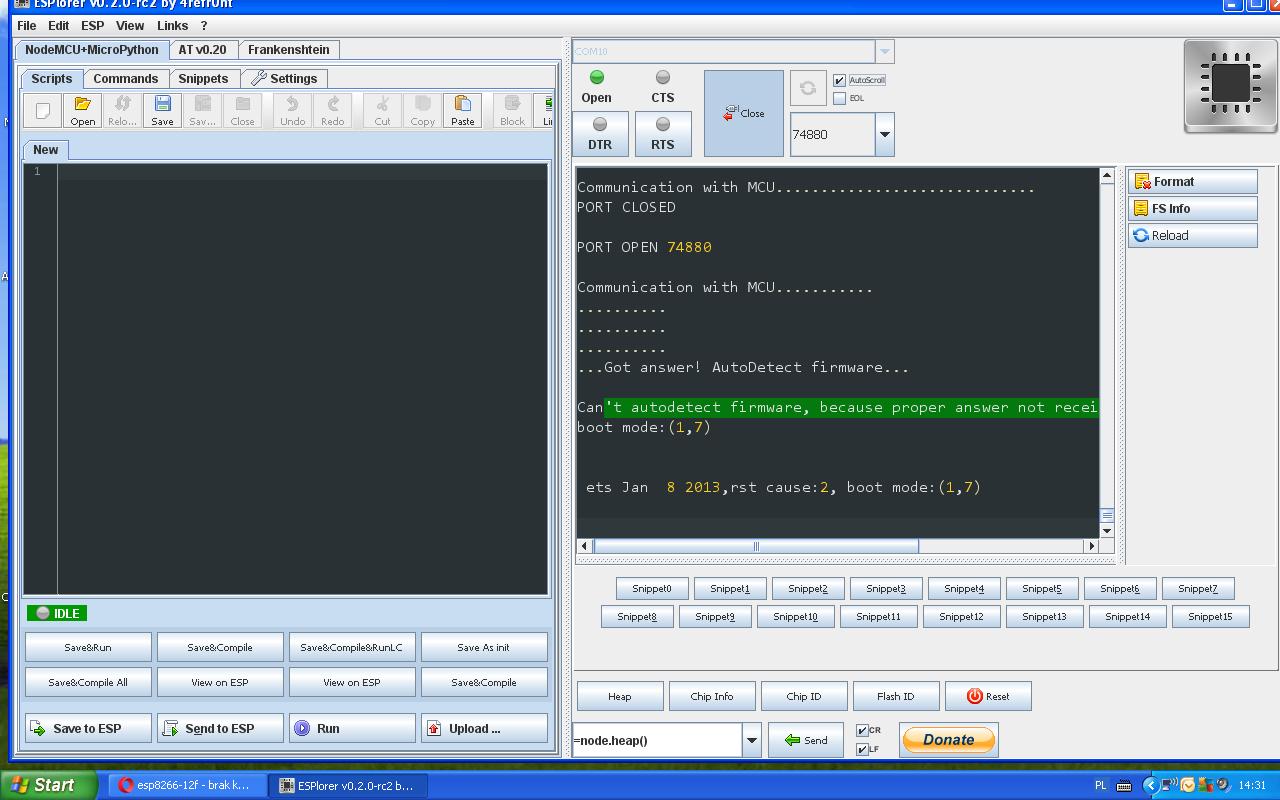
    On Esplorer

    Quote:
    PORT OPEN 74880

    Communication with MCU...
    ..........
    ..........
    ..........
    Got answer! AutoDetect firmware...

    Can't autodetect firmware, because proper answer not received.
    boot mode:( 3,6)


    ets Jan 8 2013,rst cause:2, boot mode:( 3,6)


    ets Jan 8 2013,rst cause:2, boot mode:( 1,6)


    mode:( 1,6) - is when I press reset when GIPO 0 - LOW
    mode:( 3,6) - is when I press reset when GIPO 0 - not connected
  • #10 15624876
    globalinfo
    Level 13  
    madejpm wrote:
    Disconnect the EN and GPIO2 pins, GPIO2 is the TX of UART1 and at boot time the first few lines fly to both UARTs.

    I managed to get it working, the whole problem was with the power supply.
    I uploaded the program via the Arduino IDE.
    It worked for a day and after powering it off and powering it back on, it stopped working.
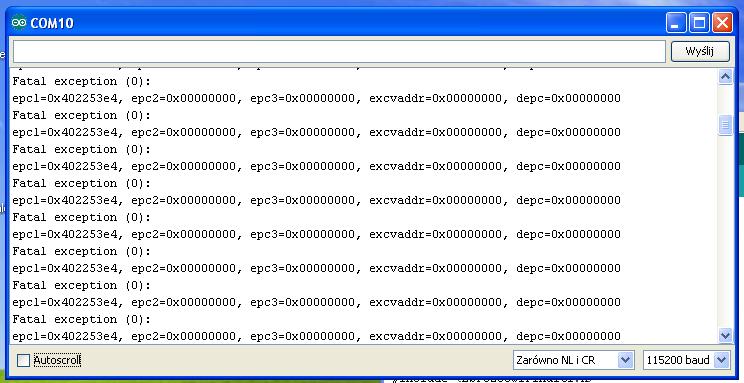
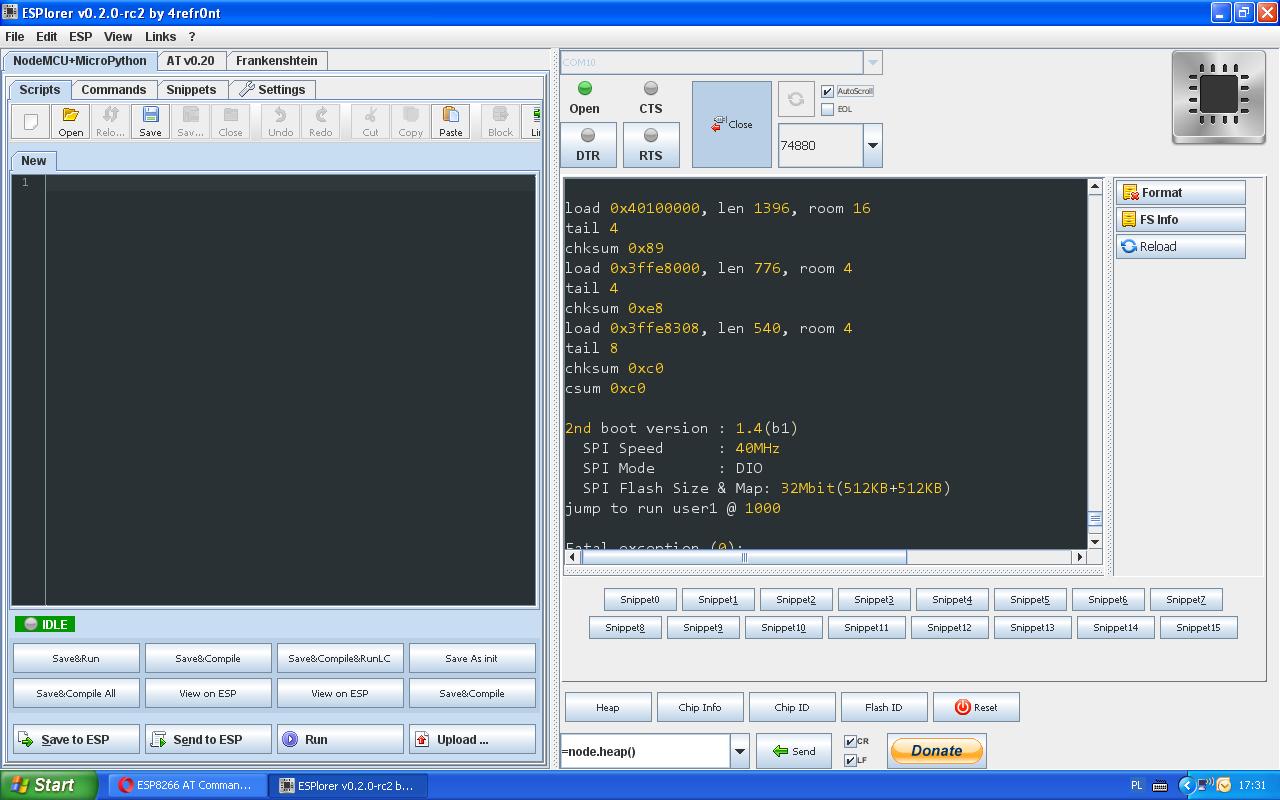
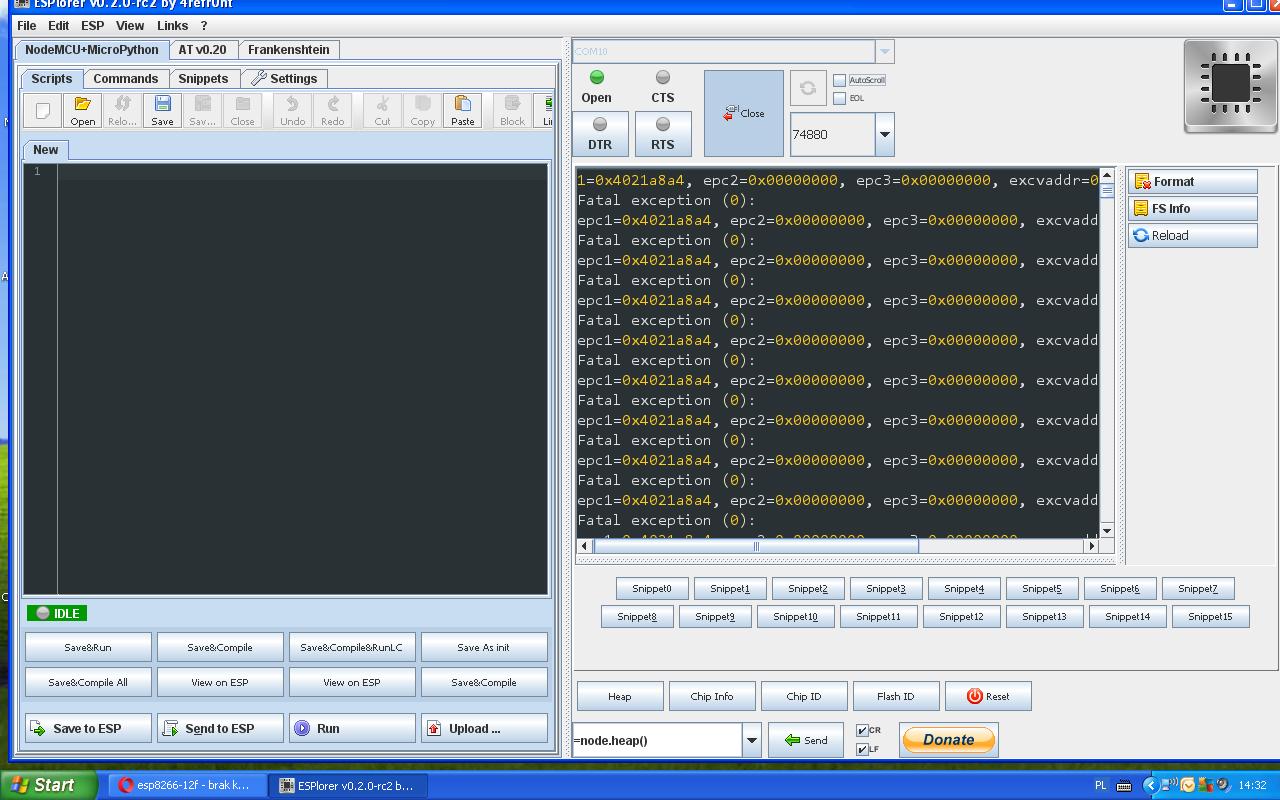
    I uploaded it again, but after starting it up I get this message on the serial monitor. esp8266-12f - no communication via UART despite correct connection
  • #11 15625520
    assist
    Level 11  
    Hello, what are you powering the ESP from? It draws quite a lot of current on start up, maybe this is where the problem is?
    I had similar problems, the power supply (no name PRC) was the culprit.I swapped the power supply, added decoupling capacitors and it went:)
    greetings.
    assist
  • #12 15625732
    globalinfo
    Level 13  
    I supply power via two USB converters, so far no problem. :?:
    The program also loads without any messages. :?:
  • #13 15625780
    assist
    Level 11  
    Maybe some leftovers from the previous firmware,do a reflash with the appropriate settings in the software.Pay attention to the Flash size settings etc.

    kind regards.
    assist
  • #14 15625850
    globalinfo
    Level 13  
    assist wrote:
    Maybe some leftovers from previous firmware,do a reflash with appropriate settings in the software.Pay attention to Flash size settings etc.

    cheers.
    assist

    Can you give a hint on how to do this :?:
  • ADVERTISEMENT
  • #15 15626143
    oczkers
    Level 10  
    Change monitor serial speed to 74880 and reset esp - you will see logs of botting
  • #16 15626507
    assist
    Level 11  
    [/quote]
    Can you give a hint on how to do this :?: [/quote]

    Right now, unfortunately I'm at work:) I'll get back to you in the evening, I'll upload screen shots of the flasher settings.
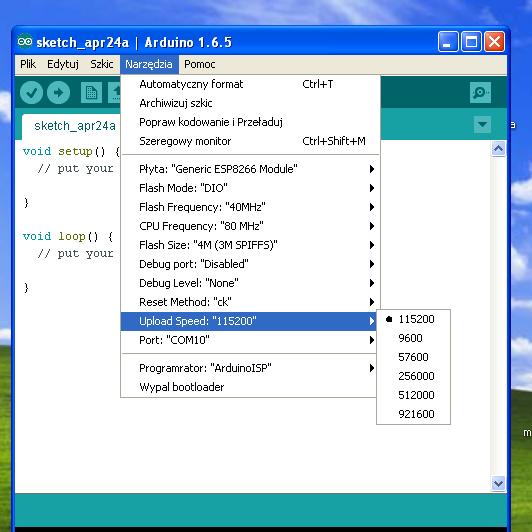
    I had such a case, I uploaded another program, and the ssid reported by Esp remained from the previous script.I uploaded Nodemcu again - it still reported the old name. Only changing the settings in the prog. helped, but something about the memory size had to be changed.

    Regards.
    assist
  • #18 15626619
    oczkers
    Level 10  
    This is the first time I have seen such a message and I have no experience in general but have you by any chance overwritten/corrupted the firmware?
    Here is a link to the latest firmware along with an update program but wait for someone more experienced to reply first.
    http://www.electrodragon.com/w/ESP8266_AT_Commands
  • #19 15638718
    sebooool
    Level 12  
    Or is it simply that the module is faulty?
    I have not been able to do anything with one module either.
  • #20 15642127
    globalinfo
    Level 13  
    sebooool wrote:
    Maybe the module is just faulty?
    I have not been able to do anything with one module either.

    Well, I'm not sure if it is defective. The program loads, the messages also display to me, so the chip works, just something is wrong stored in memory.
    Maybe someone knows how to deal with this. :?: :D
ADVERTISEMENT