logo elektroda
logo elektroda
X
logo elektroda

TH03 Pro Temperature Humidity Sensor Compatibility with OpenBeken Integration (possibly)

io2345 297 17
ADVERTISEMENT
  • #1 21828759
    io2345
    Level 9  
    Does anyone have experience with a TH03 Pro Temperatur/Humidity Sensor and the chance to get them working in a proper way with OpenBeken (or other firmware which doesn't contact chinese servers)?
    There are several threads on the forum about these sensors, yet non for this model. Some of the threads are rather old, like this one Link on elektroda.com or this one (in polish) Link on elektroda.com.
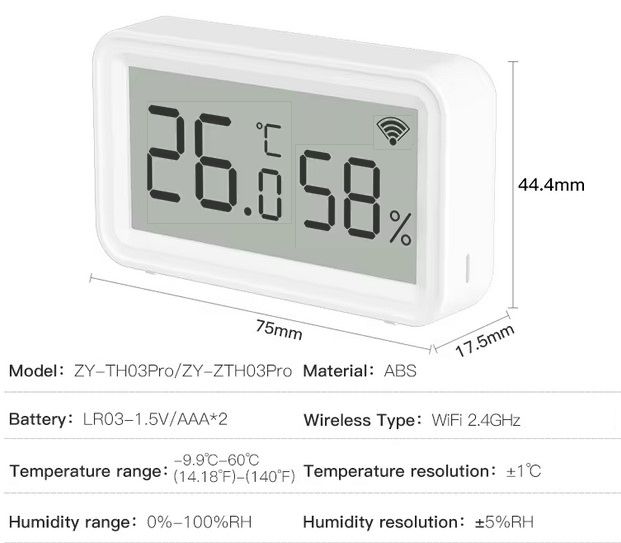
    I ordered mine out of couriousness from here: Link on Aliexpress as WiFi model.
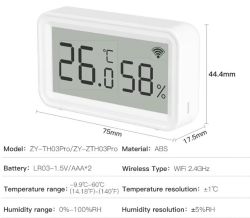
    Digital thermometer and hygrometer with LCD showing 26°C and 58% humidity
  • ADVERTISEMENT
  • #3 21829560
    io2345
    Level 9  
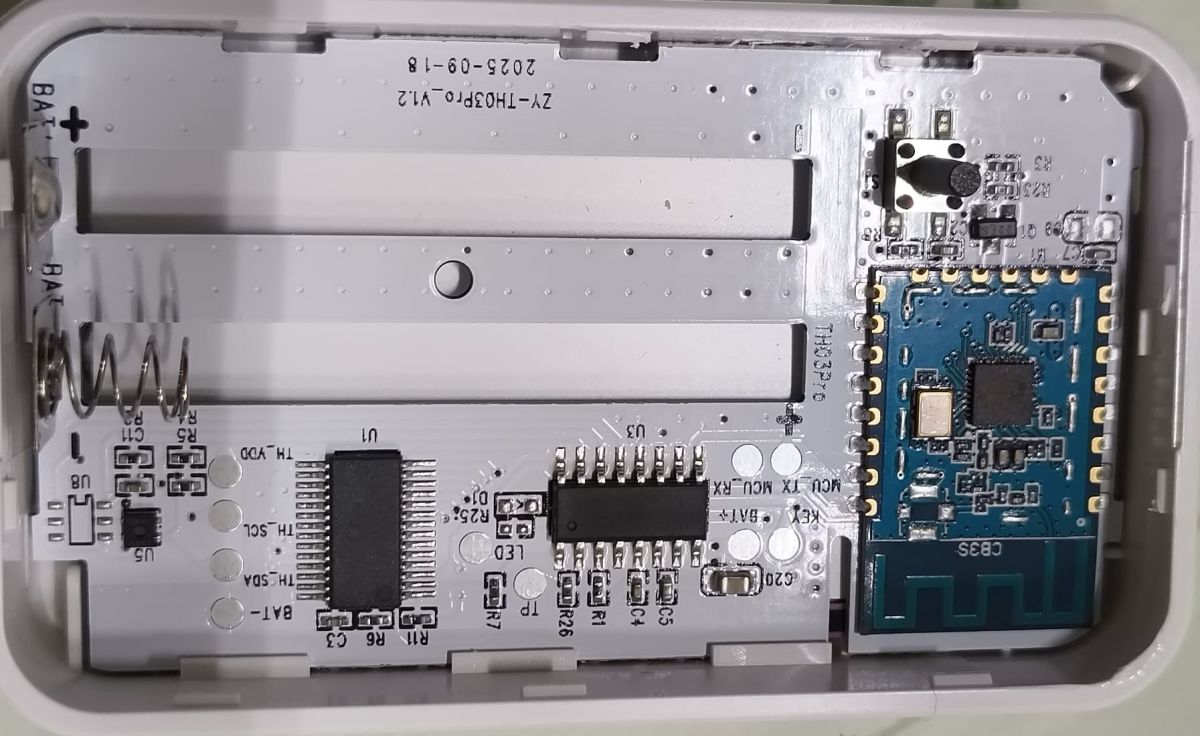
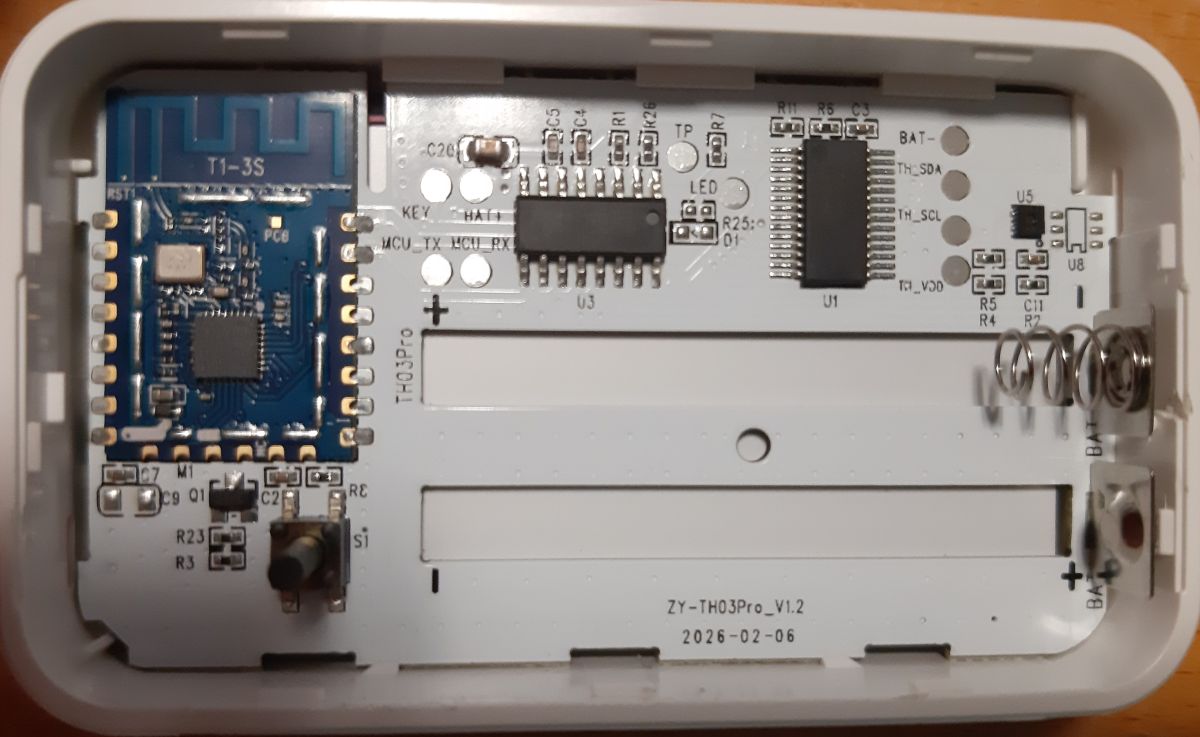
    The item you found should be exactly the same model, TH03 Pro. That's what's inside:

    Inside of a device showing a PCB with battery spring contacts and a blue electronic module on the right

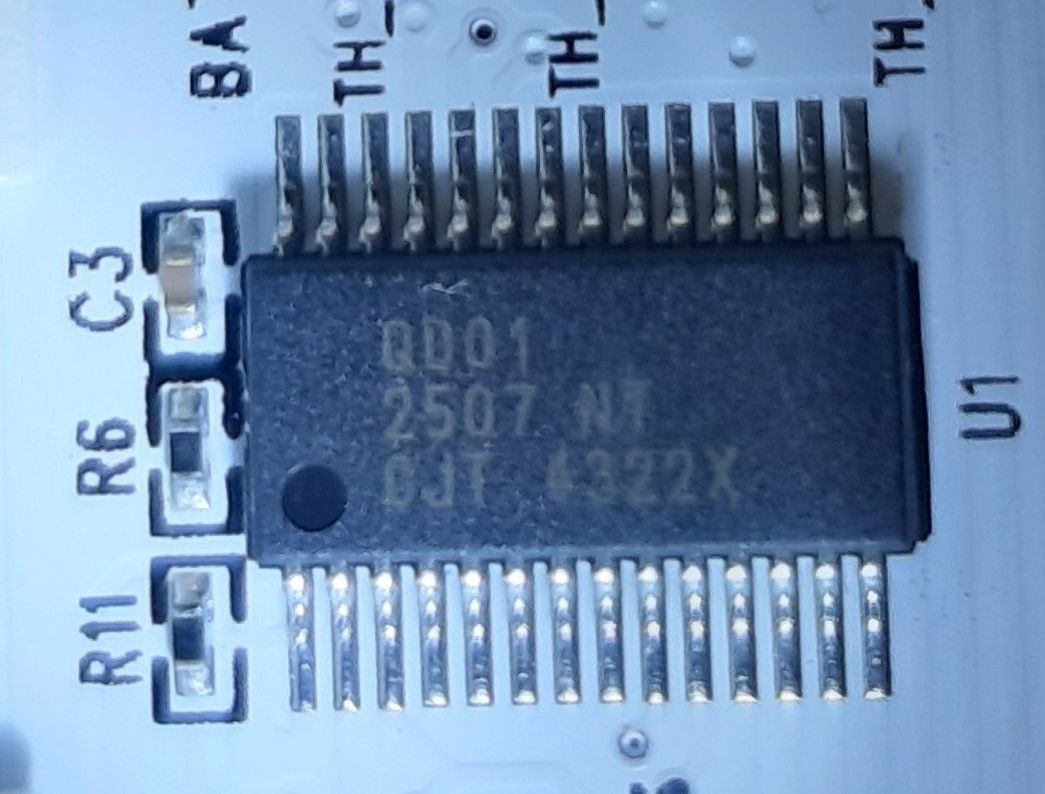
    U3 has nothing written on it, U1 reads something like "QD01 2507 NT CJT 4322X". I have no idea, which of the two chips is the MCU.

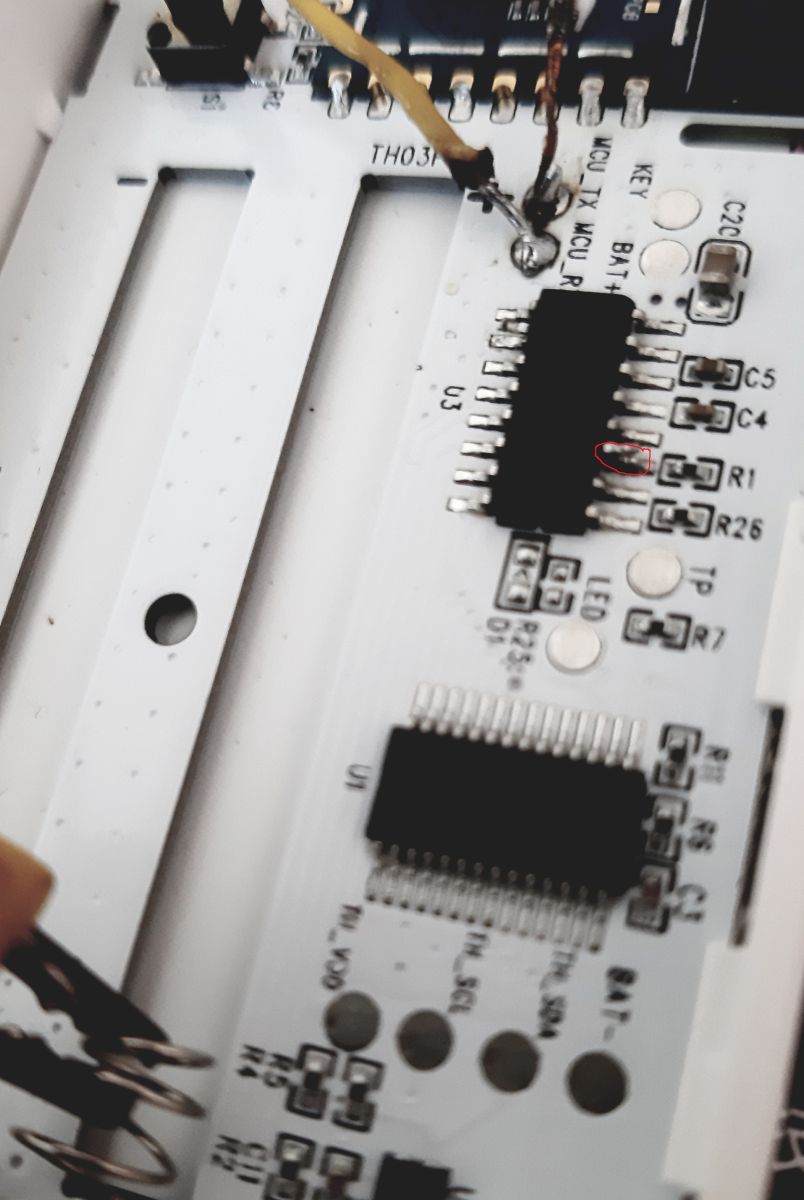
    Close-up of an SMD IC on a PCB with labels U1, R6, R11, and C3

    Communication module is CB3S, which is well known in OpenBeken. It transmits only three values: Temperature, Humidity and Battery State. It transmits data every 90 seconds (or so). Most of the time, the device is sleeping and the values in the display don't change, even if you heat or cool it. When the WiFi-Symbol starts animation, data is transmitted and some seconds later values appear in the app as well.
    What's the next recommended step to take? Just trying to flash with latest OBK-Version?
    For flashing I would have to mute the MCU, right? If anyone could help me with that? Probably there is an easier way than cutting the lead from CB3S to MCU, like setting an enable pin on the MCU to high or low signal?

    Update: Apparently U3 is the MCU, so U1 should be the LCD-Controller.
    Pin 10 of the MCU has direct connection to RX on CB3S, Pin 9 to TX. Pin 5 is V+, Pin 12 is GND.
    What does TP (Pin 2), TH_SCL (Pin14), TH_SDA (Pin 13) and TH_VOD (Pin 15) mean?
  • ADVERTISEMENT
  • #4 21832736
    io2345
    Level 9  
    Please tell me how to start. What is the best order? Trying to flash the device first or better trying to record the communication between MCU and CB3S first?
    I already did that with another device some time ago, but I don't remember how.
    Are there any guides, that are of help? Guides for flashing CB3S, or for recording traffic between MCU and CB3S?
  • #5 21834503
    io2345
    Level 9  
    If it can't be done with OpenBeken or no help can be provided: Is there an alternate firmware of different make with better support?
  • #6 21834514
    insmod
    Level 30  
    Well, it's TuyaMCU. Just dump the firmware, dpId list can be downloaded from Tuya later.

    Some devices can be flashed without MCU removal/trace cut, some can't. Depends on luck.
  • #7 21834570
    io2345
    Level 9  
    >>21834514 Thank you for your feedback. The dpId list shouldn't matter, in fact. The only user-reachable actuator is the button to connect the device to the tuya-app (which isn't of any use after flashing to OBK). As mentioned, the device only has to report temperature, humidity and general battery status via MQTT every once a while. OK, so I'll try my best to simply read out the original firmware and flash latest BK7231N firmware.
    Do you know where I can find the latest guide and software for flashing? Mine is certainly two years old. There is probably way better software now.
  • #9 21834713
    io2345
    Level 9  
    >>21834572 Thank you. Latest release: yesterday!

    You don't have a link to latest MCU-Analyzer by chance?

    UPDATE: Found it: ]Openshwprojects
    This tool seems to be able to do dual capture on UART as well. Right?
  • ADVERTISEMENT
  • #10 21836406
    io2345
    Level 9  
    Communication log with original firmware. First without WiFi connection in the App, establishing connection and from that on transmitting values. First with light temp./humidity changes (resulting in slow update intervall), at the end with greater changes.:

    Sent by WiFi module:
    55 AA   00   01      00 24   7B2270223A226C66333679356E7762386A6B78776767222C2276223A22312E302E30227D   99   
    HEADER   VER=00   Product      LEN   {"p":"lf36y5nwb8jkxwgg","v":"1.0.0"}   CHK   
    
    Sent by WiFi module:
    55 AA   00   02      00 00      01   
    HEADER   VER=00   McuConf      LEN      CHK   
    
    Sent by WiFi module:
    55 AA   00   02      00 00      01   
    HEADER   VER=00   McuConf      LEN      CHK   
    
    Sent by WiFi module:
    55 AA   00   01      00 24   7B2270223A226C66333679356E7762386A6B78776767222C2276223A22312E302E30227D   99   
    HEADER   VER=00   Product      LEN   {"p":"lf36y5nwb8jkxwgg","v":"1.0.0"}   CHK   
    
    Sent by WiFi module:
    55 AA   00   02      00 00      01   
    HEADER   VER=00   McuConf      LEN      CHK   
    
    Sent by WiFi module:
    55 AA   00   02      00 00      01   
    HEADER   VER=00   McuConf      LEN      CHK   
    
    Sent by WiFi module:
    55 AA   00   01      00 24   7B2270223A226C66333679356E7762386A6B78776767222C2276223A22312E302E30227D   99   
    HEADER   VER=00   Product      LEN   {"p":"lf36y5nwb8jkxwgg","v":"1.0.0"}   CHK   
    
    Sent by WiFi module:
    55 AA   00   02      00 00      01   
    HEADER   VER=00   McuConf      LEN      CHK   
    
    Sent by WiFi module:
    55 AA   00   02      00 00      01   
    HEADER   VER=00   McuConf      LEN      CHK   
    
    Sent by WiFi module:
    55 AA   00   01      00 24   7B2270223A226C66333679356E7762386A6B78776767222C2276223A22312E302E30227D   99   
    HEADER   VER=00   Product      LEN   {"p":"lf36y5nwb8jkxwgg","v":"1.0.0"}   CHK   
    
    Sent by WiFi module:
    55 AA   00   02      00 00      01   
    HEADER   VER=00   McuConf      LEN      CHK   
    
    Sent by WiFi module:
    55 AA   00   03      00 00      02   
    HEADER   VER=00   WifiState      LEN      CHK   
    
    Sent by WiFi module:
    55 AA   00   01      00 24   7B2270223A226C66333679356E7762386A6B78776767222C2276223A22312E302E30227D   99   
    HEADER   VER=00   Product      LEN   {"p":"lf36y5nwb8jkxwgg","v":"1.0.0"}   CHK   
    
    Sent by WiFi module:
    55 AA   00   02      00 00      01   
    HEADER   VER=00   McuConf      LEN      CHK   
    
    Sent by WiFi module:
    55 AA   00   02      00 00      01   
    HEADER   VER=00   McuConf      LEN      CHK   
    
    Sent by WiFi module:
    55 AA   00   02      00 00      01   
    HEADER   VER=00   McuConf      LEN      CHK   
    
    Sent by WiFi module:
    55 AA   00   02      00 00      01   
    HEADER   VER=00   McuConf      LEN      CHK   
    
    Sent by WiFi module:
    55 AA   00   10      00 01   00   10   
    HEADER   VER=00   ObtainDPcache      LEN         CHK   
    
    Sent by WiFi module:
    55 AA   00   0B      00 00      0A   
    HEADER   VER=00   Unk      LEN      CHK   
    
    Sent by WiFi module:
    55 AA   00   05      00 05   1404000100   22   
    HEADER   VER=00   Unk      LEN   dpId=20 Enum V=0      CHK   
    
    Sent by WiFi module:
    55 AA   00   05      00 15   1B020004000000E82E0200040000002C6504000102   EE   
    HEADER   VER=00   Unk      LEN   dpId=27 Val V=232,dpId=46 Val V=44,dpId=101 Enum V=2      CHK   
    
    Sent by WiFi module:
    55 AA   00   01      00 24   7B2270223A226C66333679356E7762386A6B78776767222C2276223A22312E302E30227D   99   
    HEADER   VER=00   Product      LEN   {"p":"lf36y5nwb8jkxwgg","v":"1.0.0"}   CHK   
    
    Sent by WiFi module:
    55 AA   00   02      00 00      01   
    HEADER   VER=00   McuConf      LEN      CHK   
    
    Sent by WiFi module:
    55 AA   00   02      00 00      01   
    HEADER   VER=00   McuConf      LEN      CHK   
    
    Sent by WiFi module:
    55 AA   00   02      00 00      01   
    HEADER   VER=00   McuConf      LEN      CHK   
    
    Sent by WiFi module:
    55 AA   00   05      00 15   1B020004000000ED2E0200040000002C6504000102   F3   
    HEADER   VER=00   Unk      LEN   dpId=27 Val V=237,dpId=46 Val V=44,dpId=101 Enum V=2      CHK   
    
    Sent by WiFi module:
    55 AA   00   01      00 24   7B2270223A226C66333679356E7762386A6B78776767222C2276223A22312E302E30227D   99   
    HEADER   VER=00   Product      LEN   {"p":"lf36y5nwb8jkxwgg","v":"1.0.0"}   CHK   
    
    Sent by WiFi module:
    55 AA   00   02      00 00      01   
    HEADER   VER=00   McuConf      LEN      CHK   
    
    Sent by WiFi module:
    55 AA   00   02      00 00      01   
    HEADER   VER=00   McuConf      LEN      CHK   
    
    Sent by WiFi module:
    55 AA   00   05      00 15   1B020004000000F22E0200040000002A6504000102   F6   
    HEADER   VER=00   Unk      LEN   dpId=27 Val V=242,dpId=46 Val V=42,dpId=101 Enum V=2      CHK   
    
    Sent by WiFi module:
    55 AA   00   01      00 24   7B2270223A226C66333679356E7762386A6B78776767222C2276223A22312E302E30227D   99   
    HEADER   VER=00   Product      LEN   {"p":"lf36y5nwb8jkxwgg","v":"1.0.0"}   CHK   
    
    Sent by WiFi module:
    55 AA   00   02      00 00      01   
    HEADER   VER=00   McuConf      LEN      CHK   
    
    Sent by WiFi module:
    55 AA   00   02      00 00      01   
    HEADER   VER=00   McuConf      LEN      CHK   
    
    Sent by WiFi module:
    55 AA   00   05      00 15   1B020004000000F72E020004000000286504000102   F9   
    HEADER   VER=00   Unk      LEN   dpId=27 Val V=247,dpId=46 Val V=40,dpId=101 Enum V=2      CHK   
    
    Sent by WiFi module:
    55 AA   00   01      00 24   7B2270223A226C66333679356E7762386A6B78776767222C2276223A22312E302E30227D   99   
    HEADER   VER=00   Product      LEN   {"p":"lf36y5nwb8jkxwgg","v":"1.0.0"}   CHK   
    
    Sent by WiFi module:
    55 AA   00   02      00 00      01   
    HEADER   VER=00   McuConf      LEN      CHK   
    
    Sent by WiFi module:
    55 AA   00   02      00 00      01   
    HEADER   VER=00   McuConf      LEN      CHK   
    
    Sent by WiFi module:
    55 AA   00   02      00 00      01   
    HEADER   VER=00   McuConf      LEN      CHK   
    
    Sent by WiFi module:
    55 AA   00   05      00 15   1B020004000000F92E0200040000003F6504000102   12   
    HEADER   VER=00   Unk      LEN   dpId=27 Val V=249,dpId=46 Val V=63,dpId=101 Enum V=2      CHK   
    
    Sent by WiFi module:
    55 AA   00   01      00 24   7B2270223A226C66333679356E7762386A6B78776767222C2276223A22312E302E30227D   99   
    HEADER   VER=00   Product      LEN   {"p":"lf36y5nwb8jkxwgg","v":"1.0.0"}   CHK   
    
    Sent by WiFi module:
    55 AA   00   02      00 00      01   
    HEADER   VER=00   McuConf      LEN      CHK   
    
    Sent by WiFi module:
    55 AA   00   02      00 00      01   
    HEADER   VER=00   McuConf      LEN      CHK   
    
    Sent by WiFi module:
    55 AA   00   05      00 15   1B020004000000F92E020004000000296504000102   FC   
    HEADER   VER=00   Unk      LEN   dpId=27 Val V=249,dpId=46 Val V=41,dpId=101 Enum V=2      CHK   


    Hinzugefügt nach 17 [Minuten]:

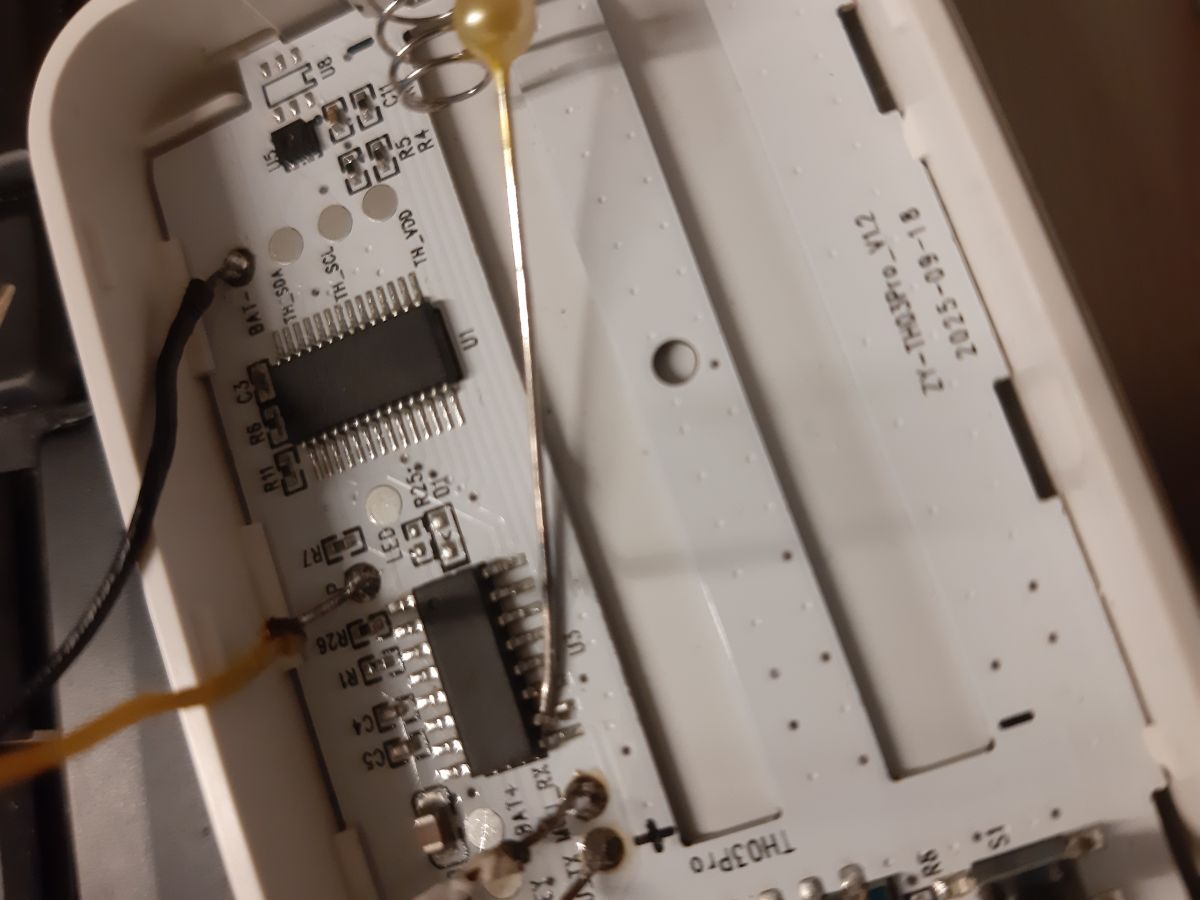
    >>21836406 For flashing you will need to disconnect MCU and CB3S. For me it worked to just heat up MCU-Pin 10 and lift up the IC-leg with a needle - just enough, that it has no longer connection with the board. You can check with a multimeter between leg and pad "MCU_RX" - there should be no longer connection if succesful.
    Inside a device: PCB with ICs and a two-AA battery compartment with a metal spring contact.

    For flashing I soldered wires to the pads MCU_RX and MCU_TX (which is - in this order - CB3S_TX and CB3S_RX). For power you can use the battery connectors on the right side. Apply 3V to V+, Ground to V-.
    After succesful flashing and device startup you only have a minute or so to connect to the OBK-Webpage for configuring, as MCU will send the WiFi-module to sleep after a while. Just pull out a battery and reinsert to complete configuration. You'll probably have to do that several times.
  • #11 21836420
    insmod
    Level 30  
    This makes it easy to configure OBK.

    setChannelType 1 Temperature_div10
    linkTuyaMCUOutputToChannel 27 val 1
    setChannelType 2 Humidity
    linkTuyaMCUOutputToChannel 46 val 2
    setChannelType 3 ReadOnlyLowMidHigh
    linkTuyaMCUOutputToChannel 101 enum 3
  • #12 21836423
    io2345
    Level 9  
    >>21836420 Thank you @insmod. Didn't reload the page before sending Post#12.

    Entries in autoexec.bat should then be:

    startDriver TuyaMCU
    setMqttRetain 1  -> Setting Flag7
    
    setChannelType 1 Temperature_div10
    linkTuyaMCUOutputToChannel 27 val 1
    
    setChannelType 2 Humidity
    linkTuyaMCUOutputToChannel 46 val 2
    
    setChannelType 3 ReadOnlyLowMidHigh
    linkTuyaMCUOutputToChannel 101 enum 3 
    
    setChannelLabel 1 Temperatur
    setChannelLabel 2 Luftfeuchte
    setChannelLabel 3 Batterie
  • #13 21836447
    insmod
    Level 30  
    >>21836423
    There are no such commands as "tuyaMCU_map", "setMqttRetain" or "setChannelScale"
    Your full autoexec would be
    
    startDriver TuyaMCU
    startDriver tmSensor
    
    setChannelLabel 1 "Temperatur"
    setChannelLabel 2 "Luftfeuchte"
    setChannelLabel 3 "Batterie"
    
    setChannelType 1 Temperature_div10
    linkTuyaMCUOutputToChannel 27 val 1
    setChannelType 2 Humidity
    linkTuyaMCUOutputToChannel 46 val 2
    setChannelType 3 ReadOnlyLowMidHigh
    linkTuyaMCUOutputToChannel 101 enum 3
    
  • #14 21836454
    io2345
    Level 9  
    >>21836447 You are right. Didn't have a look into the docs at
    OBK-Docs on Github
    I edited Post#12 now for not to confuse others...

    Setting the MQTT retain can be achieved by activating flag 7, right?

    Is driver tmSensor necessary? The sensor is read by the MCU, not by OBK

    EDIT: Again a look into this docs cleared things (at least for this driver):
    More OBK docs on github
    The driver is necessary for battery driven devices in order to keep the WiFi module sleeping as long as possible
  • ADVERTISEMENT
  • #15 21836460
    divadiow
    Level 38  
    io2345 wrote:
    In case you are still collecting original dumps, let me know. I'll send you the Tuya-Dump.

    yes please
  • #16 21836479
    insmod
    Level 30  
    >>21836454
    To keep values in HA while device is asleep - flag 35 (avty_t is availability).
  • #17 21836495
    io2345
    Level 9  
    >>21836479 I'm on ioBroker, not HA. As far as I understand, Flag 35 is specifically for HA, is it?
    Flag 7 should then be the right choice for me, I guess.
  • #18 21837785
    io2345
    Level 9  
    I activated flags 37 + 51. Reconnect times are between 6 - 13 seconds.
    Let's wait and see how battery life turns out to be.

Topic summary

The discussion centers on the compatibility of the TH03 Pro Temperature and Humidity Sensor with OpenBeken firmware or alternative firmware solutions that avoid communication with Chinese servers. The original inquiry highlights a lack of specific information or successful integration reports for the TH03 Pro model, despite existing threads on similar sensors. A respondent, without direct experience with the TH03 Pro, suggests an alternative sensor available on AliExpress, implying potential options for users seeking compatible hardware. The focus remains on achieving proper sensor functionality within open-source or privacy-conscious firmware environments.
Summary generated by the language model.
ADVERTISEMENT