logo elektroda
logo elektroda
X
logo elektroda

ESP8266 LUA PCF8563 RTC simple example

piotr411 5469 29
ADVERTISEMENT
Treść została przetłumaczona polish » english Zobacz oryginalną wersję tematu
  • #1 15803814
    piotr411
    Level 22  
    Just a quick write up, reading data from the RTC PCF8563, maybe someone will benefit.
    Code: Lua
    Log in, to see the code


    result of program operation:
    22:06:35 01-07-2016

    Date and time recording function
    Code: Lua
    Log in, to see the code
  • ADVERTISEMENT
  • #2 15803960
    excray
    Level 41  
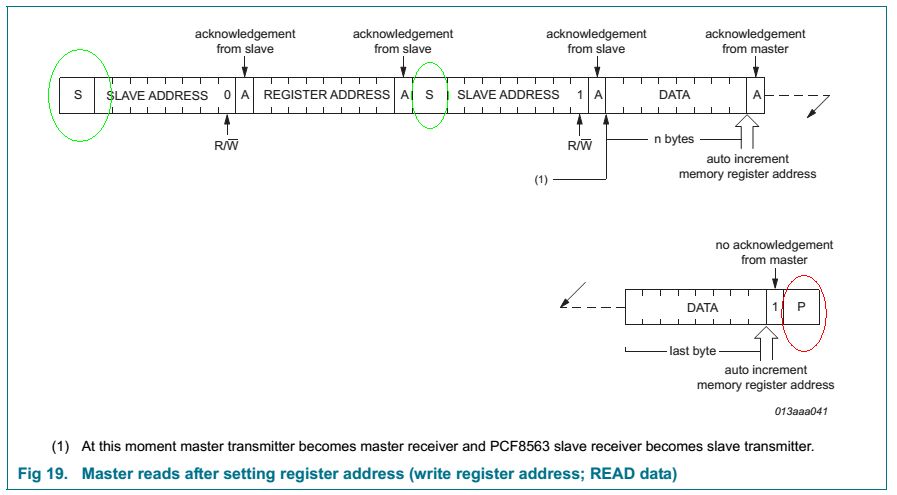
    In the GETtime function, the first i2c.stop is redundant. You do not need to stop the transmission. You only need to renew the start condition.
  • #3 15804322
    piotr411
    Level 22  
    These types of damaging posts should go in the bin. The manufacturer has imposed certain rules and these should be adhered to. It is possible not to apply a transmission stop, but this will complicate the application further. The result of your, after all, bad suggestion is this response from the programme:

    dofile('PCF8563A3.lua')
    315:715:715 07-115-20715
    >

    Further effects that can be seen if there is a lack of correct communication are random resets of the PCF8563.
  • #4 15804564
    excray
    Level 41  
    Don't rush to judgment. This is not my idea or malice, just the recommendations of the circuit manufacturer. I am enclosing a screen shot of your circuit's datasheet:
    ESP8266 LUA PCF8563 RTC simple example
    As you can see, the manufacturer himself recommends the above mentioned method. Anyway, this is a commonly used method for reading over I2C. If in your case it causes an erroneous transmission then you most likely have a misconstrued i2c.start function.
    Graphics source:
  • #5 15804621
    piotr411
    Level 22  
    As above, no stop, causes random resets. The example gives the correct sequence and this should be followed. This is an open example, you can use it for your own purposes, so if you find the stop bit unnecessary, remove it. I have given the effects of removing the Stop Bit above.

    I forgot to add that the application does not use special functions,(bit, math) this will also work on the official NodeMCU firmware as well as Custom
  • ADVERTISEMENT
  • #6 15929537
    panbosman
    Level 12  
    Thanks piotr411 for the Lua codes. Please feel free to ask for more.
    Adam
  • #7 15929548
    Anonymous
    Anonymous  
  • ADVERTISEMENT
  • #8 15929589
    piotr411
    Level 22  
    What do you need the codes for?
  • #9 15929654
    panbosman
    Level 12  
    I wrote an Android app to connect to a server on the ESP8266.
    I have now done it this way:
    Esp has an ai thinker batch and communicates with the app on the Android.
    The avr is connected to the esp via the uart and the avr controls the relay.
    Yesterday I got Link and here the stumbling blocks started because I want to get rid of the AVR and use only Sonoff.
    After searching the web I decided to upload the NodeMCU and write (add to the wifi handling in this upload) commands in lua that will receive my command, parse it and drive the GPIO to the relay.
    And for this I would like the ESP to work as an AP.
    This is only the second day of looking for info on ESP so I'm still green and looking for help.
  • #10 15929828
    piotr411
    Level 22  
    Start by assigning a name and password:

    Code: Lua
    Log in, to see the code


    And here's the server. The d variable will be what you send from Android
    Code: Lua
    Log in, to see the code


    Here the GPIO state change :
    Code: Lua
    Log in, to see the code
  • #11 15929915
    panbosman
    Level 12  
    I understand so far. Thanks.
    I read on the net as I was waiting for your answer that the function (tmr.delay) is not recommended due to the fact that this function blocks the processor for the delay time. There is a better way to do it, you should use the function
    Code: Lua
    Log in, to see the code

    Do you agree with this?

    I am analysing your code and will ask further.
  • ADVERTISEMENT
  • #12 15929926
    piotr411
    Level 22  
    Yes, tmr pauses for a time, further action. I have given an example to check. There are many ways of counting down time, which one you choose depends on the needs of your application, you have timers at your disposal, but also tmr.time() functions. You also have the rtc modul and the rtc.get() functions
  • #13 15929965
    panbosman
    Level 12  
    I will need the equivalent of this function from C to compare strings
    Code: C / C++
    Log in, to see the code

    and for extracting
    Code: C / C++
    Log in, to see the code


    and by the way, maybe you could give me a lead on a book for learning Lua and preferably with reference to NodeMCU or a good site in PL.
  • #15 15930038
    panbosman
    Level 12  
    Oh thanks for the links.
    You say two evenings? You must be a young man. It doesn't enter my head that quickly. Thanks. I'm getting on with my learning, because it's never too late for that.
  • #17 15930414
    panbosman
    Level 12  
    That is enough for me. Thanks.
  • #18 15932796
    panbosman
    Level 12  
    Looking at the code in lua I noticed that short names are used.
    I have questions in relation to this:
    1. Since the files are written to the ESP does the size matter ?
    2. If so, what should I avoid?
    - long names of variables, functions etc
    - spaces
    - blank lines, etc
  • #19 15932904
    piotr411
    Level 22  
    All code is written to Flash memory in ASCII, which means each character occupies memory. What the compiler writes goes into RAM. So significantly less.
    ESP has a terrible organisation of variables, arrays etc...
    When you use a variable, it reserves as much as 256bytes of RAM, so save that. If I write large applications, I work on small files stored in Flesh. I also save the results in a separate file. It is also worth remembering that the array should not have more than 255 characters because ESP can reset itself. Avoid ready-made modules, especially string, bin, math, gpio, they steal memory like ZUS and US combined with the ruling party ;)
  • #20 15933486
    panbosman
    Level 12  
    These small files are such equivalents of method, function or rather class?
    Is it better to use them by attaching file:
    Code: Lua
    Log in, to see the code
    or rather by modules:
    Code: Lua
    Log in, to see the code
    Programs write in separate folders?
  • #21 15933518
    piotr411
    Level 22  
    Example one, but it is not a function, but an allocation of a subroutine, but not only that:
    http://nodemcu.readthedocs.io/en/master/en/modules/file/#fileopen
    This is about writing to files on flesh.
    This is where you collect data for yourself.
    Code: Lua
    Log in, to see the code


    Code: Lua
    Log in, to see the code


    And here the situation is reversed, you download the contents of the file to the Android device line by line until the last one is empty.

    Code: Lua
    Log in, to see the code


    That is, you send "XC" from the Android, and the ESP sends strings line by line from the.dat file.

    So you already know how to write a program on an Android or PC and send it to the ESP, in other words, you have a ready-made remote update program in the ESP:)
  • #22 15933561
    panbosman
    Level 12  
    Is it about saving RAM? (saving to files)
    Tell me more about how you collect "method", "function" files, because I don't really know what they are called in lua. I mean to make myself such ready-made libraries like in C# or C.
    This lua reminds me a bit of arduino or bascom.
    Do you write in C for the ESP?
  • #23 15933736
    piotr411
    Level 22  
    Yes, it's all about saving RAM, it runs out very quickly. That's why I'm waiting for the official ESP3231 modules, the ones I got for testing cause mega problems. In ESP86, you have to give about every byte, optimise to the point of pain. One method is just to create subroutines.
    You'll probably find some of your own way that's right for your habits. The question of creating libraries, I write them as functions into the application or paste them in, or create a subroutine,it depends on the needs and the structure of the application itself. This is how I write programs in FreeRTOS. Although I prefer LUA because it is more readable and when I return to the application or make some corrections, it is easier to find and correct it. Besides, I write some Android applications in Basic or Phyton, which are closer to LUA, which is why I chose this language. I do my apk packaging classically in Android Studio, because both Basic and Phyton give complete files for packaging + keystone.
  • #24 15934646
    panbosman
    Level 12  
    Is it possible to listen on two ports?
    Code: Lua
    Log in, to see the code
  • #25 15934757
    piotrva
    VIP Meritorious for electroda.pl
    piotr411 wrote:
    When you use a variable it reserves as much as 256bytes of RAM so save here. If I write large applications, I operate on small files stored in Flesh. I also save the results in a separate file. It is also worth remembering that the array should not have more than 255 characters because ESP can reset itself. Avoid ready-made modules, especially string, bin, math, gpio, they steal memory

    It's not a matter of memory organisation in ESP, but a matter of how hopelessly LUA does it. I'm using the libraries under Arduino and I have no problem saving and handling an array of 4096 bytes, nothing crashes....

    I myself, due to the fact that I write in C/C++, have a slight revulsion when I see LUA syntax and parentheses.
  • #26 15934812
    Anonymous
    Anonymous  
  • #27 15934863
    piotrva
    VIP Meritorious for electroda.pl
    In general, for me, running an interpreted language on such hardware is a slight exaggeration ;)
    And the ESP32 - somehow I don't personally see a leap from the ESP8266. I was honestly hoping for an ARM core, not Xtens again.
  • #28 15934946
    piotr411
    Level 22  
    Then you have the inexpensive RTL-00, RTL-01 modules.
    - And I liked LUA very much, especially because of its very readable syntax. Parentheses, brackets and operators are unfortunately a legacy of C. Probably if it wasn't for nodemcu would never have picked up on this language, but given that it's recently become popular in PLC I've picked it up, ported a lot of old programs as an exercise and I'll admit it's really cool. In the case of ESP it is truncated for obvious reasons, and in many cases annoying especially when there are differences between the official firmware and the build version and no annotation of any kind.

    Added after 1 [hour] 37 [minutes]:

    panbosman wrote:
    Can you listen on two ports?
    Code: Lua
    Log in, to see the code


    And that killed my stud ;)
    I didn't do that, and what purpose does it serve?
    If it's even possible, it's not possible;)
    Probably nothing will come out of it after the first one not enough RAM.
    You would have to check if the ESP8266EX supports multiple channels simultaneously.
    Because on the one hand you have software limitations, on the other hardware limitations.
    I put a thesis in the dark that not feasible.
  • #29 15937174
    panbosman
    Level 12  
    I uploaded the nodemcu firmware with ESPFlasher. Then I uploaded init.lua and other.lua with ESPlorer. I changed the contents of the .lua files for myself. I got to the point where the AP soft was uploaded. Here I made a mistake somewhere, which resets the ESP for me and I can't connect via ESPlorer.
    To save the issue I once again uploaded the nodemcu firmware with ESPFlasher.
    And here is my surprise, even though it uploaded successfully still after starting ESP I find the network with the AP that was uploaded before flashing and I still can't connect via ESPlorer....
    I mean the new firmware is uploaded from 0x0000 to how many, but the whole flash is not erased beforehand?
    Then how do I delete all the flash?
    Or am I making some other mistake?
  • #30 15937644
    piotr411
    Level 22  
    I've just opened a new batch of modules, bearing a firmware date of 13 June 2016, and it won't let me upload nodemcu. It is not the latest "S" version yet. I am just looking for a solution as to what is causing this. The bootloader reports reading pins correctly ie 1, 7 and when trying to flash it deletes the original firmware then displays a memory read error. This is a bit strange as this is a Wendor model, which flashes without problems in older versions. I have checked this on another 10 modules and the problem is the same. I have a dozen more units from December 2015 and these flash completely normally. Perhaps your problem is similar, i.e. another strange firmware mutation that either changes or limits something.

    Photo 1 and 2: reading from the new version
    Photo 3 and 4: reading from last year's version

    As you can see from the pictures, there are differences in file size between the firmware.
    Which once again becomes extremely inconvenient as the way the flashing will be different.
    Although the Boot Mode data confirms that the pins are correctly aligned.
    I have placed photos 2 and 3 side by side so that the two firmware versions can be easily compared

    Photo 5 Boot Mode reading 3.7 older version correct
    Photo 6 reading in Boot Mode 3,6 new version - module "dead"

    Settings are correct according to the documentation
    Boot Messages and Modes
    The ESP at every boot the Pins 0, 2 and 15.

    | GPIO15 | GPIO0 | GPIO2 | Mode |
    | ------ | ----- | ----- | -------------------------------- |
    | 0V | 0V | 3.3V | Uart Bootloader |
    | | 0V | 3.3V | 3.3V | Boot sketch (SPI flash) | | | 0V | 3.3V | Uart Bootloader
    | 3.3V | x | x | SDIO mode (not used for Arduino) |

    The incompatibility occurs in the read on restart, mino GPIO15 pulldown, ESP sees pullup. And here is the problem.

    boot mode
    +
    +the first value respects the pin setup of the Pins 0, 2 and 15.
    +
    +| Number | GPIO15 | GPIO0 | GPIO2 | Mode |
    +| ------ | ------ | ----- | ----- | ---------- |
    +| 0 | 0V | 0V | 0V | Not valid |
    | +| 1 | 0V | 0V | 3.3V | Uart |
    +| 2 | 0V | 3.3V | 0V | Not valid |
    +| 3 | 0V | 3.3V | 3.3V | Flash |
    +| 4 | 3.3V | 0V | 0V | SDIO |
    +| 5 | 3.3V | 0V | 3.3V | SDIO |
    +| 6 | 3.3V | 3.3V | 0V | SDIO |
    +| 7 | 3.3V | 3.3V | 3.3V | SDIO |

    That is, the ESP, when trying to change the firmware, sets Boot Mode to load from the memory card, not flash.

    The consequence is the message "ets_main.c" indicating no firmware.
ADVERTISEMENT