logo elektroda
logo elektroda
X
logo elektroda

ESP32-CAM FT232RL - no response after uploading CameraWebServer.ino

yarogniew 2106 15
ADVERTISEMENT
Treść została przetłumaczona polish » english Zobacz oryginalną wersję tematu
  • #1 18783975
    yarogniew
    Level 9  
    Hi. As usual, I am asking for help.
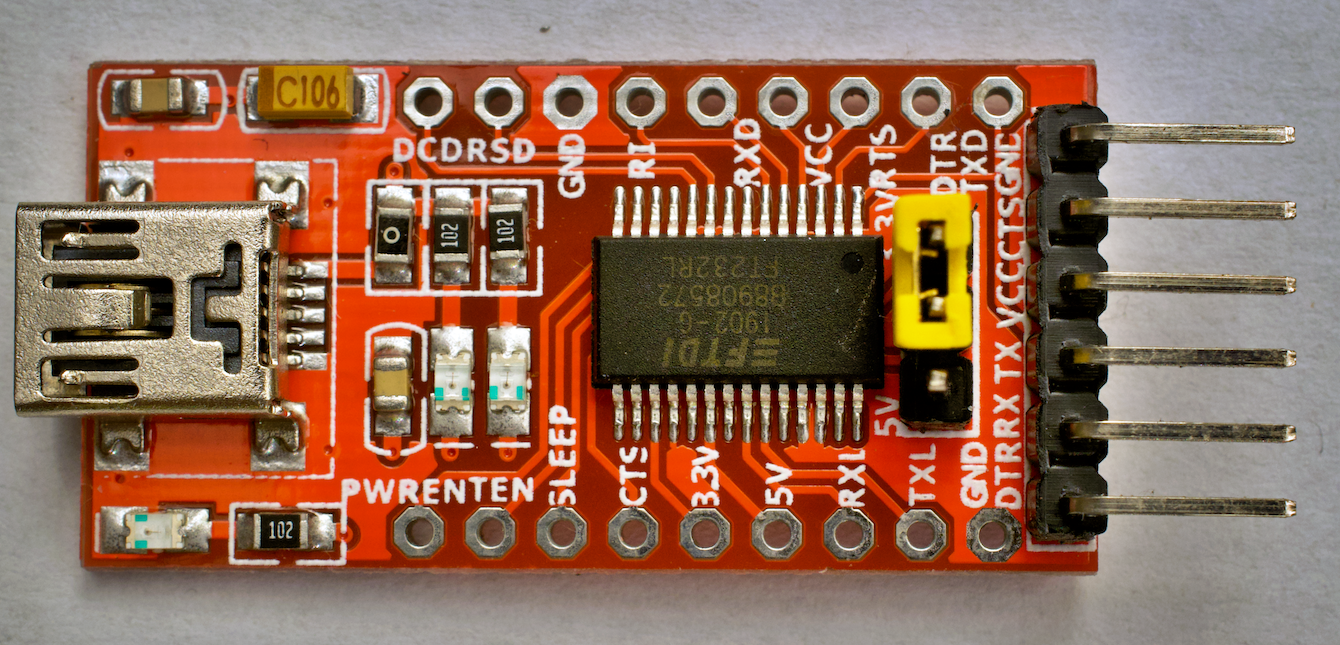
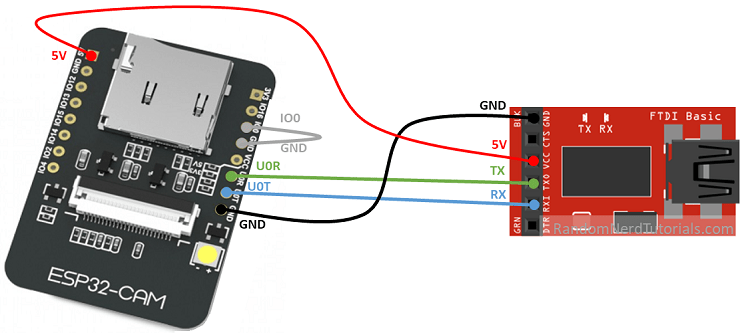
    I am uploading a typical program CameraWebServer.ino via Arduino IDE and programmer USB TO TTL FT232RL , Jumper on 3.3V, PIN0 connected to GND, ESP32 powered from programmer with 3.3V everything else as in hundreds of instructions on the net. I press reset on the board, get info on the monitor:
    14:02:22.730 -> rst:0x1 (POWERON_RESET),boot:0x3 (DOWNLOAD_BOOT(UART0/UART1/SDIO_REI_REO_V2))
    14:02:22.730 -> waiting for download
    
    .
    I upload the program, it loads elegantly. I get info Done uploading .
    I disconnect I0 from GND, press RESET and I get blocks like this displayed over and over again:
    
    14:11:21.606 -> 
    14:11:21.606 -> rst:0x3 (SW_RESET),boot:0x13 (SPI_FAST_FLASH_BOOT)
    14:11:21.640 -> configsip: 0, SPIWP:0xee
    14:11:21.640 -> clk_drv:0x00,q_drv:0x00,d_drv:0x00,cs0_drv:0x00,hd_drv:0x00,wp_drv:0x00
    14:11:21.640 -> mode:DIO, clock div:1
    14:11:21.640 -> load:0x3fff0018,len:4
    14:11:21.640 -> load:0x3fff001c,len:1216
    14:11:21.640 -> ho 0 tail 12 room 4
    14:11:21.640 -> load:0x40078000,len:9720
    14:11:21.640 -> ho 0 tail 12 room 4
    14:11:21.640 -> load:0x40080400,len:6352
    14:11:21.640 -> entry 0x400806b8
    14:11:22.225 -> ets Jun  8 2016 00:22:57
    14:11:22.225 -> 
    14:11:22.225 -> rst:0x3 (SW_RESET),boot:0x13 (SPI_FAST_FLASH_BOOT)
    14:11:22.225 -> configsip: 0, SPIWP:0xee
    14:11:22.225 -> clk_drv:0x00,q_drv:0x00,d_drv:0x00,cs0_drv:0x00,hd_drv:0x00,wp_drv:0x00
    14:11:22.225 -> mode:DIO, clock div:1
    14:11:22.225 -> load:0x3fff0018,len:4
    14:11:22.225 -> load:0x3fff001c,len:1216
    14:11:22.225 -> ho 0 tail 12 room 4
    14:11:22.225 -> load:0x40078000,len:9720
    14:11:22.225 -> ho 0 tail 12 room 4
    14:11:22.225 -> load:0x40080400,len:6352
    14:11:22.225 -> entry 0x400806b8
    14:11:22.785 -> ets Jun  8 2016 00:22:57
    itd.
    
    .
    I'll also add that when I upload Blink.ino I have the same thing only it runs faster. It looks like the programs are executing.
    Of course Board: esp32 Wroover , Huge APP etc. As expected.
    I have no idea what the issue is.
  • ADVERTISEMENT
  • #2 18784232
    vieleicht
    Level 37  
    Connect an external power supply when programming, as it will not pull from the programmer.
  • ADVERTISEMENT
  • #3 18784321
    Anonymous
    Level 1  
  • #4 18784547
    yarogniew
    Level 9  
    vieleicht wrote:
    Connect external power when programming, as it won't pull from the programmer.
    .
    Nothing has changed. I connected the external 5V is the same.

    Added after 2 [minutes]: .

    khoam wrote:
    yarogniew wrote:
    Of course Board: esp32 Wroover , Huge APP etc. As it should be.
    .
    And why not AI-Thinker ESP32-CAM , since you have an ESP32-CAM module?
    .
    Changing to the AI-Thinker ESP32-CAM didn't do anything either. It's poor because loading any program, even Blink, I get the same thing. It flies what I pasted over and over again.
  • #5 18784567
    Anonymous
    Level 1  
  • #6 18784741
    yarogniew
    Level 9  
    khoam wrote:
    yarogniew wrote:
    Changing to AI-Thinker ESP32-CAM also did nothing.
    .
    But such a board should remain. Try just clearing all the flash in the ESP32:
    https://github.com/espressif/esptool#erase-flash-erase_flash--erase-region
    You already have the esptool program installed in /.arduino15/packages/esp32/tools/esptool_py/2.6.1/
    .

    I don't really understand the terminal, but I have something like this:
     yarogniew$ /Users/yarogniew/Library/Arduino15/packages/esp32/tools/esptool_py/2.6.1/esptool erase_flash
    esptool.py v2.6
    Found 3 serial ports
    Serial port /dev/cu.usbserial-A50285BI
    Connecting........_____....._____....._____....._____....._____....._____....._____
    /dev/cu.usbserial-A50285BI failed to connect: Failed to connect to Espressif device: Invalid head of packet (0x4F)
    .

    I can hardly see it
  • #7 18784759
    Anonymous
    Level 1  
  • #8 18784805
    yarogniew
    Level 9  
    khoam wrote:
    You should still indicate as an argument to esptool the specific USB port where the ESP32 is connected. At this link, what I described earlier is explained. For example:
    Code: Bash
    Log in, to see the code
    .

    same
    
    2.6.1 yarogniew$ /Users/yarogniew/Library/Arduino15/packages/esp32/tools/esptool_py/2.6.1/esptool --port /dev/cu.usbserial-A50285BI erase_flash
    esptool.py v2.6
    Serial port /dev/cu.usbserial-A50285BI
    Connecting........_____....._____....._____....._____....._____....._____....._____
    
    A fatal error occurred: Failed to connect to Espressif device: Invalid head of packet (0x65)
    
    .

    Now as I connect pin0 to gnd, with a 3.3V supply from the programmer, it heats up my chip on TTL. When I connected external 5V, the regulator on the ESP32 almost burned up. Not even waiting for download after a reset anymore. The pudding.
  • #9 18784828
    Anonymous
    Level 1  
  • ADVERTISEMENT
  • #10 18784933
    yarogniew
    Level 9  
    khoam wrote:
    ESP32-CAM should be powered from 5V.

    ESP32-CAM FT232RL - no response after uploading CameraWebServer.ino .
    Is this /dev/cu.usbserial-A50285BI port the same one displayed in the Arduino IDE when you loaded the program?

    yarogniew wrote:
    When I connected the external 5V the regulator on the ESP32 almost burned up.
    .
    The stabiliser may have burnt out, but that's because you were connecting external 3V3 to pin 3V3 (that's the power output) on the ESP32-CAM, which you shouldn't do.


    Yes, port the same ft232rl programmer. It releases these packages all the time

    The programmer has a jumper that I set to 3.3V so that there is 3.3V on TX RX, and it should be at 5V?

    ESP32-CAM FT232RL - no response after uploading CameraWebServer.ino .
  • #11 18785088
    Anonymous
    Level 1  
  • #12 18785127
    yarogniew
    Level 9  
    khoam wrote:
    yarogniew wrote:
    Programmer has a jumper which I set to 3.3V so that there is 3.3V on TX RX
    .
    This is how it is supposed to work. The UART communication between the ESP32-CAM and the programmer should be in 3V3 logic.

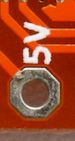
    The ESP32-CAM module itself should be powered from 5V (the "5V" pin on this module). You can power it from the programmer, but from the pad on its board marked, "5V".

    ESP32-CAM FT232RL - no response after uploading CameraWebServer.ino
    .

    That's what I did, but the comp disconnected my USB power due to excessive power consumption. I'll let it go for today. Something is wrong with this board. Thanks for your help. If I come up with something I'll let you know.
  • ADVERTISEMENT
  • Helpful post
    #13 18785148
    Anonymous
    Level 1  
  • Helpful post
    #14 18785583
    vieleicht
    Level 37  
    I had exactly the same problem with the same board and with the same programmer, and the USB port was also not current-carrying when connecting. In my case, what I wrote helped - I powered the ESP32-CAM directly with 5V from the power supply. And of course a jumper at 3.3V in the USB-UART converter.
  • #15 18785886
    yarogniew
    Level 9  
    Thanks for the hints, now I'm a bit wiser. I know how to power the board, but I think I've messed up the regulator in the so-called meantime. I'm leaving the ESP32-CAM topic for now, too much time wasted.
    Strange, because I had a similar situation recently with a regular ESP-32. Out of three chips I bought, one, after loading a sketch, behaved like this one. And it had a USB driver on board. Maybe it's not a power supply problem after all. I should add that I have a Mac with USB3 and so far I have not had any problems with the boards or the power supply. I use USB2 hubs to connect to the boards.
  • #16 18785892
    Anonymous
    Level 1  

Topic summary

✨ The discussion revolves around issues faced when uploading the CameraWebServer.ino program to the ESP32-CAM using a USB to TTL FT232RL programmer. The user reports successful uploads but encounters repeated reset messages upon attempting to run the program. Suggestions include connecting an external 5V power supply, ensuring proper power connections, and using the correct USB port for the esptool command to erase flash memory. The user experiences difficulties with power consumption and potential damage to the board's regulator. Ultimately, the user considers the possibility of a faulty board after similar issues with other ESP32 chips.
Generated by the language model.

FAQ

TL;DR: ESP32-CAM boot loops are usually power-related: peak draw is 310 mA; “This module draws a maximum of 310 mA.” Use a solid 5V supply or powered hub, then reflash and check port settings. [Elektroda, khoam, post #18785148]

Why it matters: This FAQ helps ESP32-CAM + FT232RL users fix no-response uploads, reset loops, and esptool connection errors.

Quick Facts

How do I fix the ESP32-CAM reset loop after uploading CameraWebServer.ino?

Clear the flash, then re-upload with the correct board selected. Use esptool’s erase_flash and keep the “AI Thinker ESP32-CAM” board active. Power integrity matters, but first eliminate corrupted flash with a full erase before retrying your upload. [Elektroda, khoam, post #18784567]

Should I power the ESP32-CAM from 5V or 3.3V?

Use the 5V pin to power the module. Keep UART logic at 3.3V on the FT232RL. “The ESP32-CAM module itself should be powered from 5V.” This pairing prevents brownouts and protects the camera module while maintaining safe serial levels. [Elektroda, khoam, post #18785088]

What happens if I feed 3.3V into the ESP32-CAM’s 3V3 pin?

You can damage the on-board regulator. The 3V3 pad is a regulated output, not an input. A back-powered regulator can overheat or fail, leading to resets or USB overcurrent disconnects. Avoid this wiring and use the 5V pin for power instead. [Elektroda, khoam, post #18784828]

How do I put the ESP32-CAM into flashing mode and confirm it worked?

Use this 3-step method:
  1. Set FT232RL to 3.3V logic and connect IO0 to GND.
  2. Press RESET; the serial monitor should show “waiting for download.”
  3. Upload the sketch; then remove IO0 from GND and RESET again. This confirms bootloader mode. [Elektroda, yarogniew, post #18783975]

Esptool says “Failed to connect… Invalid head of packet.” How do I fix it?

Target the exact serial port. Pass --port with your device path, then retry. Example: esptool --port /dev/ttyUSB0 erase_flash. On macOS, use the /dev/cu.* path you see in the IDE. Wrong ports trigger these connection errors. [Elektroda, khoam, post #18784759]

Which Arduino IDE board should I choose for an ESP32-CAM?

Select “AI Thinker ESP32-CAM.” Keep that board definition active while testing fixes. Switching from unrelated boards avoids mismatched pins and camera settings. As one helper noted, that board choice should remain during troubleshooting. [Elektroda, khoam, post #18784567]

How should I wire an FT232RL to ESP32-CAM safely?

Set the FT232RL to 3.3V logic. Connect GND to GND, TX to RX, and RX to TX. Power the ESP32-CAM from its 5V pin, not 3V3. This prevents brownouts and keeps the serial interface within safe voltage limits. [Elektroda, khoam, post #18785088]

My USB port cuts power due to overcurrent. What should I do?

Use a powered USB hub or an adequate external 5V supply. Some computer ports can’t sustain the camera’s peak draw during boot or flash. “I also use USB hubs, but with their own power supply.” This stabilizes voltage under load. [Elektroda, khoam, post #18785892]

Can I power the ESP32-CAM directly from a 5V bench supply while programming?

Yes. Feed a regulated 5V directly to the 5V pin, and keep the FT232RL at 3.3V logic. Users resolved identical looping issues by powering the module from a dedicated 5V supply rather than from USB alone. [Elektroda, vieleicht, post #18785583]

What current budget do I need for reliable ESP32-CAM operation?

Plan for about 200 mA typical and up to 310 mA with flash active. Marginal USB ports may sag below this, causing resets. If you see looping logs, prioritize a stronger 5V source or powered hub to maintain voltage. [Elektroda, khoam, post #18785148]

How do I erase the ESP32-CAM flash using tools installed by Arduino?

Use esptool from the Arduino packages folder. Run: esptool --port /dev/yourPort erase_flash. Replace /dev/yourPort with the exact device shown in your IDE. After erasing, reflash your sketch with the correct board selected. [Elektroda, khoam, post #18784759]

The FT232RL or ESP32-CAM regulator gets hot. What does that indicate?

It suggests incorrect powering, such as feeding the 3V3 output pin or overloading the converter. The stabilizer may have burned if 3V3 was back-fed. Replace or repair the board, then power only through the 5V pin. [Elektroda, khoam, post #18784828]

Which serial port should I use on macOS for esptool or Arduino?

Use the same /dev/cu.* device that works in Arduino IDE. Pass that exact path to esptool with --port. Confirm it matches the one that successfully uploaded your sketch previously to avoid connection errors. [Elektroda, khoam, post #18784828]

Blink.ino also resets repeatedly. Does that mean hardware is bad?

Not necessarily. Repeated resets across sketches point to power or flash issues, not the code. Fix power first using a stable 5V input, then erase and reflash. If resets persist after correct power, consider hardware faults. [Elektroda, khoam, post #18785088]
Generated by the language model.
ADVERTISEMENT