Hello, I have this Tiny Control Lan controller v2.5
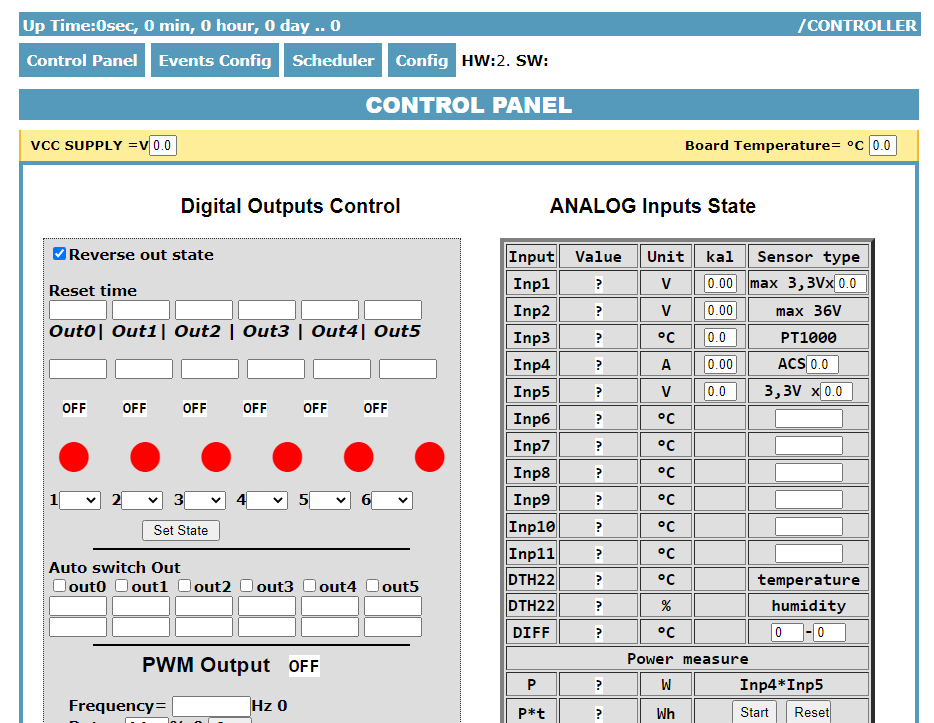
I dug it out of the cupboard and decided to use it a bit. It reported nicely in the network, but I decided to connect the DS18 temperature sensor (original with cable and plug) but it did not give any value to the controller, so I decided to move the plugs there and now I have only question marks. I have reset and uploaded the soft but it does not help. I certainly don't remember how to use it and this is the problem. Please tell me what I am doing wrong. I am attaching a picture of the screen.
I dug it out of the cupboard and decided to use it a bit. It reported nicely in the network, but I decided to connect the DS18 temperature sensor (original with cable and plug) but it did not give any value to the controller, so I decided to move the plugs there and now I have only question marks. I have reset and uploaded the soft but it does not help. I certainly don't remember how to use it and this is the problem. Please tell me what I am doing wrong. I am attaching a picture of the screen.
Attachments:
-
 Przechwytywanie.PNG
(64.33 KB)
You must be logged in to download this attachment.
Przechwytywanie.PNG
(64.33 KB)
You must be logged in to download this attachment.