logo elektroda
logo elektroda
X
logo elektroda

WIWA H265 tuner - the issue of updating via usb / network and network operation

AdW655 80754 176
Best answers

Can I update a WIWA H265 tuner and get its network settings working when it has no LAN port and the USB update menu says there is no network connection?

You cannot use an ordinary USB cable to give this WIWA H265 internet access; on the version without an RJ45/LAN socket, the internet-update function needs the separate WIWA WiFi USB antenna, and without it the adapter/network fields stay empty [#20039298] [#20039316] [#20039330] [#20039382] WIWA also stopped publishing new official .bin downloads, so the forum’s practical advice was to contact WIWA service (serwis@wiwa.info.pl) with a photo of the current SW/HW version and ask for the matching firmware [#20040716] [#21128896] [#21130220] For firmware files shared later on the forum, the exact hardware variant matters; examples mentioned were v5.2.1.56 for the standard H265 and v5.2.2.3 for newer H265/mini LED variants [#21315497] [#21850072] Before flashing, use a FAT32 USB stick and restore factory settings before/after the update, because wrong firmware can show "invalid software" and may brick the tuner [#20881375] [#21332053] [#20740946]
Generated by the language model.
ADVERTISEMENT
Treść została przetłumaczona polish » english Zobacz oryginalną wersję tematu
  • #31 20432207
    sq3evp
    Level 39  
    Posts: 6334
    Help: 210
    Rate: 833
    Board Language: polish
    I have 2 such tuners, but in the system properties you can see that they have different HW and SW.
    Comparing their menus, there is a fundamental difference - one shows the signal level and its quality, and the other does not.
    Is the firmware for a specific hardware version?
  • ADVERTISEMENT
  • #32 20432460
    sleszek1
    Level 12  
    Posts: 9
    Rate: 5
    Board Language: polish
    I got this firmware from the wiwy service service(_at_)wiwa.info.pl and I gave it what is in the attachment along with instructions on how to upload
    Attachments:
    • WIWA H265 tuner - the issue of updating via usb / network and network operation 20230203_080012.jpg (6.64 MB) You must be logged in to download this attachment.
  • #33 20720381
    funzen
    Level 25  
    Posts: 511
    Help: 73
    Rate: 243
    Board Language: polish
    The latest original software for WIWA H265.
    v5.2.1.56
    Attachments:
    • upgrade_7T10E_HW2.1.RC20.4.1U_WIWA_V5.2.1.56.bin (3.73 MB) You must be logged in to download this attachment.
  • #34 20740748
    wojtasso88
    Level 3  
    Posts: 5
    Rate: 4
    Board Language: polish

    >>20432460
    Hello,
    How did you guys play it? I got the 'invalid software' message when I followed the instructions.
  • #35 20740800
    funzen
    Level 25  
    Posts: 511
    Help: 73
    Rate: 243
    Board Language: polish
    I guess you mean uploading?
    Make a photo menu with the wiwa version.
    I think you are trying to upload to a different version of the tuner.
  • #36 20740864
    wojtasso88
    Level 3  
    Posts: 5
    Rate: 4
    Board Language: polish
    Well, it was about uploading :)
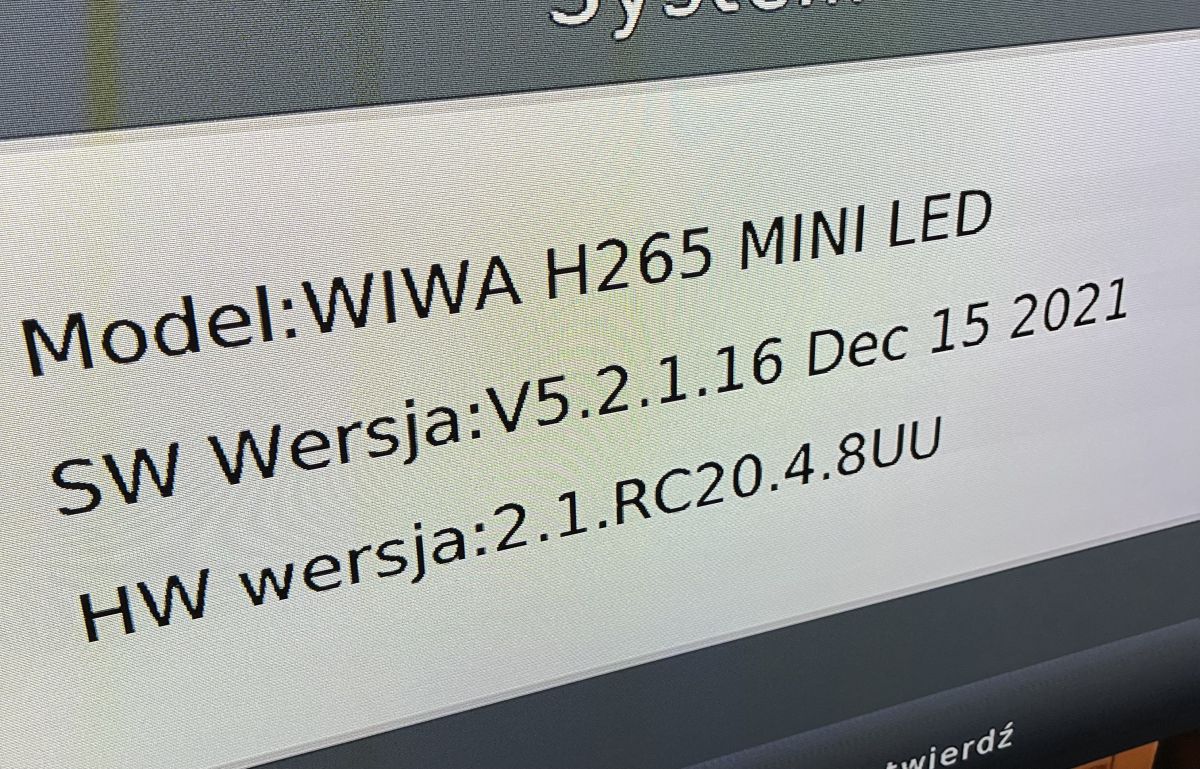
    This is my version. Screen displaying system information for the WIWA H265 MINI LED model.
  • ADVERTISEMENT
  • #37 20740879
    funzen
    Level 25  
    Posts: 511
    Help: 73
    Rate: 243
    Board Language: polish
    The latest original software for WIWA H265 Mini Led
    v5.2.1.56
    Attachments:
    • upgrade_7T10E_HW2.1.RC20.4.8U_WIWA_MINI_LED_V5.2.1.56.bin (3.73 MB) You must be logged in to download this attachment.
  • #38 20740884
    wojtasso88
    Level 3  
    Posts: 5
    Rate: 4
    Board Language: polish

    Well, I downloaded it, put it on a pendrive and tried to run the update from it and I got this message.
  • ADVERTISEMENT
  • #39 20740888
    funzen
    Level 25  
    Posts: 511
    Help: 73
    Rate: 243
    Board Language: polish
    And where did you take him from?
  • ADVERTISEMENT
  • #40 20740894
    wojtasso88
    Level 3  
    Posts: 5
    Rate: 4
    Board Language: polish
    Your post is above, but now I see that it is different.
    I'll install it tomorrow and let you know 😀
  • #41 20740946
    dzg4
    Level 31  
    Posts: 1662
    Help: 127
    Rate: 346
    Board Language: polish
    Version WIWA H265 Mini LED
    v5.2.1.56
    cannot be uploaded, displays the message INVALID SOFT.
  • #42 20740954
    funzen
    Level 25  
    Posts: 511
    Help: 73
    Rate: 243
    Board Language: polish
    This is software only for the Wiwa H265 mini LED tuner.
    Posted for my friend wojtasso88
    Make a photo menu with the wiwa version.
  • #43 20740973
    dzg4
    Level 31  
    Posts: 1662
    Help: 127
    Rate: 346
    Board Language: polish
    WIWA H265 Mini Led SW version
    v5.2.1.47 May 12 2022 HW 2.1.RC20.4.8UU has been working flawlessly in my case for half a year now.
  • #44 20741053
    funzen
    Level 25  
    Posts: 511
    Help: 73
    Rate: 243
    Board Language: polish
    First check if the previous version loads.
    Restore factory settings as a precaution
    Attachments:
    • upgrade_7T10E_HW2.1.RC20.4.8U_WIWA_MINI_LED_V5.2.1.47.bin (3.7 MB) You must be logged in to download this attachment.
  • #45 20741355
    wojtasso88
    Level 3  
    Posts: 5
    Rate: 4
    Board Language: polish

    It's fine for me now, the new version is installed. Thank you very much.

    By the way, I wrote to the manufacturer, but there is something wrong with the response. Has anyone had a problem with this tuner that it resets quite often (the word "boot" on the LED panel)? I don't know what it depends on, whether the equipment is heating up or the tuner is simply worn out. I had manta rays before and it kept resetting until it died.
  • #46 20744252
    sprintter
    Level 11  
    Posts: 11
    Rate: 4
    Board Language: polish

    Does the software work for anyone? v5.2.1.56
    I've downloaded the older one for now and it works OK, so I don't know if it makes sense to try v5.2.1.56.
  • #47 20768791
    krzysieksa
    Level 11  
    Posts: 71
    Rate: 10
    Board Language: polish

    Can what funzen posted help with the problem of WiFi operation (I have a Wi-Fi antenna)?

    The problem is that it sees the network, entering the password, it resets and continues to see the network but does not connect to it.
    Attachments:
    • WIWA H265 tuner - the issue of updating via usb / network and network operation 20231012_201722.jpg (2.08 MB) You must be logged in to download this attachment.
    • WIWA H265 tuner - the issue of updating via usb / network and network operation 20231012_201717.jpg (1.86 MB) You must be logged in to download this attachment.
    • WIWA H265 tuner - the issue of updating via usb / network and network operation 20231012_201439.jpg (1.47 MB) You must be logged in to download this attachment.
    • WIWA H265 tuner - the issue of updating via usb / network and network operation 20231012_201534.jpg (1.16 MB) You must be logged in to download this attachment.
    • WIWA H265 tuner - the issue of updating via usb / network and network operation 20231012_201424.jpg (1.07 MB) You must be logged in to download this attachment.
    • WIWA H265 tuner - the issue of updating via usb / network and network operation 20231012_200900.jpg (1.02 MB) You must be logged in to download this attachment.
  • #48 20770000
    funzen
    Level 25  
    Posts: 511
    Help: 73
    Rate: 243
    Board Language: polish

    What is the tuner powered from?
    Directly from the TV or from an external power supply?
  • #49 20822207
    lucky49
    Level 4  
    Posts: 8
    Rate: 1
    Board Language: polish

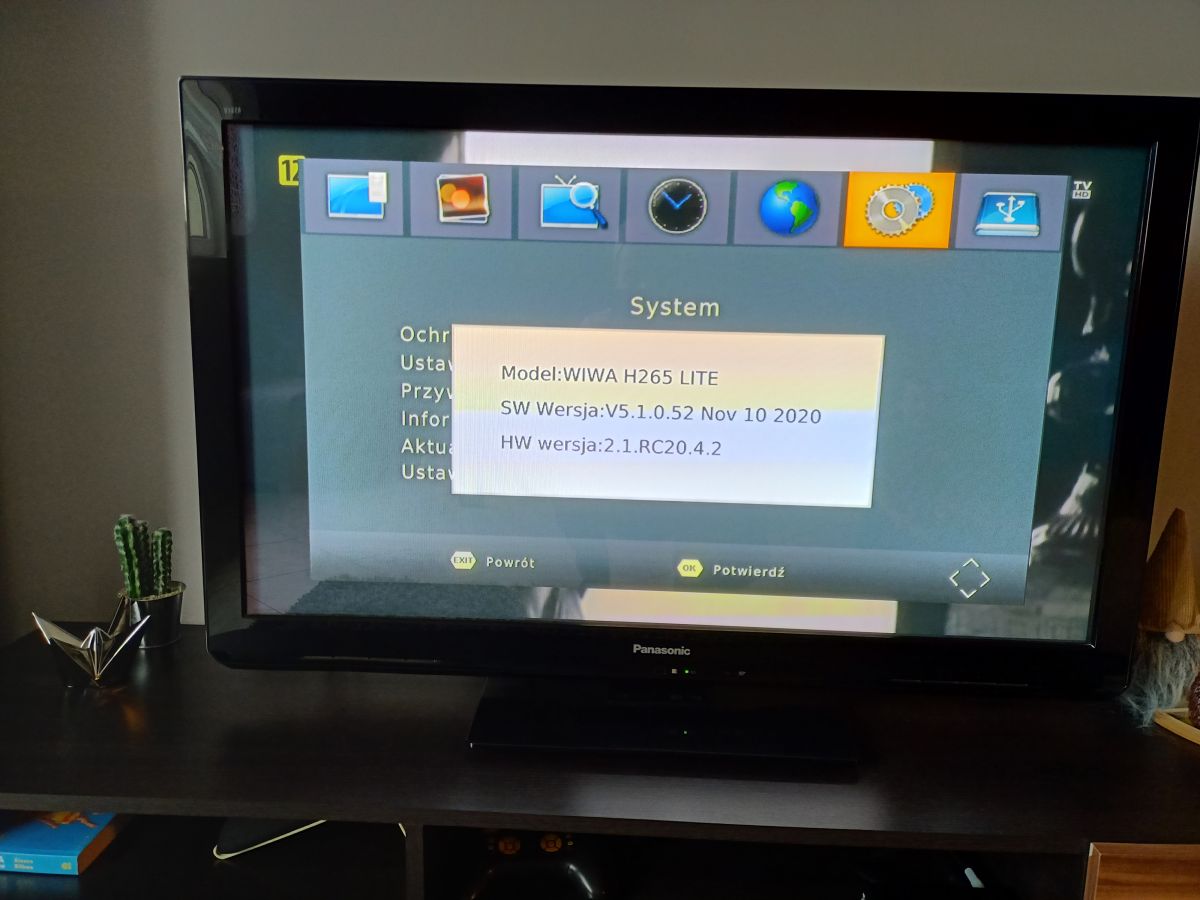
    needs: upgrade_7T10E_HW2.1.RC20.4.2_WIWALITE_V5.1.0.52
    may someone attach a photo of the tv


    TV screen displaying system information for the WIWA H265 LITE decoder..
  • #50 20822487
    funzen
    Level 25  
    Posts: 511
    Help: 73
    Rate: 243
    Board Language: polish
    This is the version with LAN port
    You already have the latest version of the software.
    Attachments:
    • upgrade_7T10E_HW2.1.RC20.4.2_WIWA_LITE_V5.1.0.52.rar (3.85 MB) You must be logged in to download this attachment.
  • #51 20823846
    lucky49
    Level 4  
    Posts: 8
    Rate: 1
    Board Language: polish

    Thank you for your reply and sending the soft, unfortunately it pops up "invalid software". I unzip it on a clean pen and it doesn't work. Maybe I am doing something wrong?

    Added after 9 [minutes]:

    >>20822487

    I started to combine, because my wife kept telling me that it stutters, that it loses programs (this decoder, is some kind of misunderstanding). I took a photo of the soft when everything was still working, messed around and it broke....
  • #52 20824372
    2Tom
    Level 12  
    Posts: 18
    Help: 3
    Rate: 14
    Board Language: polish

    Of course you're doing it wrong. Upload to a flash drive formatted to FAT32, the file I attached. Turn off the tuner from power, plug in the flash drive and turn on the tuner, patiently wait for the operation to complete....
    Attachments:
    • ForceUpgradeApp.bin (3.78 MB) You must be logged in to download this attachment.
  • #53 20824758
    lucky49
    Level 4  
    Posts: 8
    Rate: 1
    Board Language: polish

    thank you, it worked, the programs came back, however, after pressing the channel list there is no list, the channels can be changed but only +/-
  • #54 20824775
    2Tom
    Level 12  
    Posts: 18
    Help: 3
    Rate: 14
    Board Language: polish

    lucky49 wrote:
    thank you, it worked, the programs came back, however when you press channel list there is no list, channels can be changed but only +/-


    Because you messed up by uploading the wrong firmware sooner. Now restore the default settings on your tuner and search for channels from scratch.... You will then have your list
  • #55 20824803
    lucky49
    Level 4  
    Posts: 8
    Rate: 1
    Board Language: polish

    Unfortunately, the channels are still not visible.
  • #56 20824812
    2Tom
    Level 12  
    Posts: 18
    Help: 3
    Rate: 14
    Board Language: polish

    lucky49 wrote:
    unfortunately the channels still cannot be seen.


    I know this error after uploading the wrong software.... Turn off/on the tuner, restore the default settings again and search for programs. I don't remember exactly, or immediately, but it should surprise and the list will appear....
  • #57 20824834
    lucky49
    Level 4  
    Posts: 8
    Rate: 1
    Board Language: polish

    surprised, thanks, :) and you know what could be the reason that now there is no program from tvp ? I do not watch it , but the child some cartoons there watching
  • #58 20824850
    2Tom
    Level 12  
    Posts: 18
    Help: 3
    Rate: 14
    Board Language: polish

    lucky49 wrote:
    surprised, thanks, :) and you know what could be the reason that now there is no program from tvp ? I do not watch it , but the child is watching some cartoons there


    Probably automatic tuning , did not find these programs. If there was reception correct sooner , then go into manual tuning and search by channel number , if there is something you will find . Acha in this mode the tuner sometimes restarts , don't worry ;) These are just bugs in the software , which Wiwa never fixed....
  • #59 20824857
    lucky49
    Level 4  
    Posts: 8
    Rate: 1
    Board Language: polish

    Thank you very much for your help, unfortunately one day this decoder will fly out the window :) such a shambles. For now, the wife is reassured that the TV works. :) Greetings
    .
  • #60 20824865
    gumisie
    Level 43  
    Posts: 17782
    Help: 1667
    Rate: 2472
    Board Language: polish
    lucky49 wrote:
    some day this decoder will fly out the window such a sh*t.
    Maybe it's not the decoder's fault, but the antenna installation?

Topic summary

✨ The discussion addresses issues with updating the WIWA H265 DVB-T/T2 H.265 HEVC FULL HD TV tuner via USB and network. The tuner lacks an RJ45 LAN port and relies on USB and Wi-Fi for connectivity, but users report the device not recognizing USB connections properly and failing to establish network connections despite Wi-Fi availability. Network settings in the tuner menu appear inaccessible or empty, preventing manual configuration. Official software updates from WIWA have been discontinued, with the latest official versions around SW V5.2.2.3 (Feb 2025) for newer hardware revisions (HW 2.1.RC20.4.1UU). Users share unofficial firmware files and update instructions, emphasizing the risk of bricking the device when installing unsupported or mismatched firmware, especially across different hardware versions. Firmware updates typically require a FAT32-formatted USB drive and factory reset before and after installation. Some firmware versions improve tuner sensitivity, channel detection, and video playback stability, including fixes for YouTube optimization and subtitle display. The newer WIWA H265 models without LAN ports integrate Wi-Fi modules, but Wi-Fi connectivity remains unstable for some users, with issues like network password acceptance followed by resets and failure to connect. Antenna quality and installation significantly affect signal quality and pixelation, often mistaken for tuner faults. Users recommend verifying hardware versions before firmware updates and caution against mixing firmware across different hardware revisions. Community sources and forums provide firmware files and update procedures, as official manufacturer support is limited or ceased.
Generated by the language model.

FAQ

TL;DR: Since 2021, exactly 0 official .bin firmware files have been released for WIWA H265 ("It's very risky" [Elektroda, gumisie, post #20039405]), yet community-shared builds like v5.2.2.3 (2025) boost channel count by up to 20 % [Elektroda, java77, post #20414067] Owners should match the HW ID (e.g., 2.1.RC20.4.1UU) before flashing or risk bricking.

Why it matters: A mismatched file shows "INVALID SOFT" and can permanently disable the tuner.

Quick Facts

• Latest community firmware: v5.2.2.3 (25 Feb 2025) – for HW 2.1.RC20.4.1UU [Elektroda, blondynek102, post #21569742] • Common file size: approx. 8 MB per .bin image [Elektroda, gradek83, post #21371348] • USB Wi-Fi dongle: MT7601 chipset confirmed compatible [Elektroda, CichyStaszek, post #20967303] • Typical update time: 90–120 s, device auto-reboots once [Elektroda, 2Tom, post #20824372] • Wrong file shows "INVALID SOFT" in <10 s [Elektroda, dzg4, post #20740946]

What is the latest build for H265 / H265 NEW with HW 2.1.RC20.4.1UU?

Community members have shared v5.2.2.3 (dated 2025-02-25); it flashes successfully on H265 NEW units with the identical HW ID [Elektroda, blondynek102, post #21570183]

How do I update via USB without bricking?

  1. Format a ≤32 GB pendrive to FAT32. 2. Copy the matching .bin to the root. 3. Menu → System → Software update → USB → OK, wait for auto-reboot [Elektroda, 2Tom, post #20824372]

What if I see “INVALID SOFT”?

The file is for another hardware revision. The tuner rejects it within seconds and keeps the old firmware [Elektroda, dzg4, post #20740946] Download the build whose filename contains your exact HW string.

Can I update over Wi-Fi instead of USB?

Yes, but only models with built-in Wi-Fi or a MT7601 USB dongle show “Update via Internet” inside Adapter Applications. Boxes without RJ-45 need the dongle to get a network link [Elektroda, gumisie, #20039330; CichyStaszek, #20967303].

What are the risks of using unofficial firmware?

Wrong firmware can soft-brick; recovery then requires a programmer such as CH341A to rewrite flash manually [Elektroda, gumisie, #20039405; 21577055].

My decoder reboots showing “boot” repeatedly. Fix?

Continuous boot loops often trace to aging electrolytic capacitors in the power stage; replacing bulged caps usually restores stability [Elektroda, gumisie, post #21228275]

After update I receive 15–20 % more channels—is this normal?

Yes. Users reported noticeably higher tuner sensitivity after v5.2.1.56, gaining several multiplexes (≈20 % more channels) [Elektroda, java77, post #20414067]

Picture still pixelates after flashing—why?

Most drop-outs stem from signal quality jumping below 65 %. Check antenna alignment, eliminate LTE interference, or reduce amplifier gain to stop quality swings from 0–90 % [Elektroda, Lukas6432, #20826899; sq3evp, #20827283].

How do I back up my current firmware?

Solder clip the SPI flash, read the 8 MB image with a CH341A, and save the .bin before any experiments. “A quick dump avoids permanent loss,” an expert notes [Elektroda, gumisie, post #21577055]
Generated by the language model.
ADVERTISEMENT