logo elektroda
logo elektroda
X
logo elektroda

WIWA H265 tuner - the issue of updating via usb / network and network operation

AdW655 80763 176
Best answers

Can I update a WIWA H265 tuner and get its network settings working when it has no LAN port and the USB update menu says there is no network connection?

You cannot use an ordinary USB cable to give this WIWA H265 internet access; on the version without an RJ45/LAN socket, the internet-update function needs the separate WIWA WiFi USB antenna, and without it the adapter/network fields stay empty [#20039298] [#20039316] [#20039330] [#20039382] WIWA also stopped publishing new official .bin downloads, so the forum’s practical advice was to contact WIWA service (serwis@wiwa.info.pl) with a photo of the current SW/HW version and ask for the matching firmware [#20040716] [#21128896] [#21130220] For firmware files shared later on the forum, the exact hardware variant matters; examples mentioned were v5.2.1.56 for the standard H265 and v5.2.2.3 for newer H265/mini LED variants [#21315497] [#21850072] Before flashing, use a FAT32 USB stick and restore factory settings before/after the update, because wrong firmware can show "invalid software" and may brick the tuner [#20881375] [#21332053] [#20740946]
Generated by the language model.
ADVERTISEMENT
Treść została przetłumaczona polish » english Zobacz oryginalną wersję tematu
  • #61 20824869
    lucky49
    Level 4  
    Posts: 8
    Rate: 1
    Board Language: polish

    not excluded, the antenna is old and the cable too, I am considering replacing it, when I have a slower moment

  • ADVERTISEMENT
  • #62 20825686
    sq3evp
    Level 39  
    Posts: 6334
    Help: 210
    Rate: 833
    Board Language: polish
    That's also right - I had the opportunity to face the old antenna installation and it turned out that the old mesh with amplifier gave too strong a signal.
    Now there is another antenna without amplifier and it is OK. Also Wiwa 2 pcs.
  • #63 20825761
    Lukas6432
    Level 32  
    Posts: 1919
    Help: 180
    Rate: 431
    Board Language: polish
    lucky49 wrote:
    Thank you very much for your help, unfortunately one day this decoder will fly out the window :) such a jerk. For now, the wife is reassured that the TV works. :) Greetings


    What is the signal level and quality on these problematic channels?
    Press Info twice to quickly check the signal level, it has to be stable it can not jump just be stable.
  • #64 20825832
    krzysiozak
    Level 40  
    Posts: 6570
    Help: 508
    Rate: 1140
    Board Language: polish
    lucky49 wrote:
    Thank you very much for your help, unfortunately one day this decoder will fly out the window :) such a jerk. For now, the wife is reassured that the TV works. :) Greetings


    Unless my WIWA H265 works flawlessly.
  • #65 20826825
    lucky49
    Level 4  
    Posts: 8
    Rate: 1
    Board Language: polish

    >>20825761
    silence is 89% and quality jumps between 0 and 54% pixelation stutters
  • ADVERTISEMENT
  • #66 20826899
    Lukas6432
    Level 32  
    Posts: 1919
    Help: 180
    Rate: 431
    Board Language: polish
    If the quality jumps it's no wonder you have pixellosis on your TV.
    The fault is the antenna installation and not the dvbt2 tuner.
    First, maybe correctly set the antenna to the transmitter.
    Signal quality should be stable without fluctuations.
  • #67 20827283
    sq3evp
    Level 39  
    Posts: 6334
    Help: 210
    Rate: 833
    Board Language: polish
    There are applications and websites to set up the antenna.
    I had similar experiences when overdriving - the quality was from 0% to 90%, and the strength was still 100%.

    Now there is a different antenna, positioned differently without an amplifier and the strength is (depending on the MUX power) from 85% to 95% (distance to the transmitter over 50km in a straight line), the quality is at least 80% to 95% (sometimes it changes, but usually it is constant depending on the MUX and its power).
  • #68 20844323
    CichyStaszek
    Level 7  
    Posts: 13
    Rate: 3
    Board Language: polish

    Is it for Wiwa H265 Mini (without LED) soft V5.2.1.47. May 12, 2022 is the latest? HW: 2.1.RC20.4.4UU
  • #70 20881359
    GULIwer1
    Level 10  
    Posts: 6
    Rate: 1
    Board Language: polish

    funzen wrote:
    The latest original software for WIWA H265.
    v5.2.1.56

    My HW changed to UU. It's probably the new version without RJ45 (because it doesn't detect the network via cable anymore). But FW entered only the pen had to be from FAT32. NTFS saw but did not update.
    I had 5.1.0.50 from Oct 30, 2020, is there a chance for a list of changes?
  • #71 20881375
    Lukas6432
    Level 32  
    Posts: 1919
    Help: 180
    Rate: 431
    Board Language: polish
    GULIwer1 wrote:
    But FW only entered the pen had to be FAT32 .
    NTFS saw but did not update.

    After all, it writes clearly in Polish that it requires a disk with FAT32 software.
    What can I explain?
  • ADVERTISEMENT
  • #72 20881416
    GULIwer1
    Level 10  
    Posts: 6
    Rate: 1
    Board Language: polish

    Lukas6432 wrote:
    If the quality jumps, it's no wonder you have pixels on your TV.
    The antenna installation is to blame, not the dvbt2 tuner.
    First, you can correctly position the antenna on the transmitter.
    The signal quality should be stable without fluctuations.

    Can a cellular BTS at a distance of ~250m, practically on the antenna-transmitter line (IIRC 56km to the transmitter) cause sudden drops in quality? Plus a second BTS ~100m to the side?
    MUX-3 is virtually bleed-free. MUX-1 has occasional, MUX-2 sometimes and several per minute. The later, the less. As if it depended on the "garbage" in the air

    The new Toshiba TV filters and records each MUX nicely, but also encodes the recorded material, which prevents me from playing it elsewhere. There were no problems on the old WIWA HD90/95 MC, but it was DVBT-1. WIWA H.265 still performs the best of the tested ones (Ariva T75 and a commercial one) because these were barely MUX-3.

    Added after 3 [minutes]:

    Lukas6432 wrote:
    GULIwer1 wrote:
    But FW only entered the pen had to be FAT32 .
    NTFS saw but did not update.

    After all, it writes clearly in Polish that it requires a disk with FAT32 software.
    What can I explain?
    Clearance. I just added it because the decoder saw the file on the NTFS media, but it's probably the decoder's "system" and the bios only supports FAT.
  • #73 20927516
    DRAZEK87
    Level 15  
    Posts: 250
    Help: 4
    Rate: 138
    Board Language: polish
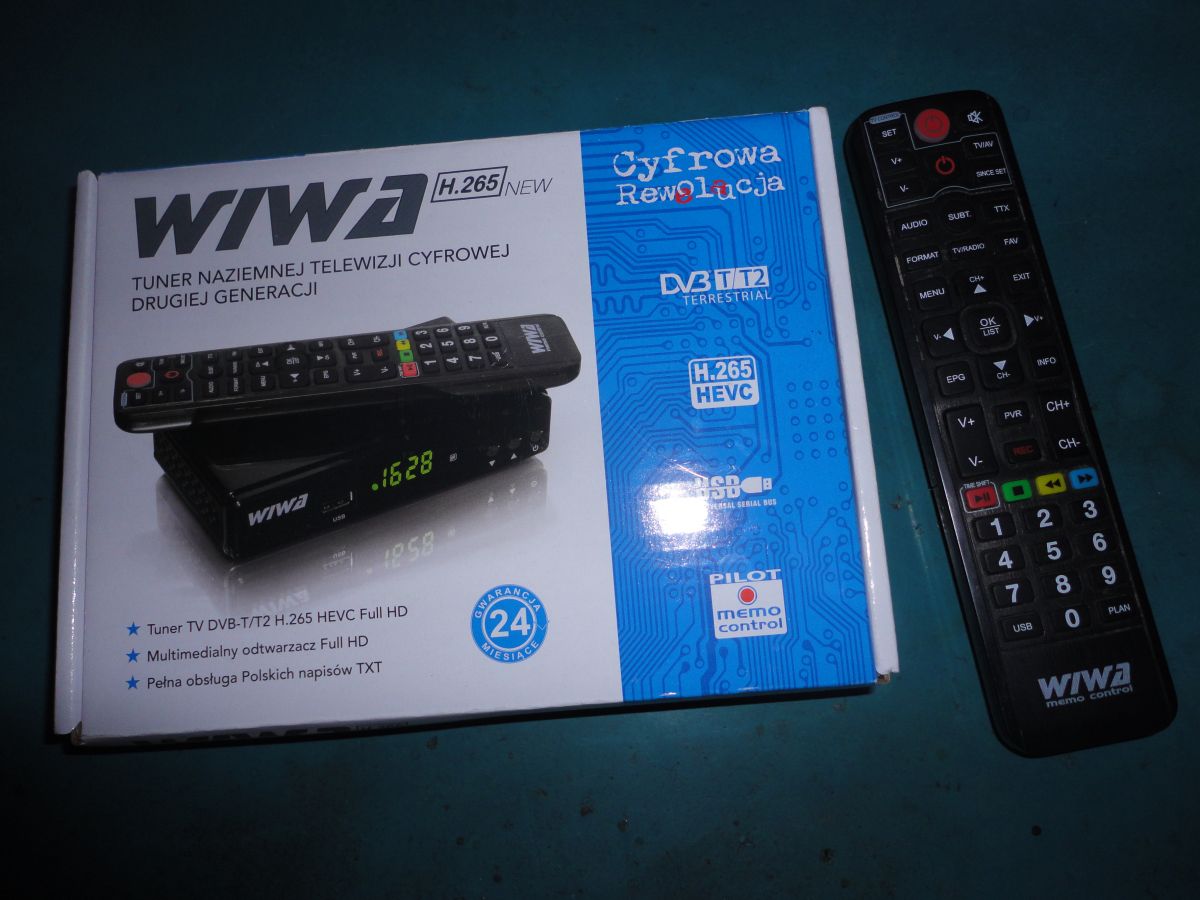
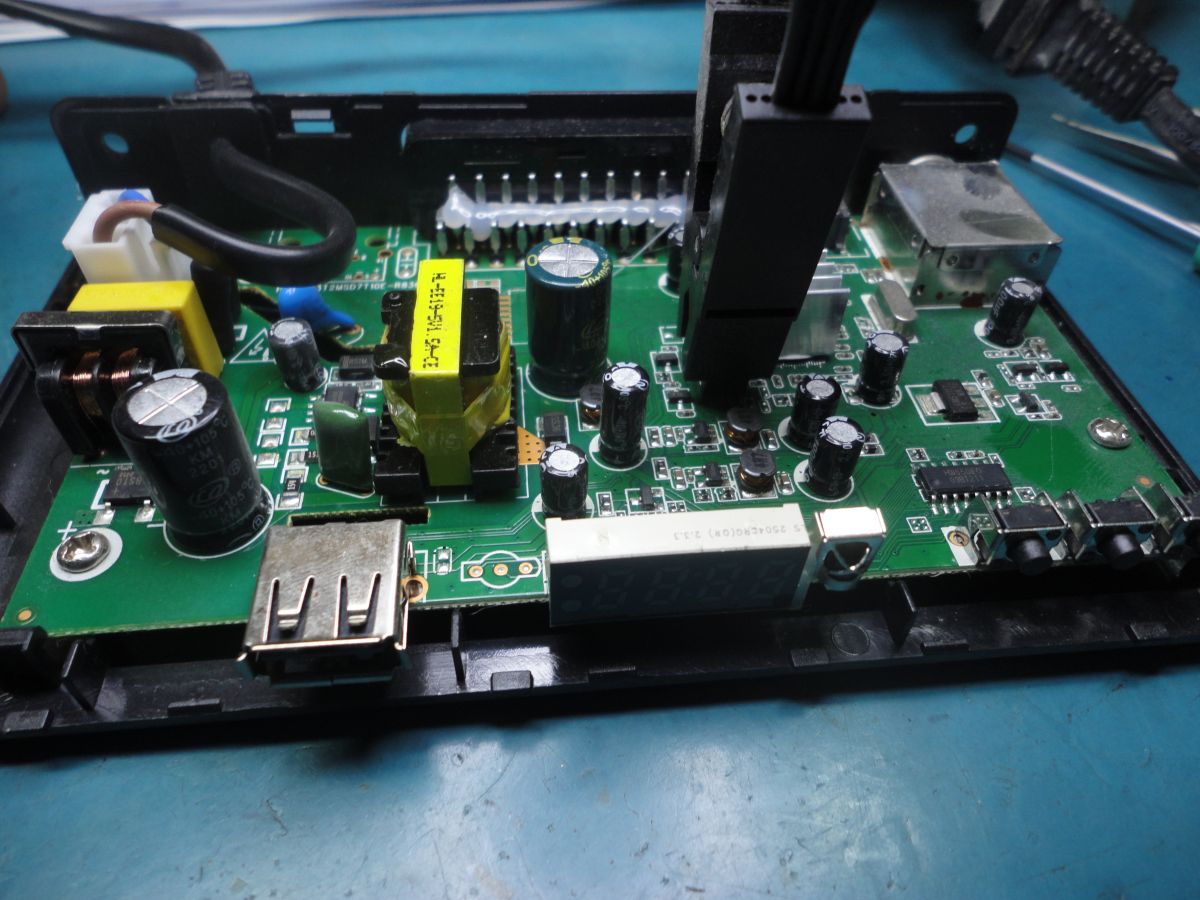
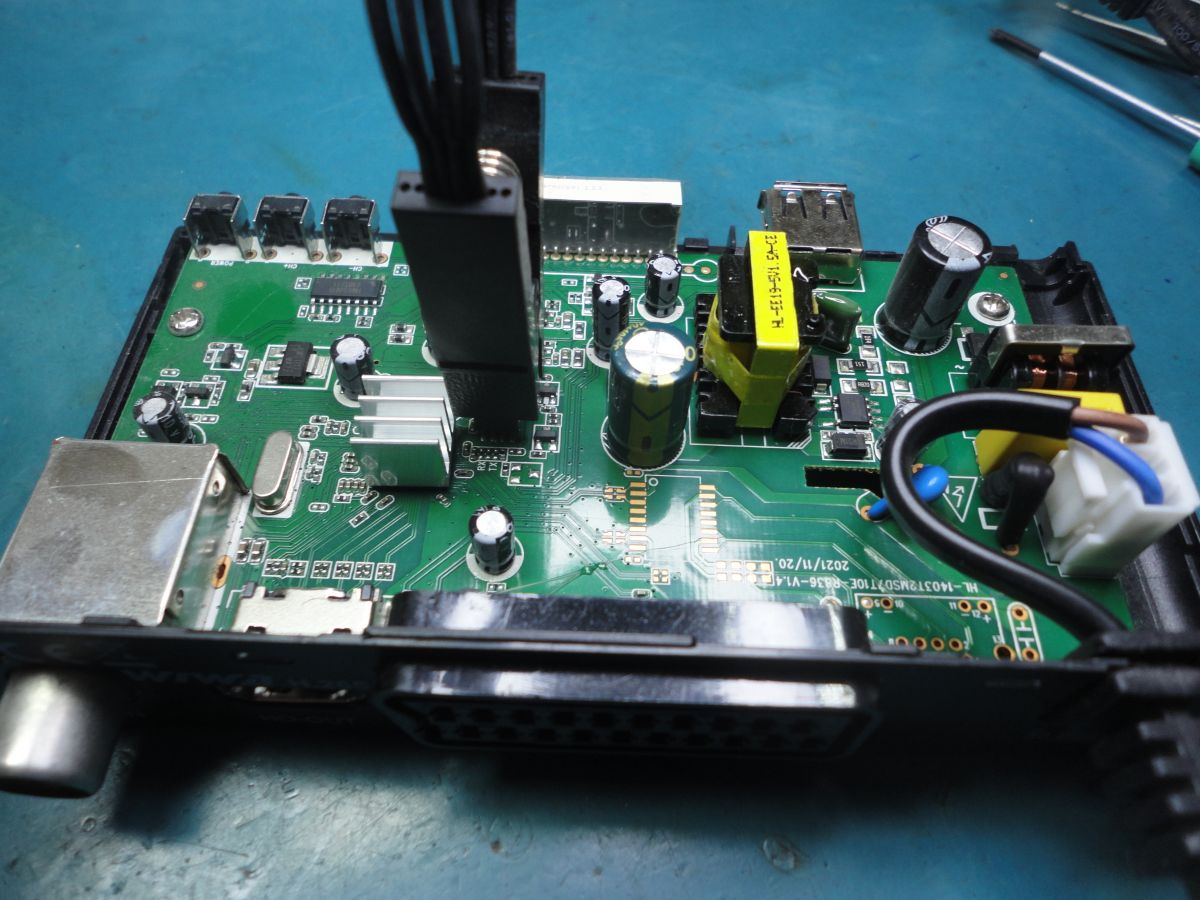
    Does anyone of you have a working .bin input for the standard 2nd generation WIWA H.265 decoder with LCD; the device does not have a LAN port; the memory chip is: 25VQ32BTIG; please download the batch from a functional unit and share it with me. I will upload it using a programmer to a new memory (*old damaged/replaced) and I will confirm whether it works; probably HW what it was: 2.1.RC20.4.1UU but I`m not sure; the USB update option is probably not possible because the hardware is dead. This is what the decoder and the box with the remote control look like inside.

    Interior of WIWA H.265 decoder with visible electronic components. Image of the mainboard of a WIWA H.265 decoder with visible electronic components. WIWA H.265 second-generation decoder with an LED display and remote control next to the box with graphics depicting the decoder and remote.
  • ADVERTISEMENT
  • #74 20967303
    CichyStaszek
    Level 7  
    Posts: 13
    Rate: 3
    Board Language: polish

    Can you add a wifi antenna from MT7601 to the H265 Mini tuner (without LED) to have e.g. YouTube? And does it have to be an antenna from Wiva, or can it be from another manufacturer?
  • #75 21128659
    sokolovera
    Level 5  
    Posts: 3
    Rate: 1
    Board Language: polish
    Hello,
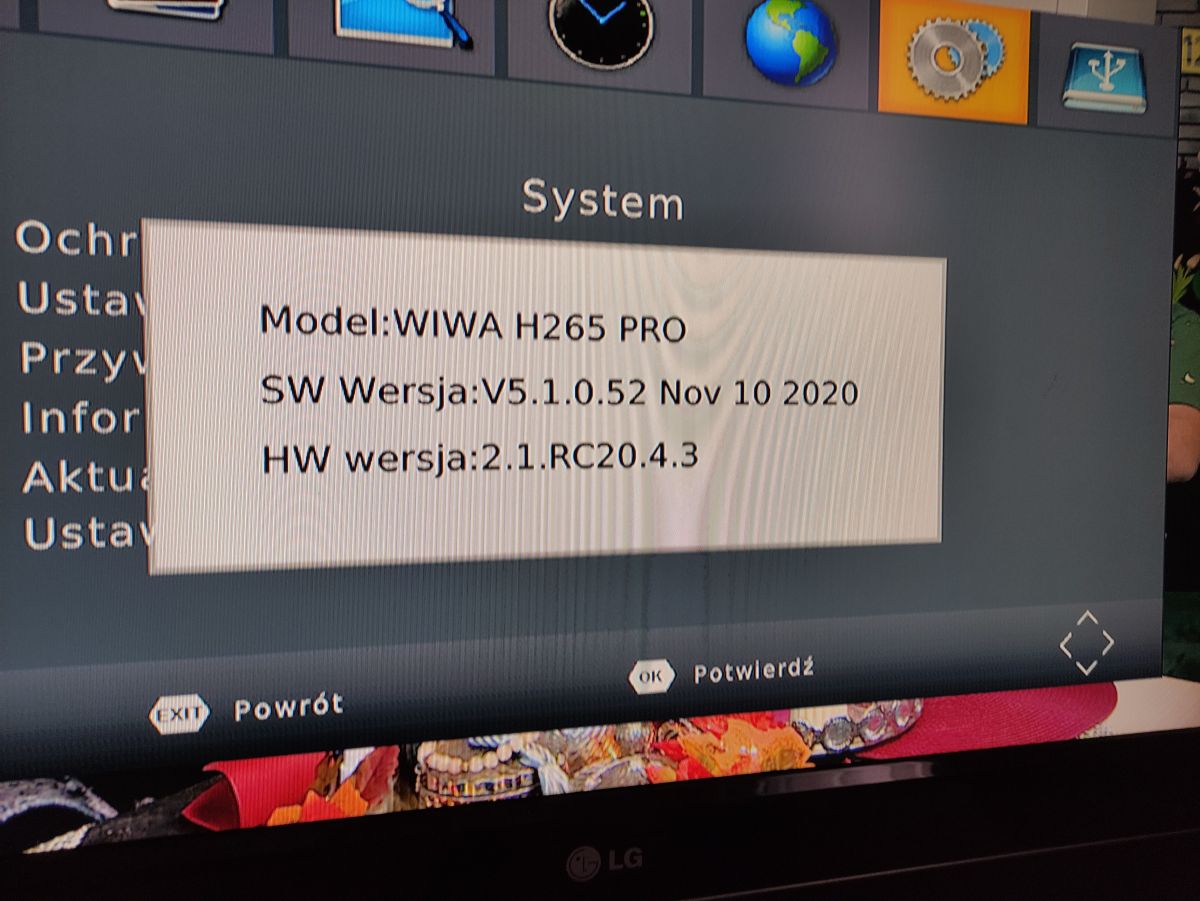
    Does anyone have the latest software update for the Wiwa H265Pro?
    I currently have:
    SW: v5.1.0.52 Nov 10.2020
    HW: 2.1.RC20 4.3.
    Thanks in advance for your help if anyone is able to help :) .

    Settings screen of WIWA H265 PRO decoder showing software version information.
  • #76 21128896
    sleszek1
    Level 12  
    Posts: 9
    Rate: 5
    Board Language: polish
    The best way is to send an email with a picture of this soft and you will get a reliable soft
    serwis(_at_)wiwa.info.pl
  • #77 21130200
    sq3evp
    Level 39  
    Posts: 6334
    Help: 210
    Rate: 833
    Board Language: polish
    sleszek1 wrote:
    Preferably send an email with a picture of this soft and you will get a firm soft
    serwis(_at_)wiwa.info.pl
    .

    Is this a service email?
    I think I'll also look for the newer versions for the tuners - a photo of them with a picture of the SW and HW versions you have will suffice?
  • #78 21130220
    sleszek1
    Level 12  
    Posts: 9
    Rate: 5
    Board Language: polish
    Yes, it's a service email. You can google wiwa and a page will pop up.
    service and there you have the address and email.
  • #79 21132360
    sokolovera
    Level 5  
    Posts: 3
    Rate: 1
    Board Language: polish
    >>21130220 .
    Unfortunately, the service replied that the 2020 version is the only current one.... a bit lame that they don't support longer with updates.
  • #80 21228243
    abart64
    Level 33  
    Posts: 1706
    Help: 269
    Rate: 629
    Board Language: polish
    My wiwa after a night's standstill is already booting up probably 9-10 times after switching on with the remote control. When it finishes it works normally.
    It started with one boot a few months ago and so it's gradually coming on.
    Should I combine with replacing the softwares or blow it out straight away? Bought just after dvb-t2 came in.
  • #81 21228275
    gumisie
    Level 43  
    Posts: 17782
    Help: 1667
    Rate: 2472
    Board Language: polish
    Since:
    abart64 wrote:
    Bought just after dvb-t2 came in.
    .
    Might be worth checking the electrolytic capacitors?
  • #82 21238860
    Tomek Sz
    Level 12  
    Posts: 10
    Board Language: polish
    Gentlemen, and for the WIWA H265 version with Lan port
    HW 2.1.RC20.4.1 is there something newer than SW V5.1.0.52?
  • #83 21240721
    funzen
    Level 25  
    Posts: 511
    Help: 73
    Rate: 243
    Board Language: polish
    There is no newer software version for wiwa z lan.
  • #84 21314591
    czarny_alibaba
    Level 17  
    Posts: 861
    Help: 5
    Rate: 150
    Board Language: polish
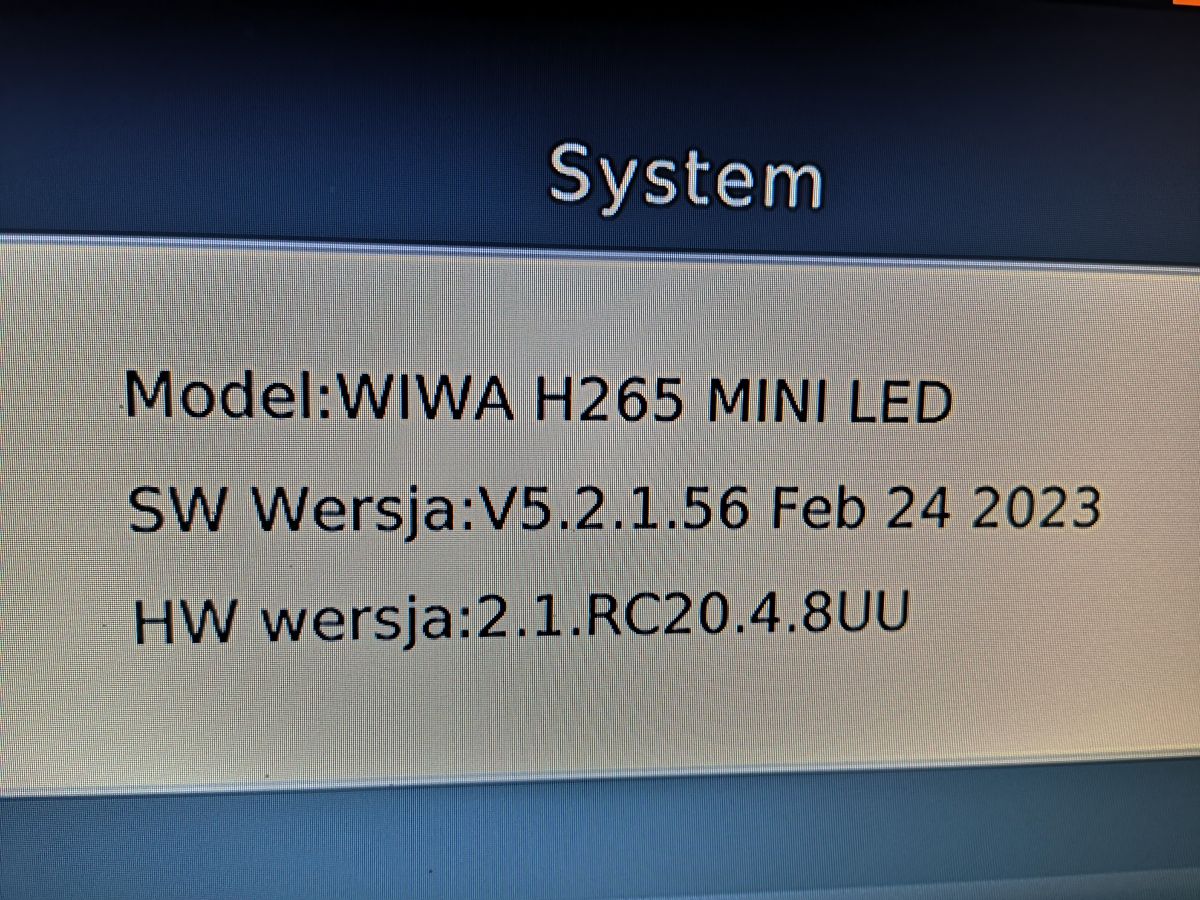
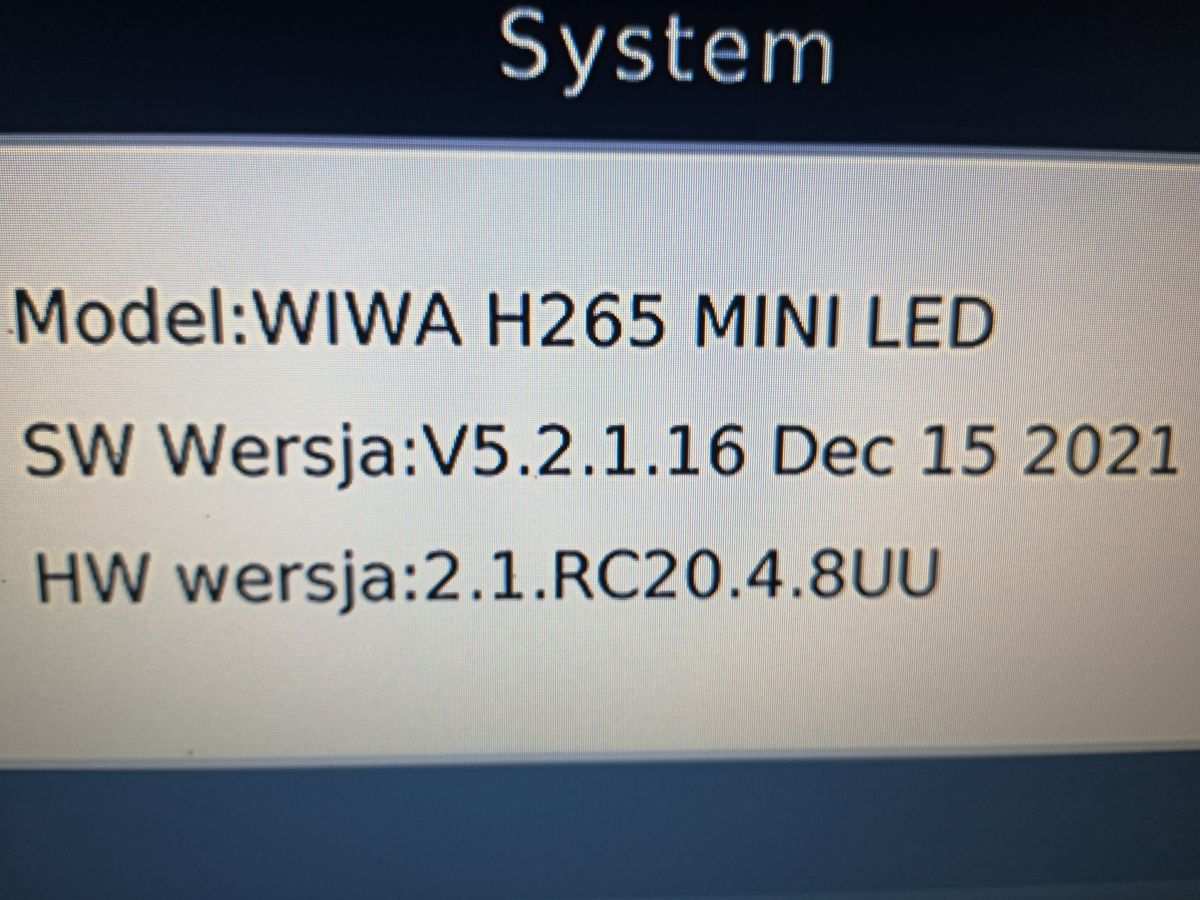
    Please find me the latest original soft for WIWA H265 Mini Led

    now i have such :
    Screenshot of system information for WIWA H265 MINI LED. .
  • #86 21314738
    czarny_alibaba
    Level 17  
    Posts: 861
    Help: 5
    Rate: 150
    Board Language: polish
    @funzen
    After downloading you have to rename the file v5.2.1.56 ?
  • #87 21314748
    funzen
    Level 25  
    Posts: 511
    Help: 73
    Rate: 243
    Board Language: polish
    There is no need for this.
  • #88 21314825
    czarny_alibaba
    Level 17  
    Posts: 861
    Help: 5
    Rate: 150
    Board Language: polish
    Update went successfully -SW v5.2.1.56 software installed

    System screen displaying the WIWA H265 MINI LED model and software and hardware version. .

    @funzen
    Thank you for your help
  • #89 21315452
    czarny_alibaba
    Level 17  
    Posts: 861
    Help: 5
    Rate: 150
    Board Language: polish
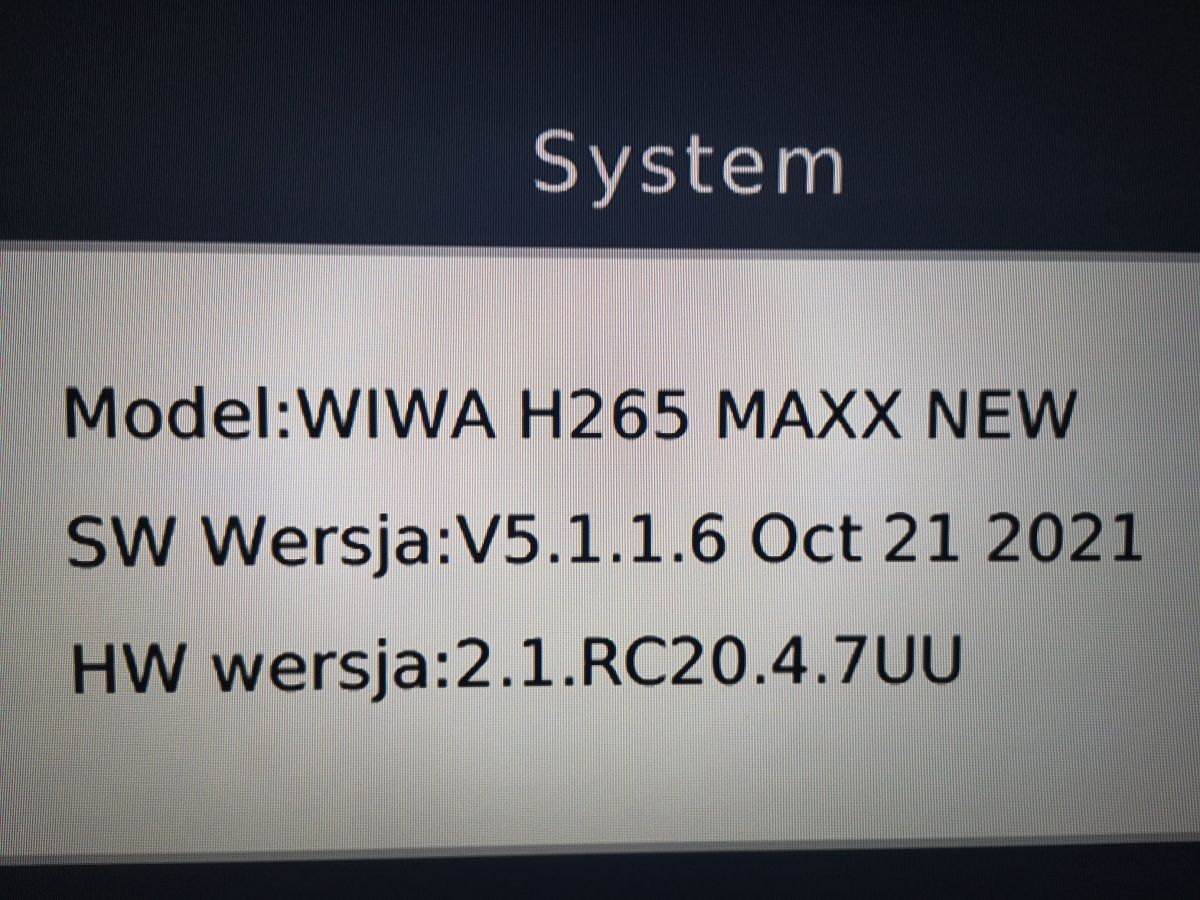
    For this model WIWA H265 MAXX New is there a newer original software ?
    Screenshot of system information for model WIWA H265 MAXX NEW. .

Topic summary

✨ The discussion addresses issues with updating the WIWA H265 DVB-T/T2 H.265 HEVC FULL HD TV tuner via USB and network. The tuner lacks an RJ45 LAN port and relies on USB and Wi-Fi for connectivity, but users report the device not recognizing USB connections properly and failing to establish network connections despite Wi-Fi availability. Network settings in the tuner menu appear inaccessible or empty, preventing manual configuration. Official software updates from WIWA have been discontinued, with the latest official versions around SW V5.2.2.3 (Feb 2025) for newer hardware revisions (HW 2.1.RC20.4.1UU). Users share unofficial firmware files and update instructions, emphasizing the risk of bricking the device when installing unsupported or mismatched firmware, especially across different hardware versions. Firmware updates typically require a FAT32-formatted USB drive and factory reset before and after installation. Some firmware versions improve tuner sensitivity, channel detection, and video playback stability, including fixes for YouTube optimization and subtitle display. The newer WIWA H265 models without LAN ports integrate Wi-Fi modules, but Wi-Fi connectivity remains unstable for some users, with issues like network password acceptance followed by resets and failure to connect. Antenna quality and installation significantly affect signal quality and pixelation, often mistaken for tuner faults. Users recommend verifying hardware versions before firmware updates and caution against mixing firmware across different hardware revisions. Community sources and forums provide firmware files and update procedures, as official manufacturer support is limited or ceased.
Generated by the language model.

FAQ

TL;DR: Since 2021, exactly 0 official .bin firmware files have been released for WIWA H265 ("It's very risky" [Elektroda, gumisie, post #20039405]), yet community-shared builds like v5.2.2.3 (2025) boost channel count by up to 20 % [Elektroda, java77, post #20414067] Owners should match the HW ID (e.g., 2.1.RC20.4.1UU) before flashing or risk bricking.

Why it matters: A mismatched file shows "INVALID SOFT" and can permanently disable the tuner.

Quick Facts

• Latest community firmware: v5.2.2.3 (25 Feb 2025) – for HW 2.1.RC20.4.1UU [Elektroda, blondynek102, post #21569742] • Common file size: approx. 8 MB per .bin image [Elektroda, gradek83, post #21371348] • USB Wi-Fi dongle: MT7601 chipset confirmed compatible [Elektroda, CichyStaszek, post #20967303] • Typical update time: 90–120 s, device auto-reboots once [Elektroda, 2Tom, post #20824372] • Wrong file shows "INVALID SOFT" in <10 s [Elektroda, dzg4, post #20740946]
What is the latest build for H265 / H265 NEW with HW 2.1.RC20.4.1UU?

Community members have shared v5.2.2.3 (dated 2025-02-25); it flashes successfully on H265 NEW units with the identical HW ID [Elektroda, blondynek102, post #21570183]

How do I update via USB without bricking?

  1. Format a ≤32 GB pendrive to FAT32. 2. Copy the matching .bin to the root. 3. Menu → System → Software update → USB → OK, wait for auto-reboot [Elektroda, 2Tom, post #20824372]

What if I see “INVALID SOFT”?

The file is for another hardware revision. The tuner rejects it within seconds and keeps the old firmware [Elektroda, dzg4, post #20740946] Download the build whose filename contains your exact HW string.

Can I update over Wi-Fi instead of USB?

Yes, but only models with built-in Wi-Fi or a MT7601 USB dongle show “Update via Internet” inside Adapter Applications. Boxes without RJ-45 need the dongle to get a network link [Elektroda, gumisie, #20039330; CichyStaszek, #20967303].

What are the risks of using unofficial firmware?

Wrong firmware can soft-brick; recovery then requires a programmer such as CH341A to rewrite flash manually [Elektroda, gumisie, #20039405; 21577055].

My decoder reboots showing “boot” repeatedly. Fix?

Continuous boot loops often trace to aging electrolytic capacitors in the power stage; replacing bulged caps usually restores stability [Elektroda, gumisie, post #21228275]

After update I receive 15–20 % more channels—is this normal?

Yes. Users reported noticeably higher tuner sensitivity after v5.2.1.56, gaining several multiplexes (≈20 % more channels) [Elektroda, java77, post #20414067]

Picture still pixelates after flashing—why?

Most drop-outs stem from signal quality jumping below 65 %. Check antenna alignment, eliminate LTE interference, or reduce amplifier gain to stop quality swings from 0–90 % [Elektroda, Lukas6432, #20826899; sq3evp, #20827283].

How do I back up my current firmware?

Solder clip the SPI flash, read the 8 MB image with a CH341A, and save the .bin before any experiments. “A quick dump avoids permanent loss,” an expert notes [Elektroda, gumisie, post #21577055]
Generated by the language model.
ADVERTISEMENT