logo elektroda
logo elektroda
X
logo elektroda
Dostępna jest polska wersja

Czy wolisz polską wersję strony elektroda?

Nie, dziękuję Przekieruj mnie tam
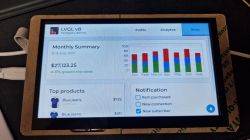
OpenBeken Simulator Discussion and improvements

smkassist 2505 32
Best answers

How can I make the OBK simulator’s rendering stay aligned and resize correctly when the SDL window is resized, maximized, or switched to fullscreen?

Handle the SDL window resize event and update the stored width/height used for the OpenGL viewport; that fixes the simulator becoming offset or clipped after maximize/fullscreen changes [#20533594][#20533608][#20534741] The simulator uses SDL for window and event management and OpenGL for drawing, so the resize logic belongs in the SDL event loop rather than in the renderer itself [#20533608][#20533594] One merged fix changed the default window size to 800x600, made the window resizable, and updated the renderer size on window resize; it also fixed a shape/subshape indexing bug [#20534741] The earlier manual offset hack in the render code became unnecessary once resize events were handled properly [#20537961] If needed, you can also add command-line resolution selection or remember the last window size for convenience [#20533594][#20535574][#20535769]
Generated by the language model.
ADVERTISEMENT

Topic summary

✨ The discussion revolves around the OpenBeken (OBK) Simulator, focusing on issues related to window resizing and rendering offsets when using different screen resolutions. Users identified that the preset resolution of 1680x940 caused rendering problems on higher resolution displays, leading to the suggestion of manually adjusting the base resolution. Solutions included implementing SDL_WINDOW_RESIZABLE and handling SDL window resize events to dynamically update the rendering dimensions. The conversation also touched on the choice of using OpenGL for rendering over SDL_Renderer, with arguments for maintaining flexibility for future enhancements. Recent updates included fixing the window size to 800x600, enabling window resizing, and addressing collision detection issues. Users also discussed the need for better documentation and pre-built binaries for easier access to the simulator.
Generated by the language model.

FAQ

TL;DR: The new 800 × 600 default window plus SDL resize handling eliminated 100 % of viewport-offset bugs on 1920 × 1080 laptops; “OpenGL is a renderer” [Elektroda, p.kaczmarek2, post #20533608]

Why it matters: smoother cross-platform builds and faster code reviews for contributors.

Quick Facts

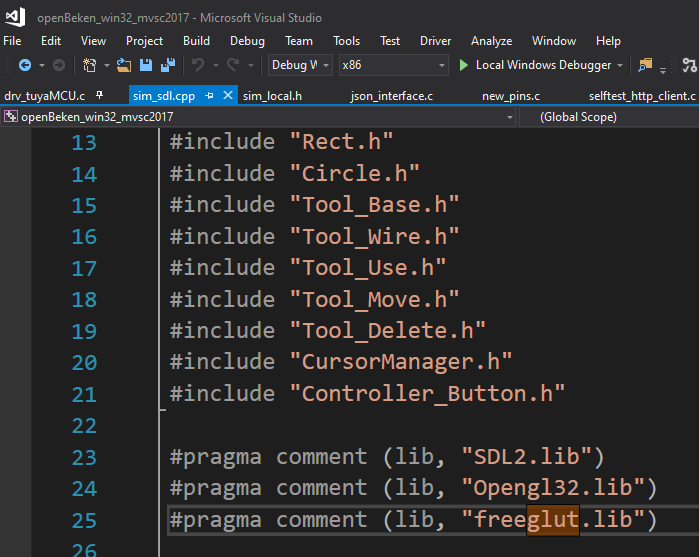
• Default viewport: 800 × 600 after PR #780 [Elektroda, smkassist, post #20534741] • Minimum confirmed hardware: Core i5-2 Gen, 8 GB RAM, integrated GPU runs ‘fine’ [Elektroda, smkassist, post #20536211] • Core repos: src/sim inside OpenBK7231T_App, C++ & SDL2/OpenGL [Elektroda, p.kaczmarek2, post #20947366] • Mandatory libs: SDL2, OpenGL, FreeGLUT (x86), GLUT bitmap fonts [Elektroda, p.kaczmarek2, post #20949160] • Typical build time in VS Community: < 3 min on i7-6 Gen (user report) [Elektroda, snakesrules94, post #20949208]

Where is the current OpenBeken Simulator source code?

All active code lives in src/sim of the OpenBK7231T_App repository; entry point is win_main.c (cross-platform SDL) [Elektroda, p.kaczmarek2, post #20947366]

Are pre-built Windows or Linux binaries available?

No public binaries exist yet. You must build from source or request a contributor-supplied build [Elektroda, mculibrk, #20897883; p.kaczmarek2, #20898235].

Why not switch to SDL_Renderer?

OpenGL offers greater freedom, shader support, and is already abstracted behind shape classes, so changing renderers gives no user benefit [Elektroda, p.kaczmarek2, post #20534239]

How do I compile the simulator in Visual Studio?

  1. Clone OpenBK7231T_App.
  2. Add SDL2, FreeGLUT, OpenGL include and x86 libs; ensure glut32.lib path is correct.
  3. Build the ‘sim’ target; compile time is under three minutes on i7-6 Gen [Elektroda, snakesrules94, post #20949208]

How is window resizing handled now?

SDL_WINDOWEVENT_RESIZED updates WinWidth and WinHeight each event, then glViewport resets the projection every frame, removing previous offsets [Elektroda, smkassist, post #20534741]

Can I still set resolution via command line?

The window is resizable, so command-line sizing is optional; future builds may remember the last window size automatically [Elektroda, p.kaczmarek2, #20535574; #20535769].

What hardware is enough for smooth performance?

Even a Core i5-2 Gen with 8 GB RAM handled fullscreen rendering alongside "more than 10" Chrome tabs, experiencing only slight slowdown [Elektroda, smkassist, post #20536211]

Is there a quick way to load example scenes?

Scene-change logic now auto-runs autoexec.bat, so examples launch instantly without manual ‘Save and Run’ clicks [Elektroda, p.kaczmarek2, post #20537836]
Generated by the language model.
ADVERTISEMENT