logo elektroda
logo elektroda
X
logo elektroda
Dostępna jest polska wersja

Czy wolisz polską wersję strony elektroda?

Nie, dziękuję Przekieruj mnie tam

Flashing New Tongou TO-Q-SY1-JWT Device: DIN Rail Switch and Meter, BK7231 template script

VIDPRO 29748 84

TL;DR

  • Tongou TO-Q-SY1-JWT DIN rail switch and meter was flashed with a BK7231 template script.
  • The BK7231N has all pins reachable, so the unit was flashed via serial and a config was attached.
  • All LEDs, the relay, and the meter are fully functional after flashing.
Generated by the language model.
ADVERTISEMENT
📢 Listen (AI):
  • #61 21282254
    luxmcdiver
    Level 3  
    Posts: 5
    Thanks for your quick reply.
  • ADVERTISEMENT
  • #62 21285189
    dwmw2
    Level 6  
    Posts: 19
    Rate: 3
    luxmcdiver wrote:
    Hi, I have a TO-Q-SY2-JWT which has a shunt-resistor instead of the coil. Has anybody flashed such a device?
    Yes, I have flashed a bunch of these, and they're mostly indistinguishable in software from the ones with a coil. Even the calibration parameters are in the same range.
  • #63 21294869
    leśny_ziutek
    Level 12  
    Posts: 52
    Help: 3
    Rate: 9
    From the manufacturer's information it appears that the SY2 differs from the SY1 not only in the use of a shunt instead of a transformer, but also in the additional function of overcurrent and overvoltage protection (Over and Under Voltage Protection).
  • ADVERTISEMENT
  • #64 21294989
    luxmcdiver
    Level 3  
    Posts: 5
    Does anybody know how to configure these additional SY2 protections in openbeken?
  • ADVERTISEMENT
  • #65 21297732
    p.kaczmarek2
    Moderator Smart Home
    Posts: 14622
    Help: 655
    Rate: 12638
    How this device looks like? Which chip is used inside?

    Are the protections you mention handled by WiFi module, or are they implemented outside it? I don't think it's possible to make a reliable, quick protection in the WiFi module code... but if you don't need it to react quickly, then you can just script OBK to turn off relay when current exceeds given value.
    Helpful post? Buy me a coffee.
  • #66 21297841
    luxmcdiver
    Level 3  
    Posts: 5
    It looks same as the SY1 and uses the BK7231N & BL0942.
  • #67 21297851
    p.kaczmarek2
    Moderator Smart Home
    Posts: 14622
    Help: 655
    Rate: 12638
    So Tuya does their protections in the software?
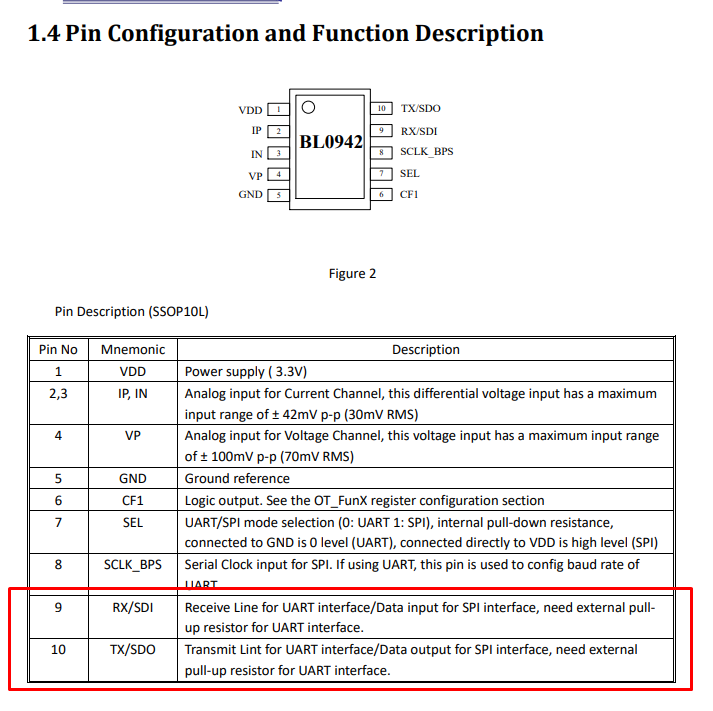
    Pin configuration diagram of the BL0942 chip with a description of each pin function.
    BL0942 just sends data via UART (or SPI) to WiFi module and WiFi module can process it once it's received.
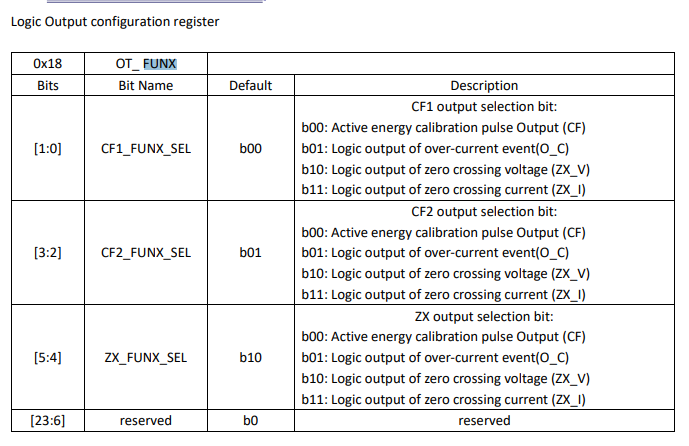
    EDIT: I edited out incorrect information, it seems that BL0942 has actually ability to detect overcurrent/overvoltage via FUNX register and signal it on CF1/CF2/ etc pins.

    If you don't need to react very fast, you can use obk autoexec.bat script:
    
    addChangeHandler Voltage > 251 POWER OFF
    

    etc, etc...
    Helpful post? Buy me a coffee.
  • #68 21300319
    leśny_ziutek
    Level 12  
    Posts: 52
    Help: 3
    Rate: 9
    It seems you can configure the BL0941 V1.06 CF1 output (also CF2, ZX otputs in bigger packages) to signal the over current condition (see OT_ FUNX) register. Is this signal connected anywhere? I can't check this myself for now, but two SY2 are on their way to me so will check when they arrive. The manufacturer clearly distinguishes SY2 from SY1, specifying the protection capability of SY2 as the only difference. But it may actually be poorly and unreliably implemented using the logic executed by the WiFi module as @p.kaczmarek2 said.
  • #69 21300797
    p.kaczmarek2
    Moderator Smart Home
    Posts: 14622
    Help: 655
    Rate: 12638
    I see, I wasn't aware that CF1 can be configured in that way.
    Logic output configuration register table with options for CF1, CF2, and ZX.
    If CF1 (etc) are connected somewhere, then maybe we indeed just need to configure OT_Funx register and the circuit will do the rest.
    Helpful post? Buy me a coffee.
  • #70 21301079
    luxmcdiver
    Level 3  
    Posts: 5
    It would be nice to have the BL0942 Current fast RMS threshold in the Web application /Tools / Power Metering section, as well as a command box to activate the overcurrent protection.
    Is that feasable?
  • #71 21301610
    leśny_ziutek
    Level 12  
    Posts: 52
    Help: 3
    Rate: 9
    Only if CF1 is used in the SY2 for this purpose.
  • #72 21305819
    p.kaczmarek2
    Moderator Smart Home
    Posts: 14622
    Help: 655
    Rate: 12638
    OpenBeken already has mechanism to write to BL0942 registers so it should be possible to enable it if used hardware has CF pin available:
    Code: C / C++
    Log in, to see the code
    Helpful post? Buy me a coffee.
  • #73 21390816
    max_mcu
    Level 3  
    Posts: 6
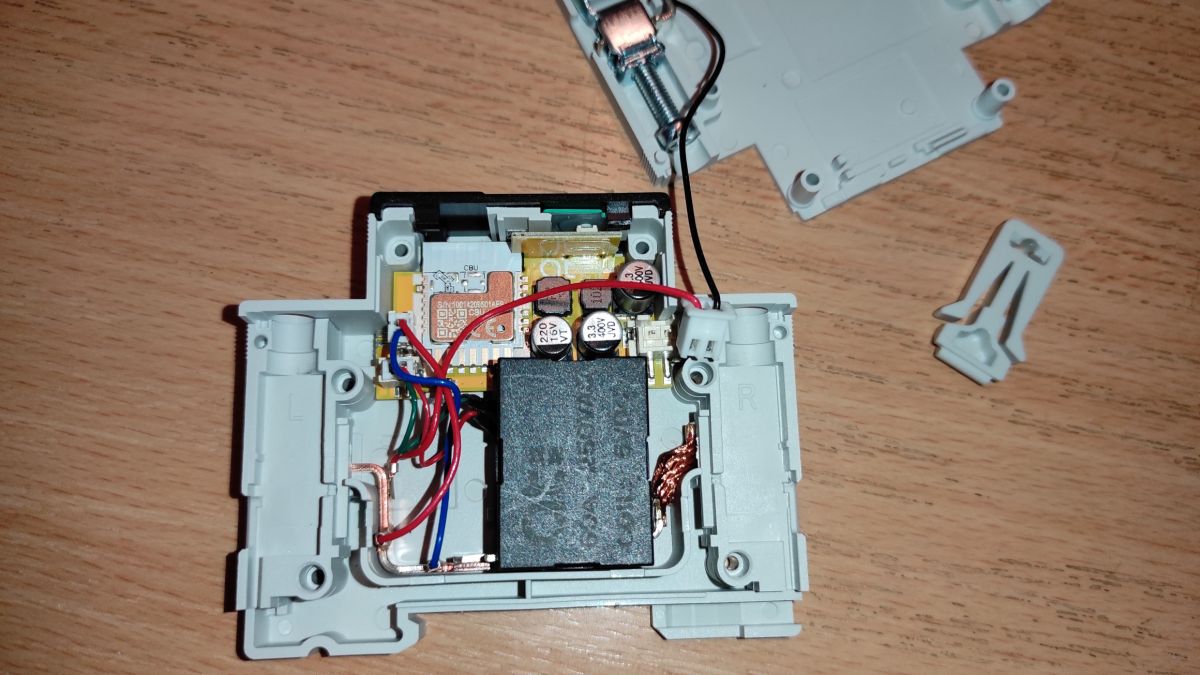
    Hello community, I have the following problem: The relay is a bi stable relay. When the power is lost and then switched back on, the switch + LED is not on if the relay was switched on before the power failure. How can I determine after the power failure whether the relay is still on or off? Can this be fixed in the software?
  • #74 21401656
    Drapol13
    Level 1  
    Posts: 1
    Hi,
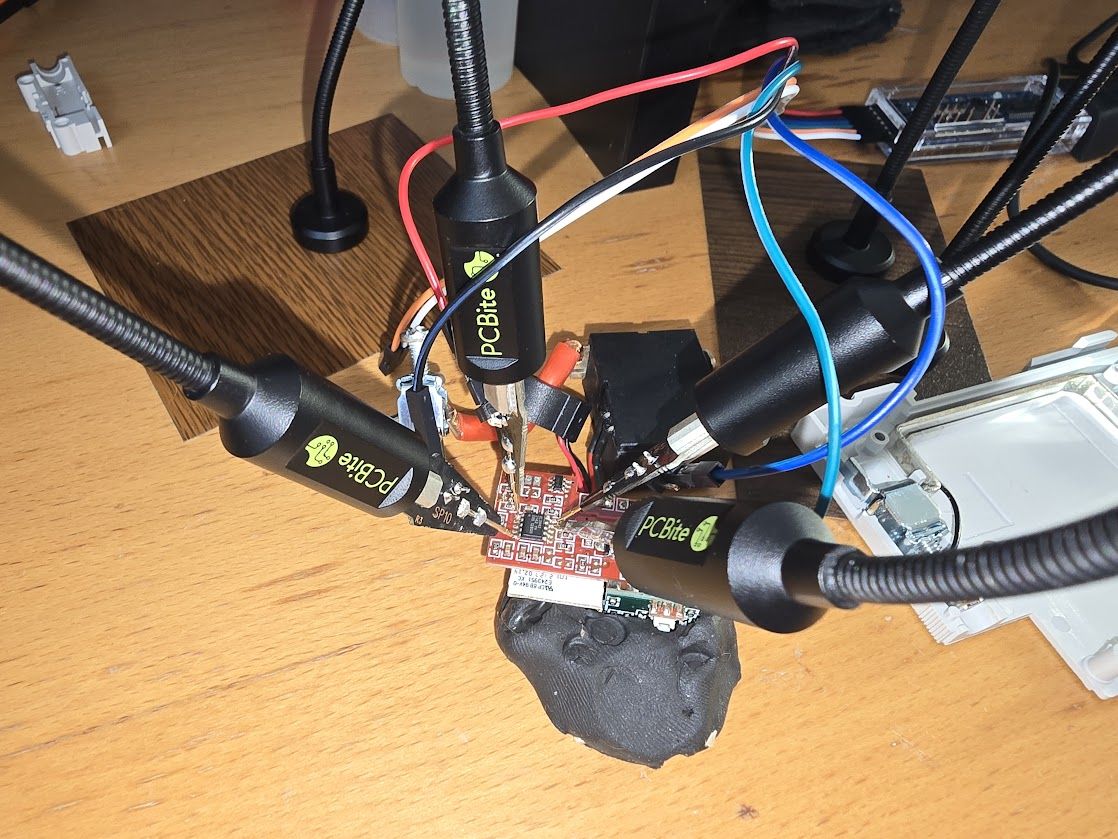
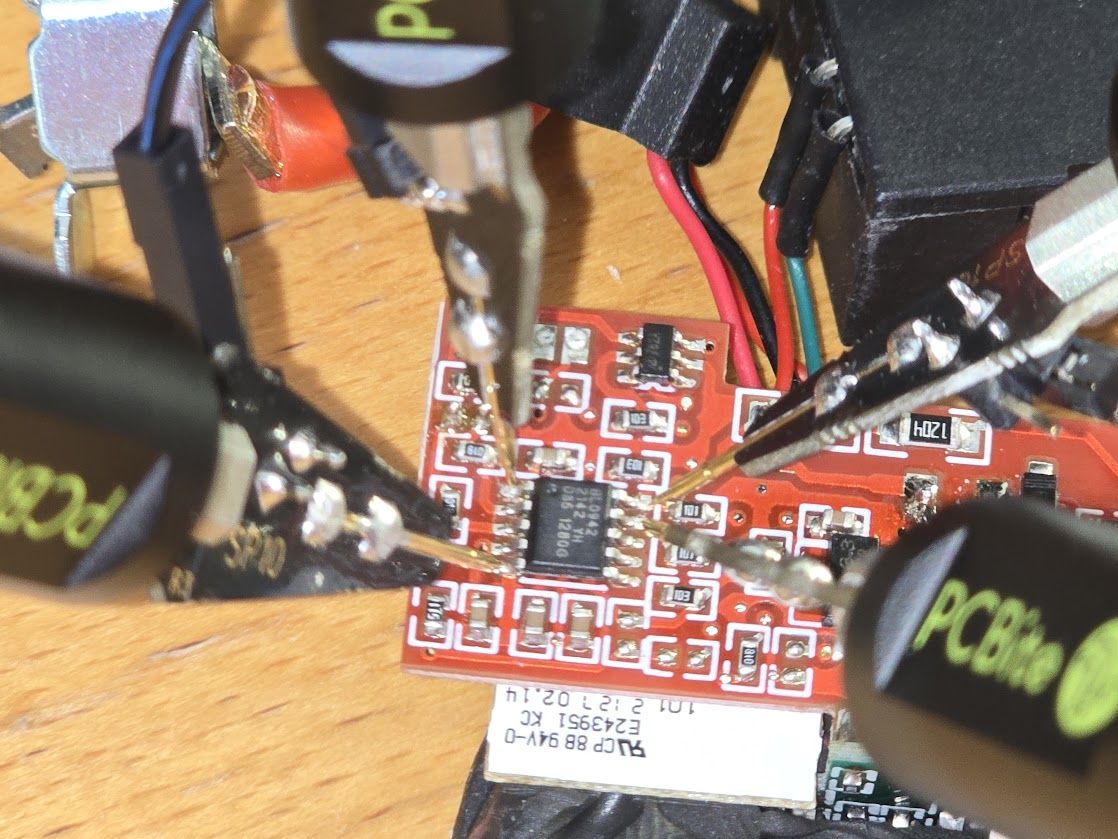
    I'm really struggling to load up this firmware. I tried BK7231GUIFlashTool-v5.
    I wanted to read firmware first. I tried disconnecting GND and also connecting CEN to GND for a fraction of a second.
    I keep getting this counter...
    Read parms: start 0x00 (sector 0), len 0x200000 (0 sectors)
    Now is: poniedziałek, 20 stycznia 2025 16:07:49.
    Flasher mode: BK7231T
    Going to open port: COM4.
    Serial port open!
    Getting bus... (now, please do reboot by CEN or by power off/on)
    Getting bus failed, will try again - 0/100!
    Getting bus failed, will try again - 1/100!
    Getting bus failed, will try again - 2/100!
    Getting bus failed, will try again - 3/100!

    I also tried to load up ESPhome but I also can't connect. Tried swapping RX TX nothing helped.
    Connections are good.

    Electronic circuit connected to several PC Bite test probes on a wooden table.
    Close-up of a PCB connected with probes.
  • #75 21402384
    p.kaczmarek2
    Moderator Smart Home
    Posts: 14622
    Help: 655
    Rate: 12638
    max_mcu wrote:
    Hello community, I have the following problem: The relay is a bi stable relay. When the power is lost and then switched back on, the switch + LED is not on if the relay was switched on before the power failure. How can I determine after the power failure whether the relay is still on or off? Can this be fixed in the software?

    Well, maybe it would be enough to just set startup value of relay channel to -1, so OpenBeken remember it between reboots?

    @Drapol13 There can be multiple issues at play:
    - too long wires, poor contacts
    - BL0942 or something may be blocking UART, I'm not sure, but I remember that it also worked for me several times with BL0942
    - you need to have a good 3.3V power supply, directly from USB to UART won't work
    - maybe you need to try other baud or other USB to UART converter
    Helpful post? Buy me a coffee.
  • #76 21487925
    leśny_ziutek
    Level 12  
    Posts: 52
    Help: 3
    Rate: 9
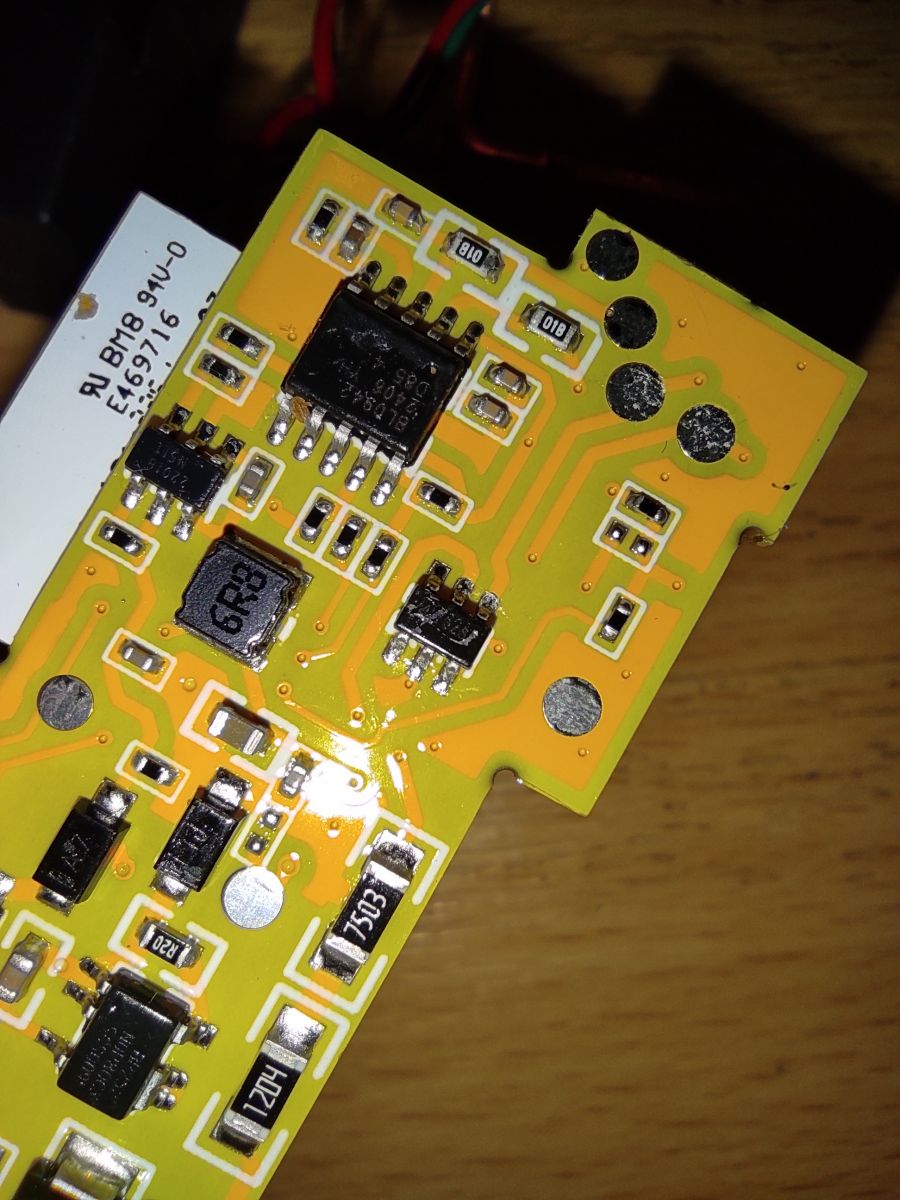
    I've managed to open and flash the SY2 version:

    Opened casing with visible electronics and connected wires.
    Close-up of a yellow PCB with visible electronic components, including an MD7620A integrated circuit.
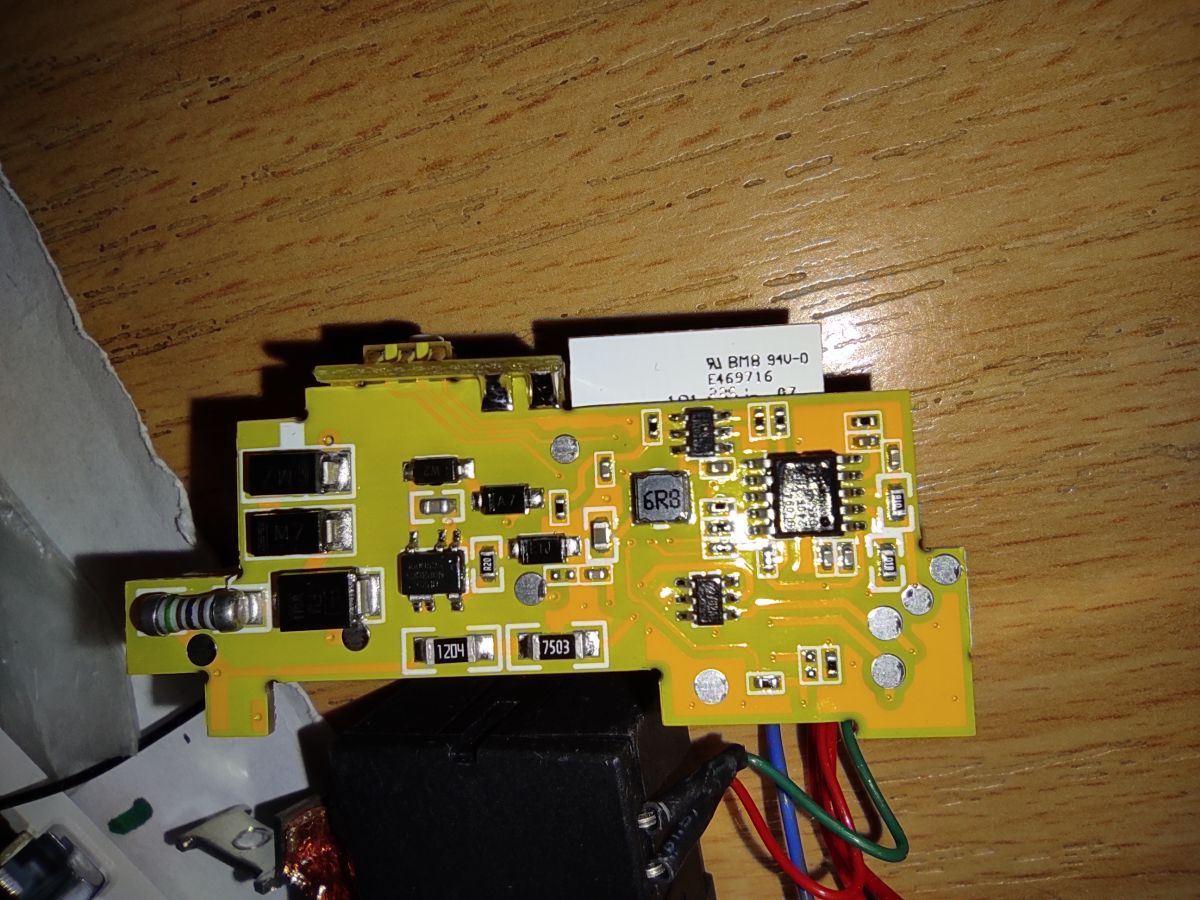
    Close-up of a circuit board with visible electronic components and the marking 6R3.

    Also checked the connections on the board with a multimeter. The relay is connected to the MD7620A driver. Both inputs of the driver are directly connected to the CBU (P24, P26). The BL0942 CF1 pin seems to be left floating. In case of any autonomous control of the relay by BL0942 it should be some circuity on the board connected to the CF1 and MD7620A but the direct connection between MD7620A and CBU indicates that nothing of this sort is implemented.
  • #77 21556224
    casiopeia80
    Level 3  
    Posts: 15
    Hello everyone!
    Many thanks for the firmware — great work!
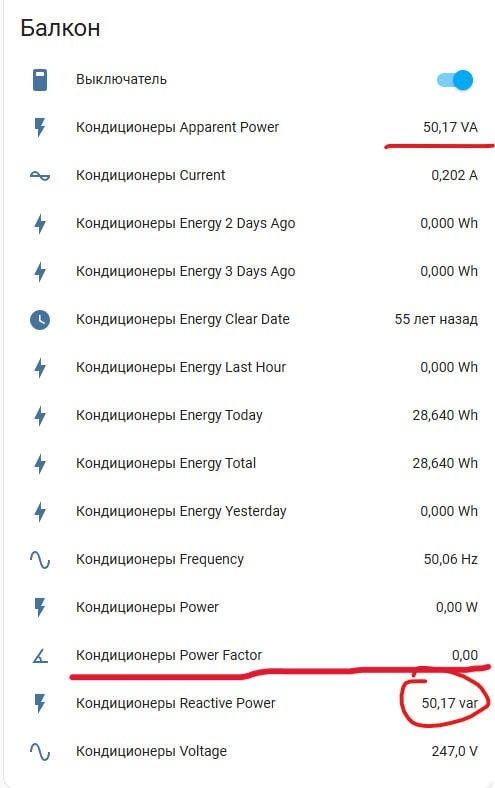
    However, I've encountered one issue. After flashing, the module doesn't seem to take the power factor into account in its calculations.
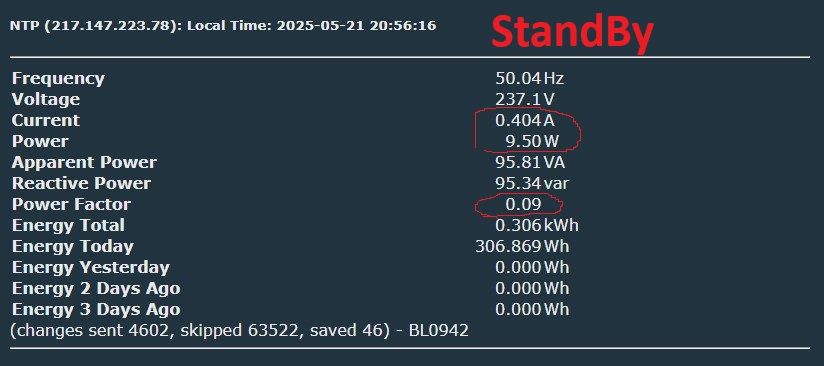
    I've been using this smart switch with the stock firmware for about a year. It powers three air conditioners, and I’m absolutely sure the original firmware correctly factored in cos(φ) (power factor) when calculating the reactive component of the AC current.
    For example, in standby mode, the three air conditioners consumed around 10 watts on the original firmware. With the new firmware, I’m seeing standby values of around 56 watts, which I believe is because the power factor isn’t being considered.
    Could this be improved in future updates?
    Energy monitoring panel for balcony air conditioners, highlighting apparent power 50.17 VA and reactive power 50.17 var.
  • #78 21556241
    p.kaczmarek2
    Moderator Smart Home
    Posts: 14622
    Help: 655
    Rate: 12638
    Welcome to forum! Just to confirm, you're using this device from this topic, with BL0942 connected via SPI?

    Added after 41 [seconds]:

    Also, did you calibrate this device after flashing with VoltageSet, PowerSet and CurrentSet commands?
    Helpful post? Buy me a coffee.
  • #79 21556434
    casiopeia80
    Level 3  
    Posts: 15
    >>21556241
    Yes, I am using the TO-Q-SY2-JWT device model.
    I realized that I needed to enable Flag 25 – [POWER] Allow negative current/power for power measurement (all chips, BL0937, BL0942, etc) in the device settings.

    I’ve read about the calibration process in the web interface, but I couldn’t understand how the power factor can be properly calibrated using a purely resistive load like an incandescent bulb.

    So, I decided to try a different approach.
    In my apartment, I have three LG air conditioners connected through this TO-Q-SY2-JWT module. Back when the device was running the original firmware, I monitored its readings and noticed that, in standby mode, the total power consumption was shown as around 10 watts. The line voltage was about 235 volts, and the current draw was 400 mA (with cos(φ) close to maximum in this low-power mode).

    At the time, I also measured the current using a True RMS multimeter — the readings matched the module’s output.
    So I tried calibrating your firmware using the same conditions: I set the air conditioners to standby and entered those known values into the calibration fields in the web interface.

    Now, the readings seem quite accurate — both when the air conditioners are in standby mode and when they are running. The measured values closely match the power consumption reported by the air conditioners themselves on their built-in displays.

    I have one more question: is there any way to extract the calibration data from the original firmware?

    Screen showing electric power consumption measurements and StandBy status.

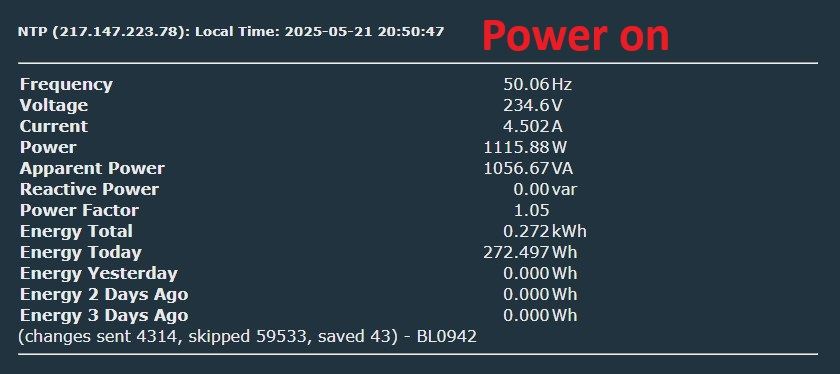
    Screen displaying electrical energy measurement data with a red Power on message.
  • #80 21556477
    przemsi_ele
    Level 12  
    Posts: 62
    Help: 1
    Rate: 15
    >>21556434
    yes u can extract original calibration setup, there is post about that , but i always calibrate using classic bulb, it is olmost true resistance , in my cases it is always satisfy

    https://esphome.io/components/sensor/bl0942.html

    maybe this will be halpfull for you
  • ADVERTISEMENT
  • #81 21556582
    sq3evp
    Level 39  
    Posts: 6553
    Help: 219
    Rate: 871
    przemsi_ele wrote:
    >>21556434 .
    yes, you can extract the original calibration configuration, there is a post on this topic, but I always calibrate with a classic bulb, it is almost the true resistance, in my cases it is always satisfactory

    Not really - a cold fibre has a different resistance to a heated one. I guess the heater is a more linear element or high power resistor.
  • #82 21556630
    casiopeia80
    Level 3  
    Posts: 15
    >>21556477 Thanks! I found an old 60W incandescent bulb (with a filament) in storage. I used it for calibration. The readings turned out to be about the same as when I calibrated using the air conditioners. :) At first, I didn’t realize that during this type of calibration, a power factor of 1 is assumed by simply using the measured power value as the product of voltage and current (U × I).
  • #83 21559062
    anatolyshokalo
    Level 1  
    Posts: 1
    >>20663233 Can you please show what pins did you used for flashing? Thanks
  • #84 21617435
    gaengeyachten6h
    Level 1  
    Posts: 1
    Has anyone managed to adjust the AC power direction on this device? The power reading is always negative, and Flag 48 in OpenBeken seems to have no effect.
  • #85 21776554
    pvv4up
    Level 1  
    Posts: 1
    Colleagues, what is the right way to redo it?
    1. We Solder the CBU, Flash the Flaser, And Configure the CBU channels. We sing back and everything is OK?
    2. Right on the board, without soldering the CBU, Flash the Flaserom, Configure the channels and everything is OK? OR WHAT?
    Please make someone a step-by-step instruction. I've flashed a lot of switches, but simple ones. But I still haven't figured out how to deal with it.
    I was typing through a translator.
📢 Listen (AI):

Topic summary

✨ The Tongou TO-Q-SY1-JWT is a DIN rail mount smart switch and energy meter based on the BK7231N chip and BL0942 power metering IC. Users successfully flashed the device with OpenBeken firmware via UART after opening the case by drilling rivets, as OTA flashing via Tuya CloudCutter is unreliable or unsupported for some firmware versions (notably metering firmware v1.0.18). The device supports relay control, LEDs, button input, and power metering, with GPIO pins mapped for these functions (e.g., pins 9 and 15 for LEDs, 17 for button, 24 and 26 for relay control). Relay behavior on power loss can be configured using SetStartValue commands or autoexec.bat scripts to restore or force relay state after reboot. Calibration of the BL0942 meter is essential for accurate power measurement, including voltage, current, and power factor; calibration can be done using resistive loads like incandescent bulbs or by extracting original calibration data from Tuya firmware. The device is not a circuit breaker and should not be used as a safety disconnect. Some hardware versions differ in PCB color and coil voltage (5V or 12V). The newer SY2 model uses a shunt resistor instead of a coil and adds overcurrent and overvoltage protection features, which may be software-configurable via BL0942 registers but lack dedicated hardware signaling. ESPHome support is emerging with device pages and calibration improvements. Users report issues such as relay coil heating when driven by pulse commands instead of continuous signals, and occasional unexplained relay power-offs requiring log retention for diagnostics. Flashing challenges include ensuring proper UART connections, stable 3.3V power supply, and correct baud rates (e.g., 921600 or 1500000). Debug logs can be captured via the TX2 pin. Sealing the device after opening can be done using M2.5x10 screws or insulated ferrules. Overall, the community provides detailed pin mappings, flashing instructions, calibration tips, and firmware configuration examples to enable reliable operation and integration with Home Assistant and ESPHome.
Generated by the language model.

FAQ

TL;DR: For DIY users flashing the Tongou TO-Q-SY1-JWT, the reliable path is UART on the BK7231N: use 3.3 V, RX1/TX1, and pulse CEN to enter boot. One expert summary from the thread says, "UART flashing method" is the recommended approach, especially after CloudCutter failures on firmware 1.0.18. [#20974510]

Why it matters: This FAQ turns a long mixed-success forum thread into a fast, citation-ready guide for flashing, configuring, calibrating, and safely using Tongou DIN-rail switch/meter devices.

Method Works on non-metering 1.0.2 Works on metering 1.0.18 Case opening needed Reliability in thread
Tuya CloudCutter Yes Often no No Mixed
UART flashing Yes Yes Usually yes High

Key insight: P24 and P26 drive a bistable relay through an H-bridge, so treating them like a normal single-pin relay causes wrong startup behavior, heat, or no state restoration. [#21188194]

Quick Facts

  • The posted OpenBeken pin map for the metering SY1 uses P9 = LED_n, P15 = WifiLED_n, P17 = Btn, P24 = BridgeFWD, and P26 = BridgeREV, with startDriver BL0942 for metering. [#20663290]
  • A working UART setup was reported at 921600 baud with BK7231N, using 3.3 V, GND, TX1, RX1, and a brief CEN-to-GND reset during “Getting bus...”. [#21173683]
  • Field reports show at least two hardware versions of similar Tongou/Erau units: green vs red PCB, and even 12 V vs 5 V DC coil variants. [#20677316]
  • One flashed TO-Q-SY2-JWT showed a relay coil temperature around 55 °C with no load when the bridge appeared to be driven incorrectly. [#21263275]
  • After opening the case by destroying rivets, users resealed it with M2.5x10 hardware or uninsulated ferrules around 1.50 mm², 18 mm long, 2.00 mm outer diameter. [#21080758]

How do I flash the Tongou TO-Q-SY1-JWT with OpenBeken over UART, step by step, using a BK7231 flasher?

Use UART flashing on the BK7231N module with 3.3 V power. 1. Open the case, connect 3.3 V, GND, TX1, and RX1 to the CBU module. 2. In BK7231 Easy UART Flasher, select BK7231N, set a tested baud such as 921600, then start read or write. 3. When the tool shows “Getting bus...”, briefly short CEN to GND or power-cycle the board, then flash OpenBK7231N and apply the SY1 template. This method worked on the metering version that failed with CloudCutter. [#21173683]

Which CBU pins should I use to flash the Tongou TO-Q-SY1-JWT, and what are RX1/TX1 versus RX2/TX2 used for?

Use RX1 and TX1 for flashing, plus 3.3 V, GND, and CEN for reset. RX2/TX2 are not the programming UART on this device. TX2 is used for debug log output, while RX1/TX1 are the pins used by the BK7231 flasher to read and write firmware. One user also noted that test pads near the BL0942 are easy to grab, but the labels are from the metering chip side, so TX and RX route oppositely to the CBU. [#20807122]

Why does BK7231GUIFlashTool get stuck on "Getting bus failed" when flashing a Tongou TO-Q-SY1-JWT, and how can I fix it?

It usually fails because the boot sequence, wiring, or 3.3 V supply is wrong. Common fixes are short wires, solid contacts, a stronger 3.3 V source, trying another USB-UART adapter, and pulsing CEN to GND exactly when the flasher says “Getting bus...”. The thread also mentions BL0942 activity may interfere, and one user fixed the issue after finding a broken RX connection into the CBU. If one baud rate fails, test another. [#21402384]

What is the correct OpenBeken template for the Tongou TO-Q-SY1-JWT with BL0942 power metering and bistable relay control?

The working OpenBeken template uses P9 LED_n;1, P15 WifiLED_n;0, P17 Btn;1, P24 BridgeFWD;1, and P26 BridgeREV;1, with the command backlog startDriver BL0942; startDriver NTP. That setup gives LED control, button input, bistable relay pulses, and BL0942 metering on the BK7231N version. Earlier posts showed Rel and Rel_n, but later testing on this model confirmed the bridge mapping is the correct control method for the relay hardware. [#21118531]

Why should P24 and P26 be configured as BridgeFWD and BridgeREV instead of Rel on the Tongou TO-Q-SY1-JWT?

They should use BridgeFWD and BridgeREV because the device drives a bistable relay through an H-bridge, not a standard hold-coil relay. "Bistable relay" is a latching relay that changes state with a short pulse, then stays there mechanically without continuous coil power. On this Tongou design, P24 and P26 go to the MD7620A driver inputs, so single-pin Rel logic can leave state tracking wrong or drive the hardware incorrectly. Users also linked wrong bridge handling to hot coils and bad reboot behavior. [#21487925]

How can I make the bistable relay on a Tongou TO-Q-SY1-JWT restore the correct state after a power loss or reboot?

Set the channel startup behavior carefully, because SetStartValue 1 0 did not fully work with the bridge driver in early builds. In testing, SetStartValue 1 1 restored ON correctly, and SetStartValue 1 -1 correctly remembered the last state, while SetStartValue 1 0 left OpenBeken thinking the channel was OFF without sending the bridge pulse. A workaround used two boot events: pulse ON at 1 second, then OFF at 2 seconds. That workaround toggles the relay if it was already OFF before reboot. [#20700999]

What does OpenBeken Flag 41 "Ignore all button events" do, and why can it make the TO-Q-SY1-JWT button stop working?

Flag 41 disables button handling entirely, so the front button changes GPIO state but does nothing in normal control. On one SY1 unit, P17 clearly changed Low/High in GPIO Doctor only when configured as dInput, yet the button still did not switch the relay. The user found Flag 41, labeled child lock, was checked by default. After clearing that flag in Configure General, the button started toggling the switch normally. [#21118531]

What is a bistable relay or H-bridge driver in the context of the Tongou TO-Q-SY1-JWT, and how does it differ from a normal relay output?

A bistable relay here is a latching power relay driven by two pulse directions through an H-bridge, not by one sustained ON pin. "H-bridge driver" is a motor-or-coil driver stage that reverses current direction, letting one coil pulse set the relay ON and the opposite pulse set it OFF. A normal relay output usually holds one coil energized continuously. The Tongou uses two control lines, so firmware must send short forward or reverse pulses instead of holding one GPIO high. [#21188194]

How do I open the Tongou TO-Q-SY1-JWT case without damaging it too much, and what can I use to reseal it afterward?

Most users opened it by drilling out the factory rivets, because there was no simple non-destructive method reported. After flashing, users resealed the case with either M2.5x10 hardware or uninsulated ferrules matching the original pins closely. One tested ferrule option was 1.50 mm², 18 mm long, with a 2.00 mm outer diameter, and it reportedly worked perfectly. Expect some cosmetic damage, but the enclosure can be closed securely again. [#21080758]

What are the hardware differences between the Tongou TO-Q-SY1-JWT and TO-Q-SY2-JWT, including coil versus shunt-resistor versions?

SY1 and SY2 are similar in software, but the thread reports several hardware variants. Users saw red, green, and yellow PCBs, plus metering versions with either a current coil or a shunt resistor. A manufacturer-linked discussion also says SY2 adds over/under-voltage or overcurrent protection features compared with SY1. However, one board inspection found the BL0942 CF1 protection pin left unconnected, suggesting any “protection” may depend on firmware logic rather than separate fast hardware cut-off. [#21487925]

Tuya CloudCutter vs UART flashing for Tongou TO-Q-SY1-JWT — which method is more reliable for metering and non-metering firmware versions?

UART flashing was the more reliable method across the thread. CloudCutter worked for some non-metering units on Tuya firmware 1.0.2, and one metering dump later helped add support. But multiple users still failed on metering firmware 1.0.18 and ended up opening the case and flashing successfully by UART. The clearest recommendation in the thread is that CloudCutter is not reliable because many devices are patched, while UART remains the suggested path for both metering and non-metering variants. [#20974510]

How can I extract the original BL0942 calibration values from Tuya firmware and apply them in OpenBeken or ESPHome?

You can extract the original BL0942 calibration data from a backup of the Tuya firmware, then reuse those values in ESPHome or OpenBeken calibration commands. The thread documents finding per-device values such as voltage_ref 15990, current_ref 124380, power_ref 309.8, and energy_ref 2659, then applying them in the BL0942 configuration. Users also confirmed that if extraction is unavailable, calibration with a known load, such as a 60 W incandescent lamp, gives acceptable results. [#21193078]

Why does the Tongou power reading show negative values in OpenBeken, and how can I correct the AC power direction when Flag 48 has no effect?

Negative power usually means the measurement direction or sign handling is wrong, not that the relay is reversed. On SY2 units, one user fixed unrealistic standby readings after enabling Flag 25, “Allow negative current/power,” and then recalibrating voltage, current, and power against known values. Another later report said Flag 48 did not correct AC direction on that device. The practical fix in the thread is calibration plus checking the metering sign configuration, because stock and flashed firmware may interpret direction differently. [#21556434]

How can I save OpenBeken logs from a Tongou TO-Q-SY1-JWT to a file or external storage so I can investigate random relay shutoffs later?

The thread does not provide a finished OpenBeken method for saving logs from this device to a file or external storage. It only confirms that TX2 outputs debug logs and can be captured externally over serial. For on-device retention of several hours, no posted solution shows SD, flash file logging, or network syslog in OpenBeken for this Tongou case. If you need evidence after random shutoffs, the thread’s only concrete logging path is monitoring the debug UART on TX2. [#20813668]

What safety limitations should I know before using a Tongou TO-Q-SY1-JWT or TO-Q-SY2-JWT as a DIN-rail switch, especially compared with a real circuit breaker?

Treat it as a DIN-rail switch with metering, not as a true protective breaker. Users explicitly stated the SY1 is not a circuit breaker, and one report says Tuya only offered software-set alarm limits with 1 A resolution. Another user warned never to use the relay as a safety device, and reverse-wiring for calibration apparently damaged one relay so it clicked without making contact. If overcurrent or overvoltage cut-off matters, verify hardware support first instead of assuming breaker-grade protection. [#20714066]
Generated by the language model.
ADVERTISEMENT