


logo elektroda
logo elektroda
X
logo elektroda

Miniature electronic lock with 1WIRE systems

Simon79 3975 0

TL;DR

  • A miniature electronic lock uses 1WIRE keys and works with DS1990/RW1990 chips as well as any 1WIRE device with a unique ROM address.
  • The design centers on an ATtiny13, a 4-pin chip reader, a 5V miniature relay, and a simple reader socket adapted from a magnetic phone-charging cable connector.
  • The firmware runs in Arduino with the MicroCore library, and the sketch stores up to 4 serial numbers in the table_serialNumbers[][8] array.
  • Pin 3 selects the strike pulse length: 3 s normally, or 1 s when shorted to ground, while the system is powered from a 5V/1.5A supply.
Generated by the language model.
ADVERTISEMENT
Treść została przetłumaczona polish » english Zobacz oryginalną wersję tematu
📢 Listen (AI):
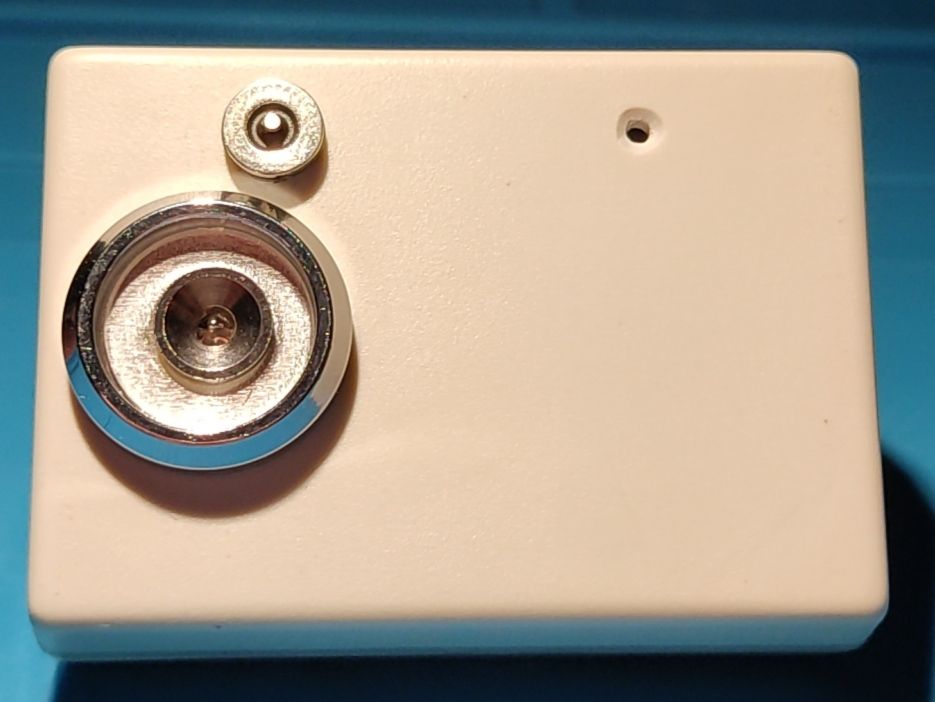
  • View of a miniature electronic lock with 1WIRE systems on a white casing.
    The miniature electronic lock with 1WIRE systems described below, unlike hundreds of similar projects, has a specific feature: it works not only with DALLAS DS1990 or RW1990 systems, but basically with any system with a 1WIRE interface having its own unique ROM address.

    Apart from the DS1990/RW1990 chips, I had several DS2405 chips in my drawer and I had no idea what I could use them for. Similarly with used, worn-out DS18B20 systems, which for some reason did not measure the temperature correctly.
    The common feature of these chips is the interface and their own address, consisting of the "family" code, serial number and CRC.
    And that`s how the idea for the unusual 1WIRE lock was born.

    The presented lock is not some innovative electronic design: attiny13, goldpins - as a 6-pin KANDA programming socket, - a chip reader (4-pin version), a miniature 5V relay switching on the bolt, electric strike or electromagnetic lock (whatever you call it) and an LED diode.
    The system is powered directly from the 5V/1.5A power supply, because the model uses an electric strike with a 5V coil (the diode eliminating overvoltages is connected directly to its coil, not on the board).
    The dashed line in the diagram shows the connection of the NO contact to +5V and the COM contact of the relay to pin 1 of the CON2 socket for connecting the electric strike coil.
    If a 12V or other coil is used, cut the connections marked with an X on the printed circuit board and use the "clean" relay contact available on the NO and COM connector terminals. If the system and coil are powered by 5V, it is worth increasing the capacity of C2.
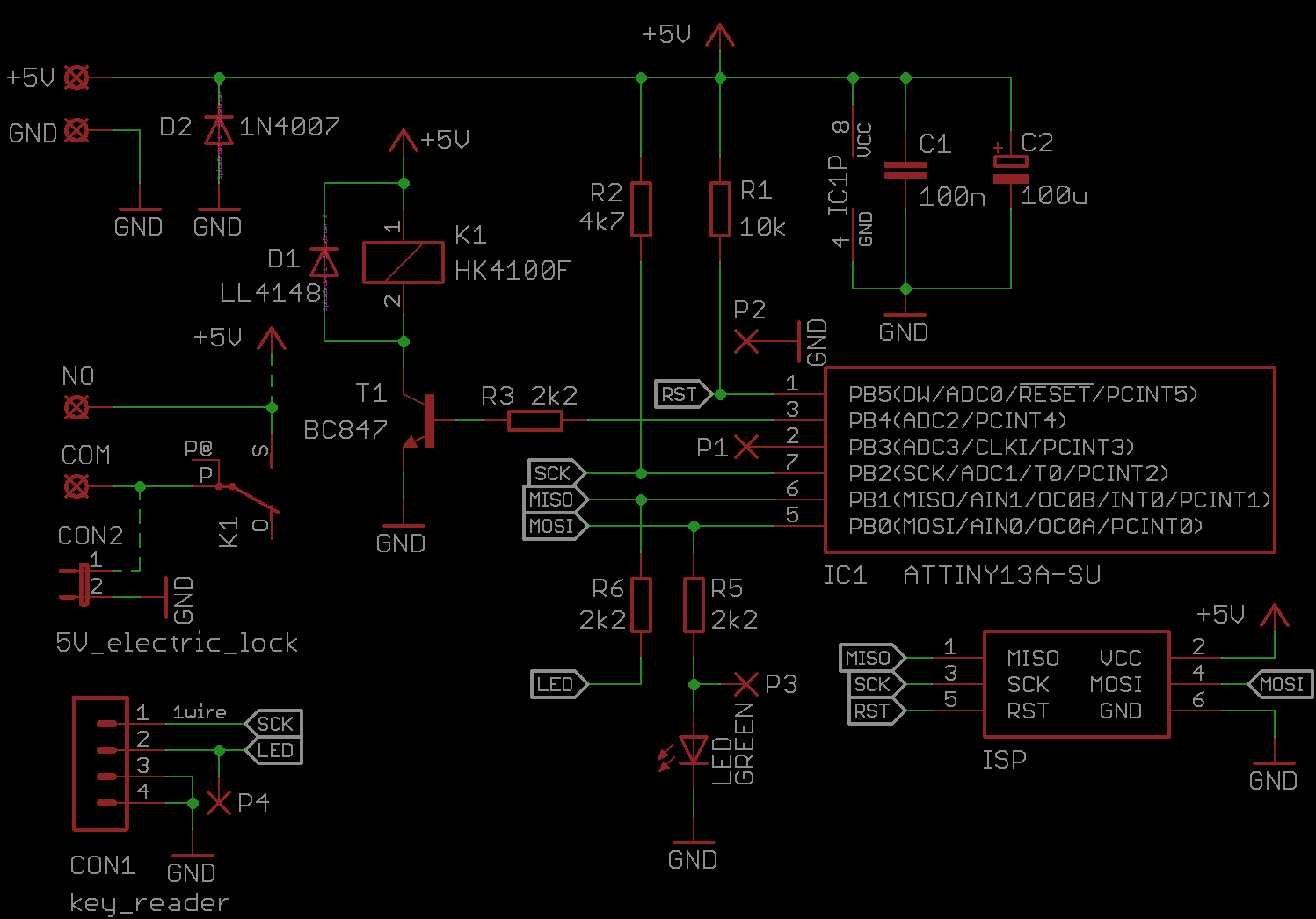
    Electronic lock 1WIRE circuit diagram with ATTINY13 microcontroller.
    The program was written in ARDUINO for ATTINY13 using the MicroCore library, which must be installed. Library description available at https://github.com/MCUdude/MicroCore. Arduino settings in the attachment.
    If I`m not mistaken, the factory new attiny13 has clock division by 8 (CKDIV8) enabled, so it should be disabled because the program should be compiled for a 9.6MHz clock. The remaining fusebits can be left unchanged.

    In the sketch in place: byte table_serialNumbers[][8] = { }; please enter your own serial numbers of 1WIRE systems. For this purpose, an additional simple sketch was created, reading these numbers in the Arduino terminal. The "data" pin of the read system should be connected to pin 2 of Arduino.
    and in place: int numSerialNumbers = 4; enter the number of entered numbers so that the number matches the number given in the table above. There can be one, but no more than 4.
    This may not be an elegant solution - the system does not "learn" how to save key numbers - but it simplifies the program, especially if the author is not an advanced programmer. :) .
    Pin "3" of Arduino determines the time of switching on the relay, and thus the electric strike. If pin "3" is not shorted to ground, this time is 3s. When this pin is shorted to ground (points P1 and P2 connected) - the switch-on time will be 1 s.
    In this way, you can control the bolt, which is triggered by an impulse, just like in the video. Of course, these times can be changed according to your own preferences.
    The reader`s LED lights up for the duration of relay operation, and an additional LED on the printed circuit board flashes in standby mode. You can omit the LED on the PCB and the R6 resistor and use the reader`s LED and connect points P3 and P4.
    Then the reader`s diode will flash in standby mode, which will make it easier to approach the tablet when it is e.g. dark.
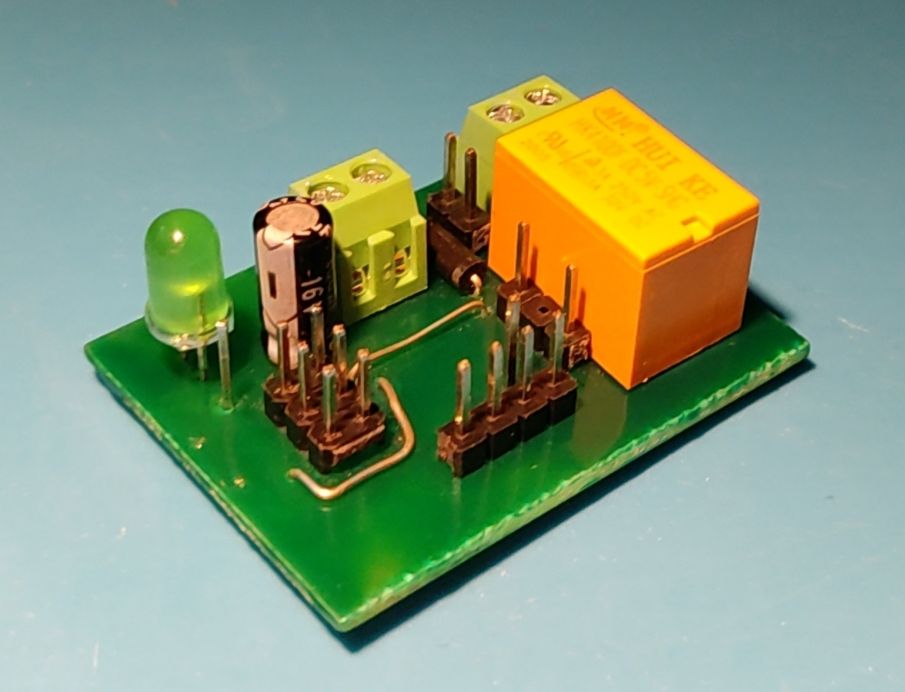
    Miniature electronic board with a relay and connectors.
    In addition to the chip reader, it was necessary to come up with a socket/plug for other 1Wire systems.
    And here a magnetic cable for charging the phone came to the rescue... or rather, it provided the plug and socket. 1Wire systems can be powered parasitely via the data line, i.e. using 2 wires.
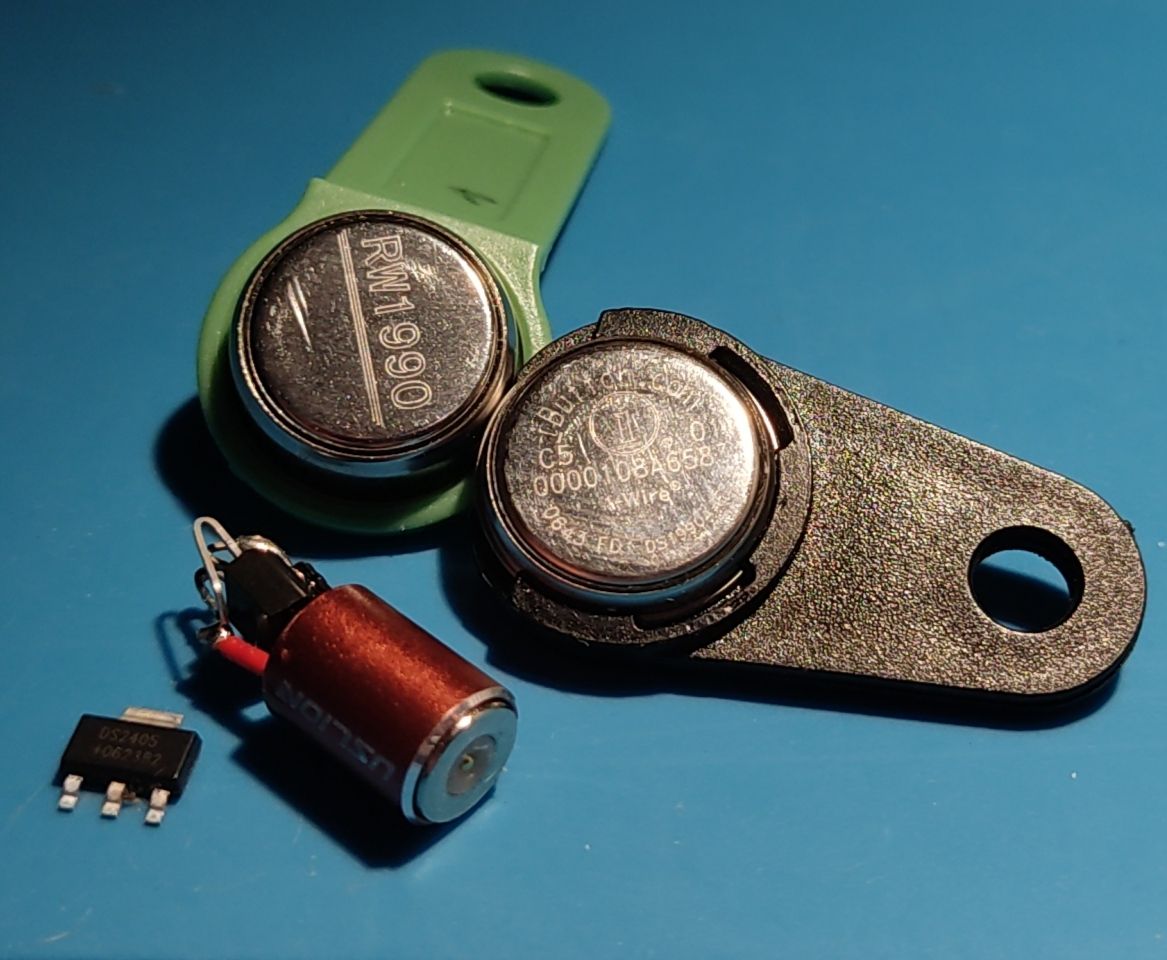
    1WIRE electronic chips, including RW1990 and DS1990 buttons, on a blue background
    Just connect the Vdd and GND pins connected together to ground (for DS2405 it`s PIO and GND), and the DATA (Dq) pin is the data line.
    Since there is usually an LED in such a plug that takes energy to power the 1Wire system, it was necessary to connect the plug the other way around (data line on the housing) so that the plug`s LED would not light up.
    The socket was connected to the PCB using a "micro USB breadboard socket".
    Pay attention to the load capacity of the contacts of the relay used and the power of the bolt used.


    The attachment includes, among others:
    - Arduino sketch of the lock
    - Arduino sketch for reading serial numbers
    - EAGLE files: sch and brd
    Attachments:
    • 1WIRE_lock.zip (174.94 KB) You must be logged in to download this attachment.

    Cool? Ranking DIY
    About Author
    Simon79
    Level 21  
    Offline 
    Simon79 wrote 424 posts with rating 397, helped 29 times. Live in city Czeladź. Been with us since 2007 year.
  • ADVERTISEMENT
📢 Listen (AI):

FAQ

TL;DR: With up to 4 programmed IDs and a “works with any 1-Wire device” approach, this miniature ATTiny13 lock helps makers build a compact door opener from DS1990, RW1990, DS2405, or even worn DS18B20 chips that still expose a valid unique ROM address. [#20880694]

Why it matters: This design solves a practical access-control problem: it accepts far more than standard Dallas touch keys, so you can reuse many 1-Wire parts as low-cost electronic keys.

Option Works as key Connection style Notes
DS1990 / RW1990 Yes Reader head Standard 1-Wire key use
DS2405 Yes 2-wire parasitic Uses unique ROM address
Worn DS18B20 Yes 2-wire parasitic May fail temperature sensing but still identify uniquely
5 V strike coil Yes Direct board path Relay path is preconfigured
12 V strike coil Yes Clean relay contact Cut marked PCB links first

Key insight: The lock authenticates the chip’s unique 1-Wire ROM address, not its sensor or switch function. That is why even non-key 1-Wire parts can open the lock if you preload their serial numbers.

Quick Facts

  • The controller is an ATTiny13 programmed in Arduino with MicroCore, and the sketch must target a 9.6 MHz clock with CKDIV8 disabled. [#20880694]
  • The firmware stores 1 to 4 approved 1-Wire ROM numbers in byte table_serialNumbers[][8] = { };, with the count matched by int numSerialNumbers. [#20880694]
  • Relay on-time is selectable: 3 s by default, or 1 s when Arduino pin 3 is shorted to ground through P1/P2. [#20880694]
  • The lock is powered from 5 V / 1.5 A in the shown build, because the example electric strike uses a 5 V coil; for a 12 V coil, use the relay’s isolated NO/COM contact path instead. [#20880694]
  • The external connector for non-reader 1-Wire keys uses 2 wires with parasitic power, and the magnetic plug is reversed so its internal LED does not consume the key’s available power. [#20880694]

How does this miniature electronic lock work with any 1-Wire device that has a unique ROM address instead of only Dallas DS1990 or RW1990 keys?

It works by comparing the presented device’s 1-Wire ROM address with a short list of approved addresses stored in the ATTiny13 sketch. The lock does not require a specific key type. It only requires a 1-Wire device with its own unique ROM code. That lets DS1990, RW1990, DS2405, and even worn DS18B20 parts act as keys if their addresses are preloaded. [#20880694]

What is a 1-Wire ROM address, and how do the family code, serial number, and CRC identify a key or chip in this lock project?

A 1-Wire ROM address is the device’s built-in unique identifier, and this lock uses it as the credential. The thread states that the address consists of a family code, serial number, and CRC. Together, those fields distinguish one chip from another on the 1-Wire bus. "1-Wire ROM address" is a hardware identifier that uniquely names a 1-Wire chip, combining device family, individual serial data, and an integrity-check field. [#20880694]

How do I read and enter DS1990, RW1990, DS2405, or DS18B20 serial numbers into the ATTiny13 Arduino sketch for this 1-Wire lock?

Use the extra Arduino sketch to read each device’s ROM number, then paste the values into the lock sketch. 1. Connect the tested chip’s data pin to Arduino pin 2. 2. Read the serial number in the Arduino terminal with the supplied reader sketch. 3. Paste each 8-byte number into byte table_serialNumbers[][8] = { }; and set int numSerialNumbers to the same count, from 1 to 4. [#20880694]

Why does the ATTiny13 need CKDIV8 disabled and the sketch compiled for a 9.6 MHz clock when using MicroCore?

The sketch expects the ATTiny13 to run at 9.6 MHz, so leaving CKDIV8 enabled would divide that clock by 8 and break timing assumptions. The post notes that a factory-new ATTiny13 may have CKDIV8 enabled. You should disable it and leave the other fuse bits unchanged. That keeps the firmware timing aligned with the MicroCore build settings used for this project. [#20880694]

What is the MicroCore library for ATTiny13, and how do I set it up in Arduino IDE for this lock project?

MicroCore is the Arduino core the author used to compile code for the ATTiny13 in this project. You must install the MicroCore library, then select ATTiny13 settings that compile the sketch for a 9.6 MHz clock. The post also mentions that the Arduino settings are included in the attachment. "MicroCore" is an Arduino core that lets Arduino IDE compile and upload sketches for small AVR chips like ATTiny13, using board-specific clock and fuse settings. [#20880694]

How do I change the relay activation time from 3 seconds to 1 second using pin 3 and the P1/P2 jumper points?

Leave pin 3 open for 3 seconds, or short pin 3 to ground through P1 and P2 for 1 second. The thread says Arduino pin 3 sets the relay activation time. When P1 and P2 are connected, the lock produces a short pulse suitable for a bolt triggered by an impulse. You can also change those times in code if needed. [#20880694]

What is a KANDA programming socket, and how is the 6-pin goldpin header used to program the ATTiny13 in this design?

The design uses goldpins as a 6-pin KANDA programming socket for the ATTiny13. That header provides the standard in-circuit programming connection point on the board. "KANDA programming socket" is a 6-pin ISP header that connects an AVR programmer to the target microcontroller for firmware upload and fuse-bit configuration. In this lock, those six pins are implemented directly with goldpin strips. [#20880694]

How should I wire the relay and electric strike when using a 5 V coil versus a 12 V coil in this 1-Wire lock?

For a 5 V strike coil, use the board’s default path where the relay contact is tied into the +5 V supply as shown. For a 12 V or other coil, cut the PCB links marked with X and use the relay’s clean NO and COM contact terminals. The overvoltage suppression diode belongs directly across the strike coil, not on the PCB. This prevents wiring the higher-voltage coil into the fixed 5 V path. [#20880694]

Why is it recommended to increase the C2 capacitor when the lock circuit and the electric strike coil are both powered from 5 V?

It is recommended because the same 5 V supply feeds both the control circuit and the strike coil, so coil activation can pull the voltage down. A larger C2 helps buffer that transient load. The thread explicitly says increasing C2 is worth considering when both the system and the coil run from 5 V. That improves stability during relay switching. [#20880694]

DS1990/RW1990 vs DS2405 or worn DS18B20 as 1-Wire keys — what are the practical differences for use in an electronic lock?

The practical difference is mechanical and functional, not identification. DS1990 and RW1990 are typical dedicated key devices for a reader head, while DS2405 and worn DS18B20 chips need a custom connector, such as the 2-wire magnetic plug shown here. In this lock, all of them work the same way if they still expose a valid unique ROM address. A worn DS18B20 may fail its temperature role yet still open the lock. [#20880694]

How do I use a magnetic phone charging plug and socket as a 2-wire connector for 1-Wire keys with parasitic power?

Use the magnetic plug and socket as a simple 2-wire connector and power the 1-Wire device parasitically through the data line. The thread says to tie Vdd and GND together to ground, then use DATA/Dq as the data line. The socket was brought to the PCB through a micro USB breadboard socket. This gives DS2405 or DS18B20-based keys a compact detachable connection. [#20880694]

Why does the magnetic plug need to be connected in reverse so the built-in LED does not steal power from the 1-Wire device?

It must be reversed because the plug’s internal LED would otherwise light and consume energy needed by the parasitically powered 1-Wire chip. The author solved this by putting the data line on the housing side so the LED stayed off. That preserves the limited power available through the 2-wire 1-Wire connection and improves key detection reliability. [#20880694]

What causes a used DS18B20 that no longer measures temperature correctly to still work as a unique 1-Wire identifier in this lock?

It still works because the lock only needs the chip’s unique 1-Wire ROM address, not a valid temperature reading. A worn DS18B20 can fail its sensor function while still answering on the 1-Wire bus with its stored identifier. In this project, that makes it usable as a key even when it no longer measures temperature correctly. [#20880694]

What is parasitic power in 1-Wire systems, and how do Vdd, GND, and DATA need to be connected for chips like DS2405 and DS18B20?

Parasitic power means the 1-Wire device is powered through the data line, so it can run with only 2 wires. The thread says to connect Vdd and GND together to ground, then use DATA (Dq) as the signal line; for DS2405, the equivalent pins are PIO and GND. "Parasitic power" is a 1-Wire power method that lets a chip operate from energy taken from the data line, avoiding a separate supply wire. [#20880694]

What should I check when the reader LED flashes in standby but the relay does not activate after presenting a programmed 1-Wire key?

First check that the key’s ROM bytes were entered correctly and that numSerialNumbers matches the actual number of stored keys, from 1 to 4. Next confirm the chip’s data line is on the correct reader or connector pin and that the ATTiny13 was compiled for 9.6 MHz with CKDIV8 disabled. Also verify the relay wiring matches the coil voltage, because a 12 V strike wired as a 5 V path will not switch correctly. [#20880694]
Generated by the language model.
ADVERTISEMENT