logo elektroda
logo elektroda
X
logo elektroda

Voltage calibration in openbeken CB2S/BK7231N/BL0937 - how to perform?

marek_lo 3342 10
ADVERTISEMENT
Treść została przetłumaczona polish » english Zobacz oryginalną wersję tematu
  • #1 20920032
    marek_lo
    Level 7  

    Welcome.
    I have just started playing with IoT, I bought two WiFi sockets with energy metering. One of them I reflashed on openbeken 1.17.419.
    The socket uses the CB2S/BK7231N and BL0937 module (as far as I can trust what the flasher reads from the original Tuya firmware).
    Everything works fine - turns on/off, connects to the network and mqtt.
    However, the energy measurement readings differ from what the socket not yet flashed shows.
    The flashed socket shows 250V, the original 232.8V. Is there any method to calibrate this firmware.

    .
  • ADVERTISEMENT
  • #2 20920434
    p.kaczmarek2
    Moderator Smart Home
    There are two ways to perform energy measurement calibration in OpenBeken:
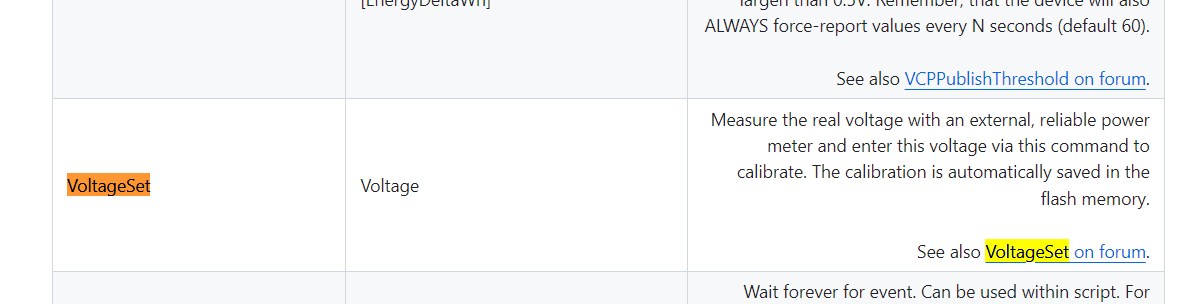
    1. You can use the commands VoltageSet , PowerSet , CurrentSet , whose names and syntax are the same as in Tasmot. We calibrate analogously to Tasmota.
    Here you have a list of commands:
    https://github.com/openshwprojects/OpenBK7231T_App/blob/main/docs/commands.md
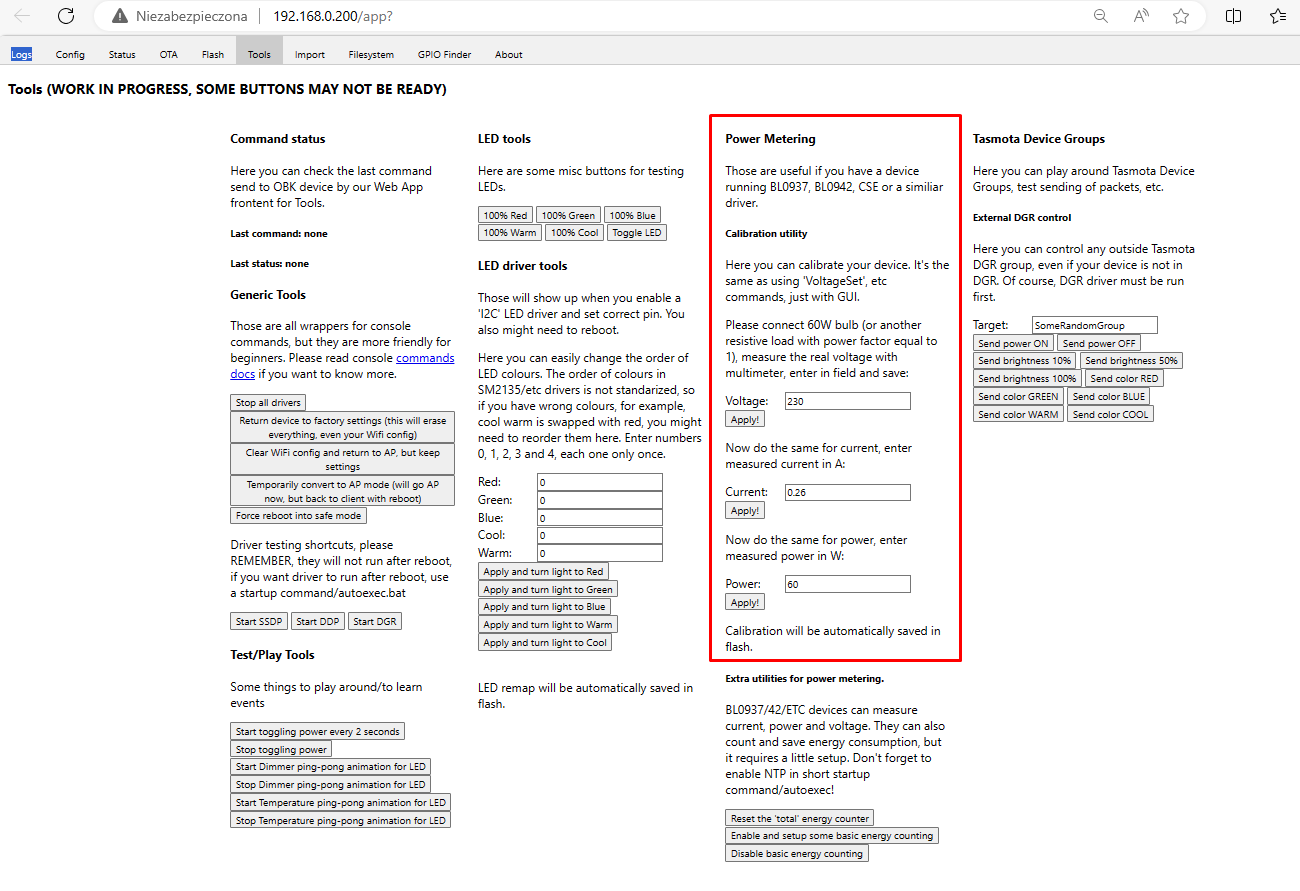
    Screenshot of a table from OpenBeken documentation showing the VoltageSet command. 2. You can use a GUI overlay downloaded from Github, i.e. open Web App and under ToolsScreenshot of a table from OpenBeken documentation showing the VoltageSet command. 2. Tools is Calibration :
    Energy measurement calibration tool interface in OpenBeken. Basically in the paragraph Calibration it is written in English what to do. This overlay uses the aforementioned commands anyway VoltageSet and so on, simply packs them into the HTML form


    For real measurements (current, voltage, power) for the VoltageSet/PowerSet/CurrentSet commands you can at least use a second unflashed socket you have or some other meter. I recommend using a classic 60W tungsten bulb as a test load.
    Helpful post? Buy me a coffee.
  • ADVERTISEMENT
  • #3 21487276
    leśny_ziutek
    Level 12  
    I have a problem with VoltageSet, CurrentSet in 1.18.62 running on TOMPD-63WIFI:

    Error:CMD:cmd VoltageSet NOT found (args 235)
    Info:CMD:[WebApp Cmd 'VoltageSet 235' Result] Unknown command

    Error:CMD:cmd CurrentSet NOT found (args 0.323)
    Info:CMD:[WebApp Cmd 'CurrentSet 0.323' Result] Unknown command
  • #4 21487463
    p.kaczmarek2
    Moderator Smart Home
    These commands are only available for the devices that you calibrate, i.e. devices with BL0947, BL0937, etc. If you have a device using TuyaMCU, the calibration option is not available, as in this case it is the MCU (additional microcontroller) that handles the energy measurement and reports to the WiFi module the already finished numerical values.

    Calibration in firmware is available because when you change the firmware of the WiFi module you lose the factory calibration, but this is only true for devices with BL0947/BL0937. For devices with TuyaMCU, we do not lose the factory calibration.
    Helpful post? Buy me a coffee.
  • #5 21797040
    python25
    Level 11  
    Strange situation: I have various energy measurements, and there is no energy consumed today. I have the total, I have from the last hour. It is not possible to add this in HA to the window with energy consumed, because there the parameter energy today is required. All the Tasmotics I have expose this parameter, and here it does not. Can this be changed somehow in the configuration?
  • #6 21797088
    p.kaczmarek2
    Moderator Smart Home
    Helpful post? Buy me a coffee.
  • ADVERTISEMENT
  • #7 21797105
    python25
    Level 11  
    No, I did not use

    Added after 1 [minute]:

    How do you use this?

    Added after 1 [minute]:


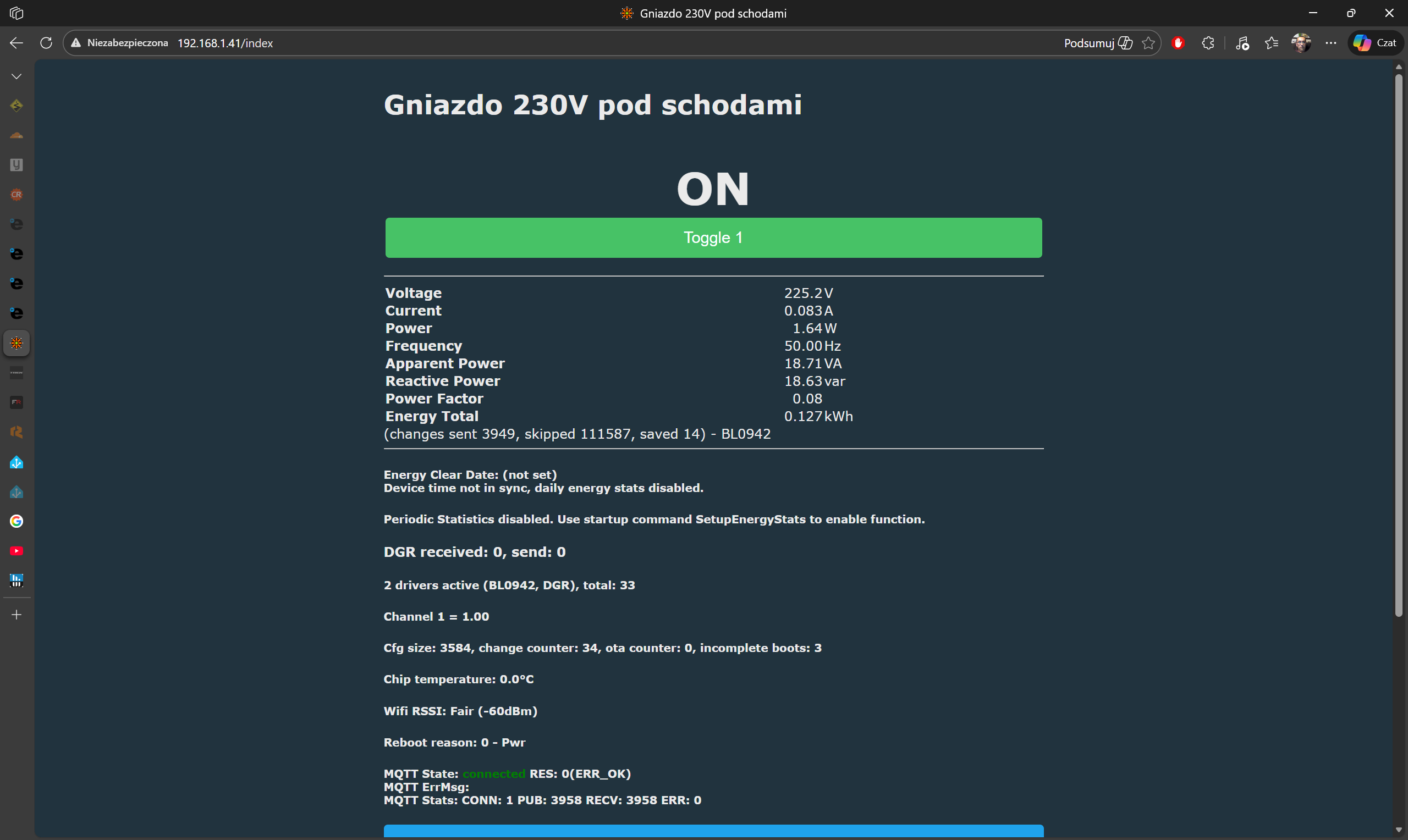
    Control panel for 230V socket showing ON status and energy data
    This much I can see.

    When I type this SetupEnergyStats with parameter 1, it pops up that there is no such command
  • Helpful post
    #8 21797222
    max4elektroda
    Level 23  
    In order to calculate the energy per day, the device must know when a day starts or ends; hence, the time of the device must be set.
    (See the message on the GUI).
    If your device has internet access, you can enable NTP (statrdriver ntp) and it should be working.
    If not, to get a roughly calculation you might set the device time "by hand" with "TIME_settime <epoch = seconds since 1970>".
    Since there is no regular correction of the time which might drift it might become off for some seconds or minutes over the time...

    Regarding "SetupEnergyStats" it needs this arguments (see here in docs):

    [enable 0 or 1] [sample_time[10..90]] [sample_count[10..180]] [JsonEnable 0 or 1]

    JSONEnable is optional.
  • ADVERTISEMENT
  • #9 21797505
    python25
    Level 11  
    I'm too stupid for that but maybe one step at a time:

    Enable:
    0 - disabled
    1 - enabled
    Sample_time - is this the length of time the measurement should last? what is 10 ...90, minutes of an hour?
    Sample_count - I don't quite know what this is for, how many such time intervals should there be? But per day, per hour?

    In addition, the measurement calibration is somehow strange: you can set the voltage "V", you can set the current power "W", but the current "A", unfortunately, does not respond to changes. Interestingly, even though it shows 222.5V 1A, the power it actually shows is that consumed by the device 375W.
  • Helpful post
    #10 21797721
    max4elektroda
    Level 23  
    For the command use
    SetupEnergyStats 1 60 60 0

    Enable, 60 sec intervals, 60 samples, no JSON

    (I also was not sure, so just looked up in the code)

    For me the calibration works as expected:


  • #11 21797847
    python25
    Level 11  
    Ok, thank you for your help, I seem to be doing the same thing and with me the amps don't change, it shows 1 A all the time

Topic summary

The discussion addresses voltage calibration for WiFi sockets running OpenBeken firmware version 1.17.419, specifically using the CB2S/BK7231N WiFi module combined with the BL0937 energy metering chip. The original poster notes a discrepancy in voltage readings between the original Tuya firmware and the reflashed OpenBeken firmware. Calibration can be performed using OpenBeken commands VoltageSet, PowerSet, and CurrentSet, which function similarly to Tasmota commands. These commands are documented in the OpenBK7231T_App GitHub repository and can also be accessed via a Web App GUI overlay under the Tools > Calibration section, which simplifies command input. However, in later firmware versions (e.g., 1.18.62), some users report that VoltageSet and CurrentSet commands may not be recognized, indicating possible device or firmware limitations. Calibration commands are only available for devices with direct energy metering chips like BL0937 or BL0947. Devices using a TuyaMCU for energy measurement do not support firmware calibration because the MCU handles and reports calibrated values independently. Thus, firmware calibration is applicable only when the WiFi module directly manages energy measurement and factory calibration is lost after reflashing.
Summary generated by the language model.
ADVERTISEMENT